power steering BUICK ENVISION 2016 User Guide
[x] Cancel search | Manufacturer: BUICK, Model Year: 2016, Model line: ENVISION, Model: BUICK ENVISION 2016Pages: 432, PDF Size: 5.68 MB
Page 156 of 432
Buick Envision Owner Manual (GMNA-Localizing-U.S./Canada/Mexico-
8534310) - 2016 - crc - 2/29/16
Lighting 155
Lighting
Exterior Lighting
Exterior Lamp Controls . . . . . . . 155
Exterior Lamps OffReminder . . . . . . . . . . . . . . . . . . . 157
Headlamp High/Low-Beam Changer . . . . . . . . . . . . . . . . . . . . 157
Flash-to-Pass . . . . . . . . . . . . . . . . 157
Daytime Running Lamps (DRL) . . . . . . . . . . . . . . . 157
Automatic Headlamp System . . . . . . . . . . . . . . . . . . . . . . 157
Adaptive Forward Lighting (AFL) . . . . . . . . . . . . . . . 158
Headlamp Leveling Control . . . 158
Hazard Warning Flashers . . . . . 159
Turn and Lane-Change Signals . . . . . . . . . . . . . . . . . . . . . . 159
Fog Lamps . . . . . . . . . . . . . . . . . . . 160
Interior Lighting
Instrument Panel Illumination
Control . . . . . . . . . . . . . . . . . . . . . . 160
Courtesy Lamps . . . . . . . . . . . . . . 160
Dome Lamps . . . . . . . . . . . . . . . . . 160
Reading Lamps . . . . . . . . . . . . . . 161
Lighting Features
Entry Lighting . . . . . . . . . . . . . . . . 161
Exit Lighting . . . . . . . . . . . . . . . . . . 162
Battery Power Protection . . . . . 162
Exterior Lighting Battery Saver . . . . . . . . . . . . . . . . . . . . . . . 162
Exterior Lighting
Exterior Lamp Controls
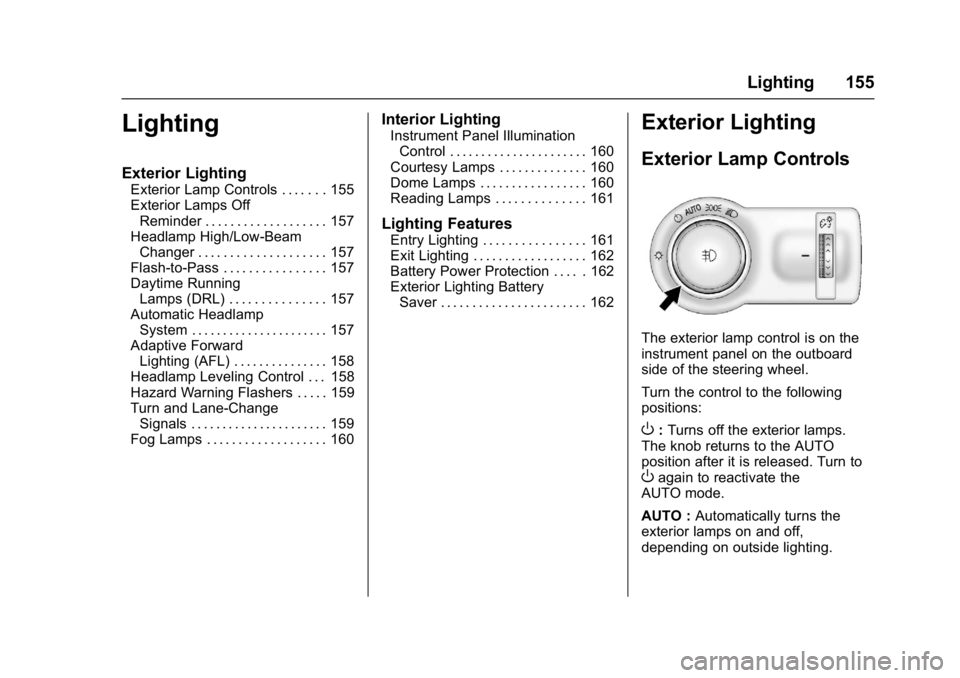
The exterior lamp control is on the
instrument panel on the outboard
side of the steering wheel.
Turn the control to the following
positions:
O: Turns off the exterior lamps.
The knob returns to the AUTO
position after it is released. Turn to
Oagain to reactivate the
AUTO mode.
AUTO : Automatically turns the
exterior lamps on and off,
depending on outside lighting.
Page 165 of 432
Buick Envision Owner Manual (GMNA-Localizing-U.S./Canada/Mexico-
8534310) - 2016 - crc - 2/29/16
164 Infotainment System
Introduction
Overview
Introduction
Read the following pages to
become familiar with the
infotainment system features.
{Warning
Taking your eyes off the road for
too long or too often while using
any infotainment feature can
cause a crash. You or others
could be injured or killed. Do not
give extended attention to
infotainment tasks while driving.
Limit your glances at the vehicle
displays and focus your attention
on driving. Use voice commands
whenever possible.The infotainment system has built-in
features intended to help avoid
distraction by disabling some
functions when driving. These
functions may gray out when they
are unavailable. Many infotainment
features are also available through
the instrument cluster and steering
wheel controls.
Before driving:
.
Become familiar with the
operation, faceplate buttons, and
screen buttons.
. Set up the audio by presetting
favorite stations, setting the
tone, and adjusting the
speakers. .
Set up phone numbers in
advance so they can be called
easily by pressing a single
button or by using a single voice
command if equipped with
Bluetooth phone capability.
See Defensive Driving 0249.
To play the infotainment system with
the ignition off, see Retained
Accessory Power (RAP) 0264.
Page 166 of 432
Buick Envision Owner Manual (GMNA-Localizing-U.S./Canada/Mexico-
8534310) - 2016 - crc - 2/29/16
Infotainment System 165
Infotainment System
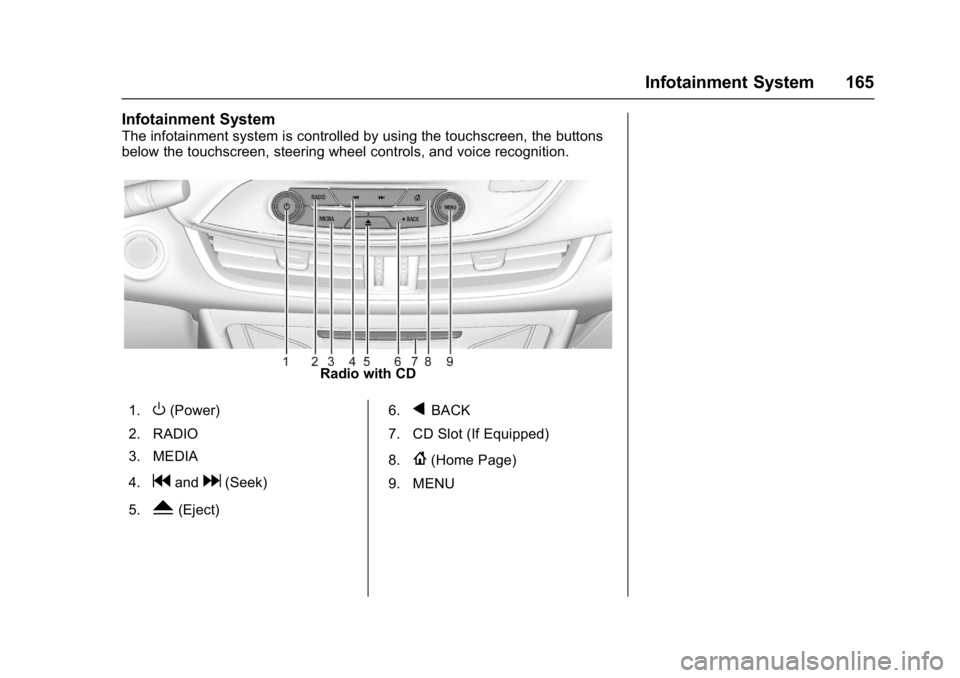
The infotainment system is controlled by using the touchscreen, the buttons
below the touchscreen, steering wheel controls, and voice recognition.
Radio with CD
1.
O(Power)
2. RADIO
3. MEDIA
4.
gandd(Seek)
5.
Y(Eject) 6.
qBACK
7. CD Slot (If Equipped)
8.
{(Home Page)
9. MENU
Page 214 of 432
Buick Envision Owner Manual (GMNA-Localizing-U.S./Canada/Mexico-
8534310) - 2016 - crc - 2/29/16
Infotainment System 213
For questions about the operation of
the navigation system or the update
process, contact the GM Nav Disc
Center toll-free phone number,
1-877-NAV-DISC (1-877-628-3472)
or go to the center’s website,
www.gmnavdisc.com. If updates are
needed, call the GM Nav Disc
Center or order online.
To order, have the vehicle’s Vehicle
Identification Number (VIN)
available to ensure the correct and
most up-to-date map data for the
vehicle is sent. See Vehicle
Identification Number (VIN) 0393.
Database Coverage
Explanations
Coverage areas vary with respect to
the level of map detail available for
any given area. Some areas feature
greater levels of detail than others.
If this happens, it does not mean
there is a problem with the system.
As the map data is updated, more
detail can become available for
areas that previously had limited
detail. See Map Data
Updates 0212.
Voice Recognition
Voice recognition allows for
hands-free operation within the
navigation, audio, phone, and
weather applications. This feature
can be started by pressing the
g
button on the steering wheel or by
touching the
gon the touchscreen
display.
However, not all features within
these areas are supported by voice
commands. Generally, only complex
tasks that require multiple manual
interactions to complete are
supported by voice commands.
For example, tasks that take more
than one or two button presses such
as selecting a song or artist to play
from a media device would be
supported by voice commands.
Other tasks, like adjusting the
volume or seeking up or down, are
audio features that are easily
performed by pressing one or two
buttons, and are not supported by
voice commands. Voice recognition can be used when
the ignition is on or when Retained
Accessory Power (RAP) is active.
See
Retained Accessory Power
(RAP) 0264.
Using Voice Recognition
Voice recognition becomes available
once the system has been
initialized. This begins when the
ignition is turned on. Initialization
may take a few moments.
1. Press
gon the steering wheel
control to activate voice
recognition, or touch
gon the
infotainment touchscreen on
the center stack.
2. The audio system mutes and the system plays a prompt
followed by a beep.
3. Wait until after the beep completes, then clearly speak
one of the commands
described in this section.
A voice recognition system
prompt can be interrupted while
it is playing by pressing
g
again.
Page 228 of 432
Buick Envision Owner Manual (GMNA-Localizing-U.S./Canada/Mexico-
8534310) - 2016 - crc - 2/29/16
Infotainment System 227
Settings
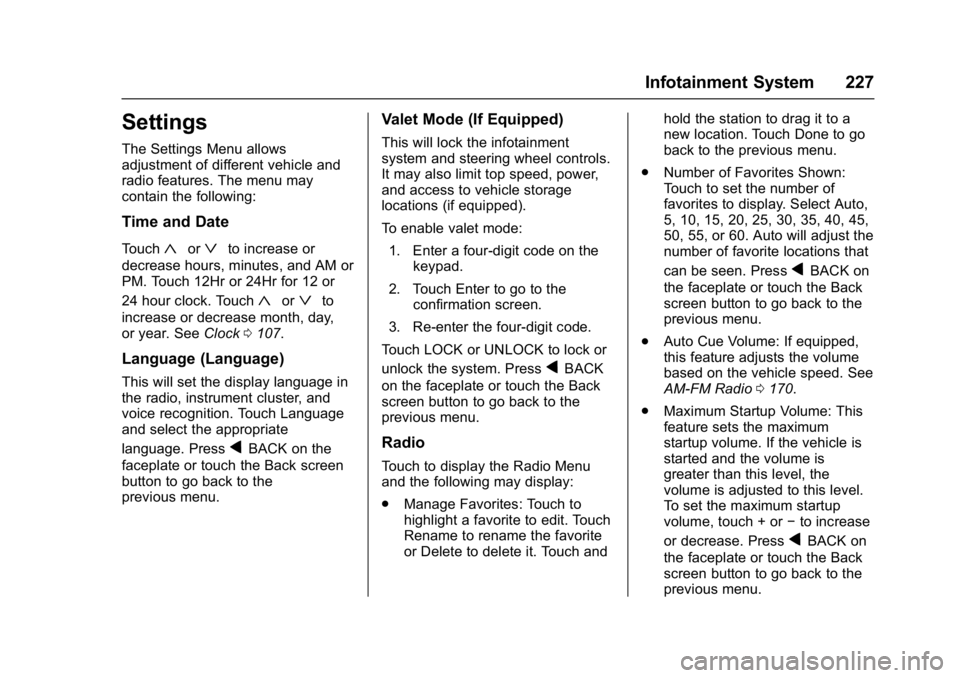
The Settings Menu allows
adjustment of different vehicle and
radio features. The menu may
contain the following:
Time and Date
Touch«orªto increase or
decrease hours, minutes, and AM or
PM. Touch 12Hr or 24Hr for 12 or
24 hour clock. Touch
«orªto
increase or decrease month, day,
or year. See Clock0107.
Language (Language)
This will set the display language in
the radio, instrument cluster, and
voice recognition. Touch Language
and select the appropriate
language. Press
qBACK on the
faceplate or touch the Back screen
button to go back to the
previous menu.
Valet Mode (If Equipped)
This will lock the infotainment
system and steering wheel controls.
It may also limit top speed, power,
and access to vehicle storage
locations (if equipped).
To enable valet mode:
1. Enter a four-digit code on the keypad.
2. Touch Enter to go to the confirmation screen.
3. Re-enter the four-digit code.
Touch LOCK or UNLOCK to lock or
unlock the system. Press
qBACK
on the faceplate or touch the Back
screen button to go back to the
previous menu.
Radio
Touch to display the Radio Menu
and the following may display:
. Manage Favorites: Touch to
highlight a favorite to edit. Touch
Rename to rename the favorite
or Delete to delete it. Touch and hold the station to drag it to a
new location. Touch Done to go
back to the previous menu.
. Number of Favorites Shown:
Touch to set the number of
favorites to display. Select Auto,
5, 10, 15, 20, 25, 30, 35, 40, 45,
50, 55, or 60. Auto will adjust the
number of favorite locations that
can be seen. Press
qBACK on
the faceplate or touch the Back
screen button to go back to the
previous menu.
. Auto Cue Volume: If equipped,
this feature adjusts the volume
based on the vehicle speed. See
AM-FM Radio 0170.
. Maximum Startup Volume: This
feature sets the maximum
startup volume. If the vehicle is
started and the volume is
greater than this level, the
volume is adjusted to this level.
To set the maximum startup
volume, touch + or −to increase
or decrease. Press
qBACK on
the faceplate or touch the Back
screen button to go back to the
previous menu.
Page 248 of 432
Buick Envision Owner Manual (GMNA-Localizing-U.S./Canada/Mexico-
8534310) - 2016 - crc - 2/29/16
Driving and Operating 247
Driving and
Operating
Driving Information
Driver Behavior . . . . . . . . . . . . . . . 248
Driving Environment . . . . . . . . . . 248
Vehicle Design . . . . . . . . . . . . . . . 248
Distracted Driving . . . . . . . . . . . . 249
Defensive Driving . . . . . . . . . . . . . 249
Drunk Driving . . . . . . . . . . . . . . . . . 250
Control of a Vehicle . . . . . . . . . . . 250
Braking . . . . . . . . . . . . . . . . . . . . . . . 250
Steering . . . . . . . . . . . . . . . . . . . . . . 250
Off-Road Recovery . . . . . . . . . . . 251
Loss of Control . . . . . . . . . . . . . . . 251
Driving on Wet Roads . . . . . . . . 252
Hill and Mountain Roads . . . . . 253
Winter Driving . . . . . . . . . . . . . . . . 253
If the Vehicle Is Stuck . . . . . . . . 255
Vehicle Load Limits . . . . . . . . . . . 255
Starting and Operating
New Vehicle Break-In . . . . . . . . . 259
Ignition Positions . . . . . . . . . . . . . 259
Starting the Engine . . . . . . . . . . . 261
Engine Heater . . . . . . . . . . . . . . . . 263
Retained AccessoryPower (RAP) . . . . . . . . . . . . . . . . 264
Shifting Into Park . . . . . . . . . . . . . 264 Shifting out of Park . . . . . . . . . . . 265
Parking over Things
That Burn . . . . . . . . . . . . . . . . . . . 265
Engine Exhaust
Engine Exhaust . . . . . . . . . . . . . . 266
Running the Vehicle WhileParked . . . . . . . . . . . . . . . . . . . . . . 266
Automatic Transmission
Automatic Transmission . . . . . . 267
Manual Mode . . . . . . . . . . . . . . . . . 269
Drive Systems
All-Wheel Drive . . . . . . . . . . . . . . . 270
Brakes
Antilock BrakeSystem (ABS) . . . . . . . . . . . . . . . 270
Electric Parking Brake . . . . . . . . 271
Brake Assist . . . . . . . . . . . . . . . . . . 272
Hill Start Assist (HSA) . . . . . . . . 272
Ride Control Systems
Traction Control/Electronic
Stability Control . . . . . . . . . . . . . 273
Cruise Control
Cruise Control . . . . . . . . . . . . . . . . 275
Adaptive Cruise Control . . . . . . 277
Driver Assistance Systems
Driver Assistance Systems . . . 284 Assistance Systems for
Parking or Backing . . . . . . . . . . 285
Assistance Systems for Driving . . . . . . . . . . . . . . . . . . . . . . 289
Forward Collision Alert (FCA)
System . . . . . . . . . . . . . . . . . . . . . . 290
Front Automatic Braking (FAB) System . . . . . . . . . . . . . . . . . . . . . . 292
Side Blind Zone Alert (SBZA) . . . . . . . . . . . . . . . . 293
Lane Change Alert (LCA) . . . . . 294
Lane Departure Warning (LDW) . . . . . . . . . . . . . 296
Lane Keep Assist (LKA) . . . . . . 296
Fuel
Fuel . . . . . . . . . . . . . . . . . . . . . . . . . . 298
California Fuel Requirements . . . . . . . . . . . . . . . 299
Fuels in Foreign Countries . . . 299
Fuel Additives . . . . . . . . . . . . . . . . 299
Filling the Tank . . . . . . . . . . . . . . . 299
Filling a Portable Fuel Container . . . . . . . . . . . . . . . . . . . 301
Trailer Towing
General TowingInformation . . . . . . . . . . . . . . . . . . 301
Driving Characteristics and
Towing Tips . . . . . . . . . . . . . . . . . 301
Trailer Towing . . . . . . . . . . . . . . . . 304
Page 251 of 432

Buick Envision Owner Manual (GMNA-Localizing-U.S./Canada/Mexico-
8534310) - 2016 - crc - 2/29/16
250 Driving and Operating
Drunk Driving
Death and injury associated with
drinking and driving is a global
tragedy.
{Warning
Drinking and then driving is very
dangerous. Your reflexes,
perceptions, attentiveness, and
judgment can be affected by even
a small amount of alcohol. You
can have a serious—or even
fatal —collision if you drive after
drinking.
Do not drink and drive or ride with
a driver who has been drinking.
Ride home in a cab; or if you are
with a group, designate a driver
who will not drink.
Control of a Vehicle
Braking, steering, and accelerating
are important factors in helping to
control a vehicle while driving.
Braking
Braking action involves perception
time and reaction time. Deciding to
push the brake pedal is perception
time. Actually doing it is
reaction time.
Average driver reaction time is
about three-quarters of a second. In
that time, a vehicle moving at
100 km/h (60 mph) travels 20 m
(66 ft), which could be a lot of
distance in an emergency.
Helpful braking tips to keep in mind
include:
. Keep enough distance between
you and the vehicle in front
of you.
. Avoid needless heavy braking.
. Keep pace with traffic.
If the engine ever stops while the
vehicle is being driven, brake
normally but do not pump the
brakes. Doing so could make the
pedal harder to push down. If the
engine stops, there will be some
power brake assist but it will be
used when the brake is applied. Once the power assist is used up, it
can take longer to stop and the
brake pedal will be harder to push.
Steering
Electric Power Steering
The vehicle has electric power
steering. It does not have power
steering fluid. Regular maintenance
is not required.
If power steering assist is lost due
to a system malfunction, the vehicle
can be steered, but may require
increased effort. See your dealer if
there is a problem.
If the steering wheel is turned until it
reaches the end of its travel and is
held against that position for an
extended period of time, power
steering assist may be reduced.
If the steering assist is used for an
extended period of time, power
assist may be reduced.
Normal use of the power steering
assist should return when the
system cools down.
Page 261 of 432

Buick Envision Owner Manual (GMNA-Localizing-U.S./Canada/Mexico-
8534310) - 2016 - crc - 2/29/16
260 Driving and Operating
Pressing the button cycles it through
three modes: ACC/ACCESSORY,
ON/RUN/START, and Stopping the
Engine/LOCK/OFF.
The Remote Keyless Entry (RKE)
transmitter must be in the vehicle for
the system to operate. If the
pushbutton start is not working, the
vehicle may be near a strong radio
antenna signal causing interference
to the Keyless Access system. See
Remote Keyless Entry (RKE)
System Operation026.
To shift out of P (Park), the vehicle
must be in ON/RUN and the brake
pedal must be applied.
Stopping the Engine/LOCK/
OFF (No Indicator Lights) : When
the vehicle is stopped, press
ENGINE START/STOP once to turn
the engine off.
If the vehicle is in P (Park), the
ignition will turn off, and Retained
Accessory Power (RAP) will remain
active. See Retained Accessory
Power (RAP) 0264. If the vehicle is not in P (Park), the
ignition will return to ACC/
ACCESSORY and display the
message SHIFT TO PARK in the
Driver Information Center (DIC).
See
Transmission Messages 0144.
When the vehicle is shifted into
P (Park), the ignition system will
switch to OFF.
The vehicle may have an electric
steering column lock. The lock is
activated when the vehicle is
switched to OFF and either front
door is opened. A sound may be
heard as the lock actuates or
releases. The steering column lock
may not release with the wheels
turned off center. If this happens,
the vehicle may not start. Move the
steering wheel from left to right
while attempting to start the vehicle.
If this does not work, the vehicle
needs service.
Do not turn the engine off when the
vehicle is moving. This will cause a
loss of power assist in the brake
and steering systems and disable
the airbags. If the vehicle must be shut off in an
emergency:
1. Brake using a firm and steady pressure. Do not pump the
brakes repeatedly. This may
deplete power assist, requiring
increased brake pedal force.
2. Shift the vehicle to N (Neutral). This can be done while the
vehicle is moving. After shifting
to N (Neutral), firmly apply the
brakes and steer the vehicle to
a safe location.
3. Come to a complete stop, shift to P (Park), and turn the
ignition to OFF. On vehicles
with an automatic transmission,
the shift lever must be in
P (Park) to turn the ignition
switch to the OFF position.
4. Set the parking brake. See Electric Parking Brake 0271.
Page 262 of 432

Buick Envision Owner Manual (GMNA-Localizing-U.S./Canada/Mexico-
8534310) - 2016 - crc - 2/29/16
Driving and Operating 261
{Warning
Turning off the vehicle while
moving may cause loss of power
assist in the brake and steering
systems and disable the airbags.
While driving, only shut the
vehicle off in an emergency.
If the vehicle cannot be pulled over
and must be shut off while driving,
press and hold ENGINE START/
STOP for longer than two seconds,
or press twice in five seconds.
ACC/ACCESSORY (Amber
Indicator Light) : This mode allows
you to use some electrical
accessories when the engine is off.
With the ignition off, pressing the
button one time without the brake
pedal applied will place the ignition
system in ACC/ACCESSORY.
The ignition will switch from ACC/
ACCESSORY to OFF after
five minutes to prevent battery
rundown. ON/RUN/START (Green Indicator
Light) :
This mode is for driving and
starting. With the ignition off and the
brake pedal applied, pressing the
button once will place the ignition
system in ON/RUN/START. Once
engine cranking begins, release the
button. Engine cranking will
continue until the engine starts. See
Starting the Engine 0261. The
ignition will then remain in ON/RUN.
Service Only Mode
This power mode is available for
service and diagnostics, and to
verify the proper operation of the
malfunction indicator lamp as may
be required for emission inspection
purposes. With the vehicle off and
the brake pedal not applied,
pressing and holding the button for
more than five seconds will place
the vehicle in Service Only Mode.
The instruments and audio systems
will operate as they do in ON/RUN,
but the vehicle will not be able to be
driven. The engine will not start in
Service Only Mode. Press the
button again to turn the vehicle off.
Starting the Engine
Move the shift lever to P (Park) or
N (Neutral). To restart the engine
when the vehicle is already moving,
use N (Neutral) only.
Caution
Do not try to shift to P (Park) if the
vehicle is moving. If you do, you
could damage the transmission.
Shift to P (Park) only when the
vehicle is stopped.
Caution
If you add electrical parts or
accessories, you could change
the way the engine operates. Any
resulting damage would not be
covered by the vehicle warranty.
See Add-On Electrical Equipment
0 308 orAdd-On Electrical
Equipment 0308.
Page 272 of 432

Buick Envision Owner Manual (GMNA-Localizing-U.S./Canada/Mexico-
8534310) - 2016 - crc - 2/29/16
Driving and Operating 271
Using ABS
Do not pump the brakes. Just hold
the brake pedal down firmly and let
ABS work. You may hear the ABS
pump or motor operating and feel
the brake pedal pulsate. This is
normal.
Braking in Emergencies
ABS allows you to steer and brake
at the same time. In many
emergencies, steering can help
more than even the very best
braking.
Electric Parking Brake
The Electric Parking Brake (EPB)
switch is on the center console. The
EPB can always be activated, even
if the ignition is off. To prevent
draining the battery, avoid repeated
cycles of the EPB when the engine
is not running.
The system has a red parking brake
status light and an amber parking
brake warning light. SeeElectric
Parking Brake Light 0122 and
Service Electric Parking Brake Light
0 122. There are also parking
brake-related Driver Information
Center (DIC) messages. See Brake
System Messages 0137. In case of
insufficient electrical power, the EPB
cannot be applied or released.
Before leaving the vehicle, check
the red parking brake status light to
ensure that the parking brake is
applied.
EPB Apply
To apply the EPB:
1. Be sure the vehicle is at a complete stop.
2. Lift up the EPB switch momentarily. The red parking brake status light
will flash and then stay on once the
EPB is fully applied. If the red
parking brake status light flashes
continuously, then the EPB is only
partially applied or there is a
problem with the EPB. A DIC
message will display. Release the
EPB and try to apply it again. If the
light does not come on, or keeps
flashing, have the vehicle serviced.
Do not drive the vehicle if the red
parking brake status light is flashing.
See your dealer. See
Electric
Parking Brake Light 0122.
If the amber parking brake warning
light is on, lift up on the EPB switch
and hold it up. Continue to hold the
switch until the red parking brake
status light remains on. If the amber
parking brake warning light is on,
see your dealer.
If the EPB is applied while the
vehicle is moving, the vehicle will
decelerate as long as the switch is
held up. If the switch is held up until
the vehicle comes to a stop, the
EPB will remain applied.