fuel BUICK ENVISION 2016 Owner's Guide
[x] Cancel search | Manufacturer: BUICK, Model Year: 2016, Model line: ENVISION, Model: BUICK ENVISION 2016Pages: 432, PDF Size: 5.68 MB
Page 209 of 432
Buick Envision Owner Manual (GMNA-Localizing-U.S./Canada/Mexico-
8534310) - 2016 - crc - 2/29/16
208 Infotainment System
If the alert is not acknowledged, the
alert automatically times out and
does not modify the route.
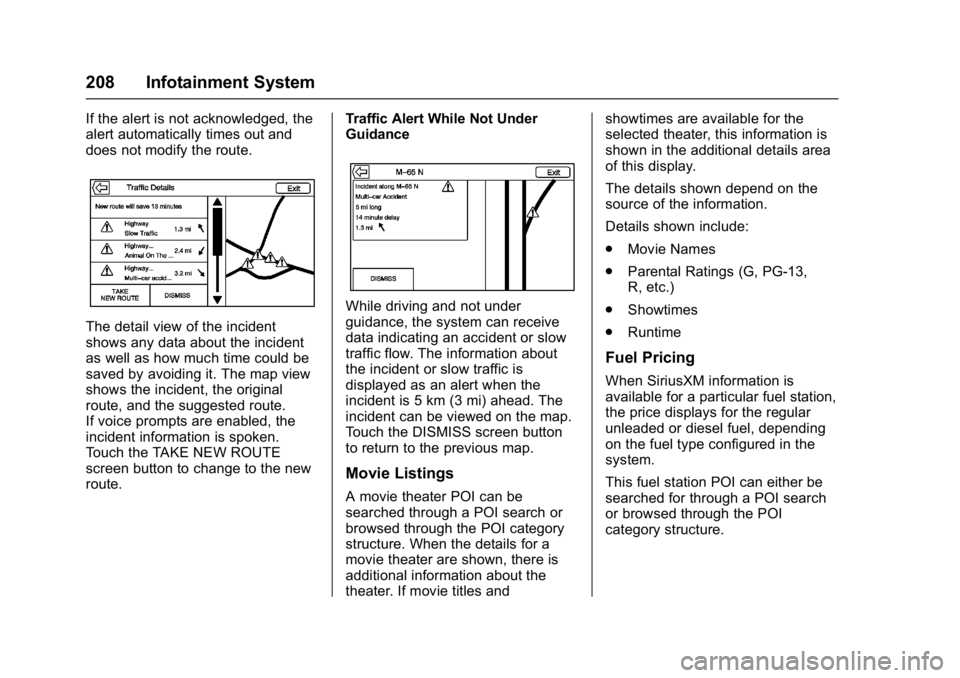
The detail view of the incident
shows any data about the incident
as well as how much time could be
saved by avoiding it. The map view
shows the incident, the original
route, and the suggested route.
If voice prompts are enabled, the
incident information is spoken.
Touch the TAKE NEW ROUTE
screen button to change to the new
route.Traffic Alert While Not Under
Guidance
While driving and not under
guidance, the system can receive
data indicating an accident or slow
traffic flow. The information about
the incident or slow traffic is
displayed as an alert when the
incident is 5 km (3 mi) ahead. The
incident can be viewed on the map.
Touch the DISMISS screen button
to return to the previous map.
Movie Listings
A movie theater POI can be
searched through a POI search or
browsed through the POI category
structure. When the details for a
movie theater are shown, there is
additional information about the
theater. If movie titles andshowtimes are available for the
selected theater, this information is
shown in the additional details area
of this display.
The details shown depend on the
source of the information.
Details shown include:
.
Movie Names
. Parental Ratings (G, PG-13,
R, etc.)
. Showtimes
. Runtime
Fuel Pricing
When SiriusXM information is
available for a particular fuel station,
the price displays for the regular
unleaded or diesel fuel, depending
on the fuel type configured in the
system.
This fuel station POI can either be
searched for through a POI search
or browsed through the POI
category structure.
Page 210 of 432
Buick Envision Owner Manual (GMNA-Localizing-U.S./Canada/Mexico-
8534310) - 2016 - crc - 2/29/16
Infotainment System 209
.Touch the Sort button to change
the sort method. The default sort
method is based on distance
with the closest fuel stations at
the top of the list.
. Touch the Sort button to cycle
through the sorting options of
distance, price, or name. The
last viewed sorting method is
displayed and retained over
ignition cycles.
If the sorting method of price has
been selected, the fuel stations in
the list will appear from the lowest to
the highest price based on the fuel
type selected. For gasoline, the
price shown is for regular unleaded.
When diesel is selected as the fuel
type, the diesel price is shown.
OnStar®System
If equipped, with an OnStar®
subscription, an OnStar Advisor can
download a destination to the
vehicle or into the built-in navigation
system. If an OnStar Turn-by-Turn
route is in progress, all other internal navigation functions are
disabled until the route is
completed.
When navigation is selected, the
OnStar Turn-by-Turn screens
display.
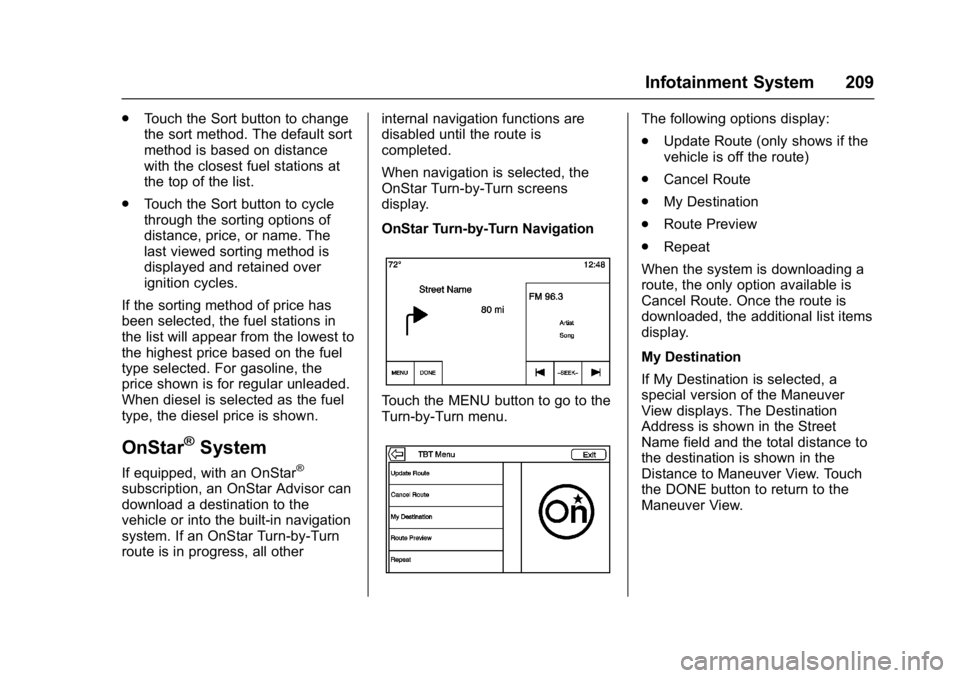
OnStar Turn-by-Turn Navigation
Touch the MENU button to go to the
Turn-by-Turn menu.
The following options display:
.
Update Route (only shows if the
vehicle is off the route)
. Cancel Route
. My Destination
. Route Preview
. Repeat
When the system is downloading a
route, the only option available is
Cancel Route. Once the route is
downloaded, the additional list items
display.
My Destination
If My Destination is selected, a
special version of the Maneuver
View displays. The Destination
Address is shown in the Street
Name field and the total distance to
the destination is shown in the
Distance to Maneuver View. Touch
the DONE button to return to the
Maneuver View.
Page 242 of 432

Buick Envision Owner Manual (GMNA-Localizing-U.S./Canada/Mexico-
8534310) - 2016 - crc - 2/29/16
Climate Controls 241
6. SYNC (SynchronizedTemperature)
7. AUTO (Automatic Operation)
8. Recirculation
9. A/C (Air Conditioning)
10. Rear Window Defogger
11. Power
Automatic Operation
The system automatically controls
the fan speed, air delivery, air
conditioning, and recirculation in
order to heat or cool the vehicle to
the desired temperature:
When AUTO is lit, all four functions
operate automatically. Each function
can also be manually set and the
selected setting is displayed.
Functions not manually set will
continue to be automatically
controlled, even if the AUTO
indicator is not lit.
For automatic operation:
1. Press AUTO. 2. Set the temperature. Allow the
system time to stabilize. Adjust
the temperature as needed for
best comfort.
To improve fuel efficiency and to
cool the vehicle faster, recirculation
may be automatically selected in
warm weather. The recirculation
light will not come on. Press
@to
select recirculation; press it again to
select outside air.
Q/R: The temperature can be
adjusted separately for the driver
and the passenger. Press to
increase or decrease the
temperature.
SYNC : Press to link the passenger
and rear climate temperature
settings to the driver setting. The
SYNC indicator light will turn on.
When the passenger or rear climate
settings are adjusted, the SYNC
indicator light turns off.
Manual Operation
O: Press to turn the fan off or on.
Q^or^ R:Press to increase or
decrease the fan speed. The fan
speed setting appears on the main display. Pressing either button
cancels automatic fan control and
the fan is controlled manually. Press
AUTO to return to automatic
operation.
Air Delivery Mode Controls :
Press
X,Y, or[to change the
direction of the airflow. The indicator
light in the button will turn on. Any
combination of the three buttons
can be selected. The indicator light
in the button will turn on. The
current mode appears in the display
screen. Pressing any of the three
buttons cancels automatic air
delivery control and the direction of
the airflow is controlled manually.
Press AUTO to return to automatic
operation.
To change the current mode, select
one or more of the following:
X: Clears the windows of fog or
moisture. Air is directed to the
windshield.
Y: Air is directed to the instrument
panel outlets.
[: Air is directed to the floor
outlets.
Page 248 of 432
Buick Envision Owner Manual (GMNA-Localizing-U.S./Canada/Mexico-
8534310) - 2016 - crc - 2/29/16
Driving and Operating 247
Driving and
Operating
Driving Information
Driver Behavior . . . . . . . . . . . . . . . 248
Driving Environment . . . . . . . . . . 248
Vehicle Design . . . . . . . . . . . . . . . 248
Distracted Driving . . . . . . . . . . . . 249
Defensive Driving . . . . . . . . . . . . . 249
Drunk Driving . . . . . . . . . . . . . . . . . 250
Control of a Vehicle . . . . . . . . . . . 250
Braking . . . . . . . . . . . . . . . . . . . . . . . 250
Steering . . . . . . . . . . . . . . . . . . . . . . 250
Off-Road Recovery . . . . . . . . . . . 251
Loss of Control . . . . . . . . . . . . . . . 251
Driving on Wet Roads . . . . . . . . 252
Hill and Mountain Roads . . . . . 253
Winter Driving . . . . . . . . . . . . . . . . 253
If the Vehicle Is Stuck . . . . . . . . 255
Vehicle Load Limits . . . . . . . . . . . 255
Starting and Operating
New Vehicle Break-In . . . . . . . . . 259
Ignition Positions . . . . . . . . . . . . . 259
Starting the Engine . . . . . . . . . . . 261
Engine Heater . . . . . . . . . . . . . . . . 263
Retained AccessoryPower (RAP) . . . . . . . . . . . . . . . . 264
Shifting Into Park . . . . . . . . . . . . . 264 Shifting out of Park . . . . . . . . . . . 265
Parking over Things
That Burn . . . . . . . . . . . . . . . . . . . 265
Engine Exhaust
Engine Exhaust . . . . . . . . . . . . . . 266
Running the Vehicle WhileParked . . . . . . . . . . . . . . . . . . . . . . 266
Automatic Transmission
Automatic Transmission . . . . . . 267
Manual Mode . . . . . . . . . . . . . . . . . 269
Drive Systems
All-Wheel Drive . . . . . . . . . . . . . . . 270
Brakes
Antilock BrakeSystem (ABS) . . . . . . . . . . . . . . . 270
Electric Parking Brake . . . . . . . . 271
Brake Assist . . . . . . . . . . . . . . . . . . 272
Hill Start Assist (HSA) . . . . . . . . 272
Ride Control Systems
Traction Control/Electronic
Stability Control . . . . . . . . . . . . . 273
Cruise Control
Cruise Control . . . . . . . . . . . . . . . . 275
Adaptive Cruise Control . . . . . . 277
Driver Assistance Systems
Driver Assistance Systems . . . 284 Assistance Systems for
Parking or Backing . . . . . . . . . . 285
Assistance Systems for Driving . . . . . . . . . . . . . . . . . . . . . . 289
Forward Collision Alert (FCA)
System . . . . . . . . . . . . . . . . . . . . . . 290
Front Automatic Braking (FAB) System . . . . . . . . . . . . . . . . . . . . . . 292
Side Blind Zone Alert (SBZA) . . . . . . . . . . . . . . . . 293
Lane Change Alert (LCA) . . . . . 294
Lane Departure Warning (LDW) . . . . . . . . . . . . . 296
Lane Keep Assist (LKA) . . . . . . 296
Fuel
Fuel . . . . . . . . . . . . . . . . . . . . . . . . . . 298
California Fuel Requirements . . . . . . . . . . . . . . . 299
Fuels in Foreign Countries . . . 299
Fuel Additives . . . . . . . . . . . . . . . . 299
Filling the Tank . . . . . . . . . . . . . . . 299
Filling a Portable Fuel Container . . . . . . . . . . . . . . . . . . . 301
Trailer Towing
General TowingInformation . . . . . . . . . . . . . . . . . . 301
Driving Characteristics and
Towing Tips . . . . . . . . . . . . . . . . . 301
Trailer Towing . . . . . . . . . . . . . . . . 304
Page 255 of 432

Buick Envision Owner Manual (GMNA-Localizing-U.S./Canada/Mexico-
8534310) - 2016 - crc - 2/29/16
254 Driving and Operating
clear roads in shaded areas.
The surface of a curve or an
overpass can remain icy when
the surrounding roads are clear.
Avoid sudden steering
maneuvers and braking while
on ice.
. Turn off cruise control.
Blizzard Conditions
Stop the vehicle in a safe place and
signal for help. Stay with the vehicle
unless there is help nearby.
If possible, use Roadside
Assistance. See Roadside
Assistance Program 0400. To get
help and keep everyone in the
vehicle safe:
. Turn on the hazard warning
flashers.
. Tie a red cloth to an outside
mirror.
{Warning
Snow can trap engine exhaust
under the vehicle. This may
cause exhaust gases to get
inside. Engine exhaust contains
carbon monoxide (CO), which
cannot be seen or smelled. It can
cause unconsciousness and even
death.
If the vehicle is stuck in snow:
. Clear snow from the base of
the vehicle, especially any
blocking the exhaust pipe.
. Open a window about 5 cm
(2 in) on the vehicle side
that is away from the wind,
to bring in fresh air.
. Fully open the air outlets on
or under the instrument
panel.
. Adjust the climate control
system to circulate the air
inside the vehicle and set
(Continued)
Warning (Continued)
the fan speed to the highest
setting. See“Climate
Control Systems.”
For more information about CO,
see Engine Exhaust 0266.
To save fuel, run the engine for
short periods to warm the vehicle
and then shut the engine off and
partially close the window. Moving
about to keep warm also helps.
If it takes time for help to arrive,
when running the engine, push the
accelerator pedal slightly so the
engine runs faster than the idle
speed. This keeps the battery
charged to restart the vehicle and to
signal for help with the headlamps.
Do this as little as possible, to
save fuel.
Page 259 of 432

Buick Envision Owner Manual (GMNA-Localizing-U.S./Canada/Mexico-
8534310) - 2016 - crc - 2/29/16
258 Driving and Operating
Example 3
1.Vehicle Capacity Weight
for Example 3 = 453 kg
(1,000 lbs).
2.Subtract Occupant
Weight @ 91 kg
(200 lbs) × 5 = 453 kg
(1,000 lbs).
3.Available Cargo Weight
= 0 kg (0 lbs).
Refer to the vehicle's tire and
loading information label for
specific information about the
vehicle's capacity weight and
seating positions. The combined weight of the driver, passengers,
and cargo should never exceed
the vehicle's capacity weight.
Certification/Tire Label
Label Example
A vehicle-specific Certification/
Tire label is attached to the
center pillar (B-pillar).
The label may show the size of
the vehicle's original tires and
the inflation pressures needed to
obtain the gross weight capacity
of the vehicle. The label shows
the gross weight capacity of the
vehicle. This is called the GrossVehicle Weight Rating (GVWR).
The GVWR includes the weight
of the vehicle, all occupants,
fuel, and cargo.
The Certification/Tire label may
also show the maximum weights
for the front and rear axles,
called the Gross Axle Weight
Rating (GAWR). To find out the
actual loads on the front and
rear axles, weigh the vehicle at
a weigh station. Your dealer can
help with this. Be sure to spread
the load equally on both sides of
the centerline.
CautionOverloading the vehicle may
cause damage. Repairs would not
be covered by the vehicle
warranty. Do not overload the
vehicle.
Page 263 of 432

Buick Envision Owner Manual (GMNA-Localizing-U.S./Canada/Mexico-
8534310) - 2016 - crc - 2/29/16
262 Driving and Operating
Starting Procedure1. With the Keyless Access system, the RKE transmitter
must be in the vehicle. Press
ENGINE START/STOP with the
brake pedal applied. When the
engine begins cranking, let go
of the button.
The idle speed will go down as
the engine gets warm. Do not
race the engine immediately
after starting it.
Caution
Cranking the engine for long
periods of time, by returning the
ignition to the START position
immediately after cranking has
ended, can overheat and damage
the cranking motor, and drain the
battery. Wait at least 15 seconds
between each try, to let the
cranking motor cool down.
2. If the engine does not start after five to 10 seconds,
especially in very cold weather
(below −18 °C or 0 °F), it could be flooded with too much
gasoline. Try pushing the
accelerator pedal all the way to
the floor and holding it there as
you hold ENGINE START/
STOP for up to a maximum of
15 seconds. Wait at least
15 seconds between each try,
to allow the cranking motor to
cool down. When the engine
starts, let go of the button and
the accelerator. If the vehicle
starts briefly but then stops
again, do the same thing. This
clears the extra gasoline from
the engine. Do not race the
engine immediately after
starting it. Operate the engine
and transmission gently until
the oil warms up and lubricates
all moving parts.
Stop/Start System
{Warning
Exiting the vehicle without first
shifting into P (Park) may cause
the vehicle to move. You or others
(Continued)
Warning (Continued)
may be injured. Because the
vehicle has the auto engine stop/
start feature, the vehicle's engine
might seem to be shut off;
however, once the brake pedal is
released, the engine will start up
again.
Shift to P (Park) and turn the
ignition to LOCK/OFF, before
exiting the vehicle.
The vehicle has a fuel saving stop/
start system to shut off the engine to
help conserve fuel.
Auto Engine Stop/Start
When the brakes are applied and
the vehicle is at a complete stop,
the engine may turn off. When
stopped, the tachometer displays
AUTO STOP. See Tachometer
0 114. When the brake pedal is
released or the accelerator pedal is
pushed, the engine will restart.
Page 264 of 432
Buick Envision Owner Manual (GMNA-Localizing-U.S./Canada/Mexico-
8534310) - 2016 - crc - 2/29/16
Driving and Operating 263
Auto Stop may be deactivated if:
.A minimum vehicle speed is not
reached.
. The engine or transmission is
not at the required operating
temperature.
. The outside temperature is not
in the required operating range,
typically between −10 °C (14 °F)
and 50 °C (122 °F).
. The shift lever is in any gear
other than D (Drive).
. The battery charge is low.
. The interior comfort level has not
reached the required level for
the climate control system or
defog settings.
. The Auto Stop time is greater
than two minutes.
Engine Heater
The vehicle may have an engine
heater. The engine heater can help
in cold weather conditions at or
below −18 °C (0 °F) for easier
starting and better fuel economy
during engine warm-up. Plug in the heater at least four hours before
starting the vehicle. An internal
thermostat in the plug end of the
cord will prevent engine heater
operation at temperatures above
−18 °C (0 °F).
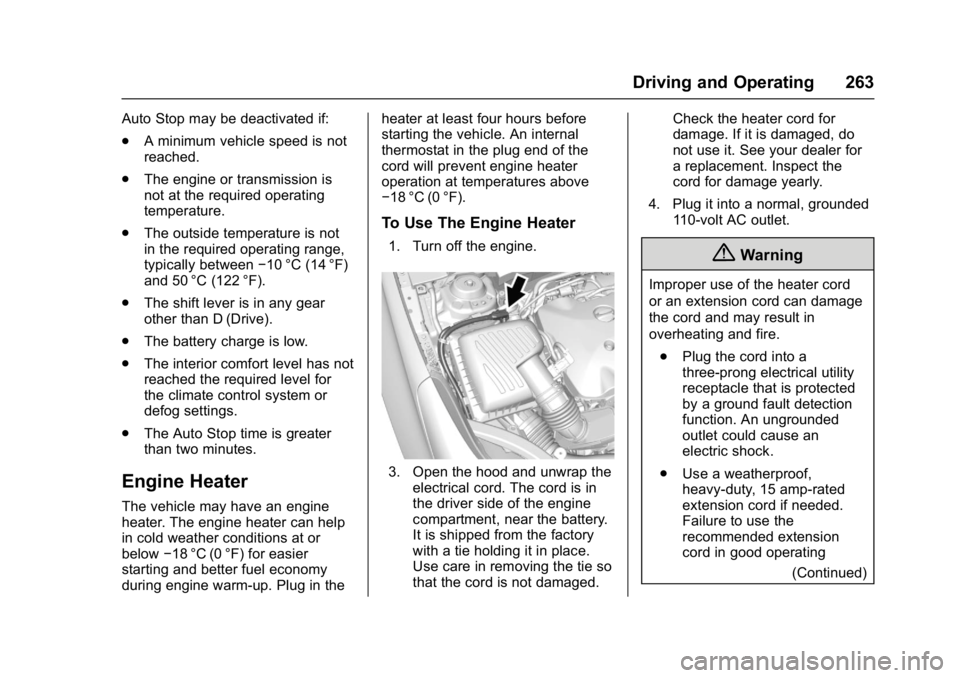
To Use The Engine Heater
1. Turn off the engine.
3. Open the hood and unwrap the
electrical cord. The cord is in
the driver side of the engine
compartment, near the battery.
It is shipped from the factory
with a tie holding it in place.
Use care in removing the tie so
that the cord is not damaged. Check the heater cord for
damage. If it is damaged, do
not use it. See your dealer for
a replacement. Inspect the
cord for damage yearly.
4. Plug it into a normal, grounded 110-volt AC outlet.
{Warning
Improper use of the heater cord
or an extension cord can damage
the cord and may result in
overheating and fire.
. Plug the cord into a
three-prong electrical utility
receptacle that is protected
by a ground fault detection
function. An ungrounded
outlet could cause an
electric shock.
. Use a weatherproof,
heavy-duty, 15 amp-rated
extension cord if needed.
Failure to use the
recommended extension
cord in good operating
(Continued)
Page 269 of 432

Buick Envision Owner Manual (GMNA-Localizing-U.S./Canada/Mexico-
8534310) - 2016 - crc - 2/29/16
268 Driving and Operating
Warning (Continued)
people or objects. Do not shift
into a drive gear while the engine
is running at high speed.
Caution
Shifting out of P (Park) or
N (Neutral) with the engine
running at high speed may
damage the transmission. The
repairs would not be covered by
the vehicle warranty. Be sure the
engine is not running at high
speed when shifting the vehicle.
D : This position is for normal
driving. It provides the best fuel
economy. If you need more power
for passing, and you are:
. Going less than 56 km/h
(35 mph), push the accelerator
pedal about halfway down.
. Going about 56 km/h (35 mph) or
more, push the accelerator all
the way down.
Caution
If the vehicle does not shift gears,
the transmission could be
damaged. Have the vehicle
serviced right away.
Caution
Spinning the tires or holding the
vehicle in one place on a hill
using only the accelerator pedal
may damage the transmission.
The repair will not be covered by
the vehicle warranty. If you are
stuck, do not spin the tires. When
stopping on a hill, use the brakes
to hold the vehicle in place.
L : This position provides access to
gear ranges, which offer more
engine braking but lower fuel
economy than D (Drive). This can
be used on very steep hills, or in
deep snow or mud. See Manual
Mode 0269. Operating Modes
The transmission may operate in a
lower gear than normal to improve
vehicle performance. The engine
speed may be higher and there may
be an increase in noise during the
following conditions:
.
When climbing a grade.
. When driving downhill.
. When driving in hot
temperatures or at high altitude.
Page 299 of 432

Buick Envision Owner Manual (GMNA-Localizing-U.S./Canada/Mexico-
8534310) - 2016 - crc - 2/29/16
298 Driving and Operating
Fuel
Use of the recommended fuel is an
important part of the proper
maintenance of this vehicle. When
driving in the U.S. and Canada, to
help keep the engine clean and
maintain optimum vehicle
performance, we recommend using
TOP TIER Detergent Gasolines.
See www.toptiergas.com for a list of
TOP TIER Detergent Gasolines.
Use premium unleaded gasoline
meeting ASTM specification D4814
with a posted octane rating of 91 or
higher. Regular unleaded gasoline
rated at 87 octane or higher can beused, but acceleration and fuel
economy will be reduced, and an
audible knocking noise may be
heard. If this occurs, use a gasoline
rated at 91 octane or higher as soon
as possible. Otherwise, the engine
could be damaged. If heavy
knocking is heard when using
gasoline with a 91 octane rating or
higher, the engine needs service.
Use of Seasonal Fuels
Use summer and winter fuels in the
appropriate season. The fuels
industry automatically modifies the
fuel for the appropriate season.
If fuel is left in the vehicle tank for
long periods of time, driving or
starting could be affected. Drive the
vehicle until the fuel is at one-half
tank or less, then refuel with the
current seasonal fuel.
Prohibited Fuels
Gasolines containing oxygenates
such as ethers and ethanol, as well
as reformulated gasolines, are
available in some cities. If these
gasolines comply with the
previously described specification,
then they are acceptable to use.However, E85 (85% ethanol) and
other fuels containing more than
15% ethanol must be used only in
FlexFuel vehicles.
Caution
Do not use fuel containing
methanol. It can corrode metal
parts in the fuel system and also
damage plastic and rubber parts.
That damage would not be
covered under the vehicle
warranty.
Some gasolines, mainly high octane
racing gasolines, can contain an
octane-enhancing additive called
methylcyclopentadienyl manganese
tricarbonyl (MMT). Do not use
gasolines and/or fuel additives with
MMT as they can reduce spark plug
life and affect emission control
system performance. The
malfunction indicator lamp may turn
on. If this occurs, see your dealer
for service.