Seat BUICK ENVISION 2019 Owner's Manual
[x] Cancel search | Manufacturer: BUICK, Model Year: 2019, Model line: ENVISION, Model: BUICK ENVISION 2019Pages: 377, PDF Size: 6.03 MB
Page 224 of 377

Buick Envision Owner Manual (GMNA-Localizing-U.S./Canada/Mexico-
12032235) - 2019 - CRC - 6/27/18
Driving and Operating 223
{Warning
FCA does not provide a warning
to help avoid a crash, unless it
detects a vehicle. FCA may not
detect a vehicle ahead if the FCA
sensor is blocked by dirt, snow,
or ice, or if the windshield is
damaged. It may also not detect a
vehicle on winding or hilly roads,
or in conditions that can limit
visibility such as fog, rain,
or snow, or if the headlamps or
windshield are not cleaned or in
proper condition. Keep the
windshield, headlamps, and FCA
sensors clean and in good repair.
Collision Alert
With Head-Up Display
Without Head-Up Display
When your vehicle approaches
another detected vehicle too rapidly,
the red FCA display will flash on the
windshield. Also, eight rapid
high-pitched beeps will sound from
the front, or both sides of the Safety
Alert Seat will pulse five times.
When this Collision Alert occurs, the
brake system may prepare for driver
braking to occur more rapidly which
can cause a brief, mild deceleration.
Continue to apply the brake pedal
as needed. Cruise control may be
disengaged when the Collision Alert
occurs. Tailgating Alert
The vehicle ahead indicator will
display amber when you are
following a detected vehicle ahead
much too closely.
Selecting the Alert Timing
The Collision Alert control is on the
steering wheel. Press
3or[to
set the FCA timing to Far, Medium,
or Near, or on some vehicles, Off.
The first button press shows the
current setting on the Driver
Information Center (DIC). Additional
button presses will change this
setting. The chosen setting will
remain until it is changed and will
affect the timing of both the Collision
Alert and the Tailgating Alert
features. The timing of both alerts
will vary based on vehicle speed.
The faster the vehicle speed, the
farther away the alert will occur.
Page 230 of 377

Buick Envision Owner Manual (GMNA-Localizing-U.S./Canada/Mexico-
12032235) - 2019 - CRC - 6/27/18
Driving and Operating 229
Warning (Continued)
and LDW, you must steer the
vehicle. Always keep your
attention on the road and
maintain proper vehicle position
within the lane, or vehicle
damage, injury, or death could
occur. Always keep the
windshield, headlamps, and
camera sensors clean and in
good repair. Do not use LKA in
bad weather conditions.
{Warning
Using LKA while towing a trailer
or on slippery roads could cause
loss of control of the vehicle and
a crash. Turn the system off.
How the System Works
The LKA camera sensor is on the
windshield ahead of the rearview
mirror.
To turn LKA on and off, press
A
on the center stack.
When on,
Ais green if LKA is
available to assist and provide LDW
alerts. It may assist by gently
turning the steering wheel and
display
Aas amber if the vehicle
approaches a detected lane marking
without using a turn signal in that
direction. It may also provide an
LDW alert by flashing
Aamber
as the lane marking is crossed.
Additionally, there may be three
beeps, or the driver seat may pulse
three times, on the right or left,
depending on the lane departure
direction. Take Steering
The LKA system does not
continuously steer the vehicle.
If LKA does not detect active driver
steering, an alert, chime, or DIC
message may be provided. Steer
the vehicle to dismiss.
When the System Does Not
Seem to Work Properly
The system performance may be
affected by:
.
Close vehicles ahead.
. Sudden lighting changes, such
as when driving through tunnels.
. Banked roads.
. Roads with poor lane markings,
such as two-lane roads.
Page 246 of 377

Buick Envision Owner Manual (GMNA-Localizing-U.S./Canada/Mexico-
12032235) - 2019 - CRC - 6/27/18
Vehicle Care 245
California Perchlorate
Materials Requirements
Certain types of automotive
applications, such as airbag
initiators, seat belt pretensioners,
and lithium batteries contained in
Remote Keyless Entry transmitters,
may contain perchlorate materials.
Special handling may be necessary.
For additional information, see
www.dtsc.ca.gov/hazardouswaste/
perchlorate.
Accessories and
Modifications
Adding non-dealer accessories or
making modifications to the vehicle
can affect vehicle performance and
safety, including such things as
airbags, braking, stability, ride and
handling, emissions systems,
aerodynamics, durability, and
electronic systems like antilock
brakes, traction control, and stability
control. These accessories or
modifications could even cause
malfunction or damage not covered
by the vehicle warranty.Damage to suspension components
caused by modifying vehicle height
outside of factory settings will not be
covered by the vehicle warranty.
Damage to vehicle components
resulting from modifications or the
installation or use of non-GM
certified parts, including control
module or software modifications, is
not covered under the terms of the
vehicle warranty and may affect
remaining warranty coverage for
affected parts.
GM Accessories are designed to
complement and function with other
systems on the vehicle. See your
dealer to accessorize the vehicle
using genuine GM Accessories
installed by a dealer technician.
Also, see
Adding Equipment to the
Airbag-Equipped Vehicle 084.
Vehicle Checks
Doing Your Own
Service Work
{Warning
It can be dangerous to work on
your vehicle if you do not have
the proper knowledge, service
manual, tools, or parts. Always
follow owner ’s manual procedures
and consult the service manual
for your vehicle before doing any
service work.
If doing some of your own service
work, use the proper service
manual. It tells you much more
about how to service the vehicle
than this manual can. To order the
proper service manual, see
Publication Ordering Information
0 349.
This vehicle has an airbag system.
Before attempting to do your own
service work, see Servicing the
Airbag-Equipped Vehicle 084.
Page 273 of 377
Buick Envision Owner Manual (GMNA-Localizing-U.S./Canada/Mexico-
12032235) - 2019 - CRC - 6/27/18
272 Vehicle Care
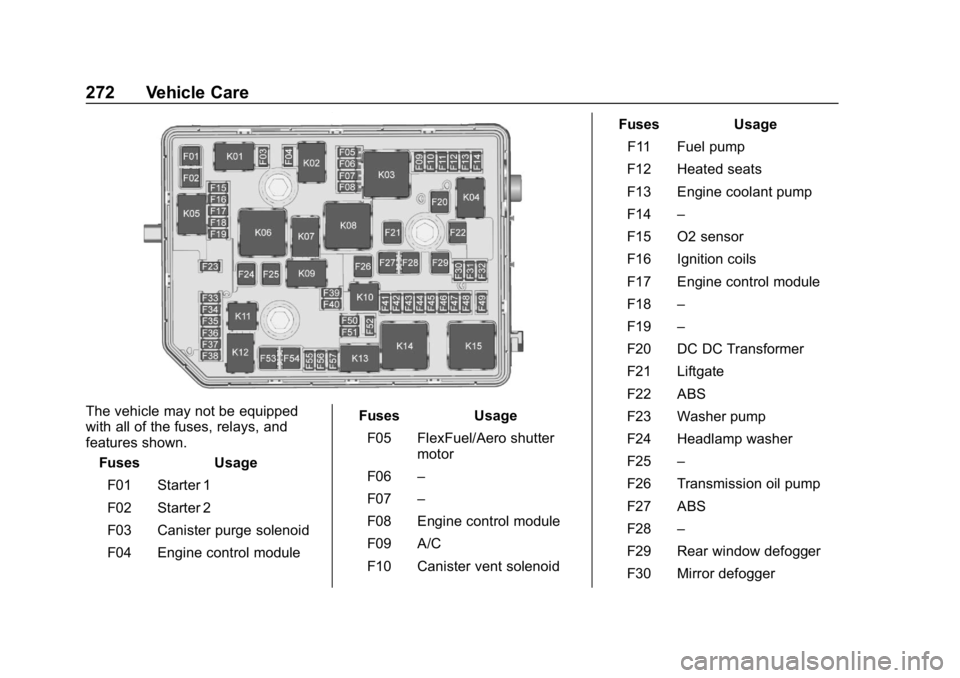
The vehicle may not be equipped
with all of the fuses, relays, and
features shown.Fuses Usage
F01 Starter 1
F02 Starter 2
F03 Canister purge solenoid
F04 Engine control module Fuses Usage
F05 FlexFuel/Aero shutter motor
F06 –
F07 –
F08 Engine control module
F09 A/C
F10 Canister vent solenoid Fuses Usage
F11 Fuel pump
F12 Heated seats
F13 Engine coolant pump
F14 –
F15 O2 sensor
F16 Ignition coils
F17 Engine control module
F18 –
F19 –
F20 DC DC Transformer
F21 Liftgate
F22 ABS
F23 Washer pump
F24 Headlamp washer
F25 –
F26 Transmission oil pump
F27 ABS
F28 –
F29 Rear window defogger
F30 Mirror defogger
Page 274 of 377
Buick Envision Owner Manual (GMNA-Localizing-U.S./Canada/Mexico-
12032235) - 2019 - CRC - 6/27/18
Vehicle Care 273
FusesUsage
F31 –
F32 Various low current functions
F33 –
F34 Horn
F35 –
F36 Right high-beam headlamp
F37 Left high-beam headlamp
F38 Automatic headlamp leveling
F39 Front fog lamps
F40 Transmission oil pump
F41 Passenger ventilated seat
F42 Headlamp position
F43 –
F44 Interior rearview mirror
F45 –
F46 Driver ventilated seat Fuses
Usage
F47 Electric steering column lock
F48 Rear wiper
F49 –
F50 –
F51 Right low-beam headlamps
F52 Engine control module/ Transmission control
module
F53 –
F54 –
F55 Front wiper
F56 –
F57 Left low-beam headlamps
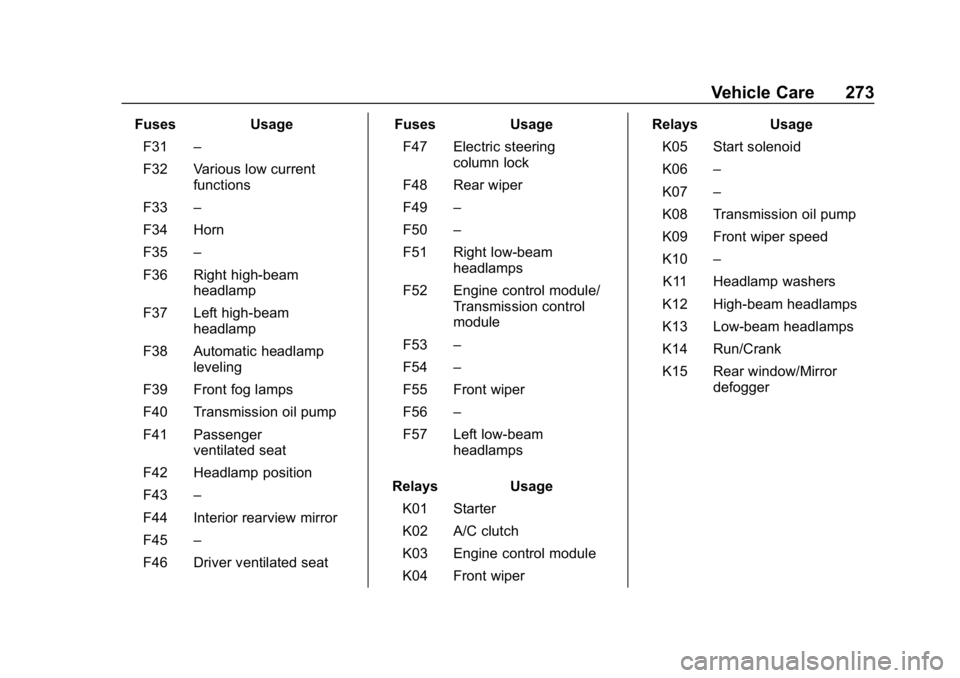
Relays Usage
K01 Starter
K02 A/C clutch
K03 Engine control module
K04 Front wiper Relays
Usage
K05 Start solenoid
K06 –
K07 –
K08 Transmission oil pump
K09 Front wiper speed
K10 –
K11 Headlamp washers
K12 High-beam headlamps
K13 Low-beam headlamps
K14 Run/Crank
K15 Rear window/Mirror defogger
Page 275 of 377
Buick Envision Owner Manual (GMNA-Localizing-U.S./Canada/Mexico-
12032235) - 2019 - CRC - 6/27/18
274 Vehicle Care
Instrument Panel Fuse
Block
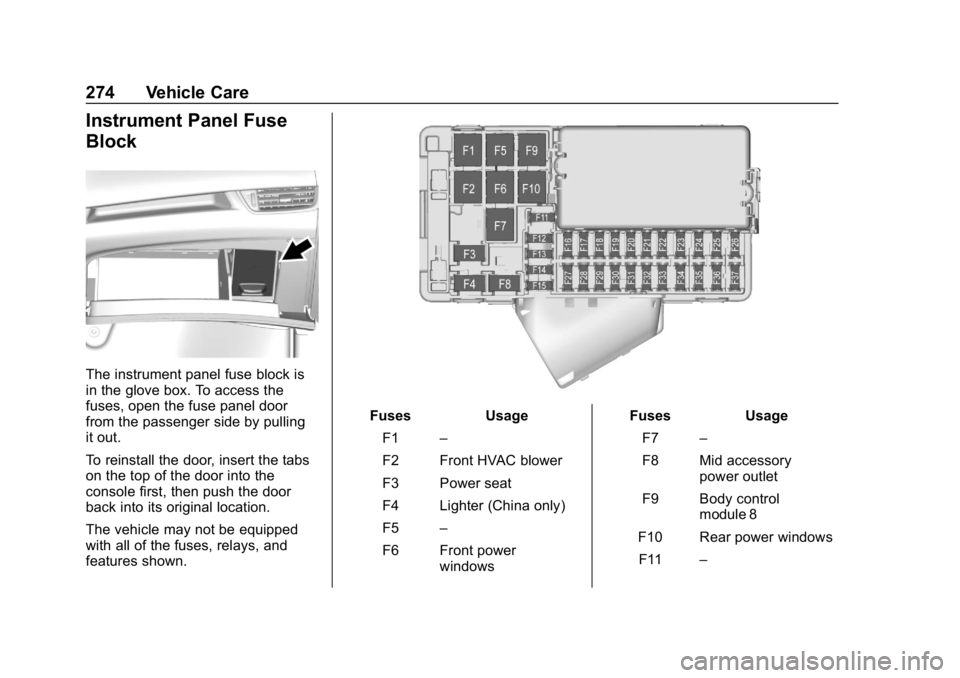
The instrument panel fuse block is
in the glove box. To access the
fuses, open the fuse panel door
from the passenger side by pulling
it out.
To reinstall the door, insert the tabs
on the top of the door into the
console first, then push the door
back into its original location.
The vehicle may not be equipped
with all of the fuses, relays, and
features shown.
FusesUsage
F1 –
F2 Front HVAC blower
F3 Power seat
F4 Lighter (China only)
F5 –
F6 Front power windows Fuses
Usage
F7 –
F8 Mid accessory power outlet
F9 Body control module 8
F10 Rear power windows F11 –
Page 276 of 377
Buick Envision Owner Manual (GMNA-Localizing-U.S./Canada/Mexico-
12032235) - 2019 - CRC - 6/27/18
Vehicle Care 275
FusesUsage
F12 Sunroof
F13 Front heated seats
F14 Exterior rearview mirror
F15 Body control module 3
F16 –
F17 –
F18 Body control module 7
F19 Data link connector
F20 SDM
F21 HVAC
F22 Liftgate release
F23 Passive entry/ Passive start
F24 OCC sensor
F25 Steering wheel controls
F26 Column lock assembly Fuses
Usage
F27 Body control module 4
F28 Transmission control module
F29 Body control module 2
F30 USB
F31 Rear HVAC blower
F32 Body control module 1
F33 Universal garage door opener
F34 Park Assist
F35 OnStar
F36 Display
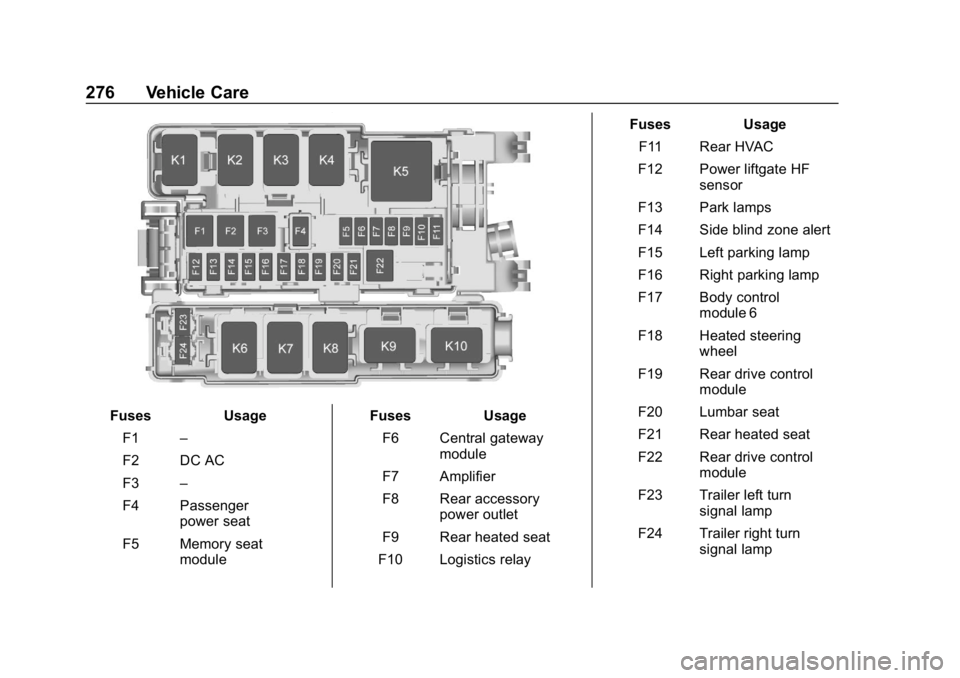
F37 RadioRear Compartment Fuse
Block
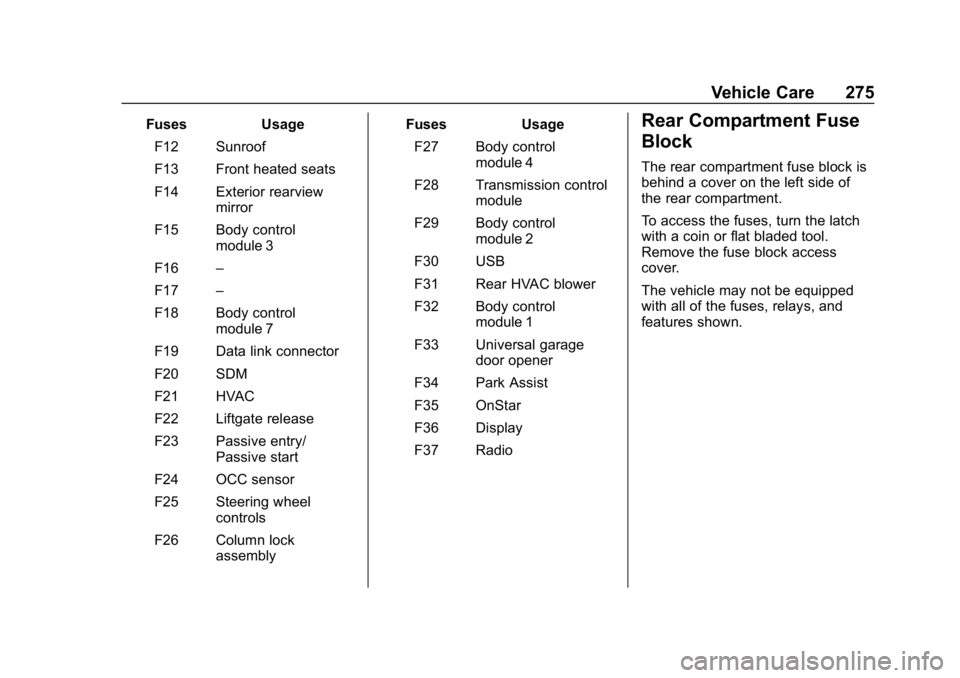
The rear compartment fuse block is
behind a cover on the left side of
the rear compartment.
To access the fuses, turn the latch
with a coin or flat bladed tool.
Remove the fuse block access
cover.
The vehicle may not be equipped
with all of the fuses, relays, and
features shown.
Page 277 of 377
Buick Envision Owner Manual (GMNA-Localizing-U.S./Canada/Mexico-
12032235) - 2019 - CRC - 6/27/18
276 Vehicle Care
FusesUsage
F1 –
F2 DC AC
F3 –
F4 Passenger power seat
F5 Memory seat module Fuses
Usage
F6 Central gateway module
F7 Amplifier
F8 Rear accessory power outlet
F9 Rear heated seat
F10 Logistics relay Fuses
Usage
F11 Rear HVAC
F12 Power liftgate HF sensor
F13 Park lamps
F14 Side blind zone alert
F15 Left parking lamp
F16 Right parking lamp
F17 Body control module 6
F18 Heated steering wheel
F19 Rear drive control module
F20 Lumbar seat
F21 Rear heated seat
F22 Rear drive control module
F23 Trailer left turn signal lamp
F24 Trailer right turn signal lamp
Page 283 of 377
Buick Envision Owner Manual (GMNA-Localizing-U.S./Canada/Mexico-
12032235) - 2019 - CRC - 6/27/18
282 Vehicle Care
(4) Construction Code:A letter
code is used to indicate the type
of ply construction in the tire.
The letter R means radial ply
construction; the letter D means
diagonal or bias ply
construction; and the letter B
means belted-bias ply
construction.
(5) Rim Diameter
:Diameter of
the wheel in inches.
(6) Service Description
:These
characters represent the load
index and speed rating of the
tire. The load index represents
the load carrying capacity a tire
is certified to carry. The speed
rating is the maximum speed a
tire is certified to carry a load.
Tire Terminology and
Definitions
Air Pressure:The amount of
air inside the tire pressing
outward on each square inch of the tire. Air pressure is
expressed in kPa (kilopascal)
or psi (pounds per square inch).
Accessory Weight
:The
combined weight of optional
accessories. Some examples of
optional accessories are
automatic transmission, power
windows, power seats, and air
conditioning.
Aspect Ratio
:The relationship
of a tire's height to its width.
Belt
:A rubber coated layer of
cords between the plies and the
tread. Cords may be made from
steel or other reinforcing
materials.
Bead
:The tire bead contains
steel wires wrapped by steel
cords that hold the tire onto
the rim. Bias Ply Tire
:A pneumatic tire
in which the plies are laid at
alternate angles less than
90 degrees to the centerline of
the tread.
Cold Tire Pressure
:The
amount of air pressure in a tire,
measured in kPa (kilopascal)
or psi (pounds per square inch)
before a tire has built up heat
from driving. See Tire Pressure
0 284.
Curb Weight
:The weight of a
motor vehicle with standard and
optional equipment including the
maximum capacity of fuel, oil,
and coolant, but without
passengers and cargo.
DOT Markings
:A code molded
into the sidewall of a tire
signifying that the tire is in
compliance with the U.S.
Department of Transportation
(DOT) Motor Vehicle Safety
Standards. The DOT code
includes the Tire Identification
Page 284 of 377

Buick Envision Owner Manual (GMNA-Localizing-U.S./Canada/Mexico-
12032235) - 2019 - CRC - 6/27/18
Vehicle Care 283
Number (TIN), an alphanumeric
designator which can also
identify the tire manufacturer,
production plant, brand, and
date of production.
GVWR
:Gross Vehicle Weight
Rating. See Vehicle Load Limits
0 184.
GAWR FRT
:Gross Axle Weight
Rating for the front axle. See
Vehicle Load Limits 0184.
GAWR RR
:Gross Axle Weight
Rating for the rear axle. See
Vehicle Load Limits 0184.
Intended Outboard Sidewall
:
The side of an asymmetrical tire
that must always face outward
when mounted on a vehicle.
Kilopascal (kPa)
:The metric
unit for air pressure.
Light Truck (LT-Metric) Tire
:A
tire used on light duty trucks and
some multipurpose passenger
vehicles. Load Index
:An assigned
number ranging from 1 to 279
that corresponds to the load
carrying capacity of a tire.
Maximum Inflation Pressure
:
The maximum air pressure to
which a cold tire can be inflated.
The maximum air pressure is
molded onto the sidewall.
Maximum Load Rating
:The
load rating for a tire at the
maximum permissible inflation
pressure for that tire.
Maximum Loaded Vehicle
Weight
:The sum of curb
weight, accessory weight,
vehicle capacity weight, and
production options weight.
Normal Occupant Weight
:The
number of occupants a vehicle
is designed to seat multiplied by
68 kg (150 lb). See Vehicle Load
Limits 0184.
Occupant Distribution
:
Designated seating positions. Outward Facing Sidewall
:The
side of an asymmetrical tire that
has a particular side that faces
outward when mounted on a
vehicle. The side of the tire that
contains a whitewall, bears
white lettering, or bears
manufacturer, brand, and/or
model name molding that is
higher or deeper than the same
moldings on the other sidewall
of the tire.
Passenger (P-Metric) Tire
:A
tire used on passenger cars and
some light duty trucks and
multipurpose vehicles.
Recommended Inflation
Pressure
:Vehicle
manufacturer's recommended
tire inflation pressure as
shown on the tire placard.
See Tire Pressure 0284 and
Vehicle Load Limits 0184.