ignition BUICK LACROSSE 2005 Manual PDF
[x] Cancel search | Manufacturer: BUICK, Model Year: 2005, Model line: LACROSSE, Model: BUICK LACROSSE 2005Pages: 410, PDF Size: 2.59 MB
Page 193 of 410
Audio System(s)
Notice:Before adding any sound equipment to
your vehicle, like a tape player, CB radio, mobile
telephone, or two-way radio, make sure that it can
be added by checking with your dealer. Also,
check federal rules covering mobile radio and
telephone units. If sound equipment can be added,
it is very important to do it properly. Added
sound equipment may interfere with the operation
of your vehicle’s engine, radio, or other systems,
and even damage them. Your vehicle’s systems may
interfere with the operation of sound equipment
that has been added improperly.
Figure out which audio system is in your vehicle, nd
out what your audio system can do, and how to operate
all of its controls.
Your vehicle has a feature called Retained Accessory
Power (RAP). With RAP, the audio system can be played
even after the ignition is turned off. SeeRetained
Accessory Power (RAP) on page 2-22for more
information.
Setting the Time
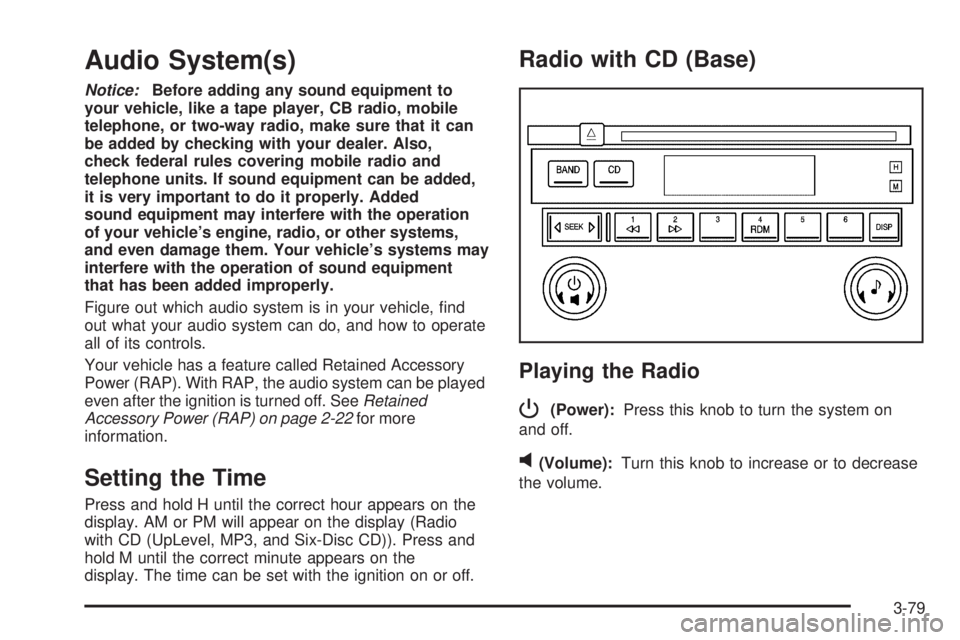
Press and hold H until the correct hour appears on the
display. AM or PM will appear on the display (Radio
with CD (UpLevel, MP3, and Six-Disc CD)). Press and
hold M until the correct minute appears on the
display. The time can be set with the ignition on or off.
Radio with CD (Base)
Playing the Radio
P
(Power):Press this knob to turn the system on
and off.
v(Volume):Turn this knob to increase or to decrease
the volume.
3-79
Page 194 of 410
DISP (Display):Press this button to switch the display
between the radio station frequency, band, and time
of day. When the ignition is turned off, press this knob to
display the time.
To change the default on the display, press the DISP
button until you see the display you want, then hold
this button for two seconds. The radio will produce
one beep and the selected display will now be
the default.
Finding a Station
BAND:Press this button to switch between FM1, FM2,
and AM. The display will show the selection.
e(Tune):Turn this knob to select radio stations.
oSEEKp:Press and release the right or the left
arrow to go to the next or to the previous station
and stay there.
To scan stations, press and hold either arrow for more
than two seconds. SCN will appear on the display
and the radio will produce one beep. The radio will go
to a station, play for a few seconds, then go on to
the next station. Press either arrow again or one of the
pushbuttons to stop scanning presets.To scan preset stations, press and hold either arrow for
more than four seconds. PSC will appear on the
display and the radio will produce two beeps. The radio
will go to a preset station, play for a few seconds,
then go on to the next preset station. Press either
arrow again or one of the pushbuttons to stop
scanning presets.
The radio will only seek and scan stations with a strong
signal that are in the selected band.
Setting Preset Stations
Up to 18 stations (six FM1, six FM2, and six AM), can
be programmed on the six numbered pushbuttons,
by performing the following steps:
1. Turn the radio on.
2. Press BAND to select FM1, FM2, or AM.
3. Tune in the desired station.
4. Press and hold one of the six numbered
pushbuttons until you hear a beep. Whenever that
numbered pushbutton is pressed, the station
that was set will return.
5. Repeat the steps for each pushbutton.
3-80
Page 196 of 410
Playing a CD
Insert a CD partway into the slot, label side up. The
player will pull it in and the CD should begin playing. If
you want to insert a CD with the ignition off, rst
press the eject button or the DISP knob.
If the ignition or radio is turned off with a CD in the
player it will stay in the player. When the ignition or radio
is turned on, the CD will start to play where it stopped,
if it was the last selected audio source.
When the CD is inserted, CD will appear on the display.
As each new track starts to play, the track number
will appear on the display.
The CD player can play the smaller 3 inch (8 cm) single
CDs with an adapter ring. Full-size CDs and the
smaller CDs are loaded in the same manner.
If playing a CD-R the sound quality may be reduced
due to CD-R quality, the method of recording, the quality
of the music that has been recorded, and the way the
CD-R has been handled. There may be an increase
in skipping, difficulty in nding tracks, and/or difficulty in
loading and ejecting. If these problems occur try a
known good CD.Do not add paper labels to CDs, they could get caught
in the CD player.
If an error appears on the display, see “CD Messages”
later in this section.
1
s(Reverse):Press this button to reverse within
the current track.
2
\(Fast Forward):Press this button to fast forward
within the current track.
4 RDM (Random):Press this pushbutton to hear the
tracks in random, rather than sequential, order. RND will
appear on the display. Press this pushbutton again to
turn off random play.
oSEEKp:Press the left arrow to go to the start of
the current or the previous track. Press the right
arrow to go to the start of the next track.
To scan tracks, press either arrow for more than
two seconds until SCN appears on the display. The CD
will search the previous or next tracks at two seconds
per track. Press either arrow to stop scanning.
3-82
Page 197 of 410
DISP (Display):Press this button to see how long the
current track has been playing. The elapsed time of
the track will appear on the display. To change
the default on the display, track, elapsed time, or time of
day, press this button until you see the display you
want, then hold the button for two seconds. The radio
will produce one beep and the selected display will now
be the default.
BAND:Press this button to listen to the radio when a
CD is playing. The inactive CD will remain safely
inside the radio for future listening.
CD:Press this button to play a CD when listening to
the radio. The CD symbol will appear on the display
when a CD is loaded.
Z(Eject):Press this button to eject a CD. Eject may
be activated with either the ignition or radio off. CDs
may be loaded with the ignition and radio off if this
button is pressed rst.
CD Messages
CHECK CD:If this message appears on the display
and/or the CD comes out, it could be for one of the
following reasons:
It is very hot. When the temperature returns to
normal, the CD should play.
You are driving on a very rough road. When the
road becomes smoother, the CD should play.
The CD is dirty, scratched, wet, or upside down.
The air is very humid. If so, wait about an hour and
try again.
There may have been a problem while burning
the CD.
The label may be caught in the CD player.
If the CD is not playing correctly, for any other reason,
try a known good CD.
If any error occurs repeatedly or if an error cannot be
corrected, contact your GM dealer. If the radio displays
an error message, write it down and provide it to
your GM dealer when reporting the problem.
3-83
Page 198 of 410
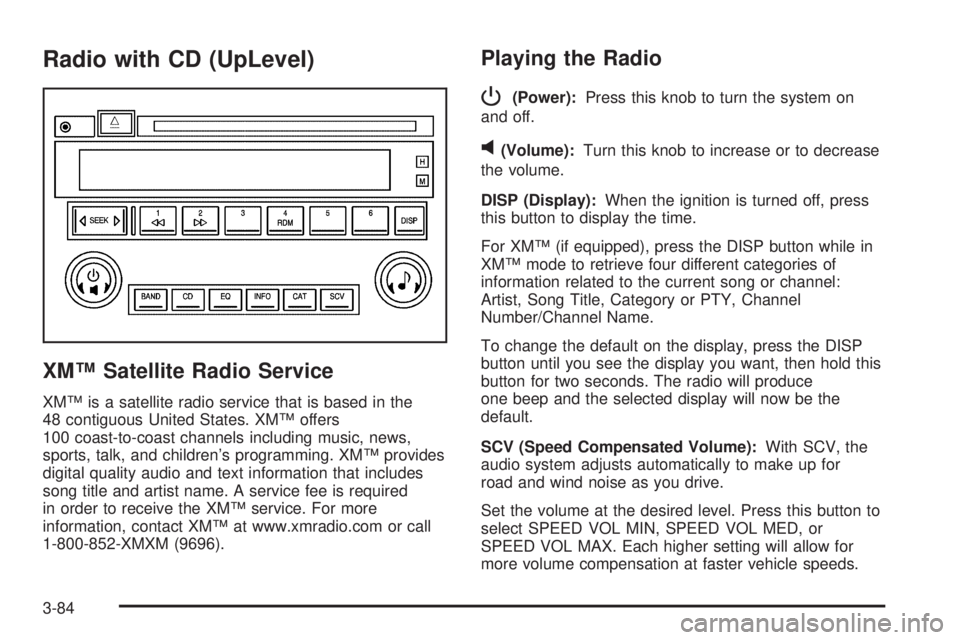
Radio with CD (UpLevel)
XM™ Satellite Radio Service
XM™ is a satellite radio service that is based in the
48 contiguous United States. XM™ offers
100 coast-to-coast channels including music, news,
sports, talk, and children’s programming. XM™ provides
digital quality audio and text information that includes
song title and artist name. A service fee is required
in order to receive the XM™ service. For more
information, contact XM™ at www.xmradio.com or call
1-800-852-XMXM (9696).
Playing the Radio
P
(Power):Press this knob to turn the system on
and off.
v(Volume):Turn this knob to increase or to decrease
the volume.
DISP (Display):When the ignition is turned off, press
this button to display the time.
For XM™ (if equipped), press the DISP button while in
XM™ mode to retrieve four different categories of
information related to the current song or channel:
Artist, Song Title, Category or PTY, Channel
Number/Channel Name.
To change the default on the display, press the DISP
button until you see the display you want, then hold this
button for two seconds. The radio will produce
one beep and the selected display will now be the
default.
SCV (Speed Compensated Volume):With SCV, the
audio system adjusts automatically to make up for
road and wind noise as you drive.
Set the volume at the desired level. Press this button to
select SPEED VOL MIN, SPEED VOL MED, or
SPEED VOL MAX. Each higher setting will allow for
more volume compensation at faster vehicle speeds.
3-84
Page 204 of 410
Playing a CD
Insert a CD partway into the slot, label side up. The
player will pull it in and the CD should begin playing. If
you want to insert a CD with the ignition off, rst
press the eject button or the DISP knob.
If the ignition or radio is turned off with a CD in the
player it will stay in the player. When the ignition or radio
is turned on, the CD will start to play where it stopped,
if it was the last selected audio source.
When the CD is inserted, the CD symbol will appear on
the display. As each new track starts to play, the
track number will appear on the display.
The CD player can play the smaller 3 inch (8 cm) single
CDs with an adapter ring. Full-size CDs and the
smaller CDs are loaded in the same manner.
If playing a CD-R the sound quality may be reduced
due to CD-R quality, the method of recording, the quality
of the music that has been recorded, and the way the
CD-R has been handled. There may be an increase
in skipping, difficulty in nding tracks, and/or difficulty in
loading and ejecting. If these problems occur try a
known good CD.
Do not add paper labels to CDs, they could get caught
in the CD player.
If an error appears on the display, see “CD Messages”
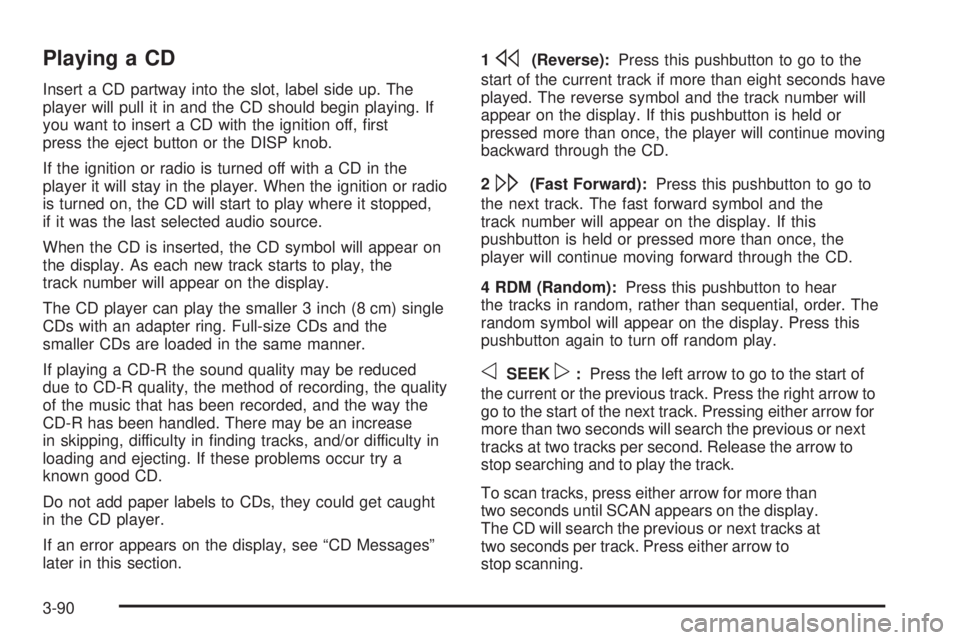
later in this section.1
s(Reverse):Press this pushbutton to go to the
start of the current track if more than eight seconds have
played. The reverse symbol and the track number will
appear on the display. If this pushbutton is held or
pressed more than once, the player will continue moving
backward through the CD.
2
\(Fast Forward):Press this pushbutton to go to
the next track. The fast forward symbol and the
track number will appear on the display. If this
pushbutton is held or pressed more than once, the
player will continue moving forward through the CD.
4 RDM (Random):Press this pushbutton to hear
the tracks in random, rather than sequential, order. The
random symbol will appear on the display. Press this
pushbutton again to turn off random play.
oSEEKp:Press the left arrow to go to the start of
the current or the previous track. Press the right arrow to
go to the start of the next track. Pressing either arrow for
more than two seconds will search the previous or next
tracks at two tracks per second. Release the arrow to
stop searching and to play the track.
To scan tracks, press either arrow for more than
two seconds until SCAN appears on the display.
The CD will search the previous or next tracks at
two seconds per track. Press either arrow to
stop scanning.
3-90
Page 205 of 410
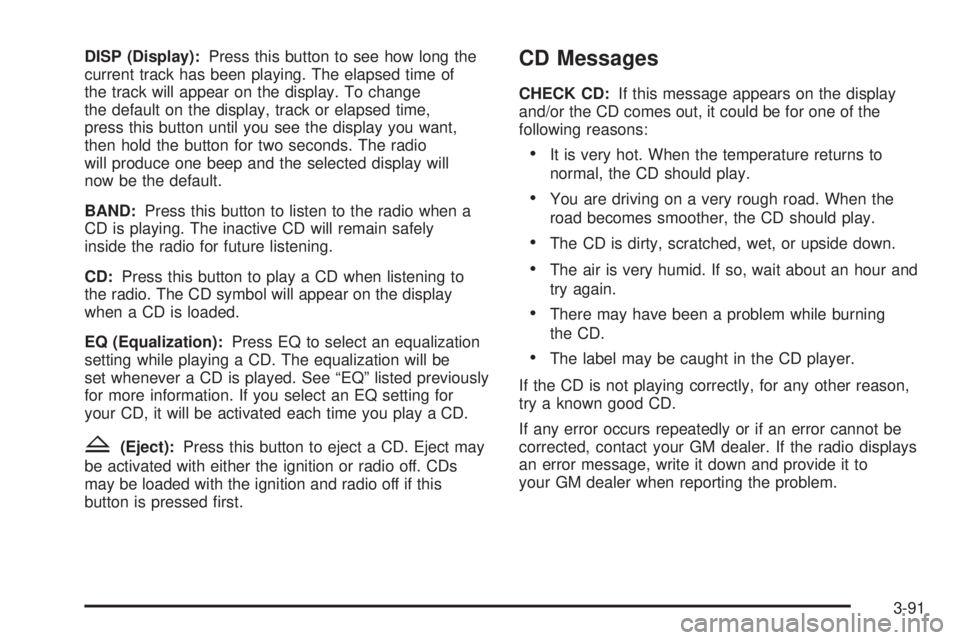
DISP (Display):Press this button to see how long the
current track has been playing. The elapsed time of
the track will appear on the display. To change
the default on the display, track or elapsed time,
press this button until you see the display you want,
then hold the button for two seconds. The radio
will produce one beep and the selected display will
now be the default.
BAND:Press this button to listen to the radio when a
CD is playing. The inactive CD will remain safely
inside the radio for future listening.
CD:Press this button to play a CD when listening to
the radio. The CD symbol will appear on the display
when a CD is loaded.
EQ (Equalization):Press EQ to select an equalization
setting while playing a CD. The equalization will be
set whenever a CD is played. See “EQ” listed previously
for more information. If you select an EQ setting for
your CD, it will be activated each time you play a CD.
Z(Eject):Press this button to eject a CD. Eject may
be activated with either the ignition or radio off. CDs
may be loaded with the ignition and radio off if this
button is pressed rst.
CD Messages
CHECK CD:If this message appears on the display
and/or the CD comes out, it could be for one of the
following reasons:
It is very hot. When the temperature returns to
normal, the CD should play.
You are driving on a very rough road. When the
road becomes smoother, the CD should play.
The CD is dirty, scratched, wet, or upside down.
The air is very humid. If so, wait about an hour and
try again.
There may have been a problem while burning
the CD.
The label may be caught in the CD player.
If the CD is not playing correctly, for any other reason,
try a known good CD.
If any error occurs repeatedly or if an error cannot be
corrected, contact your GM dealer. If the radio displays
an error message, write it down and provide it to
your GM dealer when reporting the problem.
3-91
Page 206 of 410
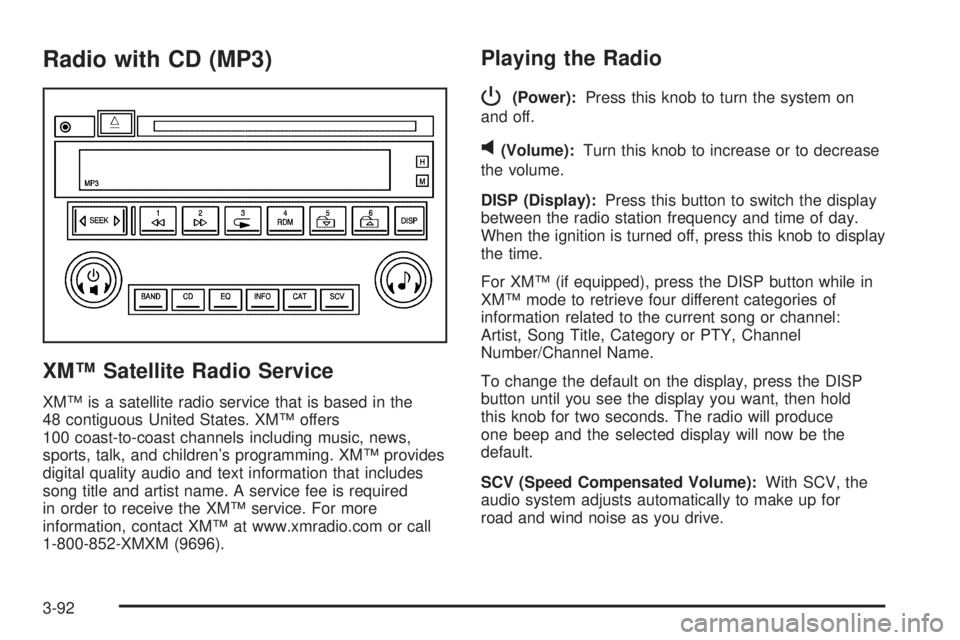
Radio with CD (MP3)
XM™ Satellite Radio Service
XM™ is a satellite radio service that is based in the
48 contiguous United States. XM™ offers
100 coast-to-coast channels including music, news,
sports, talk, and children’s programming. XM™ provides
digital quality audio and text information that includes
song title and artist name. A service fee is required
in order to receive the XM™ service. For more
information, contact XM™ at www.xmradio.com or call
1-800-852-XMXM (9696).
Playing the Radio
P
(Power):Press this knob to turn the system on
and off.
v(Volume):Turn this knob to increase or to decrease
the volume.
DISP (Display):Press this button to switch the display
between the radio station frequency and time of day.
When the ignition is turned off, press this knob to display
the time.
For XM™ (if equipped), press the DISP button while in
XM™ mode to retrieve four different categories of
information related to the current song or channel:
Artist, Song Title, Category or PTY, Channel
Number/Channel Name.
To change the default on the display, press the DISP
button until you see the display you want, then hold
this knob for two seconds. The radio will produce
one beep and the selected display will now be the
default.
SCV (Speed Compensated Volume):With SCV, the
audio system adjusts automatically to make up for
road and wind noise as you drive.
3-92
Page 213 of 410
Playing a CD
Insert a CD partway into the slot, label side up. The
player will pull it in and the CD should begin playing. If
you want to insert a CD with the ignition off, rst
press the eject button or the DISP knob.
If the ignition or radio is turned off with a CD in the
player it will stay in the player. When the ignition or radio
is turned on, the CD will start to play where it stopped,
if it was the last selected audio source.
When the CD is inserted, the CD symbol will appear on
the display. As each new track starts to play, the
track number will appear on the display.
The CD player can play the smaller 3 inch (8 cm) single
CDs with an adapter ring. Full-size CDs and the
smaller CDs are loaded in the same manner.
If playing a CD-R the sound quality may be reduced
due to CD-R quality, the method of recording, the quality
of the music that has been recorded, and the way the
CD-R has been handled. There may be an increase
in skipping, difficulty in nding tracks, and/or difficulty in
loading and ejecting. If these problems occur try a
known good CD.Do not add paper labels to CDs, they could get caught
in the CD player.
If an error appears on the display, see “CD Messages”
later in this section.
1
s(Reverse):Press this button to reverse within
the current track.
2
\(Fast Forward):Press this button to fast forward
within the current track.
3
N(Repeat):Press this pushbutton to hear a track
over again. REPEAT TRACK will appear on the
display. The current track will continue to repeat. Press
this pushbutton again to turn off repeat play.
4 RDM (Random):Press this pushbutton to hear the
tracks in random, rather than sequential, order.
RANDOM ON will appear on the display. Press this
pushbutton again to turn off random play.
3-99
Page 214 of 410
oSEEKp:Press the left arrow to go to the start of
the current or the previous track. Press the right
arrow to go to the start of the next track.
To scan tracks, press and hold either arrow for more
than two seconds. SCAN will appear on the display.
The CD will search the previous or next tracks at
two seconds per track. Press either arrow to stop
scanning.
DISP (Display):Press this button to see how long the
current track has been playing. The elapsed time of
the track will appear on the display. To change
the default on the display, track or elapsed time, press
this button until you see the display you want, then
hold the button for two seconds. The radio will produce
one beep and the selected display will now be the
default.
BAND:Press this button to listen to the radio when a
CD is playing. The inactive CD will remain safely
inside the radio for future listening.
CD:Press this button to play a CD when listening to
the radio. The CD symbol will appear on the display
when a CD is loaded.EQ (Equalization):Press EQ to select an equalization
setting while playing a CD. The equalization will be
set whenever a CD is played. See “EQ” listed previously
for more information. If you select an EQ setting for
your CD, it will be activated each time you play a CD.
Z(Eject):Press this button to eject a CD. Eject may
be activated with either the ignition or radio off. CDs
may be loaded with the ignition and radio off if this
button is pressed rst.
Using an MP3 CD
MP3 Format
This MP3 player will accept MP3 les that were recorded
on an up to 700 MB CD-R CD. The les can be
recorded with the following xed bit rates: 32 kpbs,
40 kpbs, 56 kpbs, 64 kpbs, 80 kpbs, 96 kpbs,
112 kpbs, 128 kpbs, 160 kpbs, 192 kpbs, 224 kpbs,
256 kpbs, and 320 kpbs or a variable bit rate. Song title,
artist name, and album will be available when recorded
using ID3 tags versions 1 and 2.
3-100