ECO mode BUICK LACROSSE 2007 Owner's Guide
[x] Cancel search | Manufacturer: BUICK, Model Year: 2007, Model line: LACROSSE, Model: BUICK LACROSSE 2007Pages: 512
Page 276 of 512
3N(Repeat):With repeat, one track, the entire
folder, or playlist can be repeated.
Press and release this pushbutton until REPEAT
TRACK, REPEAT FOLDER, or REPEAT
P-LIST appears on the display. The current track,
folder or playlist will continue to repeat. Press
and release this pushbutton until REPEAT OFF
appears on the display to turn off repeated play.
4 RDM (Random):Press this pushbutton to
hear tracks in random, rather than sequential
order. You can random the entire folder, playlist,
or CD.
Press and release this pushbutton until RANDOM
FOLDER, RANDOM P-LIST (play list), or
RANDOM DISC appears on the display. Once all
of the tracks in the current folder or playlist
have been played the system will move on to the
next folder or playlist and play all of the tracks
in random order.
When in random, pressing and releasing either
SEEK arrow will take you to the next or previous
random track.Press and release this pushbutton until
RANDOM OFF appears on the display, to
turn off random play.
5
!(Previous Folder):Press this pushbutton
to go to the rst track in the previous folder.
Pressing this button while in folder random mode
will take you to the previous folder and random
the tracks in that folder.
6
#(Next Folder):Press this pushbutton to go
to the rst track in the next folder. Pressing this
button while in folder random mode will take you to
the next folder and random the tracks in that folder.
oSEEKp:Press the left arrow to go to the
start of the previous track. Press the right arrow to
go to the start of the next track.
To scan tracks, press either arrow for more than
two seconds until SCAN appears on the
display. The radio will go to the next track, play
10 seconds, then go on to the next track.
276
Page 277 of 512
DISP (Display):Press this button to switch
between track mode, folder/playlist mode, and ID3
tag. The display will show only eight characters,
but there can be up to four pages of text. If
there are more than eight characters in the song,
folder, or playlist name, pressing this knob
within two seconds will take you to the next page
of text. If there are no other pages to be shown,
pressing this button within two seconds will
take you to the next display mode.
Song name and time of day mode will display
the current song name and time of day.
Folder/playlist mode will display the current
folder or playlist number the track number
and the elapsed time of the track.
Song name and track number mode
will display the current song name and
track number.
ID3 Tag and folder mode will display the ID3
tag information and the folder number.
Song and folder mode will display the number
of songs in the folder and the folder number.To change the default on the display, press the
DISP knob until you see the display you want, then
hold this knob for two seconds. The radio will
produce one beep and the selected display will
now be the default.
INFO (Information):INFO will appear on the
display whenever a current track has ID3
tag information. Press this button to display the
artist name and album contained in the tag.
BAND:Press this button to listen to the radio
when a CD is playing. The inactive CD will remain
safely inside the radio for future listening.
CD:Press this button to play a CD when listening
to the radio. The CD symbol will appear on the
display when a CD is loaded.
EQ (Equalization):Press EQ to select an
equalization setting while playing a CD. The
equalization will be set whenever a CD is played.
See “EQ” listed previously for more information.
If you select an EQ setting for your CD, it will
be activated each time you play a CD.
Z(Eject):Press this button to eject a CD. Eject
may be activated with either the ignition or radio
off. CDs may be loaded with the ignition and radio
off if this button is pressed rst.
277
Page 357 of 512
How to Reset the Engine Oil Life
System
The Engine Oil Life System calculates when to
change the engine oil and lter based on vehicle
use. Anytime the oil is changed, reset the system
so it can calculate when the next oil change is
required. If a situation occurs where you change the
oil prior to a change engine oil light or CHANGE OIL
SOON message being turned on, reset the system.
After changing the engine oil, reset the system by
performing the following steps:
Vehicles with Driver Information Center (DIC)
1. Press the option button on the DIC until
ENGINE OIL MONITOR appears on the
DIC screen.
2. Press the set/reset button to reset the
system. The next screen indicates that
the CHANGE OIL SOON message
has been reset.
If the vehicle has the uplevel DIC, when
the gages button is pressed and the
OIL LIFE REMAINING mode appears,
it should read 100 percent OIL LIFE
REMAINING.
3. Turn the key to OFF.
Vehicles without Driver Information
Center (DIC)
1. With the engine off, turn the ignition
key to RUN.
2. Fully press and release the accelerator
pedal slowly three times within
ve seconds.
3. Turn the key to OFF, then start the
vehicle.
If the light or message comes back on when
you start your vehicle, the oil life system has not
reset. Repeat the procedure.
What to Do with Used Oil
Used engine oil contains certain elements that
may be unhealthy for your skin and could
even cause cancer. Do not let used oil stay on
your skin for very long. Clean your skin and nails
with soap and water, or a good hand cleaner.
Wash or properly dispose of clothing or rags
containing used engine oil. See the manufacturer’s
warnings about the use and disposal of oil
products.
357
Page 370 of 512
Overheated Engine Protection
Operating Mode
This emergency operating mode allows your
vehicle to be driven to a safe place in an emergency
situation. If an overheated engine condition exists,
an overheat protection mode which alternates ring
groups of cylinders helps prevent engine damage.
In this mode, you will notice a signicant loss in
power and engine performance. The REDUCED
POWER STOP WHEN SAFE message will come
on in the Driver Information Center (DIC), if the
vehicle has one, along with the engine coolant
temperature warning light on the instrument panel,
to indicate the vehicle has entered overheated
engine protection operating mode. The temperature
gage will also indicate an overheat condition exists.
Driving extended miles (km) and/or towing a trailer
in the overheat protection mode should be avoided.
Notice:After driving in the overheated engine
protection operating mode, to avoid engine
damage, allow the engine to cool before
attempting any repair. The engine oil will
be severely degraded. Repair the cause of
coolant loss, change the oil and reset the
oil life system. SeeEngine Oil on page 353.
Cooling System
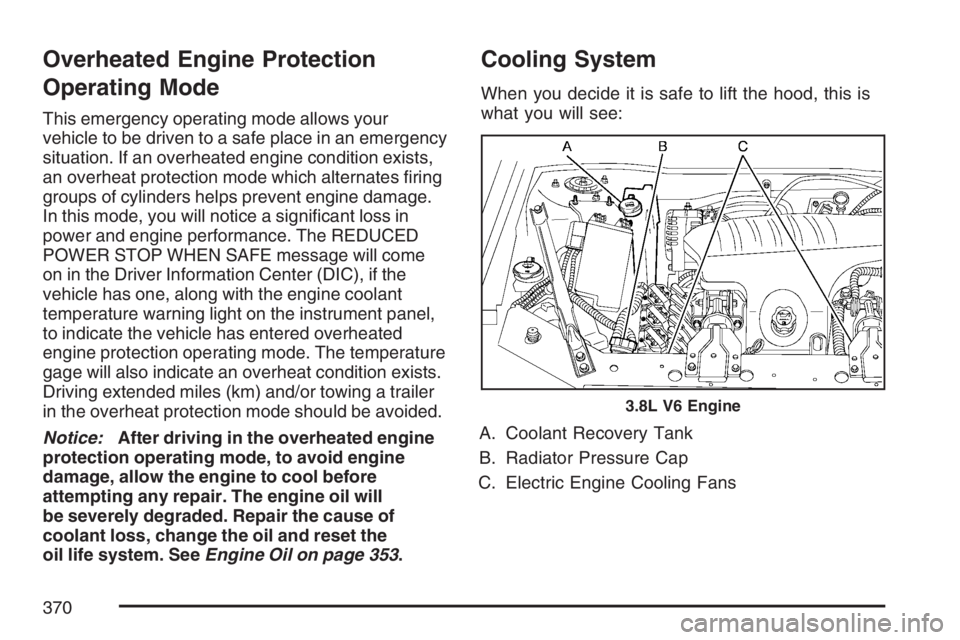
When you decide it is safe to lift the hood, this is
what you will see:
A. Coolant Recovery Tank
B. Radiator Pressure Cap
C. Electric Engine Cooling Fans
3.8L V6 Engine
370
Page 372 of 512
When the engine is cold, the coolant level should
be at or above the cold ll line on the coolant
recovery tank. If it is not, there may be a leak at the
pressure cap or in the radiator hoses, heater hoses,
radiator, water pump, or somewhere else in the
cooling system.
{CAUTION:
Heater and radiator hoses, and other
engine parts, can be very hot. Do not
touch them. If you do, you can be burned.
Do not run the engine if there is a leak.
If you run the engine, it could lose all
coolant. That could cause an engine re,
and you could be burned. Get any leak
xed before you drive the vehicle.If there seems to be no leak, with the engine on,
check to see if the electric engine cooling fans
are running. If the engine is overheating, the fans
should be running. If the fans are not running,
the vehicle needs service.
Notice:Engine damage from running your
engine without coolant is not covered by your
warranty. SeeOverheated Engine Protection
Operating Mode on page 370for information
on driving to a safe place in an emergency.
Notice:Using coolant other than DEX-COOL®
may cause premature engine, heater core,
or radiator corrosion. In addition, the engine
coolant could require changing sooner, at
30,000 miles (50 000 km) or 24 months,
whichever occurs rst. Any repairs would not
be covered by your warranty. Always use
DEX-COOL
®(silicate-free) coolant in your
vehicle.
372
Page 408 of 512
Normal Occupant Weight:The number of
occupants a vehicle is designed to seat multiplied
by 150 lbs (68 kg). SeeLoading Your Vehicle
on page 319.
Occupant Distribution:Designated seating
positions.
Outward Facing Sidewall:The side of an
asymmetrical tire that has a particular side that
faces outward when mounted on a vehicle.
The side of the tire that contains a whitewall, bears
white lettering, or bears manufacturer, brand,
and/or model name molding that is higher
or deeper than the same moldings on the other
sidewall of the tire.
Passenger (P-Metric) Tire:A tire used on
passenger cars and some light duty trucks and
multipurpose vehicles.
Recommended Ination Pressure:Vehicle
manufacturer’s recommended tire ination
pressure as shown on the tire placard. See
Ination - Tire Pressure on page 409andLoading
Your Vehicle on page 319.Radial Ply Tire:A pneumatic tire in which the
ply cords that extend to the beads are laid at
90 degrees to the centerline of the tread.
Rim:A metal support for a tire and upon which
the tire beads are seated.
Sidewall:The portion of a tire between the tread
and the bead.
Speed Rating:An alphanumeric code assigned
to a tire indicating the maximum speed at
which a tire can operate.
Traction:The friction between the tire and the
road surface. The amount of grip provided.
Tread:The portion of a tire that comes into
contact with the road.
Treadwear Indicators:Narrow bands, sometimes
called wear bars, that show across the tread of a
tire when only 1/16 inch (1.6 mm) of tread remains.
SeeWhen It Is Time for New Tires on page 417.
408
Page 414 of 512
TPMS Sensor Identication Codes
Each TPMS sensor has a unique identication
code. Any time you replace one or more of
the TPMS sensors or rotate the vehicle’s tires, the
identication codes need to be matched to the
new tire/wheel position. The sensors are matched,
to the tire/wheel positions, in the following order:
driver side front tire, passenger side front tire,
passenger side rear tire, and driver side rear tire
using a TPMS diagnostic tool. See your dealer
for service.
The TPMS sensors may also be matched to each
tire/wheel position by increasing or decreasing
the tire’s air pressure. When increasing the tire’s
pressure, do not exceed the maximum ination
pressure indicated on the tire’s sidewall.
You have two minutes to match each tire and
wheel position. If it takes longer than two minutes
to match any tire and wheel position, the
matching process stops and you need to
start over.The TPMS matching process is outlined below:
1. Set the parking brake.
2. Turn the ignition switch to RUN with the
engine off.
3. Press the Remote Keyless Entry (RKE)
transmitter’s LOCK and UNLOCK buttons
at the same time for approximately
ve seconds. The horn sounds twice to
signal the receiver is in relearn mode and the
TPMS sensor matching process can begin.
4. Start with the driver side front tire.
5. Remove the valve cap from the tire’s valve
stem. Activate the TPMS sensor by increasing
or decreasing the tire’s air pressure for
10 seconds, or until a horn chirp sounds.
The horn chirp, which may take up to
30 seconds to sound, conrms that the sensor
identication code has been matched to the
tire/wheel position. To decrease the tire’s
air-pressure use the pointed end of the valve
cap, a pencil-style air pressure gage, or a key.
414
Page 486 of 512
Alternative Service:There may be times,
when Roadside Assistance cannot provide
timely assistance, your advisor may authorize
you to secure local emergency road service,
and you will be reimbursed up to $100 upon
submission of the original receipt to Roadside
Assistance.
In many instances, mechanical failures are covered
under Buick’s Bumper-to-Bumper warranty for U.S.
customers, and the duration of the Base Warranty
Coverage for Canadian customers of the new
Vehicle Limited Warranty. However, any cost for
parts and labor for non-warranty repairs are the
responsibility of the driver.
For prompt and efficient assistance when calling,
please provide the following to the Roadside
Assistance Representative:
Your name, home address, and home
telephone number.
Telephone number of your location.
Location of the vehicle.
Model, year, color, and license plate number.
Odometer reading, Vehicle Identication
Number, and delivery date of the vehicle.
Description of the problem.
While we hope you never have the occasion to
use our service, it is added security while traveling
for you and your family. Remember, we are
only a phone call away. U.S. customers call Buick
Roadside Assistance:1-800-252-1112, TTY
users, call1-888-889-2438, Canadian customers
call1-800-268-6800.
Buick and General Motors of Canada Limited
reserve the right to limit services or reimbursement
to an owner or driver when, in their sole discretion,
the claims become excessive in frequency or type
of occurrence.
Roadside Assistance is not part of or included in
the coverage provided by the New Vehicle Limited
Warranty. Buick and General Motors of Canada
Limited reserve the right to make any changes or
discontinue the Roadside Assistance program
at any time without notication.
486
Page 489 of 512
Additional Program Information
All program options, such as shuttle service, may
not be available at every dealer. Please contact
your dealer for specic information about
availability. All Courtesy Transportation
arrangements will be administered by appropriate
dealer personnel.
General Motors reserves the right to unilaterally
modify, change or discontinue Courtesy
Transportation at any time and to resolve all
questions of claim eligibility pursuant to the terms
and conditions described herein at its sole
discretion.
Vehicle Data Collection and Event
Data Recorders
Your vehicle, like other modern motor vehicles, has
a number of sophisticated computer systems that
monitor and control several aspects of the vehicle’s
performance. Your vehicle uses on-board vehicle
computers to monitor emission control components
to optimize fuel economy, to monitor conditions for
airbag deployment and, if so equipped, to provide
anti-lock braking and to help the driver control the
vehicle in difficult driving situations.Some information may be stored during regular
operations to facilitate repair of detected
malfunctions; other information is stored only in a
crash event by computer systems, such as those
commonly called Event Data Recorders (EDR).
In a crash event, computer systems, such as the
airbag Sensing and Diagnostic Module (SDM)
in your vehicle may record information about the
condition of the vehicle and how it was operated,
such as data related to engine speed, brake
application, throttle position, vehicle speed, safety
belt usage, airbag readiness, airbag performance,
and the severity of a collision. If your vehicle is
equipped with StabiliTrak
®, steering performance,
including yaw rate, steering wheel angle, and
lateral acceleration, is also recorded. This
information has been used to improve vehicle
crash performance and may be used to improve
crash performance of future vehicles and
driving safety. Unlike the data recorders on many
airplanes, these on-board systems do not
record sounds, such as conversation of vehicle
occupants.
489
Page 502 of 512
Engine (cont.)
Overheated Protection Operating Mode.... 370
Overheating............................................. 367
Reduced Power Light............................... 196
Starting.................................................... 111
Enhanced Traction System (ETS)................ 295
Entry Lighting.............................................. 161
Event Data Recorders (EDR)...................... 489
Extender, Safety Belt..................................... 38
Exterior Lamps............................................ 158
Exterior Lighting Battery Saver.................... 160
F
Filter
Engine Air Cleaner................................... 358
Finish Damage............................................ 446
Flashers, Hazard Warning........................... 150
Flash-to-Pass.............................................. 153
Flat Tire...................................................... 425
Flat Tire, Changing...................................... 426
Flat Tire, Storing......................................... 435Fluid
Automatic Transaxle................................. 360
Power Steering........................................ 378
Windshield Washer.................................. 380
Fog Lamps.................................................. 160
Folding Rear Seat......................................... 14
Fuel............................................................ 343
Additives.................................................. 344
California Fuel.......................................... 344
Check Gas Cap Light.............................. 199
Filling a Portable Fuel Container.............. 348
Filling Your Tank...................................... 346
Fuels in Foreign Countries....................... 345
Gage....................................................... 198
Gasoline Octane...................................... 343
Gasoline Specications............................ 344
Low Warning Light................................... 198
Fuses
Fuses and Circuit Breakers...................... 450
Instrument Panel Fuse Block................... 450
Underhood Fuse Block............................. 452
Windshield Wiper..................................... 449
502