climate control BUICK LACROSSE 2009 User Guide
[x] Cancel search | Manufacturer: BUICK, Model Year: 2009, Model line: LACROSSE, Model: BUICK LACROSSE 2009Pages: 428
Page 144 of 428
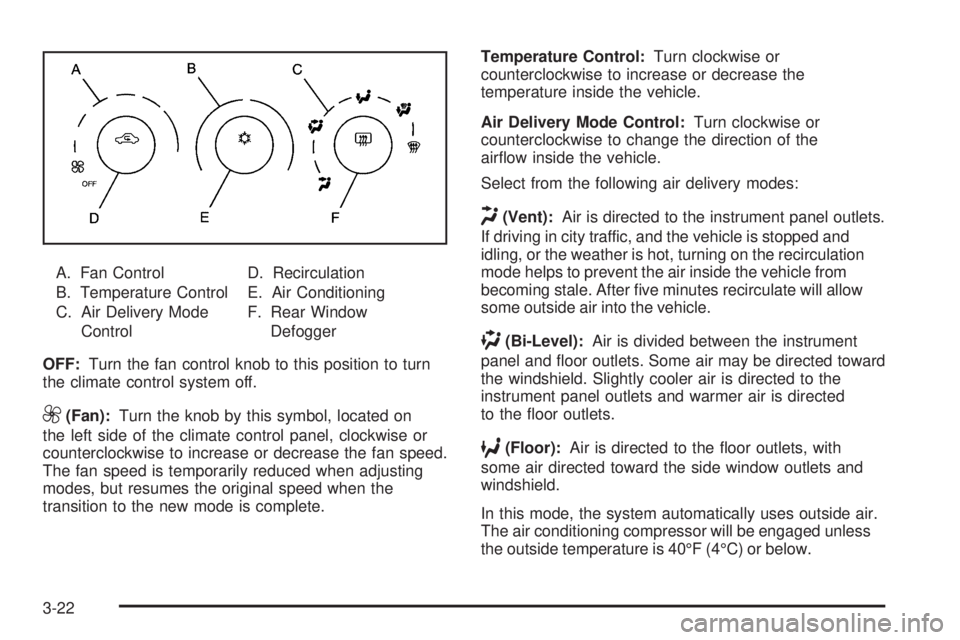
A. Fan Control
B. Temperature Control
C. Air Delivery Mode
ControlD. Recirculation
E. Air Conditioning
F. Rear Window
Defogger
OFF:Turn the fan control knob to this position to turn
the climate control system off.
9(Fan):Turn the knob by this symbol, located on
the left side of the climate control panel, clockwise or
counterclockwise to increase or decrease the fan speed.
The fan speed is temporarily reduced when adjusting
modes, but resumes the original speed when the
transition to the new mode is complete.Temperature Control:Turn clockwise or
counterclockwise to increase or decrease the
temperature inside the vehicle.
Air Delivery Mode Control:Turn clockwise or
counterclockwise to change the direction of the
airow inside the vehicle.
Select from the following air delivery modes:
H(Vent):Air is directed to the instrument panel outlets.
If driving in city traffic, and the vehicle is stopped and
idling, or the weather is hot, turning on the recirculation
mode helps to prevent the air inside the vehicle from
becoming stale. After ve minutes recirculate will allow
some outside air into the vehicle.
)(Bi-Level):Air is divided between the instrument
panel and oor outlets. Some air may be directed toward
the windshield. Slightly cooler air is directed to the
instrument panel outlets and warmer air is directed
to the oor outlets.
6(Floor):Air is directed to the oor outlets, with
some air directed toward the side window outlets and
windshield.
In this mode, the system automatically uses outside air.
The air conditioning compressor will be engaged unless
the outside temperature is 40°F (4°C) or below.
3-22
Page 147 of 428
Dual Automatic Climate Control
System
With this system the heating, cooling, and ventilation
can be controlled.
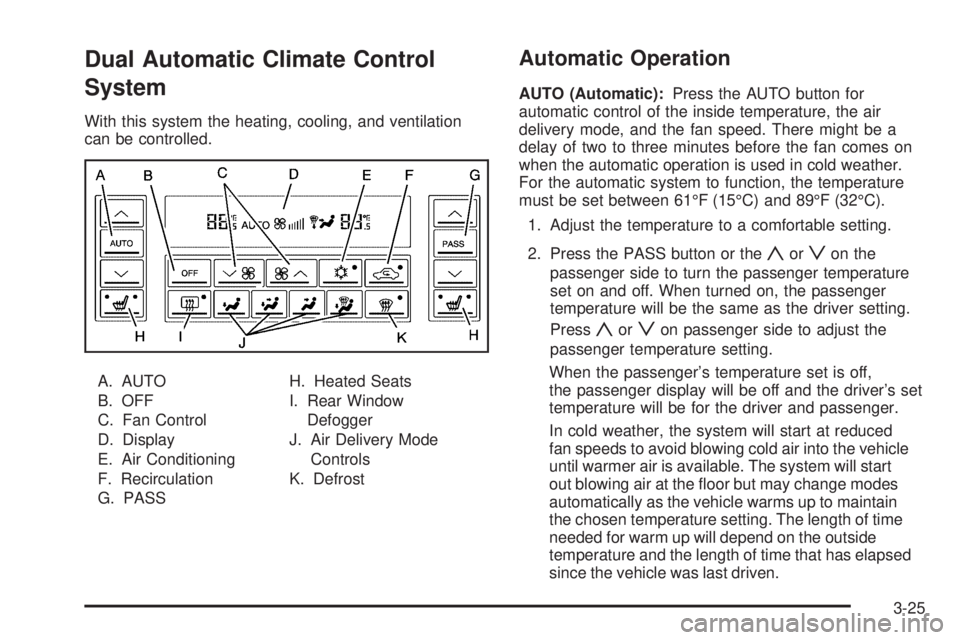
A. AUTO
B. OFF
C. Fan Control
D. Display
E. Air Conditioning
F. Recirculation
G. PASSH. Heated Seats
I. Rear Window
Defogger
J. Air Delivery Mode
Controls
K. Defrost
Automatic Operation
AUTO (Automatic):Press the AUTO button for
automatic control of the inside temperature, the air
delivery mode, and the fan speed. There might be a
delay of two to three minutes before the fan comes on
when the automatic operation is used in cold weather.
For the automatic system to function, the temperature
must be set between 61°F (15°C) and 89°F (32°C).
1. Adjust the temperature to a comfortable setting.
2. Press the PASS button or the
yorzon the
passenger side to turn the passenger temperature
set on and off. When turned on, the passenger
temperature will be the same as the driver setting.
Press
yorzon passenger side to adjust the
passenger temperature setting.
When the passenger’s temperature set is off,
the passenger display will be off and the driver’s set
temperature will be for the driver and passenger.
In cold weather, the system will start at reduced
fan speeds to avoid blowing cold air into the vehicle
until warmer air is available. The system will start
out blowing air at the oor but may change modes
automatically as the vehicle warms up to maintain
the chosen temperature setting. The length of time
needed for warm up will depend on the outside
temperature and the length of time that has elapsed
since the vehicle was last driven.
3-25
Page 148 of 428
3. Wait for the system to regulate. This may take from
10 to 30 minutes. Then, adjust the temperature,
if necessary.
Do not cover the solar sensor located in the
center of the instrument panel, near the windshield.
For more information on the solar sensor, see
“Sensors” later in this section.
4. Press OFF to turn the climate control system off.
Only the rear defog and heated seats will function.
Press AUTO or any other button except the heated
seats or rear defog to turn the climate control system
back on.
This control has four types of operation.
Automatic can set/change the temperature only.
AUTO and temperature only will appear on the
display.
Semi-Automatic Fan can set/change the
temperature and mode. The fan operates
automatically. The temperature and mode
will appear on the display.
Semi-Automatic Mode can set/change the
temperature and fan speed. The mode operates
automatically. The fan speed and temperature
will appear on the display.
Manual can set/change the temperature, mode and
fan. The fan speed, temperature, and mode will
appear on the display.For vehicles with the remote start feature, the climate
control system automatically regulates the inside
temperature of the vehicle when the remote start system
is activated. Normal operation and the last setting of
the climate control system will return after the key
is turned on.
Manual Operation
During daylight hours, the instrument panel brightness
control might need to be adjusted to the highest setting,
in order to see the indicator lights for the various
climate control settings.
OFF:Press to turn the climate control system off.
yz(Temperature):Press to manually adjust the
temperature inside the vehicle. Press
yorzon the
driver or passenger side to increase or decrease the
temperature. The display will show the selected
temperature.
z9/9y(Fan Control):Press the fan control
buttons to increase or decrease the fan speed. Pressing
the arrows cancels the automatic operation and places
the system in manual or semi-automatic mode. Press the
AUTO button to return to automatic operation. If the
airow seems low when the fan is at the highest setting,
the passenger compartment air lter may need to
be replaced. For more information seePassenger
Compartment Air Filter on page 3-29andScheduled
Maintenance on page 6-4.
3-26
Page 152 of 428
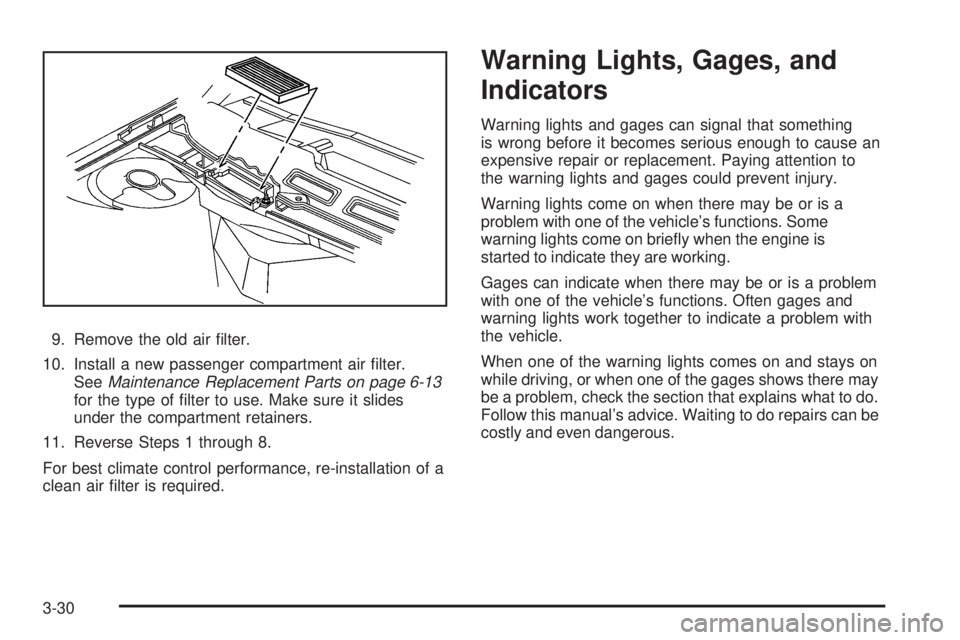
9. Remove the old air lter.
10. Install a new passenger compartment air lter.
SeeMaintenance Replacement Parts on page 6-13
for the type of lter to use. Make sure it slides
under the compartment retainers.
11. Reverse Steps 1 through 8.
For best climate control performance, re-installation of a
clean air lter is required.
Warning Lights, Gages, and
Indicators
Warning lights and gages can signal that something
is wrong before it becomes serious enough to cause an
expensive repair or replacement. Paying attention to
the warning lights and gages could prevent injury.
Warning lights come on when there may be or is a
problem with one of the vehicle’s functions. Some
warning lights come on briey when the engine is
started to indicate they are working.
Gages can indicate when there may be or is a problem
with one of the vehicle’s functions. Often gages and
warning lights work together to indicate a problem with
the vehicle.
When one of the warning lights comes on and stays on
while driving, or when one of the gages shows there may
be a problem, check the section that explains what to do.
Follow this manual’s advice. Waiting to do repairs can be
costly and even dangerous.
3-30
Page 177 of 428
Compass Calibration
The compass can be manually calibrated. Only calibrate
the compass in a magnetically clean and safe location,
such as an open parking lot, where driving the vehicle in
circles is not a danger. It is suggested to calibrate away
from tall buildings, utility wires, manhole covers, or other
industrial structures, if possible.
If CAL should ever appear in the DIC display, the
compass should be calibrated.
If the DIC display does not show a heading, for
example, N for North, or the heading does not change
after making turns, there may be a strong magnetic eld
interfering with the compass. Such interference may be
caused by a magnetic CB or cell phone antenna mount,
a magnetic emergency light, magnetic note pad holder,
or any other magnetic item. Turn off the vehicle, move the
magnetic item, then turn on the vehicle and calibrate the
compass.To calibrate the compass, use the following procedure:Compass Calibration Procedure
1. Before calibrating the compass, make sure the
compass zone is set to the variance zone in
which the vehicle is located. See “Compass
Variance (Zone) Procedure” earlier in this section.
Do not operate any switches such as window,
sunroof, climate controls, seats, etc. during
the calibration procedure.
2. Press the option button until COMPASS
CALIBRATION displays.
3. Press the set/reset button to start the compass
calibration.
4. The DIC will display CALIBRATION BEGUN DRIVE
IN CIRCLES. Drive the vehicle in tight circles at less
than 5 mph (8 km/h) to complete the calibration.
The DIC will display CALIBRATION FINISHED
for a few seconds when the calibration is complete.
The DIC display will then return to COMPASS
CALIBRATION.
3-55
Page 254 of 428
Blizzard Conditions
Being stuck in snow can be in a serious situation. Stay
with the vehicle unless there is help nearby. If possible,
use theRoadside Assistance Program on page 7-7.To
get help and keep everyone in the vehicle safe:
Turn on theHazard Warning Flashers on page 3-6.
Tie a red cloth to an outside mirror.
{CAUTION:
Snow can trap engine exhaust under the vehicle.
This may cause exhaust gases to get inside.
Engine exhaust contains carbon monoxide (CO)
which cannot be seen or smelled. It can cause
unconsciousness and even death.
If the vehicle is stuck in the snow:
Clear away snow from around the base of
your vehicle, especially any that is blocking
the exhaust pipe.
CAUTION: (Continued)
CAUTION: (Continued)
Check again from time to time to be sure
snow does not collect there.
Open a window about two inches (5 cm) on
the side of the vehicle that is away from the
wind to bring in fresh air.
Fully open the air outlets on or under the
instrument panel.
Adjust the Climate Control system to a setting
that circulates the air inside the vehicle and
set the fan speed to the highest setting. See
Climate Control System in the Index.
For more information about carbon monoxide, see
Engine Exhaust on page 2-33.
Snow can trap exhaust gases under your vehicle.
This can cause deadly CO (carbon monoxide) gas
to get inside. CO could overcome you and kill you.
You cannot see it or smell it, so you might not
know it is in your vehicle. Clear away snow from
around the base of your vehicle, especially any
that is blocking the exhaust.
4-18
Page 342 of 428
Uniform Tire Quality Grading
Quality grades can be found where applicable
on the tire sidewall between tread shoulder
and maximum section width. For example:
Treadwear 200 Traction AA
Temperature A
The following information relates to the system
developed by the United States National
Highway Traffic Safety Administration (NHTSA),
which grades tires by treadwear, traction, and
temperature performance. This applies only to
vehicles sold in the United States. The grades are
molded on the sidewalls of most passenger car
tires. The Uniform Tire Quality Grading (UTQG)
system does not apply to deep tread, winter-type
snow tires, space-saver, or temporary use
spare tires, tires with nominal rim diameters
of 10 to 12 inches (25 to 30 cm), or to some
limited-production tires.While the tires available on General Motors
passenger cars and light trucks may vary with
respect to these grades, they must also conform
to federal safety requirements and additional
General Motors Tire Performance Criteria (TPC)
standards.
Treadwear
The treadwear grade is a comparative rating
based on the wear rate of the tire when tested
under controlled conditions on a specied
government test course. For example, a tire
graded 150 would wear one and a half (1.5)
times as well on the government course as a tire
graded 100. The relative performance of tires
depends upon the actual conditions of their use,
however, and may depart signicantly from the
norm due to variations in driving habits, service
practices, and differences in road characteristics
and climate.
5-72
Page 371 of 428
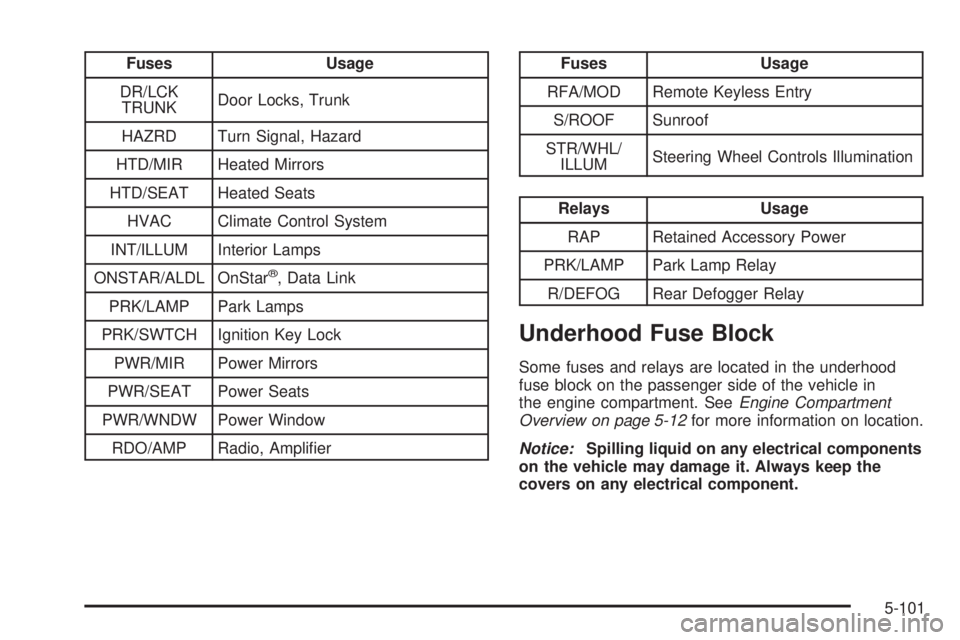
Fuses Usage
DR/LCK
TRUNKDoor Locks, Trunk
HAZRD Turn Signal, Hazard
HTD/MIR Heated Mirrors
HTD/SEAT Heated Seats
HVAC Climate Control System
INT/ILLUM Interior Lamps
ONSTAR/ALDL OnStar
®, Data Link
PRK/LAMP Park Lamps
PRK/SWTCH Ignition Key Lock
PWR/MIR Power Mirrors
PWR/SEAT Power Seats
PWR/WNDW Power Window
RDO/AMP Radio, Amplier
Fuses Usage
RFA/MOD Remote Keyless Entry
S/ROOF Sunroof
STR/WHL/
ILLUMSteering Wheel Controls Illumination
Relays Usage
RAP Retained Accessory Power
PRK/LAMP Park Lamp Relay
R/DEFOG Rear Defogger Relay
Underhood Fuse Block
Some fuses and relays are located in the underhood
fuse block on the passenger side of the vehicle in
the engine compartment. SeeEngine Compartment
Overview on page 5-12for more information on location.
Notice:Spilling liquid on any electrical components
on the vehicle may damage it. Always keep the
covers on any electrical component.
5-101
Page 374 of 428
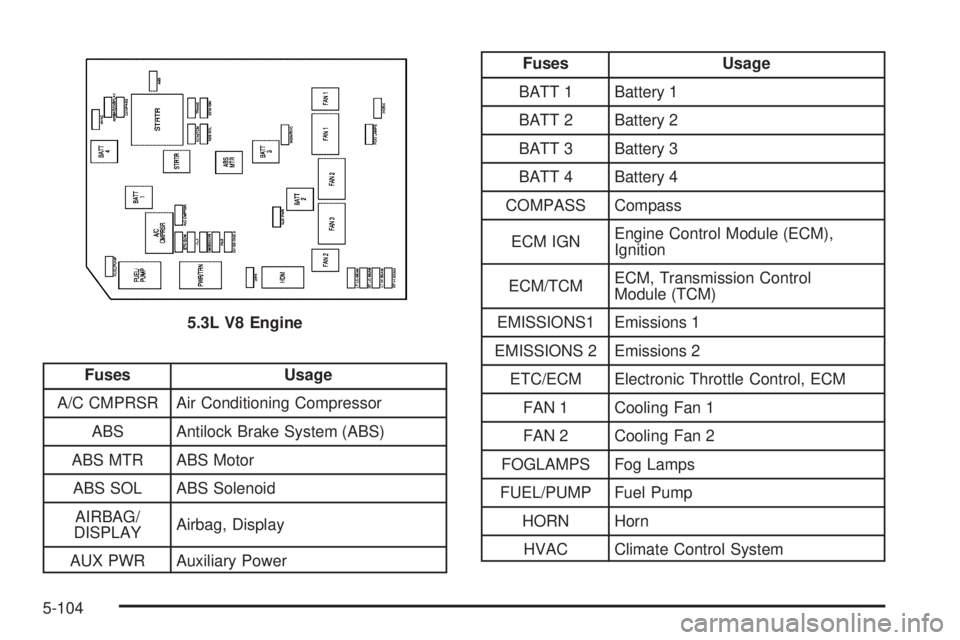
Fuses Usage
A/C CMPRSR Air Conditioning Compressor
ABS Antilock Brake System (ABS)
ABS MTR ABS Motor
ABS SOL ABS Solenoid
AIRBAG/
DISPLAYAirbag, Display
AUX PWR Auxiliary Power
Fuses Usage
BATT 1 Battery 1
BATT 2 Battery 2
BATT 3 Battery 3
BATT 4 Battery 4
COMPASS Compass
ECM IGNEngine Control Module (ECM),
Ignition
ECM/TCMECM, Transmission Control
Module (TCM)
EMISSIONS1 Emissions 1
EMISSIONS 2 Emissions 2
ETC/ECM Electronic Throttle Control, ECM
FAN 1 Cooling Fan 1
FAN 2 Cooling Fan 2
FOGLAMPS Fog Lamps
FUEL/PUMP Fuel Pump
HORN Horn
HVAC Climate Control System 5.3L V8 Engine
5-104
Page 417 of 428
Chemical Paint Spotting...................................5-97
Child Restraints
Child Restraint Systems...............................1-37
Infants and Young Children...........................1-33
Lower Anchors and Tethers for Children..........1-41
Older Children.............................................1-29
Securing a Child Restraint in a Rear
Seat Position...........................................1-47
Securing a Child Restraint in the Center
Front Seat Position...................................1-49
Securing a Child Restraint in the Right
Front Seat Position...................................1-50
Where to Put the Restraint...........................1-40
Chime Level Adjustment.................................3-113
Cigarette Lighter.............................................3-21
Cleaning
Aluminum or Chrome-Plated Wheels..............5-96
Exterior Lamps/Lenses.................................5-94
Fabric/Carpet..............................................5-91
Finish Care.................................................5-94
Instrument Panel, Vinyl, and Other
Plastic Surfaces.......................................5-92
Interior.......................................................5-90
Leather......................................................5-92
Tires..........................................................5-97
Underbody Maintenance...............................5-97
Washing Your Vehicle...................................5-93
Weatherstrips..............................................5-93
Windshield and Wiper Blades........................5-95Climate Control System...................................3-21
Air Filter, Passenger Compartment.................3-29
Dual Automatic............................................3-25
Outlet Adjustment........................................3-28
Clock, Setting.................................................3-82
Collision Damage Repair..................................7-12
Compact Spare Tire........................................5-89
Compass.......................................................3-54
Content Theft-Deterrent....................................
2-17
Control of a Vehicle.......................................... 4-3
Convenience Net............................................2-48
Coolant
Engine.......................................................5-25
Engine Temperature Gage............................3-38
Engine Temperature Warning Light.................3-38
Low Warning Light.......................................3-39
Cooling System..............................................5-24
Courtesy Lamps.............................................3-16
Cruise Control................................................3-10
Cruise Control Light........................................3-43
Cupholders....................................................2-47
Customer Assistance Information
Courtesy Transportation................................7-10
Customer Assistance for Text Telephone
(TTY) Users.............................................. 7-6
Customer Assistance Offices........................... 7-6
Customer Satisfaction Procedure..................... 7-2
GM Mobility Reimbursement Program............... 7-7
Reporting Safety Defects to
General Motors........................................7-15
3