remote start BUICK LACROSSE 2009 User Guide
[x] Cancel search | Manufacturer: BUICK, Model Year: 2009, Model line: LACROSSE, Model: BUICK LACROSSE 2009Pages: 428
Page 138 of 428
Interior Lamps
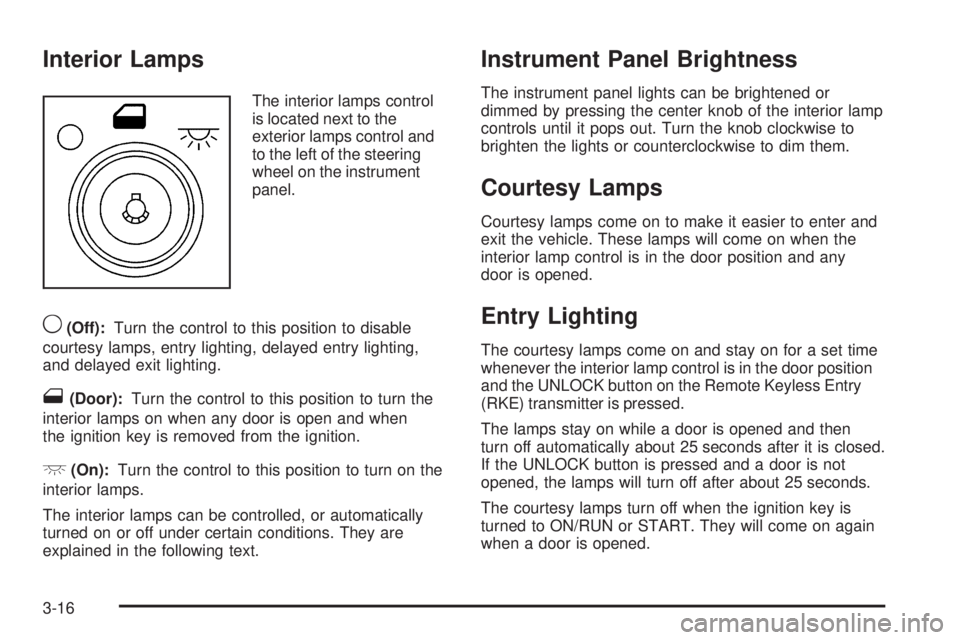
The interior lamps control
is located next to the
exterior lamps control and
to the left of the steering
wheel on the instrument
panel.
9(Off):Turn the control to this position to disable
courtesy lamps, entry lighting, delayed entry lighting,
and delayed exit lighting.
1(Door):Turn the control to this position to turn the
interior lamps on when any door is open and when
the ignition key is removed from the ignition.
+(On):Turn the control to this position to turn on the
interior lamps.
The interior lamps can be controlled, or automatically
turned on or off under certain conditions. They are
explained in the following text.
Instrument Panel Brightness
The instrument panel lights can be brightened or
dimmed by pressing the center knob of the interior lamp
controls until it pops out. Turn the knob clockwise to
brighten the lights or counterclockwise to dim them.
Courtesy Lamps
Courtesy lamps come on to make it easier to enter and
exit the vehicle. These lamps will come on when the
interior lamp control is in the door position and any
door is opened.
Entry Lighting
The courtesy lamps come on and stay on for a set time
whenever the interior lamp control is in the door position
and the UNLOCK button on the Remote Keyless Entry
(RKE) transmitter is pressed.
The lamps stay on while a door is opened and then
turn off automatically about 25 seconds after it is closed.
If the UNLOCK button is pressed and a door is not
opened, the lamps will turn off after about 25 seconds.
The courtesy lamps turn off when the ignition key is
turned to ON/RUN or START. They will come on again
when a door is opened.
3-16
Page 143 of 428
Ashtray(s) and Cigarette Lighter
The vehicle may have a removable ashtray and cigarette
lighter. The cigarette lighter may be located under the
climate control system. The removable ashtray can
be placed into the front console cupholder.
Notice:If papers, pins, or other ammable items
are put in the ashtray, hot cigarettes or other
smoking materials could ignite them and possibly
damage the vehicle. Never put ammable items
in the ashtray.
To use the cigarette lighter, push it in all the way, and
let go. When the heating element is ready, it will pop back
out by itself.
Notice:Holding a cigarette lighter in while it is
heating will not allow the lighter to back away from
the heating element when it is hot. Damage from
overheating may occur to the lighter or heating
element, or a fuse could be blown. Do not hold a
cigarette lighter in while it is heating. Do not use
equipment exceeding maximum amperage rating
of 20 amperes.
Climate Controls
Climate Control System
With this system the heating, cooling and ventilation can
be controlled.
For vehicles with the remote start feature and it is
activated, the climate control system automatically cools
the vehicle if the temperature is greater than 90°F (32°C)
and heats the vehicle if the temperature is below 37°F
(3°C). If the temperature is between 37°F (3°C) and
90°F (32°C), the last control setting selected when the
engine was running will be used. Normal operation and
the last setting of the climate control system will return
after the key is turned to the ON/RUN position.
3-21
Page 148 of 428
3. Wait for the system to regulate. This may take from
10 to 30 minutes. Then, adjust the temperature,
if necessary.
Do not cover the solar sensor located in the
center of the instrument panel, near the windshield.
For more information on the solar sensor, see
“Sensors” later in this section.
4. Press OFF to turn the climate control system off.
Only the rear defog and heated seats will function.
Press AUTO or any other button except the heated
seats or rear defog to turn the climate control system
back on.
This control has four types of operation.
Automatic can set/change the temperature only.
AUTO and temperature only will appear on the
display.
Semi-Automatic Fan can set/change the
temperature and mode. The fan operates
automatically. The temperature and mode
will appear on the display.
Semi-Automatic Mode can set/change the
temperature and fan speed. The mode operates
automatically. The fan speed and temperature
will appear on the display.
Manual can set/change the temperature, mode and
fan. The fan speed, temperature, and mode will
appear on the display.For vehicles with the remote start feature, the climate
control system automatically regulates the inside
temperature of the vehicle when the remote start system
is activated. Normal operation and the last setting of
the climate control system will return after the key
is turned on.
Manual Operation
During daylight hours, the instrument panel brightness
control might need to be adjusted to the highest setting,
in order to see the indicator lights for the various
climate control settings.
OFF:Press to turn the climate control system off.
yz(Temperature):Press to manually adjust the
temperature inside the vehicle. Press
yorzon the
driver or passenger side to increase or decrease the
temperature. The display will show the selected
temperature.
z9/9y(Fan Control):Press the fan control
buttons to increase or decrease the fan speed. Pressing
the arrows cancels the automatic operation and places
the system in manual or semi-automatic mode. Press the
AUTO button to return to automatic operation. If the
airow seems low when the fan is at the highest setting,
the passenger compartment air lter may need to
be replaced. For more information seePassenger
Compartment Air Filter on page 3-29andScheduled
Maintenance on page 6-4.
3-26
Page 156 of 428
Passenger Airbag Status Indicator
The vehicle has the passenger sensing system.
SeePassenger Sensing System on page 1-61for
important safety information. The instrument panel
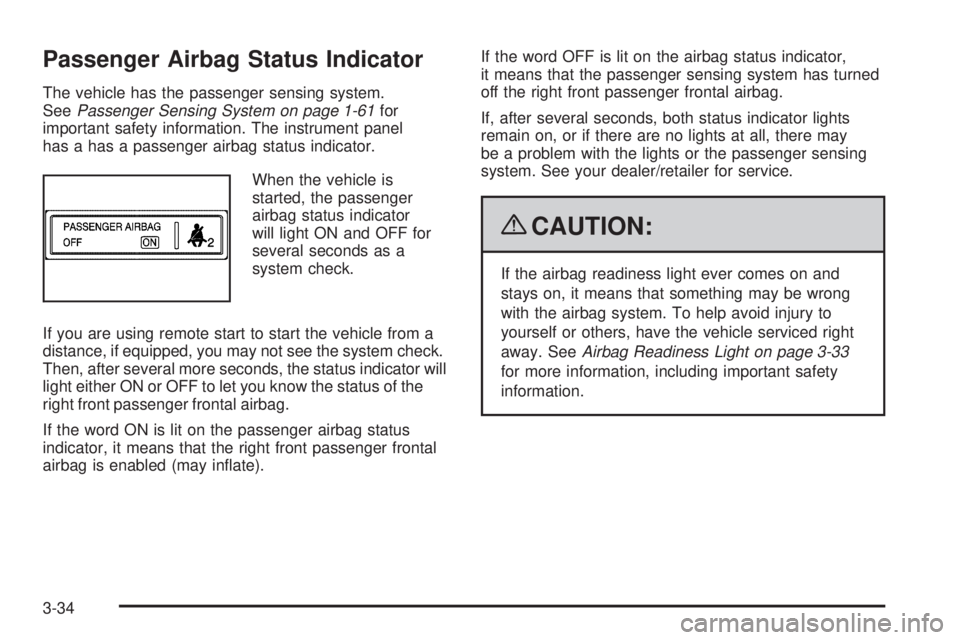
has a has a passenger airbag status indicator.
When the vehicle is
started, the passenger
airbag status indicator
will light ON and OFF for
several seconds as a
system check.
If you are using remote start to start the vehicle from a
distance, if equipped, you may not see the system check.
Then, after several more seconds, the status indicator will
light either ON or OFF to let you know the status of the
right front passenger frontal airbag.
If the word ON is lit on the passenger airbag status
indicator, it means that the right front passenger frontal
airbag is enabled (may inate).If the word OFF is lit on the airbag status indicator,
it means that the passenger sensing system has turned
off the right front passenger frontal airbag.
If, after several seconds, both status indicator lights
remain on, or if there are no lights at all, there may
be a problem with the lights or the passenger sensing
system. See your dealer/retailer for service.
{CAUTION:
If the airbag readiness light ever comes on and
stays on, it means that something may be wrong
with the airbag system. To help avoid injury to
yourself or others, have the vehicle serviced right
away. SeeAirbag Readiness Light on page 3-33
for more information, including important safety
information.
3-34
Page 183 of 428
HOOD AJAR
If your vehicle has the remote start feature, this
message displays when the hood is not closed properly.
Make sure that the hood is closed completely. SeeHood
Release on page 5-11.
This message displays while the ignition is in ON/RUN.
Press any of the DIC buttons to acknowledge this
message and to clear it from the screen.
This message continues to display for two seconds
if it has not been acknowledged when the engine
is turned off. It also re-displays for two seconds if the
message has been acknowledged, but the condition
still exists when the engine is turned off.
If the condition still exists, the message re-appears
when the engine is turned on.
HOT TRANS (Transmission) FLUID
This message displays when the transmission uid in
your vehicle is too hot. Stop the vehicle and allow it to idle
until it cools down. If the warning message continues to
display, have the vehicle serviced by your dealer/retailer
as soon as possible.
This message displays and a chime sounds only while
the ignition is in ON/RUN. Press any of the DIC buttons
to acknowledge this message and to clear it from the
screen.This message continues to display for two seconds
if it has not been acknowledged when the engine
is turned off. It also re-displays for two seconds if the
message has been acknowledged, but the condition
still exists when the engine is turned off.
If the condition still exists, the message re-appears
when the engine is turned on.
KEY FOB BATTERY LOW
This message displays when the battery in the Remote
Keyless Entry (RKE) transmitter needs to be replaced.
To replace the battery, see “Battery Replacement” under
Remote Keyless Entry (RKE) System Operation on
page 2-4.
This message displays while the ignition is in ON/RUN.
Press any of the DIC buttons to acknowledge this
message and to clear it from the screen.
This message continues to display for two seconds
if it has not been acknowledged when the engine
is turned off. It also re-displays for two seconds if the
message has been acknowledged, but the condition
still exists when the engine is turned off.
If the condition still exists, the message re-appears
when the engine is turned on.
3-61
Page 189 of 428
REMOTE START DISABLED
If your vehicle has the remote start feature,
this message displays if a remote start attempt is
unsuccessful. This may be caused if any of the
following conditions are true when a remote start
attempt is made:
The remote start system is disabled through the DIC.
The key is in the ignition.
The hood or the doors are not closed.
There is an emission control system malfunction.
The engine coolant temperature is too high.
The oil pressure is low.
The hazard warning ashers are turned on.
The maximum number of remote starts or remote
start attempts between ignition cycles has been
reached.
The content theft-deterrent alarm is on while
attempting to remote start the vehicle.
See “REMOTE START” underDIC Vehicle
Personalization on page 3-74andRemote Vehicle
Start on page 2-7for more information.
RIGHT FRONT TURN LAMP OUT
This message displays when the right front turn signal
bulb needs to be replaced.
This message displays while the ignition is in ON/RUN.
Press any of the DIC buttons to acknowledge this
message and to clear it from the screen.
This message continues to display for two seconds
if it has not been acknowledged when the engine
is turned off. It also re-displays for two seconds if the
message has been acknowledged, but the condition
still exists when the engine is turned off.
If the condition still exists, the message re-appears
when the engine is turned on.
RIGHT REAR TURN LAMP OUT
This message displays when the right rear turn signal
bulb needs to be replaced. SeeTaillamps, Turn Signal,
Sidemarker, Stoplamps and Back-up Lamps on
page 5-50.
This message displays while the ignition is in ON/RUN.
Press any of the DIC buttons to acknowledge this
message and to clear it from the screen.
3-67
Page 196 of 428
TURN SIGNAL ON
This message displays as a reminder to turn off the
turn signal if you drive your vehicle for more than about
0.75 mile (1.2 km) with a turn signal on. SeeTurn
Signal/Multifunction Lever on page 3-7.
This message displays and a chime sounds only when
the ignition is in ON/RUN. This message clears from
the DIC if the turn signal is manually turned off, a turn
is completed, or the message is acknowledged.
DIC Vehicle Personalization
Your vehicle may have customization capabilities that
allow you to program certain features to one preferred
setting. Customization features can only be programmed
to one setting on the vehicle and cannot be programmed
to a preferred setting for two different drivers. The
customization features include the following:
Exterior lighting delay
Interior lighting delay
Delayed locking
Content theft
Remote keyless entry feedback
Remote startYour vehicle may also have personalization capabilities
that allow you to program certain features to a preferred
setting for up to two drivers. The rst personalized key
corresponds to driver 1 and the second personalized key
corresponds to driver 2. The personalization features
include the following:
Radio station presets
Auto door unlock preferences
Remote keyless entry unlock preferences
All of the customization and personalization options
may not be available on your vehicle. Only the options
available will be displayed on the DIC.
The default settings for the customization and
personalization features were set when your vehicle
left the factory, but may have been changed from their
default state since then.
The customization preferences are automatically
recalled.
The driver’s personalization preferences are recalled by
using the key programmed for driver 1 or 2.
3-74
Page 201 of 428
REMOTE START
If your vehicle has remote start, this feature allows
the remote start to be turned off or on. The remote start
feature allows you to start the engine from outside of
the vehicle using the Remote Keyless Entry (RKE)
transmitter. SeeRemote Vehicle Start on page 2-7
for more information.
Press the option button until REMOTE START appears
on the DIC display. Press the set/reset button to
scroll through the following settings:
OFF:The remote start feature will be disabled.
ON (default):The remote start feature will be enabled.
To select a setting and move on to the next feature,
press the option button while the desired setting
is displayed on the DIC.
Personalization Menu Items
The following are personalization features that allow you
to program setting for up to two drivers:
PERSONALIZE KEY
This feature allows you to personalize a key to be
recognized as key 1 or 2. A personalized key allows you
to program personalization features to a preferred setting
to correspond to key 1 or 2. If you are using a key that
has already been personalized, this screen will not
display.
Press the option button until PERSONALIZE KEY
appears on the DIC display. Press the set/reset button
to scroll through the following settings:
NO (default):The key will not be personalized.
YES:The key will be personalized.
To select a setting and move on to the next feature,
press the option button while the desired setting
is displayed on the DIC.
3-79
Page 283 of 428
A. Windshield Washer Fluid Reservoir. See “Adding
Washer Fluid” underWindshield Washer Fluid
on page 5-35.
B.Battery on page 5-40.
C. Remote Positive (+) Terminal. SeeJump Starting on
page 5-41.
D.Passenger Compartment Air Filter on page 3-29.
E.Underhood Fuse Block on page 5-101.
F. Engine Coolant Recovery Tank. SeeCooling System
on page 5-24.
G.Radiator Pressure Cap on page 5-31.
H. Power Steering Fluid Reservoir (Out of View).
SeePower Steering Fluid on page 5-34.
I. Electric Engine Cooling Fans. SeeCooling System
on page 5-24.J. Engine Oil Dipstick. See “Checking Engine Oil”
underEngine Oil on page 5-15.
K. Engine Oil Fill Cap. See “When to Add Engine Oil”
underEngine Oil on page 5-15.
L. Automatic Transmission Fluid Dipstick.
See “Checking the Fluid Level” underAutomatic
Transmission Fluid on page 5-22.
M. Engine Coolant Bleed Valve. See “How to Add
Coolant to the Radiator” underCooling System on
page 5-24.
N. Brake Master Cylinder Reservoir. See “Brake Fluid”
underBrakes on page 5-37.
O.Engine Air Cleaner/Filter on page 5-20.
5-13
Page 285 of 428
A. Windshield Washer Fluid Reservoir. See “Adding
Washer Fluid” underWindshield Washer Fluid
on page 5-35.
B.Battery on page 5-40.
C. Underhood Fuse Block. SeeUnderhood Fuse Block
on page 5-101.
D. Remote Positive (+) Terminal. SeeJump Starting on
page 5-41.
E.Passenger Compartment Air Filter on page 3-29.
F. Pressure Cap. SeePressure Cap on page 5-31.
G. Power Steering Fluid Reservoir. SeePower Steering
Fluid on page 5-34.
H. Engine Oil Dipstick. See “Checking Engine Oil”
underEngine Oil on page 5-15.
I. Engine Oil Fill Cap. See “When to Add Engine Oil”
underEngine Oil on page 5-15.
J. Automatic Transmission Fluid Dipstick.
See “Checking the Fluid Level” underAutomatic
Transmission Fluid on page 5-22.
K. Brake Master Cylinder Reservoir. See “Brake Fluid”
underBrakes on page 5-37.
L.Engine Air Cleaner/Filter on page 5-20.
M. Engine Coolant Recovery Tank. SeeCooling System
on page 5-24.Engine Oil
Checking Engine Oil
It is a good idea to check the engine oil every time you
get fuel. In order to get an accurate reading, the oil
must be warm and the vehicle must be on level ground.
The engine oil dipstick handle is a yellow loop.
SeeEngine Compartment Overview on page 5-12
for the location of the engine oil dipstick.
1. Turn off the engine and give the oil several minutes
to drain back into the oil pan. If you do not do this,
the oil dipstick might not show the actual level.
2. Pull out the dipstick and clean it with a paper towel
or cloth, then push it back in all the way. Remove it
again, keeping the tip down, and check the level.
5-15