key BUICK LACROSSE 2010 Owner's Guide
[x] Cancel search | Manufacturer: BUICK, Model Year: 2010, Model line: LACROSSE, Model: BUICK LACROSSE 2010Pages: 414
Page 26 of 414
1-20 Keys, Doors and Windows
If the sunshade is closed, it opens
automatically with the sunroof but
can also be express-opened/
express-closed by using the
sunshade control (C) (D). The
sunshade cannot be fully closed
with the sunroof open.
Notice:Forcing the sunshade
forward of the sliding glass panel
may cause damage and the
sunroof may not operate properly.
Always close the glass panel
before closing the sunshade.
The sunroof glass panel cannot be
opened or closed if the vehicle has
an electrical failure.Anti-Pinch Feature
If an object is in the path of the
sunroof while it is closing, the
anti-pinch feature will detect the
object and stop the sunroof from
closing at the point of the
obstruction. The sunroof, and
sunshade will then return to the
open or vent position. To close the
sunroof once the obstruction has
been removed, refer to the
"Express-Open/Express-Close"
functions described previously.
Do not keep the sunroof open for
long periods of time while the
vehicle is not in use. Debris can
collect in the tracks, damage the
sunroof operation and plug the
water draining system.
Page 31 of 414
Seats and Restraints 2-5
Using the Remote Keyless Entry
(RKE) transmitter to enter the
vehicle with the remote recall
memory feature on causes
automatic seat and mirror
adjustment associated with that
transmitter. There is no adjustment
when the position has not been
changed by another seating
position.
To stop recall movement of the
memory feature at any time, press
one of the power seat controls,
memory buttons, or power mirror
buttons.
If something has blocked the driver
seat while recalling a memory
position, the driver seat recall may
stop working. If this happens, press
the appropriate control for the area
that is not recalling for two seconds,
after the obstruction is removed.Then try recalling the memory
position again by pressing the
appropriate memory button. If the
memory position is still not being
recalled, see your dealer/retailer for
service.
Easy Exit Seat
With this feature, the driver seat
automatically moves back to give
the driver more room to exit when
the ignition is turned to OFF and the
driver door is opened.
Lumbar Adjustment
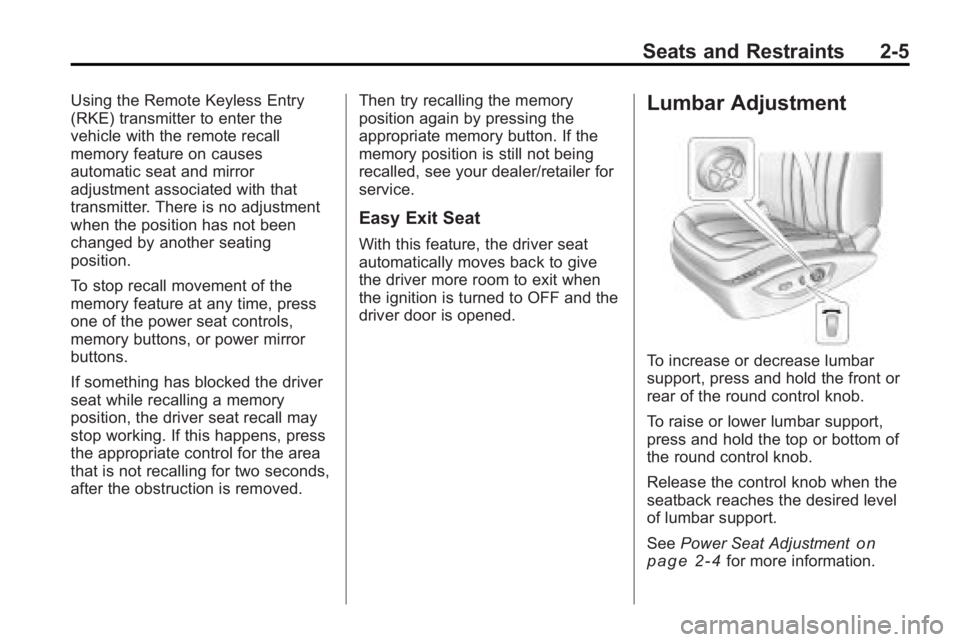
To increase or decrease lumbar
support, press and hold the front or
rear of the round control knob.
To raise or lower lumbar support,
press and hold the top or bottom of
the round control knob.
Release the control knob when the
seatback reaches the desired level
of lumbar support.
See
Power Seat Adjustment
on
page 2‑4for more information.
Page 34 of 414
2-8 Seats and Restraints
Heated Front Seats
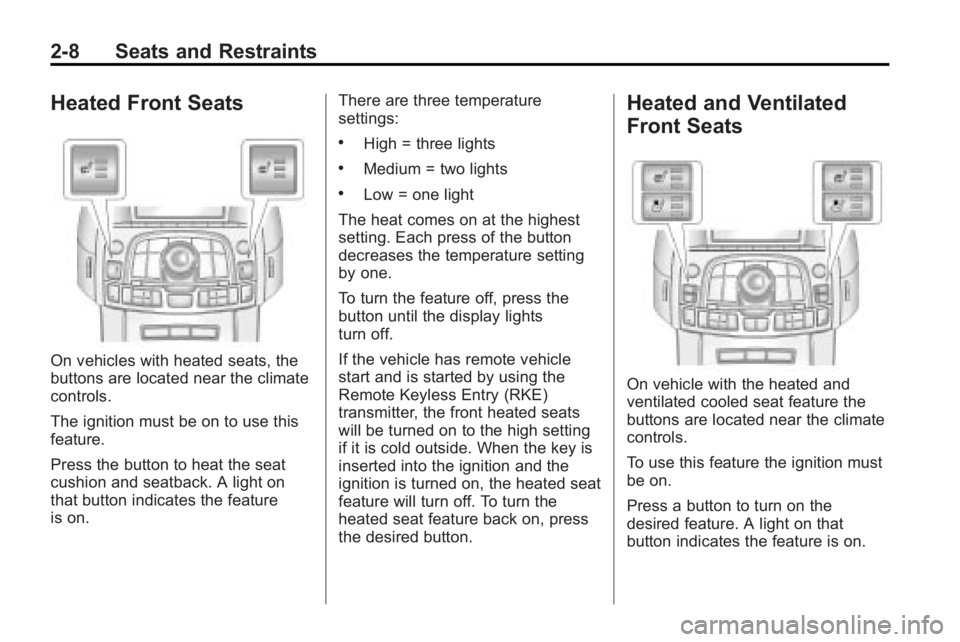
On vehicles with heated seats, the
buttons are located near the climate
controls.
The ignition must be on to use this
feature.
Press the button to heat the seat
cushion and seatback. A light on
that button indicates the feature
is on.There are three temperature
settings:
.High = three lights
.Medium = two lights
.Low = one light
The heat comes on at the highest
setting. Each press of the button
decreases the temperature setting
by one.
To turn the feature off, press the
button until the display lights
turn off.
If the vehicle has remote vehicle
start and is started by using the
Remote Keyless Entry (RKE)
transmitter, the front heated seats
will be turned on to the high setting
if it is cold outside. When the key is
inserted into the ignition and the
ignition is turned on, the heated seat
feature will turn off. To turn the
heated seat feature back on, press
the desired button.
Heated and Ventilated
Front Seats
On vehicle with the heated and
ventilated cooled seat feature the
buttons are located near the climate
controls.
To use this feature the ignition must
be on.
Press a button to turn on the
desired feature. A light on that
button indicates the feature is on.
Page 35 of 414
Seats and Restraints 2-9
There are three temperature
settings for each feature:
.High = three
.Medium = two
.Low = one
Press a button to turn the feature on
at the maximum setting. Each press
of the button changes the
temperature one setting.
Turn the feature off by pressing the
button until the display lights
turn off.
If the vehicle has remote vehicle
start and is started by using the
remote keyless entry transmitter, the
heated and ventilated seats turn on
at the maximum setting according to
the temperature outside. When the
key is inserted into the ignition and
the ignition is turned on, the heated
or cooled seat feature turns off. To
turn this feature back on, press the
desired button.
Rear Seats
The vehicle's rear seat can be
folded down to allow for more cargo
space or it can be placed back into
a locked upright position. Adjust the
seatback only when the vehicle is
not moving.
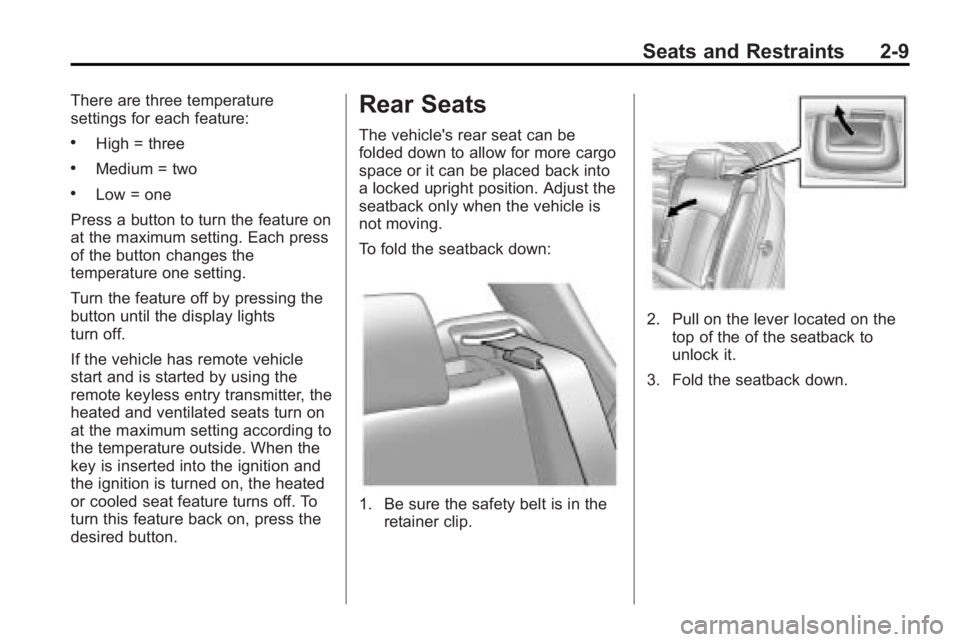
To fold the seatback down:
1. Be sure the safety belt is in the retainer clip.
2. Pull on the lever located on the
top of the of the seatback to
unlock it.
3. Fold the seatback down.
Page 49 of 414
Seats and Restraints 2-23
The best way to protect the fetus is
to protect the mother. When a safety
belt is worn properly, it is more likely
that the fetus will not be hurt in a
crash. For pregnant women, as for
anyone, the key to making safety
belts effective is wearing them
properly.
Safety Belt Extender
If the vehicle's safety belt will fasten
around you, you should use it.
But if a safety belt is not long
enough, your dealer/retailer will
order you an extender. When you
go in to order it, take the heaviest
coat you will wear, so the extender
will be long enough for you. To help
avoid personal injury, do not let
someone else use it, and use it only
for the seat it is made to fit. The
extender has been designed for
adults. Never use it for securing
child seats. To wear it, attach it to
the regular safety belt. For more
information, see the instruction
sheet that comes with the extender.
Safety System Check
Now and then, check that the safety
belt reminder light, safety belts,
buckles, latch plates, retractors and
anchorages are working properly.
Look for any other loose or
damaged safety belt system parts
that might keep a safety belt system
from doing its job. See your dealer/
retailer to have it repaired. Torn or
frayed safety belts may not protect
you in a crash. They can rip apart
under impact forces. If a belt is torn
or frayed, get a new one right away.
Make sure the safety belt reminder
light is working. SeeSafety Belt
Reminders
on page 4‑15for more
information.
Keep safety belts clean and dry.
See Safety Belt Care
on
page 2‑23.
Safety Belt Care
Keep belts clean and dry.
{WARNING
Do not bleach or dye safety belts.
It may severely weaken them. In
a crash, they might not be able to
provide adequate protection.
Clean safety belts only with mild
soap and lukewarm water.
Page 90 of 414
4-2 Instruments and Controls
Information Displays
Driver InformationCenter (DIC) . . . . . . . . . . . . . . . 4-25
Head-Up Display (HUD) . . . . . 4-28
Vehicle Messages
Vehicle Messages . . . . . . . . . . . 4-32
Battery Voltage and Charging Messages . . . . . . . . 4-33
Brake System Messages . . . . 4-33
Compass Messages . . . . . . . . . 4-33
Cruise Control Messages . . . . 4-34
Door Ajar Messages . . . . . . . . . 4-34
Engine Cooling System Messages . . . . . . . . . . . . . . . . . . 4-34
Engine Oil Messages . . . . . . . . 4-35
Engine Power Messages . . . . 4-35
Fuel System Messages . . . . . . 4-36
Key and Lock Messages . . . . . 4-36
Lamp Messages . . . . . . . . . . . . . 4-36 Ride Control System
Messages . . . . . . . . . . . . . . . . . . 4-36
Anti-Theft Alarm System Messages . . . . . . . . . . . . . . . . . . 4-37
Tire Messages . . . . . . . . . . . . . . . 4-37
Transmission Messages . . . . . 4-37
Window Messages . . . . . . . . . . . 4-38
Vehicle Personalization
Vehicle Personalization . . . . . . 4-38
OnStar System®
OnStar®System . . . . . . . . . . . . . 4-43
Universal Remote System
Universal Remote
System . . . . . . . . . . . . . . . . . . . . . 4-45
Universal Remote System Programming . . . . . . . . . . . . . . . 4-45
Universal Remote System Operation . . . . . . . . . . . . . . . . . . 4-48
Page 93 of 414
Instruments and Controls 4-5
A.Air Vents on page 7‑8.
B. Head-Up Display (HUD)
on
page 4‑28(If Equipped).
C. Turn and Lane-Change Lever. See Turn and Lane-Change
Signals
on page 5‑4. Driver
Information Center Buttons. See
Driver Information Center (DIC)
on page 4‑25.
D. Instrument Cluster
on
page 4‑13. Driver Information
Center Display. See Driver
Information Center (DIC)
on
page 4‑25.
E. Windshield Wiper/Washer
on
page 4‑7.
F. Info-Display.
G. AM-FM Radio on page 6‑12.
H. Exterior Lamp Controls
on
page 5‑1. Fog Lampson
page 5‑5(If Equipped).
Instrument Panel Illumination
Control on page 5‑5. I.
Front Storage on page 3‑1.
J. Cruise Control
on page 8‑37.
Heated Steering Wheelon
page 4‑7.
K. Steering Wheel Adjustment
on
page 4‑6.
L. Horn on page 4‑7.
M. Steering Wheel Controls
on
page 4‑6.
N. Ignition Positions (Key Access)
on page 8‑18orIgnition
Positions (Keyless Access)on
page 8‑19.
O. Heated and Ventilated Front
Seats on page 2‑8.
P. Automatic Climate Control
System
on page 7‑1orDual
Automatic Climate Control
System on page 7‑4.
Q. Power Door Locks
on
page 1‑10. Hazard Warning
Flasherson page 5‑4.
Passenger Sensing Systemon
page 2‑32. R.
Parking Brake on page 8‑32.
S. PRNDL. See Automatic
Transmission on page 8‑27.
T. Shift Lever. See Shifting Into
Park on page 8‑23.
U. Traction Control System (TCS)
on page 8‑34.Electronic
Stability Control (ESC)on
page 8‑35. Ultrasonic Parking
Assiston page 8‑40. Power
Rear Sunshade.
V. Glove Box on page 3‑1.
Page 117 of 414
Instruments and Controls 4-29
station, including XM information or
CD track. It will also display
turn-by-turn navigation information if
the vehicle has a navigation radio.
The images are projected through
the HUD lens located on the driver's
side of the instrument panel.
Notice:If you try to use the HUD
image as a parking aid, you may
misjudge the distance and
damage your vehicle. Do not use
the HUD image as a parking aid.
The tap shift gear will also appear
on the HUD if the vehicle has tap
shift and it is active.
The HUD information can be
displayed in one of three languages,
English, French, or Spanish. The
speedometer reading and other
numerical values can be displayed
in either English or metric units.
The language selection is changed
through the radio and the units of
measurement is changed through
the trip computer in the Driver
Information Center (DIC). See
AM-FM Radioon page 6‑12andDriver Information Center (DIC)on page 4‑25.
HUD Display on the Vehicle
Windshield
The HUD information appears as an
image focused out toward the front
of the vehicle.
When the ignition key is turned to
ON/RUN, the HUD will display an
introductory message for a short
time, until the HUD is ready. The following indicator lights come
on the instrument panel when
activated and also appear on
the HUD:
.Turn Signal Indicators
.High-Beam Indicator Symbol
The HUD temporarily displays some
vehicle warnings, such as CHECK
TIRE PRESSURE and FUEL
LEVEL LOW when these messages
are on the DIC trip computer.
The HUD also displays the following
messages on vehicles with these
systems, when they are active:
.TRACTION CONTROL ACTIVE
.STABILITRAK ACTIVE
When the HUD is on, the
speedometer reading is continually
displayed. The current radio station
or CD track number will display for a
short period of time after the radio
or CD track status changes. This
happens whenever radio information
is changed. The speedometer size
Page 124 of 414
4-36 Instruments and Controls
message stays on, the vehicle
should be taken to your dealer/
retailer for service as soon as
possible.
Fuel System Messages
Fuel Level Low
This message displays when the
vehicle is low on fuel. Refuel as
soon as possible.
Tighten Gas Cap
This message displays when the
fuel cap is not on tight. Tighten the
fuel cap.
Key and Lock Messages
No Remote Detected
This message displays when the
transmitter battery is weak on
vehicles with Keyless Access. See
“Starting the Vehicle with a Low
Battery”under“Remote Keyless
Transmitter Operation (Keyless
Access)” for more information.
Replace Battery In Remote Key
This message displays when the
battery in the Remote Keyless Entry
(RKE) transmitter needs to be
replaced.
Lamp Messages
AFL (Adaptive Forward
Lighting) Lamps Need Service
This message displays when the
Adaptive Forward Lighting (AFL)
system is disabled and needs
service. See your dealer/retailer.
SeeAdaptive Forward Lighting
(AFL)
on page 5‑3for more
information.
Ride Control System
Messages
Service Rear Axle
This message displays when there
is a problem with the All-Wheel
Drive (AWD) System. See your
dealer/retailer for service.
Service Traction Control
This message displays when there
is a problem with the Traction
Control System (TCS). When this
message is displayed, the system
will not limit wheel spin. Adjust your
driving accordingly. See your dealer/
retailer for service.
Service Stabilitrak
This message displays if there is a
problem with the StabiliTrak®
system. If this message appears, try
to reset the system. Stop; turn off
the engine for at least 15 seconds;
then start the engine again. If this
message still comes on, it means
there is a problem. See your dealer/
retailer for service. The vehicle is
safe to drive, however, you do not
have the benefit of StabiliTrak, so
reduce your speed and drive
accordingly.
Page 125 of 414
Instruments and Controls 4-37
Sport Mode On
This message displays when using
the selective ride control. See
Selective Ride Control
on
page 8‑36for more information.
Traction Control Off
This message displays when the
Traction Control System (TCS) is
turned off. Adjust your driving
accordingly.
Anti-Theft Alarm System
Messages
Theft Attempted
This message displays if the vehicle
detects a tamper condition.
Tire Messages
Check XXX Tire Pressure or
Add Air To Tire
This message displays if the vehicle
detects low pressure in one or more
tires. The tire with the low pressure
will be shown in the message.
Check the tire pressures.
Service Tire Monitor System
This message displays if there is a
problem with the Tire Pressure
Monitor System (TPMS). See Tire
Pressure Monitor Operation
on
page 9‑55for more information.
Tire Learning Active
This message displays when the
system is learning new tires. See
Tire Pressure Monitor Operation
on
page 9‑55for more information.
Transmission Messages
Service Transmission
This message displays if there is a
problem with the transmission. See
your dealer/retailer.
Shift To Park
This message displays when the
transmission needs to be shifted to
park. This may appear when
attempting to remove the key from
the ignition if the vehicle is not in
P (Park).
Transmission Hot –Idle
Engine
This message displays and a chime
sounds if the transmission fluid in
the vehicle gets hot. Driving with the
transmission fluid temperature high
can cause damage to the vehicle.
Stop the vehicle and let it idle to
allow the transmission to cool. This
message clears when the fluid
temperature reaches a safe level.