remote control BUICK LACROSSE 2011 User Guide
[x] Cancel search | Manufacturer: BUICK, Model Year: 2011, Model line: LACROSSE, Model: BUICK LACROSSE 2011Pages: 462, PDF Size: 5.73 MB
Page 48 of 462
Black plate (16,1)Buick LaCrosse Owner Manual - 2011
2-16 Keys, Doors and Windows
The system has one or more
transmitters that are matched to
an immobilizer control unit in your
vehicle. Only a correctly matched
transmitter will start the vehicle.
If the transmitter is ever damaged,
you may not be able to start your
vehicle.
When trying to start the vehicle, the
security light comes on briefly when
the ignition is turned on.
If the engine does not start and the
security light stays on, there is a
problem with the system. Turn the
ignition off and try again.If the RKE appears to be
undamaged, try another
transmitter. Or, you may try
placing the transmitter in the
transmitter pocket located in the
center console. See
“No Remote
Detected” underKey and Lock
Messages on page 5‑36.
If the engine does not start with
the other transmitter or when the
transmitter is on the pocket in the
center console, your vehicle needs
service. See your dealer who can
service the theft-deterrent system
and have a new transmitter
programmed to the vehicle.
Do not leave the key or device
that disarms or deactivates the
theft-deterrent system in the vehicle.Exterior Mirrors
Power Mirrors
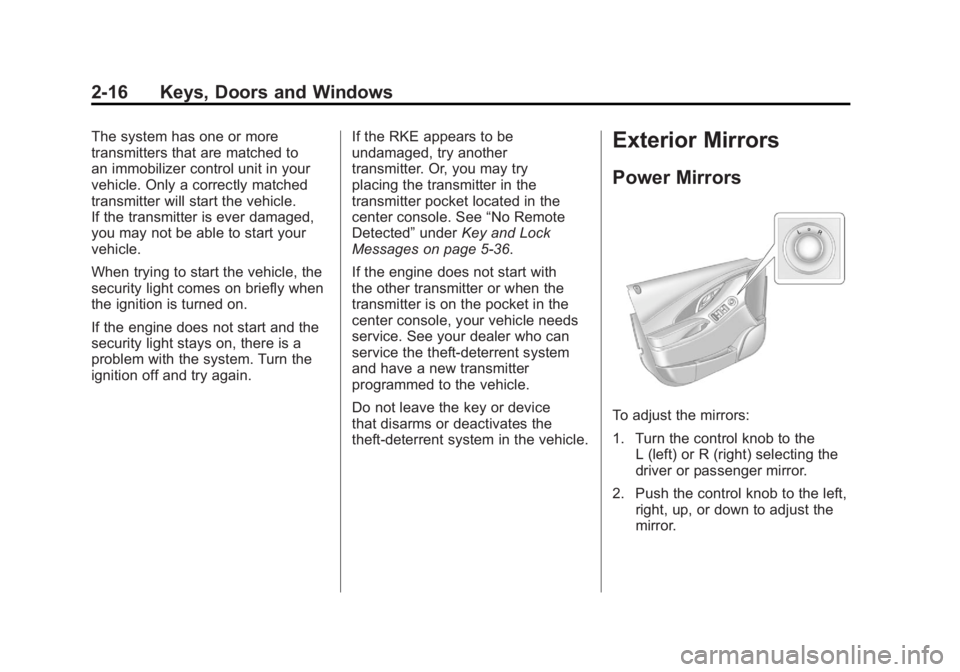
To adjust the mirrors:
1. Turn the control knob to the L (left) or R (right) selecting the
driver or passenger mirror.
2. Push the control knob to the left, right, up, or down to adjust the
mirror.
Page 59 of 462
Black plate (5,1)Buick LaCrosse Owner Manual - 2011
Seats and Restraints 3-5
Power Seat Adjustment
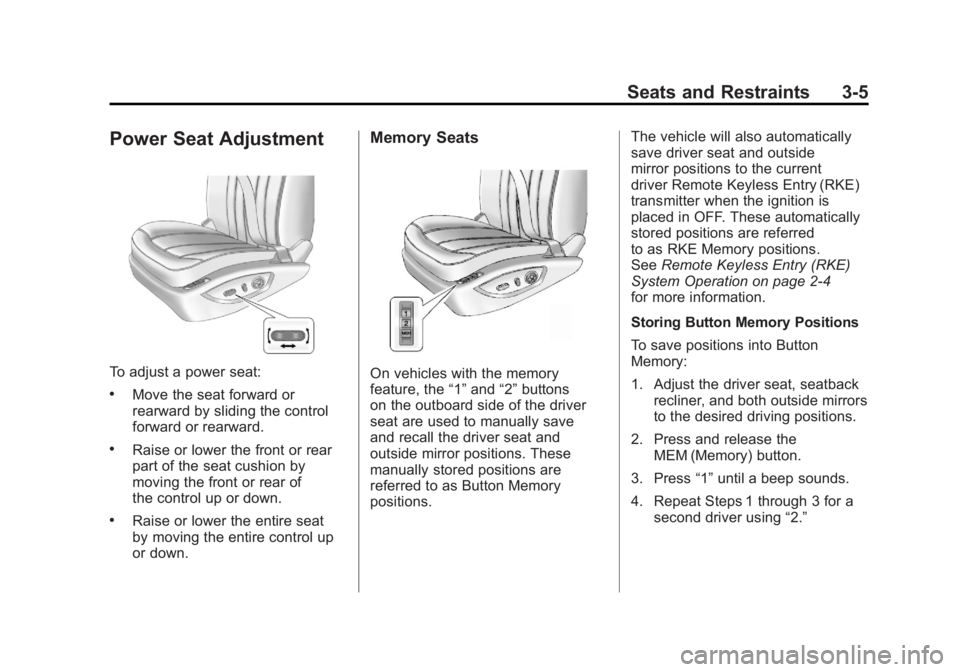
To adjust a power seat:
.Move the seat forward or
rearward by sliding the control
forward or rearward.
.Raise or lower the front or rear
part of the seat cushion by
moving the front or rear of
the control up or down.
.Raise or lower the entire seat
by moving the entire control up
or down.
Memory Seats
On vehicles with the memory
feature, the“1”and “2”buttons
on the outboard side of the driver
seat are used to manually save
and recall the driver seat and
outside mirror positions. These
manually stored positions are
referred to as Button Memory
positions. The vehicle will also automatically
save driver seat and outside
mirror positions to the current
driver Remote Keyless Entry (RKE)
transmitter when the ignition is
placed in OFF. These automatically
stored positions are referred
to as RKE Memory positions.
See
Remote Keyless Entry (RKE)
System Operation on page 2‑4
for more information.
Storing Button Memory Positions
To save positions into Button
Memory:
1. Adjust the driver seat, seatback recliner, and both outside mirrors
to the desired driving positions.
2. Press and release the MEM (Memory) button.
3. Press “1”until a beep sounds.
4. Repeat Steps 1 through 3 for a second driver using “2.”
Page 60 of 462
Black plate (6,1)Buick LaCrosse Owner Manual - 2011
3-6 Seats and Restraints
Recalling Button Memory
Positions
To recall the manually saved
Button Memory positions, press
and hold“1”or“2.” The driver seat
and outside mirrors move to the
positions stored to those buttons
when pressed. Releasing “1”or“2”
before the stored positions are
reached stops the recall.
If something has blocked the
driver seat while recalling a
memory position, the recall may
stop. Remove the obstruction;
then press and hold the appropriate
manual control for the memory item
that is not recalling for two seconds.
Try recalling the memory position
again by pressing the appropriate
memory button. If the memory
position is still not recalling,
see your dealer for service. Recalling RKE Memory Positions
(Memory Remote Recall)
The Memory Remote Recall
feature can recall the driver seat
and outside mirrors to previously
stored RKE Memory positions
when entering the vehicle.
Every time the ignition is placed
in OFF, the positions of the driver
seat and outside mirrors are
automatically stored to the RKE
transmitter that was used to start
the vehicle. These positions are
called RKE Memory positions and
may be different than the previously
mentioned Button Memory positions
saved to the
“1”or“2” buttons. To automatically recall RKE
Memory positions, unlock
the driver door with the RKE
transmitter, and open the driver
door. On vehicles with Keyless
Access, opening the driver door
when an RKE transmitter is
present will activate the RKE
Memory recall. If the driver door
is already open, pressing the
RKE transmitter
Kbutton will also
activate the RKE Memory recall.
The driver seat and outside mirrors
will move to the previously saved
RKE Memory positions.
Page 61 of 462
Black plate (7,1)Buick LaCrosse Owner Manual - 2011
Seats and Restraints 3-7
This feature is turned on or off using
the vehicle personalization menu.
See“Remote Recall” underVehicle
Personalization on page 5‑39 for
more information.
To stop recall movement, press
one of the memory, power mirror,
or power seat controls.
If something has blocked the
driver seat while recalling a
memory position, the recall may
stop. Remove the obstruction;
then press and hold the appropriate
manual control for the memory item
that is not recalling for two seconds.
Try recalling the memory position
again by opening the driver door
and pressing the RKE transmitter K
button. If the memory position is
still not recalling, see your dealer
for service. Easy Exit Driver Seat
This feature moves the seat
rearward allowing the driver
more room to exit the vehicle.
To activate, place the ignition in
OFF and open the driver door. If the
driver door is already open, placing
the ignition in OFF will activate the
easy exit driver seat.
This feature is turned on or off
using the vehicle personalization
menu. See
“Driver Seat Easy Exit”
under Vehicle Personalization on
page 5‑39 for more information.
To stop recall movement, press
one of the memory or power seat
controls.
If something has blocked the driver
seat while recalling the exit position,
the recall may stop. Remove the
obstruction; then press and hold
the power seat control rearward for
two seconds. Try recalling the exit
position again. If the exit position is
still not recalling, see your dealer
for service.Lumbar Adjustment
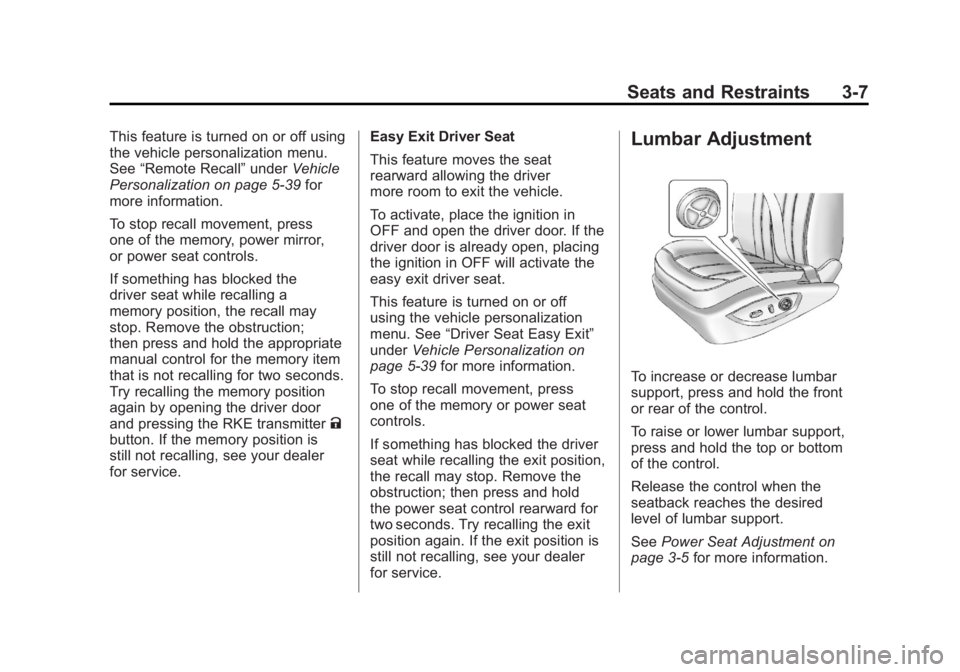
To increase or decrease lumbar
support, press and hold the front
or rear of the control.
To raise or lower lumbar support,
press and hold the top or bottom
of the control.
Release the control when the
seatback reaches the desired
level of lumbar support.
See Power Seat Adjustment on
page 3‑5 for more information.
Page 124 of 462
Black plate (2,1)Buick LaCrosse Owner Manual - 2011
5-2 Instruments and Controls
Engine Oil Messages . . . . . . . . 5-35
Engine Power Messages . . . . 5-36
Fuel System Messages . . . . . . 5-36
Key and Lock Messages . . . . . 5-36
Lamp Messages . . . . . . . . . . . . . 5-37
Object Detection SystemMessages . . . . . . . . . . . . . . . . . . 5-37
Ride Control System Messages . . . . . . . . . . . . . . . . . . 5-37
Anti-Theft Alarm System Messages . . . . . . . . . . . . . . . . . . 5-38
Tire Messages . . . . . . . . . . . . . . . 5-38
Transmission Messages . . . . . 5-38
Window Messages . . . . . . . . . . . 5-39
Vehicle Personalization
Vehicle Personalization . . . . . . 5-39
Universal Remote System
Universal Remote System . . . 5-45
Universal Remote System Programming . . . . . . . . . . . . . . . 5-45
Universal Remote System Operation . . . . . . . . . . . . . . . . . . 5-48
Controls
Steering Wheel
Adjustment
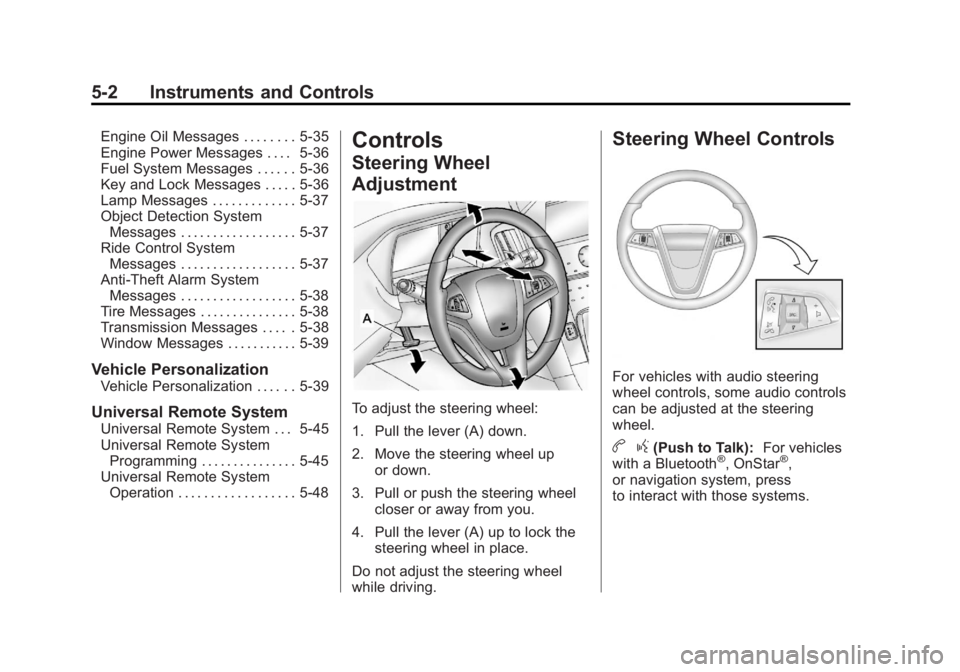
To adjust the steering wheel:
1. Pull the lever (A) down.
2. Move the steering wheel up
or down.
3. Pull or push the steering wheel closer or away from you.
4. Pull the lever (A) up to lock the steering wheel in place.
Do not adjust the steering wheel
while driving.
Steering Wheel Controls
For vehicles with audio steering
wheel controls, some audio controls
can be adjusted at the steering
wheel.
b g(Push to Talk): For vehicles
with a Bluetooth®, OnStar®,
or navigation system, press
to interact with those systems.
Page 130 of 462
Black plate (8,1)Buick LaCrosse Owner Manual - 2011
5-8 Instruments and Controls
Remove the cover to access and
replace when not in use.
Certain electrical accessories
may not be compatible with the
accessory power outlets and could
overload vehicle or adapter fuses.
If there is a problem, see your
dealer.
When adding electrical equipment,
be sure to follow the installation
instructions included with the
equipment. SeeAdd-On Electrical
Equipment on page 9‑62.
Notice: Hanging heavy
equipment from the power
outlet can cause damage not
covered by the vehicle warranty.
The power outlets are designed
for accessory power plugs only,
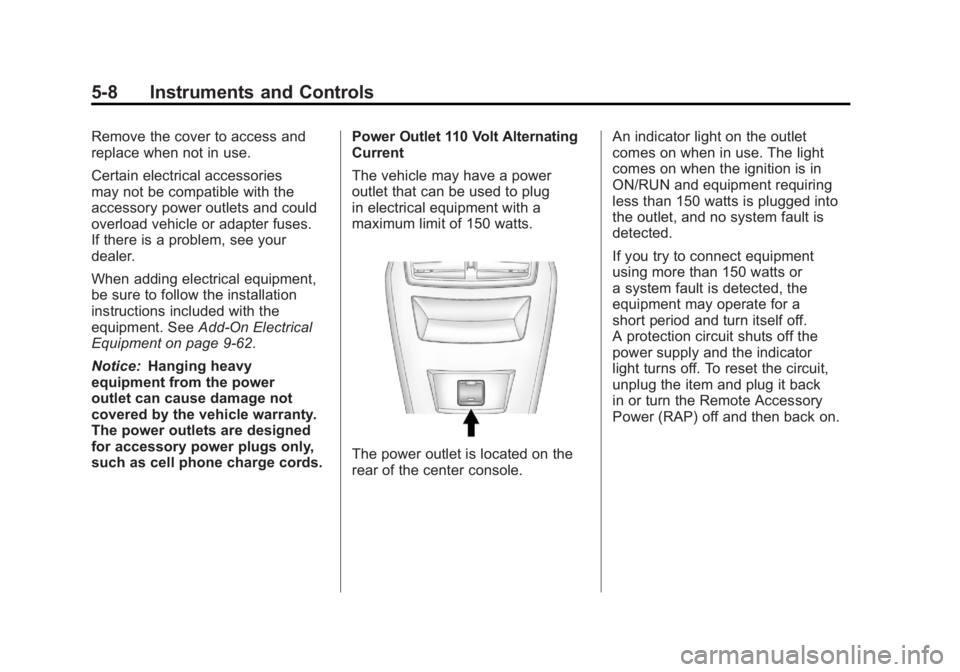
such as cell phone charge cords. Power Outlet 110 Volt Alternating
Current
The vehicle may have a power
outlet that can be used to plug
in electrical equipment with a
maximum limit of 150 watts.
The power outlet is located on the
rear of the center console.An indicator light on the outlet
comes on when in use. The light
comes on when the ignition is in
ON/RUN and equipment requiring
less than 150 watts is plugged into
the outlet, and no system fault is
detected.
If you try to connect equipment
using more than 150 watts or
a system fault is detected, the
equipment may operate for a
short period and turn itself off.
A protection circuit shuts off the
power supply and the indicator
light turns off. To reset the circuit,
unplug the item and plug it back
in or turn the Remote Accessory
Power (RAP) off and then back on.
Page 138 of 462
Black plate (16,1)Buick LaCrosse Owner Manual - 2011
5-16 Instruments and Controls
If you are using remote start,
if equipped, to start the vehicle
from a distance, you may not see
the system check. Then, after
several more seconds, the status
indicator will light either the word
ON or OFF to let you know the
status of the right front passenger
frontal airbag.
If the word ON is lit on the
passenger airbag status indicator,
it means that the right front
passenger frontal airbag is
enabled (may inflate).
If the word OFF is lit on the airbag
status indicator, it means that the
passenger sensing system has
turned off the right front passenger
frontal airbag.If, after several seconds, both
status indicator lights remain on,
or if there are no lights at all, there
may be a problem with the lights
or the passenger sensing system.
See your dealer for service.
{WARNING
If the airbag readiness light
ever comes on and stays on,
it means that something may be
wrong with the airbag system.
To help avoid injury to yourself or
others, have the vehicle serviced
right away. See
Airbag Readiness
Light on page 5‑14 for more
information, including important
safety information.
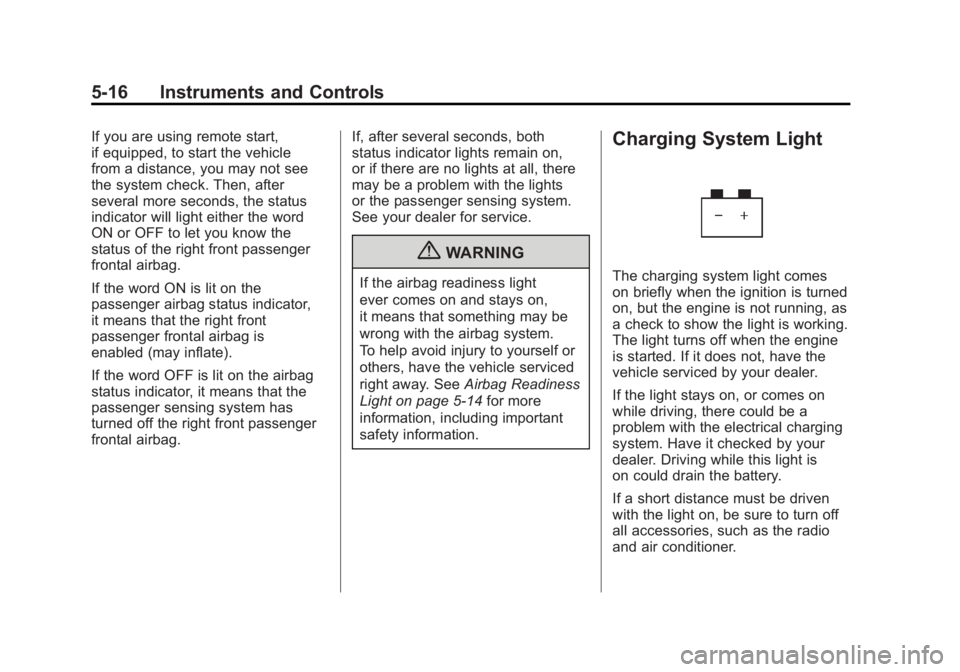
Charging System Light
The charging system light comes
on briefly when the ignition is turned
on, but the engine is not running, as
a check to show the light is working.
The light turns off when the engine
is started. If it does not, have the
vehicle serviced by your dealer.
If the light stays on, or comes on
while driving, there could be a
problem with the electrical charging
system. Have it checked by your
dealer. Driving while this light is
on could drain the battery.
If a short distance must be driven
with the light on, be sure to turn off
all accessories, such as the radio
and air conditioner.
Page 158 of 462
Black plate (36,1)Buick LaCrosse Owner Manual - 2011
5-36 Instruments and Controls
ENGINE OIL HOT, IDLE
ENGINE
This message displays when the
engine oil temperature is too hot.
Stop and allow the vehicle to idle
until it cools down.
ENGINE OIL LOW—ADD OIL
This message displays when the
engine oil level is too low. Check
the oil level. See Engine Oil on
page 10‑9.
OIL PRESSURE LOW —STOP
ENGINE
This message displays if low oil
pressure levels occur. Stop the
vehicle as soon as safely possible
and do not operate it until the cause
of the low oil pressure has been
corrected. Check the oil as soon
as possible and have the vehicle
serviced by your dealer.
Engine Power Messages
ENGINE POWER IS REDUCED
This message displays when the
vehicle's engine power is reduced.
Reduced engine power can affect
the vehicle's ability to accelerate.
If this message is on, but there
is no reduction in performance,
proceed to your destination.
The performance may be reduced
the next time the vehicle is driven.
The vehicle may be driven at a
reduced speed while this message
is on, but maximum acceleration
and speed may be reduced.
Anytime this message stays on,
the vehicle should be taken to
your dealer for service as soon
as possible.
Fuel System Messages
FUEL LEVEL LOW
This message displays when the
vehicle is low on fuel. Refuel as
soon as possible.
TIGHTEN GAS CAP
This message displays when the
fuel cap is not on tight. Tighten the
fuel cap.
Key and Lock Messages
NO REMOTE DETECTED
This message displays when the
transmitter battery is weak on
vehicles with keyless access.
See “Starting the Vehicle with
a Low Transmitter Battery” under
Remote Keyless Entry (RKE)
System Operation on page 2‑4
for more information.
REPLACE BATTERY IN
REMOTE KEY
This message displays when the
battery in the Remote Keyless
Entry (RKE) transmitter needs
to be replaced.
Page 161 of 462
Black plate (39,1)Buick LaCrosse Owner Manual - 2011
Instruments and Controls 5-39
Window Messages
OPEN, THEN CLOSE DRIVER
WINDOW
This message is displayed when the
window needs to be reprogrammed.
If the vehicle's battery has been
recharged or disconnected, you
will need to reprogram each front
window for the express-up feature
to work. SeePower Windows on
page 2‑19 for more information.
OPEN, THEN CLOSE
PASSENGER WINDOW
This message is displayed when the
window needs to be reprogrammed.
If the vehicle's battery has been
recharged or disconnected, you
will need to reprogram each front
window for the express-up feature
to work. See Power Windows on
page 2‑19 for more information.
Vehicle
Personalization
The audio system controls are
used to access the personalization
menus for customizing vehicle
features.
CONFIG (Configuration):
Press to access the Configuration
Settings Menu.
MENU/SELECT Knob: Press
the center of this knob to enter
the menus and select menu items.
Turn the knob to scroll through the
menus.
0BACK: Press to exit or move
backward in a menu.
Entering the Personalization
Menus
1. Press CONFIG to access the Configuration Settings menu.
2. Turn the MENU/SELECT knob to highlight Vehicle Settings. 3. Press the center of the
MENU/SELECT knob to select
the Vehicle Settings menu.
The following list of menu items will
be available:
.Climate and Air Quality
.Comfort and Convenience
.Collision/Detection Systems
.Language
.Lighting
.Power Door Locks
.Remote Lock/Unlock/Start
.Return to Factory Settings
Turn the MENU/SELECT knob to
highlight the menu. Press the knob
to select it. Each of the menus is
detailed in the following information.
Page 162 of 462
Black plate (40,1)Buick LaCrosse Owner Manual - 2011
5-40 Instruments and Controls
Climate and Air Quality
Select the Climate and Air Quality
menu and the following will be
displayed:
.Auto Fan Control
.Air Quality Control
.Auto Heated Seats
.Remote Start Heated Seats
.Remote Start Cooled Seats
.Auto Defog
.Auto Rear Defog
Auto Fan Control
This will allow you to select the
automatic fan speed. It can be
adjusted to run lower or higher
than normal.
Press the MENU/SELECT
knob when Auto Fan Control is
highlighted to open the menu.
Turn the knob to highlight High,
Medium, or Low. Press the knob
to confirm the selection and move
back to the last menu. Air Quality Control
This will allow you to select whether
the system will operate at high or
low sensitivity. Only vehicles with
the dual zone climate control will
have this option.
Press the MENU/SELECT
knob when Air Quality Control
is highlighted to open the menu.
Turn the knob to highlight High or
Low. Press the knob to confirm the
selection and move back to the
last menu.
Remote Start Heated Seats
When on, this feature will turn the
heated seats on when using remote
start on cold days.
Press the MENU/SELECT knob
when Remote Start Heated Seats is
highlighted. Turn the knob to select
On or Off. Press the knob to confirm
and go back to the last menu.
Remote Start Cooled Seats
When on, this feature will turn the
cooled seats on when using remote
start on warm days.
Press the MENU/SELECT knob
when Remote Start Cooled Seats is
highlighted. Turn the knob to select
On or Off. Press the knob to confirm
and go back to the last menu.
Auto Defog
This will allow you to turn the auto
defog on or off. Only vehicles with
the dual zone climate control will
have this option.
Press the MENU/SELECT knob
when Auto Defog is highlighted to
open the menu. Turn the knob to
highlight On or Off. Press the knob
to confirm the selection and move
back to the last menu.