display BUICK LACROSSE 2019 Owner's Manual
[x] Cancel search | Manufacturer: BUICK, Model Year: 2019, Model line: LACROSSE, Model: BUICK LACROSSE 2019Pages: 374, PDF Size: 5.65 MB
Page 8 of 374

Buick LaCrosse Owner Manual (GMNA-Localizing-U.S./Canada-12032549) -
2019 - crc - 8/20/18
In Brief 7
1.Air Vents 0162.
2. Exterior Lamp Controls 0149.
Fog Lamps 0152.
Instrument Panel Illumination
Control 0153.
3. Turn and Lane-Change Signals
0152.
4. Tap Shift Controls (If Equipped). See Manual Mode
0 191.
5. Instrument Cluster 0114.
Driver Information Center (DIC)
Display. See Driver Information
Center (DIC) 0131.
6. Windshield Wiper/Washer
0107.
7. Hazard Warning Flashers
0151.
8. Light Sensor. See Automatic
Headlamp System 0150.
9. Infotainment 0156.
10. Dual Automatic Climate Control
System 0157. 11.
Traction Control/Electronic
Stability Control 0196.
Park Assist Button (If
Equipped). See Driver
Assistance Systems 0208.
SPORT Button (If Equipped).
See Selective Ride Control
0 198.
Lane Keep Assist (LKA) 0222
(If Equipped).
Automatic Parking Assist
Button (If Equipped). See
Driver Assistance Systems
0 208.
12. Shift Lever. See Automatic
Transmission 0187.
13. ENGINE START/STOP Button (Out of View). See Ignition
Positions 0176.
14. Steering Wheel Controls. See the infotainment manual.
Driver Information Center (DIC)
Controls. See Driver
Information Center (DIC) 0131.
15. Horn 0107. 16.
Steering Wheel Adjustment
0106 (Out of View).
17. Cruise Control 0199 (If
Equipped).
Adaptive Cruise Control 0201
(If Equipped).
Forward Collision Alert (FCA)
System 0214 (If Equipped).
Heated Steering Wheel 0106
(If Equipped).
18. Head-Up Display (HUD) 0134
(If Equipped).
19. Hood Release (Out of View). SeeHood 0237.
20. Front Storage.
21. Data Link Connector (DLC) (Out of View). See Malfunction
Indicator Lamp (Check Engine
Light) 0122.
22. Electric Parking Brake 0193.
Page 9 of 374
Buick LaCrosse Owner Manual (GMNA-Localizing-U.S./Canada-12032549) -
2019 - crc - 8/20/18
8 In Brief
Initial Drive
Information
This section provides a brief
overview about some of the
important features that may or may
not be on your specific vehicle.
For more detailed information, refer
to each of the features which can be
found later in this owner’s manual.
Stop/Start System
If equipped, the Stop/Start system
will shut off the engine to help
conserve fuel. It has components
designed for the increased number
of starts.
When the brakes are applied and
the vehicle is at a complete stop,
the engine may turn off. When
stopped, the tachometer displays
AUTO STOP. SeeTachometer
0 116. When the brake pedal is
released or the accelerator pedal is
pressed, the engine will restart.
See Stop/Start System (Without
eAssist) 0178 orStop/Start System
(With eAssist) 0179.
Remote Keyless Entry
(RKE) System
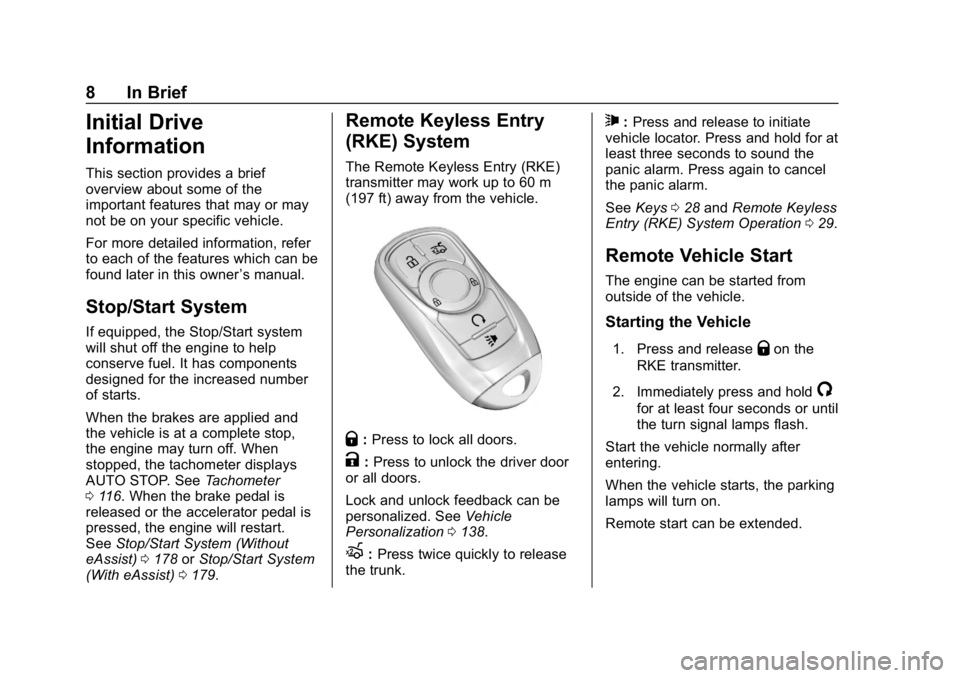
The Remote Keyless Entry (RKE)
transmitter may work up to 60 m
(197 ft) away from the vehicle.
Q:Press to lock all doors.
K:Press to unlock the driver door
or all doors.
Lock and unlock feedback can be
personalized. See Vehicle
Personalization 0138.
X:Press twice quickly to release
the trunk.
7: Press and release to initiate
vehicle locator. Press and hold for at
least three seconds to sound the
panic alarm. Press again to cancel
the panic alarm.
See Keys 028 and Remote Keyless
Entry (RKE) System Operation 029.
Remote Vehicle Start
The engine can be started from
outside of the vehicle.
Starting the Vehicle
1. Press and releaseQon the
RKE transmitter.
2. Immediately press and hold
/
for at least four seconds or until
the turn signal lamps flash.
Start the vehicle normally after
entering.
When the vehicle starts, the parking
lamps will turn on.
Remote start can be extended.
Page 17 of 374
Buick LaCrosse Owner Manual (GMNA-Localizing-U.S./Canada-12032549) -
2019 - crc - 8/20/18
16 In Brief
LO :Use for slow wipes.
INT : Use for intermittent wipes. To
adjust wipe frequency, turn the band
up for more frequent wipes or down
for less frequent wipes.
OFF : Use to turn the wipers off.
1x : For a single wipe, briefly move
the wiper lever down. For several
wipes, hold the wiper lever down.
f: Pull the windshield wiper
lever toward you to spray windshield
washer fluid and activate the wipers.
See Windshield Wiper/Washer
0 107.
Climate Controls
Dual Automatic Climate Control System
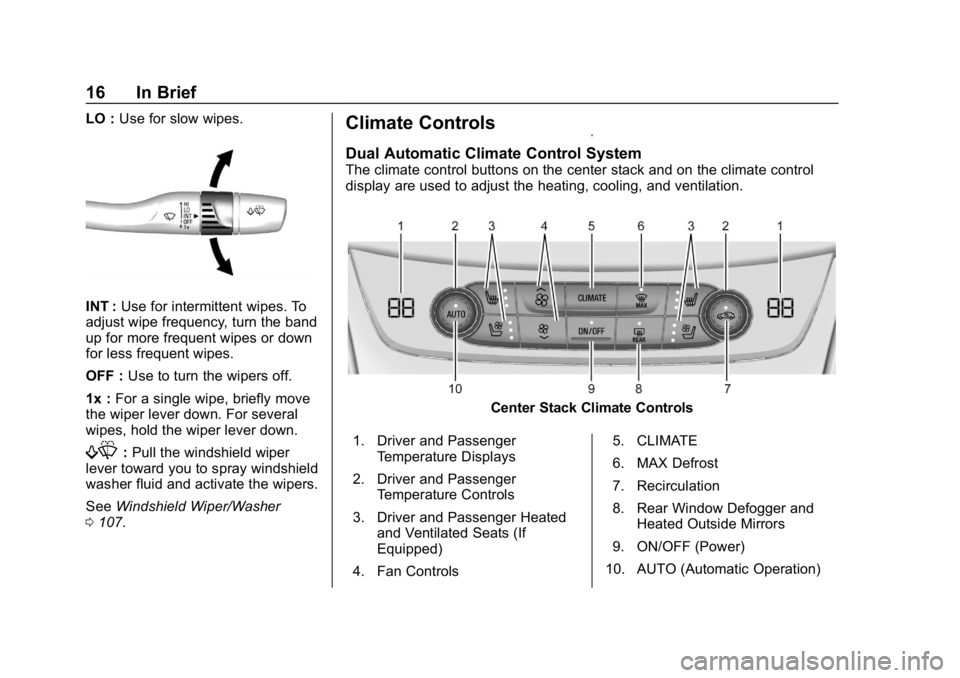
The climate control buttons on the center stack and on the climate control
display are used to adjust the heating, cooling, and ventilation.
Center Stack Climate Controls
1. Driver and Passenger Temperature Displays
2. Driver and Passenger Temperature Controls
3. Driver and Passenger Heated and Ventilated Seats (If
Equipped)
4. Fan Controls 5. CLIMATE
6. MAX Defrost
7. Recirculation
8. Rear Window Defogger and
Heated Outside Mirrors
9. ON/OFF (Power)
10. AUTO (Automatic Operation)
Page 18 of 374
Buick LaCrosse Owner Manual (GMNA-Localizing-U.S./Canada-12032549) -
2019 - crc - 8/20/18
In Brief 17
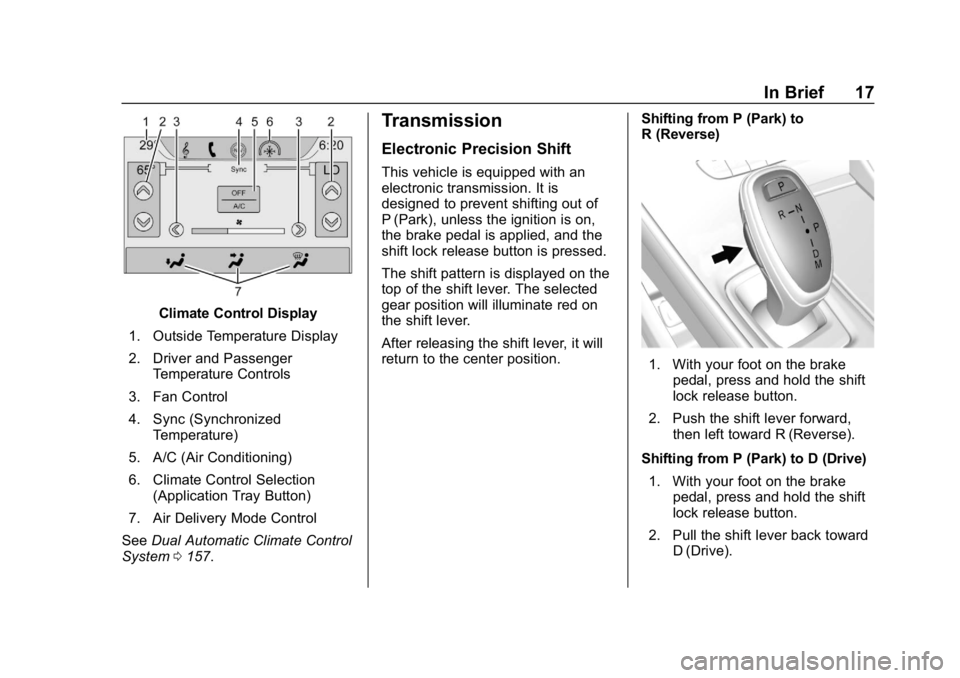
Climate Control Display
1. Outside Temperature Display
2. Driver and Passenger Temperature Controls
3. Fan Control
4. Sync (Synchronized Temperature)
5. A/C (Air Conditioning)
6. Climate Control Selection (Application Tray Button)
7. Air Delivery Mode Control
See Dual Automatic Climate Control
System 0157.
Transmission
Electronic Precision Shift
This vehicle is equipped with an
electronic transmission. It is
designed to prevent shifting out of
P (Park), unless the ignition is on,
the brake pedal is applied, and the
shift lock release button is pressed.
The shift pattern is displayed on the
top of the shift lever. The selected
gear position will illuminate red on
the shift lever.
After releasing the shift lever, it will
return to the center position. Shifting from P (Park) to
R (Reverse)
1. With your foot on the brake
pedal, press and hold the shift
lock release button.
2. Push the shift lever forward, then left toward R (Reverse).
Shifting from P (Park) to D (Drive) 1. With your foot on the brake pedal, press and hold the shift
lock release button.
2. Pull the shift lever back toward D (Drive).
Page 20 of 374
Buick LaCrosse Owner Manual (GMNA-Localizing-U.S./Canada-12032549) -
2019 - crc - 8/20/18
In Brief 19
Cruise Control
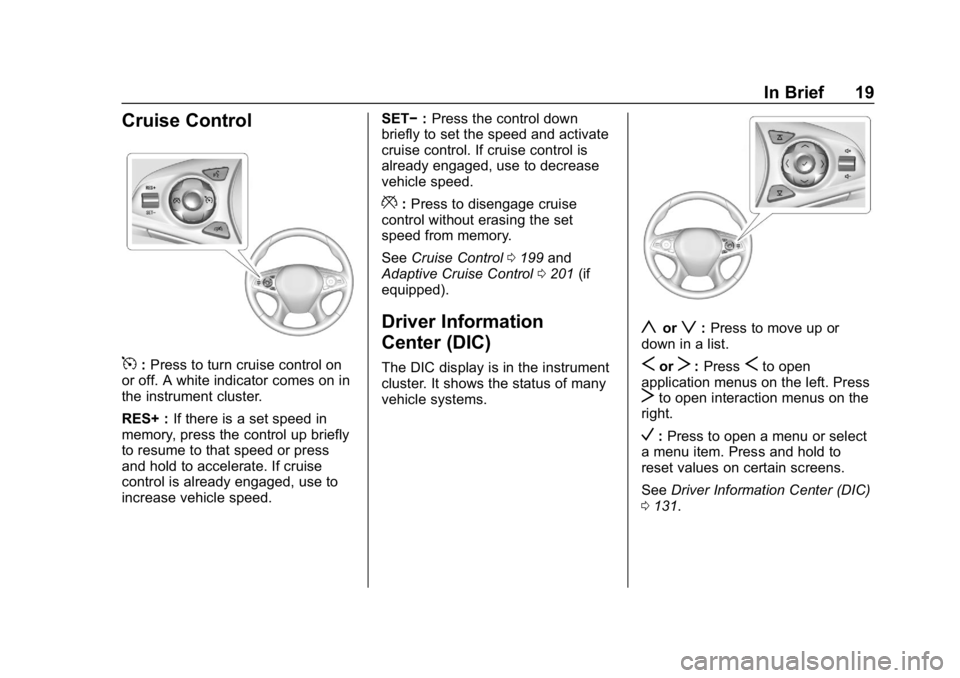
5:Press to turn cruise control on
or off. A white indicator comes on in
the instrument cluster.
RES+ : If there is a set speed in
memory, press the control up briefly
to resume to that speed or press
and hold to accelerate. If cruise
control is already engaged, use to
increase vehicle speed. SET−
:Press the control down
briefly to set the speed and activate
cruise control. If cruise control is
already engaged, use to decrease
vehicle speed.
*: Press to disengage cruise
control without erasing the set
speed from memory.
See Cruise Control 0199 and
Adaptive Cruise Control 0201 (if
equipped).
Driver Information
Center (DIC)
The DIC display is in the instrument
cluster. It shows the status of many
vehicle systems.
yorz: Press to move up or
down in a list.
SorT: PressSto open
application menus on the left. Press
Tto open interaction menus on the
right.
V: Press to open a menu or select
a menu item. Press and hold to
reset values on certain screens.
See Driver Information Center (DIC)
0 131.
Page 21 of 374
Buick LaCrosse Owner Manual (GMNA-Localizing-U.S./Canada-12032549) -
2019 - crc - 8/20/18
20 In Brief
Forward Collision Alert
(FCA) System
If equipped, FCA may help avoid or
reduce the harm caused by
front-end crashes. FCA provides a
green indicator,
V, when a vehicle
is detected ahead. This indicator
displays amber when following a
vehicle much too closely. When
approaching a vehicle ahead too
quickly, FCA provides a flashing red
alert on the windshield and rapidly
beeps or pulses the driver seat.
See Forward Collision Alert (FCA)
System 0214.
Forward Automatic
Braking (FAB)
If the vehicle has Adaptive Cruise
Control (ACC), it also has FAB,
which includes Intelligent Brake
Assist (IBA). When the system
detects a vehicle ahead in your path
that is traveling in the same
direction that you may be about to
crash into, it can provide a boost to
braking or automatically brake the vehicle. This can help avoid or
lessen the severity of crashes when
driving in a forward gear.
See
Forward Automatic Braking
(FAB) 0216.
Front Pedestrian Braking
(FPB) System
If equipped, the FPB system may
help avoid or reduce the harm
caused by front-end crashes with
nearby pedestrians when driving in
a forward gear. FPB displays an
amber indicator,
~, when a nearby
pedestrian is detected directly
ahead. When approaching a
detected pedestrian too quickly,
FPB provides a red flashing alert on
the windshield and rapidly beeps or
pulses the driver seat. FPB can
provide a boost to braking or
automatically brake the vehicle.
See Front Pedestrian Braking (FPB)
System 0218.
Lane Keep Assist (LKA)
If equipped, LKA may help avoid
crashes due to unintentional lane
departures. It may assist by gently
turning the steering wheel if the
vehicle approaches a detected lane
marking without using a turn signal
in that direction. It may also provide
a Lane Departure Warning (LDW)
alert as the lane marking is crossed.
The system will not assist or alert if
it detects that you are actively
steering. Override LKA by turning
the steering wheel. LKA uses a
camera to detect lane markings
between 60 km/h (37 mph) and
180 km/h (112 mph).
See Lane Departure Warning (LDW)
0 222 andLane Keep Assist (LKA)
0 222.
Lane Change Alert (LCA)
If equipped, the LCA system is a
lane-changing aid that assists
drivers with avoiding lane change
crashes that occur with moving
vehicles in the side blind zone (or
spot) areas or with vehicles rapidly
Page 22 of 374
Buick LaCrosse Owner Manual (GMNA-Localizing-U.S./Canada-12032549) -
2019 - crc - 8/20/18
In Brief 21
approaching these areas from
behind. The LCA warning display
will light up in the corresponding
outside mirror and will flash if the
turn signal is on. The Side Blind
Zone Alert (SBZA) system is
included as part of the LCA system.
SeeSide Blind Zone Alert (SBZA)
0 220 andLane Change Alert (LCA)
0 220.
Rear Vision
Camera (RVC)
RVC displays a view of the area
behind the vehicle on the
infotainment display when the
vehicle is shifted into R (Reverse) to
aid with parking and low-speed
backing maneuvers.
See Assistance Systems for Parking
or Backing 0210.
Rear Cross Traffic Alert
(RCTA) System
If equipped, the RCTA system
shows a triangle with an arrow on
the infotainment display to warn of traffic behind your vehicle that may
cross your vehicle's path while in
R (Reverse). In addition, beeps will
sound, or the driver seat will pulse.
See
Assistance Systems for Parking
or Backing 0210.
Parking Assist
If equipped, Rear Park Assist (RPA)
uses sensors on the rear bumper to
assist with parking and avoiding
objects while in R (Reverse).
It operates at speeds less than
8 km/h (5 mph). RPA may display a
warning triangle on the infotainment
display and a graphic on the
instrument cluster to provide the
object distance. In addition, multiple
beeps or seat pulses may occur if
very close to an object.
See Assistance Systems for Parking
or Backing 0210.
Automatic Parking
Assist (APA)
If equipped, the APA system helps
to search for and maneuver the
vehicle into parallel or perpendicular parking spots using automatic
steering, DIC displays, and beeps.
When the vehicle speed is below
30 km/h (18 mph), press
Oto
enable the system.
See “Automatic Parking Assist
(APA)” underAssistance Systems
for Parking or Backing 0210.
Power Outlets
The 12-volt power outlets can be
used to plug in electrical equipment,
such as a cell phone or MP3 player.
Page 27 of 374
Buick LaCrosse Owner Manual (GMNA-Localizing-U.S./Canada-12032549) -
2019 - crc - 8/20/18
26 In Brief
tire pressures are getting low and
the tires need to be inflated to the
proper pressure.
The TPMS does not replace normal
monthly tire maintenance. Maintain
the correct tire pressures.
SeeTire Pressure Monitor System
0 276.
Fuel
Regular Unleaded Fuel
Use only Regular 87 octane —
(R+M)/2 —or higher unleaded
gasoline in your vehicle. TOP TIER
Detergent Gasoline is
recommended. Do not use gasoline
with an octane rating lower as it will
result in reduced performance and
lower fuel economy. See
Recommended Fuel 0224.
E85 or FlexFuel
No E85 or FlexFuel
Gasoline-ethanol fuel blends greater
than E15 (15% ethanol by volume),
such as E85, cannot be used in this
vehicle.
Engine Oil Life System
The engine oil life system calculates
engine oil life based on vehicle use
and displays the CHANGE ENGINE
OIL SOON message when it is time
to change the engine oil and filter.
The oil life system should be reset
to 100% only following an oil
change.
Resetting the Oil Life System
1. Using the DIC controls on the right side of the steering wheel,
display REMAINING OIL LIFE on the DIC. See
Driver
Information Center (DIC) 0131.
When remaining oil life is low,
the CHANGE ENGINE OIL
SOON message will appear on
the display.
2. Press
Von the DIC controls
and hold down for a few
seconds to clear the CHANGE
ENGINE OIL SOON message
and reset the oil life at 100%.
Be careful not to reset the oil
life display accidentally at any
time other than after the oil is
changed. It cannot be reset
accurately until the next oil
change.
See Engine Oil Life System 0244.
Driving for Better Fuel
Economy
Driving habits can affect fuel
mileage. Here are some driving tips
to get the best fuel economy
possible:
Page 33 of 374
Buick LaCrosse Owner Manual (GMNA-Localizing-U.S./Canada-12032549) -
2019 - crc - 8/20/18
32 Keys, Doors, and Windows
transmitter inside the vehicle. Do
not leave the RKE transmitter in an
unattended vehicle.
To customize the doors to
automatically lock when exiting the
vehicle, seeVehicle Personalization
0 138.
Temporary Disable of Passive
Locking
Temporarily disable passive locking
by pressing and holding
Kon the
interior door switch with a door open
for at least four seconds, or until
three chimes are heard. Passive
locking will then remain disabled
until
Qon the interior door is
pressed, or until the vehicle is
turned on.
Remote Left in Vehicle Alert
When the vehicle is turned off and
an RKE transmitter is left in the
vehicle, the horn will chirp three
times after all doors are closed. To
turn on or off see Vehicle
Personalization 0138. Remote No Longer in Vehicle Alert
If the vehicle is on with a door open
and then all doors are closed, the
vehicle will check for RKE
transmitters inside. If an RKE
transmitter is not detected, the
Driver Information Center (DIC) will
display NO REMOTE DETECTED
and the horn will chirp three times.
This occurs only once each time the
vehicle is driven.
See
Vehicle Personalization 0138.
Key Access
To access a vehicle with a weak
transmitter battery, see Door Locks
0 37.
Programming Transmitters to
the Vehicle
Only RKE transmitters programmed
to the vehicle will work. If a
transmitter is lost or stolen, a
replacement can be purchased and
programmed through your dealer.
The vehicle can be reprogrammed
so that lost or stolen transmitters no
longer work. Any remaining
transmitters will need to be reprogrammed. Each vehicle can
have up to eight transmitters
matched to it.
Programming with Recognized
Transmitters
A new transmitter can be
programmed to the vehicle when
there are two recognized
transmitters. To program, the vehicle
must be off and all of the
transmitters, both currently
recognized and new, must be
with you.
1. Place the two recognized transmitters in the cupholder.
2. Remove the key lock cylinder cap on the driver door handle.
See Door Locks 037.
3. Insert the vehicle key of the new transmitter into the key
lock cylinder on the outside of
the driver door and turn the key
to the unlock position five times
within 10 seconds.
The DIC displays READY FOR
REMOTE #2, 3, 4, or 5.
Page 34 of 374
Buick LaCrosse Owner Manual (GMNA-Localizing-U.S./Canada-12032549) -
2019 - crc - 8/20/18
Keys, Doors, and Windows 33
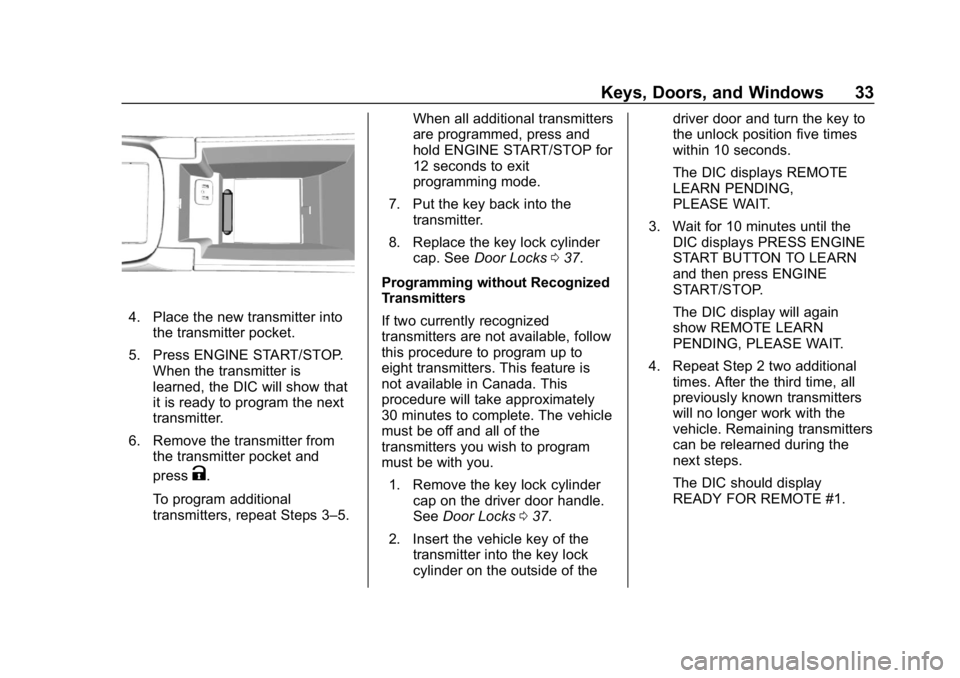
4. Place the new transmitter intothe transmitter pocket.
5. Press ENGINE START/STOP. When the transmitter is
learned, the DIC will show that
it is ready to program the next
transmitter.
6. Remove the transmitter from the transmitter pocket and
press
K.
To program additional
transmitters, repeat Steps 3–5. When all additional transmitters
are programmed, press and
hold ENGINE START/STOP for
12 seconds to exit
programming mode.
7. Put the key back into the transmitter.
8. Replace the key lock cylinder cap. See Door Locks 037.
Programming without Recognized
Transmitters
If two currently recognized
transmitters are not available, follow
this procedure to program up to
eight transmitters. This feature is
not available in Canada. This
procedure will take approximately
30 minutes to complete. The vehicle
must be off and all of the
transmitters you wish to program
must be with you. 1. Remove the key lock cylinder cap on the driver door handle.
See Door Locks 037.
2. Insert the vehicle key of the transmitter into the key lock
cylinder on the outside of the driver door and turn the key to
the unlock position five times
within 10 seconds.
The DIC displays REMOTE
LEARN PENDING,
PLEASE WAIT.
3. Wait for 10 minutes until the DIC displays PRESS ENGINE
START BUTTON TO LEARN
and then press ENGINE
START/STOP.
The DIC display will again
show REMOTE LEARN
PENDING, PLEASE WAIT.
4. Repeat Step 2 two additional times. After the third time, all
previously known transmitters
will no longer work with the
vehicle. Remaining transmitters
can be relearned during the
next steps.
The DIC should display
READY FOR REMOTE #1.