dic BUICK LESABRE 2003 Owner's Guide
[x] Cancel search | Manufacturer: BUICK, Model Year: 2003, Model line: LESABRE, Model: BUICK LESABRE 2003Pages: 380, PDF Size: 2.75 MB
Page 141 of 380
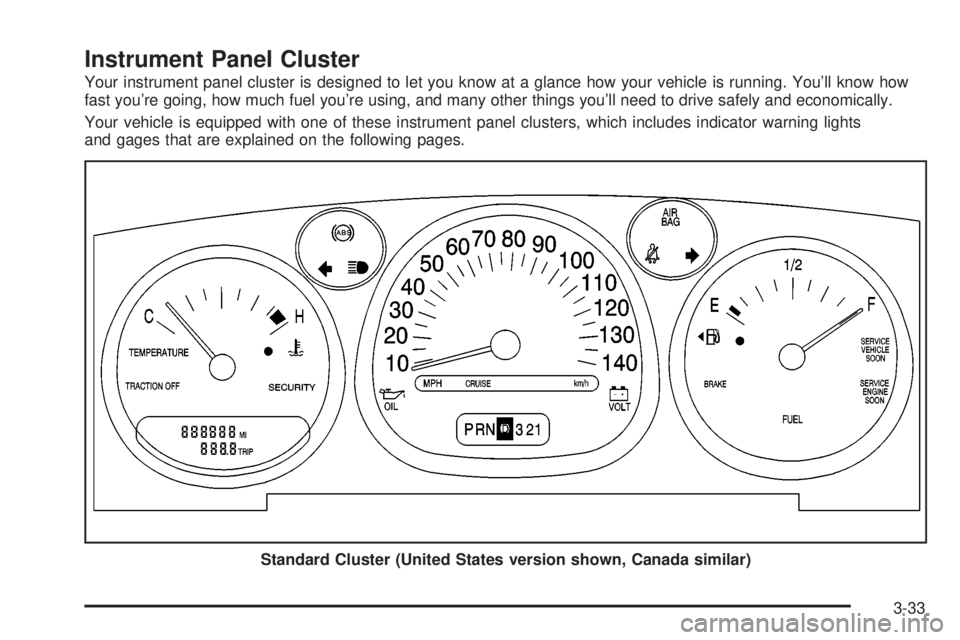
Instrument Panel Cluster
Your instrument panel cluster is designed to let you know at a glance how your vehicle is running. You'll know how
fast you're going, how much fuel you're using, and many other things you'll need to drive safely and economically.
Your vehicle is equipped with one of these instrument panel clusters, which includes indicator warning lights
and gages that are explained on the following pages.
Standard Cluster (United States version shown, Canada similar)
3-33
Page 143 of 380

Speedometer and Odometer
Your speedometer lets you see your speed in both
miles per hour (mph) and kilometers per hour (km/h).
Your odometer shows how far your vehicle has
been driven, in either miles or kilometers. Press The
ENG/MET button which is located to the left of the
speedometer to change from mph to km/h.
Your vehicle has a tamper resistant odometer.
You may wonder what happens if your vehicle needs a
new odometer installed. If the new one can be set to
the mileage total of the old odometer, then it must
be. But if it can't, then it's set at zero and a label must
be put on the driver's door to show the old mileage
reading when the new odometer was installed.
Trip Odometer
A trip odometer can tell you how far you have driven
since you last set it to zero. To reset it, push the TRIP
RESET button. If your vehicle is equipped with a
DIC, see
Driver Information Center (DIC) on page 3-45for information on resetting the trip odometer.
Tachometer
If your vehicle has this
feature, the tachometer
tells you how fast the
engine is running.
It displays engine speed in
thousands of revolutions
per minute (rpm).
Notice:Do not operate the engine with the
tachometer in the shaded warning area, or engine
damage may occur.
3-35
Page 145 of 380

The air bag readiness light should ¯ash for a few
seconds when you turn the ignition key to RUN. If the
light doesn't come on then, have it ®xed so it will
be ready to warn you if there is a problem.
Battery Warning Light
When you turn the key to
RUN, this light will turn on
brie¯y to show that the
generator and battery
charging systems
are working.
If the light stays on, a chime will sound indicating that
the vehicle needs service. You should take your vehicle
to the dealer as soon as possible. To save the battery
until you get there, turn off all accessories and set
the climate control system to OFF.
Brake System Warning Light
Your vehicle's hydraulic brake system is divided into two
parts. If one part isn't working, the other part can still
work and stop you. For good braking, though, you need
both parts working well.
If the warning light comes on, there is a brake problem.
Have your brake system inspected right away.
This light should come on when you turn the key to
RUN. If it doesn't come on then, have it ®xed so it will
be ready to warn you if there's a problem.
United StatesCanada
3-37
Page 148 of 380

Engine Coolant Temperature Gage
This gage shows the
engine coolant
temperature. If the pointer
moves into the shaded
area, the engine is too hot.
A temperature indicator light will turn on and a chime
will sound.
If you have been operating your vehicle under normal
driving conditions, and the temperature indicator
light comes on, you should pull off the road, stop your
vehicle and turn off the engine as soon as possible.
Malfunction Indicator Lamp
Service Engine Soon Light
Your vehicle is equipped
with a computer which
monitors operation of the
fuel, ignition and emission
control systems.
This system is called OBD II (On-Board
Diagnostics-Second Generation) and is intended to
assure that emissions are at acceptable levels for the
life of the vehicle, helping to produce a cleaner
environment. The SERVICE ENGINE SOON light
comes on to indicate that there is a problem and service
is required. Malfunctions often will be indicated by the
system before any problem is apparent. This may
prevent more serious damage to your vehicle. This
system is also designed to assist your service technician
in correctly diagnosing any malfunction.
Notice:If you keep driving your vehicle with this
light on, after a while, your emission controls
may not work as well, your fuel economy may not
be as good and your engine may not run as
smoothly. This could lead to costly repairs that may
not be covered by your warranty. Standard version
shown, uplevel similar
3-40
Page 151 of 380

Your vehicle will not pass this inspection if the OBD
(on-board diagnostic) system determines that critical
emission control systems have not been completely
diagnosed by the system. The vehicle would be
considered not ready for inspection. This can happen if
you have recently replaced your battery or if your
battery has run down. The diagnostic system is
designed to evaluate critical emission control systems
during normal driving. This may take several days
of routine driving. If you have done this and your vehicle
still does not pass the inspection for lack of OBD
system readiness, your GM dealer can prepare the
vehicle for inspection.
Oil Pressure Light
If your vehicle has the
standard instrument panel
cluster, this light will
come on if there is a
problem with your vehicle's
engine oil pressure.
If your vehicle has the optional gage cluster, you can
read your oil pressure directly from the Driver
Information Center (DIC). See
DIC Controls and
Displays on page 3-46.The oil pressure light will come on brie¯y when you turn
your key to RUN. That's just a check to be sure the
light works. This is normal and doesn't show a problem.
If it doesn't come on and then go off, be sure to have
it ®xed so it will be there to warn you if there is a
problem.
When this light
comeson andstayson, and a chime
sounds, it means oil isn't going through the engine
properly. The oil could be low, or there might be some
other oil problem. See your dealer for service.
{CAUTION:
Don't keep driving if the oil pressure is low. If
you do, your engine can become so hot that it
catches ®re. You or others could be burned.
Check your oil as soon as possible and have
your vehicle serviced.
Notice:Damage to your engine from neglected oil
problems can be costly and is not covered by
your warranty.
3-43
Page 153 of 380

Fuel Gage
The fuel gage shows about how much fuel is in your
tank. It works only when the ignition is on. When
the indicator moves to the edge of the low fuel warning
band, the low fuel warning light will come on and a
chime will sound. You still have a little fuel left, but you
need to get more fuel right away.Here are some things that some owners ask about.
None of these show a problem with your fuel gage:
·At the service station, the gas pump shuts off before
the gage reads full.
·It takes more (or less) fuel to ®ll up than the gage
indicated. For example, the gage may have
indicated half full, but it took more (or less) than
half the tank's capacity to ®ll it.
·The gage moves up a little when you turn a corner,
speed up or make a hard stop.
·The gage doesn't go back to empty when you turn
off the ignition.
Driver Information Center (DIC)
Your vehicle may be equipped with a Driver Information
Center (DIC). The DIC will display information about
how your vehicle is functioning, as well as warning
messages if a system problem is detected. This feature
also allows two different drivers to store and recall
their own personal choice settings. See ªDIC Controls
and Displaysº following for more information. United States
Canada
3-45
Page 154 of 380

DIC Controls and Displays
When you turn the ignition on, the DIC will display your
DRIVER NUMBER. You can have your dealer
program your name to appear on this display line. See
your dealer for more information.
The system will then perform a status check and display
any messages if a problem is detected. If there are
no problems detected, the display will return to the mode
selected by that driver the last time the ignition was
turned off.
If a problem is detected, a diagnostic message will
appear in the display. The following pages will show the
messages you may see on the DIC display.
The message center is continuously updated with the
vehicle's performance status.The following buttons are
on the DIC control panel
which is located to
the left of the steering
column:
ODO/TRIP (Odometer/Trip):When this button is
pressed, the display will show the total mileage, and
Trip 1 or Trip 2 miles. Trip 1 and Trip 2 will display the
miles traveled since the last reset. To reset the trip
odometer, press the ODO/TRIP button until the preferred
trip number (1 or 2) is shown in the DIC display, then
press the RESET button. The trip odometer will
now accumulate miles until the next reset.
3-46
Page 155 of 380
FUEL INFO (Information):Press this button to display
fuel information.
Press the FUEL INFO button until the display shows
FUEL ECONOMY AVERAGE. Average fuel economy is
viewed as a long term approximation of your overall
driving conditions. To learn the average fuel economy
from a new starting point, press the RESET button while
the average fuel economy is displayed in the DIC.
Press the FUEL INFO button until the display shows
FUEL ECONOMY INST. Instantaneous fuel economy
varies with your driving conditions, such as acceleration,
braking and the grade of the road being traveled. The
RESET button does not function in this mode.
Press the FUEL INFO button until the display shows
FUEL RANGE. The fuel range will calculate the
remaining distance you can drive without refueling. This
calculation is based on the average fuel economy for
the last 25 miles (40.25 km) driven, and the fuel
remaining in the fuel tank. The RESET button does not
function in this mode.
GAGE INFO (Information):Use this button to display
oil pressure, oil life, coolant temperature, tire pressure
and battery information.Press the GAGE INFO button until OIL PRESSURE
appears in the display. If there are no problems detected
with the oil pressure, the display will show OIL
PRESSURE NORMAL. If a low oil pressure condition is
detected, the display will show OIL PRESSURE
LOW. If you see the OIL PRESSURE LOW message,
your vehicle could be low on oil or the oil is not
going through the engine properly. See your dealer for
service.
Press the GAGE INFO button until COOLANT TEMP
appears in the display. If there are no problems detected
with the temperature, COOLANT TEMP NORMAL will
appear in the display. If the temperature is too high,
COOLANT TEMP HOT will appear in the display. If you
see the COOLANT TEMP HOT message, the engine
is overheated. You should pull off the road, stop
your vehicle and turn off your engine as soon as
possible. This manual explains what to do. See
Engine
Overheating on page 5-26.
Press the GAGE INFO button until the display shows
BATTERY STATE. If the voltage is normal the display
will show BATTERY STATE NORMAL. If the voltage
drops below 10.5 volts, the display will show BATTERY
STATE LOW. If the voltage is above 16.2 volts, the
display will show BATTERY STATE HIGH. If the display
shows the high or low message, you need to have
your battery and charging system checked.
3-47
Page 156 of 380

Press the GAGE INFO button until OIL LIFE INDEX
appears in the display. The OIL LIFE INDEX NORMAL
display will show an estimate of the oil's remaining
useful life. When the oil life index is less than 10 percent,
the display will show OIL LIFE INDEX CHANGE OIL.
When you have the oil changed according to the
maintenance schedule (see
Part A: Scheduled
Maintenance Services on page 6-4), you will have to
reset the oil life monitor. To reset the Oil Life System,
see
Engine Oil on page 5-13.
Press the GAGE INFO button until TIRE PRESSURE
appears in the display. TIRE PRESSURE NORMAL
is displayed when the check tire pressure system
believes your vehicle's tire pressures are normal. If a
potential tire pressure problem is detected, the display
will show CHECK TIRE PRESSURE.
If you see the CHECK TIRE PRESSURE message, you
should stop as soon as you can and check all your
tires for damage. If a tire is ¯at, see
If a Tire Goes Flat
on page 5-66. Also check the tire pressure in all four
tires as soon as you can. SeeIn¯ation -- Tire Pressure
on page 5-58andCheck Tire Pressure System on
page 5-59. There are times when you will have to reset
(calibrate) the Check Tire Pressure System. See
Check Tire Pressure System on page 5-59.RESET:This button, used along with other buttons, will
reset system functions.
ENG/MET (English/Metric):Use this button to change
the display between English and metric units.
DIC messages can be displayed in one of three
languages: English, French or Spanish. The language
of the display is set by pressing both the FUEL
INFO and RESET buttons for ®ve seconds. As the
buttons are held, each language will be displayed for
three seconds. Release the FUEL INFO and RESET
buttons when the desired language is displayed. All DIC
messages will now be in the selected language.
Language selection can also be done through the DIC
Personal Choice Programming. See ªLanguage
Selectionº later in this section.
3-48
Page 157 of 380
DIC Warnings and Messages
Other messages or warnings may appear in the DIC
display. For Canadian drivers, in addition to the
DIC message your DIC will display EXP with a number
after it which re¯ects the following messages:
EXP
(Export ID) Warning Message
20 TURN SIGNAL STILL ON?
24 TRUNK AJAR
25 WINDSHIELD WASHER FLUID LOW
27 BATTERY SAVER ACTIVE
36 ENGINE OIL LOW ± CHECK LEVEL
40 THEFT ATTEMPT DETECTED
54 SERVICE STABILITY SYSTEM
55 STABILITY SYSTEM ACTIVE
61 GAS CAP LOOSE ± CHECK CAP
81 CHANGE ENGINE OIL SOON
91
TRACTION CONTROL SYSTEM ACTIVE
102 CHECK CHARGE SYSTEM
139 DOOR AJAR
144 CHECK TIRE PRESSURES
The EXP codes are used to make translation from
English to other languages easier.
Pressing any of the DIC control buttons will remove
the messages or warnings from the DIC display.SERVICE STABILITY SYSTEM ± 54:If you ever see
the SERVICE STABILITY SYSTEM message, it
means there may be a problem with your stability
enhancement system. If you see this message, try to
reset the system (stop; turn off the engine; then start the
engine again). If the SERVICE STABILITY SYSTEM
message still comes on, it means there is a problem.
You should see your dealer for service. Reduce
your speed and drive accordingly.
STABILITY SYSTEM ACTIVE ± 55:You may see the
STABILITY SYSTEM ACTIVE message on the Driver
Information Center. It means that an advanced,
computer-controlled system has come on to help your
vehicle continue to go in the direction in which you're
steering. This stability enhancement system activates
when the computer senses that your vehicle is just
starting to spin, as it might if you hit a patch of ice or
other slippery spot on the road. When the system is on,
you may hear a noise or feel a vibration in the brake
pedal. This is normal.
When the STABILITY SYSTEM ACTIVE message is on,
you should continue to steer in the direction you want
to go. The system is designed to help you in bad
weather or other difficult driving situations by making the
most of whatever road conditions will permit. If the
STABILITY SYSTEM ACTIVE message comes on, you'll
know that something has caused your vehicle to start
to spin, so you should consider slowing down.
3-49