flat tire BUICK LESABRE 2003 Owner's Manual
[x] Cancel search | Manufacturer: BUICK, Model Year: 2003, Model line: LESABRE, Model: BUICK LESABRE 2003Pages: 380, PDF Size: 2.75 MB
Page 156 of 380

Press the GAGE INFO button until OIL LIFE INDEX
appears in the display. The OIL LIFE INDEX NORMAL
display will show an estimate of the oil's remaining
useful life. When the oil life index is less than 10 percent,
the display will show OIL LIFE INDEX CHANGE OIL.
When you have the oil changed according to the
maintenance schedule (see
Part A: Scheduled
Maintenance Services on page 6-4), you will have to
reset the oil life monitor. To reset the Oil Life System,
see
Engine Oil on page 5-13.
Press the GAGE INFO button until TIRE PRESSURE
appears in the display. TIRE PRESSURE NORMAL
is displayed when the check tire pressure system
believes your vehicle's tire pressures are normal. If a
potential tire pressure problem is detected, the display
will show CHECK TIRE PRESSURE.
If you see the CHECK TIRE PRESSURE message, you
should stop as soon as you can and check all your
tires for damage. If a tire is ¯at, see
If a Tire Goes Flat
on page 5-66. Also check the tire pressure in all four
tires as soon as you can. SeeIn¯ation -- Tire Pressure
on page 5-58andCheck Tire Pressure System on
page 5-59. There are times when you will have to reset
(calibrate) the Check Tire Pressure System. See
Check Tire Pressure System on page 5-59.RESET:This button, used along with other buttons, will
reset system functions.
ENG/MET (English/Metric):Use this button to change
the display between English and metric units.
DIC messages can be displayed in one of three
languages: English, French or Spanish. The language
of the display is set by pressing both the FUEL
INFO and RESET buttons for ®ve seconds. As the
buttons are held, each language will be displayed for
three seconds. Release the FUEL INFO and RESET
buttons when the desired language is displayed. All DIC
messages will now be in the selected language.
Language selection can also be done through the DIC
Personal Choice Programming. See ªLanguage
Selectionº later in this section.
3-48
Page 234 of 380
Wheel Replacement......................................5-65
Tire Chains..................................................5-66
If a Tire Goes Flat........................................5-66
Changing a Flat Tire.....................................5-67
Compact Spare Tire......................................5-76
Appearance Care............................................5-77
Cleaning the Inside of Your Vehicle.................5-77
Care of Safety Belts......................................5-80
Weatherstrips...............................................5-80
Cleaning the Outside of Your Vehicle..............5-80
Sheet Metal Damage.....................................5-82
Finish Damage.............................................5-83
Underbody Maintenance................................5-83
Chemical Paint Spotting.................................5-83
Vehicle Care/Appearance Materials..................5-84Vehicle Identi®cation......................................5-85
Vehicle Identi®cation Number (VIN).................5-85
Service Parts Identi®cation Label.....................5-85
Electrical System............................................5-85
Add-On Electrical Equipment..........................5-85
Power Windows and Other Power Options.......5-86
Fuses and Circuit Breakers............................5-86
Removing the Rear Seat Cushion...................5-89
Capacities and Speci®cations..........................5-93
Normal Maintenance Replacement Parts..........5-94
Normal Maintenance Replacement Parts..........5-94
Section 5 Service and Appearance Care
5-2
Page 292 of 380
If the anti-lock brake system warning light comes on,
the check tire pressure system may not be working
properly. See your dealer for service. Also, see
Anti-Lock Brake System Warning Light on page 3-38.
The check tire pressure system detects differences
in tire rotation speeds that are caused by changes in tire
pressure. The system can alert you about a low tire ±
but it doesn't replace normal tire maintenance. See
Tires
on page 5-58.
When the CHECK TIRE PRESSURE message appears
on the Driver Information Center, you should stop as
soon as you can and check all your tires for damage. If
a tire is ¯at, see
If a Tire Goes Flat on page 5-66.
Also check the tire pressure in all four tires as soon as
you can. See
In¯ation -- Tire Pressure on page 5-58.
Any time you adjust a tire's pressure or have one
or more tires repaired or replaced, you'll need to reset
(calibrate) the check tire pressure system. You'll
also need to reset the system whenever you rotate
the tires, buy new tires and install or remove the
compact spare.
Don't reset the check tire pressure system without ®rst
correcting the cause of the problem and checking
and adjusting the pressure in all four tires. If you reset
the system when the tire pressures are incorrect,
the check tire pressure system will not work properly
and may not alert you when a tire is low or high.To reset (calibrate) the system:
1. Turn the ignition switch to RUN.
2. Press the GAGE INFO button on the DIC until TIRE
PRESSURE appears on the display.
3. Press and hold the DIC RESET button for about ®ve
seconds. After ®ve seconds, the display will show
TIRE PRESSURE RESET. If TIRE PRESSURE
RESET does not appear in the display after about
®ve seconds retry the process. If it does not work
after two tries, see your dealer for service. After you
release the DIC RESET button, TIRE PRESSURE
NORMAL will appear in the display.
The system completes the calibration process during
driving. Calibration time can take 45 to 90 minutes,
depending on your driving habits. After the system has
been calibrated, the system will alert the driver that
a tire is low, up to a maximum speed of 65 mph
(105 km/h).
Tire Inspection and Rotation
Tires should be rotated every 6,000 to 8,000 miles
(10 000 to 13 000 km).
Any time you notice unusual wear rotate your tires as
soon as possible and check wheel alignment. Also
check for damaged tires or wheels. See
When It Is Time
for New Tires on page 5-62andWheel Replacement
on page 5-65for more information.
5-60
Page 293 of 380
The purpose of regular rotation is to achieve more
uniform wear for all tires on the vehicle. The ®rst rotation
is the most important. See ªPart A: Scheduled
Maintenance Services,º in Section 6, for scheduled
rotation intervals.
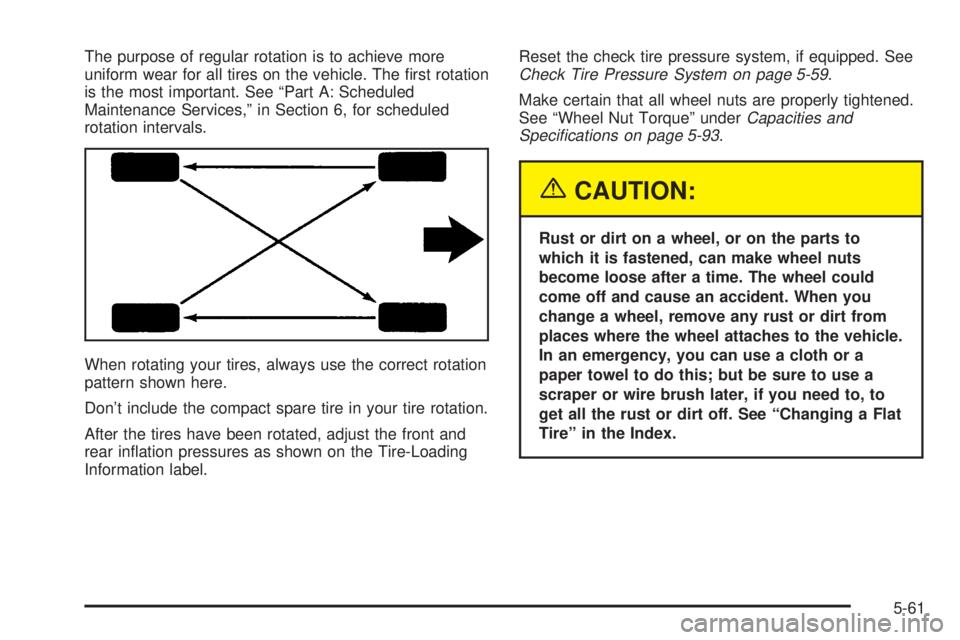
When rotating your tires, always use the correct rotation
pattern shown here.
Don't include the compact spare tire in your tire rotation.
After the tires have been rotated, adjust the front and
rear in¯ation pressures as shown on the Tire-Loading
Information label.Reset the check tire pressure system, if equipped. SeeCheck Tire Pressure System on page 5-59.
Make certain that all wheel nuts are properly tightened.
See ªWheel Nut Torqueº under
Capacities and
Speci®cations on page 5-93.
{CAUTION:
Rust or dirt on a wheel, or on the parts to
which it is fastened, can make wheel nuts
become loose after a time. The wheel could
come off and cause an accident. When you
change a wheel, remove any rust or dirt from
places where the wheel attaches to the vehicle.
In an emergency, you can use a cloth or a
paper towel to do this; but be sure to use a
scraper or wire brush later, if you need to, to
get all the rust or dirt off. See ªChanging a Flat
Tireº in the Index.
5-61
Page 297 of 380
Wheel Replacement
Replace any wheel that is bent, cracked or badly rusted
or corroded. If wheel nuts keep coming loose, the
wheel, wheel bolts and wheel nuts should be replaced.
If the wheel leaks air, replace it (except some
aluminum wheels, which can sometimes be repaired).
See your dealer if any of these conditions exist.
Your dealer will know the kind of wheel you need.
Each new wheel should have the same load-carrying
capacity, diameter, width, offset and be mounted
the same way as the one it replaces.
If you need to replace any of your wheels, wheel bolts
or wheel nuts, replace them only with new GM
original equipment parts. This way, you will be sure to
have the right wheel, wheel bolts and wheel nuts
for your vehicle.{CAUTION:
Using the wrong replacement wheels, wheel
bolts or wheel nuts on your vehicle can be
dangerous. It could affect the braking and
handling of your vehicle, make your tires lose
air and make you lose control. You could have
a collision in which you or others could be
injured. Always use the correct wheel, wheel
bolts and wheel nuts for replacement.
Notice:The wrong wheel can also cause problems
with bearing life, brake cooling, speedometer or
odometer calibration, headlamp aim, bumper height,
vehicle ground clearance and tire or tire chain
clearance to the body and chassis.
See
Changing a Flat Tire on page 5-67for more
information.
5-65
Page 298 of 380
Used Replacement Wheels
{CAUTION:
Putting a used wheel on your vehicle is
dangerous. You can't know how it's been used
or how far it's been driven. It could fail
suddenly and cause a crash. If you have to
replace a wheel, use a new GM original
equipment wheel.
Tire Chains
Notice:Use tire chains only where legal and only
when you must. Use only SAE Class ªSº type chains
that are the proper size for your tires. Install them
on the front tires and tighten them as tightly as
possible with the ends securely fastened. Drive
slowly and follow the chain manufacturer's
instructions. If you can hear the chains contacting
your vehicle, stop and retighten them. If the contact
continues, slow down until it stops. Driving too
fast or spinning the wheels with chains on will
damage your vehicle.
If a Tire Goes Flat
It's unusual for a tire to ªblowoutº while you're driving,
especially if you maintain your tires properly. If air goes
out of a tire, it's much more likely to leak out slowly.
But if you should ever have a ªblowout,º here are a few
tips about what to expect and what to do:
If a front tire fails, the ¯at tire will create a drag that
pulls the vehicle toward that side. Take your foot off the
accelerator pedal and grip the steering wheel ®rmly.
Steer to maintain lane position, and then gently brake to
a stop well out of the traffic lane.
A rear blowout, particularly on a curve, acts much like a
skid and may require the same correction you'd use
in a skid. In any rear blowout, remove your foot from the
accelerator pedal. Get the vehicle under control by
steering the way you want the vehicle to go. It may be
very bumpy and noisy, but you can still steer. Gently
brake to a stop, well off the road if possible.
5-66
Page 299 of 380
{CAUTION:
Lifting a vehicle and getting under it to do
maintenance or repairs is dangerous without
the appropriate safety equipment and training.
The jack provided with your vehicle is
designed only for changing a ¯at tire. If it is
used for anything else, you or others could be
badly injured or killed if the vehicle slips off
the jack. Use the jack provided with your
vehicle only for changing a ¯at tire.
If a tire goes ¯at, the next part shows how to use your
jacking equipment to change a ¯at tire safely.
Changing a Flat Tire
If a tire goes ¯at, avoid further tire and wheel damage
by driving slowly to a level place. Turn on your
hazard warning ¯ashers.
{CAUTION:
Changing a tire can cause an injury. The
vehicle can slip off the jack and roll over you
or other people. You and they could be badly
injured. Find a level place to change your tire.
To help prevent the vehicle from moving:
1. Set the parking brake ®rmly.
2. Put the shift lever in PARK (P).
3. Turn off the engine.
To be even more certain the vehicle won't
move, you can put blocks at the front and rear
of the tire farthest away from the one being
changed. That would be the tire on the other
side of the vehicle, at the opposite end.
5-67
Page 302 of 380
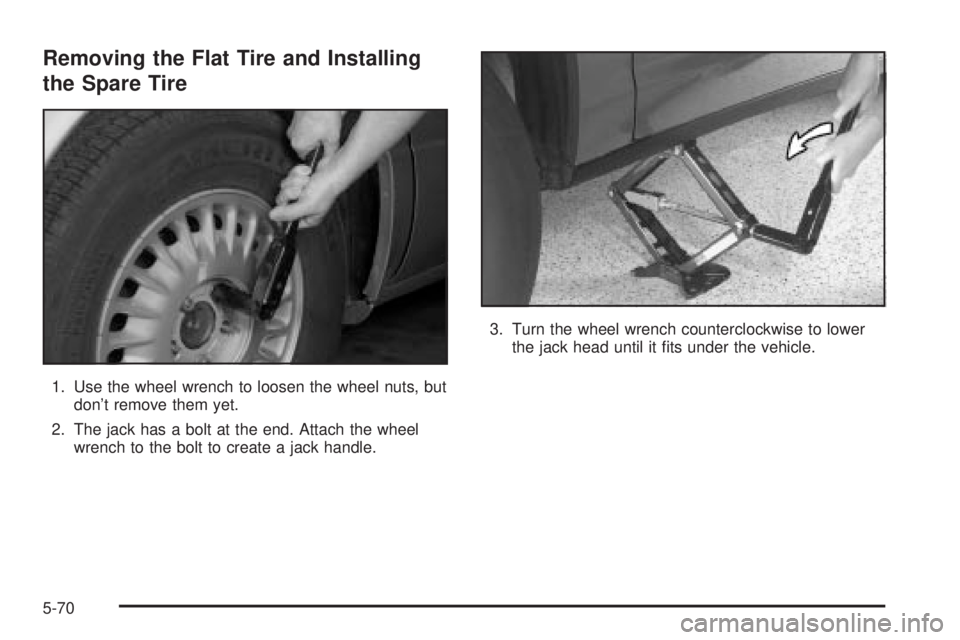
Removing the Flat Tire and Installing
the Spare Tire
1. Use the wheel wrench to loosen the wheel nuts, but
don't remove them yet.
2. The jack has a bolt at the end. Attach the wheel
wrench to the bolt to create a jack handle.3. Turn the wheel wrench counterclockwise to lower
the jack head until it ®ts under the vehicle.
5-70
Page 306 of 380
Notice:Improperly tightened wheel nuts can lead
to brake pulsation and rotor damage. To avoid
expensive brake repairs, evenly tighten the wheel
nuts in the proper sequence and to the proper
torque speci®cation. See ªCapacities and
Speci®cationsº in the index for the wheel nut torque
speci®cation.
Notice:Wheel covers won't ®t on your compact
spare. If you try to put a wheel cover on your
compact spare, you could damage the cover or the
spare.
Storing the Flat Tire and Tools
{CAUTION:
Storing a jack, a tire, or other equipment in the
passenger compartment of the vehicle could
cause injury. In a sudden stop or collision,
loose equipment could strike someone. Store
all these in the proper place.After you've put the compact spare tire on your vehicle,
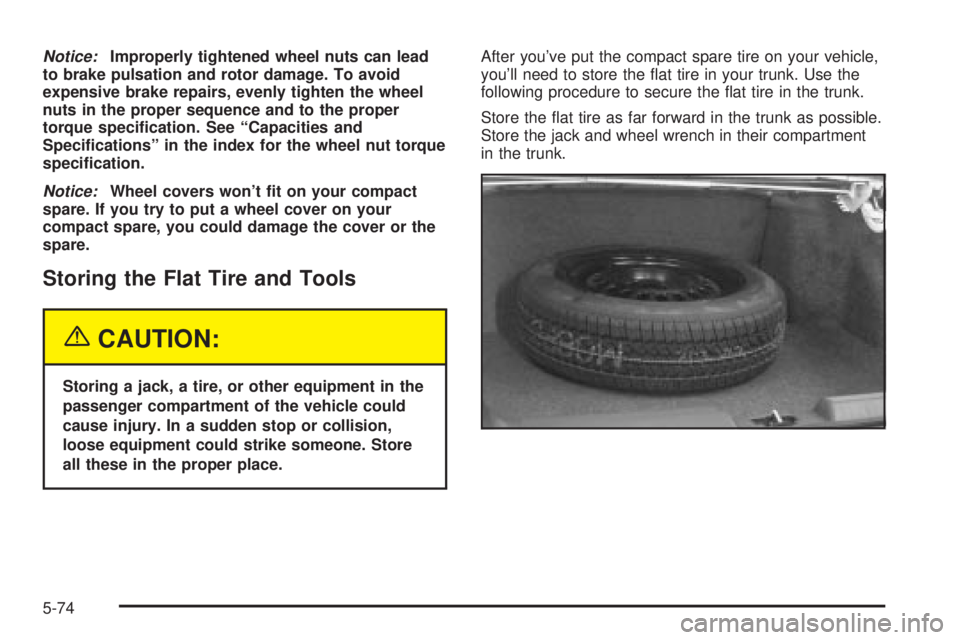
you'll need to store the ¯at tire in your trunk. Use the
following procedure to secure the ¯at tire in the trunk.
Store the ¯at tire as far forward in the trunk as possible.
Store the jack and wheel wrench in their compartment
in the trunk.
5-74
Page 370 of 380

Flash-To-Pass.................................................. 3-9
Flat Tire, Changing.........................................5-67
Flat Tire........................................................5-66
Fluid.............................................................5-21
Automatic Transaxle.....................................5-21
Power Steering...........................................5-35
Windshield Washer......................................5-36
FM Stereo.....................................................3-79
Following Distance..........................................4-40
Front Reading Lamps......................................3-19
Fuel............................................................... 5-4
Additives...................................................... 5-6
California Fuel.............................................. 5-5
Filling a Portable Fuel Container..................... 5-9
Filling Your Tank........................................... 5-7
Fuels in Foreign Countries.............................. 5-6
Gage.........................................................3-45
Gasoline Octane........................................... 5-4
Gasoline Speci®cations.................................. 5-5
System Inspection.......................................6-22
Fuses...........................................................5-86
Fuses and Circuit Breakers...........................5-86
G
Gage............................................................3-40
Engine Coolant Temperature.........................3-40
Fuel..........................................................3-45Gage (cont.)
Speedometer..............................................3-35
Tachometer.................................................3-35
Garage Door Opener.......................................2-38
Gasoline......................................................... 5-4
Octane........................................................ 5-4
Speci®cations............................................... 5-5
Gate Operator and Canadian Programming........2-41
Glove Box.....................................................2-42
GM Mobility Program for Persons with
Disabilities.................................................... 7-5
H
Hazard Warning Flashers................................... 3-6
Head Restraints............................................... 1-6
Headlamp High/Low-Beam Changer.................... 3-8
Headlamp......................................................5-47
Aiming.......................................................5-47
Horizontal Aiming.........................................5-49
Vertical Aiming............................................5-50
Headlamps On Reminder.................................3-15
Headlamps....................................................5-52
Bulb Replacement.......................................5-52
Front Turn Signal Lamps..............................5-53
Halogen Bulbs............................................5-52
Head-Up Display (HUD)...................................3-20
Heated Seats................................................... 1-4
6