DIC BUICK LESABRE 2004 Service Manual
[x] Cancel search | Manufacturer: BUICK, Model Year: 2004, Model line: LESABRE, Model: BUICK LESABRE 2004Pages: 392, PDF Size: 4.3 MB
Page 160 of 392
DIC Vehicle Personalization
The DIC can be used to program the following personal
choice features available with your vehicle:
Automatic Door Locks
Window Lock Out
Security Feedback
Delayed Locking
Perimeter Lighting
Memory Seats
Outside Curb View Assist Mirror
Driver ID
Language Selection
The personal choice settings displayed on the DIC are
determined by the transmitter used to enter the
vehicle. Each remote keyless entry transmitter was
pre-programmed to belong to DRIVER 1 or DRIVER 2
and is numbered on the back. After the unlock button on
a remote keyless entry transmitter is pressed and the
ignition is in RUN, the DIC will display the identied
driver and recall the settings previously programmed for
that driver. The settings can also be recalled by
briey pressing one of the MEMORY buttons located on
the driver’s door.If you unlock the vehicle using your door key instead of
your transmitter, the DIC will not change drivers and
will recall the information from the last transmitter used
or the last driver using the memory seat controls. If
this happens and you were not the last driver of
the vehicle, simply press your correct driver number on
the memory seat controls or press the unlock button
on your remote keyless entry transmitter.
Use the following steps for personalization programming
instructions.
1. Turn the ignition on and keep the transaxle in
PARK (P).
2. Inform the DIC which driver you are by pressing the
unlock button on your remote keyless entry
transmitter or the appropriate memory seat control.
3. Press and hold the ENG/MET button for ve
seconds. WELCOME TO BUICK OPTION
FEATURE will appear in the display.
4. The rst choice to be made will be DRIVER
ID 1 or 2. Press the ENG/MET button to toggle
between your selections within a display and
RESET to choose the current selection and move
on to the next personal choice feature.
3-50
Page 161 of 392
If you would like to exit the selection mode without
moving through each of the personal choice features,
simply press a different button on the DIC or turn off the
ignition. Whatever personal choices you made will
still be retained, even without passing through each of
the features. In order for your personal choices to save,
you must press RESET after making your selections.
If you happen to move past a selection you would like to
make a personal choice for, press the unlock button
on your remote keyless entry transmitter or press
the appropriate driver number on the seat control. This
will return you to the beginning of the option feature
programming mode.
Automatic Door Locks
The door lock modes when shifting in and out of
PARK (P), can be changed through the DIC. You can
change these modes by different selections of the
following DIC displays:
AUTO DOOR LOCKS – OFF/ON
UNLOCK – OFF/ON
UNLOCK – KEY OFF/PARK
DOOR TO UNLOCK – DRIVER/ALL
If you choose OFF for AUTO DOOR LOCKS, your door
locks will operate normally with no automatic feature.If you choose ON for AUTO DOOR LOCKS, ON for
UNLOCK and KEY OFF, your doors will lock every time
you shift out of PARK (P), and the doors will unlock
every time you stop and turn the ignition to OFF.
If you choose ON for AUTO DOOR LOCKS, ON for
UNLOCK and PARK, your doors will lock every time you
shift out of PARK (P), and the doors will unlock every
time you stop and shift into PARK (P).
If you choose ON for AUTO DOOR LOCKS, and OFF
for UNLOCK, your doors will lock every time you
shift out of PARK (P), and there will be no automatic
door unlock when shifting back into PARK (P).
If you choose ON for UNLOCK and DRIVER for DOOR
TO UNLOCK, only the driver’s door will automatically
unlock when shifting into PARK or turning the key
to OFF.
If you choose ON for UNLOCK and ALL for DOOR TO
UNLOCK, all doors will automatically unlock when
shifting into PARK or turning the key to OFF.
To change modes, do the following:
1. Move the arrow on the display between the
selections by pressing the ENG/MET button.
2. Once you have made your selection, press the
RESET button and your choice will be retained
in memory.
SeeProgrmmable Automatic Door Locks on page 2-12
for more information about this feature.
3-51
Page 162 of 392
Window Lock Out
The number of passenger windows locked out by the
window LOCK switch can be programmed through
the DIC.
If you choose R + PASS, all three passenger window
switches will be inactive when the window LOCK switch
is enabled.
If you choose REAR, only the two rear passenger
window switches will be locked out when the window
LOCK switch is enabled.
To change modes, do the following:
1. Move the arrow on the display between R + PASS
and REAR by pressing the ENG/MET button.
2. Once you have made your selection, press the
RESET button. Your choice will be retained in
memory.
For more information on this feature, see “Window Lock
Out” underPower Windows on page 2-17.
Security Feedback
By choosing different combinations of these selections,
you can choose the type of transmitter activated
feedback when locking and unlocking your vehicle with
your transmitter. Each time you make a selection by
pressing the ENG/MET button, press the RESET button
to record your choice.
KEYLESS FEEDBACK – OFF/ON
LIGHTS FEEDBACK – OFF/ON
HORN FEEDBACK – OFF/ON
If you choose ON for KEYLESS FEEDBACK you will
also need to choose LIGHTS and/or HORN FEEDBACK.
You can select the following modes:
If you choose OFF for KEYLESS FEEDBACK, you will
receive no security feedback when locking or
unlocking your vehicle.
If you choose ON for KEYLESS FEEDBACK and ON for
LIGHTS FEEDBACK, the exterior lamps will ash
twice when unlocking your vehicle and once when
locking your vehicle.
3-52
Page 163 of 392
If you choose ON for KEYLESS FEEDBACK and ON for
HORN FEEDBACK, your horn will chirp when all
doors are unlocked and when locking your vehicle.
If you choose ON for KEYLESS, LIGHTS and HORN
FEEDBACK, your exterior lamps will ash twice at
the rst unlock button press, your exterior lamps will
ash twice and the horn will chirp once at the second
unlock button press, and the exterior lamps will ash and
the horn will chirp once when locking your vehicle.
For more information on this feature, see “Security
Feedback” underRemote Keyless Entry System
Operation on page 2-5.
Delayed Locking
This feature, which delays the locking of the vehicle,
can be made active or inactive through the DIC. When
DELAYED LOCKING – OFF/ON appears on the
display, use the ENG/MET button to toggle the arrow
between OFF and ON. When you have made your
choice, press the RESET button to record your
selection.
For more information on this feature, seeDelayed
Locking on page 2-11.
Perimeter Lighting
Press the unlock button on the remote keyless entry
transmitter to turn on the DRL (high-beams at reduced
intensity), parking lamps and back-up lamps if it is
dark enough according to the Twilight Sentinel
®.
You can control activation of this feature by choosing
OFF or ON when the PERIMETER LIGHTS choice
is displayed on the DIC. Make your choice by pressing
the ENG/MET button and record your choice by
pressing the RESET button. You will then be prompted
to choose a TIMEOUT period. See “Exterior Lights”
following for more information.
For more information on this feature, see “Perimeter
Lighting” underInterior Lamps on page 3-17.
Exterior Lights
The EXTERIOR LIGHTS/TIMEOUT feature can be
changed to a desired setting by using the ENG/MET to
toggle from 5 to 30 seconds. Each toggle will increase
the time by ve seconds. Once the desired timeout
is displayed, press RESET to record your choice and
move on to the next personal choice feature.
3-53
Page 164 of 392
Memory Seats
If your vehicle has this feature, the memory seat and
mirror positions will be recalled for the identied
driver when the remote keyless entry transmitter is used
to enter the vehicle.
You can program this feature to be active by choosing
ON when the SEAT RECALL choice appears, or
inactive by choosing OFF when the SEAT RECALL
choice appears on the DIC. Make your choices
by pressing the ENG/MET button and store them to
memory by pressing the RESET button.
You can also program this feature to recall your
memory seat position or the exit seat position.
MEMORY:Choose ON when the SEAT RECALL
choice appears, and then choose MEMORY when the
RECALL POSITION choice appears.
EXIT:Choose ON when the SEAT RECALL choice
appears, and then choose EXIT when the RECALL
POSITION choice appears. The seat will move when
you enter the vehicle after unlocking it with a remote
keyless entry transmitter. This will allow for easy entry.
For more information on this feature, seeMemory
Seat and Mirrors on page 2-44.
Outside Curb View Assist Mirror
If your vehicle has the outside curb view assist mirror,
which tips the passenger mirror down while the vehicle is
in REVERSE (R), it can be made active or inactive
through the DIC. When TILT MIRRORS – OFF/ON
appears on the display, use the ENG/MET button to
toggle the arrow between OFF and ON. When you have
made your choice, press the RESET button to record
your selection. For more information on this feature, see
Outside Curb View Assist Mirror on page 2-36.
Driver ID
This feature displays the DRIVER ID, as identied by
the DIC. If this feature is ON, the DRIVER ID will
be displayed every time the ignition is turned on. If the
DRIVER ID is OFF, the DRIVER ID can be displayed
by pressing either a button on the remote keyless entry
transmitter or a memory seat button.
Language Selection
After DRIVER ID has been selected, “Language
English” will be displayed. Pressing the RESET button
selects English as the DIC language and ends
programming. If you prefer the language to be French
or Spanish, press the ENG/MET button when “Language
English” appears on the display. Hold the ENG/MET
button until the desired language is displayed, then
press the RESET button to select that language.
3-54
Page 167 of 392
To scan preset stations, press and hold one of the
SEEK arrows for more than four seconds until PSCAN
and the preset number appear on the display. You
will hear a double beep. The radio will go to the rst
preset station stored on your pushbuttons, play for a few
seconds, then go on to the next preset station. Press
one of the SEEK arrows again to stop scanning presets.
The radio will seek and scan only to stations that are
in the selected band and only to those with a strong
signal.
Setting Preset Stations
The six numbered pushbuttons let you return to your
favorite stations. You can set up to 18 stations (six FM1,
six FM2 and six AM) by performing the following steps:
1. Turn the radio on.
2. Press BAND to select FM1, FM2, or AM.
3. Tune in the desired station.
4. Press EQ to select the EQ setting. It will be stored
with the preset station.
5. Press and hold one of the six numbered
pushbuttons. When you hear the radio produce one
beep, release the pushbutton. Whenever you
press that numbered pushbutton, the station you
set will return.
6. Repeat the steps for each pushbutton.
Setting the Tone (Bass/Treble)
AUDIO:Push and release AUDIO until BASS, MID, or
TREBLE appears on the display. Then turn the
AUDIO knob to increase or to decrease. If a station is
weak or noisy, you may want to decrease the treble.
To adjust bass, midrange or treble to the middle
position, select BASS, MID, or TREBLE. Then push and
hold AUDIO for more than two seconds until you hear
a beep. BASS and a zero, MID and a zero or TREBLE
and a zero will appear on the display.
To adjust both tone controls and both speaker controls
to the middle position, end out of audio mode by
waiting ve seconds without making any changes. Then
push and hold AUDIO for more than two seconds
until you hear a beep. ALL CENTERED will appear on
the display.
Adjusting the Speakers (Balance/Fade)
AUDIO:To adjust the balance between the right
and the left speakers, push and release AUDIO until
BAL appears on the display. Then turn the AUDIO knob
to move the sound toward the right or the left speakers.
A bar graph with indicators will show how the sound
is balanced between the right and the left speakers.
3-57
Page 168 of 392
To adjust the fade between the front and the rear
speakers, push and release AUDIO until FADE appears
on the display. Then turn the AUDIO knob to move
the sound toward the front or the rear speakers. A bar
graph with indicators will show how the sound is
balanced between the front and rear speakers.
To adjust balance or fade to the middle position, select
BAL or FADE. Then push and hold AUDIO for more
than two seconds until you hear a beep. The indicator
will be centered on the display.
To adjust both tone controls and both speaker controls
to the middle position, end out of audio mode by
waiting ve seconds without making any changes. Then
press and hold AUDIO for more than two seconds
until you hear a beep. ALL CENTERED will appear on
the display.
EQ (Equalizer):Press this button to choose bass, mid
and treble equalization settings designed for different
program types.Using RDS
Your audio system is equipped with a Radio Data
System (RDS). RDS features are available for use only
on FM stations that broadcast RDS information.
Using this system, the radio can do the following:
With RDS, your radio can do the following:
Seek to stations broadcasting the selected type of
programming
Receive announcements concerning local and
national emergencies
Display messages from radio stations
Seek to stations with traffic announcements
This system relies upon receiving specic information
from these stations and will only work when the
information is available. In rare cases, a radio station
may broadcast incorrect information that will cause
the radio features to work improperly. If this happens,
contact the radio station.
While you are tuned to an RDS station, the station
name or the call letters will appear on the display,
instead of the frequency. RDS stations may also provide
the time of day, a program type (PTY) for current
programming, and the name of the program being
broadcast.
3-58
Page 175 of 392
Setting the Tone (Bass/Treble)
AUDIO:Push and release AUDIO until BASS, MID, or
TREBLE appears on the display. Then turn the
AUDIO knob to increase or to decrease. If a station is
weak or noisy, you may want to decrease the treble.
To adjust bass, midrange or treble to the middle
position, select BASS, MID, or TREBLE. Then push and
hold AUDIO for more than two seconds until you hear
a beep. BASS and a zero, MID and a zero or TREBLE
and a zero will appear on the display.
To adjust both tone controls and both speaker controls
to the middle position, end out of audio mode by
waiting ve seconds without making any changes. Then
push and hold AUDIO for more than two seconds
until you hear a beep. ALL CENTERED will appear on
the display.
EQ (Equalizer):Press this button to choose bass, mid
and treble equalization settings designed for different
program types.
Adjusting the Speakers (Balance/Fade)
AUDIO:To adjust the balance between the right
and the left speakers, push and release AUDIO until
BAL appears on the display. Then turn the AUDIO knob
to move the sound toward the right or the left speakers.
A bar graph with indicators will show how the sound
is balanced.
To adjust the fade between the front and the rear
speakers, push and release AUDIO until FADE appears
on the display. Then turn the AUDIO knob to move
the sound toward the front or the rear speakers. A bar
graph with indicators will show how the sound is
balanced.
To adjust balance or fade to the middle position, select
BAL or FADE. Then push and hold AUDIO for more
than two seconds until you hear a beep. The indicator
will be centered on the display.
To adjust both tone controls and both speaker controls
to the middle position, end out of audio mode by
waiting ve seconds without making any changes. Then
press and hold AUDIO for more than two seconds
until you hear a beep. ALL CENTERED will appear on
the display.
3-65
Page 178 of 392
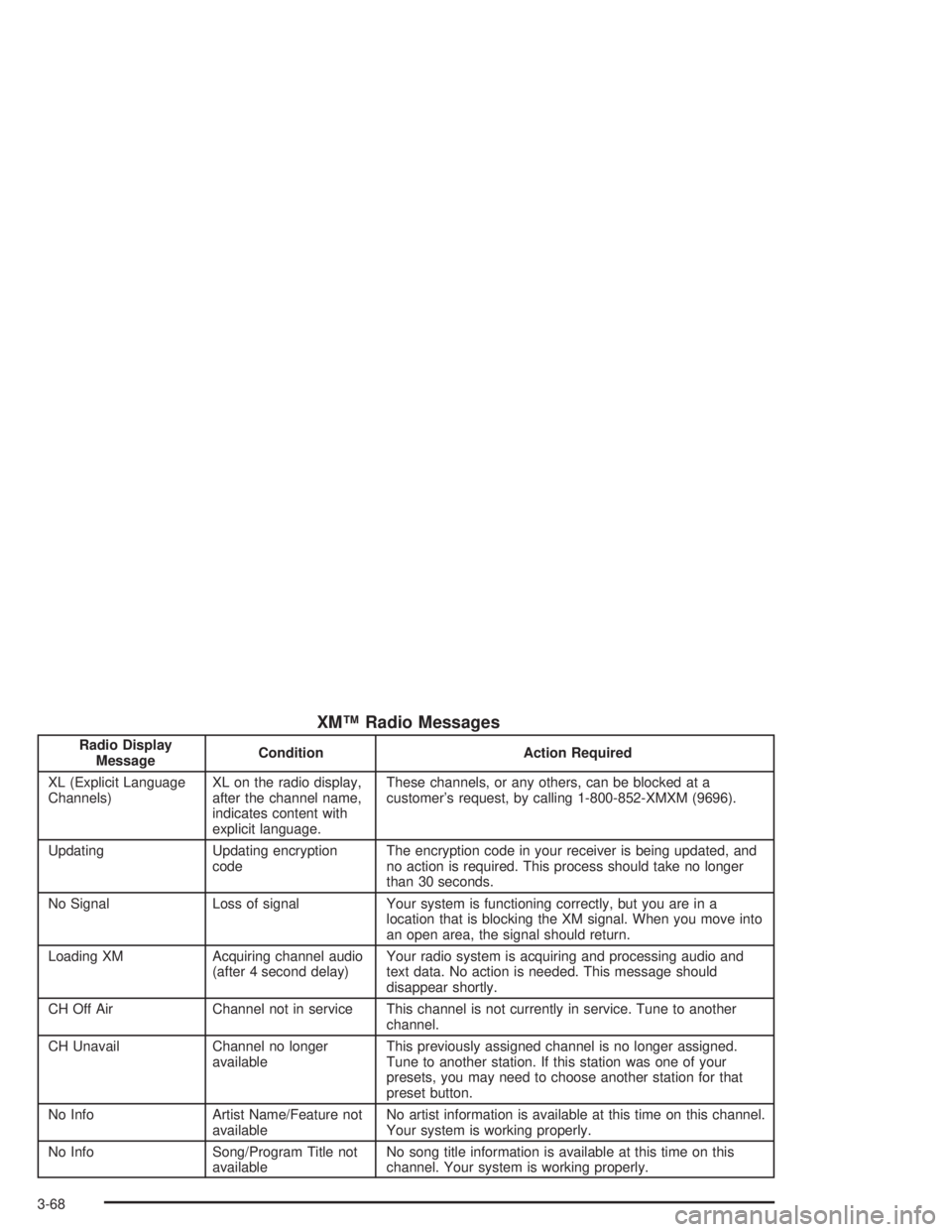
XM™ Radio Messages
Radio Display
MessageCondition Action Required
XL (Explicit Language
Channels)XL on the radio display,
after the channel name,
indicates content with
explicit language.These channels, or any others, can be blocked at a
customer’s request, by calling 1-800-852-XMXM (9696).
Updating Updating encryption
codeThe encryption code in your receiver is being updated, and
no action is required. This process should take no longer
than 30 seconds.
No Signal Loss of signal Your system is functioning correctly, but you are in a
location that is blocking the XM signal. When you move into
an open area, the signal should return.
Loading XM Acquiring channel audio
(after 4 second delay)Your radio system is acquiring and processing audio and
text data. No action is needed. This message should
disappear shortly.
CH Off Air Channel not in service This channel is not currently in service. Tune to another
channel.
CH Unavail Channel no longer
availableThis previously assigned channel is no longer assigned.
Tune to another station. If this station was one of your
presets, you may need to choose another station for that
preset button.
No Info Artist Name/Feature not
availableNo artist information is available at this time on this channel.
Your system is working properly.
No Info Song/Program Title not
availableNo song title information is available at this time on this
channel. Your system is working properly.
3-68
Page 188 of 392
Theft-Deterrent Feature
THEFTLOCK®is designed to discourage theft of your
radio. It works by using a secret code to disable all radio
functions whenever battery power is removed and the
radio is placed in a different vehicle. This feature
requires no user input to be activated. It is automatically
armed when it is put into the vehicle for the rst time.
When the ignition is turned off, the blinking red light
indicates that THEFTLOCK
®is armed.
If THEFTLOCK
®is activated, your radio will not operate
if stolen. The radio will display LOCKED and a red
LED indicator light will come on above the key symbol
to indicate a locked condition. If this occurs, the radio will
need to be returned to the dealer.
Audio Steering Wheel Controls
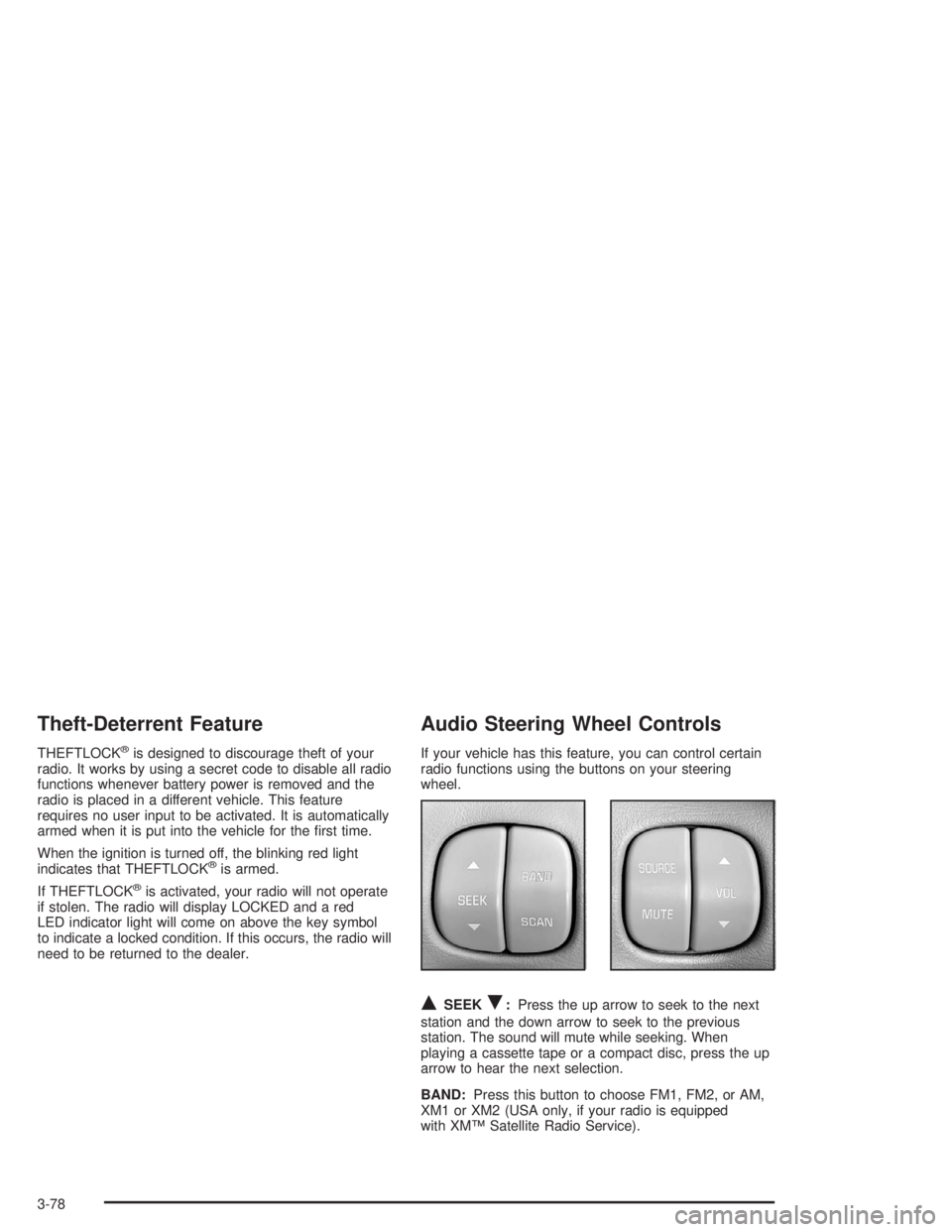
If your vehicle has this feature, you can control certain
radio functions using the buttons on your steering
wheel.
QSEEKR:Press the up arrow to seek to the next
station and the down arrow to seek to the previous
station. The sound will mute while seeking. When
playing a cassette tape or a compact disc, press the up
arrow to hear the next selection.
BAND:Press this button to choose FM1, FM2, or AM,
XM1 or XM2 (USA only, if your radio is equipped
with XM™ Satellite Radio Service).
3-78