remote control BUICK LUCERNE 2006 User Guide
[x] Cancel search | Manufacturer: BUICK, Model Year: 2006, Model line: LUCERNE, Model: BUICK LUCERNE 2006Pages: 416, PDF Size: 2.6 MB
Page 174 of 416
Driver Information Center (DIC)
Your vehicle has a Driver Information Center (DIC).
All messages will appear in the DIC display located
below the speedometer in the instrument panel cluster.
The DIC buttons are located on the instrument panel,
to the left of the instrument panel cluster.
The DIC comes on when the ignition is on. After a short
delay, the DIC will display the information that was
last displayed before the engine was turned off.
The DIC displays trip, fuel, and vehicle system
information, and warning messages if a system problem
is detected. The bottom line of the DIC shows the
shift lever position indicator. SeeAutomatic Transaxle
Operation on page 2-25for more information.
If your vehicle’s DIC has these features, the compass
direction and the outside air temperature may also
display on the DIC when viewing the trip and fuel
information. The compass direction appears on the
top right corner of the DIC display. The outside
air temperature automatically appears in the bottom
right corner of the DIC display. If there is a problem with
the system that controls the temperature display, the
numbers will be replaced with dashes. If this occurs,
have the vehicle serviced by your GM dealer.
The DIC also allows some features to be customized.
SeeDIC Vehicle Customization on page 3-65for
more information.
DIC Controls and Displays
The DIC has different displays which can be accessed
by pressing the DIC buttons located on the instrument
panel, to the left of the instrument panel cluster.
DIC Buttons
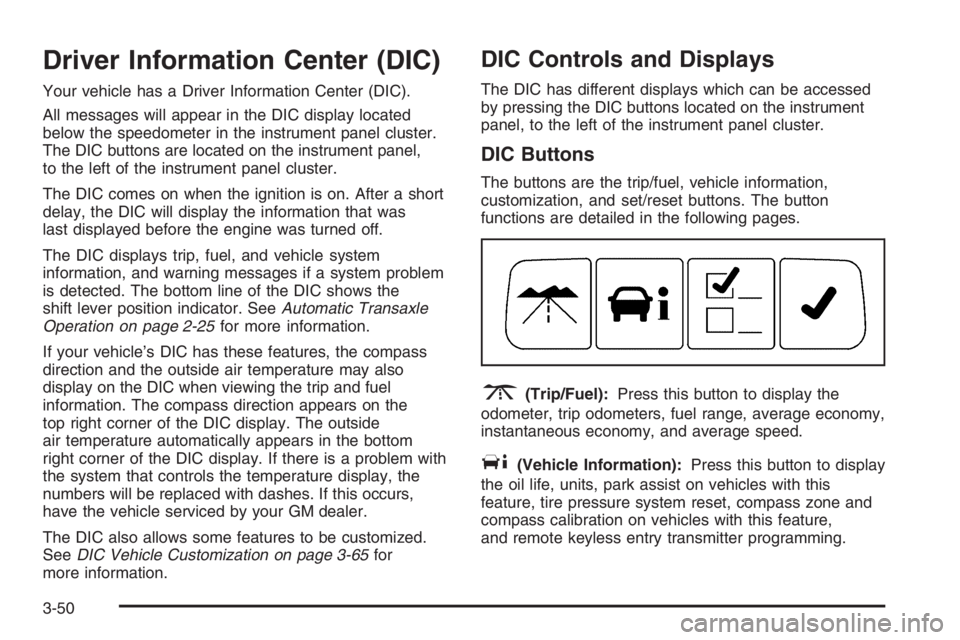
The buttons are the trip/fuel, vehicle information,
customization, and set/reset buttons. The button
functions are detailed in the following pages.
3(Trip/Fuel):Press this button to display the
odometer, trip odometers, fuel range, average economy,
instantaneous economy, and average speed.
T(Vehicle Information):Press this button to display
the oil life, units, park assist on vehicles with this
feature, tire pressure system reset, compass zone and
compass calibration on vehicles with this feature,
and remote keyless entry transmitter programming.
3-50
Page 184 of 416

PARK ASSIST OFF
After the vehicle has been started, this message will
remind the driver that the Ultrasonic Rear Parking
Assist (URPA) system has been turned off. Press the
set/reset button to acknowledge this message and clear
it from the DIC display. To turn the URPA system
back on, see “Park Assist” underDIC Controls and
Displays on page 3-50. SeeUltrasonic Rear Parking
Assist (URPA) on page 3-18for more information.
PASSENGER DOOR OPEN
This message will display when the front passenger’s
door is not closed properly. When this message
appears, you should make sure that the front
passenger’s door is closed completely.
RAINSENSE WIPERS ACTIVE
If your vehicle has this feature, this message will
display while the Rainsense™ system is active.
SeeRainsense™ II Wipers on page 3-9for more
information.
REMOTE KEY LEARNING ACTIVE
This message will display while you are matching a
remote keyless entry transmitter to your vehicle.
See “Matching Transmitter(s) to Your Vehicle” under
Remote Keyless Entry System Operation on page 2-6
andDIC Controls and Displays on page 3-50for
more information.
REPLACE BATTERY IN REMOTE KEY
This message will display when the battery in the remote
keyless entry transmitter needs to be replaced. To
replace the battery, see “Battery Replacement” under
Remote Keyless Entry System Operation on page 2-6.
RIGHT REAR DOOR OPEN
This message will display when the passenger’s side
rear door is not closed properly. When this message
appears, you should make sure that the passenger’s
door is closed completely.
3-60
Page 412 of 416
Power (cont.)
Inadvertent Battery Saver.............................3-18
Lumbar Controls........................................... 1-3
Retained Accessory (RAP)............................2-22
Seat ............................................................ 1-2
Steering Fluid.............................................5-38
Windows....................................................2-17
Pretensioners, Safety Belt................................1-29
Programmable Automatic Door Locks.................2-13
Q
Questions and Answers About Safety Belts.........1-15
R
Radiator Pressure Cap....................................5-27
Radios..........................................................3-74
Care of Your CD Player..............................3-101
Care of Your CDs ......................................3-100
Navigation/Radio System,
see Navigation Manual..............................3-98
Radio with CD....................................3-77, 3-82
Setting the Time..................................3-75, 3-76
Theft-Deterrent............................................3-98
Understanding Reception............................3-100
Rainsense™ II Wipers....................................... 3-9Rear Door Security Locks................................2-13
Rear Safety Belt Comfort Guides......................1-27
Rear Seat Armrest..........................................2-46
Rear Seat Passengers, Safety Belts..................1-25
Rearview Mirror, Automatic Dimming..................2-33
Rearview Mirror, Automatic Dimming with
Compass....................................................2-33
Rearview Mirror with Compass and
Temperature...............................................1-10
Rearview Mirrors.............................................2-33
Reclining Seatbacks.......................................... 1-6
Recommended Fluids and Lubricants.................6-12
Recreational Vehicle Towing.............................4-34
Remote Keyless Entry System............................ 2-5
Remote Keyless Entry System, Operation............ 2-6
Removing the Flat Tire and Installing the
Spare Tire..................................................5-75
Removing the Spare Tire and Tools...................5-74
Replacement Bulbs.........................................5-55
Reporting Safety Defects
Canadian Government..................................7-14
General Motors...........................................7-14
United States Government............................7-13
Restraint System Check
Checking the Restraint Systems....................1-69
Replacing Restraint System Parts
After a Crash..........................................1-70
10
Page 415 of 416
Tires (cont.)
Ination - Tire Pressure................................5-62
Inspection and Rotation................................5-65
Installing the Spare Tire................................5-75
Removing the Flat Tire.................................5-75
Removing the Spare Tire and Tools...............5-74
Storing a Flat or Spare Tire and Tools............5-81
Tire Sidewall Labeling..................................5-57
Tire Terminology and Denitions....................5-59
Uniform Tire Quality Grading.........................5-68
Wheel Alignment and Tire Balance.................5-70
Wheel Replacement.....................................5-70
When It Is Time for New Tires......................5-66
Towing
Recreational Vehicle.....................................4-34
Towing a Trailer..........................................4-36
Your Vehicle...............................................4-34
Traction
Control System (TCS).................................... 4-9
Control System Warning Light.......................3-41
StabiliTrak
®System.....................................4-10
Transaxle
Fluid, Automatic...........................................5-21
Transaxle Operation, Automatic.........................2-25
Trip Odometer................................................3-35
Trunk............................................................2-14
Turn and Lane-Change Signals.......................... 3-7
Turn Signal/Multifunction Lever........................... 3-7
U
Ultrasonic Rear Parking Assist (URPA)...............3-18
Understanding Radio Reception.......................3-100
Uniform Tire Quality Grading............................5-68
Universal Home Remote System.......................2-40
Operation...................................................2-41
V
Vehicle
Control........................................................ 4-6
Damage Warnings........................................... iv
Loading......................................................4-29
Symbols......................................................... iv
Vehicle Customization, DIC..............................3-65
Vehicle Data Collection and Event Data
Recorders.................................................... 7-9
Vehicle Identication
Number (VIN).............................................5-92
Service Parts Identication Label...................5-92
Vehicle Personalization....................................2-46
Memory Seat and Mirrors.............................2-47
Ventilation Adjustment......................................3-31
Visors...........................................................2-18
13