instrument panel BUICK LUCERNE 2006 Owner's Guide
[x] Cancel search | Manufacturer: BUICK, Model Year: 2006, Model line: LUCERNE, Model: BUICK LUCERNE 2006Pages: 416, PDF Size: 2.6 MB
Page 153 of 416

Sensors
The solar sensor, located in the defrost grille, middle of
the instrument panel, monitors the solar radiation.
Do not cover the solar sensor or the system will not work
properly.
There is also an interior temperature sensor located
next to the steering wheel that measures the
temperature of the air inside your vehicle.There is also an exterior temperature sensor located
behind the front grille. This sensor reads the outside air
temperature and helps maintain the temperature
inside the vehicle. Any cover on the front of the
vehicle could cause a false reading in the displayed
temperature.
In order to prevent false temperature readings at
startup, the displayed temperature will not change
until the following occurs:
Vehicle speed is above 10 mph (16 k/mh) for
5 minutes.
Vehicle speed is above 32 mph (51 k/mh) for
2 and a half minutes.
The climate control system uses the information from
these sensors to maintain your comfort setting by
adjusting the outlet temperature, fan speed, and the
air delivery mode. The system may also supply
cooler air to the side of the vehicle facing the sun.
The recirculation mode will also be used as needed to
maintain cool outlet temperatures.
3-29
Page 158 of 416
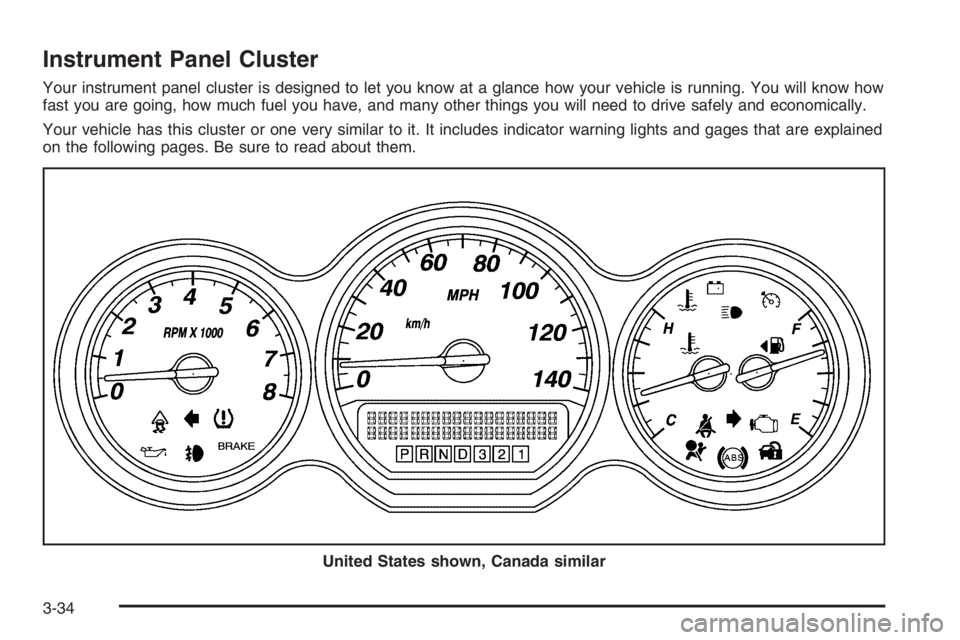
Instrument Panel Cluster
Your instrument panel cluster is designed to let you know at a glance how your vehicle is running. You will know how
fast you are going, how much fuel you have, and many other things you will need to drive safely and economically.
Your vehicle has this cluster or one very similar to it. It includes indicator warning lights and gages that are explained
on the following pages. Be sure to read about them.
United States shown, Canada similar
3-34
Page 160 of 416

Passenger Safety Belt Reminder
Light
Several seconds after the key is turned to RUN or
START, a chime will sound for several seconds to
remind the front passenger to buckle their safety belt.
This would only occur if the passenger airbag is
enabled. SeePassenger Sensing System on page 1-63
for more information. The passenger safety belt light
will also come on and stay on for several seconds, then
it will ash for several more.
This chime and light will be
repeated if the passenger
remains unbuckled and
the vehicle is in motion.
If the passenger’s safety belt is buckled, neither the
chime nor the light will come on.
Airbag Readiness Light
There is an airbag readiness light on the instrument
panel, which shows the airbag symbol. The system
checks the airbag’s electrical system for malfunctions.
The light tells you if there is an electrical problem.
The system check includes the airbag sensors, the
airbag modules, the wiring and the diagnostic module.
For more information on the airbag system, see
Airbag System on page 1-52.
This light will come on
when you start your
vehicle, and it will ash for
a few seconds. Then the
light should go out.
This means the system
is ready.
If the airbag readiness light stays on after you start the
vehicle or comes on when you are driving, your
airbag system may not work properly. Have your vehicle
serviced right away.
3-36
Page 174 of 416
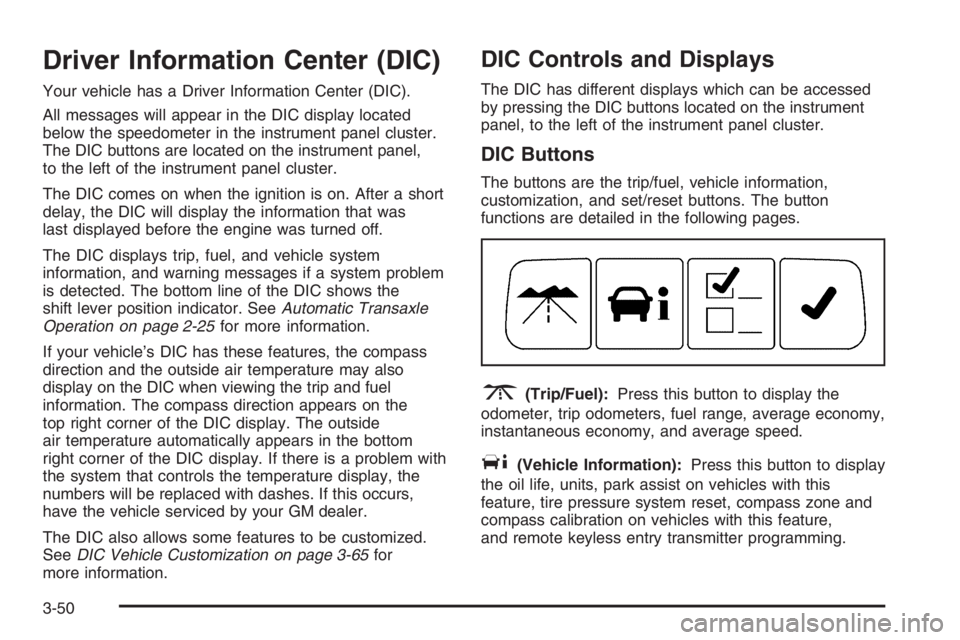
Driver Information Center (DIC)
Your vehicle has a Driver Information Center (DIC).
All messages will appear in the DIC display located
below the speedometer in the instrument panel cluster.
The DIC buttons are located on the instrument panel,
to the left of the instrument panel cluster.
The DIC comes on when the ignition is on. After a short
delay, the DIC will display the information that was
last displayed before the engine was turned off.
The DIC displays trip, fuel, and vehicle system
information, and warning messages if a system problem
is detected. The bottom line of the DIC shows the
shift lever position indicator. SeeAutomatic Transaxle
Operation on page 2-25for more information.
If your vehicle’s DIC has these features, the compass
direction and the outside air temperature may also
display on the DIC when viewing the trip and fuel
information. The compass direction appears on the
top right corner of the DIC display. The outside
air temperature automatically appears in the bottom
right corner of the DIC display. If there is a problem with
the system that controls the temperature display, the
numbers will be replaced with dashes. If this occurs,
have the vehicle serviced by your GM dealer.
The DIC also allows some features to be customized.
SeeDIC Vehicle Customization on page 3-65for
more information.
DIC Controls and Displays
The DIC has different displays which can be accessed
by pressing the DIC buttons located on the instrument
panel, to the left of the instrument panel cluster.
DIC Buttons
The buttons are the trip/fuel, vehicle information,
customization, and set/reset buttons. The button
functions are detailed in the following pages.
3(Trip/Fuel):Press this button to display the
odometer, trip odometers, fuel range, average economy,
instantaneous economy, and average speed.
T(Vehicle Information):Press this button to display
the oil life, units, park assist on vehicles with this
feature, tire pressure system reset, compass zone and
compass calibration on vehicles with this feature,
and remote keyless entry transmitter programming.
3-50
Page 181 of 416

CHECK TIRE PRESSURE
This warning message and the tire pressure light on
the instrument panel cluster will appear when the
air pressure in one of the tires is too low or too high.
Check the vehicle’s tire pressure as soon as possible,
and ll or deate the affected tire to the appropriate
level. The correct tire ination pressure should be set to
those shown on the tire-loading information label on
the vehicle. SeeLoading Your Vehicle on page 4-29and
Tire Pressure Light on page 3-44for more information.
This message is reset when it is acknowledged.
However, you must also reset the tire pressure system.
See “Reset Tire Pressure System” underDIC Controls
and Displays on page 3-50for more information.
DRIVER DOOR OPEN
This message will display when the driver’s door is not
closed properly. When this message appears, you should
make sure that the driver’s door is closed completely.
ENGINE HOT A/C (Air Conditioning) OFF
This message will display when the engine coolant
becomes hotter than the normal operating temperature.
To avoid added strain on a hot engine, the air
conditioning compressor is automatically turned off.
When the coolant temperature returns to normal,
the A/C operation will automatically resume. You can
continue to drive your vehicle. If this message continues
to appear, have the system repaired by your GM dealer
as soon as possible to avoid compressor damage.
ENGINE OIL LOW ADD OIL
This message will display when the vehicle’s engine oil
is low. Fill the oil to the proper level as soon as
possible. SeeEngine Compartment Overview on
page 5-12for the engine oil ll location. Also, see
Engine Oil on page 5-15for information on the kind of
oil to use and the proper oil level.
3-57
Page 182 of 416
ENGINE OVERHEATED IDLE ENGINE
Notice:If you drive your vehicle while the engine is
overheating, severe engine damage may occur.
If an overheat warning appears on the instrument
panel cluster and/or DIC, stop the vehicle as soon as
possible. Do not increase the engine speed above
normal idling speed. SeeEngine Overheating
on page 5-27for more information.
This message will display when the engine coolant
temperature is too hot. Stop and allow the vehicle to idle
until it cools down.
ENGINE OVERHEATED STOP ENGINE
Notice:If you drive your vehicle while the engine
is overheating, severe engine damage may occur.
If an overheat warning appears on the instrument
panel cluster and/or DIC, stop the vehicle as soon as
possible. Do not increase the engine speed above
normal idling speed. SeeEngine Overheating
on page 5-27for more information.
This message will display along with a continuous
chime when the engine has overheated. Stop and turn
the engine off immediately to avoid severe engine
damage. SeeEngine Overheating on page 5-27.
ENGINE POWER IS REDUCED
This message will display when the vehicle’s engine
power is reduced. Reduced engine power can affect the
vehicle’s ability to accelerate. If this message is on,
but there is no reduction in performance, proceed
to your destination. The performance may be reduced
the next time the vehicle is driven. The vehicle may
be driven at a reduced speed while this message is on,
but acceleration and speed may be reduced. Anytime
this message stays on, the vehicle should be taken
to your GM dealer for service as soon as possible.
ERROR
This message will display when viewing the odometer or
trip odometers if there is a problem with the instrument
panel cluster. See your GM dealer for service.
FUEL LEVEL LOW
This message will display when your vehicle is low on
fuel. You should rell the fuel tank as soon as possible.
SeeFuel Gage on page 3-49andFilling the Tank on
page 5-8for more information.
3-58
Page 183 of 416

HEATED WASH (Washer) FLUID
SYSTEM OFF
This message will display when you manually turn off
the heated windshield washer uid system or when the
system automatically turns off. See “Heated Washer
Fluid” underWindshield Washer on page 3-10for more
information.
HEATING WASH (Washer) FLUID
WASH (Washer) WIPES PENDING
This message will display when you turn on the heated
windshield washer uid system. See “Heated Washer
Fluid” underWindshield Washer on page 3-10for more
information.
HOOD OPEN
If your vehicle has the remote start feature, this message
will display when the hood is not closed properly.
When this message appears, you should make sure that
the hood is closed completely. SeeHood Release on
page 5-11.
ICE POSSIBLE DRIVE WITH CARE
This message will display when the outside air
temperature is cold enough to create icy road conditions.
Adjust your driving accordingly.
LEFT REAR DOOR OPEN
This message will display when the driver’s side rear
door is not closed properly. When this message
appears, you should make sure that the passenger’s
door is closed completely.
OIL PRESSURE LOW STOP ENGINE
Notice:If you drive your vehicle while the engine
oil pressure is low, severe engine damage may
occur. If a low oil pressure warning appears on the
instrument panel cluster and/or DIC, stop the
vehicle as soon as possible. Do not drive the vehicle
until the cause of the low oil pressure is corrected.
SeeEngine Oil on page 5-15for more information.
This message will display when the vehicle’s engine oil
pressure is low. The oil pressure light will also appear
on the instrument panel cluster. SeeOil Pressure Light
on page 3-47.
Stop the vehicle immediately, as engine damage can
result from driving a vehicle with low oil pressure.
Have the vehicle serviced by your GM dealer as soon
as possible when this message is displayed.
3-59
Page 185 of 416
SERVICE A/C (Air Conditioning)
SYSTEM
This message will display when the electronic sensors
that control the air conditioning and heating systems are
no longer working. Have the climate control system
serviced by your GM dealer if you notice a drop
in heating and air conditioning efficiency.
SERVICE AIR BAG
This message will display when there is a problem with
the airbag system. Have your vehicle serviced by
your GM dealer immediately. SeeAirbag Readiness
Light on page 3-36for more information.
SERVICE BATTERY CHARGING
SYSTEM
This message will display when there is a problem with
the generator and battery charging systems. Driving
with this problem could drain your battery. Turn off all
unnecessary accessories. Stop and turn off the
vehicle as soon as it is safe to do so. Have the electrical
system checked by your GM dealer immediately.
SERVICE BRAKE ASSIST
This message will display if there is a problem with the
brake system. The brake system warning light and
the anti-lock brake system warning light may also be
displayed on the instrument panel cluster. SeeBrake
System Warning Light on page 3-40andAnti-Lock
Brake System Warning Light on page 3-41for more
information. If this happens, stop as soon as possible
and turn off the vehicle. Restart the vehicle and
check for the message on the DIC display. If the
message is displayed or appears again when you begin
driving, the brake system needs service. See your
GM dealer as soon as possible. SeeBrakes on
page 5-40for more information.
SERVICE BRAKE SYSTEM
This message will display if the ignition is on to inform
the driver that the brake uid level is low. Have the
brake system serviced by your GM dealer as soon as
possible. The brake system warning light will also
appear on the instrument panel cluster when this
message appears on the DIC. SeeBrake System
Warning Light on page 3-40.
3-61
Page 186 of 416
SERVICE PARK ASSIST
This message will display if there is a problem with the
Ultrasonic Rear Parking Assist (URPA) system.
Do not use this system to help you park. SeeUltrasonic
Rear Parking Assist (URPA) on page 3-18for more
information. See your GM dealer for service.
SERVICE POWER STEERING
Your vehicle may have a speed variable assist steering
system. SeeSteering on page 4-11.
This message will display if a problem is detected with
the speed variable assist steering system. When this
message is displayed, you may notice that the
effort required to steer the vehicle decreases or feels
lighter, but you will still be able to steer the vehicle.
SERVICE STABILITRAK
If your vehicle has StabiliTrak®, this message will
display if there has been a problem detected with
StabiliTrak
®. A warning light will also appear on
the instrument panel cluster. SeeTraction Control
System (TCS) Warning Light on page 3-41.
SeeStabiliTrak
®System on page 4-10for more
information.If this message turns on while you are driving, pull off
the road as soon as possible and stop carefully.
Try resetting the system by turning the ignition off and
then back on. If this message still stays on or turns back
on again while you are driving, your vehicle needs
service. Have the StabiliTrak
®System inspected by your
GM dealer as soon as possible.
SERVICE SUSPENSION SYSTEM
This message will display to indicate that the suspension
system is not operating properly. See your GM dealer
for service.
SERVICE THEFT SYSTEM
This message will display when there is a problem with
the theft-deterrent system programmed in the key.
A fault has been detected in the system which means
that the system is disabled and it is not protecting
the vehicle. The vehicle usually restarts; however,
you may want to take the vehicle to your GM dealer
before turning off the engine. SeePASS-Key
®III+
on page 2-19for more information.
3-62
Page 187 of 416
SERVICE TRACTION CONTROL
If your vehicle has the traction control system, this
message will display when the system is not functioning
properly. A warning light will also appear on the
instrument panel cluster. SeeTraction Control System
(TCS) Warning Light on page 3-41. SeeTraction Control
System (TCS) on page 4-9for more information.
Have the traction control system serviced by your
GM dealer as soon as possible.
SERVICE TRANSMISSION
This message will display when there is a problem with
the transaxle. See your GM dealer for service.
SERVICE VEHICLE SOON
This message will display when a non-emissions related
malfunction occurs. Have the vehicle serviced by your
GM dealer as soon as possible.
SPEED LIMITED TO XXX MPH (km/h)
This message will display when your vehicle speed is
limited to 80 mph (128 km/h) because the vehicle
detects a problem in the speed variable assist steering,
magnetic ride control, or automatic leveling control
systems. Have your vehicle serviced by your GM dealer.
STABILITRAK NOT READY
If your vehicle has StabiliTrak®, this message may
display and the Traction Control System and
StabiliTrak
®Warning Light on the instrument panel
cluster may be on after rst driving the vehicle
and exceeding 19 mph (30 km/h) for 30 seconds.
The StabiliTrak
®system is not functional until the light
has turned off. SeeStabiliTrak®System on page 4-10
for more information.
STARTING DISABLED SERVICE
THROTTLE
This message will display if the starting of the engine is
disabled due to the electronic throttle control system.
Have your vehicle serviced by your GM dealer
immediately.
This message will only appear while the ignition is in RUN,
and will not disappear until the problem is resolved.
This message cannot be acknowledged.
THEFT ATTEMPTED
This message will display if the content theft-deterrent
system has detected a break-in attempt while you
were away from your vehicle. SeeContent
Theft-Deterrent on page 2-18for more information.
3-63