Accessory BUICK LUCERNE 2006 Owner's Manual
[x] Cancel search | Manufacturer: BUICK, Model Year: 2006, Model line: LUCERNE, Model: BUICK LUCERNE 2006Pages: 416, PDF Size: 2.6 MB
Page 77 of 416
Keys...............................................................2-3
Remote Keyless Entry System.........................2-5
Remote Keyless Entry System Operation...........2-6
Doors and Locks............................................2-11
Door Locks..................................................2-11
Power Door Locks........................................2-11
Delayed Locking...........................................2-12
Programmable Automatic Door Locks..............2-13
Rear Door Security Locks..............................2-13
Lockout Protection........................................2-14
Trunk..........................................................2-14
Windows........................................................2-16
Power Windows............................................2-17
Sun Visors...................................................2-18
Theft-Deterrent Systems..................................2-18
Content Theft-Deterrent.................................2-18
PASS-Key
®III+.............................................2-19
PASS-Key®III+ Operation..............................2-20
Starting and Operating Your Vehicle................2-21
New Vehicle Break-In....................................2-21
Ignition Positions..........................................2-22
Retained Accessory Power (RAP)...................2-22
Starting the Engine.......................................2-23Engine Coolant Heater..................................2-24
Automatic Transaxle Operation.......................2-25
Parking Brake..............................................2-28
Shifting Into Park (P).....................................2-29
Shifting Out of Park (P).................................2-30
Parking Over Things That Burn.......................2-31
Engine Exhaust............................................2-31
Running the Engine While Parked...................2-32
Mirrors...........................................................2-33
Manual Rearview Mirror.................................2-33
Automatic Dimming Rearview Mirror................2-33
Automatic Dimming Rearview Mirror with
Compass.................................................2-33
Outside Power Mirrors...................................2-36
Outside Curb View Assist Mirror.....................2-36
Outside Convex Mirror...................................2-37
Outside Automatic Dimming
Heated Mirror...........................................2-37
OnStar®System.............................................2-38
Universal Home Remote System......................2-40
Universal Home Remote
System Operation......................................2-41
Section 2 Features and Controls
2-1
Page 93 of 416
Power Windows
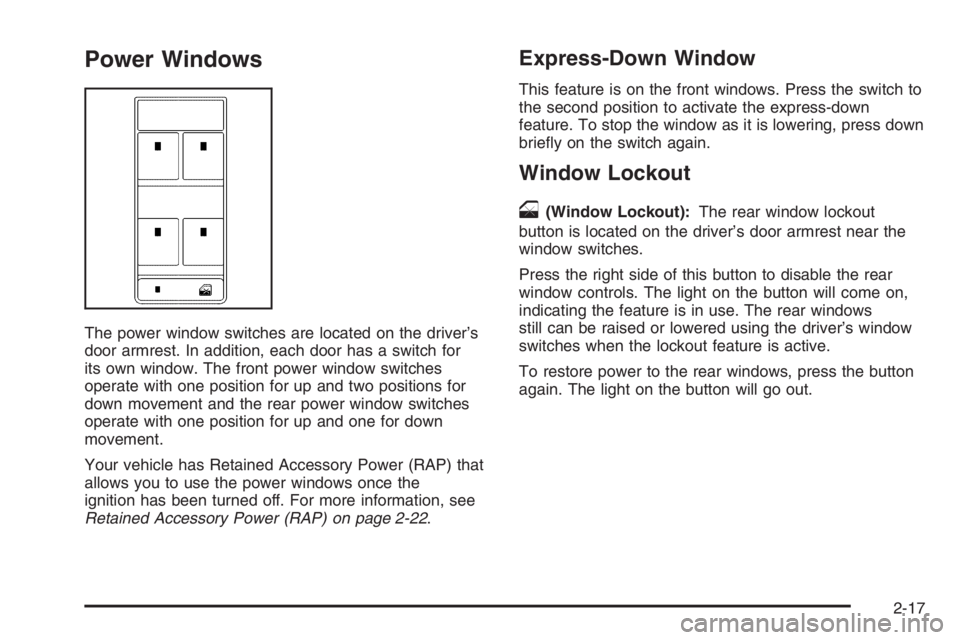
The power window switches are located on the driver’s
door armrest. In addition, each door has a switch for
its own window. The front power window switches
operate with one position for up and two positions for
down movement and the rear power window switches
operate with one position for up and one for down
movement.
Your vehicle has Retained Accessory Power (RAP) that
allows you to use the power windows once the
ignition has been turned off. For more information, see
Retained Accessory Power (RAP) on page 2-22.
Express-Down Window
This feature is on the front windows. Press the switch to
the second position to activate the express-down
feature. To stop the window as it is lowering, press down
briey on the switch again.
Window Lockout
o
(Window Lockout):The rear window lockout
button is located on the driver’s door armrest near the
window switches.
Press the right side of this button to disable the rear
window controls. The light on the button will come on,
indicating the feature is in use. The rear windows
still can be raised or lowered using the driver’s window
switches when the lockout feature is active.
To restore power to the rear windows, press the button
again. The light on the button will go out.
2-17
Page 98 of 416
Ignition Positions
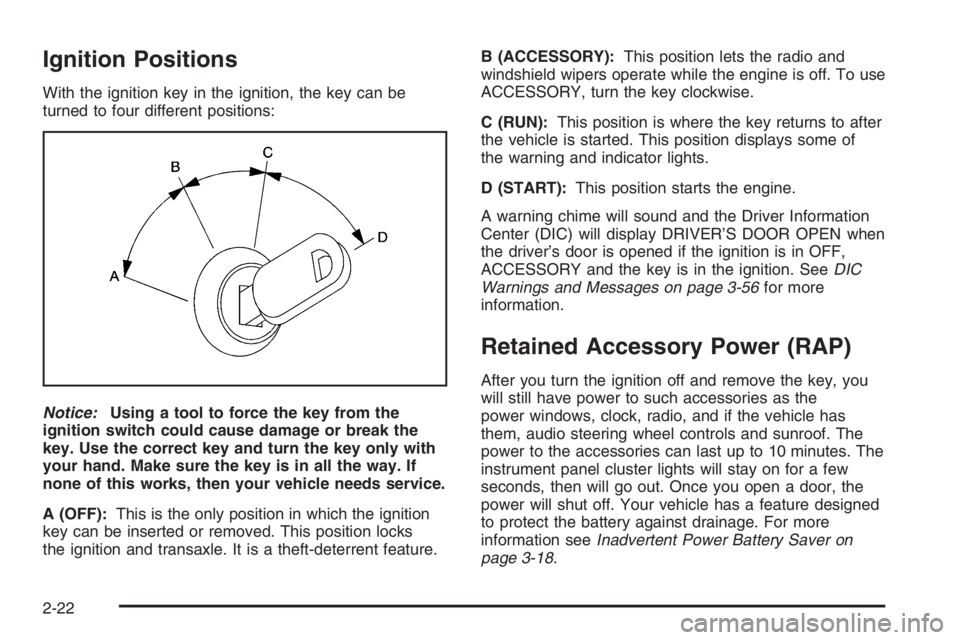
With the ignition key in the ignition, the key can be
turned to four different positions:
Notice:Using a tool to force the key from the
ignition switch could cause damage or break the
key. Use the correct key and turn the key only with
your hand. Make sure the key is in all the way. If
none of this works, then your vehicle needs service.
A (OFF):This is the only position in which the ignition
key can be inserted or removed. This position locks
the ignition and transaxle. It is a theft-deterrent feature.B (ACCESSORY):This position lets the radio and
windshield wipers operate while the engine is off. To use
ACCESSORY, turn the key clockwise.
C (RUN):This position is where the key returns to after
the vehicle is started. This position displays some of
the warning and indicator lights.
D (START):This position starts the engine.
A warning chime will sound and the Driver Information
Center (DIC) will display DRIVER’S DOOR OPEN when
the driver’s door is opened if the ignition is in OFF,
ACCESSORY and the key is in the ignition. SeeDIC
Warnings and Messages on page 3-56for more
information.
Retained Accessory Power (RAP)
After you turn the ignition off and remove the key, you
will still have power to such accessories as the
power windows, clock, radio, and if the vehicle has
them, audio steering wheel controls and sunroof. The
power to the accessories can last up to 10 minutes. The
instrument panel cluster lights will stay on for a few
seconds, then will go out. Once you open a door, the
power will shut off. Your vehicle has a feature designed
to protect the battery against drainage. For more
information seeInadvertent Power Battery Saver on
page 3-18.
2-22
Page 120 of 416

Reprogramming a Single Universal
Home Remote Button
To program a device to Universal Home Remote using
a Universal Home Remote button previously trained,
follow these steps:
1. Press and hold the desired Universal Home
Remote button. Do not release the button.
2. The indicator light will begin to ash after
20 seconds. While still holding the Universal Home
Remote button, proceed with Step 2 under
“Programming Universal Home Remote” shown
earlier in this section.
For additional information on Universal Home Remote,
seeCustomer Assistance Offices on page 7-4.
Storage Areas
Glove Box
To open the glove box, lift up on the lever. The glove
box has a light inside. Use the key to lock and unlock.
Cupholder(s)
There are cupholders located in the full oor console, or
in the front of the center seat console. In addition to
this, cup holders are located in the rear armrest.
To access the full oor console cupholder slide the
cover back. To access the center seat console
cupholder, turn the front portion of console.
Front Storage Area
Your vehicle is equipped with a removable front storage
bin. For vehicles equipped with a center console,
push down then release to reveal the front bin and
accessory outlet. To remove, push up and forward to
loosen, then pull bin out. If your vehicle is equipped with
a center ex storage unit, pull the handle rearward to
open the front bin and accessory power outlet. To
remove, pull bin out.
2-44
Page 125 of 416
Instrument Panel Overview...............................3-4
Hazard Warning Flashers................................3-6
Other Warning Devices...................................3-6
Horn .............................................................3-6
Tilt Wheel.....................................................3-6
Turn Signal/Multifunction Lever.........................3-7
Turn and Lane-Change Signals........................3-7
Headlamp High/Low-Beam Changer..................3-8
Flash-to-Pass.................................................3-8
Windshield Wipers..........................................3-8
Rainsense™ II Wipers.....................................3-9
Windshield Washer.......................................3-10
Cruise Control..............................................3-11
Exterior Lamps.............................................3-14
Wiper Activated Headlamps............................3-15
Headlamps on Reminder................................3-15
Daytime Running Lamps (DRL).......................3-15
Fog Lamps ..................................................3-16
Cornering Lamps..........................................3-16
Exterior Lighting Battery Saver........................3-16
Instrument Panel Brightness...........................3-16
Courtesy Lamps...........................................3-17
Entry Lighting...............................................3-17
Delayed Entry Lighting...................................3-17
Theater Dimming..........................................3-17
Delayed Exit Lighting.....................................3-17Perimeter Lighting.........................................3-17
Front Reading Lamps....................................3-18
Battery Load Management.............................3-18
Inadvertent Power Battery Saver.....................3-18
Ultrasonic Rear Parking Assist (URPA)............3-18
Accessory Power Outlet(s).............................3-21
Ashtray(s) and Cigarette Lighter......................3-22
Climate Controls............................................3-23
Climate Control System.................................3-23
Dual Automatic Climate Control System...........3-26
Outlet Adjustment.........................................3-31
Passenger Compartment Air Filter...................3-31
Warning Lights, Gages, and Indicators............3-33
Instrument Panel Cluster................................3-34
Speedometer and Odometer...........................3-35
Trip Odometer..............................................3-35
Tachometer.................................................3-35
Safety Belt Reminder Light.............................3-35
Passenger Safety Belt Reminder Light.............3-36
Airbag Readiness Light..................................3-36
Passenger Airbag Status Indicator...................3-37
Charging System Light..................................3-39
Brake System Warning Light..........................3-40
Anti-Lock Brake System Warning Light.............3-41
Traction Control System (TCS) Warning Light . . .3-41
Section 3 Instrument Panel
3-1
Page 129 of 416
The main components of your instrument panel are the following:
A. Air Outlets. SeeOutlet Adjustment on page 3-31.
B. Driver Information Center (DIC) Buttons
(If Equipped). SeeDIC Controls and Displays
on page 3-50.
C. Turn Signal/Multifunction Lever. SeeTurn
Signal/Multifunction Lever on page 3-7.
D. Instrument Panel Cluster. SeeInstrument Panel
Cluster on page 3-34.
E. Hazard Warning Flashers. SeeHazard Warning
Flashers on page 3-6.
F. Audio System. SeeAudio System(s) on page 3-74.
G. Exterior Lamp Buttons. SeeExterior Lamps on
page 3-14.
H. Instrument Panel Brightness Control. SeeInstrument
Panel Brightness on page 3-16.
I. Hood Release. SeeHood Release on page 5-11.
J. Cruise Controls. SeeCruise Control on page 3-11.K. Parking Brake. SeeParking Brake on page 2-28.
L. Audio Steering Wheel Controls. SeeAudio Steering
Wheel Controls on page 3-99.
M. Climate Controls. SeeClimate Control System on
page 3-23orDual Automatic Climate Control System
on page 3-26.
N. Traction Control/StabiliTrak
®Button. SeeTraction
Control System (TCS) on page 4-9andStabiliTrak®
System on page 4-10.
O. Ashtray. SeeAshtray(s) and Cigarette Lighter on
page 3-22.
P. Shift Lever. SeeAutomatic Transaxle Operation
on page 2-25.
Q. Accessory Power Outlet. SeeAccessory Power
Outlet(s) on page 3-21.
R. Trunk Release. SeeTrunk on page 2-14.
S. Glove Box. SeeGlove Box on page 2-44.
3-5
Page 145 of 416
The ultrasonic sensors are not kept clean. So, be
sure to keep your vehicle’s rear bumper free of mud,
dirt, snow, ice, and slush. For cleaning instructions,
seeWashing Your Vehicle on page 5-87. If the DIC
still displays the PARK ASSIST OFF message after
cleaning the bumper and driving forward at a speed
of at least 15 mph (25 km/h), see your dealer.
Other conditions that may affect system performance
include vibrations from a jackhammer or the
compression of air brakes on a very large truck or
other mechanical devices that interfere with URPA
performance.
When URPA is disabled without driver action and the
driver attempts to turn URPA back on using the
Driver Information Center (DIC), the PARK ASSIST
ON option will not be selectable if the necessary
conditions stated above for normal system operation
are not met.
As always, drivers should use care when backing up a
vehicle. Always look behind you, being sure to check
for other vehicles, obstructions and blind spots.
For Driver Information Center messages related to
URPA, seeDIC Warnings and Messages on page 3-56.
If the bumper is damaged, your URPA system may
not work properly. Take the vehicle to your dealer
to repair the system.
Accessory Power Outlet(s)
The accessory power outlets can be used to plug in
electrical equipment such as a cellular telephone or
CB radio.
Your vehicle has two power outlets. One is located next
to the ashtray and the other is located on the right
forward lower edge of the driver’s seat.
Your vehicle may have a small cap that must be pulled
down to access the accessory power outlet. If it does,
when not using the outlet be sure to cover it with
the protective cap.
Notice:Leaving electrical equipment on for
extended periods will drain the battery. Always turn
off electrical equipment when not in use and do
not plug in equipment that exceeds the maximum
amperage rating.
Certain electrical accessories may not be compatible to
the accessory power outlets and could result in blown
vehicle or adapter fuses. If you experience a problem
see your dealer for additional information on the
accessory power outlets.
3-21
Page 146 of 416
Notice:Adding any electrical equipment to your
vehicle may damage it or keep other components
from working as they should. The repairs would not
be covered by your warranty. Do not use equipment
exceeding maximum amperage rating. Check
with your dealer before adding electrical equipment.
When adding electrical equipment, be sure to follow
the proper installation instructions included with
the equipment.
Notice:Improper use of the power outlet can cause
damage not covered by your warranty. Do not
hang any type of accessory or accessory bracket
from the plug because the power outlets are
designed for accessory power plugs only.Ashtray(s) and Cigarette Lighter
Push down on the front center tray to reveal the front
ashtray, cigarette lighter, and accessory power outlet.
The ashtray can be removed for cleaning. Hold the sides
of the ashtray and then pull the ashtray up and out.
Notice:If you put papers, pins, or other ammable
items in the ashtray, hot cigarettes or other
smoking materials could ignite them and possibly
damage your vehicle. Never put ammable items in
the ashtray.
To use the lighter, push the center all the way in and
let it go. When it is ready, the center will pop back
out by itself. Pull out the entire unit to use it.
Notice:Holding a cigarette lighter in while it is
heating will not allow the lighter to back away from
the heating element when it is hot. Damage from
overheating may occur to the lighter or heating
element, or a fuse could be blown. Do not hold a
cigarette lighter in while it is heating.
3-22
Page 149 of 416

See “Rear Window Defogger” later in this section for
information on clearing the rear window of fog or ice.
Turn the right knob to select the defog or defrost mode.
-(Defog):This mode directs half of the air to the
windshield and the side window outlets and half to the
oor outlets. When you select this mode, the system
turns recirculation off and runs the air conditioning
compressor unless the outside temperature is near or
below freezing. Pressing the recirculation button
will have no effect other than turning on the indicator
light while in defog mode.
0(Defrost):This mode directs most of the air to the
windshield and the side window outlets. When you select
this mode, the system turns recirculation off. Pressing the
recirculation button will have no effect other than turning
on the indicator light while in defrost mode.
Rear Window Defogger
The rear window defogger uses a warming grid to
remove fog from the rear window.
<(Rear Window Defogger):Press this button to turn
the rear window defogger on or off. An indicator light
below the button will come on to let you know that the
rear window defogger is activated. Be sure to clear
as much snow from the rear window as possible.The rear window defogger will only work when the
ignition is in run. The rear window defogger will stay on
for approximately 20 minutes after the button is
pressed if you are traveling at slower vehicle speeds.
At higher vehicle speeds, the rear defogger may stay on
continuously. If turned on again, the defogger will only
run for approximately 10 minutes before turning off.
The defogger can be turned off by pressing the button
again, by turning the ignition to B (ACCESSORY) or
C (RUN), or by turning off the engine.
If your vehicle has heated outside rearview mirrors,
the mirrors will heat to help clear fog or frost from the
surface of the mirror when the rear window defogger
is on. SeeOutside Automatic Dimming Heated
Mirror on page 2-37for more information.
Notice:Do not use anything sharp on the inside
of the rear window. If you do, you could cut or
damage the warming grid, and the repairs would
not be covered by your warranty. Do not attach
a temporary vehicle license, tape, a decal or
anything similar to the defogger grid.
3-25
Page 154 of 416

Defogging and Defrosting
Fog on the inside of windows is a result of high humidity
(moisture) condensing on the cool window glass. This
can be minimized if the climate control system is
used properly. There are two modes to clear fog from
your windshield, defog and defrost.
W(Floor/Defog):Use this mode to clear the windows
of fog or moisture and to warm the passengers.
Turning the control to this mode directs approximately
half of the air to the oor outlets and the remaining air
is directed to the side window outlets and to the
windshield. When you select this mode, the system
turns off recirculation and runs the air-conditioning
compressor unless the outside temperature is at or
below freezing. The recirculation mode cannot be
selected while in the oor/defog mode.
0(Defrost):Use this mode to remove fog or frost
from the windshield more quickly. Turning the control to
this mode directs most of the air to the windshield
and the side window outlets. In this mode, the system
will automatically turn off recirculation and run the
air-conditioning compressor, unless the outside
temperature is at or below freezing. Recirculation cannot
be selected while in the defrost mode. Do not drive
the vehicle until all the windows are clear.
Rear Window Defogger
The rear window defogger uses a warming grid to
remove fog or frost from the rear window.
<(Rear Defogger):Press this button to turn the rear
window defogger on or off. An indicator light below
the button will come on to let you know that the rear
window defogger is activated. Be sure to clear as much
snow from the rear window as possible.
The rear window defogger will only work when the
ignition is in C (RUN). The rear window defogger will
stay on for approximately 20 minutes after the button is
pressed if you are traveling at slower vehicle speeds.
At higher vehicle speeds the rear window defogger may
stay on continuously. If turned on again, the defogger
will only run for approximately 10 minutes before turning
off. The defogger can be turned off by pressing the
button again, by turning the ignition to B (ACCESSORY)
or C (RUN), or by turning off the engine.
The heated outside rearview mirrors will heat to help clear
fog or frost from the surface of the mirror when the rear
window defogger is on. SeeOutside Automatic Dimming
Heated Mirror on page 2-37for more information.
Notice:Do not use a razor blade or sharp object to
clear the inside rear window. Do not adhere
anything to the defogger grid lines in the rear glass.
These actions may damage the rear defogger.
Repairs would not be covered by your warranty.
3-30