climate control BUICK LUCERNE 2007 User Guide
[x] Cancel search | Manufacturer: BUICK, Model Year: 2007, Model line: LUCERNE, Model: BUICK LUCERNE 2007Pages: 496, PDF Size: 2.77 MB
Page 183 of 496

Operation
(
(Off):Turn the left knob to this position to turn
the climate control system off.
9(Fan):Turn the left knob clockwise or
counterclockwise to increase or decrease the fan
speed. The fan speed will be temporarily reduced
between the transition to a new mode. The fan will
resume when the new mode is complete.
If the airow seems low when the fan speed is at
the highest setting, the passenger compartment
air lter may need to be replaced. For more
information, seePassenger Compartment Air
Filter on page 192andScheduled Maintenance
on page 442.
Temperature Control:Turn the center knob
clockwise or counterclockwise to warm or cool
the air coming through the outlets.
Use the right knob to select from the following
modes:
H(Vent):This mode directs outside air to the
instrument panel outlets.
)(Bi-Level):This mode directs half of the air to
the instrument panel outlets, and the remaining
air to the oor outlets. Slightly cooler air is directed
to the instrument panel outlets and warmer air is
directed to the oor outlets.
6(Floor):This mode directs most of the air to
the oor outlets with some air directed toward
the side window outlets and a little air directed to
the windshield.
In this mode, the system will automatically use
outside air.
You can also select modes by using the following
buttons:
h(Recirculate):Press this button to recirculate
cabin air through the vehicle. It can be used to
prevent outside air and odors from entering your
vehicle or to help heat or cool the air inside your
vehicle more quickly. An indicator light below the
button will come on in this mode. Operation in this
mode during periods of high humidity and cool
outside temperatures may result in increased
window fogging. If window fogging is experienced,
select the defrost mode.
183
Page 184 of 496
#(Air Conditioning):Press this button to turn
the air conditioning system on or off. When this
button is pressed, an indicator light below the
button will come on to let you know the air
conditioning is activated. Air conditioning can
be selected in any mode as long as the fan knob
is not in the off position.
On hot days during the vehicle’s initial start-up,
open the windows to let hot inside air escape; then
close them. This helps to reduce the time it takes
for the vehicle to cool down. It also helps the
system to operate more efficiently.
For quicker cool down on hot days, do the
following:
1. Select the vent air mode.
2. Select the recirculation mode.
3. Select the air conditioner.
4. Select the coolest temperature.
5. Select the highest fan speed.
The air-conditioning system removes moisture
from the air, so you may sometimes notice a
small amount of water dripping underneath your
vehicle while idling or after turning off the
engine. This is normal.Defogging and Defrosting
Fog on the inside of the vehicle is a result of high
humidity causing moisture to condense on the cool
window glass. This can be minimized if the climate
control system is used properly. There are two
modes to clear frost or fog from the windshield.
Use the oor/defog mode to clear the windows of
condensation and to warm the vehicle’s occupants.
Use the defrost mode to remove frost or
condensation from the windshield quickly.
See “Rear Window Defogger” later in this section
for information on clearing the rear window of
fog or ice.
Turn the right knob to select the defog or defrost
mode. The recirculation mode cannot be selected
while in these modes.
-(Floor/Defog):This mode directs half of the air
to the windshield and the side window outlets and
half to the oor outlets. The system runs the air
conditioning compressor unless the outside
temperature is near or below freezing.
0(Defrost):This mode directs most of the air to
the windshield and the side window outlets. The
system runs the air conditioning compressor unless
the outside temperature is near or below freezing.
184
Page 186 of 496

Dual Automatic Climate Control
System
With this system you can control the heating,
cooling, and ventilation for your vehicle.
If your vehicle has the remote start feature and it is
activated, the climate control system will heat and
cool the inside of the vehicle, using the previous
system settings before the vehicle was turned off.
The rear window defogger will be turned on by the
climate control system when it is cold outside. If the
vehicle has heated seats, they will also turn on.
Cooled seats are not activated during a remote
start. Normal operation of the system will return
after the key is turned to the RUN position. See
Remote Keyless Entry (RKE) System Operation
on page 95for more information.
Automatic Operation
AUTO (Automatic Fan):When this position is
selected on the fan control, the system will adjust
the fan speed. If the OnStar
®system is activated
when this position is selected, the fan speed
will lower.
AUTO (Automatic Mode)
1. Turn the fan control to AUTO.
2. Turn the mode control to AUTO.
3. Adjust the temperature to a comfortable
setting between 68°F (21°C) and 78°F (26°C).
Choosing the coldest or warmest temperature
setting will not cause the system to heat or cool
any faster. In cold weather, the system will start
at reduced fan speeds to avoid blowing cold air
into your vehicle until warmer air is available.
The system will start out blowing air at the oor
but may change modes automatically as the
vehicle warms up to maintain the chosen
temperature setting. The length of time needed
to warm the interior will depend on the outside
temperature.
186
Page 188 of 496
9(Off):Turn the left control to this position to
turn the entire climate control system off.
To change the current mode, select one of the
following positions using the right control:
F(Vent):Turn the control to this mode to direct
air to the instrument panel outlets.
*(Bi-Level):Turn the control to this mode to
direct about half of the air to the instrument panel
outlets and most of the remaining air to the
oor outlets. In automatic operation, cooler air is
directed to the upper outlets and warmer air to the
oor outlets.
7(Floor):Turn the control to this mode to direct
most of the air to the oor outlets with some air
directed to the side window outlets and the
windshield.
The mode control can also be used to select the
oor/defog mode. Information on defogging
and defrosting can be found later in this section.
#(Air Conditioning):Press this button to
override the automatic system and turn the air
conditioning system on or off. When in AUTO,
the air conditioning compressor will come
on automatically, as necessary.
The air conditioning system removes moisture
from the air, so you may notice a small amount
of water dripping underneath your vehicle while
idling or after turning off the engine. This is normal.
:(Outside Air):This mode allows outside air
to enter the vehicle. It can be used to prevent
the inside from becoming too dry. Press this button
to turn outside air on. Pressing the recirculation
button will cancel this mode. When the button
is pressed, an indicator light will turn on.
?(Recirculation):Press this button to keep
outside air from coming in the vehicle. It can be
used to prevent outside air and odors from entering
your vehicle or to help cool the air inside your
vehicle more quickly. Press this button to turn the
recirculation mode on or off. When the button is
pressed, an indicator light will come on.
188
Page 189 of 496
wx(Driver’s Temperature Controls):Press
these buttons next to the fan control to manually
increase or decrease the temperature inside
your vehicle.
wx(Passenger’s Temperature Controls):
Press these buttons next to the mode control to
manually increase or decrease the temperature for
the front passenger. If the passenger’s climate
control system is off, pressing one of these buttons
will turn it on.
PASS (Passenger’s Climate Control):Press
this button to turn the passenger’s climate control
systems on or off.
If the PASS button is pressed to turn the
passenger temperature setting off, the driver’s
temperature setting will control the temperature
for the entire vehicle.
Sensors
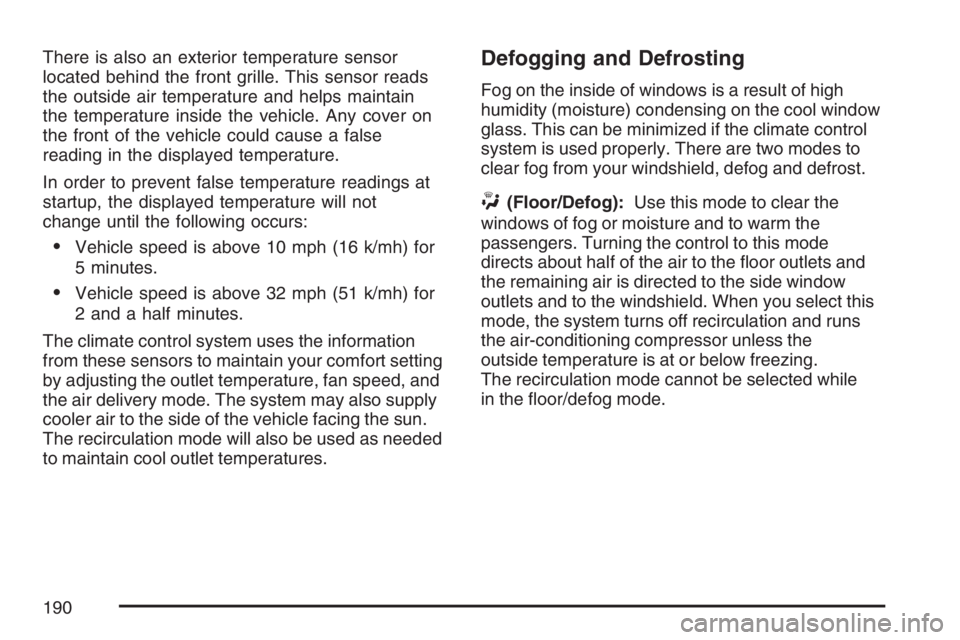
The solar sensor, located in the defrost grille,
middle of the instrument panel, monitors the solar
radiation. Do not cover the solar sensor or the
system will not work properly.
There is also an interior temperature sensor
located next to the steering wheel that measures
the temperature of the air inside your vehicle.
189
Page 190 of 496
There is also an exterior temperature sensor
located behind the front grille. This sensor reads
the outside air temperature and helps maintain
the temperature inside the vehicle. Any cover on
the front of the vehicle could cause a false
reading in the displayed temperature.
In order to prevent false temperature readings at
startup, the displayed temperature will not
change until the following occurs:
Vehicle speed is above 10 mph (16 k/mh) for
5 minutes.
Vehicle speed is above 32 mph (51 k/mh) for
2 and a half minutes.
The climate control system uses the information
from these sensors to maintain your comfort setting
by adjusting the outlet temperature, fan speed, and
the air delivery mode. The system may also supply
cooler air to the side of the vehicle facing the sun.
The recirculation mode will also be used as needed
to maintain cool outlet temperatures.
Defogging and Defrosting
Fog on the inside of windows is a result of high
humidity (moisture) condensing on the cool window
glass. This can be minimized if the climate control
system is used properly. There are two modes to
clear fog from your windshield, defog and defrost.
W(Floor/Defog):Use this mode to clear the
windows of fog or moisture and to warm the
passengers. Turning the control to this mode
directs about half of the air to the oor outlets and
the remaining air is directed to the side window
outlets and to the windshield. When you select this
mode, the system turns off recirculation and runs
the air-conditioning compressor unless the
outside temperature is at or below freezing.
The recirculation mode cannot be selected while
in the oor/defog mode.
190
Page 226 of 496
REMOTE KEY LEARNING ACTIVE
This message displays while you are matching
a Remote Keyless Entry (RKE) transmitter to your
vehicle. See “Matching Transmitter(s) to Your
Vehicle” underRemote Keyless Entry (RKE)
System Operation on page 95andDIC Controls
and Displays on page 212for more information.
REPLACE BATTERY IN REMOTE KEY
This message displays when the battery in the
Remote Keyless Entry (RKE) transmitter needs to
be replaced. To replace the battery, see “Battery
Replacement” underRemote Keyless Entry (RKE)
System Operation on page 95.
RIGHT REAR DOOR OPEN
This message displays when the passenger’s
side rear door is not closed properly. When this
message appears, make sure that the passenger’s
door is closed completely.
SERVICE A/C (Air Conditioning)
SYSTEM
This message displays when the electronic
sensors that control the air conditioning and
heating systems are no longer working. Have the
climate control system serviced by your dealer
if you notice a drop in heating and air conditioning
efficiency.
SERVICE AIR BAG
This message displays when there is a problem
with the airbag system. Have your vehicle serviced
by your dealer immediately. SeeAirbag Readiness
Light on page 197for more information.
SERVICE BATTERY CHARGING
SYSTEM
This message displays when there is a problem
with the generator and battery charging systems.
Driving with this problem could drain the battery.
Turn off all unnecessary accessories. Stop
and turn off the vehicle as soon as it is safe to do
so. Have the electrical system checked by your
dealer immediately.
226
Page 403 of 496

While the tires available on General Motors
passenger cars and light trucks may vary with
respect to these grades, they must also conform to
federal safety requirements and additional General
Motors Tire Performance Criteria (TPC) standards.
Treadwear
The treadwear grade is a comparative rating
based on the wear rate of the tire when tested
under controlled conditions on a specied
government test course. For example, a tire
graded 150 would wear one and a half (1.5) times
as well on the government course as a tire
graded 100. The relative performance of tires
depends upon the actual conditions of their use,
however, and may depart signicantly from
the norm due to variations in driving habits, service
practices, and differences in road characteristics
and climate.
Traction – AA, A, B, C
The traction grades, from highest to lowest, are AA,
A, B, and C. Those grades represent the tire’s
ability to stop on wet pavement as measured under
controlled conditions on specied government test
surfaces of asphalt and concrete. A tire marked C
may have poor traction performance.Warning:The traction grade assigned to this tire
is based on straight-ahead braking traction
tests, and does not include acceleration, cornering,
hydroplaning, or peak traction characteristics.
Temperature – A, B, C
The temperature grades are A (the highest), B,
and C, representing the tire’s resistance to
the generation of heat and its ability to dissipate
heat when tested under controlled conditions on a
specied indoor laboratory test wheel. Sustained
high temperature can cause the material of the tire
to degenerate and reduce tire life, and excessive
temperature can lead to sudden tire failure.
The grade C corresponds to a level of performance
which all passenger car tires must meet under
the Federal Motor Vehicle Safety Standard
No. 109. Grades B and A represent higher levels
of performance on the laboratory test wheel
than the minimum required by law.
Warning:The temperature grade for this tire is
established for a tire that is properly inated
and not overloaded. Excessive speed,
under-ination, or excessive loading, either
separately or in combination, can cause heat
buildup and possible tire failure.
403
Page 430 of 496

Fuses Usage
F7 Spare
F8 Spare
F9 Spare
F10Passenger’s Side High-Beam
Headlamp
F11 Driver’s Side High-Beam Headlamp
F12 Windshield Washer Pump
F13 Spare
F14Climate Controls, Instrument Panel
Cluster
F15 Spare
F16 Fog Lamps
F17 Horn
F18 Windshield Wiper
F19 Driver’s Side Corner Lamp
F20 Passenger’s Side Corner Lamp
F21 Oxygen Sensor
F22 Powertrain
F23Engine Control Module (ECM),
Crank
F24 Injector Coil
F25 Injector Coil
F26 Air Conditioning
F27 Air SolenoidFuses Usage
F28Engine Control Module, Transaxle
Control Module (ECM/TCM)
F29 Spare
F30 Spare
F31 Spare
F32 Spare
J-Case Fuse Usage
JC1 Heated Windshield Washer
JC2 Cooling Fan 1
JC3 Spare
JC4 Crank
JC5 Cooling Fan 2
JC6 Anti-lock Brake System 2
JC7 Anti-lock Brake System 1
JC8 Air Pump
Relays Usage
R1 Cooling Fan 1
R2 Cooling Fan
R3 Crank
R4 Powertrain
R5 Spare
430
Page 433 of 496
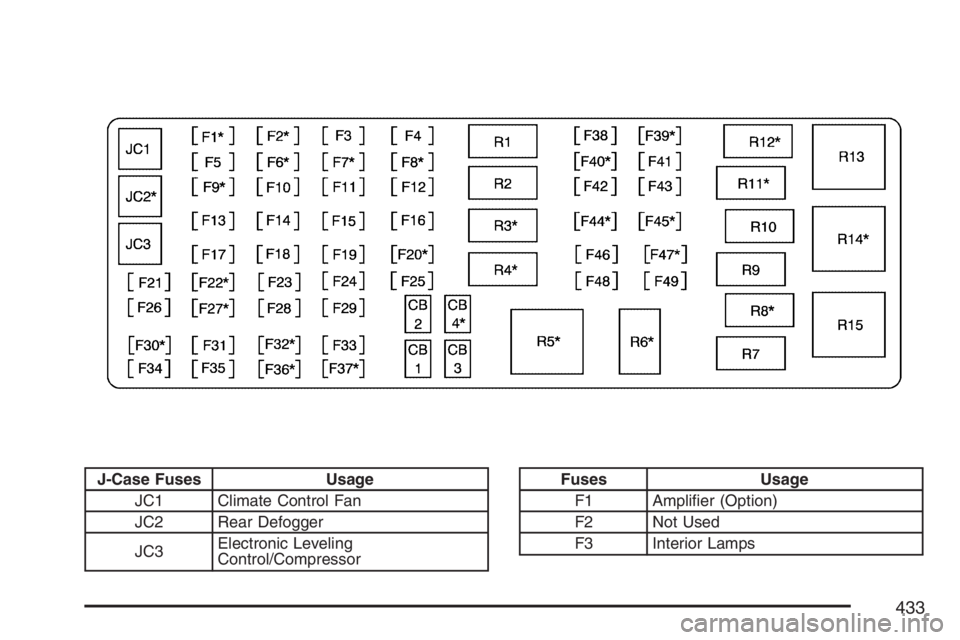
J-Case Fuses Usage
JC1 Climate Control Fan
JC2 Rear Defogger
JC3Electronic Leveling
Control/CompressorFuses Usage
F1 Amplier (Option)
F2 Not Used
F3 Interior Lamps
433