ignition switch BUICK LUCERNE 2007 Owner's Manual
[x] Cancel search | Manufacturer: BUICK, Model Year: 2007, Model line: LUCERNE, Model: BUICK LUCERNE 2007Pages: 496, PDF Size: 2.77 MB
Page 100 of 496
To start the vehicle using the remote start feature,
do the following:
1. Aim the transmitter at the vehicle.
2. Press and release the transmitter’s lock
button, then immediately press and hold
the transmitter’s remote start button until the
turn signal lights ash or if the vehicle’s
lights are not visible, press and hold the
remote start button for at least four seconds.
The vehicle’s doors will lock.
When the vehicle starts, the parking lamps will
turn on and remain on while the vehicle is
running.
3. If it is your rst remote start since last driving,
repeat these steps while the engine is still
running for a 10 minute time extension.
Remote start can be extended one time.
When you enter the vehicle during a remote start,
and the engine is still running, turn the key to the
RUN position to drive the vehicle. If the vehicle
is left running it will automatically shut off after
10 minutes unless a time extension has been done.To manually shut off a remote start, do any of the
following:
Aim the RKE transmitter at the vehicle and
press the remote start button until the
parking lamps turn off.
Turn on the hazard warning ashers.
Turn the ignition switch on and then off.
The vehicle can be started remotely two separate
times between driving sequences. The engine
will run for 10 minutes after each remote start.
Or, you can extend the engine run time by another
10 minutes within the rst 10 minute remote
start time frame, and before the engine stops.
For example, if the lock button and then the
remote start buttons are pressed again after
the vehicle has been running for ve minutes,
10 minutes are added, allowing the engine to run
for 15 minutes.
The additional 10 minutes are considered a
second remote vehicle start.
100
Page 103 of 496
From the inside, use the power door lock switches
or manual lock knobs. The manual lock knobs are
located at the top of the door panel near the
window.
Push the manual lock knob down to lock the door.
To unlock the door, pull up on the knob.
Power Door Locks
The power door lock switches are located on the
armrest on the front doors.
K(Unlock):Press the side of the switch with the
unlock symbol to unlock the doors.
Q(Lock):Press the side of the switch with the
lock symbol to lock the doors.
Delayed Locking
This feature allows the driver to delay the actual
locking of the doors. When the driver’s power door
lock switch or remote keyless entry transmitter lock
button is pressed with the key removed from the
ignition, and the driver’s door open, a chime will
sound three times to signal that the delayed locking
system is active. When all doors have been closed,
the doors will lock automatically after several
seconds. If any door is opened before this, the timer
will reset itself once all the doors have been closed
again.
Pressing the driver’s or passenger’s power door
lock switch or the remote keyless entry transmitter
button again will override this feature.
103
Page 104 of 496
Personal Choice Programming
The delayed locking feature can be turned on or
off, using the Driver Information Center (DIC)
to program this feature. See “DELAY DOOR
LOCK” underDIC Vehicle Customization on
page 231.
Programmable Automatic
Door Locks
Your vehicle is programmed so that, when the
doors are closed, the ignition is on, and the shift
lever is moved out of PARK (P), all the doors will
lock. The doors will unlock every time you stop the
vehicle and move the shift lever into PARK (P).
If someone needs to get out while your vehicle is
not in PARK (P), have the person use the manual
lock knob or power door lock switch. When the door
is closed again, it will not lock automatically. Use
the manual lock knob or power door lock switch to
lock the door.
If your vehicle has a Driver Information Center
(DIC), you can choose various lock and unlock
settings. For programming information, see
DIC Vehicle Customization on page 231.
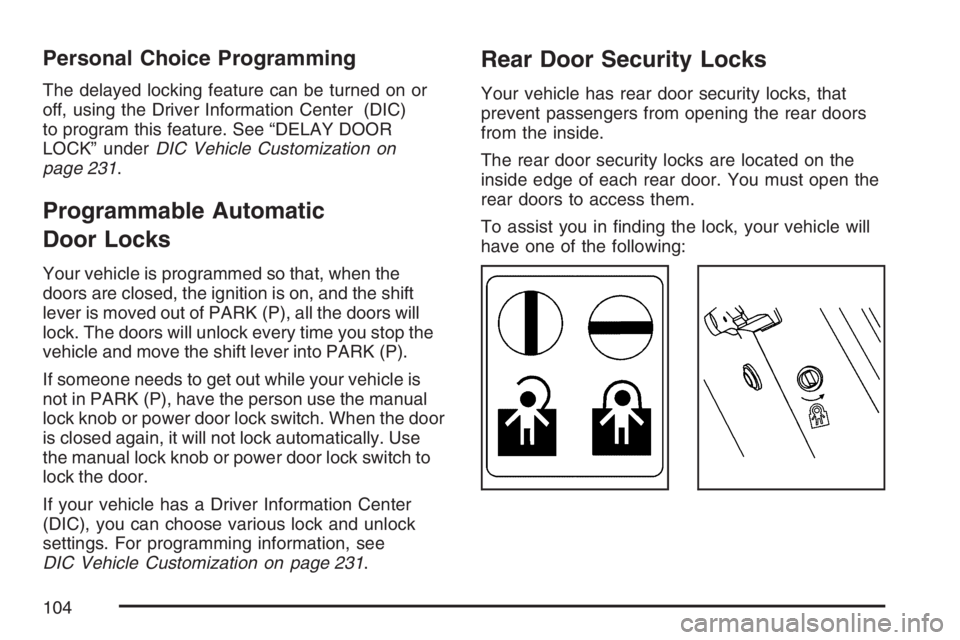
Rear Door Security Locks
Your vehicle has rear door security locks, that
prevent passengers from opening the rear doors
from the inside.
The rear door security locks are located on the
inside edge of each rear door. You must open the
rear doors to access them.
To assist you in nding the lock, your vehicle will
have one of the following:
104
Page 105 of 496
To use these locks, do the following:
1. Insert the key into the security lock slot and
turn it so the slot is in the horizontal position.
2. Close the door.
3. Do the same for the other rear door.
When you want to open a rear door when the
security lock is on, do the following:
1. Unlock the door using the remote keyless
entry transmitter, if the vehicle has one, the
power door lock switch, or by lifting the
rear door manual lock.
2. Open the door from the outside.
To cancel the rear door security lock, do the
following:
1. Unlock the door and open it from the outside.
2. Insert the key into the security lock slot
and turn it so the slot is in the vertical position.
3. Do the same for the other rear door.Lockout Protection
If the key is in the ignition and the power door lock
switch is used to lock the doors, all doors will lock
and then the driver’s door will unlock. It is always
recommended that you remove the ignition key
when locking your vehicle.
The lockout protection feature can be overridden
by holding the power door lock switch for
three seconds or longer.
105
Page 109 of 496
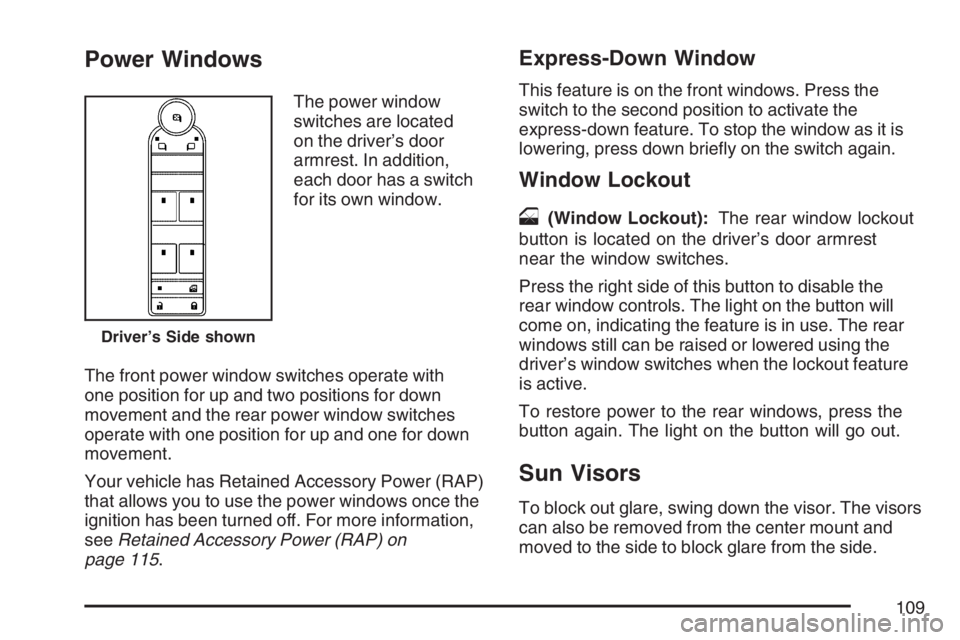
Power Windows
The power window
switches are located
on the driver’s door
armrest. In addition,
each door has a switch
for its own window.
The front power window switches operate with
one position for up and two positions for down
movement and the rear power window switches
operate with one position for up and one for down
movement.
Your vehicle has Retained Accessory Power (RAP)
that allows you to use the power windows once the
ignition has been turned off. For more information,
seeRetained Accessory Power (RAP) on
page 115.
Express-Down Window
This feature is on the front windows. Press the
switch to the second position to activate the
express-down feature. To stop the window as it is
lowering, press down briey on the switch again.
Window Lockout
o
(Window Lockout):The rear window lockout
button is located on the driver’s door armrest
near the window switches.
Press the right side of this button to disable the
rear window controls. The light on the button will
come on, indicating the feature is in use. The rear
windows still can be raised or lowered using the
driver’s window switches when the lockout feature
is active.
To restore power to the rear windows, press the
button again. The light on the button will go out.
Sun Visors
To block out glare, swing down the visor. The visors
can also be removed from the center mount and
moved to the side to block glare from the side.
Driver’s Side shown
109
Page 110 of 496
Lighted Visor Vanity Mirror
Your sun visors may have lighted vanity mirrors.
When you open the cover to the visor vanity
mirror, the lamp will turn on.
Theft-Deterrent Systems
Vehicle theft is big business, especially in some
cities. Although your vehicle has a number of
theft-deterrent features, we know that nothing we
put on it can make it impossible to steal.
Content Theft-Deterrent
Your vehicle may have the optional content
theft-deterrent alarm system.
To activate the theft-deterrent system:
1. Open the door.
2. Lock the door with the power door lock switch
or the Remote Keyless Entry (RKE) transmitter.
If you are using the RKE transmitter, the door
does not need to be open.
3. Close all doors.Once armed, the alarm will go off if someone
tries to enter the vehicle without using the RKE
transmitter or a key or turns the ignition on with an
incorrect key. The horn will sound and the turn
signal lamps will ash for about two minutes.
When the alarm is armed, the trunk may be opened
with the RKE transmitter. The power door lock
switches are disabled and the doors remain locked.
You must use your RKE transmitter or your key to
unlock the doors when the system is armed.
Arming with the Power Lock Switch
The alarm system will arm when you use either
power lock switch to lock the doors while any door
or the trunk is open and the key is removed
from the ignition.
Arming with the RKE Transmitter
The alarm system will arm when you use your
RKE transmitter to lock the doors, if the key is not
in the ignition.
110
Page 114 of 496
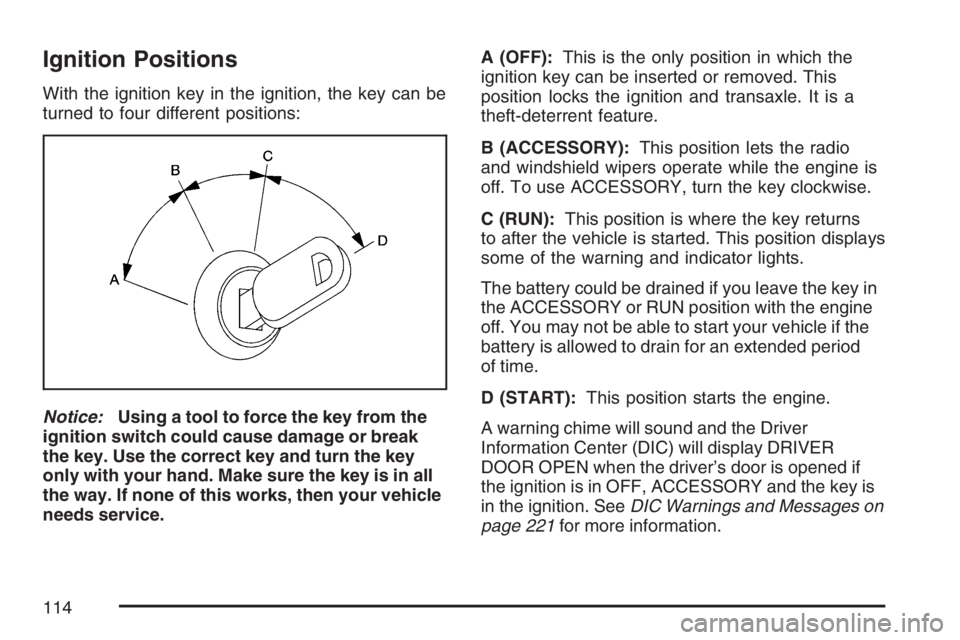
Ignition Positions
With the ignition key in the ignition, the key can be
turned to four different positions:
Notice:Using a tool to force the key from the
ignition switch could cause damage or break
the key. Use the correct key and turn the key
only with your hand. Make sure the key is in all
the way. If none of this works, then your vehicle
needs service.A (OFF):This is the only position in which the
ignition key can be inserted or removed. This
position locks the ignition and transaxle. It is a
theft-deterrent feature.
B (ACCESSORY):This position lets the radio
and windshield wipers operate while the engine is
off. To use ACCESSORY, turn the key clockwise.
C (RUN):This position is where the key returns
to after the vehicle is started. This position displays
some of the warning and indicator lights.
The battery could be drained if you leave the key in
the ACCESSORY or RUN position with the engine
off. You may not be able to start your vehicle if the
battery is allowed to drain for an extended period
of time.
D (START):This position starts the engine.
A warning chime will sound and the Driver
Information Center (DIC) will display DRIVER
DOOR OPEN when the driver’s door is opened if
the ignition is in OFF, ACCESSORY and the key is
in the ignition. SeeDIC Warnings and Messages on
page 221for more information.
114
Page 116 of 496
Starting the Engine
Place the transaxle in the proper gear.
Move your shift lever to PARK (P) or
NEUTRAL (N). Your engine will not start in
any other position — this is a safety feature.
To restart when you are already moving,
use NEUTRAL (N) only.
Notice:Shifting into PARK (P) with the vehicle
moving could damage the transaxle. Shift
into PARK (P) only when your vehicle is
stopped.
Starting Procedure
1. With your foot off the accelerator pedal, turn
the ignition key to START. When the engine
starts, let go of the key. The idle speed will
go down as your engine gets warm. Do
not race the engine immediately after starting
it. Operate the engine and transaxle gently
to allow the oil to warm up and lubricate
all moving parts.Your vehicle has a Computer-Controlled
Cranking System. This feature assists in
starting the engine and protects components. If
the ignition key is turned to the START position,
and then released when the engine begins
cranking, the engine will continue cranking for
a few seconds or until the vehicle starts. If the
engine does not start and the key is held in
START for many seconds, cranking will be
stopped after 15 seconds to prevent cranking
motor damage. To prevent gear damage, this
system also prevents cranking if the engine is
already running. Engine cranking can be
stopped by turning the ignition switch to
the ACCESSORY or OFF position.
Notice:Cranking the engine for long periods
of time, by returning the key to the START
position immediately after cranking has ended,
can overheat and damage the cranking
motor, and drain the battery. Wait at least
15 seconds between each try, to allow
the cranking motor to cool down.
116
Page 171 of 496
The exterior lamps control has four positions:
O(Off):Turn the control to this position to turn
off the exterior lamps.
AUTO (Automatic):Turn the control to this
position to automatically turn on the headlamps at
normal brightness, together with the following:
Parking Lamps
Instrument Panel Lights
;(Parking Lamps):Turn the control to this
position to turn on the parking lamps together with
the following:
Taillamps
License Plate Lamps
Instrument Panel Lights
2(Headlamps):Turn the control to this position
to turn on the headlamps together with the following
lamps listed below. A warning chime will sound if
you open the driver’s door when the ignition switch
is off and the headlamps are on.
Parking Lamps
License Plate Lamps
Instrument Panel Lights
-(Fog Lamps):Push the exterior lamps control
in to turn on the fog lamps.
SeeFog Lamps on page 173.
Wiper Activated Headlamps
This feature activates the headlamps and parking
lamps after the windshield wipers are turned
on and have completed eight wipe cycles within
four minutes.
When the ignition is turned to OFF, the
wiper-activated headlamps immediately turn off.
The wiper-activated headlamps also turn off if the
windshield wipers are turned off.
Headlamps on Reminder
If you leave the exterior lamp buttons for the
headlamps or parking lamps on, remove the key
from the ignition and open the driver’s door,
you will hear a continuous warning chime. The
chime will turn off when the lamps are turned off.
171
Page 174 of 496
Instrument Panel Brightness
D(Instrument Panel Brightness):This feature
controls the brightness of the instrument panel
lights.
The knob for this control is located next to the
exterior lamps control.
Push the knob in and release when it pops out.
Turn the knob clockwise to increase the brightness
of the instrument panel lights and counter clockwise
to decrease the brightness. Turning the knob
completely clockwise to the detent will turn on the
courtesy lamps.
Courtesy Lamps
When any door is opened, several lamps turn on
making it easier for you to enter and exit the
vehicle. Turn the instrument panel brightness
control completely clockwise to manually turn
on these lamps.
Entry Lighting
If it is dark enough outside when you press the
unlock button on the remote keyless entry
transmitter, the interior courtesy lamps will turn on
and stay on for about 40 seconds. The lamps can
be turned off immediately by pressing the lock
button on the remote keyless entry transmitter,
turning the ignition key to RUN or activating the
power door locks.
Delayed Entry Lighting
The interior lamps will turn on if you open the door
when it is dark enough outside. When you close the
door with the ignition off, the interior lamps will stay
on for up to 25 seconds or until the ignition is turned
to an on position. When the lamps turn off as a
result of the 25 second timer or the ignition switch
being turned on, the lighting will deactivate by way
of the theater dimming effect. Locking the doors will
override the delayed entry lighting feature and the
lamps will turn off right away.
174