trans BUICK LUCERNE 2007 Owner's Manual
[x] Cancel search | Manufacturer: BUICK, Model Year: 2007, Model line: LUCERNE, Model: BUICK LUCERNE 2007Pages: 496, PDF Size: 2.77 MB
Page 11 of 496
Heated Seats
Your vehicle may have heated front seats. To
operate the heated seats, the ignition must be on.
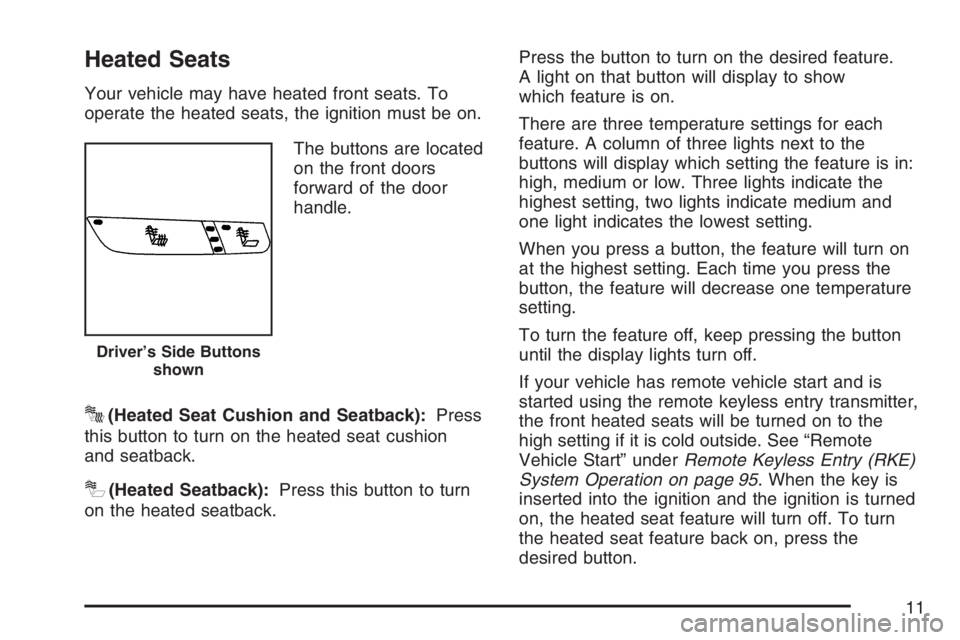
The buttons are located
on the front doors
forward of the door
handle.
J(Heated Seat Cushion and Seatback):Press
this button to turn on the heated seat cushion
and seatback.
I(Heated Seatback):Press this button to turn
on the heated seatback.Press the button to turn on the desired feature.
A light on that button will display to show
which feature is on.
There are three temperature settings for each
feature. A column of three lights next to the
buttons will display which setting the feature is in:
high, medium or low. Three lights indicate the
highest setting, two lights indicate medium and
one light indicates the lowest setting.
When you press a button, the feature will turn on
at the highest setting. Each time you press the
button, the feature will decrease one temperature
setting.
To turn the feature off, keep pressing the button
until the display lights turn off.
If your vehicle has remote vehicle start and is
started using the remote keyless entry transmitter,
the front heated seats will be turned on to the
high setting if it is cold outside. See “Remote
Vehicle Start” underRemote Keyless Entry (RKE)
System Operation on page 95. When the key is
inserted into the ignition and the ignition is turned
on, the heated seat feature will turn off. To turn
the heated seat feature back on, press the
desired button.
Driver’s Side Buttons
shown
11
Page 12 of 496
Heated and Cooled Seats
The front seats may have the heated and cooled
seat feature. To heat or cool the seats, the
ignition must be on.
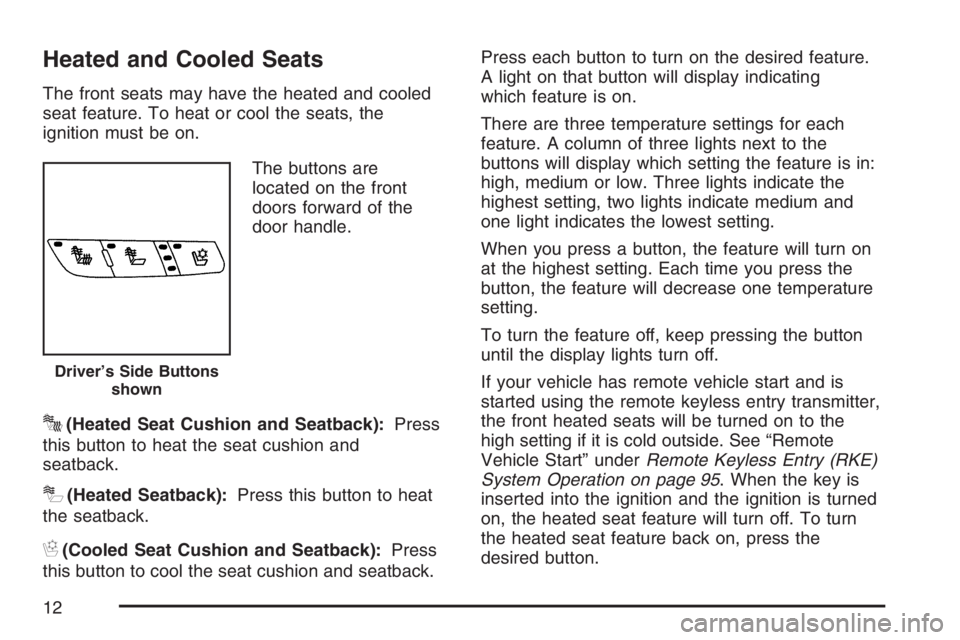
The buttons are
located on the front
doors forward of the
door handle.
J(Heated Seat Cushion and Seatback):Press
this button to heat the seat cushion and
seatback.
I(Heated Seatback):Press this button to heat
the seatback.
H(Cooled Seat Cushion and Seatback):Press
this button to cool the seat cushion and seatback.Press each button to turn on the desired feature.
A light on that button will display indicating
which feature is on.
There are three temperature settings for each
feature. A column of three lights next to the
buttons will display which setting the feature is in:
high, medium or low. Three lights indicate the
highest setting, two lights indicate medium and
one light indicates the lowest setting.
When you press a button, the feature will turn on
at the highest setting. Each time you press the
button, the feature will decrease one temperature
setting.
To turn the feature off, keep pressing the button
until the display lights turn off.
If your vehicle has remote vehicle start and is
started using the remote keyless entry transmitter,
the front heated seats will be turned on to the
high setting if it is cold outside. See “Remote
Vehicle Start” underRemote Keyless Entry (RKE)
System Operation on page 95. When the key is
inserted into the ignition and the ignition is turned
on, the heated seat feature will turn off. To turn
the heated seat feature back on, press the
desired button.
Driver’s Side Buttons
shown
12
Page 13 of 496
Memory Seat and Mirrors
Your vehicle may have the memory package.
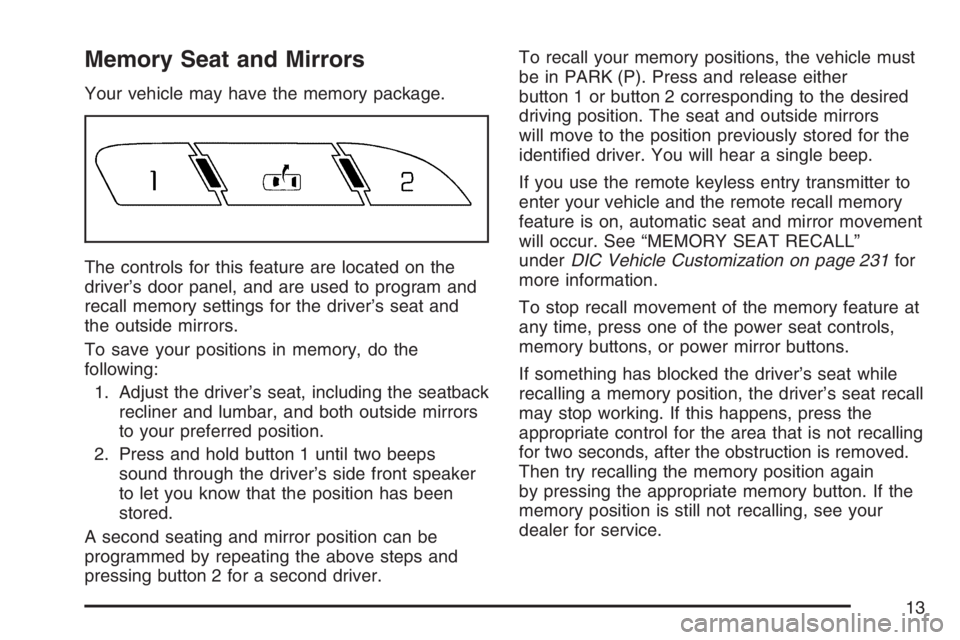
The controls for this feature are located on the
driver’s door panel, and are used to program and
recall memory settings for the driver’s seat and
the outside mirrors.
To save your positions in memory, do the
following:
1. Adjust the driver’s seat, including the seatback
recliner and lumbar, and both outside mirrors
to your preferred position.
2. Press and hold button 1 until two beeps
sound through the driver’s side front speaker
to let you know that the position has been
stored.
A second seating and mirror position can be
programmed by repeating the above steps and
pressing button 2 for a second driver.To recall your memory positions, the vehicle must
be in PARK (P). Press and release either
button 1 or button 2 corresponding to the desired
driving position. The seat and outside mirrors
will move to the position previously stored for the
identied driver. You will hear a single beep.
If you use the remote keyless entry transmitter to
enter your vehicle and the remote recall memory
feature is on, automatic seat and mirror movement
will occur. See “MEMORY SEAT RECALL”
underDIC Vehicle Customization on page 231for
more information.
To stop recall movement of the memory feature at
any time, press one of the power seat controls,
memory buttons, or power mirror buttons.
If something has blocked the driver’s seat while
recalling a memory position, the driver’s seat recall
may stop working. If this happens, press the
appropriate control for the area that is not recalling
for two seconds, after the obstruction is removed.
Then try recalling the memory position again
by pressing the appropriate memory button. If the
memory position is still not recalling, see your
dealer for service.
13
Page 91 of 496
Keys.............................................................. 93
Remote Keyless Entry (RKE) System.......... 94
Remote Keyless Entry (RKE) System
Operation................................................. 95
Doors and Locks........................................ 102
Door Locks................................................ 102
Power Door Locks..................................... 103
Delayed Locking........................................ 103
Programmable Automatic Door Locks........ 104
Rear Door Security Locks......................... 104
Lockout Protection..................................... 105
Trunk........................................................ 106
Windows...................................................... 108
Power Windows........................................ 109
Sun Visors................................................ 109
Theft-Deterrent Systems............................. 110
Content Theft-Deterrent............................. 110
PASS-Key
®III+......................................... 111
PASS-Key®III+ Operation......................... 112
Starting and Operating Your Vehicle......... 113
New Vehicle Break-In................................ 113
Ignition Positions....................................... 114
Retained Accessory Power (RAP)............. 115Starting the Engine.................................... 116
Engine Coolant Heater.............................. 117
Automatic Transaxle Operation.................. 119
Parking Brake........................................... 122
Shifting Into Park (P) ................................. 123
Shifting Out of Park (P)............................. 125
Parking Over Things That Burn................. 126
Engine Exhaust......................................... 127
Running the Engine While Parked............. 128
Mirrors......................................................... 129
Manual Rearview Mirror............................. 129
Manual Rearview Mirror with OnStar
®....... 129
Automatic Dimming Rearview Mirror
with OnStar
®.......................................... 129
Automatic Dimming Rearview Mirror with
OnStar
®and Compass........................... 130
Automatic Dimming Rearview Mirror
with Compass........................................ 132
Outside Power Mirrors............................... 133
Outside Curb View Assist Mirror................ 134
Outside Convex Mirror............................... 134
Outside Automatic Dimming
Heated Mirror......................................... 135
OnStar
®System.......................................... 135
Section 2 Features and Controls
91
Page 95 of 496
At times you may notice a decrease in operating
range. This is normal for any RKE system. If the
transmitter does not work or if you have to stand
closer to your vehicle for the transmitter to work,
try this:
Check the distance. You may be too far from
your vehicle. You may need to stand closer
during rainy or snowy weather.
Check the location. Other vehicles or objects
may be blocking the signal. Take a few steps to
the left or right, hold the transmitter higher, and
try again.
Check to determine if battery replacement is
necessary. See “Battery Replacement” under
Remote Keyless Entry (RKE) System
Operation on page 95.
If you are still having trouble, see your dealer or
a qualied technician for service.
Remote Keyless Entry (RKE)
System Operation
The vehicle’s doors can be locked and unlocked,
and the trunk can be unlatched from about
3 feet (1 m) up to 60 feet (18 m) away with the
Remote Keyless Entry (RKE) transmitter.
If your vehicle has the remote start feature you can
also start your vehicle with the RKE transmitter.
Your RKE transmitter, with the remote start button,
provides an increased range of 195 feet (60 m)
away. However, the range may be less while the
vehicle is running. As a result, you may need to be
closer to your vehicle to turn it off than you were to
turn it on.
There are other conditions which can affect the
performance of the transmitter. SeeRemote
Keyless Entry (RKE) System on page 94.
95
Page 96 of 496

The following functions may be available if your
vehicle has the RKE system:
/(Remote Vehicle Start):If your vehicle has
this feature, it may be started from outside the
vehicle using the RKE transmitter. See “Remote
Vehicle Start” following for more detailed
information.
Q(Lock):Press the lock button to lock all the
doors. If enabled through the Driver Information
Center (DIC), the parking lamps will ash once to
indicate locking has occurred. If enabled through
the DIC, the horn will chirp when the lock button
is pressed again within ve seconds of the
previous press of the lock button. SeeDIC
Vehicle Customization on page 231for additional
information. Pressing the lock button may arm
the content theft-deterrent system. SeeContent
Theft-Deterrent on page 110.
"(Unlock):Press the unlock button to unlock the
driver’s door. If the button is pressed again within
ve seconds, all remaining doors will unlock.
The interior lamps will come on and stay on for
20 seconds or until the ignition is turned on. If
enabled through the DIC, the parking lamps will
ash once to indicate unlocking has occurred. See
DIC Vehicle Customization on page 231. Pressing
the unlock button on the RKE transmitter will disarm
the content theft-deterrent system. SeeContent
Theft-Deterrent on page 110.RKE with Remote StartRKE without Remote
Start
96
Page 97 of 496
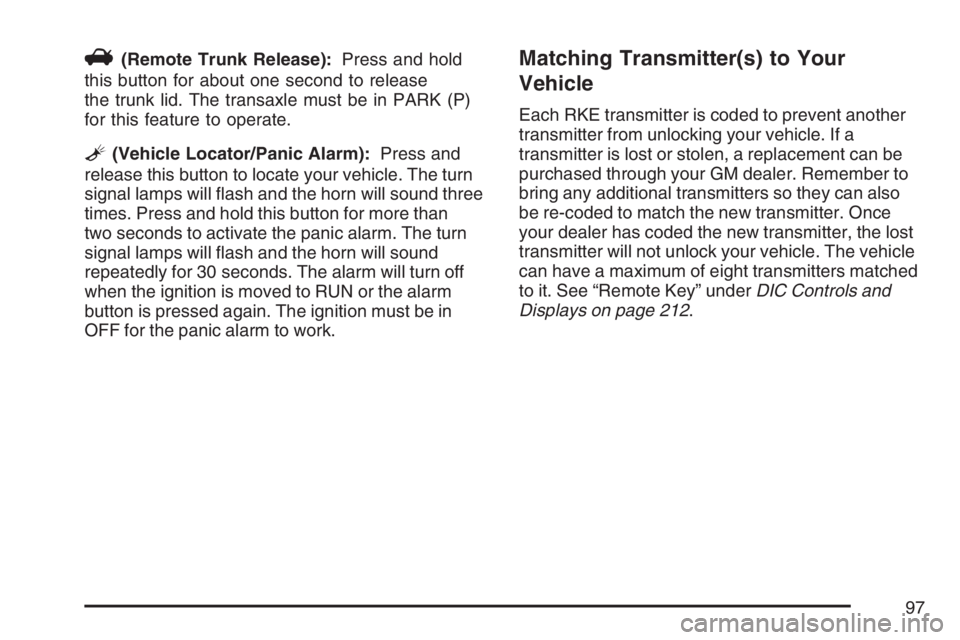
V(Remote Trunk Release):Press and hold
this button for about one second to release
the trunk lid. The transaxle must be in PARK (P)
for this feature to operate.
L(Vehicle Locator/Panic Alarm):Press and
release this button to locate your vehicle. The turn
signal lamps will ash and the horn will sound three
times. Press and hold this button for more than
two seconds to activate the panic alarm. The turn
signal lamps will ash and the horn will sound
repeatedly for 30 seconds. The alarm will turn off
when the ignition is moved to RUN or the alarm
button is pressed again. The ignition must be in
OFF for the panic alarm to work.
Matching Transmitter(s) to Your
Vehicle
Each RKE transmitter is coded to prevent another
transmitter from unlocking your vehicle. If a
transmitter is lost or stolen, a replacement can be
purchased through your GM dealer. Remember to
bring any additional transmitters so they can also
be re-coded to match the new transmitter. Once
your dealer has coded the new transmitter, the lost
transmitter will not unlock your vehicle. The vehicle
can have a maximum of eight transmitters matched
to it. See “Remote Key” underDIC Controls and
Displays on page 212.
97
Page 98 of 496
Battery Replacement
Under normal use, the battery in your RKE
transmitter should last about four years.
You can tell the battery is weak if the transmitter
will not work at the normal range in any location.
If you have to get close to your vehicle before
the transmitter works, it is probably time to change
the battery.
The REPLACE BATTERY IN REMOTE KEY
message in the vehicle’s DIC will display if the
RKE transmitter battery is low. See “REPLACE
BATTERY IN REMOTE KEY” underDIC Warnings
and Messages on page 221for additional
information.
Notice:When replacing the battery, use care
not to touch any of the circuitry. Static from
your body transferred to these surfaces may
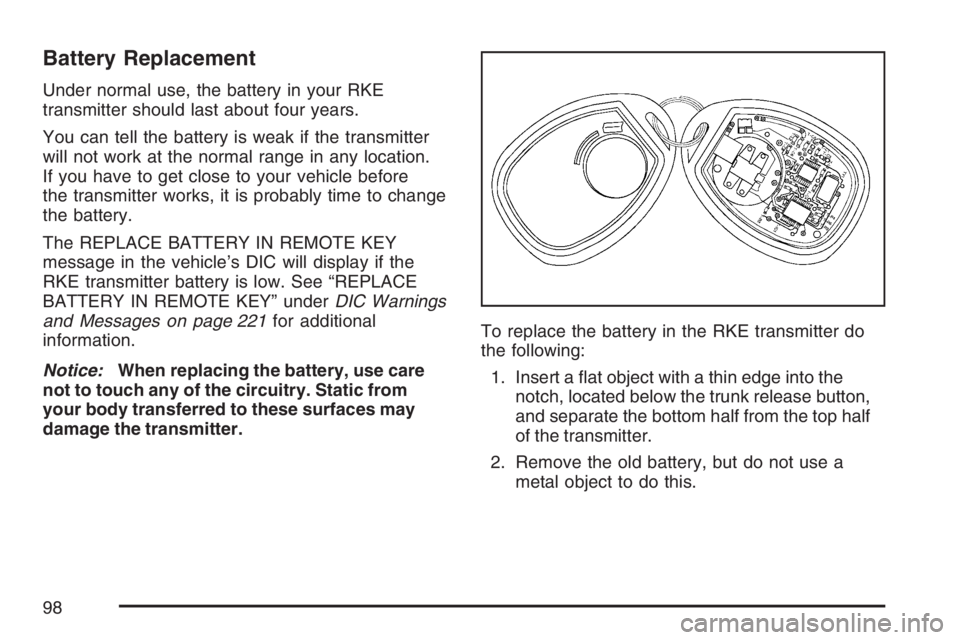
damage the transmitter.To replace the battery in the RKE transmitter do
the following:
1. Insert a at object with a thin edge into the
notch, located below the trunk release button,
and separate the bottom half from the top half
of the transmitter.
2. Remove the old battery, but do not use a
metal object to do this.
98
Page 99 of 496
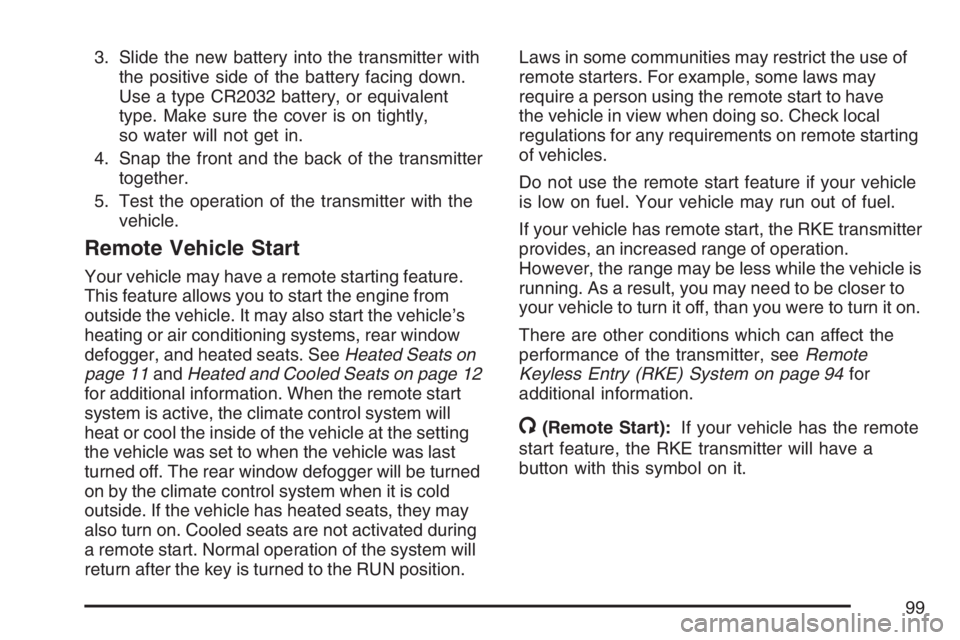
3. Slide the new battery into the transmitter with
the positive side of the battery facing down.
Use a type CR2032 battery, or equivalent
type. Make sure the cover is on tightly,
so water will not get in.
4. Snap the front and the back of the transmitter
together.
5. Test the operation of the transmitter with the
vehicle.
Remote Vehicle Start
Your vehicle may have a remote starting feature.
This feature allows you to start the engine from
outside the vehicle. It may also start the vehicle’s
heating or air conditioning systems, rear window
defogger, and heated seats. SeeHeated Seats on
page 11andHeated and Cooled Seats on page 12
for additional information. When the remote start
system is active, the climate control system will
heat or cool the inside of the vehicle at the setting
the vehicle was set to when the vehicle was last
turned off. The rear window defogger will be turned
on by the climate control system when it is cold
outside. If the vehicle has heated seats, they may
also turn on. Cooled seats are not activated during
a remote start. Normal operation of the system will
return after the key is turned to the RUN position.Laws in some communities may restrict the use of
remote starters. For example, some laws may
require a person using the remote start to have
the vehicle in view when doing so. Check local
regulations for any requirements on remote starting
of vehicles.
Do not use the remote start feature if your vehicle
is low on fuel. Your vehicle may run out of fuel.
If your vehicle has remote start, the RKE transmitter
provides, an increased range of operation.
However, the range may be less while the vehicle is
running. As a result, you may need to be closer to
your vehicle to turn it off, than you were to turn it on.
There are other conditions which can affect the
performance of the transmitter, seeRemote
Keyless Entry (RKE) System on page 94for
additional information.
/(Remote Start):If your vehicle has the remote
start feature, the RKE transmitter will have a
button with this symbol on it.
99
Page 100 of 496
To start the vehicle using the remote start feature,
do the following:
1. Aim the transmitter at the vehicle.
2. Press and release the transmitter’s lock
button, then immediately press and hold
the transmitter’s remote start button until the
turn signal lights ash or if the vehicle’s
lights are not visible, press and hold the
remote start button for at least four seconds.
The vehicle’s doors will lock.
When the vehicle starts, the parking lamps will
turn on and remain on while the vehicle is
running.
3. If it is your rst remote start since last driving,
repeat these steps while the engine is still
running for a 10 minute time extension.
Remote start can be extended one time.
When you enter the vehicle during a remote start,
and the engine is still running, turn the key to the
RUN position to drive the vehicle. If the vehicle
is left running it will automatically shut off after
10 minutes unless a time extension has been done.To manually shut off a remote start, do any of the
following:
Aim the RKE transmitter at the vehicle and
press the remote start button until the
parking lamps turn off.
Turn on the hazard warning ashers.
Turn the ignition switch on and then off.
The vehicle can be started remotely two separate
times between driving sequences. The engine
will run for 10 minutes after each remote start.
Or, you can extend the engine run time by another
10 minutes within the rst 10 minute remote
start time frame, and before the engine stops.
For example, if the lock button and then the
remote start buttons are pressed again after
the vehicle has been running for ve minutes,
10 minutes are added, allowing the engine to run
for 15 minutes.
The additional 10 minutes are considered a
second remote vehicle start.
100