trans BUICK LUCERNE 2007 Owner's Guide
[x] Cancel search | Manufacturer: BUICK, Model Year: 2007, Model line: LUCERNE, Model: BUICK LUCERNE 2007Pages: 496, PDF Size: 2.77 MB
Page 142 of 496
Do not use the this system with any garage door
opener that does not have the stop and reverse
feature. This includes any garage door opener
model manufactured before April 1, 1982.
Read the instructions completely before attempting
to program the transmitter. Because of the steps
involved, it may be helpful to have another person
available to assist you in programming the
transmitter.
Be sure to keep the original remote control
transmitter for use in other vehicles, as well as,
for future programming. You only need the
original remote control transmitter for xed code
programming. It is also recommended that upon
the sale or lease termination of the vehicle, the
programmed buttons should be erased for security
purposes. See “Erasing your Universal Home
Remote Buttons” later in this section.
Be sure that people and objects are clear
of the garage door or security device you are
programming. When programming a garage
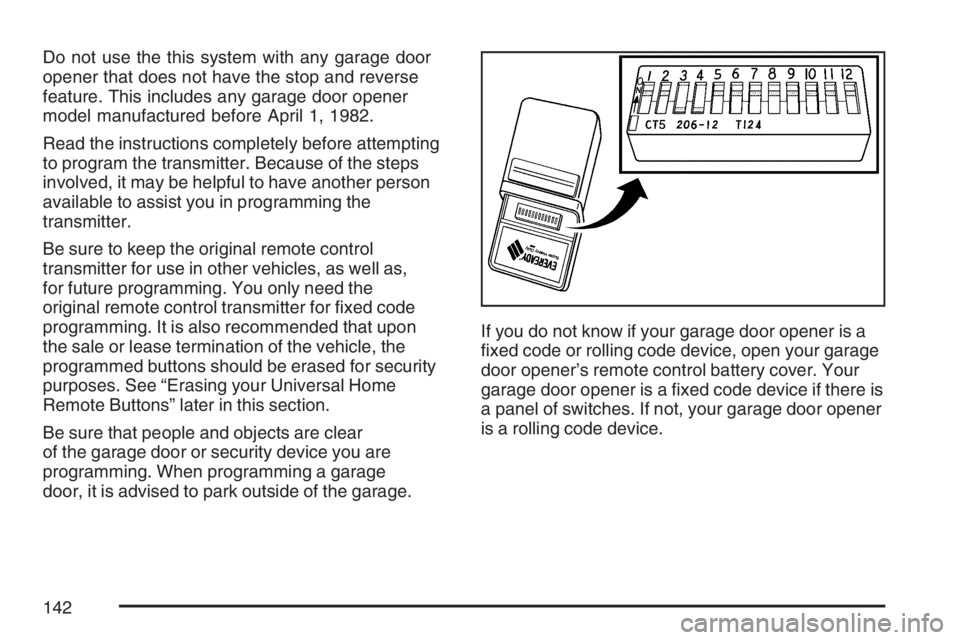
door, it is advised to park outside of the garage.If you do not know if your garage door opener is a
xed code or rolling code device, open your garage
door opener’s remote control battery cover. Your
garage door opener is a xed code device if there is
a panel of switches. If not, your garage door opener
is a rolling code device.
142
Page 143 of 496
Programming Universal Home
Remote — Fixed Code
Fixed Code garage door openers are used for
garage doors produced prior to 1996. Fixed code
uses the same coded signal every time, which
is manually programmed by setting DIP switches
for a unique personal code.
Follow these steps to program up to
three channels:
1. Remove the battery cover of the hand-held
transmitter.
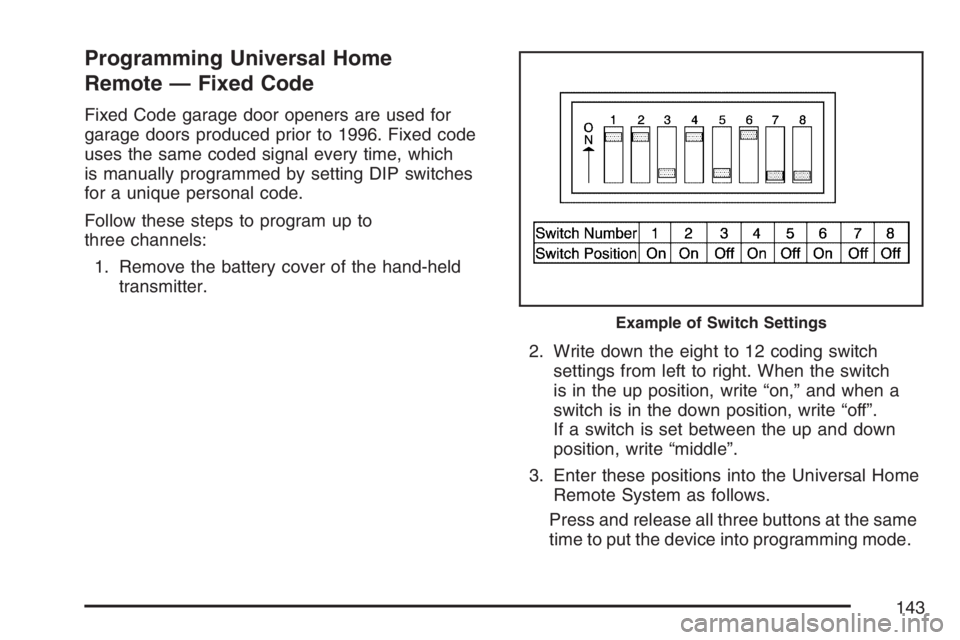
2. Write down the eight to 12 coding switch
settings from left to right. When the switch
is in the up position, write “on,” and when a
switch is in the down position, write “off”.
If a switch is set between the up and down
position, write “middle”.
3. Enter these positions into the Universal Home
Remote System as follows.
Press and release all three buttons at the same
time to put the device into programming mode.
Example of Switch Settings
143
Page 146 of 496
4. Immediately release the button when the
garage door moves. The indicator light will
blink rapidly until programming is complete.
5. Press and release the button again. The
garage door should move, conrming that
programming is successful and complete.
To program another device such as an additional
garage door opener, a security device, or home
lighting, repeat Steps 1 through 6, choosing a
different function button in Step 4 than what you
used for the garage door opener.
Using Universal Home Remote
Press and hold the appropriate button for at least
half of a second. The indicator light will come
on while the signal is being transmitted.
Reprogramming Universal Home
Remote Buttons
You can reprogram any of the three buttons by
repeating the instructions.
Erasing Universal Home Remote
Buttons
You should erase the programmed buttons when
you sell the vehicle or terminate your lease.
To erase either rolling code or xed code on the
Universal Home Remote device, do the following:
1. Press and hold the two outside buttons at
the same time for about 20 seconds, until
the indicator lights, located directly above
the buttons, begin to blink rapidly.
2. Once the indicator lights begin to blink,
release both buttons. The codes from all
button will be erased.
For additional information on Universal Home
Remote, seeCustomer Assistance Offices
on page 464.
146
Page 147 of 496
Universal Home Remote
System Operation
(With One Triangular LED)
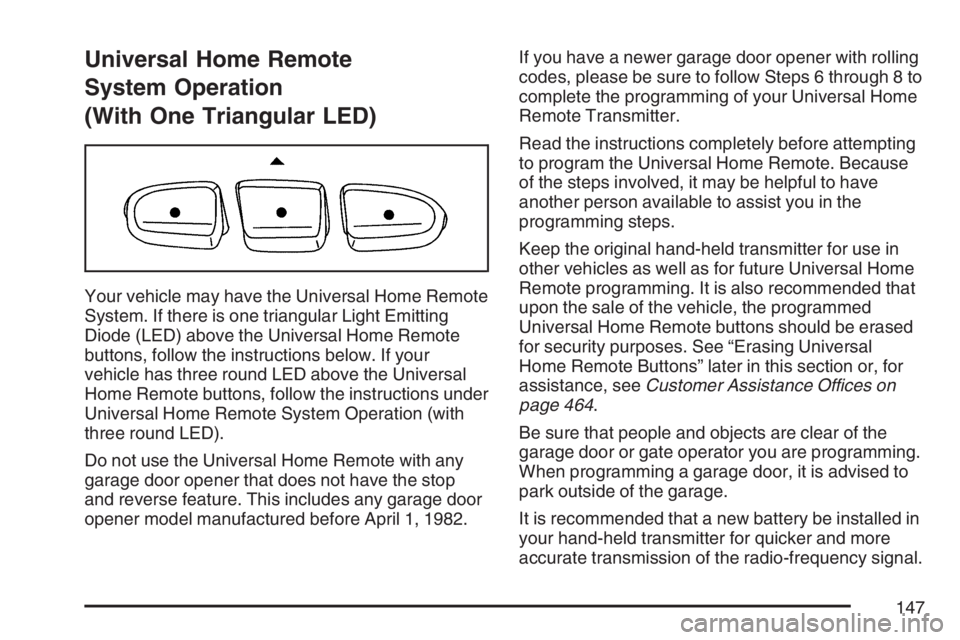
Your vehicle may have the Universal Home Remote
System. If there is one triangular Light Emitting
Diode (LED) above the Universal Home Remote
buttons, follow the instructions below. If your
vehicle has three round LED above the Universal
Home Remote buttons, follow the instructions under
Universal Home Remote System Operation (with
three round LED).
Do not use the Universal Home Remote with any
garage door opener that does not have the stop
and reverse feature. This includes any garage door
opener model manufactured before April 1, 1982.If you have a newer garage door opener with rolling
codes, please be sure to follow Steps 6 through 8 to
complete the programming of your Universal Home
Remote Transmitter.
Read the instructions completely before attempting
to program the Universal Home Remote. Because
of the steps involved, it may be helpful to have
another person available to assist you in the
programming steps.
Keep the original hand-held transmitter for use in
other vehicles as well as for future Universal Home
Remote programming. It is also recommended that
upon the sale of the vehicle, the programmed
Universal Home Remote buttons should be erased
for security purposes. See “Erasing Universal
Home Remote Buttons” later in this section or, for
assistance, seeCustomer Assistance Offices on
page 464.
Be sure that people and objects are clear of the
garage door or gate operator you are programming.
When programming a garage door, it is advised to
park outside of the garage.
It is recommended that a new battery be installed in
your hand-held transmitter for quicker and more
accurate transmission of the radio-frequency signal.
147
Page 148 of 496
Programming Universal Home Remote
Follow these steps to program up to
three channels:
1. Press and hold down the two outside Universal
Home Remote buttons, releasing only when
the Universal Home Remote indicator light
begins to ash, after 20 seconds. Do not hold
down the buttons for longer than 30 seconds
and do not repeat this step to program a
second and/or third hand-held transmitter to
the remaining two Universal Home Remote
buttons.
2. Position the end of your hand-held transmitter
about 1 to 3 inches (3 to 8 cm) away from the
Universal Home Remote buttons while
keeping the indicator light in view.
3. Simultaneously press and hold both the
desired Universal Home Remote button
and the hand-held transmitter button. Do not
release the buttons until Step 4 has been
completed.
Some entry gates and garage door openers
may require you to substitute Step 3 with
the procedure noted in “Gate Operator and
Canadian Programming” later in this section.4. The indicator light will ash slowly at rst and
then rapidly after Universal Home Remote
successfully receives the frequency signal
from the hand-held transmitter. Release both
buttons.
5. Press and hold the newly-trained Universal
Home Remote button and observe the
indicator light.
If the indicator light stays on continuously,
programming is complete and your device
should activate when the Universal Home
Remote button is pressed and released.
To program the remaining two Universal Home
Remote buttons, begin with Step 2 under
“Programming Universal Home Remote.” Do
not repeat Step 1 as this will erase all of the
programmed channels.
If the indicator light blinks rapidly for
two seconds and then turns to a constant light,
continue with Steps 6 through 8 following to
complete the programming of a rolling-code
device, most commonly, a garage door opener.
148
Page 149 of 496
6. Locate in the garage, the garage door opener
receiver (motor-head unit). Locate the “Learn”
or “Smart” button. This can usually be
found where the hanging antenna wire is
attached to the motor-head unit.
7. Firmly press and release the “Learn” or
“Smart” button. The name and color of
the button may vary by manufacturer.
You will have 30 seconds to start Step 8.
8. Return to the vehicle. Firmly press and hold the
programmed Universal Home Remote button
for two seconds, then release it. Immediately
press and hold the same button a second time
for two seconds, then release it. Immediately,
press and hold the same button a third time for
two seconds, then release.
The Universal Home Remote should now
activate the rolling-code device.
To program the remaining two Universal
Home Remote buttons, begin with Step 2 of
“Programming Universal Home Remote.” Do not
repeat Step 1, as this will erase all previous
programming from the Universal Home Remote
buttons.Gate Operator and Canadian
Programming
Canadian radio-frequency laws require transmitter
signals to time out or quit after several seconds
of transmission. This may not be long enough
for Universal Home Remote to pick up the signal
during programming. Similarly, some U.S. gate
operators are manufactured to time out in
the same manner.
If you live in Canada, or you are having difficulty
programming a gate operator or garage door
opener by using the “Programming Universal
Home Remote” procedures, regardless of where
you live, replace Step 3 under “Programming
Universal Home Remote” with the following:
Continue to press and hold the Universal Home
Remote button while you press and release every
two seconds (cycle) the hand-held transmitter
button until the frequency signal has been
successfully accepted by the Universal Home
Remote. The Universal Home Remote indicator
light will ash slowly at rst and then rapidly.
Proceed with Step 4 under “Programming
Universal Home Remote” to complete.
149
Page 150 of 496
Using Universal Home Remote
Press and hold the appropriate Universal Home
Remote button for at least half of a second.
The indicator light will come on while the signal is
being transmitted.
Erasing Universal Home Remote
Buttons
To erase programming from the three Universal
Home Remote buttons do the following:
1. Press and hold down the two outside buttons
until the indicator light begins to ash, after
20 seconds. Do not hold the two outside
buttons for longer than 30 seconds.
2. Release both buttons.
The Universal Home Remote is now in the training
(learning) mode and can be programmed at any
time beginning with Step 2 under “Programming
Universal Home Remote” shown earlier in
this section.
Individual buttons cannot be erased, but they
can be reprogrammed. See “Reprogramming a
Single Universal Home Remote Button” following
this section.
Reprogramming a Single Universal
Home Remote Button
To program a device to Universal Home Remote
using a Universal Home Remote button
previously trained, follow these steps:
1. Press and hold the desired Universal Home
Remote button. Do not release the button.
2. The indicator light will begin to ash after
20 seconds. While still holding the Universal
Home Remote button, proceed with Step
2 under “Programming Universal Home
Remote” shown earlier in this section.
For additional information on Universal Home
Remote, seeCustomer Assistance Offices
on page 464.
150
Page 159 of 496
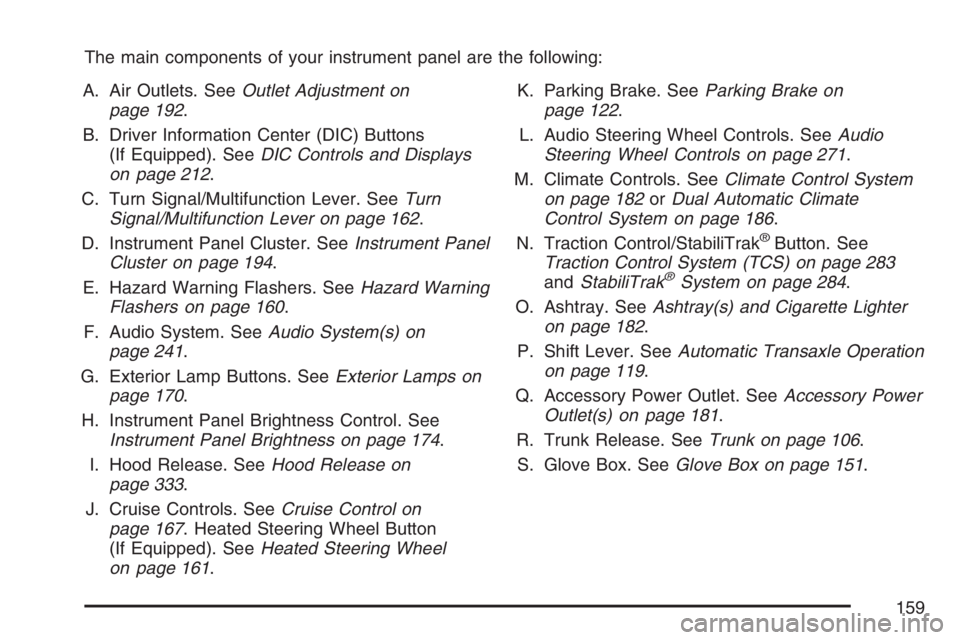
The main components of your instrument panel are the following:
A. Air Outlets. SeeOutlet Adjustment on
page 192.
B. Driver Information Center (DIC) Buttons
(If Equipped). SeeDIC Controls and Displays
on page 212.
C. Turn Signal/Multifunction Lever. SeeTurn
Signal/Multifunction Lever on page 162.
D. Instrument Panel Cluster. SeeInstrument Panel
Cluster on page 194.
E. Hazard Warning Flashers. SeeHazard Warning
Flashers on page 160.
F. Audio System. SeeAudio System(s) on
page 241.
G. Exterior Lamp Buttons. SeeExterior Lamps on
page 170.
H. Instrument Panel Brightness Control. See
Instrument Panel Brightness on page 174.
I. Hood Release. SeeHood Release on
page 333.
J. Cruise Controls. SeeCruise Control on
page 167. Heated Steering Wheel Button
(If Equipped). SeeHeated Steering Wheel
on page 161.K. Parking Brake. SeeParking Brake on
page 122.
L. Audio Steering Wheel Controls. SeeAudio
Steering Wheel Controls on page 271.
M. Climate Controls. SeeClimate Control System
on page 182orDual Automatic Climate
Control System on page 186.
N. Traction Control/StabiliTrak
®Button. See
Traction Control System (TCS) on page 283
andStabiliTrak
®System on page 284.
O. Ashtray. SeeAshtray(s) and Cigarette Lighter
on page 182.
P. Shift Lever. SeeAutomatic Transaxle Operation
on page 119.
Q. Accessory Power Outlet. SeeAccessory Power
Outlet(s) on page 181.
R. Trunk Release. SeeTrunk on page 106.
S. Glove Box. SeeGlove Box on page 151.
159
Page 172 of 496
Daytime Running Lamps (DRL)
Daytime Running Lamps (DRL) can make it easier
for others to see the front of your vehicle during
the day. DRL can be helpful in many different
driving conditions, but they can be especially
helpful in the short periods after dawn and before
sunset. Fully functional daytime running lamps
are required on all vehicles rst sold in Canada.
A light sensor on top of the instrument panel
monitors the exterior light level for the operation
of DRL, so be sure it is not covered.
The DRL system will make your low-beam
headlamps turn on at reduced brightness in
daylight when the following conditions are met:
The ignition is on.
The exterior lamp button for the headlamps
is off.
The automatic transaxle is not in PARK (P).When the DRL are on, only your low-beam
headlamps will be on. The parking lamps, taillamps,
sidemarker and other lamps will not be on.
When it is dark enough outside, your low-beam
headlamps will come on. The other lamps that turn
on with your headlamps will also turn on. When
it is bright enough outside, the regular lamps
will go off, and your low-beam headlamps change
to the reduced brightness of DRL.
To turn off all exterior lighting at night when you
are parked, turn the exterior lamp control to the
off position. The exterior lamps will turn back
on automatically when you move the transaxle out
of PARK (P). SeeExterior Lamps on page 170
for more information.
As with any vehicle, you should turn on the
regular headlamp system when you need it.
172
Page 174 of 496
Instrument Panel Brightness
D(Instrument Panel Brightness):This feature
controls the brightness of the instrument panel
lights.
The knob for this control is located next to the
exterior lamps control.
Push the knob in and release when it pops out.
Turn the knob clockwise to increase the brightness
of the instrument panel lights and counter clockwise
to decrease the brightness. Turning the knob
completely clockwise to the detent will turn on the
courtesy lamps.
Courtesy Lamps
When any door is opened, several lamps turn on
making it easier for you to enter and exit the
vehicle. Turn the instrument panel brightness
control completely clockwise to manually turn
on these lamps.
Entry Lighting
If it is dark enough outside when you press the
unlock button on the remote keyless entry
transmitter, the interior courtesy lamps will turn on
and stay on for about 40 seconds. The lamps can
be turned off immediately by pressing the lock
button on the remote keyless entry transmitter,
turning the ignition key to RUN or activating the
power door locks.
Delayed Entry Lighting
The interior lamps will turn on if you open the door
when it is dark enough outside. When you close the
door with the ignition off, the interior lamps will stay
on for up to 25 seconds or until the ignition is turned
to an on position. When the lamps turn off as a
result of the 25 second timer or the ignition switch
being turned on, the lighting will deactivate by way
of the theater dimming effect. Locking the doors will
override the delayed entry lighting feature and the
lamps will turn off right away.
174