audio BUICK LUCERNE 2010 Owner's Guide
[x] Cancel search | Manufacturer: BUICK, Model Year: 2010, Model line: LUCERNE, Model: BUICK LUCERNE 2010Pages: 474
Page 254 of 474
Audio System
When using the in‐vehicle Bluetooth system, sound
comes through the vehicle's front audio system
speakers and overrides the audio system. Use the
audio system volume knob, during a call, to change the
volume level. The adjusted volume level remains in
memory for later calls. To prevent missed calls, a
minimum volume level is used if the volume is turned
down too low.
Bluetooth Controls
Use the buttons located on the steering wheel to
operate the in‐vehicle Bluetooth system. SeeAudio
Steering Wheel Controls
on page 4‑105for more
information.
b g(Push To Talk) : Press to answer incoming calls,
to confirm system information, and to start speech
recognition.
c x(Phone On Hook): Press to end a call, reject a
call, or to cancel an operation.
Pairing
A Bluetooth enabled cell phone must be paired to the
in‐vehicle Bluetooth system first and then connected
to the vehicle before it can be used. See the cell
phone manufacturers user guide for Bluetooth functions
before pairing the cell phone. If a Bluetooth phone is
not connected, calls will be made using OnStar
®
Hands‐Free Calling, if available. Refer to the OnStar
owner's guide for more information.
Pairing Information:
.Up to five cell phones can be paired to the
in‐vehicle Bluetooth system.
.The pairing process is disabled when the vehicle is
moving.
.The in‐vehicle Bluetooth system automatically links
with the first available paired cell phone in the
order the phone was paired.
.Only one paired cell phone can be connected to
the in‐vehicle Bluetooth system at a time.
.Pairing should only need to be completed once,
unless changes to the pairing information have
been made or the phone is deleted.
To link to a different paired phone, see Linking to a
Different Phone later in this section.
4-94
Page 260 of 474
Using the Digit Dial Command
1. Press and holdbgfor two seconds. The system
responds with “Ready”followed by a tone.
2. Say “Digit Dial”. The system responds with “Digit
dial using
to dial” followed by a tone.
3. Say the digit to be dialed one at a time. Following each digit, the system will repeat back the digit it
heard followed by a tone.
4. Continue entering digits until the number to be dialed is complete. After the whole number has
been entered, say “Dial”. The system responds
with “OK, Dialing” and dials the number.
.If an unwanted number is recognized by the
system, say“Clear”at any time to clear the last
number.
.To hear all of the numbers recognized by the
system, say “Verify”at any time and the system
will repeat them.
Using the Call Command
1. Press and holdb gfor two seconds. The system
responds with “Ready”followed by a tone.
2. Say “Call”. The system responds with “Call using
by a tone.
3. Say the name tag of the person to call.
.If the system clearly recognizes the name tag it
responds with “OK, calling,
dials the number.
.If the system is unsure it recognizes the right
name tag, it confirms the name tag followed by
a tone. If the name tag is correct, say “Yes”.
The system responds with “OK, calling,
not correct, say “No”. The system will ask for
the name tag to be re‐entered.
Once connected, the person called will be heard
through the audio speakers.
4-100
Page 261 of 474
Using the Re‐dial Command
1. Press and holdbgfor two seconds. The system
responds with “Ready”followed by a tone.
2. After the tone, say “Re‐dial”. The system responds
with “Re‐dial using
last number called from the connected Bluetooth
phone.
Once connected, the person called will be heard
through the audio speakers.
Receiving a Call
When an incoming call is received, the audio system
mutes and a ring tone is heard in the vehicle.
.Pressb gand begin speaking to answer the call.
.Pressc xto ignore a call.
Call Waiting
Call waiting must be supported on the Bluetooth phone
and enabled by the wireless service carrier to work.
.Pressbgto answer an incoming call when
another call is active. The original call is placed
on hold.
.Pressb gagain to return to the original call.
.To ignore the incoming call, continue with the
original call with no action.
.Pressc xto disconnect the current call and
switch to the call on hold.
Three‐Way Calling
Three‐Way Calling must be supported on the Bluetooth
phone and enabled by the wireless service carrier
to work.
1. While on a call press
b g. The system responds
with “Ready” followed by a tone.
2. Say “Three‐way call”. The system responds with
“Three‐way call, please say dial or call”.
3. Use the dial or call command to dial the number of the third party to be called.
4. Once the call is connected, press
b gto link all
the callers together.
Ending a Call
Pressc xto end a call.
4-101
Page 262 of 474
Muting a Call
During a call, all sounds from inside the vehicle can be
muted so that the person on the other end of the call
cannot hear them.
To Mute a call
1. Pressbg. The system responds with “Ready”
followed by a tone.
2. Say “Mute Call”. The system responds with “Call
muted”.
To Cancel Mute
1. Pressb g. The system responds with “Ready”
followed by a tone.
2. After the tone, say “Mute Call”. The system
responds with “Resuming call”.
Transferring a Call
Audio can be transferred between the in‐vehicle
Bluetooth system and the cell phone.
To Transfer Audio to the Cell Phone
During a call with the audio in the vehicle:
1. Press
b g. The system responds with “Ready”
followed by a tone.
2. Say “Transfer Call.” The system responds with
“Transferring call” and the audio will switch from
the vehicle to the cell phone.
To Transfer Audio to the In-Vehicle
Bluetooth System
The cellular phone must be paired and connected with
the Bluetooth system before a call can be transferred.
The connection process can take up to two minutes
after the key is turned to the ON/RUN or ACC/
ACCESSORY position.
During a call with the audio on the cell phone,
press
b gfor more than two seconds. The audio
switches from the cell phone to the vehicle.
4-102
Page 265 of 474
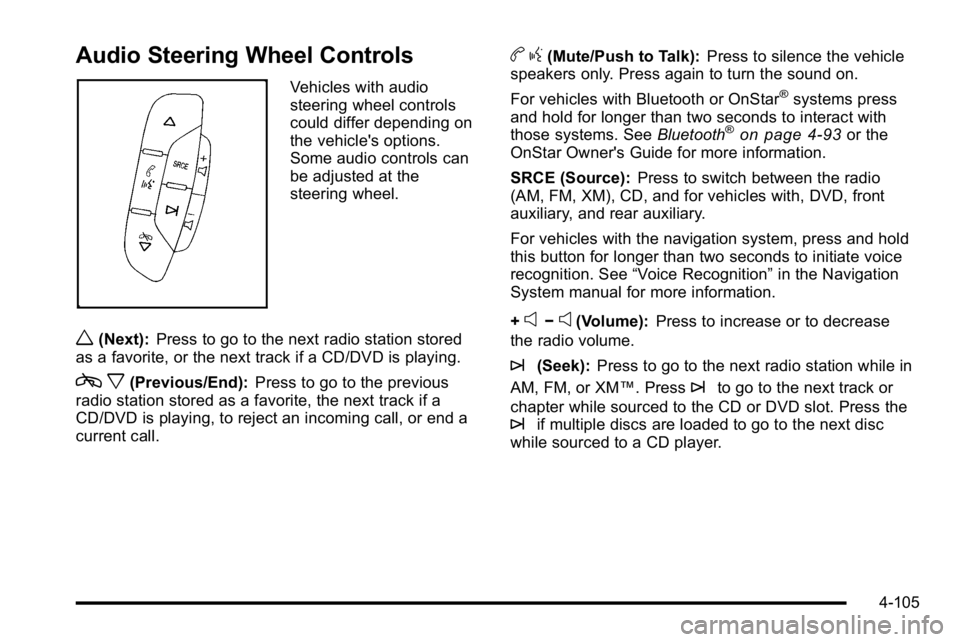
Audio Steering Wheel Controls
Vehicles with audio
steering wheel controls
could differ depending on
the vehicle's options.
Some audio controls can
be adjusted at the
steering wheel.
w(Next):Press to go to the next radio station stored
as a favorite, or the next track if a CD/DVD is playing.
c x(Previous/End): Press to go to the previous
radio station stored as a favorite, the next track if a
CD/DVD is playing, to reject an incoming call, or end a
current call.
b g(Mute/Push to Talk): Press to silence the vehicle
speakers only. Press again to turn the sound on.
For vehicles with Bluetooth or OnStar
®systems press
and hold for longer than two seconds to interact with
those systems. See Bluetooth
®on page 4‑93or the
OnStar Owner's Guide for more information.
SRCE (Source): Press to switch between the radio
(AM, FM, XM), CD, and for vehicles with, DVD, front
auxiliary, and rear auxiliary.
For vehicles with the navigation system, press and hold
this button for longer than two seconds to initiate voice
recognition. See “Voice Recognition” in the Navigation
System manual for more information.
+
e−e(Volume): Press to increase or to decrease
the radio volume.
¨(Seek): Press to go to the next radio station while in
AM, FM, or XM™. Press
¨to go to the next track or
chapter while sourced to the CD or DVD slot. Press the
¨if multiple discs are loaded to go to the next disc
while sourced to a CD player.
4-105
Page 346 of 474
Vehicle Storage
{WARNING:
Batteries have acid that can burn you and gas
that can explode. You can be badly hurt if you are
not careful. SeeJump Starting
on page 6‑44for
tips on working around a battery without
getting hurt.
Infrequent Usage: Remove the black, negative (−) cable
from the battery to keep the battery from running down.
Extended Storage: Remove the black, negative (−)
cable from the battery or use a battery trickle charger.
See Theft-Deterrent Feature
on page 4‑104for the audio
system.
Jump Starting
If the vehicle's battery has run down, you may want to
use another vehicle and some jumper cables to start
your vehicle. Be sure to use the following steps to do it
safely.
{WARNING:
Batteries can hurt you. They can be dangerous
because:
.They contain acid that can burn you.
.They contain gas that can explode or ignite.
.They contain enough electricity to burn you.
If you do not follow these steps exactly, some or
all of these things can hurt you.
6-44
Page 460 of 474

Audio System . . . . . . . . . . . . . . . . . . . . . . . . . . . . . . . . . . . . . . 4-74Audio Steering Wheel Controls . . . . . . . . . . . . . . . . . .4-105
Navigation/Radio System, see Navigation
Manual . . . . . . . . . . . . . . . . . . . . . . . . . . . . . . . . . . . . . . . . . . 4-93
Radio Reception . . . . . . . . . . . . . . . . . . . . . . . . . . . . . . . . .4-106
Setting the Clock . . . . . . . . . . . . . . . . . . . . . . . . . . . . . . . . . 4-75
Theft-Deterrent Feature . . . . . . . . . . . . . . . . . . . . . . . . . .4-104
XM™ Satellite Radio Antenna System . . . . . . . . . . .4-107
Audio System(s) . . . . . . . . . . . . . . . . . . . . . . . . . . . . . . . . . . . 4-77
Automatic Transmission Fluid . . . . . . . . . . . . . . . . . . . . . . . . . . . . . . . . . . . . . . . . . . . . . . 6-23
Operation . . . . . . . . . . . . . . . . . . . . . . . . . . . . . . . . . . . . . . . . . 3-24
B
Backglass Antenna . . . . . . . . . . . . . . . . . . . . . . . . . . . . . . . 4-107
Battery . . . . . . . . . . . . . . . . . . . . . . . . . . . . . . . . . . . . . . . . . . . . 6-42
Electric Power Management . . . . . . . . . . . . . . . . . . . . . . 4-16
Exterior Lighting Battery Saver . . . . . . . . . . . . . . . . . . . 4-14
Inadvertent Power Saver . . . . . . . . . . . . . . . . . . . . . . . . . 4-16
Run-Down Protection . . . . . . . . . . . . . . . . . . . . . . . . . . . . . 4-17
Belt Routing, Engine . . . . . . . . . . . . . . . . . . . . . . . . . . . . . . . 7-12
Bluetooth
®. . . . . . . . . . . . . . . . . . . . . . . . . . . . . . . . . . . . . . . . . 4-93
Brake
Emergencies . . . . . . . . . . . . . . . . . . . . . . . . . . . . . . . . . . . . . . 5-5 Brakes . . . . . . . . . . . . . . . . . . . . . . . . . . . . . . . . . . . . . . . . . . . . . 6-40
Antilock . . . . . . . . . . . . . . . . . . . . . . . . . . . . . . . . . . . . . . . . . . . . 5-4
Parking . . . . . . . . . . . . . . . . . . . . . . . . . . . . . . . . . . . . . . . . . . . 3-26
System Warning Light . . . . . . . . . . . . . . . . . . . . . . . . . . . . 4-36
Braking . . . . . . . . . . . . . . . . . . . . . . . . . . . . . . . . . . . . . . . . . . . . . .5-3
Braking in Emergencies . . . . . . . . . . . . . . . . . . . . . . . . . . . . .5-5
Break-In, New Vehicle . . . . . . . . . . . . . . . . . . . . . . . . . . . . . 3-19
Bulb Replacement . . . . . . . . . . . . . . . . . . . . . . . . . . . . . . . . . 6-55 Fog Lamps . . . . . . . . . . . . . . . . . . . . . . . . . . . . . . . . . . . . . . . 4-14
Halogen Bulbs . . . . . . . . . . . . . . . . . . . . . . . . . . . . . . . . . . . . 6-52
Headlamp Aiming . . . . . . . . . . . . . . . . . . . . . . . . . . . . . . . . . 6-49
Headlamps . . . . . . . . . . . . . . . . . . . . . . . . . . . . . . . . . . . . . . . 6-52
License Plate Lamps . . . . . . . . . . . . . . . . . . . . . . . . . . . . . 6-55
Taillamps and Back-Up Lamps . . . . . . . . . . . . . . . . . . . . 6-54
Taillamps, Turn Signal, Stoplamps andSidemarker Lamps . . . . . . . . . . . . . . . . . . . . . . . . . . . . . . 6-52
Buying New Tires . . . . . . . . . . . . . . . . . . . . . . . . . . . . . . . . . . 6-74
C
Calibration . . . . . . . . . . . . . . . . . . . . . . . . . . . . . . . . . . . 3-33, 4-53
California Perchlorate Materials Requirements . . . . . . . . . . . . . . . 6-4
Warning . . . . . . . . . . . . . . . . . . . . . . . . . . . . . . . . . . . . . . . . . . . 6-4
California Fuel . . . . . . . . . . . . . . . . . . . . . . . . . . . . . . . . . . . . . . .6-6
Canadian Owners . . . . . . . . . . . . . . . . . . . . . . . . . . . . . . . . . . . . iii
Capacities and Specifications . . . . . . . . . . . . . . . . . . . . . 6-118
i - 2
Page 471 of 474

Seats (cont.)Heated Seats . . . . . . . . . . . . . . . . . . . . . . . . . . . . . . . . . . . . . . 2-4
Memory, Mirrors . . . . . . . . . . . . . . . . . . . . . . . . . . . . . . . . . . . 2-7
Power Lumbar . . . . . . . . . . . . . . . . . . . . . . . . . . . . . . . . . . . . . 2-4
Power Seats . . . . . . . . . . . . . . . . . . . . . . . . . . . . . . . . . . . . . . . 2-3
Reclining Seatbacks . . . . . . . . . . . . . . . . . . . . . . . . . . . . . . . 2-8
Securing a Child Restraint Center Front Seat Position . . . . . . . . . . . . . . . . . . . . . . . 2-52
Rear Seat Position . . . . . . . . . . . . . . . . . . . . . . . . . . . . . . . 2-49
Right Front Seat Position . . . . . . . . . . . . . . . . . . . . . . . . . 2-52
Security Light . . . . . . . . . . . . . . . . . . . . . . . . . . . . . . . . . . . . . . . . . . . . . . 4-45
Service . . . . . . . . . . . . . . . . . . . . . . . . . . . . . . . . . . . . . . . . . . . . . .6-3 Accessories and Modifications . . . . . . . . . . . . . . . . . . . . . 6-3
Adding Equipment to the Outside of the Vehicle . . . 6-5
Doing Your Own Work . . . . . . . . . . . . . . . . . . . . . . . . . . . . . 6-4
Engine Soon Lamp . . . . . . . . . . . . . . . . . . . . . . . . . . . . . . . 4-41
Parts Identification Label . . . . . . . . . . . . . . . . . . . . . . . .6-109
Publications Ordering Information . . . . . . . . . . . . . . . . . 8-17
Scheduling Appointments . . . . . . . . . . . . . . . . . . . . . . . . . 8-11
Servicing Your Airbag-Equipped Vehicle . . . . . . . . . . . 2-72
Setting the Clock . . . . . . . . . . . . . . . . . . . . . . . . . . . . . . . . . . 4-75
Sheet Metal Damage . . . . . . . . . . . . . . . . . . . . . . . . . . . . . 6-107
Shifting Out of Park . . . . . . . . . . . . . . . . . . . . . . . . . . . . . . . . . . . . . . . 3-30 Shifting Into Park . . . . . . . . . . . . . . . . . . . . . . . . . . . . . . . . . . 3-27
Side Blind Zone Alert . . . . . . . . . . . . . . . . . . . . . . . . . . . . . . 3-39
Signals, Turn and Lane-Change . . . . . . . . . . . . . . . . . . . . .4-5
Spare Tire
Compact . . . . . . . . . . . . . . . . . . . . . . . . . . . . . . . . . . . . . . . . .6-100
Installing . . . . . . . . . . . . . . . . . . . . . . . . . . . . . . . . . . . . . . . . . . 6-93
Removing . . . . . . . . . . . . . . . . . . . . . . . . . . . . . . . . . . . . . . . . 6-92
Storing . . . . . . . . . . . . . . . . . . . . . . . . . . . . . . . . . . . . . . . . . . . 6-98
Specifications and Capacities . . . . . . . . . . . . . . . . . . . . . 6-118
Speedometer . . . . . . . . . . . . . . . . . . . . . . . . . . . . . . . . . . . . . . 4-32
StabiliTrak
®Indicator Light . . . . . . . . . . . . . . . . . . . . . . . . 4-39
StabiliTrak®System . . . . . . . . . . . . . . . . . . . . . . . . . . . . . . . . .5-6
Start Vehicle, Remote . . . . . . . . . . . . . . . . . . . . . . . . . . . . . . .3-7
Starting the Engine . . . . . . . . . . . . . . . . . . . . . . . . . . . . . . . . 3-21
Steering . . . . . . . . . . . . . . . . . . . . . . . . . . . . . . . . . . . . . . . . . . . . .5-8 Heated Wheel . . . . . . . . . . . . . . . . . . . . . . . . . . . . . . . . . . . . . 4-4
Steering Wheel Controls, Audio . . . . . . . . . . . . . . . . . . 4-105
Steering Wheel, Power Tilt Wheel and Telescopic Steering Column . . . . . . . . . . . . . . . . . . . . . . . . . . . . . . . . . . .4-4
Steering Wheel, Tilt Wheel . . . . . . . . . . . . . . . . . . . . . . . . . .4-3
Storage Areas Center Console . . . . . . . . . . . . . . . . . . . . . . . . . . . . . . . . . . . 3-51
Center Flex Storage Unit . . . . . . . . . . . . . . . . . . . . . . . . . 3-51
Convenience Net . . . . . . . . . . . . . . . . . . . . . . . . . . . . . . . . . 3-51
Cupholders . . . . . . . . . . . . . . . . . . . . . . . . . . . . . . . . . . . . . . . 3-51
i - 13