light BUICK LUCERNE 2010 Manual Online
[x] Cancel search | Manufacturer: BUICK, Model Year: 2010, Model line: LUCERNE, Model: BUICK LUCERNE 2010Pages: 474
Page 228 of 474

To select a setting, press the set/reset button while the
desired setting is displayed on the DIC.
REMOTE DOOR UNLOCK
This feature allows you to select the type of feedback
you will receive when unlocking the vehicle with the
Remote Keyless Entry (RKE) transmitter. You will not
receive feedback when unlocking the vehicle with the
RKE transmitter if the doors are open. SeeRemote
Keyless Entry (RKE) System Operation
on page 3‑4for more information.
Press the customization button until REMOTE DOOR
UNLOCK appears on the DIC display. Press the set/
reset button once to access the settings for this feature.
Then press the customization button to scroll through
the following settings:
LIGHTS OFF: The exterior lamps will not flash when
you press the unlock button on the RKE transmitter.
LIGHTS ON (default): The exterior lamps will flash
when you press the unlock button on the RKE
transmitter.
NO CHANGE: No change will be made to this feature.
The current setting will remain.
To select a setting, press the set/reset button while the
desired setting is displayed on the DIC.
DELAY DOOR LOCK
This feature allows you to select whether or not the
locking of the vehicle's doors will be delayed. When
locking the doors with the power door lock switch and a
door is open, this feature will delay locking the doors
until five seconds after the last door is closed. You will
hear three chimes to signal that the delayed locking
feature is in use. The key must be out of the ignition for
this feature to work. You can temporarily override
delayed locking by pressing the power door lock switch
twice or the lock button on the RKE transmitter twice.
See Delayed Locking
on page 3‑10for more
information.
Press the customization button until DELAY DOOR
LOCK appears on the DIC display. Press the set/reset
button once to access the settings for this feature. Then
press the customization button to scroll through the
following settings:
OFF: There will be no delayed locking of the vehicle's
doors.
ON (default): The doors will not lock until five seconds
after the last door is closed.
NO CHANGE: No change will be made to this feature.
The current setting will remain.
To select a setting, press the set/reset button while the
desired setting is displayed on the DIC.
4-68
Page 229 of 474

EXIT LIGHTING
This feature allows you to select the amount of time you
want the exterior lamps to remain on when it is dark
enough outside. This happens after the key is turned
from ON/RUN to LOCK/OFF.
Press the customization button until EXIT LIGHTING
appears on the DIC display. Press the set/reset button
once to access the settings for this feature. Then press
the customization button to scroll through the following
settings:
OFF:The exterior lamps will not turn on.
30 SECONDS (default): The exterior lamps will stay on
for 30 seconds.
1 MINUTE: The exterior lamps will stay on for
one minute.
2 MINUTES: The exterior lamps will stay on for
two minutes.
NO CHANGE: No change will be made to this feature.
The current setting will remain.
To select a setting, press the set/reset button while the
desired setting is displayed on the DIC.
APPROACH LIGHTING
This feature allows you to select whether or not to have
the exterior lights turn on briefly during low light periods
after unlocking the vehicle using the Remote Keyless
Entry (RKE) transmitter.
Press the customization button until APPROACH
LIGHTING appears on the DIC display. Press the set/
reset button once to access the settings for this feature.
Then press the customization button to scroll through
the following settings:
OFF: The exterior lights will not turn on when you
unlock the vehicle with the RKE transmitter.
ON (default): If it is dark enough outside, the exterior
lights will turn on briefly when you unlock the vehicle
with the RKE transmitter.
The lights will remain on for 20 seconds or until the lock
button on the RKE transmitter is pressed, or the vehicle
is no longer off. See Remote Keyless Entry (RKE)
System Operation
on page 3‑4for more information.
NO CHANGE: No change will be made to this feature.
The current setting will remain.
To select a setting, press the set/reset button while the
desired setting is displayed on the DIC.
4-69
Page 239 of 474
Storing a Radio Station as a Favorite
Drivers are encouraged to set up their radio station
favorites while the vehicle is in P (Park). Tune to
favorite stations using the presets, favorites button, and
steering wheel controls if the vehicle has this feature.
SeeDefensive Driving on page 5‑2.
If the vehicle has XM and has a FAV button, a
maximum of 36 stations can be programmed as
favorites using the six pushbuttons positioned below the
radio station frequency tabs and by using the radio
favorites page button (FAV button).
FAV (Favorites): Press to go through up to six pages
of favorites, each having six favorite stations available
per page. Each page of favorites can contain any
combination of AM, FM, or XM stations. To store a
station as a favorite:
1. Tune to the desired radio station.
2. Press the FAV button to display the page where you want the station stored.
3. Press and hold one of the six pushbuttons until a beep sounds. When that pushbutton is pressed
and released, the station that was set, returns.
4. Repeat the steps for each pushbutton radio station you want stored as a favorite. The number of favorites pages can be setup using the
MENU button. To setup the number of favorites pages:
1. Press the MENU button to display the radio setup menu.
2. Press the pushbutton located below the FAV 1-6 tab.
3. Select the desired number of favorites pages by pressing the pushbutton located below the
displayed page numbers.
4. Press the FAV button, or let the menu time out, to return to the original main radio screen showing
the radio station frequency tabs and to begin the
process of programming favorites for the chosen
amount of numbered pages.
Setting the Tone (Bass/Midrange/Treble)
BASS/MID/TREB (Bass, Midrange, or Treble): The
radio may display some or all tones, such as BASS,
MID, and TREB. To adjust the tone settings, press the
fknob until the tone control tabs display. Press the
pushbutton positioned under the desired tab, then turn
the
fknob clockwise or counterclockwise to adjust the
highlighted setting. The highlighted setting can also be
adjusted by pressing either SEEK arrow,
\FWD,
or
sREV button until the desired levels are obtained.
If a station's frequency is weak, or has static, decrease
the treble.
4-79
Page 240 of 474
The radio may be capable of adjusting bass, midrange,
or treble to the middle position by pressing the
pushbutton positioned under the BASS, MID
(midrange), or TREB (treble) tab for more than
two seconds. The radio beeps once and the level
adjusts to the middle position.
The radio may also be capable of adjusting all tone and
speaker controls to the middle position by pressing the
fknob for more than two seconds until the radio
beeps once.
EQ (Equalization): Press to select preset equalization
settings.
To return to the manual mode, press until Manual
displays or start to manually adjust the bass and
depending on the radio, midrange, or treble by pressing
the
fknob.
Adjusting the Speakers (Balance/Fade)
`
BAL/FADE (Balance/Fade): To adjust balance or
fade, press the
`if the radio has this symbol, or the
fknob until the speaker control tabs display. Continue
pressing to highlight the desired tab, or press the
pushbutton positioned under the desired tab. Turn the
fknob clockwise or counterclockwise to adjust the
setting. The setting can also be adjusted by pressing
either SEEK arrow,
\FWD, orsREV until the
desired levels are obtained.
The radio may be capable of adjusting balance or fade
to the middle position by pressing the pushbutton
positioned under the BAL or FADE tab for more than
two seconds. The radio beeps once and the level
adjusts to the middle position.
The radio may also be capable of adjusting all speaker
and tone controls to the middle position by pressing
the
fknob for more than two seconds until the radio
beeps once.
4-80
Page 245 of 474

Care of CDs
If playing a CD-R, the sound quality can be reduced
due to CD-R quality, the method of recording, the
quality of the music that has been recorded, and the
way the CD-R has been handled. Handle them
carefully. Store CD-R(s) in their original cases or other
protective cases and away from direct sunlight and
dust. The CD player scans the bottom surface of the
disc. If the surface of a CD is damaged, such as
cracked, broken, or scratched, the CD does not play
properly or not at all. Do not touch the bottom side of a
CD while handling it; this could damage the surface.
Pick up CDs by grasping the outer edges or the edge of
the hole and the outer edge.
If the surface of a CD is soiled, take a soft, lint free
cloth or dampen a clean, soft cloth in a mild, neutral
detergent solution mixed with water, and clean it.
Make sure the wiping process starts from the center to
the edge.
Care of the CD Player
Do not add any label to a CD, it could get caught in the
CD player. If a CD is recorded on a personal computer
and a description label is needed, try labeling the top of
the recorded CD with a marking pen.
The use of CD lens cleaners for CDs is not advised,
due to the risk of contaminating the lens of the CD
optics with lubricants internal to the CD player
mechanism.
Notice:If a label is added to a CD, or more than one
CD is inserted into the slot at a time, or an attempt
is made to play scratched or damaged CDs, the CD
player could be damaged. While using the CD
player, use only CDs in good condition without any
label, load one CD at a time, and keep the CD player
and the loading slot free of foreign materials,
liquids, and debris.
If an error displays, see “CD Messages”later in this
section.
4-85
Page 271 of 474
For persons under 21, it is against the law in every
U.S. state to drink alcohol. There are good medical,
psychological, and developmental reasons for
these laws.
The obvious way to eliminate the leading highway
safety problem is for people never to drink alcohol and
then drive.
Medical research shows that alcohol in a person's
system can make crash injuries worse, especially
injuries to the brain, spinal cord, or heart. This means
that when anyone who has been drinking—driver or
passenger —is in a crash, that person's chance of
being killed or permanently disabled is higher than if the
person had not been drinking.
Control of a Vehicle
The following three systems help to control the vehicle
while driving —brakes, steering, and accelerator. At
times, as when driving on snow or ice, it is easy to ask
more of those control systems than the tires and road
can provide. Meaning, you can lose control of the
vehicle. See Traction Control System (TCS)
on
page 5‑6.
Adding non‐dealer/non‐retailer accessories can
affect vehicle performance. See Accessories and
Modifications on page 6‑3.
Braking
See Brake System Warning Light on page 4‑36.
Braking action involves perception time and reaction
time. Deciding to push the brake pedal is perception
time. Actually doing it is reaction time.
Average reaction time is about three‐fourths of a
second. But that is only an average. It might be less
with one driver and as long as two or three seconds or
more with another. Age, physical condition, alertness,
coordination, and eyesight all play a part. So do alcohol,
drugs, and frustration. But even in three‐fourths of a
second, a vehicle moving at 100 km/h (60 mph) travels
20 m (66 feet). That could be a lot of distance in an
emergency, so keeping enough space between the
vehicle and others is important.
And, of course, actual stopping distances vary greatly
with the surface of the road, whether it is pavement
or gravel; the condition of the road, whether it is wet,
dry, or icy; tire tread; the condition of the brakes; the
weight of the vehicle; and the amount of brake force
applied.
5-3
Page 272 of 474
Avoid needless heavy braking. Some people drive in
spurts, heavy acceleration followed by heavy braking,
rather than keeping pace with traffic. This is a mistake.
The brakes might not have time to cool between hard
stops. The brakes will wear out much faster with a lot
of heavy braking. Keeping pace with the traffic and
allowing realistic following distances eliminates a lot of
unnecessary braking. That means better braking and
longer brake life.
If the engine ever stops while the vehicle is being
driven, brake normally but do not pump the brakes.
If the brakes are pumped, the pedal could get harder to
push down. If the engine stops, there will still be some
power brake assist but it will be used when the brake is
applied. Once the power assist is used up, it can take
longer to stop and the brake pedal will be harder
to push.
Adding non‐dealer/non‐retailer accessories can
affect vehicle performance. SeeAccessories and
Modifications on page 6‑3.Antilock Brake System (ABS)
This vehicle has the Antilock Brake System (ABS), an
advanced electronic braking system that helps prevent
a braking skid.
When the engine is started and the vehicle begins to
drive away, ABS checks itself. A momentary motor or
clicking noise might be heard while this test is going on,
and it might even be noticed that the brake pedal
moves a little. This is normal.
If there is a problem with
ABS, this warning light
stays on. See Antilock
Brake System (ABS)
Warning Light
on
page 4‑37.
Let us say the road is wet and you are driving safely.
Suddenly, an animal jumps out in front of you. You slam
on the brakes and continue braking. Here is what
happens with ABS:
A computer senses that the wheels are slowing down.
If one of the wheels is about to stop rolling, the
computer will separately work the brakes at each front
wheel and at both rear wheels.
5-4
Page 274 of 474

StabiliTrak®System
The vehicle may have the StabiliTrak system which
combines antilock brake, traction and stability control
systems and helps the driver maintain directional
control of the vehicle in most driving conditions. This is
accomplished by selectively applying any one of the
vehicle's brakes and reducing engine power.
The StabiliTrak system comes on automatically
whenever the vehicle is started. The system cannot be
turned off.
This light will flash when
the system is operating.
The STABILITRAK NOT READY message may be
displayed in the Driver Information Center (DIC) and the
Traction Control System (TCS)/StabiliTrak warning light
on the instrument panel cluster comes on after first
driving the vehicle and exceeding 19 mph (30 km/h) for
30 seconds. The StabiliTrak system is off until the light
has turned off. This could take up to 15 minutes. The TCS/StabiliTrak warning light on the instrument
panel cluster will flash when the system is operating.
See
Traction Control System (TCS) Warning Light
on
page 4‑38and StabiliTrak®Indicator Lighton
page 4‑39for more information. The system may be
heard or felt while it is working. This is normal.
The SERVICE STABILITRAK message is displayed and
the TCS/StabiliTrak warning light on the instrument
panel cluster comes on if there is a problem with
the system. When this light and the SERVICE
STABILITRAK message are on, the system is not
working. Adjust your driving accordingly.
Traction Control System (TCS)
The vehicle has a Traction Control System (TCS) that
limits wheel spin. This is especially useful in slippery
road conditions. The system operates only if it senses
that the front wheels are spinning too much or
beginning to lose traction. When this happens, the
system works the front brakes and reduces engine
power (by closing the throttle and managing engine
spark) to limit wheel spin.
5-6
Page 275 of 474

The TCS and StabiliTrak®
light will flash when the
system is limiting
wheel spin.
The system may be heard or felt while it is working, but
this is normal. See Traction Control System (TCS)
Warning Light
on page 4‑38for more information.
If the vehicle is in cruise control when TCS begins to
limit wheel spin, the cruise control will automatically
disengage. The cruise control may be re-engaged when
road conditions allow. See Cruise Control on page 4‑9.
The SERVICE TRACTION CONTROL message in the
DIC and the TCS/StabiliTrak warning light comes on if
there is a problem with the traction control system. See
DIC Warnings and Messages on page 4‑55.
When this light and the SERVICE TRACTION
CONTROL message are on, the system will not limit
wheel spin. Adjust your driving accordingly.
To turn the system off or
on, press and release this
button located in front of
the shift lever.
TCS automatically comes on whenever the vehicle is
started. To limit wheel spin, especially in slippery road
conditions, always leave the system turned on. TCS
can be turned off if needed.
The system can be turned on or off at any time by
pressing the TCS button. The DIC will display
TRACTION CONTROL OFF when the button is
pressed, and part of the traction control system is
disabled. The vehicle will still have brake-traction
control, but will not be able to use the engine speed
management system. System noises may be heard as
a result of the brake-traction control working. If the
controller detects excessive wheel spin in this mode,
the TCS/StabiliTrak light may blink.
5-7
Page 278 of 474
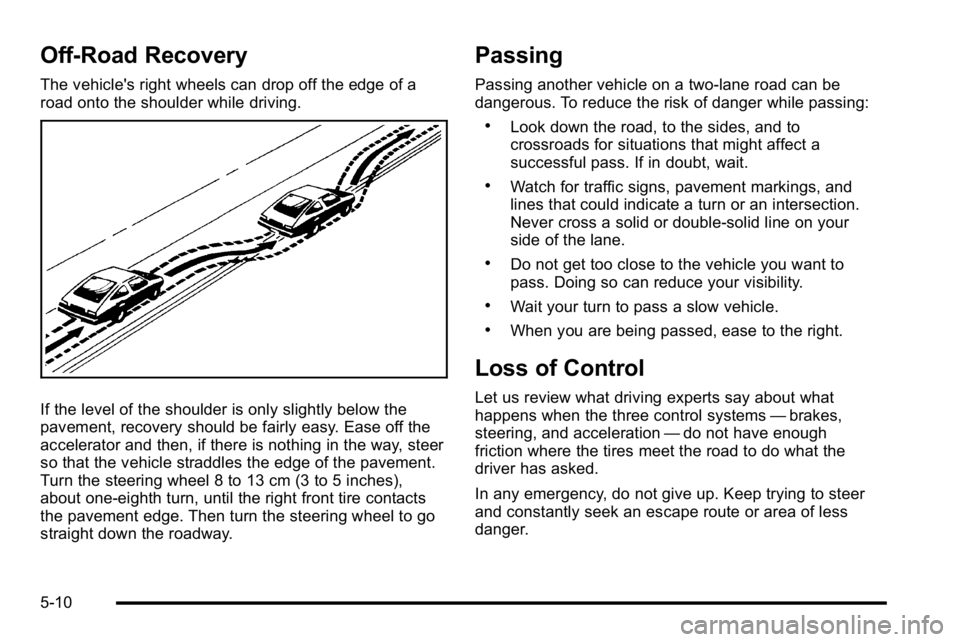
Off-Road Recovery
The vehicle's right wheels can drop off the edge of a
road onto the shoulder while driving.
If the level of the shoulder is only slightly below the
pavement, recovery should be fairly easy. Ease off the
accelerator and then, if there is nothing in the way, steer
so that the vehicle straddles the edge of the pavement.
Turn the steering wheel 8 to 13 cm (3 to 5 inches),
about one-eighth turn, until the right front tire contacts
the pavement edge. Then turn the steering wheel to go
straight down the roadway.
Passing
Passing another vehicle on a two-lane road can be
dangerous. To reduce the risk of danger while passing:
.Look down the road, to the sides, and to
crossroads for situations that might affect a
successful pass. If in doubt, wait.
.Watch for traffic signs, pavement markings, and
lines that could indicate a turn or an intersection.
Never cross a solid or double‐solid line on your
side of the lane.
.Do not get too close to the vehicle you want to
pass. Doing so can reduce your visibility.
.Wait your turn to pass a slow vehicle.
.When you are being passed, ease to the right.
Loss of Control
Let us review what driving experts say about what
happens when the three control systems—brakes,
steering, and acceleration —do not have enough
friction where the tires meet the road to do what the
driver has asked.
In any emergency, do not give up. Keep trying to steer
and constantly seek an escape route or area of less
danger.
5-10