light BUICK LUCERNE 2010 Service Manual
[x] Cancel search | Manufacturer: BUICK, Model Year: 2010, Model line: LUCERNE, Model: BUICK LUCERNE 2010Pages: 474
Page 164 of 474

Power Tilt Wheel and Telescopic
Steering Column
For vehicles with a power
tilt control, it is located on
the left hand side of the
steering column.To adjust the power tilt wheel:
.Push the control up or down to tilt the steering
wheel up or down.
.Push the control forward or rearward to move the
steering wheel toward the front or rear of the
vehicle.
Heated Steering Wheel
For vehicles with a heated steering wheel, the button for
this feature is located on the steering wheel.
(:
Press to turn the heated steering wheel on or off.
A light on the button displays when the feature is
turned on.
The steering wheel takes about three minutes to start
heating.
4-4
Page 166 of 474

Turn Signal On Chime
If the turn signal is left on, a warning chime sounds and
the Driver Information Center (DIC) will display TURN
SIGNAL ON after driving about a mile as a reminder to
turn it off. SeeDIC Warnings and Messages
on
page 4‑55.
Headlamp High/Low-Beam Changer
To change the headlamps from low beam to high beam,
push the turn signal lever away from you. To change
from high beam to low beam, pull the turn signal lever
toward you.
While the high beams are
on, this light located on
the instrument panel
cluster will also be on.
Flash-to-Pass
This feature lets you use the high-beam headlamps to
signal the driver in front of you that you want to pass.
It works even if your headlamps are off.
Pull the turn signal lever toward you briefly to
flash-to-pass.
If the headlamps are off or on low beam, the high-beam
headlamps will turn on. They will stay on as long as you
hold the lever toward you and the high-beam indicator
on the instrument panel cluster will come on.
Windshield Wipers
The windshield wiper lever is located on the left side of
the steering column.
Turn the band with the wiper symbol on it to control the
windshield wipers.
8 (Mist): For a single wiping cycle, hold it on mist until
the wipers start, then release. The wipers stop after one
wipe. Several wipes, hold the band longer.
6(Delay): Use to set the delay time between wipe
cycles. The wiper speed can be set for a long or short
delay between wipes. The closer the band is set to the
top of the lever, the shorter the delay.
4-6
Page 167 of 474
6(Low Speed): Slow wipes.
1 (High Speed): Fast wipes.
9 (Off): Turns the wipers off.
Clear ice and snow from the wiper blades before using
them. If frozen to the windshield, carefully loosen or
thaw them. Damaged blades should be replaced.
Heavy snow or ice can overload the wiper motor.
A circuit breaker will stop the motor until it cools.
The vehicle has wiper-activated headlamps. After the
windshield wipers have completed eight wipe cycles
within four minutes, the headlamps automatically turn
on. See Wiper Activated Headlamps
on page 4‑13for
more information.
Rainsense™ II Wipers
If the vehicle has this feature, the moisture sensor is
mounted on the interior of the windshield beside the
rearview mirror and is used to automatically operate the
wipers. This system operates by monitoring the amount
of moisture build-up on the windshield. Wipes occur as
needed to clear the windshield depending on the driving
conditions and the sensitivity setting. In light rain or
snow, fewer wipes will occur. In heavy rain or snow,
wipes will occur more frequently. The system operates
in the delay mode. If the system is left on for long
periods of time, occasional wipes may occur without
any moisture on the windshield. This is normal and
indicates that the Rainsense™ system is active.
4-7
Page 170 of 474
Setting Cruise Control
The cruise control light on the instrument panel cluster
comes on after the cruise control has been set to the
desired speed. SeeInstrument Panel Cluster
on
page 4‑30.
{WARNING:
If you leave your cruise control on when you are
not using cruise, you might hit a button and go
into cruise when you do not want to. You could be
startled and even lose control. Keep the cruise
control switch off until you want to use cruise
control.
1. Press the
Tbutton to turn the cruise system on.
2. Get up to the desired speed.
3. Press and release the SET– button located on the
steering wheel.
4. Take your foot off the accelerator.
Resuming a Set Speed
If cruise control is set at a desired speed and then the
brakes are applied, the cruise control is disengaged
without erasing the set speed from memory.
Once the vehicle speed is 40 km/h (25 mph) or greater,
press the +RES button on the steering wheel. The
vehicle returns to the previously selected speed and
stays there.
Increasing Speed While Using Cruise
Control
If the cruise control system is already activated,
.Press and hold the +RES button on the steering
wheel until the desired speed is reached, then
release it.
.To increase vehicle speed in small increments,
press the +RES button. Each time this is done, the
vehicle goes about 1.6 km/h (1 mph) faster.
4-10
Page 171 of 474
Reducing Speed While Using Cruise
Control
If the cruise control system is already activated,
.Press and hold the SET–button on the steering
wheel until the lower speed desired is reached,
then release it.
.To slow down in small amounts, press the SET–
button briefly. Each time this is done, the vehicle
goes about 1.6 km/h (1 mph) slower.
Passing Another Vehicle While Using
Cruise Control
Use the accelerator pedal to increase vehicle speed.
When you take your foot off the pedal, the vehicle will
slow down to the cruise speed you set earlier.
Using Cruise Control on Hills
How well the cruise control will work on hills depends
upon the vehicle speed, load and the steepness of the
hills. When going up steep hills, you might have to step
on the accelerator pedal to maintain your speed. When
going downhill, you might have to brake or shift to a
lower gear to keep your speed down. If the brakes are
applied the cruise control will turn off.
Ending Cruise Control
There are three ways to end cruise control:
.To disengage cruise control, step lightly on the
brake pedal, or
.Press the[button on the steering wheel.
.To turn off the cruise control, press theTbutton
on the steering wheel.
4-11
Page 172 of 474
Erasing Speed Memory
The cruise control set speed memory is erased from
memory by pressing
Tor if the ignition is turned off.
Exterior Lamps
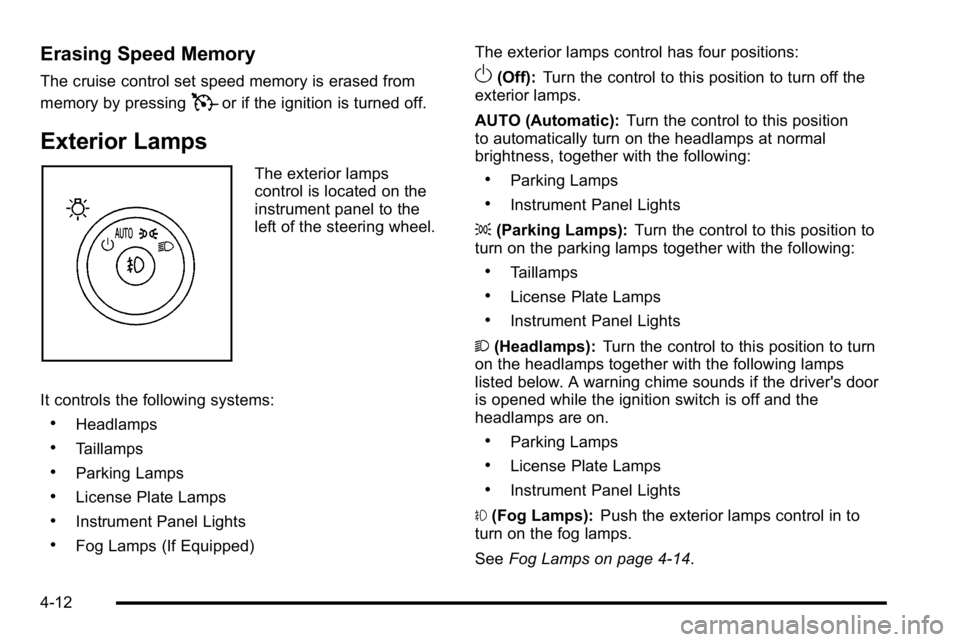
The exterior lamps
control is located on the
instrument panel to the
left of the steering wheel.
It controls the following systems:
.Headlamps
.Taillamps
.Parking Lamps
.License Plate Lamps
.Instrument Panel Lights
.Fog Lamps (If Equipped) The exterior lamps control has four positions:
O(Off):
Turn the control to this position to turn off the
exterior lamps.
AUTO (Automatic): Turn the control to this position
to automatically turn on the headlamps at normal
brightness, together with the following:
.Parking Lamps
.Instrument Panel Lights
; (Parking Lamps): Turn the control to this position to
turn on the parking lamps together with the following:
.Taillamps
.License Plate Lamps
.Instrument Panel Lights
2 (Headlamps): Turn the control to this position to turn
on the headlamps together with the following lamps
listed below. A warning chime sounds if the driver's door
is opened while the ignition switch is off and the
headlamps are on.
.Parking Lamps
.License Plate Lamps
.Instrument Panel Lights
# (Fog Lamps): Push the exterior lamps control in to
turn on the fog lamps.
See Fog Lamps on page 4‑14.
4-12
Page 173 of 474
Wiper Activated Headlamps
This feature activates the headlamps and parking lamps
after the windshield wipers are turned on and have
completed eight wipe cycles within four minutes.
When the ignition is turned to LOCK/OFF, the
wiper-activated headlamps immediately turn off. The
wiper-activated headlamps also turn off if the windshield
wipers are turned off.
Headlamps on Reminder
If you leave the exterior lamp buttons for the headlamps
or parking lamps on, remove the key from the ignition
and open the driver's door, you will hear a continuous
warning chime. The chime will turn off when the lamps
are turned off.
Daytime Running Lamps (DRL)
Daytime Running Lamps (DRL) can make it easier for
others to see the front of your vehicle during the day.
Fully functional daytime running lamps are required on
all vehicles first sold in Canada.
A light sensor on top of the instrument panel monitors
the exterior light level for the operation of DRL, so be
sure it is not covered.The DRL system makes the low-beam headlamps turn
on at reduced brightness in daylight when the following
conditions are met:
.The ignition is on.
.The exterior lamp button for the headlamps is off.
.The automatic transmission is not in P (Park).
When the DRL are on, only the low-beam headlamps
will be on. The parking lamps, taillamps, sidemarker
and other lamps will not be on.
When it is dark enough outside, the low-beam
headlamps will come on. The other lamps that turn on
with the headlamps will also turn on. When it is bright
enough outside, the regular lamps will go off, and the
low-beam headlamps change to the reduced brightness
of DRL.
To turn off all exterior lighting at night when the
vehicle is parked, turn the exterior lamp control to
the off position. The exterior lamps will turn back on
automatically when the transmission is moved out of
P (Park). See Exterior Lamps
on page 4‑12for more
information.
The regular headlamp system should be turned on
when needed.
4-13
Page 174 of 474
Fog Lamps
The fog lamps button is on the exterior lamps control to
the left of the steering column.
#(Fog Lamps):Press the exterior lamps button to
turn the fog lamps on or off. A light comes on in the
instrument panel cluster when the fog lamps are in use.
See Instrument Panel Cluster
on page 4‑30. The
ignition must be in the ON/RUN position for the fog
lamps to work.
The fog lamps will go off when the headlamps are
changed to high-beam.
Some localities have laws that require the headlamps to
be on along with the fog lamps.
Cornering Lamps
For vehicles with this feature, the cornering lamps come
on when: the headlamps or parking lamps are on, the
vehicle is not in P (Park), and you signal a turn with the
turn signal/multifunction lever. They provide more light
for cornering.
Exterior Lighting Battery Saver
If the exterior lamp button has been left on, the exterior
lamps will turn off about 10 minutes after the ignition is
turned to LOCK/OFF and a door has been opened. This
protects against draining the battery if the headlamps or
parking lamps are accidentally left on. If you need to
leave the lamps on for more than 10 minutes, use the
exterior lamp control to turn the lamps back on after the
ignition is turned to LOCK/OFF and any door is opened.
Instrument Panel Brightness
D (Instrument Panel Brightness): This feature
controls the brightness of the instrument panel lights.
The knob for this control is located next to the exterior
lamps control.
Push the knob in and release when it pops out. Turn
the knob clockwise to increase the brightness of the
instrument panel lights and counter clockwise to
decrease the brightness. Turning the knob completely
clockwise to the detent will turn on the courtesy lamps.
4-14
Page 175 of 474
Courtesy Lamps
When any door is opened, several lamps turn on
making it easier for you to enter and exit the vehicle.
Turn the instrument panel brightness control completely
clockwise to manually turn on these lamps.
Entry Lighting
If it is dark enough outside when you press the unlock
button on the remote keyless entry transmitter, the
interior courtesy lamps will turn on and stay on for about
40 seconds. The lamps can be turned off immediately
by pressing the lock button on the remote keyless entry
transmitter, turning the ignition key to ON/RUN or
activating the power door locks.
Delayed Entry Lighting
The interior lamps will turn on if you open the door
when it is dark enough outside. When you close the
door with the ignition off, the interior lamps will stay on
for up to 25 seconds or until the ignition is turned to an
on position. When the lamps turn off as a result of the
25 second timer or the ignition switch being turned on,
the lighting will deactivate by way of the theater
dimming effect. Locking the doors will override the
delayed entry lighting feature and the lamps will turn off
right away.
Theater Dimming
This feature allows for a three to five second fade out of
the courtesy lamps instead of immediate turn off.
Delayed Exit Lighting
If it is dark enough outside when you remove the key
from the ignition, the interior lamps will turn on and stay
on for about 25 seconds. This will give you time to find
the door pull handle or lock switches. Once the key
is inserted into the ignition, the exit lighting will be
cancelled and the lighting will fade out.
Perimeter Lighting
If it is dark enough outside when the unlock button on
the remote keyless entry transmitter is pressed, the
DRL, parking lamps and back-up lamps will come on.
This feature can be programmed on for various
amounts of time in seconds for each transmitter.
SeeDIC Vehicle Customization
on page 4‑65for
information on programming.
Front Reading Lamps
The front reading lamps are located on the headliner.
Press the button near each lamp to turn them on or off.
4-15
Page 176 of 474
Electric Power Management
The vehicle has Electric Power Management (EPM) that
estimates the battery's temperature and state of charge.
It then adjusts the voltage for best performance and
extended life of the battery.
When the battery's state of charge is low, the voltage is
raised slightly to quickly bring the charge back up.
When the state of charge is high, the voltage is lowered
slightly to prevent overcharging. If the vehicle has a
voltmeter gauge or a voltage display on the Driver
Information Center (DIC), you may see the voltage
move up or down. This is normal. If there is a problem,
an alert will be displayed.
The battery can be discharged at idle if the electrical
loads are very high. This is true for all vehicles. This is
because the generator (alternator) may not be spinning
fast enough at idle to produce all the power that is
needed for very high electrical loads.
A high electrical load occurs when several of the
following are on, such as: headlamps, high beams, fog
lamps, rear window defogger, climate control fan at high
speed, heated seats, engine cooling fans, trailer loads,
and loads plugged into accessory power outlets.EPM works to prevent excessive discharge of the
battery. It does this by balancing the generator's output
and the vehicle's electrical needs. It can increase
engine idle speed to generate more power, whenever
needed. It can temporarily reduce the power demands
of some accessories.
Normally, these actions occur in steps or levels, without
being noticeable. In rare cases at the highest levels of
corrective action, this action may be noticeable to the
driver. If so, a Driver Information Center (DIC) message
might be displayed, such as BATTERY SAVER
ACTIVE, BATTERY VOLTAGE LOW, or LOW
BATTERY. If this message is displayed, it is
recommended that the driver reduce the electrical loads
as much as possible. See
DIC Warnings and Messages
on page 4‑55.
Inadvertent Power Battery Saver
This feature is designed to protect your vehicle's battery
against drainage from the interior lamps, or garage
door opener. When the ignition is turned off, the power
to these features will automatically turn off after
10 minutes. Power will be restored for an additional
10 minutes if any door is opened, the trunk is opened or
the courtesy lamp switch is turned on.
4-16