light BUICK LUCERNE 2010 Workshop Manual
[x] Cancel search | Manufacturer: BUICK, Model Year: 2010, Model line: LUCERNE, Model: BUICK LUCERNE 2010Pages: 474
Page 180 of 474
To change the current mode, select one of the following:
H(Vent):Air is directed to the instrument panel
outlets.
)(Bi-Level): Air is divided between the instrument
panel outlets and the floor outlets. Slightly cooler air is
directed to the instrument panel outlets and warmer air
is directed to the floor outlets.
6(Floor): Air is directed to the floor outlets, with some
air directed to the windshield and side window outlets.
If recirculation is selected while in this mode, it stays on
for three minutes to reduce windshield fogging.
-(Floor/Defog): This clears the windows of fog or
moisture. Air is directed to the windshield and side
window outlets and to the floor outlets. The system
runs the air conditioning compressor unless the outside
temperature is near or below freezing.
0(Defrost): This mode clears the windshield of
fog or frost more quickly. Air is directed to the
windshield and side window outlets. The system runs
the air conditioning compressor unless the outside
temperature is near or below freezing.
#(Air Conditioning): Press to turn the air
conditioning system on or off. An indicator light below
the button comes on to show that this mode is on. Air
conditioning can be selected in any mode as long as
the fan knob is not in the off position.
On hot days during the vehicle's initial start-up, open
the windows to let hot inside air escape; then close
them. This helps to reduce the time it takes for the
vehicle to cool down. It also helps the system to operate
more efficiently.
For quicker cool down on hot days, do the following:
1. Select
H.
2. Select
h.
3. Select
#.
4. Select the coolest temperature.
5. Select the highest fan speed.
The air-conditioning system removes moisture from the
air, so a small amount of water might drip under the
vehicle while idling or after turning off the engine. This
is normal.
4-20
Page 181 of 474
h(Recirculation):Press to turn the recirculation
mode on. An indicator light below the button comes on
to show that this mode is on. This mode recirculates
and helps to quickly cool the air inside the vehicle.
It can be used to prevent outside air and odors from
entering the vehicle. This mode cannot be selected
while in the defog or defrost modes. If you try to
select the recirculation mode, the indicator light
flashes three times and turns off.
Operation in this mode during periods of high humidity
and cool outside temperatures may result in increased
window fogging. If window fogging is experienced,
select the defrost mode.
Rear Window Defogger
The rear window defogger uses a warming grid to
remove fog from the rear window.
<(Rear Window Defogger): Press to turn the rear
window defogger on or off. An indicator light below the
button comes on to show that the rear window defogger
is on. Be sure to clear as much snow from the rear
window as possible. The rear window defogger only works when the ignition
is in ON/RUN. The rear window defogger stays on for
about 20 minutes after the button is pressed if traveling
at slow speeds. At higher vehicle speeds, the rear
defogger may stay on continuously. If turned on again,
the defogger only runs for about 10 minutes before
turning off. The defogger can be turned off by pressing
the button again, by turning the ignition to ACC/
ACCESSORY or ON/RUN, or by turning off the engine.
If the vehicle has heated outside rearview mirrors, the
mirrors heat to help clear fog or frost from the surface of
the mirror when the rear window defogger is on. See
Outside Heated Mirrors
on page 3‑36for more
information.
Notice: Do not use anything sharp on the inside of
the rear window. If you do, you could cut or damage
the warming grid, and the repairs would not be
covered by the vehicle warranty. Do not attach a
temporary vehicle license, tape, a decal or anything
similar to the defogger grid.
4-21
Page 183 of 474

Automatic Operation
AUTO (Automatic Fan):When AUTO is selected on
the fan control, the system automatically adjusts the fan
speed. If the OnStar
®system is activated when this
position is selected, the fan speed will lower.
AUTO (Automatic Mode)
1. Turn the fan control to AUTO.
2. Turn the mode control to AUTO.
3. Adjust the temperature to a comfortable setting between 68°F (21°C) and 78°F (26°C).
Choosing the coldest or warmest temperature
setting will not cause the system to heat or cool
any faster. In cold weather, the system starts at
reduced fan speeds to avoid blowing cold air into
the vehicle until warmer air is available. The
system will start out blowing air to the floor, but
may change modes automatically as the vehicle
warms up to maintain the chosen temperature
setting. The length of time needed to warm the
interior depends on the outside temperature.
4. Wait a few minutes for the system to automatically regulate. Then adjust the temperature as
necessary to find your comfort setting. Do not cover the solar sensor located in the center of
the instrument panel, near the windshield. For more
information on the solar sensor, see
“Sensors”later in
this section.
After the vehicle is started, the display shows the
interior temperature settings.
When the ENG/MET (English/metric) button on the
Driver Information Center (DIC) is pressed, the display
shows readings in Fahrenheit or Celsius. Use the
ENG/MET button to toggle between the readings.
AUTO (Automatic Air Conditioning): If AUTO is
selected on the fan or mode control, the system
automatically controls the air conditioning compressor.
The A/C compressor runs automatically even at cool
outside temperatures in order to dehumidify the air. The
A/C indicator light is lit when the system is operating
automatically. Press the A/C button on the fan control to
turn off the A/C. To clear windows better in defog or
defrost modes, the A/C compressor runs automatically
in damp cool conditions.
4-23
Page 184 of 474

h(Auto Recirculation) :If AUTO is selected on
either the fan or mode control, the system automatically
controls the supply of fresh outside air or recirculates
the interior air to cool the car faster. The indicator light
on the recirculation button will light whenever the
system switches to recirculation. You may force outside
air by pressing the outside air button. The next time
AUTO fan or mode is selected, it will reset back to
AUTO operation.
Manual Operation
9(Off): Turns the climate control system off. Outside
air still enters the vehicle and is directed to the floor.
The airflow direction and temperature can be adjusted.
If the temperature is adjusted while the system is off,
the display will light to show the current settings.
w x(Driver Temperature Controls): Press these
buttons next to the fan control to increase or decrease
the temperature inside the vehicle.
w x(Passenger Temperature Controls): Press
these buttons next to the mode control to increase or
decrease the temperature for the front passenger. If the
passenger climate control system is off, pressing one of
these buttons turns it on.
9(Fan Control): Turn clockwise or counterclockwise
to increase or decrease the fan speed. Turning this
control completely counterclockwise turns on the
automatic fan operation.
If the airflow seems low when the fan speed is at the
highest setting, the passenger compartment air filter
may need to be replaced. For more information, see
Passenger Compartment Air Filter
on page 4‑28and
Scheduled Maintenance on page 7‑3.
Air Delivery Mode Control: Turn clockwise or
counterclockwise to change the direction of the airflow
in the vehicle.
To change the current mode, select one of the following:
F(Vent): Air is directed to the instrument panel outlets.
*(Bi-Level): Air is divided between the instrument
panel outlets and the floor outlets. In automatic
operation, cooler air is directed to the upper outlets and
warmer air to the floor outlets.
7(Floor): Air is directed to the floor outlets, with some
air directed to the windshield and side window outlets.
If recirculation is selected while in this mode, it stays on
for three minutes to reduce windshield fogging.
4-24
Page 185 of 474

W(Floor/Defog):This mode clears the windows of fog
or moisture. Air is directed to the floor outlets, with
some air directed to the windshield and side window
outlets. The system turns off recirculation and runs
the air-conditioning compressor unless the outside
temperature is at or below freezing. The recirculation
mode cannot be selected while in the floor/defog mode.
0(Defrost): This mode removes fog or frost from the
windshield more quickly. Air is directed to the
windshield and the side window outlets. The system
automatically turns off recirculation and runs the
air-conditioning compressor, unless the outside
temperature is at or below freezing. Recirculation
cannot be selected while in the defrost mode.
#(Air Conditioning): Press to turn the air
conditioning system on or off and override the
automatic system. An indicator light below the
button comes on to show that this mode is on.
The air conditioning system removes moisture from the
air, so a small amount of water might drip under the
vehicle while idling or after turning off the engine. This
is normal.
:(Outside Air): Press to let outside air enter the
vehicle. An indicator light comes on to show this mode
is on. Pressing
?cancels this mode.
?(Recirculation): Press to turn the recirculation
mode on. An indicator light below the button comes on
to show that this mode is on. This mode recirculates
and helps to quickly cool the air inside the vehicle.
It can be used to prevent outside air and odors from
entering the vehicle. This mode cannot be selected
while in the defog or defrost modes. If you try to select
the recirculation mode, the indicator light flashes three
times and turns off.
Operation in this mode during periods of high humidity
and cool outside temperatures may result in increased
window fogging. If window fogging is experienced,
select the defrost mode.
PASS (Passenger Climate Control): Press to turn the
passenger climate control systems on or off.
When the passenger climate control system is on, the
passenger temperature setting is displayed.
If the PASS button is pressed to turn the passenger
temperature setting off, the driver temperature setting
controls the temperature for the entire vehicle.
4-25
Page 187 of 474
Rear Window Defogger
The rear window defogger uses a warming grid to
remove fog or frost from the rear window.
<(Rear Defogger):Press to turn the rear window
defogger on or off. An indicator light below the button
comes on to show that the rear window defogger is on.
Be sure to clear as much snow from the rear window as
possible.
The rear window defogger only works when the ignition
is in ON/RUN. The rear window defogger stays on for
about 20 minutes after the button is pressed if the
vehicle is traveling at slower vehicle speeds. At higher
vehicle speeds the rear window defogger may stay on
continuously. If turned on again, the defogger only runs
for about 10 minutes before turning off. The defogger
can be turned off by pressing the button again, by
turning the ignition to ACC/ACCESSORY or ON/RUN,
or by turning off the engine.
The heated outside rearview mirrors will heat to help
clear fog or frost from the surface of the mirror when the
rear window defogger is on. See Outside Heated
Mirrors
on page 3‑36for more information. Notice:
Do not use a razor blade or sharp object to
clear the inside rear window. Do not adhere
anything to the defogger grid lines in the rear glass.
These actions may damage the rear defogger.
Repairs would not be covered by your warranty.
Outlet Adjustment
Use the levers, located in the middle of the front
outlets, to change the direction of the airflow. Use the
thumbwheel located between the outlets to turn them on
and off.
If the vehicle has rear seat outlets, adjust the direction
of the airflow using the lever in the center of each outlet.
Operation Tips
.Clear away any ice, snow, or leaves from the air
inlets at the base of the windshield that could block
the flow of air into the vehicle.
.Use of non-GM approved hood deflectors can
adversely affect the performance of the system.
.Keep the path under the front seats clear of
objects to help circulate the air inside the vehicle
better.
4-27
Page 190 of 474

Warning Lights, Gauges, and
Indicators
Warning lights and gauges can signal that something is
wrong before it becomes serious enough to cause an
expensive repair or replacement. Paying attention to the
warning lights and gauges could prevent injury.
Warning lights come on when there might be or there is
a problem with one of the vehicle's functions. Some
warning lights come on briefly when the engine is
started to indicate they are working.
Gauges can indicate when there might be or there is a
problem with one of the vehicle's functions. Often
gauges and warning lights work together to indicate a
problem with the vehicle.When one of the warning lights comes on and stays on
while driving, or when one of the gauges shows there
could be a problem, check the section that explains
what to do. Follow this manual's advice. Waiting to do
repairs can be costly and even dangerous.
Instrument Panel Cluster
The instrument panel cluster is designed to show how
the vehicle is running. It shows how fast the vehicle is
going, how much fuel has been used, and many other
things needed to drive safely and economically.
The vehicle has this cluster or one very similar to it.
It includes indicator warning lights and gauges that are
explained on the following pages. Be sure to read
about them.
4-30
Page 192 of 474

Speedometer and Odometer
The speedometer shows the vehicle speed in both
miles per hour (mph) and kilometers per hour (km/h).
The odometer shows how far the vehicle has been
driven, in either miles or kilometers.
This vehicle has a tamper resistant odometer.
If the vehicle needs a new odometer installed, the new
one can be set to the mileage total of the old odometer.
If this is not possible, it is set to zero and a label must
be put on the driver's door to show the old mileage
reading when the new odometer was installed.
Trip Odometer
A trip odometer show how far the vehicle has been
driven since the odometer was last set to zero. See
Driver Information Center (DIC)
on page 4‑47for
information on resetting the trip odometer.
Tachometer
The tachometer displays the engine speed in
revolutions per minute (rpm).
Safety Belt Reminders
Safety Belt Reminder Light
When the engine is started, a chime sounds for
several seconds to remind a driver to fasten the
safety belt, unless the driver safety belt is already
buckled.
The safety belt light
comes on and stays on
for several seconds, then
flashes for several more.
This chime and light are repeated if the driver remains
unbuckled and the vehicle is in motion. If the driver
safety belt is already buckled, neither the chime nor the
light comes on.
4-32
Page 193 of 474

Airbag Readiness Light
The system checks the airbag's electrical system for
possible malfunctions. If the light stays on it indicates
there is an electrical problem. The system check
includes the airbag sensor, the pretensioners, the
airbag modules, the wiring and the crash sensing and
diagnostic module. For more information on the airbag
system, seeAirbag System on page 2‑56.
The airbag readiness light
flashes for a few seconds
when the engine is
started. If the light does
not come on then, have it
fixed immediately.
{WARNING:
If the airbag readiness light stays on after the
vehicle is started or comes on while driving, it
means the airbag system might not be working
properly. The airbags in the vehicle might not
inflate in a crash, or they could even inflate
without a crash. To help avoid injury, have the
vehicle serviced right away.
If there is a problem with the airbag system, an airbag
Driver Information Center (DIC) message can also
come on. See DIC Warnings and Messages
on
page 4‑55for more information.
4-33
Page 194 of 474
Passenger Airbag Status Indicator
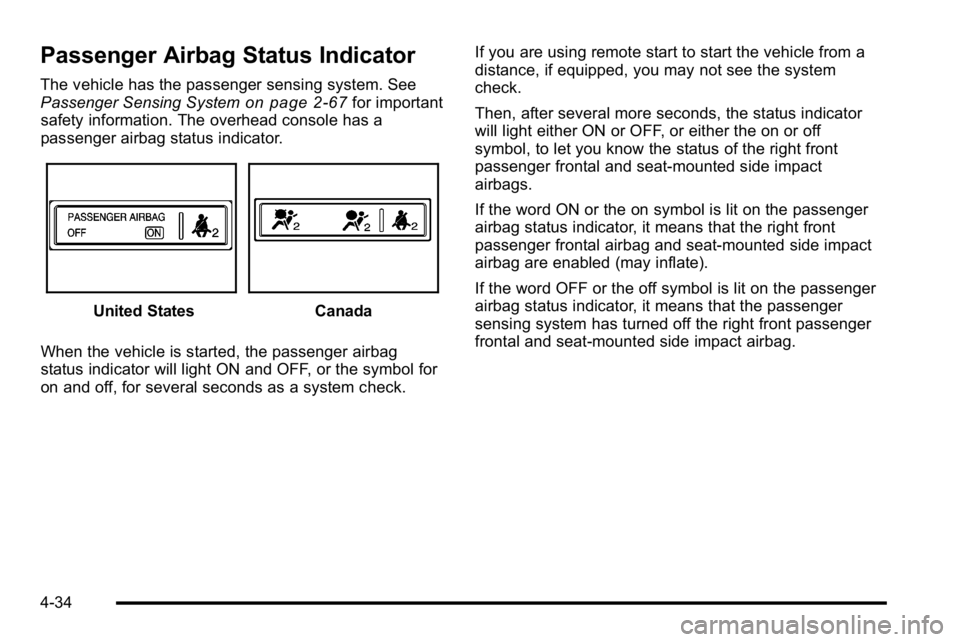
The vehicle has the passenger sensing system. See
Passenger Sensing Systemon page 2‑67for important
safety information. The overhead console has a
passenger airbag status indicator.
United StatesCanada
When the vehicle is started, the passenger airbag
status indicator will light ON and OFF, or the symbol for
on and off, for several seconds as a system check. If you are using remote start to start the vehicle from a
distance, if equipped, you may not see the system
check.
Then, after several more seconds, the status indicator
will light either ON or OFF, or either the on or off
symbol, to let you know the status of the right front
passenger frontal and seat-mounted side impact
airbags.
If the word ON or the on symbol is lit on the passenger
airbag status indicator, it means that the right front
passenger frontal airbag and seat-mounted side impact
airbag are enabled (may inflate).
If the word OFF or the off symbol is lit on the passenger
airbag status indicator, it means that the passenger
sensing system has turned off the right front passenger
frontal and seat‐mounted side impact airbag.
4-34