Motor BUICK LUCERNE 2010 Owner's Manual
[x] Cancel search | Manufacturer: BUICK, Model Year: 2010, Model line: LUCERNE, Model: BUICK LUCERNE 2010Pages: 474
Page 3 of 474
GENERAL MOTORS, GM, the GM Emblem, BUICK,
the BUICK Emblem, and the name LUCERNE are
registered trademarks of General Motors.
This manual describes features that may or may not
be on your specific vehicle either because they are
options that you did not purchase or due to changes
subsequent to the printing of this owner manual. Please
refer to the purchase documentation relating to your
specific vehicle to confirm each of the features found
on your vehicle. For vehicles first sold in Canada,
substitute the name“General Motors of Canada
Limited” for Buick Motor Division wherever it appears in
this manual.
Keep this manual in the vehicle for quick reference.
Canadian Owners
Propriétaires Canadiens
A French language copy of this manual can be obtained
from your dealer or from:
On peut obtenir un exemplaire de ce guide en français
auprès du concessionnaire ou à l'adresse suivante:
Helm, Incorporated
P.O. Box 07130
Detroit, MI 48207
1-800-551-4123
Numéro de poste 6438 de langue française www.helminc.com
Index
To quickly locate information about the vehicle, use the
index in the back of the manual. It is an alphabetical list
of what is in the manual and the page number where it
can be found.
iii
Litho in U.S.A.
Part No. 25896317 B Second Printing©2009 General Motors. All Rights Reserved.
Page 71 of 474
Q: What are the different types of add-on childrestraints?
A: Add-on child restraints, which are purchased by the
vehicle's owner, are available in four basic types.
Selection of a particular restraint should take into
consideration not only the child's weight, height, and
age but also whether or not the restraint will be
compatible with the motor vehicle in which it will
be used.
For most basic types of child restraints, there are
many different models available. When purchasing a
child restraint, be sure it is designed to be used in a
motor vehicle. If it is, the restraint will have a label
saying that it meets federal motor vehicle safety
standards.
The restraint manufacturer's instructions that come
with the restraint state the weight and height
limitations for a particular child restraint. In addition,
there are many kinds of restraints available for
children with special needs.
{WARNING:
To reduce the risk of neck and head injury during
a crash, infants need complete support. This is
because an infant's neck is not fully developed
(Continued)
WARNING: (Continued)
and its head weighs so much compared with
the rest of its body. In a crash, an infant in a
rear-facing child restraint settles into the restraint,
so the crash forces can be distributed across the
strongest part of an infant's body, the back and
shoulders. Infants should always be secured in
rear-facing child restraints.
{WARNING:
A young child's hip bones are still so small that
the vehicle's regular safety belt may not remain
low on the hip bones, as it should. Instead, it may
settle up around the child's abdomen. In a crash,
the belt would apply force on a body area that is
unprotected by any bony structure. This alone
could cause serious or fatal injuries. To reduce the
risk of serious or fatal injuries during a crash,
young children should always be secured in
appropriate child restraints.
2-39
Page 130 of 474
The vehicle has a Computer-Controlled Cranking
System. This feature assists in starting the engine
and protects components. If the ignition key is
turned to the START position, and then released
when the engine begins cranking, the engine will
continue cranking for a few seconds or until the
vehicle starts. If the engine does not start and the
key is held in START, cranking will be stopped
after 15 seconds to prevent cranking motor
damage. To prevent gear damage, this system also
prevents cranking if the engine is already running.
Engine cranking can be stopped by turning the
ignition switch to the ACC/ACCESSORY or LOCK/
OFF position.
Notice: Cranking the engine for long periods of
time, by returning the key to the START position
immediately after cranking has ended, can overheat
and damage the cranking motor, and drain the
battery. Wait at least 15 seconds between each try,
to let the cranking motor cool down. 2. If the engine does not start after 5‐10 seconds,
especially in very cold weather (below 0°F or
−18°C), it could be flooded with too much gasoline.
Try pushing the accelerator pedal all the way to the
floor and holding it there as you hold the key in
START for up to a maximum of 15 seconds. Wait at
least 15 seconds between each try, to allow the
cranking motor to cool down. When the engine
starts, let go of the key and accelerator. If the
vehicle starts briefly but then stops again, repeat
these steps. This clears the extra gasoline from the
engine. Do not race the engine immediately after
starting it. Operate the engine and transmission
gently until the oil warms up and lubricates all
moving parts.
Notice: The engine is designed to work with the
electronics in the vehicle. If you add electrical parts
or accessories, you could change the way the
engine operates. Before adding electrical
equipment, check with your dealer. If you do not,
the engine might not perform properly. Any
resulting damage would not be covered by the
vehicle warranty.
3-22
Page 154 of 474
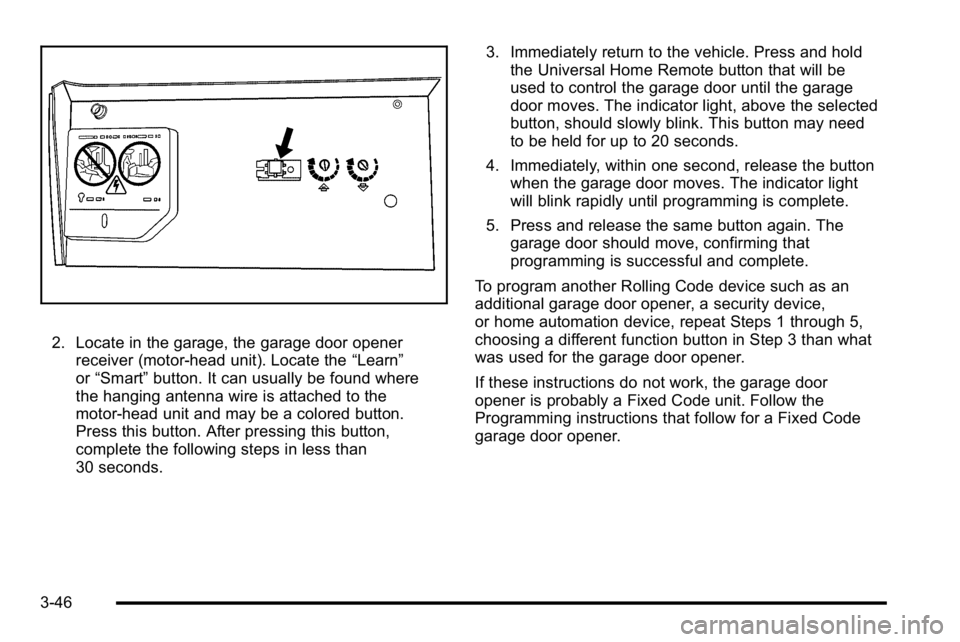
2. Locate in the garage, the garage door openerreceiver (motor-head unit). Locate the “Learn”
or “Smart” button. It can usually be found where
the hanging antenna wire is attached to the
motor-head unit and may be a colored button.
Press this button. After pressing this button,
complete the following steps in less than
30 seconds. 3. Immediately return to the vehicle. Press and hold
the Universal Home Remote button that will be
used to control the garage door until the garage
door moves. The indicator light, above the selected
button, should slowly blink. This button may need
to be held for up to 20 seconds.
4. Immediately, within one second, release the button when the garage door moves. The indicator light
will blink rapidly until programming is complete.
5. Press and release the same button again. The garage door should move, confirming that
programming is successful and complete.
To program another Rolling Code device such as an
additional garage door opener, a security device,
or home automation device, repeat Steps 1 through 5,
choosing a different function button in Step 3 than what
was used for the garage door opener.
If these instructions do not work, the garage door
opener is probably a Fixed Code unit. Follow the
Programming instructions that follow for a Fixed Code
garage door opener.
3-46
Page 155 of 474
Programming Universal Home
Remote—Fixed Code
For questions or help programming the Universal
Home Remote System, call 1-866-572-2728 or
go to learcar2u.com.
Most garage door openers sold before 1996 are Fixed
Code units.
Programming a garage door opener involves
time-sensitive actions, so read the entire procedure
before starting. Otherwise, the device will time out and
the procedure will have to be repeated. To program up to three devices:
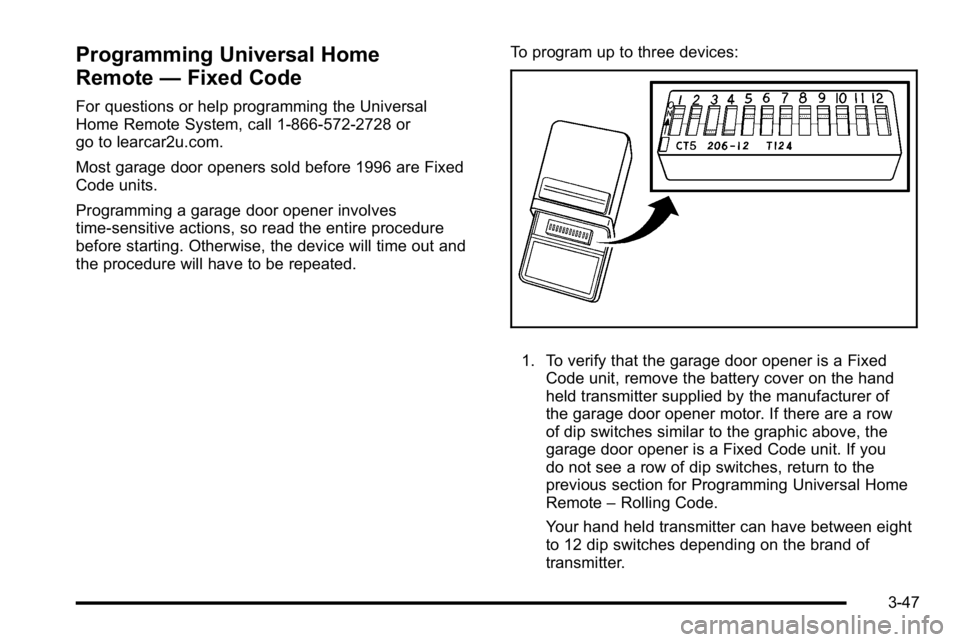
1. To verify that the garage door opener is a Fixed
Code unit, remove the battery cover on the hand
held transmitter supplied by the manufacturer of
the garage door opener motor. If there are a row
of dip switches similar to the graphic above, the
garage door opener is a Fixed Code unit. If you
do not see a row of dip switches, return to the
previous section for Programming Universal Home
Remote –Rolling Code.
Your hand held transmitter can have between eight
to 12 dip switches depending on the brand of
transmitter.
3-47
Page 156 of 474
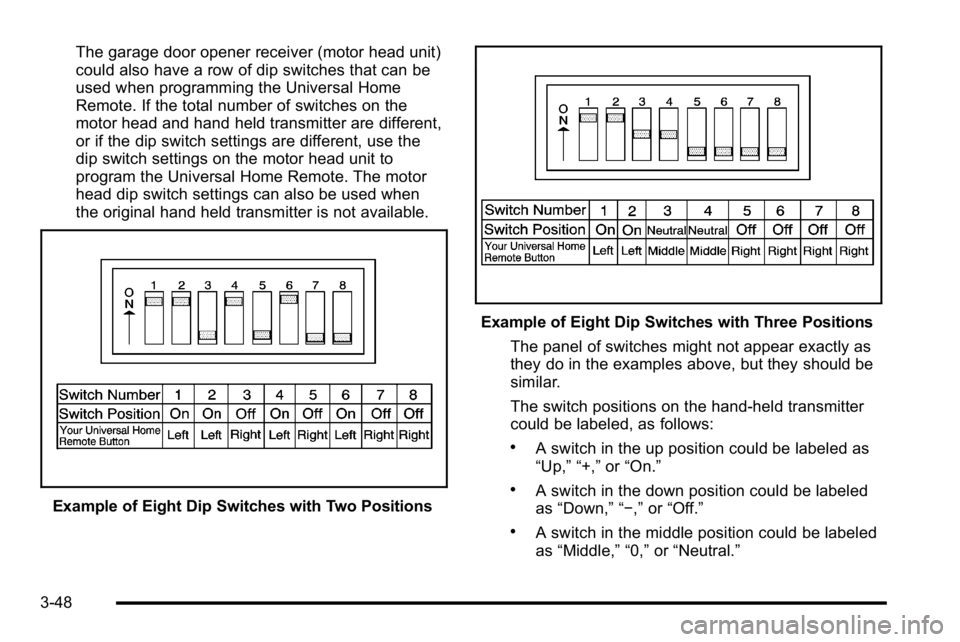
The garage door opener receiver (motor head unit)
could also have a row of dip switches that can be
used when programming the Universal Home
Remote. If the total number of switches on the
motor head and hand held transmitter are different,
or if the dip switch settings are different, use the
dip switch settings on the motor head unit to
program the Universal Home Remote. The motor
head dip switch settings can also be used when
the original hand held transmitter is not available.
Example of Eight Dip Switches with Two Positions
Example of Eight Dip Switches with Three PositionsThe panel of switches might not appear exactly as
they do in the examples above, but they should be
similar.
The switch positions on the hand-held transmitter
could be labeled, as follows:
.A switch in the up position could be labeled as
“Up,” “+,” or“On.”
.A switch in the down position could be labeled
as “Down,” “−,” or“Off.”
.A switch in the middle position could be labeled
as “Middle,” “0,” or“Neutral.”
3-48
Page 167 of 474
6(Low Speed): Slow wipes.
1 (High Speed): Fast wipes.
9 (Off): Turns the wipers off.
Clear ice and snow from the wiper blades before using
them. If frozen to the windshield, carefully loosen or
thaw them. Damaged blades should be replaced.
Heavy snow or ice can overload the wiper motor.
A circuit breaker will stop the motor until it cools.
The vehicle has wiper-activated headlamps. After the
windshield wipers have completed eight wipe cycles
within four minutes, the headlamps automatically turn
on. See Wiper Activated Headlamps
on page 4‑13for
more information.
Rainsense™ II Wipers
If the vehicle has this feature, the moisture sensor is
mounted on the interior of the windshield beside the
rearview mirror and is used to automatically operate the
wipers. This system operates by monitoring the amount
of moisture build-up on the windshield. Wipes occur as
needed to clear the windshield depending on the driving
conditions and the sensitivity setting. In light rain or
snow, fewer wipes will occur. In heavy rain or snow,
wipes will occur more frequently. The system operates
in the delay mode. If the system is left on for long
periods of time, occasional wipes may occur without
any moisture on the windshield. This is normal and
indicates that the Rainsense™ system is active.
4-7
Page 255 of 474
Pairing a Phone
1. Press and holdbgfor two seconds. The system
responds with “Ready”followed by a tone.
2. Say “Bluetooth”. The system responds with
“Bluetooth ready” followed by a tone.
3. Say “Pair”. The system responds with instructions
and a four digit PIN number. The PIN number will
be used in Step 4.
4. Start the Pairing process on the cell phone that will be paired to the vehicle. Reference the cell phone
manufacturers user guide for information on this
process.
Locate the device named “General Motors”in the
list on the cellular phone and follow the instructions
on the cell phone to enter the four digit PIN
number that was provided in Step 3.
5. The system prompts for a name for the phone. Use a name that best describes the phone. This name
will be used to indicate which phone is connected.
The system then confirms the name provided.
6. The system responds with “
been successfully paired” after the pairing process
is complete.
7. Repeat Steps 1 through 7 for additional phones to be paired.
Listing All Paired and Connected Phones
1. Press and holdbgfor two seconds. The system
responds with “Ready”followed by a tone.
2. Say “Bluetooth”. The system responds with
“Bluetooth ready” followed by a tone.
3. Say “List”. The system lists all the paired Bluetooth
devices. If a phone is connected to the vehicle, the
system will say “Is connected”after the connected
phone.
Deleting a Paired Phone
1. Press and holdb gfor two seconds. The system
responds with “Ready”followed by a tone.
2. Say “Bluetooth”. The system responds with
“Bluetooth ready” followed by a tone.
3. Say “Delete”. The system asks which phone to
delete followed by a tone.
4. Say the name of the phone to be deleted. If the phone name is unknown, use the “List”command
for a list of all paired phones. The system responds
with “Would you like to delete
or No” followed by a tone.
5. Say “Yes”to delete the phone. The system
responds with “OK, deleting
4-95
Page 264 of 474
Sending a Stored Name Tag During a Call
1. Pressbg. The system responds with “Ready”
followed by a tone.
2. Say “Send name tag.” The system responds with
“Say a name tag to send tones” followed by a tone.
3. Say the name tag to send.
.If the system clearly recognizes the name tag it
responds with “OK, Sending
the dial tones are sent and the call continues.
.If the system is not sure it recognized the name
tag properly, it responds “Dial
Please say yes or no?” followed by a tone.
If the name tag is correct, say “Yes”. The
system responds with “OK, Sending
continues.
Clearing the System
Unless information is deleted out of the in‐vehicle
Bluetooth system, it will be retained indefinitely. This
includes all saved name tags in the phonebook and
phone pairing information. For information on how to
delete this information, see the above sections on
Deleting a Paired Phone and Deleting Name Tags.
Other Information
The Bluetooth®word mark and logos are owned by the
Bluetooth®SIG, Inc. and any use of such marks by
General Motors is under license. Other trademarks and
trade names are those of their respective owners.
See Radio Frequency Statement
on page 8‑20for FCC
information.
Theft-Deterrent Feature
THEFTLOCK®is designed to discourage theft of the
vehicle's radio by learning a portion of the Vehicle
Identification Number (VIN). The radio does not operate
if it is stolen or moved to a different vehicle.
4-104
Page 270 of 474
Your Driving, the Road, and the
Vehicle
Defensive Driving
Defensive driving means“always expect the
unexpected.” The first step in driving defensively is to
wear your safety belt —See Safety Belts: They Are for
Everyone on page 2‑12.
{WARNING:
Assume that other road users (pedestrians,
bicyclists, and other drivers) are going to be
careless and make mistakes. Anticipate what they
might do and be ready. In addition:
.Allow enough following distance between you
and the driver in front of you.
.Focus on the task of driving.
Driver distraction can cause collisions resulting in
injury or possible death. These simple defensive
driving techniques could save your life.
Drunk Driving
{WARNING:
Drinking and then driving is very dangerous.
Your reflexes, perceptions, attentiveness, and
judgment can be affected by even a small amount
of alcohol. You can have a serious —or even
fatal —collision if you drive after drinking. Do not
drink and drive or ride with a driver who has been
drinking. Ride home in a cab; or if you are with a
group, designate a driver who will not drink.
Death and injury associated with drinking and driving is
a global tragedy.
Alcohol affects four things that anyone needs to drive a
vehicle: judgment, muscular coordination, vision, and
attentiveness.
Police records show that almost 40 percent of all motor
vehicle-related deaths involve alcohol. In most cases,
these deaths are the result of someone who was
drinking and driving. In recent years, more than
17,000 annual motor vehicle-related deaths have
been associated with the use of alcohol, with about
250,000 people injured.
5-2