climate control BUICK LUCERNE 2011 Owner's Manual
[x] Cancel search | Manufacturer: BUICK, Model Year: 2011, Model line: LUCERNE, Model: BUICK LUCERNE 2011Pages: 450, PDF Size: 3.63 MB
Page 1 of 450
Black plate (1,1)Buick Lucerne Owner Manual - 2011
2011 Buick Lucerne Owner ManualM
In Brief. . . . . . . . . . . . . . . . . . . . . . . . . . . . . . . . . . . . . . . . . . . . 1-1
Instrument Panel . . . . . . . . . . . . . . . . . . . . . . . . . . . . . . . . . 1-2
Initial Drive Information . . . . . . . . . . . . . . . . . . . . . . . . . . . 1-4
Vehicle Features . . . . . . . . . . . . . . . . . . . . . . . . . . . . . . . . 1-15
Performance and Maintenance . . . . . . . . . . . . . . . . . . 1-22
Seats and Restraint System . . . . . . . . . . . . . . . . . . . . . . 2-1
Head Restraints . . . . . . . . . . . . . . . . . . . . . . . . . . . . . . . . . . 2-2
Front Seats . . . . . . . . . . . . . . . . . . . . . . . . . . . . . . . . . . . . . . . 2-3
Rear Seats . . . . . . . . . . . . . . . . . . . . . . . . . . . . . . . . . . . . . . 2-12
Safety Belts . . . . . . . . . . . . . . . . . . . . . . . . . . . . . . . . . . . . . 2-12
Child Restraints . . . . . . . . . . . . . . . . . . . . . . . . . . . . . . . . . 2-33
Airbag System . . . . . . . . . . . . . . . . . . . . . . . . . . . . . . . . . . 2-55
Restraint System Check . . . . . . . . . . . . . . . . . . . . . . . . . 2-70
Features and Controls . . . . . . . . . . . . . . . . . . . . . . . . . . . . 3-1
Keys . . . . . . . . . . . . . . . . . . . . . . . . . . . . . . . . . . . . . . . . . . . . . 3-3
Doors and Locks . . . . . . . . . . . . . . . . . . . . . . . . . . . . . . . . . 3-9
Windows . . . . . . . . . . . . . . . . . . . . . . . . . . . . . . . . . . . . . . . . 3-14 Theft-Deterrent Systems . . . . . . . . . . . . . . . . . . . . . . . . 3-16
Starting and Operating Your Vehicle . . . . . . . . . . . . . 3-19
Mirrors . . . . . . . . . . . . . . . . . . . . . . . . . . . . . . . . . . . . . . . . . . 3-31
Object Detection Systems . . . . . . . . . . . . . . . . . . . . . . . 3-35
Universal Home Remote System . . . . . . . . . . . . . . . . 3-42
Storage Areas . . . . . . . . . . . . . . . . . . . . . . . . . . . . . . . . . . . 3-49
Sunroof . . . . . . . . . . . . . . . . . . . . . . . . . . . . . . . . . . . . . . . . . 3-51
Instrument Panel . . . . . . . . . . . . . . . . . . . . . . . . . . . . . . . . . 4-1
Instrument Panel Overview . . . . . . . . . . . . . . . . . . . . . . . 4-3
Climate Controls . . . . . . . . . . . . . . . . . . . . . . . . . . . . . . . . 4-16
Warning Lights, Gauges, and Indicators . . . . . . . . . 4-27
Driver Information Center (DIC) . . . . . . . . . . . . . . . . . 4-42
Audio System(s) . . . . . . . . . . . . . . . . . . . . . . . . . . . . . . . . 4-67
Driving Your Vehicle . . . . . . . . . . . . . . . . . . . . . . . . . . . . . . 5-1
Your Driving, the Road, and the Vehicle . . . . . . . . . . 5-2
Towing . . . . . . . . . . . . . . . . . . . . . . . . . . . . . . . . . . . . . . . . . . 5-23
Page 7 of 450
Black plate (1,1)Buick Lucerne Owner Manual - 2011
Section 1 In Brief
Instrument Panel. . . . . . . . . . . . . . . . . . . . . . . . . . . . . . . . . . . 1-2
Initial Drive Information . . . . . . . . . . . . . . . . . . . . . . . . . . . 1-4
Remote Keyless Entry (RKE) System . . . . . . . . . . . 1-4
Remote Vehicle Start . . . . . . . . . . . . . . . . . . . . . . . . . . . 1-4
Door Locks . . . . . . . . . . . . . . . . . . . . . . . . . . . . . . . . . . . . . 1-5
Trunk Release . . . . . . . . . . . . . . . . . . . . . . . . . . . . . . . . . . 1-5
Windows . . . . . . . . . . . . . . . . . . . . . . . . . . . . . . . . . . . . . . . . 1-6
Seat Adjustment . . . . . . . . . . . . . . . . . . . . . . . . . . . . . . . . 1-6
Memory Features . . . . . . . . . . . . . . . . . . . . . . . . . . . . . . . 1-8
Heated Seats . . . . . . . . . . . . . . . . . . . . . . . . . . . . . . . . . . . 1-9
Heated and Ventilated Seats . . . . . . . . . . . . . . . . . . . . 1-9
Head Restraint Adjustment . . . . . . . . . . . . . . . . . . . . 1-10
Safety Belts . . . . . . . . . . . . . . . . . . . . . . . . . . . . . . . . . . . . 1-10
Sensing System for Passenger Airbag . . . . . . . . . 1-11
Mirror Adjustment . . . . . . . . . . . . . . . . . . . . . . . . . . . . . . 1-11
Steering Wheel Adjustment . . . . . . . . . . . . . . . . . . . . 1-12
Interior Lighting . . . . . . . . . . . . . . . . . . . . . . . . . . . . . . . . 1-13
Exterior Lighting . . . . . . . . . . . . . . . . . . . . . . . . . . . . . . . 1-13
Windshield Wiper/Washer . . . . . . . . . . . . . . . . . . . . . . 1-14
Climate Controls . . . . . . . . . . . . . . . . . . . . . . . . . . . . . . . 1-14 Vehicle Features
. . . . . . . . . . . . . . . . . . . . . . . . . . . . . . . . . . 1-15
Radio(s) . . . . . . . . . . . . . . . . . . . . . . . . . . . . . . . . . . . . . . . 1-15
Satellite Radio . . . . . . . . . . . . . . . . . . . . . . . . . . . . . . . . . 1-16
Portable Audio Devices (Auxiliary Input or USB Port) . . . . . . . . . . . . . . . . . . . . . . . . . . . . . . . . . . . 1-17
Steering Wheel Controls . . . . . . . . . . . . . . . . . . . . . . . 1-17
Bluetooth
®. . . . . . . . . . . . . . . . . . . . . . . . . . . . . . . . . . . . . 1-18
Navigation System . . . . . . . . . . . . . . . . . . . . . . . . . . . . . 1-18
Driver Information Center (DIC) . . . . . . . . . . . . . . . . 1-18
Cruise Control . . . . . . . . . . . . . . . . . . . . . . . . . . . . . . . . . 1-19
Lane Departure Warning (LDW) . . . . . . . . . . . . . . . 1-20
Side Blind Zone Alert (SBZA) . . . . . . . . . . . . . . . . . . 1-20
Ultrasonic Parking Assist . . . . . . . . . . . . . . . . . . . . . . 1-21
Power Outlets . . . . . . . . . . . . . . . . . . . . . . . . . . . . . . . . . 1-21
Universal Remote System . . . . . . . . . . . . . . . . . . . . . 1-21
Performance and Maintenance . . . . . . . . . . . . . . . . . .1-22
Traction Control System (TCS) . . . . . . . . . . . . . . . . 1-22
StabiliTrak
®System . . . . . . . . . . . . . . . . . . . . . . . . . . . 1-22
Tire Pressure Monitor . . . . . . . . . . . . . . . . . . . . . . . . . . 1-22
Tire Sealant and Compressor Kit . . . . . . . . . . . . . . 1-23
Engine Oil Life System . . . . . . . . . . . . . . . . . . . . . . . . 1-23
Fuel E85 (85% Ethanol) . . . . . . . . . . . . . . . . . . . . . . . 1-23
Driving for Better Fuel Economy . . . . . . . . . . . . . . . 1-23
Roadside Assistance Program . . . . . . . . . . . . . . . . . 1-24
OnStar
®. . . . . . . . . . . . . . . . . . . . . . . . . . . . . . . . . . . . . . . 1-24
1-1
Page 9 of 450
Black plate (3,1)Buick Lucerne Owner Manual - 2011
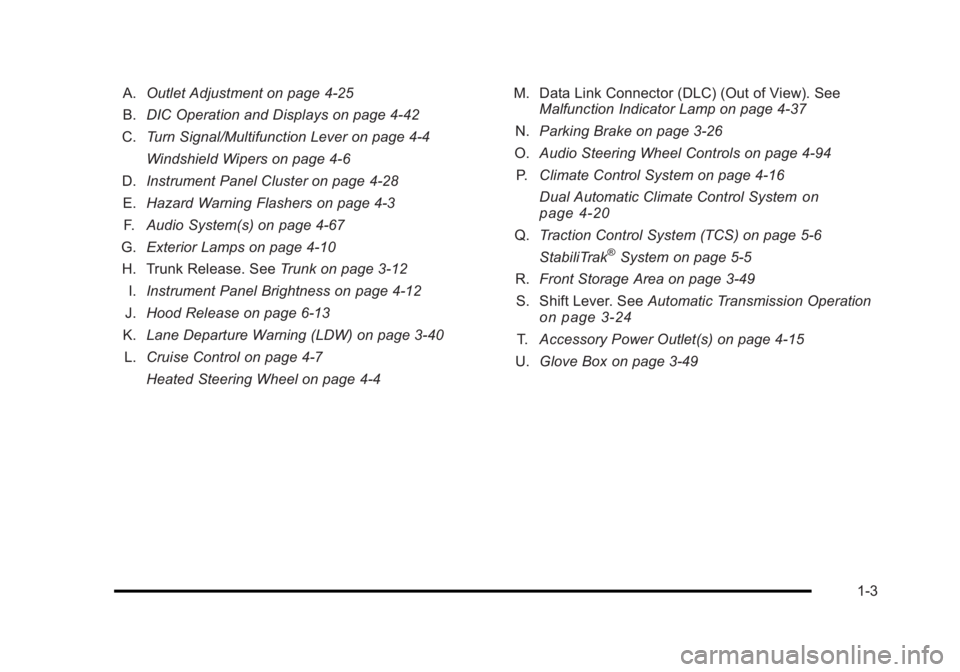
A.Outlet Adjustment on page 4‑25
B. DIC Operation and Displays on page 4‑42
C. Turn Signal/Multifunction Lever on page 4‑4
Windshield Wipers on page 4‑6
D. Instrument Panel Cluster on page 4‑28
E. Hazard Warning Flashers on page 4‑3
F. Audio System(s) on page 4‑67
G. Exterior Lamps on page 4‑10
H. Trunk Release. See Trunk on page 3‑12
I. Instrument Panel Brightness on page 4‑12
J. Hood Release on page 6‑13
K. Lane Departure Warning (LDW) on page 3‑40
L. Cruise Control on page 4‑7
Heated Steering Wheel on page 4‑4 M. Data Link Connector (DLC) (Out of View). See
Malfunction Indicator Lamp on page 4‑37
N. Parking Brake on page 3‑26
O. Audio Steering Wheel Controls on page 4‑94
P. Climate Control System on page 4‑16
Dual Automatic Climate Control System
on
page 4‑20
Q. Traction Control System (TCS) on page 5‑6
StabiliTrak®System on page 5‑5
R. Front Storage Area on page 3‑49
S. Shift Lever. See Automatic Transmission Operation
on page 3‑24
T.Accessory Power Outlet(s) on page 4‑15
U. Glove Box on page 3‑49
1-3
Page 11 of 450
Black plate (5,1)Buick Lucerne Owner Manual - 2011
When the vehicle starts, the parking lamps will turn on
and remain on as long as the engine is running. The
doors will be locked and the climate control system may
come on.
The engine will continue to run for 10 minutes. Repeat
the steps for a 10-minute time extension. Remote start
can be extended only once.
Canceling a Remote Start
To cancel a remote start:
.Aim the RKE transmitter at the vehicle and press
and hold
/until the parking lamps turn off.
.Turn on the hazard warning flashers.
.Turn the ignition on and then back off.
See Remote Vehicle Start on page 3‑7.
Door Locks
From the outside, unlock the door using either the key
or the RKE transmitter.
From the inside, use the power door lock switches or
manual lock knobs located at the top of the door panel
near the window.
Power Door Locks
On vehicles with power door locks, the switches are
located on the front doors.
"(Unlock): Press to unlock the doors.
Q(Lock):Remove the key from the ignition and press
to lock the doors.
For more information, see:
.Door Locks on page 3‑9.
.Power Door Locks on page 3‑9.
.Remote Keyless Entry (RKE) System Operationon page 3‑4.
Trunk Release
In addition to the trunk release button on the RKE
transmitter, there is a remote release
Vbutton
located to the left of the steering wheel, next to the
instrument panel brightness control. Press to open the
trunk.
See Trunk on page 3‑12.
1-5
Page 20 of 450
Black plate (14,1)Buick Lucerne Owner Manual - 2011
For more information, see:
.Exterior Lamps on page 4‑10.
.Daytime Running Lamps (DRL) on page 4‑11.
.Fog Lamps on page 4‑12.
.Wiper Activated Headlamps on page 4‑11.
Windshield Wiper/Washer
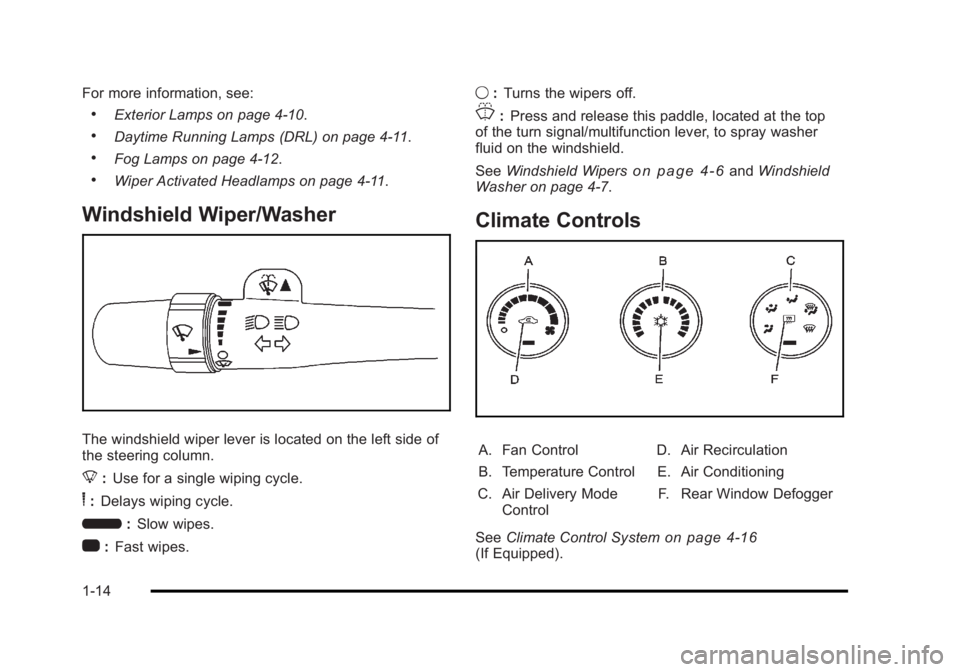
The windshield wiper lever is located on the left side of
the steering column.
8:Use for a single wiping cycle.
6:Delays wiping cycle.
6 :Slow wipes.
1 :Fast wipes. 9
:Turns the wipers off.
J:Press and release this paddle, located at the top
of the turn signal/multifunction lever, to spray washer
fluid on the windshield.
See Windshield Wipers
on page 4‑6andWindshield
Washer on page 4‑7.
Climate Controls
A. Fan Control
B. Temperature Control
C. Air Delivery Mode Control D. Air Recirculation
E. Air Conditioning
F. Rear Window Defogger
See Climate Control System
on page 4‑16(If Equipped).
1-14
Page 21 of 450
Black plate (15,1)Buick Lucerne Owner Manual - 2011
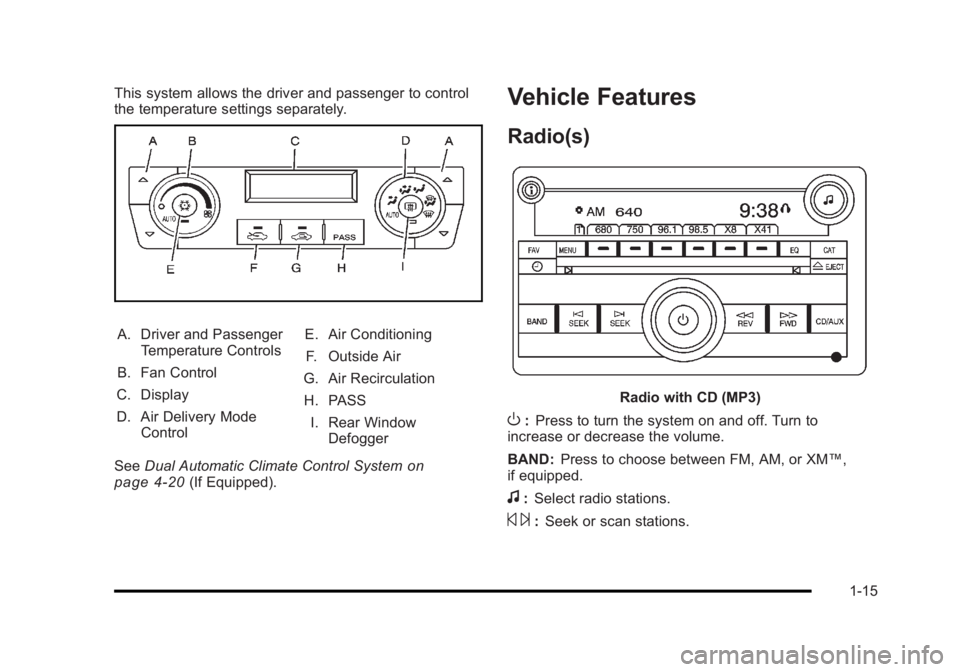
This system allows the driver and passenger to control
the temperature settings separately.
A. Driver and PassengerTemperature Controls
B. Fan Control
C. Display
D. Air Delivery Mode Control E. Air Conditioning
F. Outside Air
G. Air Recirculation
H. PASS I. Rear Window Defogger
See Dual Automatic Climate Control System
on
page 4‑20(If Equipped).
Vehicle Features
Radio(s)
Radio with CD (MP3)
O: Press to turn the system on and off. Turn to
increase or decrease the volume.
BAND: Press to choose between FM, AM, or XM™,
if equipped.
f: Select radio stations.
© ¨:Seek or scan stations.
1-15
Page 27 of 450
Black plate (21,1)Buick Lucerne Owner Manual - 2011
Ultrasonic Parking Assist
For vehicles with this feature, it uses sensors on the
rear bumper to detect objects while parking the vehicle.
It operates at speeds less than 8 km/h (5 mph) while in
R (Reverse).
Keep the sensors on the vehicle's rear bumper clean to
ensure proper operation.
The system can be disabled through the Driver
Information Center (DIC).
SeeUltrasonic Rear Parking Assist (URPA)
on
page 3‑35for more information.
Power Outlets
The accessory power outlets can be used to plug in
electrical equipment, such as a cell phone or MP3
player.
The vehicle may have up to three power outlets
depending on the type of front seat installed. If the
vehicle has front bucket seats with a center console,
there are two outlets inside the center console storage
bin, one accessory power outlet and one USB port
outlet. An extra power outlet can be found under the
climate control system next to the ashtray.
See Accessory Power Outlet(s) on page 4‑15.
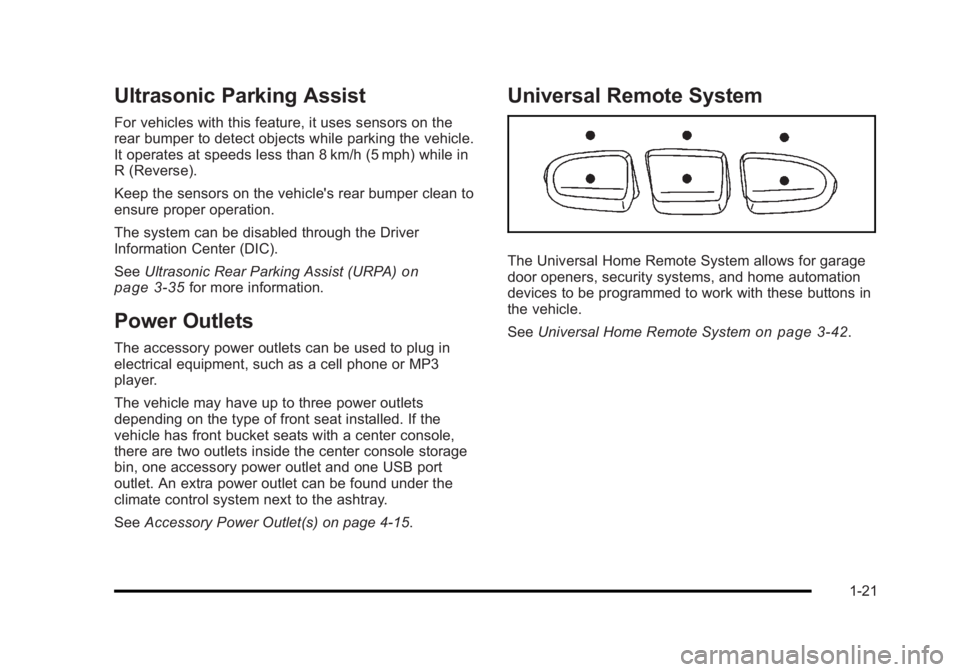
Universal Remote System
The Universal Home Remote System allows for garage
door openers, security systems, and home automation
devices to be programmed to work with these buttons in
the vehicle.
SeeUniversal Home Remote System
on page 3‑42.
1-21
Page 111 of 450
Black plate (7,1)Buick Lucerne Owner Manual - 2011
Remote Vehicle Start
Your vehicle may have a remote starting feature.
This feature allows you to start the engine from outside
the vehicle. It may also start the vehicle's heating or
air conditioning systems, rear window defogger, and
heated seats. SeeHeated Seats
on page 2‑4and
Heated and Ventilated Seatson page 2‑6for
additional information. When the remote start system is
active, the climate control system will heat or cool the
inside of the vehicle at the setting the vehicle was set to
when the vehicle was last turned off. The rear window
defogger will be turned on by the climate control system
when it is cold outside. If the vehicle has heated seats,
they may also turn on when it is cold outside. Cooled
seats are not activated during a remote start. Normal
operation of the system will return after the key is
turned to the ON/RUN position.
Laws in some communities may restrict the use of
remote starters. For example, some laws may require
a person using the remote start to have the vehicle in
view when doing so. Check local regulations for any
requirements on remote starting of vehicles.
Do not use the remote start feature if your vehicle is low
on fuel. Your vehicle may run out of fuel.
If your vehicle has the remote start feature, the RKE
transmitter functions will have an increased range of
operation. However, the range may be less while the
vehicle is running. There are other conditions which can affect the
performance of the transmitter, see
Remote Keyless
Entry (RKE) System
on page 3‑4for additional
information.
/ (Remote Start): This button will be on the RKE
transmitter if you have remote start.
To start the vehicle using the remote start feature:
1. Aim the transmitter at the vehicle.
2. Press and release the transmitter's lock button, then immediately press and hold the transmitter's
remote start button until the turn signal lights flash
or if the vehicle's lights are not visible, press
and hold the remote start button for at least
four seconds.
When the vehicle starts, the parking lamps will turn
on and remain on while the vehicle is running. The
vehicle's doors will be locked.
3. If it is the first remote start since the vehicle has been driven, repeat these steps, while the engine
is still running, to extend the engine running time
by 10 minutes. Remote start can be extended
one time.
After entering the vehicle during a remote start, insert
and turn the key to ON/RUN to drive the vehicle.
If the vehicle is left running it will automatically shut
off after 10 minutes unless a time extension has
been done.
3-7
Page 116 of 450
Black plate (12,1)Buick Lucerne Owner Manual - 2011
Trunk
{WARNING:
Exhaust gases can enter the vehicle if it is driven
with the liftgate, trunk/hatch open, or with any
objects that pass through the seal between the
body and the trunk/hatch or liftgate. Engine
exhaust contains Carbon Monoxide (CO) which
cannot be seen or smelled. It can cause
unconsciousness and even death.
If the vehicle must be driven with the liftgate,
or trunk/hatch open:
.Close all of the windows.
.Fully open the air outlets on or under the
instrument panel.
.Adjust the Climate Control system to a setting
that brings in only outside air and set the fan
speed to the highest setting. See Climate
Control System in the Index.
.If the vehicle is equipped with a power liftgate,
disable the power liftgate function.
For more information about carbon monoxide, see
Engine Exhaust on page 3‑30.
Remote Trunk Release
The remote trunk release buttonFis located on the
instrument panel. See Instrument Panel on page 1‑2.
Press the button to open the trunk. To use this feature,
your vehicle must be in P (Park) or N (Neutral).
You can also press the remote trunk release button on
the Remote Keyless Entry (RKE) transmitter to open
the trunk. See Remote Keyless Entry (RKE) System
Operation on page 3‑4.
3-12
Page 138 of 450
Black plate (34,1)Buick Lucerne Owner Manual - 2011
Side Blind Zone Alert (SBZA)
If the vehicle has the Side Blind Zone Alert (SBZA)
system, seeSide Blind Zone Alert (SBZA)on
page 3‑36.
Park Tilt Mirrors
If the vehicle has memory mirrors, the outside mirrors
have park tilt mirrors . This feature tilts the driver's side
and passenger side mirror to a factory programmed
position when the vehicle is in R (Reverse). This feature
may be useful in allowing you to view the curb when
you are parallel parking.
When the vehicle is shifted out of R (Reverse) and
either a five second delay has occurred, or the ignition
is turned to LOCK/OFF, the driver and passenger side
mirrors return to their original position.
See DIC Vehicle Customization
on page 4‑58for more
information.
Outside Convex Mirror
{WARNING:
A convex mirror can make things, like other
vehicles, look farther away than they really are.
If you cut too sharply into the right lane, you could
hit a vehicle on the right. Check the inside mirror
or glance over your shoulder before changing
lanes.
The passenger side mirror is convex shaped. A convex
mirror's surface is curved so more can be seen from the
driver seat.
Outside Heated Mirrors
For vehicles with heated mirrors:
<(Rear Window Defogger): Press to heat the
mirrors.
See “Rear Window Defogger” underClimate Control
System
on page 4‑16or Dual Automatic Climate
Control Systemon page 4‑20for more information.
3-34