seats BUICK PARK AVENUE 1997 User Guide
[x] Cancel search | Manufacturer: BUICK, Model Year: 1997, Model line: PARK AVENUE, Model: BUICK PARK AVENUE 1997Pages: 420, PDF Size: 21.93 MB
Page 145 of 420
Personal Choice DIC Display
This feature allows two different drivers to store and
recall their own preferred display mode. The Personal
Choice settings displayed on the DIC
are determined by
the transmitter used to enter the vehicle. After the
UNLOCK button of a remote keyless entry transmitter
is pressed and the ignition is in RUN, the DIC will
display the last settings of the identified driver. The
settings can also be changed by briefly pressing one of
the MEMORY buttons located on the driver’s door.
The DIC can also be used to program personal choice
features available with your vehicle, such as, memory
seats, memory door locks, security feedback, delayed
locking and perimeter lighting.
See “Personal Choice
Features” in the Index and “DIC Personal Choice
Programming” later
in this part. The DIC is used to
program information for DRIVER
#1 and DRIVER #2.
The DIC will identify a person as UNKNOWN
DRIVER
if they are neither DRIVER #1 nor DRIVER
#2.
Driver Information Center Controls
and Displays
There are two lines in the DIC display. The bottom line
of the display area is left blank. You can have your
dealer program your name to appear on this display line.
See your dealer for more information.
When you turn the ignition on, the DIC will display
your DRIVER NUMBER. The system will then perform
a status check and display any messages if a problem
is detected.
If there are
no problems detected, the display will return
to the mode selected by that driver the last time the
ignition was turned
off.
If a problem is detected, a diagnostic message will
appear in the display. The following pages will show the
messages you may see on the DIC display.
The message center is continuously updated with the
vehicle’s performance status.
ProCarManuals.com
Page 148 of 420
Warnings and Messages
Other messages or warnings may appear in the DIC
display such as:
WINDSHIELD WASHER FLUID LOW
0 ENG COOLANT LOW - CHECK LEVEL
ENGINE OIL LOW - CHECK LEVEL
CHANGE ENGINE OIL SOON
CHECK TIRE PRESSURES
TRACTION CONTROL SYSTEM ACTIVE
DOOR AJAR
TRUNK AJAR
Pressing any
of the DIC buttons will remove the above
messages or warnings from the DIC display.
Driver Information Center
Personal Choice Programming
The DIC can be used to program personal choice
features available with your vehicle, such as memory
seats, memory door locks, security feedback, delayed
locking and perimeter lighting. See “Personal Choice
Features” in the Index.
The DIC is used to program the personal choices of
two drivers. The driver’s are recognized by DRIVER
#1
and DRIVER #2. You will let the DIC know which
driver you are by using your Remote Keyless Entry
transmitter or by pressing the appropriate memory
seat control button located on the driver’s door. The
remote transmitter was pre-programmed to belong
to
DRIVER #1 or DRIVER #2.
The last driver number remembered by the DIC will show
on the display each time the UNLOCK button on the same
transmitter is pressed, and the ignition is turned on.
When you press UNLOCK on your transmitter, the DIC
will automatically change driver numbers and the
vehicle will recall the personal choice settings that were
last made to correspond to your transmitter.
ProCarManuals.com
Page 152 of 420
Perimeter Lighting
When the UNLOCK button on the transmitter is
pressed, the
DRL lamps (high-beams at reduced
intensity), parking lamps and back-up lamps will turn on
if it is dark enough according to the twilight sentinel.
You can control activation of this feature by choosing
OFF or ON when the PERIMETER LIGHTS choice is
displayed on the DIC. Make your choice by pressing the
ENGMET button and record your choice by pressing
the RESET button.
Memory Seat Recall
NOTE: If you want to choose PERIMETER
LIGHTS ON, you must also choose LIGHTS for
UNLOCK FEEDBACK while making the security
feedback choices.
For more information on this feature, see “Perimeter
Lighting” in the Index. This feature recalls the position
of your seat.
You can program this feature to be active by choosing
ON when the SEAT RECALL choice appears, or
inactive by choosing
OFF when the SEAT RECALL
choice appears on the DIC. Make your choices by
pressing the ENGMET button and store them to
memory by then pressing the RESET button.
You can also program this feature to recall your memory
seat position or the exit seat position.
Memory Position: Choose ON when the SEAT
RECALL choice appears, and then choose MEMORY
when the RECALL POSITION choice appears.
Exit Position: Choose ON when the SEAT RECALL
choice appears, and then choose EXIT when the
RECALL POSITION choice appears and your seat
will move all the way down and back for easy exit.
The seat will also move when you enter the vehicle
after unlocking
it with a Remote Keyless Entry
transmitter. This will allow for easy entry as well.
For more information on this feature, see “Memory Seats” in the Index.
2-92
ProCarManuals.com
Page 159 of 420
Ventilation Tips
0 Keep the hood and front air inlet free of ice, snow or
any other obstruction such as leaves. The heater and
defroster will work better, reducing the chance of
fogging your windows.
e Keep the air path under the front seats clear of objects.
This helps
air to circulate throughout your vehicle.
Passenger Compartment Air Filter (Option)
rassenger compartment air, both outside air and
recirculated air, is routed through a passenger
compartment filter, which is part of a three piece filter
system. The filter removes certain particles from the air,
including pollen and dust particles. Reductions in
airflow, which may occur more quickly in dusty areas,
indicate that the filter needs to be replaced early. The
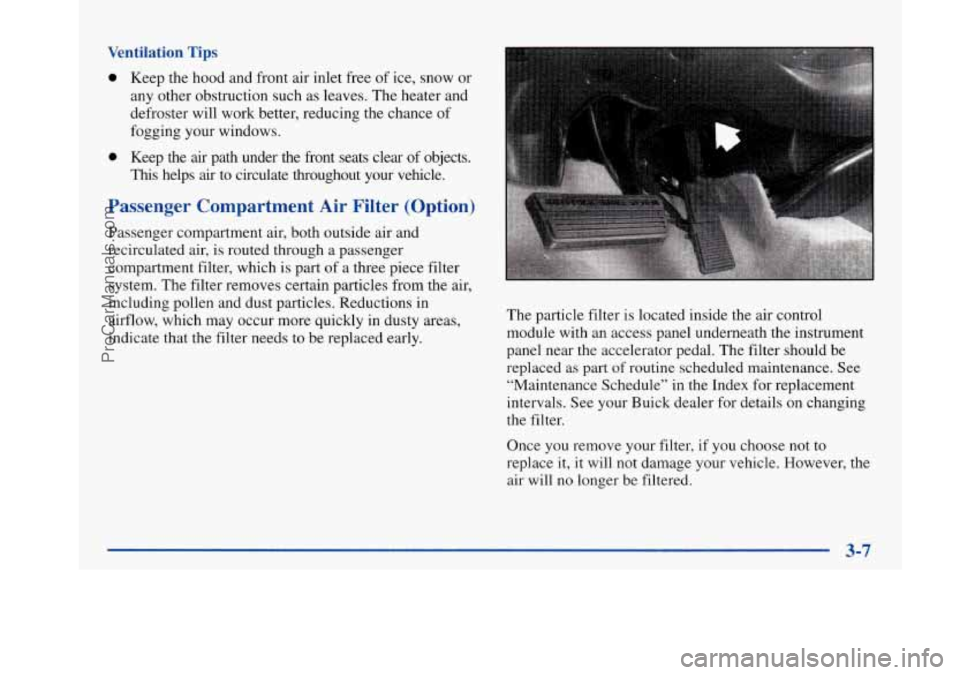
particle filter is located inside the air control
module with an access panel underneath the instrument
panel near the accelerator pedal. The filter should be
replaced as part
of routine scheduled maintenance. See
“Maintenance Schedule” in the Index for replacement
intervals. See your Buick dealer for details on changing
the filter.
Once you remove your filter, if you choose not
to
replace it, it will not damage your vehicle. However, the
air will no longer be filtered.
3-7
ProCarManuals.com
Page 220 of 420
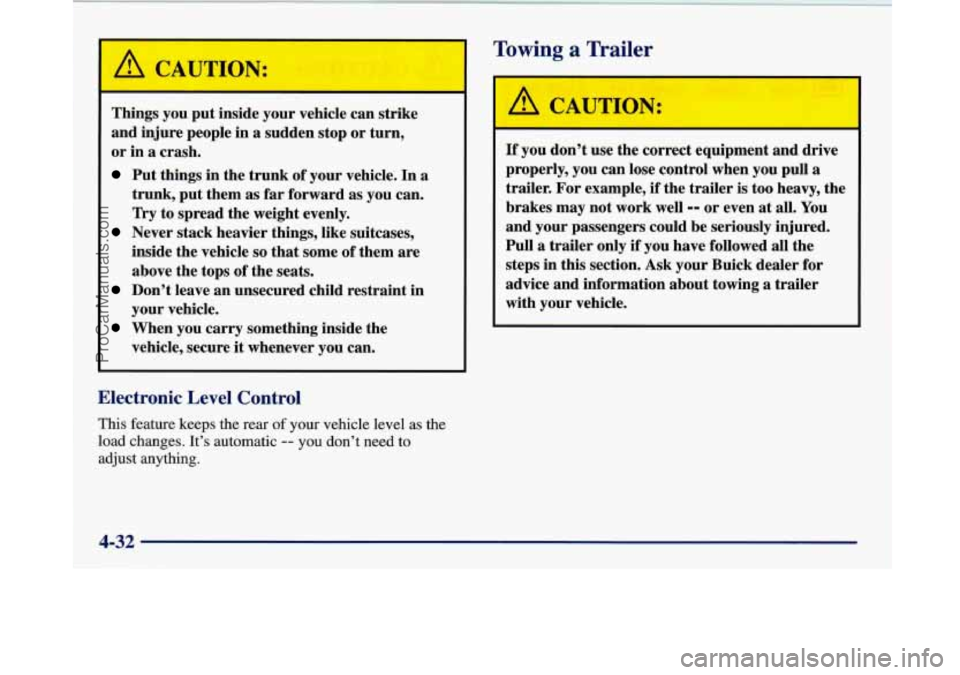
A C~"rIO1
r --
Things you put inside your vehicle can strike
and injure people in
a sudden stop or turn,
or in
a crash.
Put things in the trunk of your vehicle. In a
trunk, put them
as far forward as you can.
Try to spread the weight evenly.
Never stack heavier things, like suitcases,
inside the vehicle
so that some of them are
above the tops of the seats.
Don't leave an unsecured child restraint in
your vehicle.
When you carry something inside the
vehicle, secure
it whenever you can.
Towing a Trailer
/A CAL I'ION:
If you don't use the correct equipment and drive
properly, you can lose control when you pull
a
trailer. For example, if the trailer is too heavy, the
brakes may not work well
-- or even at all. You
and your passengers could be seriously injured.
Pull
a trailer only if you have followed all the
steps in this section. Ask your Buick dealer for
advice and information about towing
a trailer
with your vehicle.
Electronic Level Control
This feature keeps the rear of your vehicle level as the
load changes. It's automatic
-- you don't need to
adjust anything.
4-32
ProCarManuals.com
Page 335 of 420
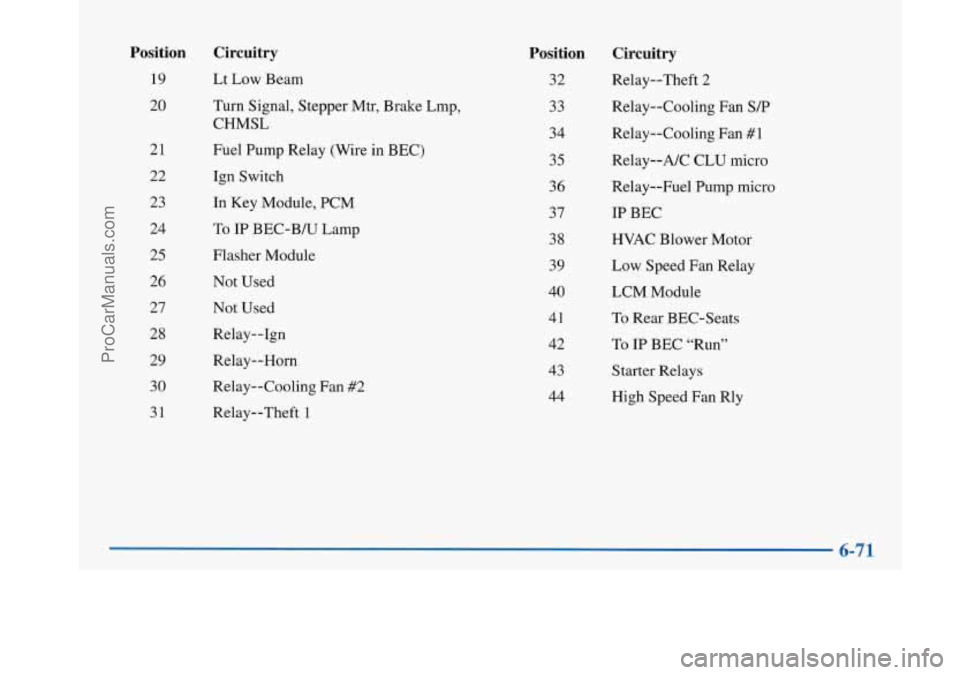
Position
19
20
21
22 23
24
25
26 27
28
29 30
31
Circuitry
Lt Low Beam
Turn Signal, Stepper Mtr, Brake Lmp,
CHMSL
Fuel Pump Relay (Wire in BEC)
Ign Switch
In Key Module, PCM
To
IP BEC-B/U Lamp
Flasher Module Not Used
Not Used
Relay--1gn
Relay--Horn
Relay--Cooling Fan #2
Relay--Theft 1
Position
32
33
34
35
36 37
38
39
40
41
42
43
44
Circuitry
Relay--Theft 2
Relay--Cooling Fan
S/P
Relay--Cooling Fan #1
Relay--A/C CLU micro
Relay--Fuel Pump micro
IP BEC
HVAC Blower Motor
Low Speed Fan Relay
LCM Module
To Rear BEC-Seats
To
IP BEC “Run”
Starter Relays
High Speed Fan Rly
ProCarManuals.com
Page 409 of 420
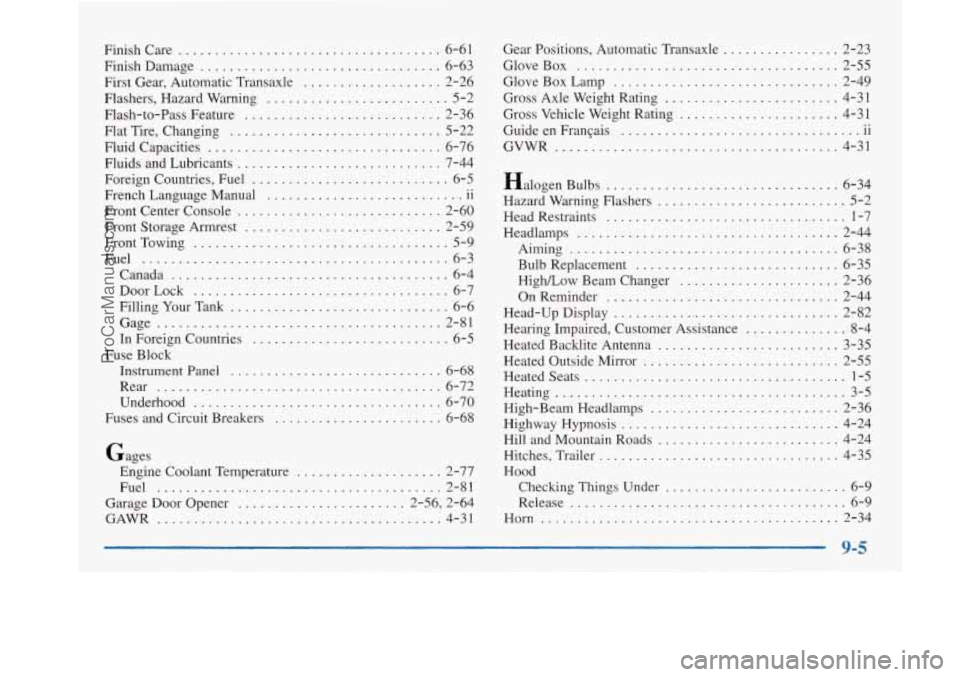
Finishcare .................................... 6-61
Finish Damage
................................. 6-63
First Gear. Automatic Transaxle
................... 2-26
Flashers. Hazard Warning
......................... 5-2
Flash-to-Pass Feature
........................... 2-36
Flat Tire. Changing
............................. 5-22
Fluid Capacities
................................ 6-76
Fluids and Lubricants
............................ 7-44
Foreign Countries. Fuel
........................... 6-5
French Language Manual
11
Front Center Console ............................ 2-60
Front Storage Armrest
........................... 2-59
FrontTowing
................................... 5-9
Fuel
.......................................... 6-3
Canada
...................................... 6-4
DoorLock
................................... 6-7
Filling Your Tank
.............................. 6-6
Gage
....................................... 2-81
In Foreign Countries
........................... 6-5
Instrument Panel
............................. 6-68
Rear
....................................... 6-72
Underhood
.................................. 6-70
Fuses and Circuit Breakers
....................... 6-68
.. ...........................
Fuse Block
Gages Engine Coolant Temperature
.................... 2-77
Fuel
....................................... 2-81
Garage Door Opener ....................... 2-56, 2-64
GAWR
....................................... 4-31 Gear
Positions. Automatic Transaxle
................ 2-23
GloveBox
.................................... 2-55
GloveBoxLamp
............................... 2-49
Gross Axle Weight Rating
........................ 4-31
Gross Vehicle Weight Rating
...................... 4-31
Guide en FranGais
-11
GVWR ......... ....................... 4-31
.. ................................
Halogen Bulbs ................................ 6-34
Hazard Warning Flashers
.......................... 5-2
Head Restraints
................................. 1-7
Headlamps
.................................... 2-44
Bulb Replacement
............................ 6-35
OnReminder
................................ 2-44
Head-Up Display
............................... 2-82
Hearing Impaired, Customer Assistance
.............. 8-4
Heated Backlite Antenna
......................... 3-35
Heated Outside Mirror
........................... 2-55
Heatedseats
.................................... 1-5
Heating
........................................ 3-5
High-Beam Headlamps
.......................... 2-36
.Highway Hypnosis
.............................. 4-24
Hill and Mountain Roads
......................... 4-24
Hitches, Trailer
................................. 4-35
Hood Checking Things Under
......................... 6-9
Release
...................................... 6-9
Horn
......................................... 2-34
Aiming
..................................... 6-38
High/Low Beamchanger
...................... 2-36
9-5
ProCarManuals.com
Page 414 of 420
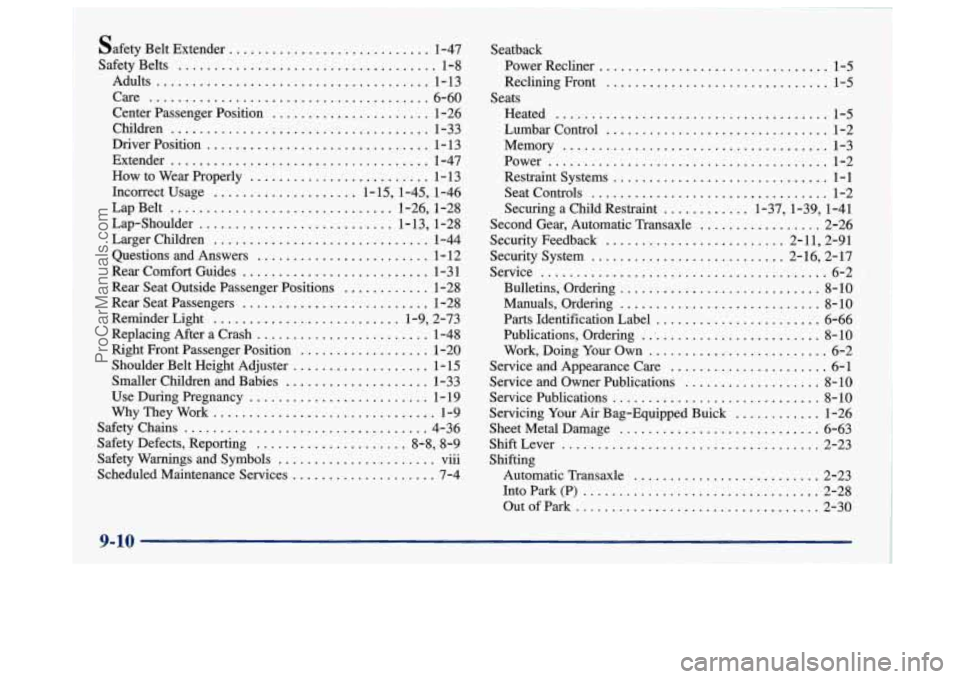
safety Belt Extender ............................ 1-47
Safety Belts
.................................... 1-8
Center Passenger Position
...................... 1-26
Children
.................................... 1-33
Driver Position
............................... 1 - 13
How to Wear Properly
......................... 1 - 13
Incorrect Usage
.................... 1-15,l-45, 1-46
Lap Belt
............................... 1-26, 1-28
Lap-Shoulder
........................... 1-13, 1-28
Questions and Answers
........................ 1-12
Rear
Comfort Guides .......................... 1-3 1
Rear Seat Outside Passenger Positions
............ 1-28
Rear Seat Passengers
.......................... 1-28
Reminder Light
.......................... 1-9, 2-73
Replacing After a Crash
........................ 1-48
Right Front Passenger Position
.................. 1-20
Shoulder Belt Height Adjuster
................... 1-15
Smaller Children and Babies
.................... 1-33
Use During Pregnancy
......................... 1-19
WhyTheyWork
............................... 1-9
Safety Chains
.................................. 4-36
Safety Defects, Reporting
..................... 8-8, 8-9
Scheduled Maintenance Services
.................... 7-4
Adults
...................................... l-13
Care ....................................... 6-60
Extender
.................................... l-47
LargerChildren ..........,................... l-44
... Safety Warnings and Symbols ...................... vu1 Seatback
Power Recliner
................................ 1-5
Reclining Front ............................... 1-5
Lumbar Control
............................... 1-2
Restraint Systems
.............................. 1-1
Securing a Child Restraint ............ 1-37,l-39, 1-41
Second Gear, Automatic Transaxle
................. 2-26
Security System
........................... 2-16, 2-17
Bulletins, Ordering
............................ 8-10
Manuals, Ordering
............................ 8-10
Parts Identification Label
....................... 6-66
Publications, Ordering
.......................... 8-10
Work, Doing
Your Own ......................... 6-2
Service and Appearance Care
...................... 6-1
Service and Owner Publications
................... 8-10
Servicing
Your Ar Bag-Equipped Buick ............ 1-26
Sheet Metal Damage
............................ 6-63
Automatic Transaxle
.......................... 2-23
Into Park (P)
................................. 2-28
Outofpark
.................................. 2-30
Seats
Heated
...................................... 1-5
Memory ..................................... l-3
Power ....................................... l-2
SeatControls ................................. l-2
Security Feedback ......................... 2-11, 2-91
Service
........................................ 6-2
ServicePublications
............................. 8-10
ShiftLever
.................................... 2-23
Shifting
ProCarManuals.com