light BUICK REGAL 1996 Owner's Guide
[x] Cancel search | Manufacturer: BUICK, Model Year: 1996, Model line: REGAL, Model: BUICK REGAL 1996Pages: 356, PDF Size: 17.97 MB
Page 126 of 356
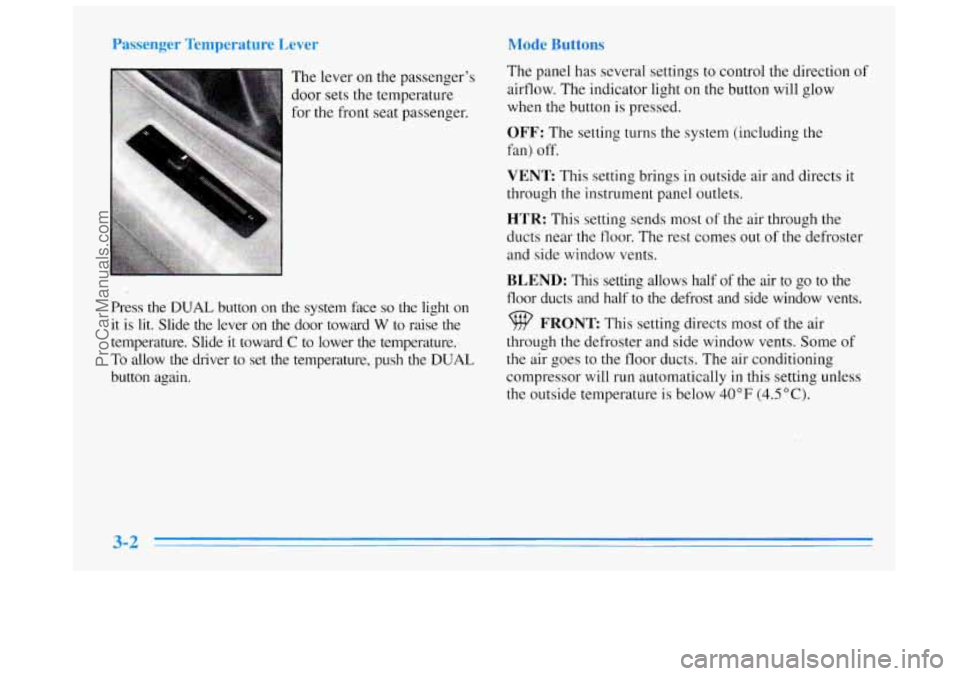
The lever on the passenger's
door sets the temperature
for the front seat passenger.
Press the
DUAL button on the system face so the light on
it is lit. Slide the lever on the door toward
W to raise the
temperature. Slide it toward
C to lower the temperature.
To allow the driver to set
the temperature, push the DUAL
button again. The
panel has several settings to control the direction
of
airflow. The indicator light on the button will glow
when
the button is pressed.
OFF: The setting turns the system (including the
fan) off.
VENT This setting brings in outside air and directs it
through the instrument panel outlets.
HTR: This setting sends most of the air through the
ducts near the
floor. The rest comes out of the defroster
and side window vents.
BLEND: This setting allows half of the air to go to the
floor ducts and half to the defrost and side window vents.
FRONT This setting directs most of the air
through the defroster and side window vents. Some
of
the air goes to the floor ducts. The air conditioning
compressor will run automatically
in this setting unless
the outside temperature is below
40°F (4.5"C).
ProCarManuals.com
Page 127 of 356
MAX: This setting recirculates much of the air inside
your vehicle and sends it through
the instrument panel
outlets. The air conditioning compressor will run
automatically
in this setting unless the outside
temperature is below 40°F (4.5"C).
NORM: This setting brings in outside air and sends
it through the instrument panel outlets. The air
conditioning compressor will run automatically
in this
setting unless the outside temperature is below 40°F
(4.5 " C).
BI-LEV: This setting brings in the outside air and
directs
it two ways. Half of the air is directed through
the instrument panel outlets. Most
of the remaining air is
directed through the floor ducts and
a little to the defrost
and side window vents. The air conditioning compressor
will run automatically in this setting unless the outside
temperature
is below 40°F (4.5"C).
Air Conditioning
On very hot days, open the windows long enough to let
hot, inside air escape. This reduces the time the
compressor has to
run, which should help fuel economy.
For quick cool-down on very hot days, use
MAX with
the temperature lever all the way to COOL.
If this
setting is used for long periods of time,
the air in your
vehicle may become too dry.
For normal cooling on hot days, use
NORM with the
temperature lever all the way to COOL. The system will
bring
in outside air and cool it.
On cool but sunny days, the sun may warm your upper
body, but your lower body may not be warm enough.
You can use BI-LEV with the temperature knob in the
middle. The system will bring
in outside air and direct it
to your upper body, while sending slightly warmed air to
your lower body. You may notice this temperature
difference more at some times than others.
3-3
ProCarManuals.com
Page 129 of 356
Ventilation Tips
0
0
0
0
For mild outside temperatures when little heating or
cooling is needed, use VENT to direct outside air
through your vehicle.
Keep the hood and front air inlet free of ice, snow or
any other obstruction, such
as leaves. The heater and
defroster will work far better, reducing the chance of
fogging the inside of your windows.
When you enter
a vehicle in cold weather, adjust the
mode to HTR and the fan to the highest speed for a
few moments before driving off. This helps clear the
intake ducts
of snow and moisture and reduces the
chance
of fogging the inside of your windows.
Keep the air path under the front seats clear of
objects. This helps air to circulate throughout
your vehicle.
Defogging and Defrosting
Your system has two settings for clearing the front and
side windows.
To defrost the windows quickly, use
FRONT with the temperature lever all the way to
WARM.
To warm passengers while keeping the
windows clean, use BLEND.
For maximum defrost performance, both the driver’s
and passenger’s temperature controls should be
in the
full warm position. To do this, push the DUAL button so
that the light goes out. The driver can then control both
sides with the main temperature control. Slide the lever
all the way toward WARM.
ProCarManuals.com
Page 132 of 356
PUSHBUTTONS: The six numbered pushbuttons let
you return to your favorite stations.
You can set up to
18 stations (six AM, six FMl and six FM2).
1. Press AM-FM to select the band.
2. Find the station you want by using TUNE or SEEK.
3. Press and hold one of the six numbered buttons.
4. The sound will mute. When it returns, release the
button. Whenever you press that numbered button,
the station
you set will return.
P SCAN: Press this button to listen to each of your
preset stations for
a few seconds. The radio will go to
the first preset station, stop for a few seconds, then go
on to the next preset station. Press P SCAN again to
stop scanning.
If a preset station has weak reception,
the radio will not stop at the preset station.
Setting the Tone
BASS: Press this knob lightly so it extends. Turn the
knob to increase or decrease bass. The middle position is
a detent.
TREB: Press this button lightly so it extends. Turn the
knob to increase or decrease treble. The middle position
is a detent.
Push the knobs back in when you are not using them.
Adjusting the Speakers
BAL: Turn the control behind the upper knob to move
the sound to the left or right speakers. The middle
position is
a detent and balances the speakers.
FADE: Turn the control behind the lower knob to move
the sound to the front
or rear speakers. The middle
position is
a detent and balances the speakers.
Playing a Cassette Tape
The longer side with the tape visible should face to the
right.
If the ignition is on, but the radio is off, the tape
will begin playing. If you hear nothing or hear
a garbled
sound, the tape may not be in squarely. Press EJECT to
remove the tape and start over.
While the tape
is playing, use the VOLUh-, FADE,
BAL, TREB and BASS controls just as you do for the
radio. Other controls may have different functions when
a tape is inserted. The display will show an arrow to
show which side
of the tape is playing.
ProCarManuals.com
Page 135 of 356
PUSHBUTTONS: The six numbered pushbuttons let
you return to your favorite stations. You can set up to
18 stations (six AM, six FM1 and six FM2).
1. Press AM-FM to select the band.
2. Find the station you want by using TUNE or SEEK.
3. Press TONE to select the setting you prefer.
4. Press and hold one of the six numbered buttons.
5. The sound will mute. When it returns, release the
button. Whenever you press that numbered button, the
station
you set will return and the TONE you selected
will be automatically selected for that button.
P SCAN: Press this button to listen to each of your
preset stations for a few seconds. The radio will go to
the first preset station, stop for a few seconds, then go
on to the next preset station. Press P SCAN again to stop
scanning.
If a preset station has weak reception, the
radio will not stop at the preset station.
AUTO SET Press this button and the system will seek
and set the
12 strongest FM or the 6 strongest AM
stations on your preset buttons. To return to the stations
you manually set, press AUTO SET again.
Setting the Tone
BASS:
Press this knob lightly so it extends. Turn the
knob to increase or decrease bass. The middle position is
a detent.
TREB: Press this knob lightly so it extends. Turn the
knob to increase or decrease treble. The middle position
is a detent.
Push the knobs back
in when you are not using them.
TONE: This feature allows you to choose preset treble
and bass equalization settings designed for classical,
pop, rock, jazz, talk and country/western stations.
CLASS will appear on the display when you first press
TONE. Each time you press it, another setting will
appear on the display. Press
it again after C & W
appears and MANUAL will appear. Tone control will
return to the TREB and BASS knobs,
Also, if you use
the TREB and
BASS knobs, control will return to them
and
MANUAL will appear.
Adjusting the Speakers
BAL: Press this knob lightly so it extends. Turn the
knob to move
the sound to the left or right speakers. The
middle position
is a detent and balances the speakers.
3-11
ProCarManuals.com
Page 138 of 356
RECALL: Press this button briefly to recall the station
being played or the clock display. To change what is
normally shown on the display (station or time), press
the button until you see the display
you want, then hold
the button
until the display flashes. If you press the
button when the ignition is off, the clock will show for
a few seconds.
ung a :atlon
AM-FM: Press this button to select AM, FM1 or FM2.
The display shows your selection.
TUNE: Press the up or down arrows to choose radio
stations.
SEEK: Press the up or down arrows to go to the
next higher or lower station. The sound will be muted
while seeking.
SCAN: Press one of the SEEK arrows for two seconds
and
SCAN will appear on the display. Use SCAN to
listen to stations for a few seconds. The radio will go to
a station, stop
for a few seconds, then go on to the next
station. Press one of the SEEK arrows again to stop
scanning. The sound will be muted while scanning.
PUSHBUTTONS: The six numbered pushbuttons let
you return to your favorite stations. You can set up to
18 stations (six AM, six FM 1 and six FM2).
1. Press AM-FM to select the band.
2. Find the station you want by using TUNE or SEEK.
3. Press TONE to select the setting you prefer.
4. Press and hold one of the six numbered buttons.
5. The sound will mute. When it returns, release the
button. Whenever you press that numbered button, the
station you set will return and the TONE you selected
will be automatically selected for that button.
P SCAN: Press this button to listen to each of your
preset stations
for a few seconds. The radio will go to
the first preset station, stop for
a few seconds, then go
on to the next preset station. Press P
SCAN again to stop
scanning. If
a preset station has weak reception, the
radio will not stop at the preset station.
TREB: Press this knob lightly so it extends. Turn the
knob to increase
or decrease treble. The middle position
is a detent.
3-14
ProCarManuals.com
Page 139 of 356
Push the knobs back in when you are not using them.
TONE: This feature allows you to choose preset treble
and bass equalization settings designed for classical,
pop, rock,
jazz, talk and countrylwestern stations.
CLASS will appear on the display when you first press
TONE. Each time you press it, another setting will
appear on the display. Press
it again after C & W
appears and MANUAL will appear. Tone control will
return to the TREB and BASS knobs. Also,
if you use
the TREB and BASS knobs, control will return to them
and MANUAL will appear.
djusting the Spc cers
BAL: Press this knob lightly so it extends. Turn this
knob to move the sound to the left or right speakers. The
middle position is
a detent and balances the speakers.
FADE: Press this knob lightly so it extends. Turn this
knob to move the sound to the front or rear speakers. The
middle position is a detent and balances the speakers.
Cc
Insert a disc partway into the slot, label side up. The
player will pull
it in. The disc should begin playing.
If you’re driving on a very rough road or if it’s very hot,
the disc may not play and
ERR (error) may appear on
the display. Press RECALL
to take ERR off the display. When
things get back to normal, the disc should play.
If
the disc comes out, it could be that:
0 The disc is upside down.
0 It is dirty, scratched or wet.
0 It is very humid. (If so, wait about an hour and
RECALL: Press this button to see which track is
playing. Press it again within five seconds
to see how
long
it has been playing. To change what is normally
shown on the display (track or elapsed time), press the
button until you see the display you want, then hold the
button
until the display flashes.
PREV (1): Press this button to go to the start of the
current track
if more than eight seconds have played.
If you hold the button or press it more than once, the
player
will continu’e moving back through the disc. The
sound will be muted while seeking.
NEXT (2): Press this button to go to the next track. If
you hold the button
or press it more than once, the
player will continue moving forward through the disc.
The sound will be muted while seeking.
try
again.)
ProCarManuals.com
Page 142 of 356
Setting the Tone
BASS: Press this knob lightly so it extends. Turn the
knob to increase or decrease bass.
Playing a Cassette Tape
The longer side with the tape visible should face to the
right.
If the ignition is on, but the radio is off, the tape
will begin playing. If you hear nothing or hear
a garbled
sound the tape may not
be in squarely. Press EJECT to
remove the tape and start over.
While
the tape is playing, use the VOLUME, FADE,
BAL, TREB and BASS controls just as you do for the
radio. Other controls may have different functions when
a tape is inserted. The display will show
an arrow to
show which side of the tape is playing.
TREB: Press this knob lightly so it extends. Turn the
knob
to increase or decrease treble.
Push the knobs back in when you are not using them.
TONE: This feature allows you to choose preset treble and
bass equalization settings designed for classical, pop, rock,
jazz, talk and country/western stations. CLASS will
appear
on the display when you first press TONE. Each
time you press
it, another setting will appear on the display.
Press it again after
C & W appears and MANUAL will
appear. Tone control will return
to the TREB and BASS
knobs.
Also, if you use the TREB and BASS knobs,
control will return
to them and MANUAL will appear.
Adjusting the Speakers
BAL: Press this knob lightly so it extends. Turn the
knob to move the sound
to the left or right speakers.
Use
the middle position to balance these speakers.
FADE: Press this button lightly so it extends. Turn the
knob to move
the sound to the front or rear speakers.
Use the middle position to balance these speakers.
Push the knobs back
in when you are not using them.
If you want to insert a tape when the ignition or radio is
off, first press EJECT or RECALL. Note that the
cassette tape adapter kits for portable compact disc
players may not work
in your cassette player. These
adapters can cause an error message on the display, and
the adapter cassette could be ejected.
Your tape bias
is set automatically.
PREV (1): Press this button to search for the previous
selection on the tape. Your tape must have at least three
seconds of silence between each selection for PREV to
work. The sound
will be muted while seeking.
NEXT (2): Press this button to search for the next
selection on the tape. Your tape must have at least three
3-18
ProCarManuals.com
Page 149 of 356
C __~ ~ ~ Iur C mette Tape PIayer
A tape player that is not cleaned regularly can cause
reduced sound quality, ruined cassettes or a damaged
mechanism. Cassette tapes should be stored in their
cases away from contaminants, direct sunlight and
extreme heat. If they aren’t, they may not operate
properly or may cause failure
of the tape player.
Your tape player should be cleaned regularly after every
50 hours of use. Your radio may display CLN to indicate
that you have used your tape player for
50 hours without
resetting the tape clean timer. If you notice a reduction in
sound quality,
try a known good cassette to see if the tape
or the tape player is at fault. If this other cassette has no
improvement
in sound quality, clean the tape player.
Cleaning may be done with a scrubbing action,
non-abrasive cleaning cassette with pads which scrub
the tape head as the hubs of the cleaner cassette turn. It
is normal for the cassette to eject while cleaning. Insert
the cassette at least three times to ensure thorough
cleaning. A scrubbing action cleaning cassette is
available through your Buick dealer. You
may also choose a non-scrubbing action, wet-type
cleaner which uses a cassette with a fabric belt to clean
the tape head. This type
of cleaning cassette will not
eject. It may not clean as thoroughly as the scrubbing
type cleaner.
Cassettes are subject to wear and the sound quality may
degrade over time. Always make sure that the cassette
tape is in good condition before you have your tape
player serviced.
Care of Your Compact Discs
Handle discs carefully. Store them in their original cases
or other protective cases and away from direct sunlight
and dust. If the surface of a disc is soiled, dampen a
clean, soft cloth in
a mild, neutral detergent solution and
clean it, wiping from the center to the edge.
Be sure never to touch the signal surface when handling
discs. Pick up discs by grasping the outer edges or the
edge
of the hole and the outer edge.
t
ProCarManuals.com
Page 150 of 356
1 Ma:
The fixed mast antenna can withstand most car washes
without being damaged.
If the mast should ever become
slightly bent, you can straighten
it out by hand. If the
mast is badly bent, as it might be by vandals, you should
replace it.
Check every once
in a while to be sure the mast is still
tightened to the fender.
Powe: intenna ast Care
Your power antenna will look its best and work well if
it’s cleaned from time to time. To clean the antenna mast:
1.
2.
3.
4.
5.
6.
Turn on the ignition and radio to raise the antenna.
Dampen
a clean cloth with mineral spirits or
equivalent solvent.
Wipe the cloth over the mast sections, removing
any dirt.
Wipe dry with a clean cloth.
Make
the antenna go up and down by turning the
radio or ignition off and on.
Repeat
if necessary.
I NOTICE:
Don’t lubricate the power antenna. Lubrication
could damage it.
NOTICE:
Before entering an automatic car wash, turn off
your radio to make the power antenna go down.
This
will prevent the mast from possibly getting
damaged.
If the antenna does not go down when
you turn the radio off, it may be damaged
or
need to be cleaned. In either case, lower the
antenna by hand by carefully pressing the
antenna down.
If the mast portion of your antenna is damaged, you can
easily replace
it. See your dealer for a replacement kit
and follow the instructions
in the kit.
3-26
ProCarManuals.com