radio controls BUICK REGAL 1997 Owners Manual
[x] Cancel search | Manufacturer: BUICK, Model Year: 1997, Model line: REGAL, Model: BUICK REGAL 1997Pages: 422, PDF Size: 21.34 MB
Page 157 of 422
Section 3 Comfort Controls and Audio Systems
In this section, you’ll find out how to operate the comfort control and audio systems offered with your Buick. Be sure
to read about the particular systems supplied with your vehicle.
3-2
3-2
3 -4
3-7
3-10
3-1
1
3-12
3-12
3-13
3-
15
3-18 Comfort Controls
Manual Single Zone Climate Control
Dual ComforTemp Climate Control
Dual Automatic ComforTemp Climate Control
Ventilation System
Rear Window Defogger
Audio Systems
Setting
the Clock
AM-FM Stereo
AM-FM Stereo with Cassette Tape Player
AM-FM Stereo with Cassette Tape Player and
Automatic Tone Control 3-22
3-26
3-3
1
3-33
3-34
3-34
3-35
3-36
3-36
3-37 AM-FM
Stereo with Compact Disc Player and
Automatic Tone Control AM-FM Stereo with Cassette Tape and
Compact Disc Player with Automatic
Tone Control
Theft-Deterrent Feature
Audio Steering Wheel Controls
Understanding Radio Reception
Tips About Your Audio System
Care of Your Cassette Tape Player
Care of Your Compact Discs
Fixed Mast Antenna
Backglass Antenna
ProCarManuals.com
Page 169 of 422
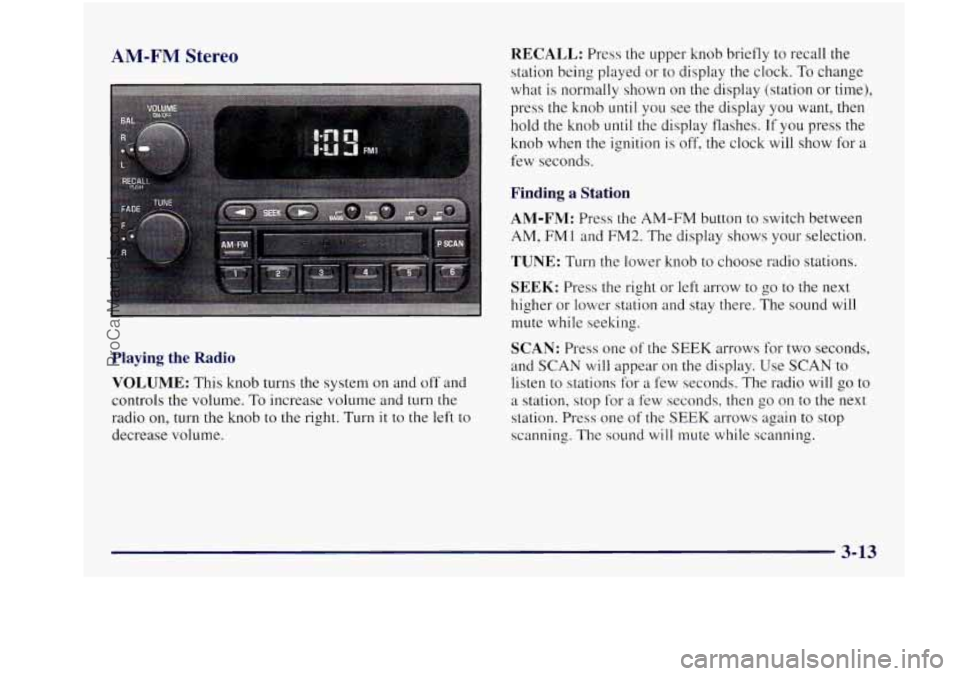
AM-FM Stereo RECALL: Press the upper knob briefly to recall the
station being played or to display the clock. To change
what is normally shown on the display (station or time),
press the knob until you see the display you want,
then
hold the knob until the display flashes. If you press the
knob when the ignition
is off, the clock will show for a
few seconds.
Finding a Station
AM-FM: Press the AM-FM button to switch between
AM, FM1 and FM2. The display shows your selection.
TUNE: Turn the lower knob to choose radio stations.
SEEK: Press the right or left arrow to go to the next
higher or lower station and stay there. The sound will
mute while seeking.
Playing the Radio
VOLUME: This knob turns the system on and off and
controls the volume.
To increase volume and turn the
radio on, turn the knob to the right. Turn it to the left to
decrease volume.
SCAN: Press one of the SEEK arrows for two seconds,
and SCAN will appear on the display. Use SCAN to
listen to stations for a few seconds. The radio will
go to
a station, stop for a few seconds, then go on to the next
station. Press one of the
SEEK arrows again to stop
scanning. The sound will mute while scanning.
3-13
ProCarManuals.com
Page 171 of 422
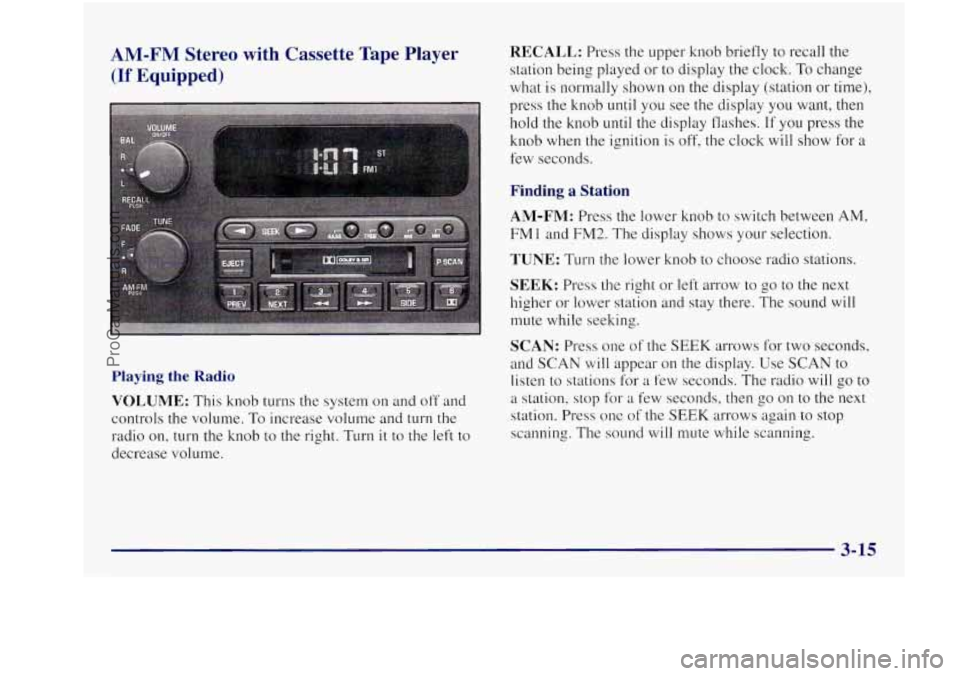
AM-FM Stereo with Cassette Tape Player RECALL: Press the upper knob briefly to recall the
(If Equipped) station being played or to display the clock. To change
what is normally shown on the display (station or time),
press the knob
until you see the display you want, then
hold the knob until the display flashes. If you press the
knob
when the ignition is off, the clock will show for a
few seconds.
Finding a Station
AM-FM: Press the lower knob to switch between AM,
FMl and FM2. The display shows your selection.
TUNE: Turn the lower knob to choose radio stations,
Playing the Radio
VOLUME: This knob turns the system on and off and
controls the volume.
To increase volume and turn the
radio on, turn the knob to the right. Turn
it to the left to
decrease volume.
SEEK: Press the right or left arrow to go to the next
higher
or lower station and stay there. The sound will
mute while seeking.
SCAN: Press one of the SEEK arrows for two seconds,
and
SCAN will appear on the display. Use SCAN to
listen
to stations for a few seconds. The radio will go to
a station, stop for a few seconds, then go on to the next
station. Press one
of the SEEK arrows again to stop
scanning. The sound will mute while scanning.
3-15
__
ProCarManuals.com
Page 173 of 422
While the tape is playing, use the VOLUME, FADE,
BAL, BASS and TREB controls just as you do for the
radio. Other controls may have different functions when
a tape is inserted. The display will show an arrow to
show which side of the tape is playing.
If you want to insert
a tape when the ignition or radio is
off, first press EJECT or RECALL. Note that the
cassette tape adapter kits for portable compact disc
players will work in your cassette tape player.
Your tape bias is set automatically.
If
E and a number appear on the radio display, the tape
won’t play because
of an error.
E10: The tape is tight and the player can’t turn the
tape hubs. Remove the tape. Hold the tape with the
open end down and try to turn the right hub to the
left with a pencil. Turn the tape over and repeat.
If
the hubs do not turn easily, your tape may be
damaged and should not be used in the player.
Try a new tape to make sure your player is
working properly.
Ell: The tape is broken. Try a new tape. If
any error occurs repeatedly or if an error can’t be
corrected, please contact your dealer. If your radio
displays an error number, write it down and provide it to
your dealer when reporting the problem.
PREV (1): Press this button to search for the previous
selection on the tape. Your tape must have at least three
seconds of silence between each selection for PREV to
work. The sound will mute while seeking.
NEXT (2): Press this button to search for the next
selection on the tape. Your tape must have at least three
seconds of silence between each selection for NEXT to
work. The sound will mute while seeking.
The
SEEK left and right arrows will also find the
previous and next selections on the tape.
44 (3): Press this button to reverse the tape rapidly.
Press it again to return to playing speed. The radio will
play while the tape reverses.
bb (4): Press this button to advance quickly to
another part of the tape. Press the button again to
return to playing speed. The radio will play while the
tape advances.
ProCarManuals.com
Page 176 of 422
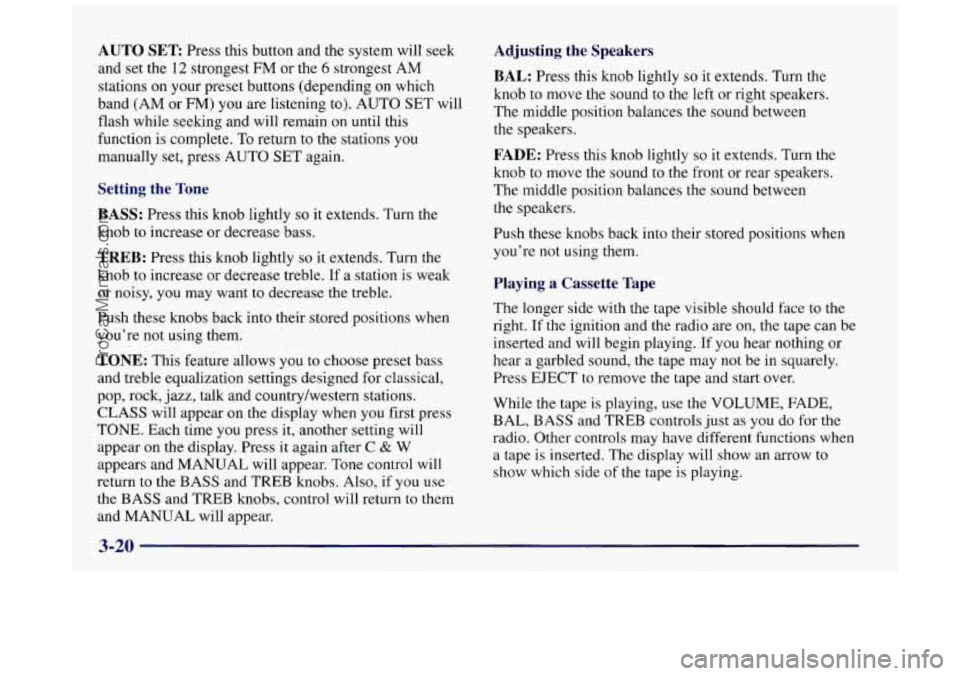
AUTO SET Press this button and the system will seek
and set the 12 strongest FM
or the 6 strongest AM
stations on your preset buttons (depending
on which
band (AM or FM) you are listening to). AUTO
SET will
flash while seeking and will remain
on until this
function is complete. To return
to the stations you
manually
set, press AUTO SET again.
Setting the Tone
BASS:
Press this knob lightly so it extends. Turn the
knob to increase or decrease bass.
TREB: Press this knob lightly so it extends. Turn the
knob to increase or decrease treble.
If a station is weak
or noisy,
you may want to decrease the treble.
Push these knobs back into their stored positions when
you’re not using them.
TONE: This feature allows you to choose preset bass
and treble equalization settings designed for classical,
pop, rock, jazz, talk and country/western stations.
CLASS will appear on the display when you first press
TONE. Each time you press it, another setting will
appear on the display. Press it again after
C & W
appears and MANUAL will appear. Tone control will
return to the BASS and TREB knobs. Also, if you use
the BASS and TREB knobs, control will return to them
and MANUAL will appear.
Adjusting the Speakers
BAL:
Press this knob lightly so it extends. Turn the
knob to move the sound
to the left or right speakers.
The middle position balances the sound between
the speakers.
FADE: Press this knob lightly so it extends. Turn the
knob to move the sound
to the front or rear speakers.
The middle position balances the sound between
the speakers.
Push these knobs back into their stored positions when
you’re not using them.
Playing a Cassette Tape
The longer side with the tape visible should face to the
right. If the ignition and the radio are on, the tape can be
inserted and will begin playing.
If you hear nothing or
hear a garbled sound, the tape may
not be in squarely.
Press EJECT to remove the tape and start over.
While the tape is playing,
use the VOLUME, FADE,
BAL, BASS and TREB controls just as
you do for the
radio. Other controls may have different functions when
a tape is inserted. The display will show an arrow to
show which side
of the tape is playing.
3-20
ProCarManuals.com
Page 184 of 422
Adjusting the Speakers
BAL:
Press this knob lightly so it extends. Turn the
knob to move the sound to the left or right speakers. The middle position balances the sound between
the speakers.
FADE: Press this knob lightly so it extends. Turn the
knob to move the sound to the front or rear speakers.
The middle position balances the sound between
the speakers.
Push these knobs back into their stored positions when
you’re not using them.
Playing a Cassette Tape
The longer side with the tape visible should face to the
right. If the ignition and the radio
are on, the tape can be
inserted and will begin playing. If you hear nothing or
hear a garbled sound, the tape may not be in squarely.
Press EJECT to remove the tape and start over.
While the tape is playing, use the
VOLUME, FADE,
BAL, BASS and TREB controls just as you do for the
radio. Other controls may have different functions when
a tape is inserted. The display will show an arrow to
show which side of the tape is playing.
If you want to insert a tape when the ignition or radio is
off, first press EJECT or RECALL.
Your tape bias is set automatically.
If E and a number appear on the radio display, the tape
won’t play because of an error.
E10: The tape is tight and the player can’t turn the
tape hubs. Remove the tape. Hold
the tape with the
open end down and
try to turn the right hub to the left
with a pencil. Turn the tape over and repeat. If the
hubs
do not turn easily, your tape may be damaged and
should not be used
in the player. Try a new tape to
make sure your player is working properly.
0 Ell: The tape is broken. Try a new tape.
If any error occurs repeatedly or if an error can’t be
corrected, please contact your dealer. If your radio
displays an error number, write it down and provide it to
your dealer when reporting the problem.
PREV (1): Press this button to search for the previous
selection on the tape. Your tape must have at least
three
seconds of silence between each selection for PREV to
work. The sound will mute while seeking.
3-28
ProCarManuals.com
Page 189 of 422
Disabling the Theft-Deterrent Feature
Enter your secret code as follows; pause no more than
15 seconds between steps:
1. Turn the ignition to ACCESSORY or RUN.
2. Turn the radio off.
3. Press the 1 and 4 buttons together. Hold them down
4. Press MIN and 000 will appear on the display.
5. Press MTN again to make the last two digits agree
6. Press HRS to make the first one or two digits agree
7. Press AM-FM after you have confirmed that the
until
SEC shows on the display.
with your code.
with your code.
code matches the secret code you have written down.
The display will show
---, indicating that the radio is
no longer secured.
If the code entered is incorrect, SEC will appear on the
display. The radio will remain secured until the correct
code is entered.
When battery power
is removed and later applied to a
secured radio, the radio won’t turn on and LOC will
appear on the display.
To unlock a secured radio see “Unlocking the
Theft-Deterrent Feature After a Power
Loss” earlier in
this section.
Audio Steering Wheel Controls
(If Equipped)
If your vehicle has this feature, you can control certain
radio functions using the buttons
on your steering wheel.
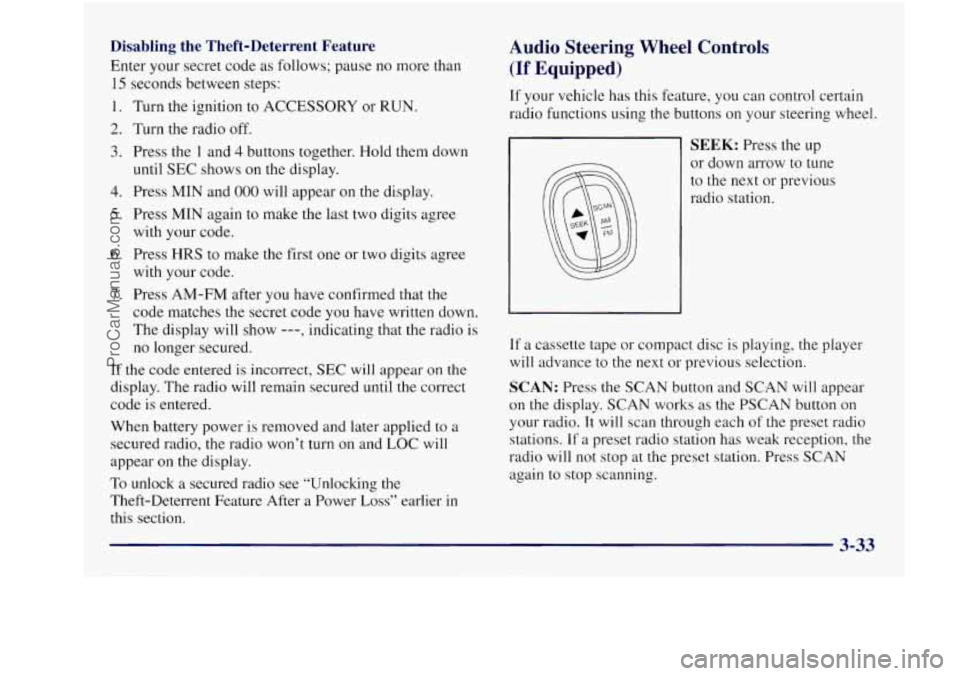
SEEK: Press the up
or down arrow to tune
to the next or previous
radio station.
If a cassette tape or compact disc is playing, the player
will advance to the next or previous selection.
SCAN: Press the SCAN button and SCAN will appear
on the display. SCAN works as the PSCAN button
on
your radio. It will scan through each of the preset radio
stations. If
a preset radio station has weak reception, the
radio will not stop at the preset station. Press
SCAN
again to stop scanning.
ProCarManuals.com
Page 336 of 422
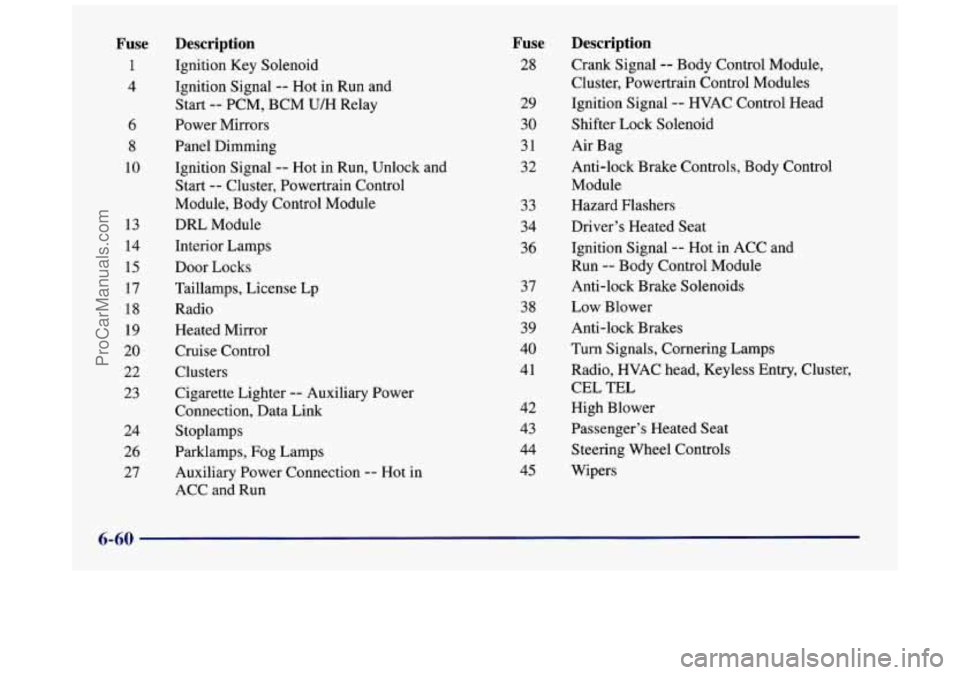
Fuse
1
4
6
8
10
13
14 15
17
18
19
20
22
23
24 26
27 Description
Ignition
Key Solenoid
Ignition Signal
-- Hot in Run and
Start
-- PCM, BCM U/H Relay
Power Mirrors
Panel Dimming Ignition Signal
-- Hot in Run, Unlock and
Start
-- Cluster, Powertrain Control
Module, Body Control Module
DRL Module
Interior Lamps
Door Locks
Taillamps, License Lp
Radio Heated Mirror
Cruise Control
Clusters
Cigarette Lighter
-- Auxiliary Power
Connection, Data Link
Stoplamps
Parklamps, Fog Lamps
Auxiliary Power Connection
-- Hot in
ACC and Run
Fuse
28
29
30
31
32
33
34
36
37
38
39
40
41
42
43
44
45
Description
Crank Signal -- Body Control Module,
Cluster, Powertrain Control Modules
Ignition Signal
-- HVAC Control Head
Shifter Lock Solenoid
Air Bag
Anti-lock Brake Controls, Body Control
Module
Hazard Flashers
Driver’s Heated Seat
Ignition Signal
-- Hot in ACC and
Run
-- Body Control Module
Anti-lock Brake Solenoids
Low Blower
Anti-lock Brakes
Turn Signals, Cornering Lamps
Radio, HVAC head, Keyless En
CEL
TEL
High Blower
Passenger’s Heated Seat
Steering Wheel Controls
Wipers ltry,
Clus
; ter,
6-60
ProCarManuals.com
Page 337 of 422
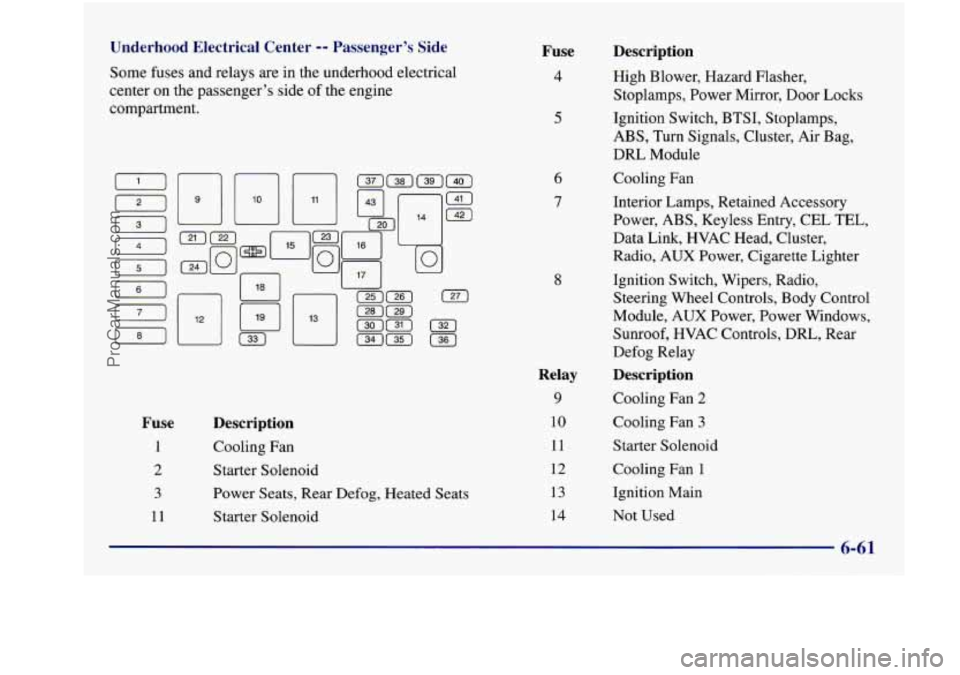
Underhood Electrical Center -- Passenger’s Side
Some fuses and relays are in the underhood electrical
center on the passenger’s side of the engine
compartment.
Fuse
1
2
3
11
Description
Cooling Fan
Starter Solenoid
Power Seats, Rear
Defog, Heated Seats
Starter Solenoid
Fuse
4
5
6
7
8
Relay
9
10
11
12
13
14
Description
High Blower, Hazard Flasher,
Stoplamps, Power Mirror, Door Locks
Ignition Switch, BTSI, Stoplamps,
ABS, Turn Signals, Cluster, Air Bag,
DRL Module
Cooling Fan
Interior Lamps, Retained Accessory
Power, ABS, Keyless Entry, CEL TEL,
Data Link,
HVAC Head, Cluster,
Radio, AUX Power, Cigarette Lighter
Ignition Switch, Wipers, Radio,
Steering Wheel Controls, Body Control
Module, AUX Power, Power Windows,
Sunroof, HVAC Controls, DRL, Rear
Defog Relay
Description
Cooling Fan 2
Cooling Fan
3
Starter Solenoid
Cooling Fan 1
Ignition Main
Not Used
6-61
ProCarManuals.com
Page 407 of 422
Section 9 Index
Accessory outlet .............................. 2-52
Adding Equipment to the Outside
of Your Vehicle ...... 6-3
AirBag
....................................... 1-19
How Does it Restrain .......................... 1-23
How
it Works ................................ 1-2 1
Location .................................... 1-21
Readiness Light
......................... 1-20. 2-60
Servicing
................................... 1-24
What Makes
it Inflate .......................... 1-22
What Will You See After
it Inflates ............... 1-23
When Should it Inflate ......................... 1-22
Aircleaner .................................... 6-16
Air Conditioning
........................ 3-3.3-6. 3-9
Air Conditioning Refrigerants ..................... 6-65
Alarm. Instant
................................. 2- 12
Alignment and Balance. Tire
...................... 6-45
Aluminum Wheels. Cleaning
...................... 6-53
AM-FMStereo ................................ 3-13
AM-FM Stereo with Cassette Tape Player and
AM-FM Stereo with Compact Disc Player and
AM-FM Stereo
with Cassette Tape and Compact
Antenna AM-FM Stereo
with Cassette Tape Player ........... 3- I5
Automatic Tone Control
...................... 3- 18
Automatic Tone Control
...................... 3-22
Disc Player
with Automatic Tone Control ........ 3-26
Backglass
................................... 3-37 Fixed Mast
.................................. 346
Antifreeze ..................................... 6-22
Anti-Lock
Brake System Active Light
................. 2.63. 4.9
Brake System Wa-ning Light
................ 2.62. 4.7
Brakes
...................................... 4-7
Using
....................................... 4-9
Anti.Theft. Radio .............................. 3-31
Appearancecare
............................... 6-47
Appearance Care Materials
....................... 6-56
Arbitration Program
.............................. 8-7
Ashtrays
...................................... 2-51
Audio Controls. Steering Wheel Touch Control
....... 3-33
Audio Equipment. Adding ........................ 3-35
AudioSyste~ns
................................. 3-12
Auto-Down Window
............................ 2-33
Automatic
Audio Systems.
Tips
............................ 3-34
Headlamp Control ............................ 2-42
Overdrive
(a) .......................... 2.25. 2.26
Power Door Locks
............................. 2-7
Transaxle Check
.............................. 7-40
Transaxle Fluid
............................... 6-19
Transaxle Operation ........................... 2-22
Transaxle PARK
(P) Mechanism Check ........... 7-42
Auxiliary Power Connection
...................... 2-53
ProCarManuals.com