time BUICK REGAL 2003 User Guide
[x] Cancel search | Manufacturer: BUICK, Model Year: 2003, Model line: REGAL, Model: BUICK REGAL 2003Pages: 344, PDF Size: 2.21 MB
Page 66 of 344

This device complies with RSS-210 of Industry Canada.
Operation is subject to the following two conditions:
1. This device may not cause interference, and
2. This device must accept any interference received,
including interference that may cause undesired
operation of the device.
Changes or modifications to this system by other than
an authorized service facility could void authorization to
use this equipment.
At times you may notice a decrease in range. This is
normal for any remote keyless entry system. If the
transmitter does not work or if you have to stand closer
to your vehicle for the transmitter to work, try this:
•Check the distance. You may be too far from your
vehicle. You may need to stand closer during
rainy or snowy weather.
•Check the location. Other vehicles or objects may
be blocking the signal. Take a few steps to the
left or right, hold the transmitter higher, and
try again.
•Check to determine if battery replacement is
necessary. See “Battery Replacement” under
Remote Keyless Entry System Operation on
page 2-4.
•If you are still having trouble, see your dealer or a
qualified technician for service.
Remote Keyless Entry System
Operation
Using the remote keyless
entry transmitter, you can
lock and unlock your
doors, or release the trunk
from about 3 feet 1 (m)
and up to 30 feet
9 (m) away.
LOCK:Press the LOCK button to lock all the doors.
UNLOCK:Press the UNLOCK button to unlock
the driver’s door and turn on the interior lamps. See
“Illumination on Remote Activation” later in this section
for more details. Press UNLOCK again to unlock
the passenger’s door.
F: (Trunk)To unlock the trunk, press the button with
the trunk symbol on it. The trunk will only unlock if
your transaxle is in PARK (P).
2-4
2003 - Regal OM
Page 67 of 344

L: (Remote Alarm)Press this button to activate an
alarm. The ignition must be in OFF or ACC for the
remote alarm to work. When you press the remote alarm
button the headlamps willflash, the horn will sound
repeatedly and your interior lamps will turn on, attracting
attention. The alarms will continue until one of the
following occurs:
•You press the remote alarm on the remote keyless
entry transmitter a second time,
•the ignition is moved to RUN, or
•an alarm period of about two minutes has elapsed.
Security Feedback
Security feedback provides audible and/or visible
feedback confirming that a remote keyless entry lock or
unlock command has been received and executed.
The ignition must be off for this feature to work.
You may select one of four operating modes for
reception of a lock command. You may also select one
of four operating modes for reception of an unlock
command. The selection and programming of the lock
and unlock operating modes are independent of
each other.
Programmable Modes
Your vehicle can be programmed to one of the following
modes.
Mode 1:No Verification
Mode 2:Horn Chirp only
Mode 3:Headlamps Flash only
Mode 4:Horn Chirp and Headlamps Flash
Before your vehicle was shipped from the factory, it was
programmed to Mode 3. The mode to which your
vehicle was programmed may have been changed since
it left the factory. To determine which security feedback
lock mode your vehicle is programmed to or to
program your vehicle to a different mode, do the
following:
1. Close all doors and turn the ignition key to RUN.
2. Press and hold the power door lock switch in
the lock position.
3. While holding the door lock switch in the lock
position, press and release the remote keyless entry
transmitter LOCK button. This will start the
customization mode. While in the customization
mode, the feature will sound the number of chimes
corresponding to the current lock mode. If you
do not wish to change the current mode, you can
either exit the programming mode by following
the instructions listed here or program the
next feature available on your vehicle.
2-5
2003 - Regal OM
Page 68 of 344

4. Each additional press of the remote keyless entry
transmitter LOCK button will cause your vehicle to
advance the lock mode by one, starting from
the current lock mode.
5. If cycled beyond Mode 4, the vehicle will enter
Mode 1. When the door lock switch is released,
the vehicle will remain in the most recent lock mode.
The mode you selected is now set. You can either exit
the programming mode by following the previous
instructions or program the next feature available on
your vehicle.
Disconnecting the vehicle’s battery for up to a year will
not change the programmed mode for the lock and
unlock security feedback features.
Delayed Locking
Delayed locking allows the doors to be locked while the
passengers are exiting the vehicle. This feature also
allows a brief time period for you to re-enter the vehicle
after the doors have been closed and locked. Delayed
locking is user programmable for enabling or disabling
the feature.
Delayed locking is activated when a door lock switch is
pressed while the key is not in the vehicle’s ignition,
and a door is open. The door lock switch may be either
the lock switch on the door or on the remote keyless
entry transmitter. See“Remote Keyless Entry System
Operation”earlier in this section for more details.The doors do not lock when the lock switch is pressed,
but instead, three chimes are heard. These chimes
indicate that the delayed locking function has been
activated.
You have three actions possible once delayed locking is
activated:
•Cancel the delayed locking by pressing the unlock
switch or by fully inserting the key in the ignition.
•Override the delayed locking feature and lock the
doors immediately by pressing the lock switch a
second time.
•Let the delayed locking feature complete the locking
of the vehicle.
If you wish to let the delayed locking feature complete
the locking of the vehicle, no additional action is
required. The delayed locking feature will lock the doors
automatically after all the doors have been closed for
a period offive seconds. During thisfive second period,
any door may be reopened, at which time the three
possible actions shown above are again available.
You may also customize your vehicle to activate the
delayed locking feature as described previously, or you
may choose to completely disable the feature at all
times. If disabled, the power door locks will activate
immediately when a power door lock switch is pressed.
2-6
2003 - Regal OM
Page 69 of 344

The enabled/disabled state of the delayed locking
feature will be toggled when you perform the following
sequence:
1. Close the doors.
2. Move the ignition key to the RUN position.
3. Apply your regular brakes.
4. Press and hold the power door unlock switch. While
holding the door unlock switch, move the shift lever
out of and back into PARK (P).
After an initial transaxle cycle, each additional cycle will
toggle the enable/disable state of the delayed locking
feature. During this procedure, the chime will sound,
providing you with feedback. In Mode 1, a single chime
will be heard if the delayed locking feature is disabled.
In Mode 2, two chimes will be heard if the feature
is enabled. When the door lock switch is released, the
vehicle will remain in the most recent operating mode.
Disconnecting the vehicle battery for up to a year will not
change the programmed mode for the delayed locking
feature.Illumination on Remote Activation
This feature provides interior lighting when a remote
keyless entry door unlock command is received
and executed by your vehicle. Your ignition must be off
for the illumination on remote activation feature to
work. The interior lamps will light until either the ignition
is turned to RUN or until a period of 40 seconds has
elapsed. If a door is opened during this period, the timed
lighting will be canceled, and the interior lamps will
remain on. Also see“Entry Lighting”underInterior
Lamps on page 3-13for more information.
Matching Transmitter(s) to Your
Vehicle
Each remote keyless entry transmitter is coded to
prevent another transmitter from unlocking your vehicle.
If a transmitter is lost or stolen, a replacement can
be purchased through your dealer. Remember to bring
any remaining transmitters with you when you go to
your dealer. When the dealer matches the replacement
transmitter to your vehicle, any remaining transmitters
must also be matched. Once your dealer has coded the
new transmitter, the lost transmitter will not unlock
your vehicle. Each vehicle can have a maximum of four
transmitters matched to it.
2-7
2003 - Regal OM
Page 70 of 344
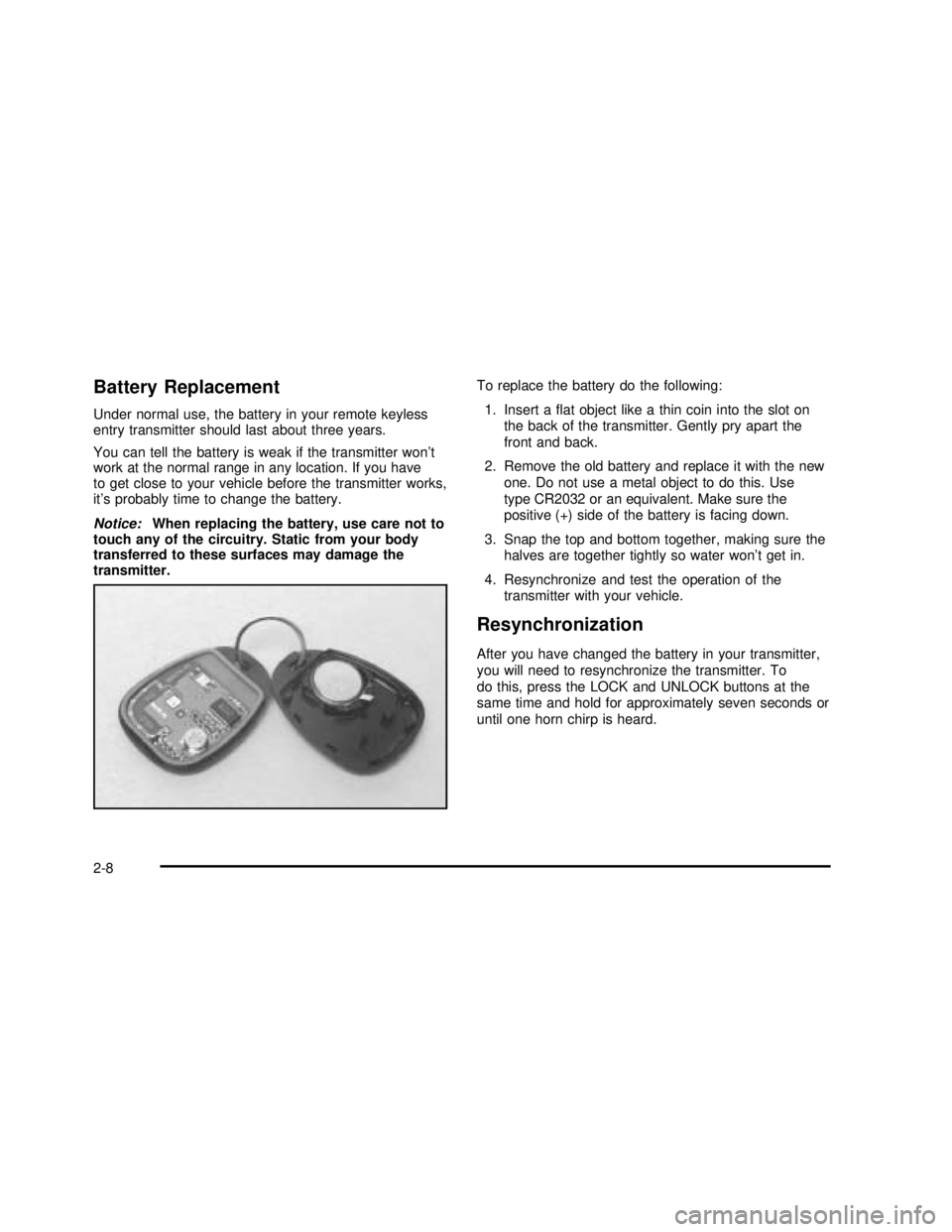
Battery Replacement
Under normal use, the battery in your remote keyless
entry transmitter should last about three years.
You can tell the battery is weak if the transmitter won’t
work at the normal range in any location. If you have
to get close to your vehicle before the transmitter works,
it’s probably time to change the battery.
Notice:When replacing the battery, use care not to
touch any of the circuitry. Static from your body
transferred to these surfaces may damage the
transmitter.To replace the battery do the following:
1. Insert aflat object like a thin coin into the slot on
the back of the transmitter. Gently pry apart the
front and back.
2. Remove the old battery and replace it with the new
one. Do not use a metal object to do this. Use
type CR2032 or an equivalent. Make sure the
positive (+) side of the battery is facing down.
3. Snap the top and bottom together, making sure the
halves are together tightly so water won’t get in.
4. Resynchronize and test the operation of the
transmitter with your vehicle.
Resynchronization
After you have changed the battery in your transmitter,
you will need to resynchronize the transmitter. To
do this, press the LOCK and UNLOCK buttons at the
same time and hold for approximately seven seconds or
until one horn chirp is heard.
2-8
2003 - Regal OM
Page 78 of 344

Theft-Deterrent Systems
Vehicle theft is big business, especially in some cities.
Although your vehicle has a number of theft-deterrent
features, we know that nothing we put on it can make it
impossible to steal. However, there are ways you
can help.
PASS-Key®II
Your vehicle is equipped
with the PASS-Key®II
(Personalized Automotive
Security System)
theft-deterrent system.
PASS-Key
®II is a passive
theft-deterrent system.
It works when you insert or
remove the key from the
ignition.
PASS-Key
®II uses a resistor pellet in the ignition key
that matches a decoder in your vehicle.When the PASS-Key
®II system senses that someone is
using the wrong key, it shuts down the vehicle’s
starter and fuel systems. For about three minutes, the
starter won’t work and fuel won’t go to the engine.
If someone tries to start your vehicle again or uses
another key during this time, the vehicle will not start.
This discourages someone from randomly trying different
keys with different resistor pellets in an attempt to
make a match.
The ignition key must be clean and dry before it’s
inserted in the ignition or the engine may not start. If the
engine does not start and the SECURITY warning
light on the instrument panel isflashing, the key may be
dirty or wet. Turn the ignition off.
Clean and dry the key. Wait about three minutes and try
again. If the starter still won’t work, and the key
appears to be clean and dry, wait about three minutes
and try another ignition key. At this time, you may
also want to check the fuse. SeeFuses and Circuit
Breakers on page 5-87. If the starter won’t work with the
other key, your vehicle needs service. If your vehicle
does start, thefirst ignition key may be faulty. See your
dealer or a locksmith who can service the PASS-Key
®II.
2-16
2003 - Regal OM
Page 79 of 344

If you accidentally use a key that has a damaged or
missing resistor pellet, the starter won’t work. The
SECURITY warning light on the instrument panel will
then come on. But you don’t have to wait three minutes
before trying another ignition key.
See your dealer or a locksmith who can service the
PASS-Key
®II to have a new key made.
If you’re ever driving and the SECURITY warning light
comes on, you will be able to restart your engine if
you turn it off. Your PASS-Key
®II system, however, is
not working properly and must be serviced by your
dealer. Your vehicle is not protected by the
PASS-Key
®II system.
If you lose or damage a PASS-Key
®II ignition key, see
your dealer or a locksmith who can service
PASS-Key
®II to have a new key made. Also, see
Roadside Assistance Program on page 7-6for more
information.
Starting and Operating Your
Vehicle
New Vehicle Break-In
Notice:Your vehicle doesn’t need an elaborate
“break-in.”But it will perform better in the long run
if you follow these guidelines:
Don’t drive at any one speed—fast or
slow—for the first 500 miles (805 km). Don’t
make full-throttle starts.
•Avoid making hard stops for the first 200 miles
(322 km) or so. During this time your new
brake linings aren’t yet broken in. Hard stops
with new linings can mean premature wear and
earlier replacement. Follow this breaking-in
guideline every time you get new brake linings.
•Don’t tow a trailer during break-in. See “Towing
a Trailer” in the Index for more information.
2-17
2003 - Regal OM
Page 81 of 344

Starting Your Engine
Move your shift lever to PARK (P) or NEUTRAL (N).
Your engine won’t start in any other position–that’sa
safety feature. To restart when you’re already moving,
use NEUTRAL (N) only.
Notice:Don’t try to shift to PARK (P) if your
vehicle is moving. If you do, you could damage the
transmission. Shift to PARK (P) only when your
vehicle is stopped.
1. With your foot off the accelerator pedal, turn your
ignition key to START. When the engine starts, let
go of the key. The idle speed will go down as
your engine gets warm.
Notice:Holding your key in START for longer than
15 seconds at a time will cause your battery to
be drained much sooner. And the excessive heat
can damage your starter motor. Wait about
15 seconds between each try to help avoid draining
your battery or damaging your starter.
2. If it doesn’t start within 10 seconds, hold your key in
START for about 10 seconds at a time until your
engine starts. Wait about 15 seconds between
each try.3. If your engine still won’t start (or starts but then
stops), it could beflooded with too much gasoline.
Try pushing your accelerator pedal all the way to the
floor and holding it there as you hold the key in
START for about three seconds. If the vehicle starts
briefly but then stops again, do the same thing.
This time keep the pedal down forfive or six
seconds to clear the extra gasoline from the engine.
After waiting about 15 seconds, repeat the normal
starting procedure.
Notice:Your engine is designed to work with the
electronics in your vehicle. If you add electrical
parts or accessories, you could change the way the
engine operates. Before adding electrical equipment,
check with your dealer. If you don’t, your engine
might not perform properly.
2-19
2003 - Regal OM
Page 85 of 344

NEUTRAL (N):In this position, your engine doesn’t
connect with the wheels. To restart when you’re already
moving, use NEUTRAL (N) only. Also, use
NEUTRAL (N) when your vehicle is being towed.
{CAUTION:
Shifting into a drive gear while your engine is
“racing”(running at high speed) is dangerous.
Unless your foot isfirmly on the brake pedal,
your vehicle could move very rapidly. You
could lose control and hit people or objects.
Don’t shift into a drive gear while your engine
is racing.
Notice:Damage to your transaxle caused by
shifting into a drive gear with the engine racing isn’t
covered by your warranty.
Notice:If your vehicle seems to start up rather
slowly, or if it seems not to shift gears as you go
faster, something may be wrong with a transaxle
system sensor. If you drive very far that way, your
vehicle can be damaged. So, if this happens,
have your vehicle serviced right away. Until then,
you can use SECOND (2) when you are driving less
than 35 mph (55 km/h) and AUTOMATIC OVERDRIVE
(
X)for higher speeds.AUTOMATIC OVERDRIVE (
X): This position is for
normal driving. If you need more power for passing, and
you’re:
•Going less than 35 mph (55 km/h), push your
accelerator pedal about halfway down.
•Going about 35 mph (55 km/h) or more, push the
accelerator pedal all the way down.
You’ll shift down to the next gear and have more power.
THIRD (3):This position is also used for normal
driving, but it offers more power and lower fuel economy
than AUTOMATIC OVERDRIVE (
X).
Here are some times you might choose THIRD (3)
instead of AUTOMATIC OVERDRIVE (
X):
•When driving on hilly, winding roads.
•When towing a trailer, so there is less shifting
between gears.
•When going down a steep hill.
•When driving in no-highway scenarios (i.e. city
streets, etc.)
2-23
2003 - Regal OM
Page 99 of 344

Instrument Panel Overview...............................3-2
Hazard Warning Flashers................................3-4
Other Warning Devices...................................3-4
Horn .............................................................3-5
Tilt Wheel.....................................................3-5
Turn Signal/Multifunction Lever.........................3-5
Exterior Lamps.............................................3-10
Interior Lamps..............................................3-13
Accessory Power Outlets...............................3-15
Auxiliary Power Connection (Power Drop).........3-16
Ashtrays and Cigarette Lighter........................3-17
Climate Controls............................................3-17
Dual Climate Control System..........................3-17
Dual Automatic Climate Control System...........3-20
Outlet Adjutment...........................................3-24
Passenger Compartment Air Filter...................3-24
Warning Lights, Gages and Indicators.............3-26
Instrument Panel Cluster................................3-27
Speedometer and Odometer...........................3-28
Tachometer.................................................3-29
Safety Belt Reminder Light.............................3-29
Air Bag Readiness Light................................3-30
Charging System Light..................................3-31
Brake System Warning Light..........................3-31
Anti-Lock Brake System Warning Light.............3-32
Traction Control System (TCS) Warning Light . . .3-33
Low Traction Light
........................................3-33Engine Coolant Temperature Warning Light......3-34
Engine Coolant Temperature Gage..................3-34
Tire Pressure Light.......................................3-35
Malfunction Indicator Lamp.............................3-35
Oil Pressure Light.........................................3-38
Low Oil Level Light.......................................3-39
Change Engine Oil Light................................3-39
Security Light...............................................3-40
Cruise Control Light......................................3-40
Low Washer Fluid Warning Light.....................3-40
Door/Trunk Ajar Warning Light........................3-40
Service Vehicle Soon Light............................3-41
Fuel Gage...................................................3-41
Low Fuel Warning Light.................................3-42
Driver Information Center (DIC).......................3-42
Audio System(s).............................................3-44
Setting the Time...........................................3-45
Radio with Cassette......................................3-45
Radio with Cassette and CD..........................3-49
Theft-Deterrent Feature..................................3-55
Audio Steering Wheel Controls.......................3-57
Understanding Radio Reception......................3-57
Care of Your Cassette Tape Player.................3-58
Care of Your CDs.........................................3-59
Care of Your CD Player................................3-59
Backglass Antenna.......................................3-59
Section 3 Instrument Panel
3-1
2003 - Regal OM