radio BUICK REGAL 2004 Owner's Guide
[x] Cancel search | Manufacturer: BUICK, Model Year: 2004, Model line: REGAL, Model: BUICK REGAL 2004Pages: 354, PDF Size: 4.16 MB
Page 159 of 354
CD Messages
CHECK CD:If this message appears on the radio
display, it could be for one of the following reasons:
It is very hot. When the temperature returns to
normal, the CD should play.
You are driving on a very rough road. When the
road becomes smooth, the CD should play.
The CD is dirty, scratched, wet, or upside down.
The air is very humid. If so, wait about an hour and
try again.
There may have been a problem while burning
the CD.
The label may be caught in the CD player.
If the CD is not playing correctly, for any other reason,
try a known good CD.
If any error occurs repeatedly or if an error cannot be
corrected, contact your dealer. If your radio displays an
error message, write it down and provide it to your
dealer when reporting the problem.
Theft-Deterrent Feature
THEFTLOCK®is designed to discourage theft of your
radio. It works by using a secret code to disable all radio
functions whenever battery power is removed and the
radio is placed in a different vehicle. This feature
requires no user input to be activated. It is automatically
armed when it is put into the vehicle for the rst time.
When the ignition is turned off, the blinking red light
indicates that THEFTLOCK
®is armed.
If THEFTLOCK
®is activated, your radio will not operate
if stolen. The radio will display LOCKED and a red
LED indicator light will come on above the key symbol
to indicate a locked condition. If this occurs, the radio will
need to be returned to the dealer.
3-61
Page 160 of 354
Audio Steering Wheel Controls
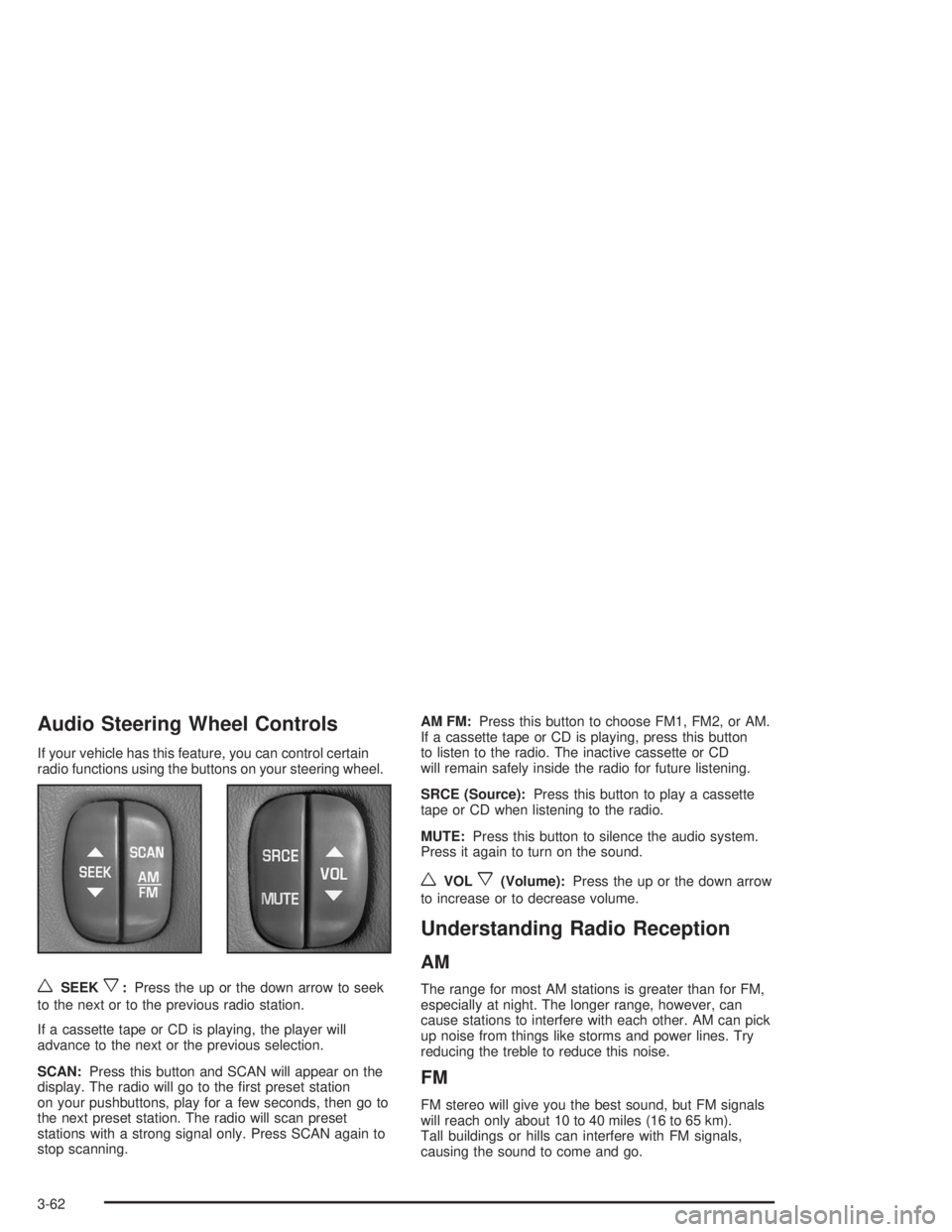
If your vehicle has this feature, you can control certain
radio functions using the buttons on your steering wheel.
wSEEKx:Press the up or the down arrow to seek
to the next or to the previous radio station.
If a cassette tape or CD is playing, the player will
advance to the next or the previous selection.
SCAN:Press this button and SCAN will appear on the
display. The radio will go to the rst preset station
on your pushbuttons, play for a few seconds, then go to
the next preset station. The radio will scan preset
stations with a strong signal only. Press SCAN again to
stop scanning.AM FM:Press this button to choose FM1, FM2, or AM.
If a cassette tape or CD is playing, press this button
to listen to the radio. The inactive cassette or CD
will remain safely inside the radio for future listening.
SRCE (Source):Press this button to play a cassette
tape or CD when listening to the radio.
MUTE:Press this button to silence the audio system.
Press it again to turn on the sound.
wVOLx(Volume):Press the up or the down arrow
to increase or to decrease volume.
Understanding Radio Reception
AM
The range for most AM stations is greater than for FM,
especially at night. The longer range, however, can
cause stations to interfere with each other. AM can pick
up noise from things like storms and power lines. Try
reducing the treble to reduce this noise.
FM
FM stereo will give you the best sound, but FM signals
will reach only about 10 to 40 miles (16 to 65 km).
Tall buildings or hills can interfere with FM signals,
causing the sound to come and go.
3-62
Page 161 of 354

Care of Your Cassette Tape Player
A tape player that is not cleaned regularly can cause
reduced sound quality, ruined cassettes, or a damaged
mechanism. Cassette tapes should be stored in their
cases away from contaminants, direct sunlight, and
extreme heat. If they are not, they may not operate
properly or they may cause failure of the tape player.
Your tape player should be cleaned regularly after every
50 hours of use. Your radio may display CLEAN
PLAYER to indicate that you have used your tape player
for 50 hours without resetting the tape clean timer. If
this message appears on the display, your cassette tape
player needs to be cleaned. It will still play tapes, but
you should clean it as soon as possible to prevent
damage to your tapes and player. If you notice a
reduction in sound quality, try a known good cassette to
see if the tape or the tape player is at fault. If this
other cassette has no improvement in sound quality,
clean the tape player.
For best results, use a scrubbing action, non-abrasive
cleaning cassette with pads which scrub the tape
head as the hubs of the cleaner cassette turn. The
recommended cleaning cassette is available through
your dealership.The cut tape detection feature of your cassette tape
player may identify the cleaning cassette tape as
a damaged tape, in error. If the cleaning cassette ejects,
insert the cassette at least three times to ensure
thorough cleaning.
You may also choose a non-scrubbing action, wet-type
cleaner which uses a cassette with a fabric belt to
clean the tape head. This type of cleaning cassette will
not eject on its own. A non-scrubbing action cleaner
may not clean as thoroughly as the scrubbing type
cleaner. The use of a non-scrubbing action, dry-type
cleaning cassette is not recommended.
After you clean the player, press and hold the eject
button for ve seconds to reset the CLEAN PLAYER
indicator. The radio will display --- to show the indicator
was reset.
Cassettes are subject to wear and the sound quality
may degrade over time. Always make sure the cassette
tape is in good condition before you have your tape
player serviced.
3-63
Page 162 of 354
Care of Your CDs
Handle CDs carefully. Store them in their original cases
or other protective cases and away from direct
sunlight and dust. If the surface of a CD is soiled,
dampen a clean, soft cloth in a mild, neutral detergent
solution and clean it, wiping from the center to the edge.
Be sure never to touch the side without writing when
handling CDs. Pick up CDs by grasping the outer edges
or the edge of the hole and the outer edge.
Care of Your CD Player
The use of CD lens cleaners for CDs is not advised,
due to the risk of contaminating the lens of the CD optics
with lubricants internal to the CD mechanism.
Backglass Antenna
The AM-FM antenna is integrated with the rear window
defogger, located in the rear window. Be sure that the
inside surface of the rear window is not scratched and
that the lines on the glass are not damaged. If the inside
surface is damaged, it could interfere with radio
reception. Also, for proper radio reception, the antenna
connector at the top-center of the rear window needs to
be properly attached to the post on the glass.Notice:Using a razor blade or sharp object to clear
the inside rear window may damage the rear window
antenna and/or the rear window defogger. Repairs
would not be covered by your warranty. Do not clear
the inside rear window with sharp objects.
Notice:Do not apply aftermarket glass tinting with
metallic lm. The metallic lm in some tinting
materials will interfere with or distort the incoming
radio reception. Any damage caused to your
backglass antenna due to metallic tinting materials
will not be covered by your warranty.
Because this antenna is built into your rear window,
there is a reduced risk of damage caused by car washes
and vandals.
If you choose to add a cellular telephone to your
vehicle, and the antenna needs to be attached to the
glass, be sure that you do not damage the grid lines for
the AM-FM antenna. There is enough space between
the lines to attach a cellular telephone antenna
without interfering with radio reception
Do not apply aftermarket glass tinting to the back glass.
The metallic lm in some tinting materials will interfere
with or distort the incoming radio reception. Care
must be taken when cleaning the rear window because
it breaks in the resistive material heating element
and will adversely affect radio and defogger
performance. See your dealer for details.
3-64
Page 255 of 354
Jump Starting
If the battery has run down, you may want to use
another vehicle and some jumper cables to start the
vehicle. Be sure to follow the steps below to do it safely.
{CAUTION:
Batteries can hurt you. They can be dangerous
because:
They contain acid that can burn you.
They contain gas that can explode or
ignite.
They contain enough electricity to
burn you.
If you do not follow these steps exactly, some
or all of these things can hurt you.
Notice:Ignoring these steps could result in costly
damage to your vehicle that would not be covered
by your warranty.
Trying to start your vehicle by pushing or pulling it
will not work, and it could damage your vehicle.
1. Check the other vehicle. It must have a 12-volt
battery with a negative ground system.Notice:If the other vehicle’s system is not a 12-volt
system with a negative ground, both vehicles can
be damaged. Only use vehicles with 12-volt systems
with negative grounds to jump start your vehicle.
2. Get the vehicles close enough so the jumper cables
can reach, but be sure the vehicles are not touching
each other. If they are, it could cause a ground
connection you do not want. You would not be able
to start your vehicle, and the bad grounding
could damage the electrical systems.
To avoid the possibility of the vehicles rolling, set
the parking brake rmly on both vehicles involved in
the jump start procedure. Put an automatic
transaxle in PARK (P) or a manual transaxle in
NEUTRAL (N) before setting the parking brake.
Notice:If you leave your radio or other accessories
on during the jump starting procedure, they could
be damaged. The repairs would not be covered
by your warranty. Always turn off your radio and
other accessories when jump starting your vehicle.
3. Turn off the ignition on both vehicles. Unplug
unnecessary accessories plugged into the cigarette
lighter or in the auxiliary power outlet. Turn off
the radio and all lamps that are not needed. This
will avoid sparks and help save both batteries. And
it could save the radio!
5-47
Page 300 of 354
Cleaning the Top of the Instrument
Panel
Use only mild soap and water to clean the top surfaces
of the instrument panel. Sprays containing silicones
or waxes may cause annoying reections in the
windshield and even make it difficult to see through the
windshield under certain conditions.
Cleaning Interior Plastic Components
Use only a mild soap and water solution on a soft cloth
or sponge. Commercial cleaners may affect the
surface nish.
Cleaning Glass Surfaces
Glass should be cleaned often. GM Glass Cleaner or a
liquid household glass cleaner will remove normal
tobacco smoke and dust lms on interior glass. See
Vehicle Care/Appearance Materials on page 5-96.
Notice:If you use abrasive cleaners when cleaning
glass surfaces on your vehicle, you could scratch
the glass and/or cause damage to the rear window
defogger and the integrated radio antenna. When
cleaning the glass on your vehicle, use only a soft
cloth and glass cleaner.
Care of Safety Belts
Keep belts clean and dry.
{CAUTION:
Do not bleach or dye safety belts. If you do, it
may severely weaken them. In a crash, they
might not be able to provide adequate
protection. Clean safety belts only with mild
soap and lukewarm water.
Weatherstrips
Silicone grease on weatherstrips will make them last
longer, seal better, and not stick or squeak. Apply
silicone grease with a clean cloth at least every six
months. During very cold, damp weather more frequent
application may be required. SeeRecommended
Fluids and Lubricants on page 6-12.
5-92
Page 307 of 354
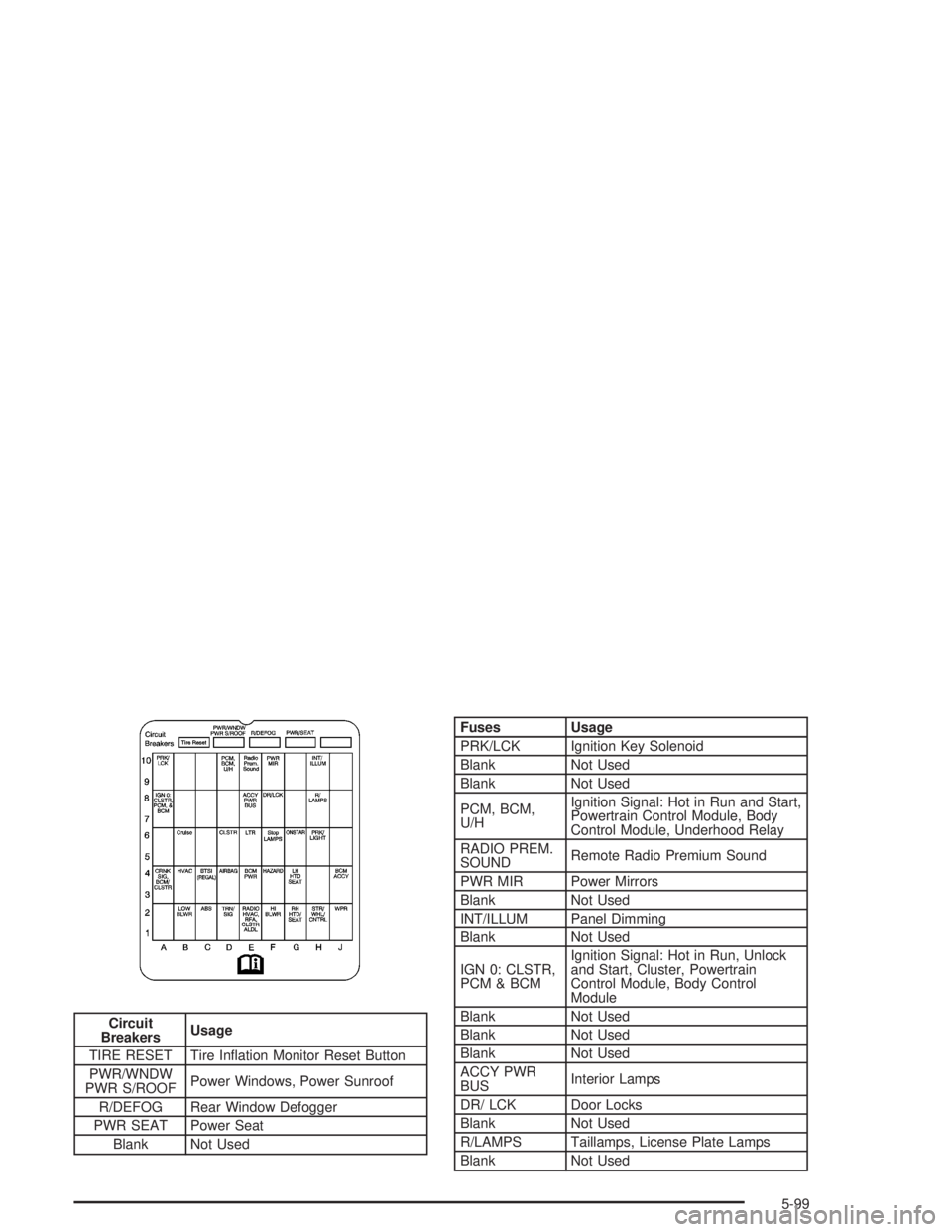
Circuit
BreakersUsage
TIRE RESET Tire Ination Monitor Reset Button
PWR/WNDW
PWR S/ROOFPower Windows, Power Sunroof
R/DEFOG Rear Window Defogger
PWR SEAT Power Seat
Blank Not Used
Fuses Usage
PRK/LCK Ignition Key Solenoid
Blank Not Used
Blank Not Used
PCM, BCM,
U/HIgnition Signal: Hot in Run and Start,
Powertrain Control Module, Body
Control Module, Underhood Relay
RADIO PREM.
SOUNDRemote Radio Premium Sound
PWR MIR Power Mirrors
Blank Not Used
INT/ILLUM Panel Dimming
Blank Not Used
IGN 0: CLSTR,
PCM & BCMIgnition Signal: Hot in Run, Unlock
and Start, Cluster, Powertrain
Control Module, Body Control
Module
Blank Not Used
Blank Not Used
Blank Not Used
ACCY PWR
BUSInterior Lamps
DR/ LCK Door Locks
Blank Not Used
R/LAMPS Taillamps, License Plate Lamps
Blank Not Used
5-99
Page 308 of 354
Fuses Usage
CRUISE Cruise Control
Blank Not Used
CLSTR Instrument Panel Cluster
LTR Cigarette Lighter
STOP LAMPS Stoplamps
ONSTAR OnStar
®
PRK/LGHT Parking Lamps
Blank Not Used
CRNK SIG,
BCM, CLSTRCrank Signal, Body Control Module,
Cluster, Powertrain Control Module
HVACIgnition Signal, Heating, Ventilation
and Air Conditioning Control Head
BTSI (REGAL) Shifter Lock Solenoid
AIR BAG Air Bag
BCM PWR Body Control Module
HAZRD Hazard Warning Flashers
Fuses Usage
LH HTD SEAT Driver’s Heated Seat
Blank Not Used
BCM ACCYIgnition Signal: Hot in ACCESSORY
and RUN, Body Control Module
Blank Not Used
LOW BLWER Low Blower
ABS Anti-Lock Brakes
TRN SIG Turn Signals, Cornering Lamps
RADIO, HVAC,
RFA, CLSTR
ALDLRadio; Heating Ventilation, and Air
Conditioning Head; Remote Keyless
Entry, Cluster
HI BLWR High Blower
RH HTD SEAT Passenger’s Heated Seat
STR/WHL
CNTRLAudio Steering Wheel Controls
WPR Windshield Wipers
5-100
Page 309 of 354
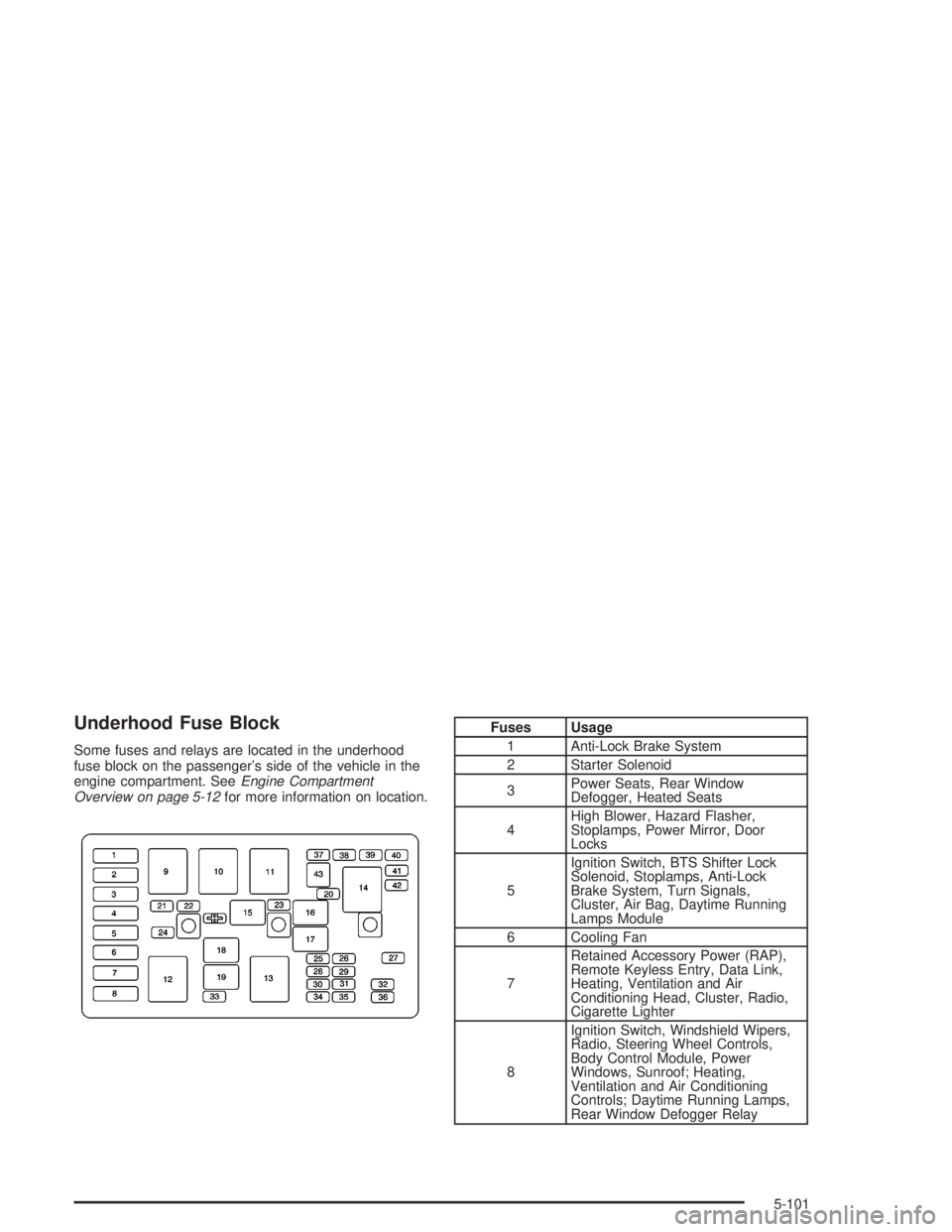
Underhood Fuse Block
Some fuses and relays are located in the underhood
fuse block on the passenger’s side of the vehicle in the
engine compartment. SeeEngine Compartment
Overview on page 5-12for more information on location.
Fuses Usage
1 Anti-Lock Brake System
2 Starter Solenoid
3Power Seats, Rear Window
Defogger, Heated Seats
4High Blower, Hazard Flasher,
Stoplamps, Power Mirror, Door
Locks
5Ignition Switch, BTS Shifter Lock
Solenoid, Stoplamps, Anti-Lock
Brake System, Turn Signals,
Cluster, Air Bag, Daytime Running
Lamps Module
6 Cooling Fan
7Retained Accessory Power (RAP),
Remote Keyless Entry, Data Link,
Heating, Ventilation and Air
Conditioning Head, Cluster, Radio,
Cigarette Lighter
8Ignition Switch, Windshield Wipers,
Radio, Steering Wheel Controls,
Body Control Module, Power
Windows, Sunroof; Heating,
Ventilation and Air Conditioning
Controls; Daytime Running Lamps,
Rear Window Defogger Relay
5-101
Page 341 of 354
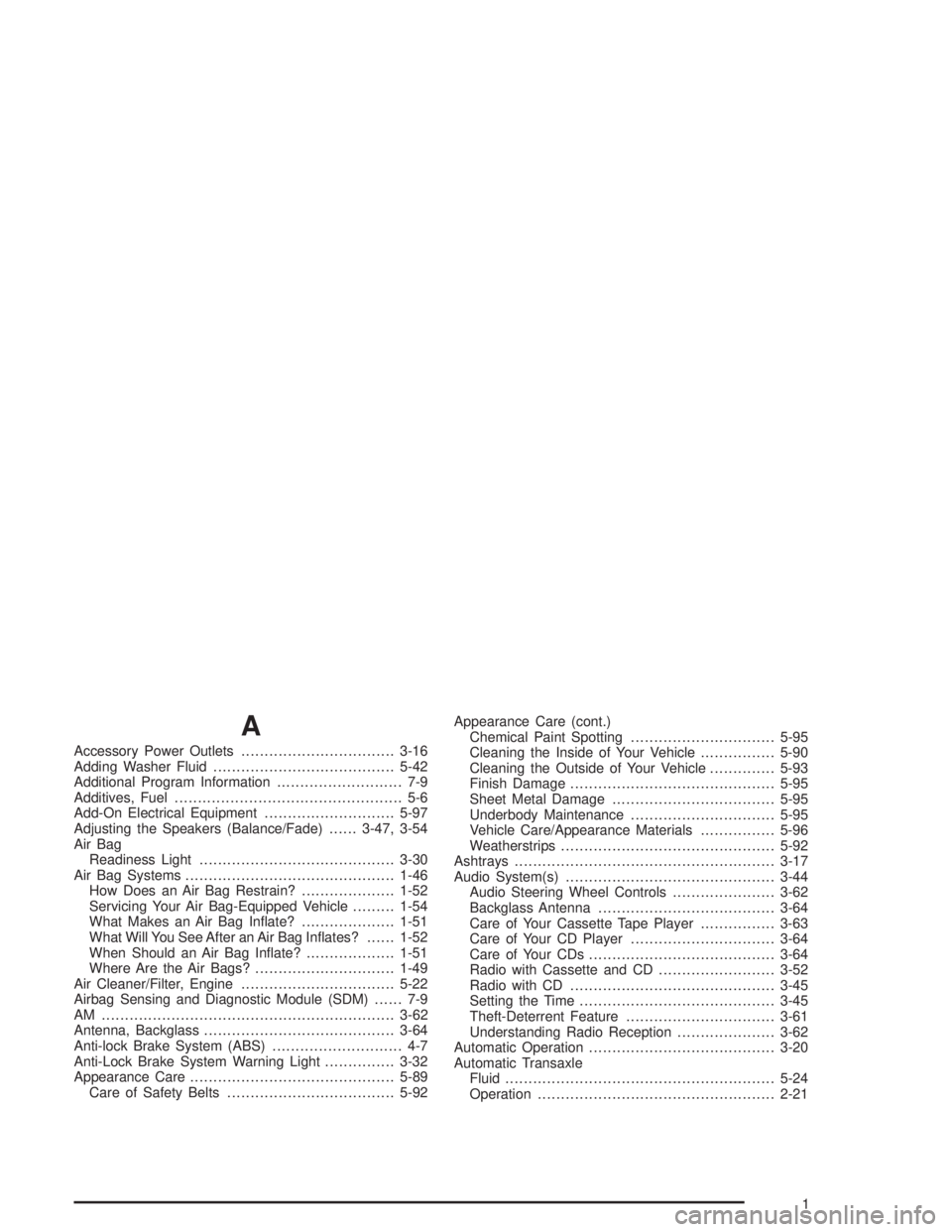
A
Accessory Power Outlets.................................3-16
Adding Washer Fluid.......................................5-42
Additional Program Information........................... 7-9
Additives, Fuel................................................. 5-6
Add-On Electrical Equipment............................5-97
Adjusting the Speakers (Balance/Fade)......3-47, 3-54
Air Bag
Readiness Light..........................................3-30
Air Bag Systems.............................................1-46
How Does an Air Bag Restrain?....................1-52
Servicing Your Air Bag-Equipped Vehicle.........1-54
What Makes an Air Bag Inate?....................1-51
What Will You See After an Air Bag Inates?......1-52
When Should an Air Bag Inate?...................1-51
Where Are the Air Bags?..............................1-49
Air Cleaner/Filter, Engine.................................5-22
Airbag Sensing and Diagnostic Module (SDM)...... 7-9
AM ...............................................................3-62
Antenna, Backglass.........................................3-64
Anti-lock Brake System (ABS)............................ 4-7
Anti-Lock Brake System Warning Light...............3-32
Appearance Care............................................5-89
Care of Safety Belts....................................5-92Appearance Care (cont.)
Chemical Paint Spotting...............................5-95
Cleaning the Inside of Your Vehicle................5-90
Cleaning the Outside of Your Vehicle..............5-93
Finish Damage............................................5-95
Sheet Metal Damage...................................5-95
Underbody Maintenance...............................5-95
Vehicle Care/Appearance Materials................5-96
Weatherstrips..............................................5-92
Ashtrays........................................................3-17
Audio System(s).............................................3-44
Audio Steering Wheel Controls......................3-62
Backglass Antenna......................................3-64
Care of Your Cassette Tape Player................3-63
Care of Your CD Player...............................3-64
Care of Your CDs........................................3-64
Radio with Cassette and CD.........................3-52
Radio with CD............................................3-45
Setting the Time..........................................3-45
Theft-Deterrent Feature................................3-61
Understanding Radio Reception.....................3-62
Automatic Operation........................................3-20
Automatic Transaxle
Fluid..........................................................5-24
Operation...................................................2-21
1