infotainment BUICK REGAL 2011 Owner's Guide
[x] Cancel search | Manufacturer: BUICK, Model Year: 2011, Model line: REGAL, Model: BUICK REGAL 2011Pages: 368, PDF Size: 5.35 MB
Page 166 of 368
Black plate (16,1)Buick Regal Owner Manual - 2011
7-16 Infotainment System
Selecting a CD Track
Using the control buttons:
.Press thes©or¨\button
to select the previous or next
track.
.Turn theZknob.
Using the CD Menu:
1. Press the
Zknob.
2. Select Tracks list.
3. Select the track.
Playing Tracks in Random Order
Press the
Zknob and then set
Shuffle Songs to On.
Fast Forward and Rewind
Press and hold
¨ \ors ©to
fast forward or rewind within the
current track. Selecting an MP3 Track
Using the control buttons:
.Press thes
©or¨\button
to select the previous or next
track.
.Turn theZknob.
Using the CD Menu:
1. Press the
Zknob.
2. Select Playlists/Folders.
3. Select the playlist or folder.
4. Select the track.
Searching for MP3 Tracks
The search feature may take some
time to display the information after
reading the disc due to the amount
of information stored on the disc.
FM automatically plays while the
disc is being read. Tracks can be searched by:
.Playlists
.Artists
.Albums
.Song Titles
.Genres
.Folder View
To search for tracks:
1. Press the
Zknob.
2. Select Search.
3. Select: Playlists, Artists, Albums, Song Titles, Genres,
or Folder View.
4. Select the track.
Page 167 of 368
Black plate (17,1)Buick Regal Owner Manual - 2011
Infotainment System 7-17
Auxiliary Devices
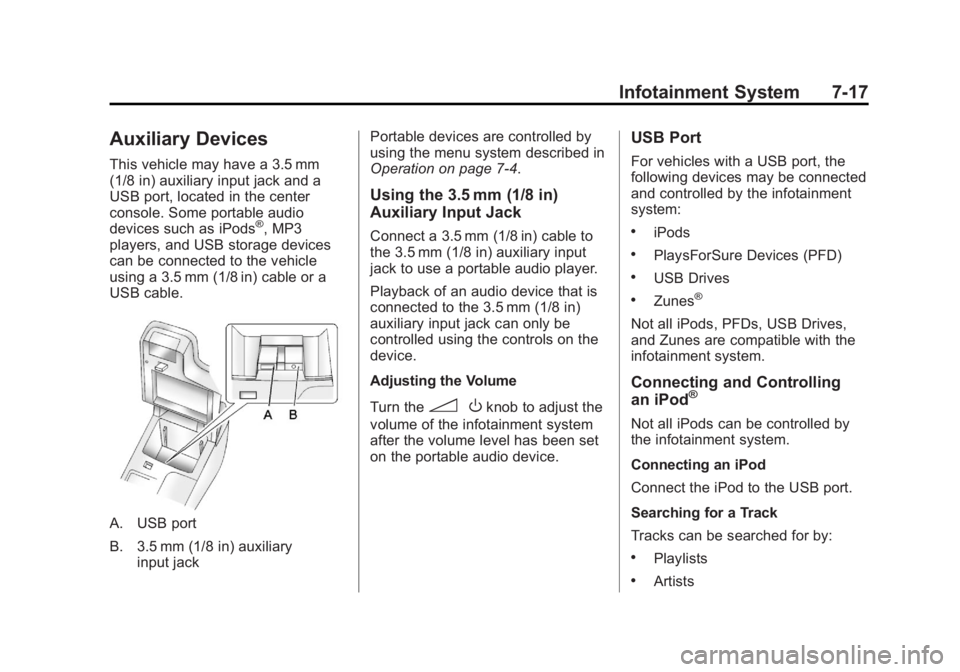
This vehicle may have a 3.5 mm
(1/8 in) auxiliary input jack and a
USB port, located in the center
console. Some portable audio
devices such as iPods
®, MP3
players, and USB storage devices
can be connected to the vehicle
using a 3.5 mm (1/8 in) cable or a
USB cable.
A. USB port
B. 3.5 mm (1/8 in) auxiliary input jack Portable devices are controlled by
using the menu system described in
Operation on page 7‑4.
Using the 3.5 mm (1/8 in)
Auxiliary Input Jack
Connect a 3.5 mm (1/8 in) cable to
the 3.5 mm (1/8 in) auxiliary input
jack to use a portable audio player.
Playback of an audio device that is
connected to the 3.5 mm (1/8 in)
auxiliary input jack can only be
controlled using the controls on the
device.
Adjusting the Volume
Turn the
3
Oknob to adjust the
volume of the infotainment system
after the volume level has been set
on the portable audio device.
USB Port
For vehicles with a USB port, the
following devices may be connected
and controlled by the infotainment
system:
.iPods
.PlaysForSure Devices (PFD)
.USB Drives
.Zunes®
Not all iPods, PFDs, USB Drives,
and Zunes are compatible with the
infotainment system.
Connecting and Controlling
an iPod®
Not all iPods can be controlled by
the infotainment system.
Connecting an iPod
Connect the iPod to the USB port.
Searching for a Track
Tracks can be searched for by:
.Playlists
.Artists
Page 168 of 368
Black plate (18,1)Buick Regal Owner Manual - 2011
7-18 Infotainment System
.Albums
.Song Titles
.Podcasts
.Genres
.Audiobooks
.Composers
To search for tracks:
1. Press the
Zknob.
2. Select Search.
3. Select: Playlists, Artists, Albums, Song Titles, Podcasts, Genres,
Audiobooks, or Composers.
4. Select the track.
Shuffle
Press the
Zknob and set
Shuffle Songs (Random) to On or
Off, then press the BACK button to
return the main screen.
On: Plays tracks in the current
folder in random order.
Off: Plays tracks in the current
folder in sequential order. Repeat
Press the
Zknob and set
Repeat to On or Off, then press the
BACK button to return the main
screen.
On: Repeats the current track.
Off: Starts playing from the
beginning of the current track after
the last track finishes.
Connecting and Controlling a
PlaysForSure Device (PFD)
or Zune
®
Connecting a PFD or Zune
Connect the PFD or Zune to the
USB port.
Searching for a Track
Tracks can be searched for by:
.Playlists
.Artists
.Albums
.Song Titles
.Podcasts
.Genres
To search for tracks:
1. Press the
Zknob.
2. Select Search.
3. Select: Playlists, Artists, Albums, Song Titles, Podcasts,
or Genres.
4. Select the track.
Shuffle
Press the
Zknob and set
Shuffle Songs (Random) to On
or Off.
On: Plays current tracks in random
order.
Off: Plays current tracks in
sequential order.
Repeat
Press the
Zknob and set
Repeat to On or Off.
Repeat On: Repeats the current
track.
Page 169 of 368
Black plate (19,1)Buick Regal Owner Manual - 2011
Infotainment System 7-19
Repeat Off:Starts playing from the
beginning of the current track after
the last track finishes.
Connecting and Controlling a
USB Drive
The infotainment system can only
play back .mp3 and .wma files from
a USB drive.
Only the first 2,500 songs are
recognized on the device.
When a device is not supported, the
message “No supported data found.
You can safely disconnect the
device” appears.
Connecting a USB Drive
Connect the USB drive to the
USB port.
Searching for a Track
It is normal for the search feature to
take some time to display the
information after reading the device
due to the amount of information
stored. Files that do not have any meta
data stored in the ID3 tag display as
Unknown.
Tracks can be searched for by:
.Playlists*
.Artists
.Albums
.Song Titles
.Genres
.Folder View
*This only displays if a playlist is
found on the device.
To search for tracks:
1. Press the
Zknob.
2. Select Search.
3. Select: Playlists, Artists, Albums, Song Titles, Genres,
or Folder View.
4. Select the track. Shuffle
Press the
Zknob and set
Shuffle Songs (Random) to On
or Off.
On: Plays current tracks in random
order.
Off: Plays current tracks in
sequential order.
Repeat
Press the
Zknob and set
Repeat to On or Off.
Repeat On: Repeats the current
track.
Repeat Off: Starts playing from the
beginning of the current track after
the last track finishes.
Page 170 of 368
Black plate (20,1)Buick Regal Owner Manual - 2011
7-20 Infotainment System
Phone
Bluetooth (Overview)
Vehicles with a Bluetooth system
can use a Bluetooth‐capable cell
phone with a Hands‐Free Profile to
make and receive phone calls. The
infotainment system and voice
recognition are used to control the
system. The system can be used
while the ignition is in ON/RUN or
ACC/ACCESSORY. The range of
the Bluetooth system can be up to
9.1 m (30 ft). Not all phones support
all functions and not all phones work
with the Bluetooth system. See
www.gm.com/bluetooth for more
information about compatible
phones.
Bluetooth Controls
Use the buttons located on the
infotainment system and the
steering wheel to operate the
Bluetooth system.Steering Wheel Controls
b/g(Push to Talk):
Press to
answer incoming calls, confirm
system information, and start voice
recognition.
$/i(Mute/End Call): Press to
end a call, reject a call, or cancel an
operation.
Infotainment System Controls
For information about how to
navigate the menu system using the
infotainment controls, see Operation
on page 7‑4.
V/$(Phone): Press to enter the
Phone main menu.
Voice Recognition
The voice recognition system uses
commands to control the system
and dial phone numbers.
Noise: The system may not
recognize voice commands if there
is too much background noise. When to Speak:
A tone sounds to
indicate that the system is ready for
a voice command. Wait for the tone
and then speak.
How to Speak: Speak clearly in a
calm and natural voice.
Audio System
When using the Bluetooth system,
sound comes through the vehicle's
front audio system speakers and
overrides the audio system. Use the
3/Oknob during a call to
change the volume level. The
adjusted volume level remains in
memory for later calls. The system
maintains a minimum volume level.
Other Information
The Bluetooth®word mark and
logos are owned by Bluetooth®SIG,
Inc. and any use of such marks by
General Motors is under license.
Other trademarks and trade names
are those of their respective owners.
Page 171 of 368
Black plate (21,1)Buick Regal Owner Manual - 2011
Infotainment System 7-21
SeeRadio Frequency Statement on
page 13‑15 for Federal
Communications Commission (FCC)
rules and Industry Canada
Standards.
Bluetooth (Infotainment
Controls)
For information about how to
navigate the menu system using the
infotainment controls, see Operation
on page 7‑4.
Pairing
A Bluetooth‐enabled cell phone
must be paired to the Bluetooth
system first and then connected to
the vehicle before it can be used.
See the cell phone manufacturer's
user guide for Bluetooth functions
before pairing the cell phone. If a
Bluetooth phone is not connected,
calls can be made using OnStar
®
Hands‐Free Calling, if available.
Refer to the OnStar Owner's Guide
for more information. The pairing process can be started
by using the voice recognition
system or the controls on the
infotainment system.
Pairing information:
.Up to five cell phones can be
paired to the Bluetooth system.
.The pairing process is disabled
when the vehicle is moving.
.The Bluetooth system links with
the first available paired cell
phone in the order the phone
was paired.
.Only one paired cell phone can
be connected to the Bluetooth
system at a time.
.Pairing should only need to be
completed once, unless changes
to the pairing information have
been made or the phone is
deleted.
To link to a different paired phone,
see “Linking to a Different Phone”
later in this section. Pairing a Phone
1. Press the CONFIG button.
2. Select Phone Settings.
3. Select Bluetooth.
4. Select Pair Device (Phone).
A four‐digit Personal
Identification Number (PIN)
appears on the display.
If the “Add new GPS device”
option is selected, the system
will start a search for Bluetooth
“Hands‐free” profile devices just
like if “Add new Phone” was
selected. The additional GPS
location feature which would
provide the vehicle's GPS
location through the Bluetooth
Serial Port Profile is not
available.
5. Start the pairing process on the cell phone that will be paired to
the vehicle. Reference the cell
phone manufacturer's user guide
for information on this process.
Page 172 of 368
Black plate (22,1)Buick Regal Owner Manual - 2011
7-22 Infotainment System
Locate the device named
“General Motors”or“Your
Vehicle” in the list on the cell
phone and follow the instructions
on the cell phone to enter the
four‐digit PIN provided by the
system.
6. The system prompts for a name for the phone and confirms the
name provided. This name is
used to indicate which phone is
connected.
7. The system responds with “
successfully paired” after the
pairing process is complete.
8. Repeat Steps 1 through 7 to pair additional phones.
Listing All Paired and Connected
Phones
1. Press the CONFIG button.
2. Select Phone Settings.
3. Select Bluetooth.
4. Select Device List. Deleting a Paired Phone
1. Press the CONFIG button.
2. Select Phone Settings.
3. Select Bluetooth.
4. Select Device List.
5. Select the phone to delete and
follow the on‐screen prompts.
Linking to a Different Phone
To link to a different phone, the new
phone must be in the vehicle and
available to be connected to the
Bluetooth system before the
process is started.
1. Press the CONFIG button.
2. Select Phone Settings.
3. Select Bluetooth.
4. Select Device List.
5. Select the new phone to link to and follow the on‐screen
prompts.
If delete is selected, the
highlighted phone will be
deleted.Making a Call
1. Press theV/$button twice.
2. Enter the character sequence. See “Entering a Character
Sequence” inOperation on
page 7‑4 for more information.
3. Select Call to start dialing the number.
Accepting or Declining a Call
When a call is received, the
infotainment system mutes and a
ring tone is heard in the vehicle.
Accepting a Call
Turn the
Zknob to Answer and
press the
Zknob.
Declining a Call
Turn the
Zknob to Decline and
press the
Zknob.
Call Waiting
Call waiting must be supported on
the Bluetooth phone and enabled by
the wireless service carrier to work.
Page 173 of 368
Black plate (23,1)Buick Regal Owner Manual - 2011
Infotainment System 7-23
Accepting a Call
Turn the
Zknob to Answer and
press the
Zknob.
Declining a Call
Turn the
Zknob to Decline and
press the
Zknob.
Switching Between Calls
(Call Waiting Calls Only)
To switch between calls:
1. Press the
Zknob.
2. Select Switch Call from the menu.
Conference Calling
Conference calling and three‐way
calling must be supported on the
Bluetooth phone and enabled by the
wireless service carrier to work.
To start a conference while in a
current call:
1. Press the
Zknob.
2. Select Enter Number. 3. Enter the character sequence
then select Call. See “Entering
a Character Sequence” in
Operation on page 7‑4 for more
information.
4. After the call has been placed, press the
Zknob and select
Merge Calls.
5. To add more callers to the conference call, repeat Steps 1
through 4. The number of callers
who can be added is limited by
your wireless service carrier.
Ending a Call
Press theZknob and select
Hang Up.
Muting a Call
To Mute a Call
Press the
Zknob and select
Mute Call.
To Cancel Mute
Press the
Zknob and select
Mute Call.
Dual Tone Multi-Frequency
(DTMF) Tones
The in‐vehicle Bluetooth system can
send numbers during a call. This is
used when calling a menu‐driven
phone system.
1. Press the
Zknob and
select Enter Number.
2. Enter the character sequence; see “Entering a Character
Sequence” inOperation on
page 7‑4 for more information.
Bluetooth (Voice
Recognition)
Pairing
A Bluetooth‐enabled cell phone
must be paired to the Bluetooth
system and then connected to the
vehicle before it can be used. See
the cell phone manufacturer's user
guide for Bluetooth functions before
pairing the cell phone. If a Bluetooth
phone is not connected, calls can
be made using OnStar
®Hands‐Free
Page 174 of 368
Black plate (24,1)Buick Regal Owner Manual - 2011
7-24 Infotainment System
Calling, if available. Refer to the
OnStar Owner's Guide for more
information.
The pairing process can be started
by using the voice recognition
system or the controls on the
infotainment system.
Pairing information:
.Up to five cell phones can be
paired to the Bluetooth system.
.The pairing process is disabled
when the vehicle is moving.
.The Bluetooth system links with
the first available paired cell
phone in the order the phone
was paired.
.Only one paired cell phone can
be connected to the Bluetooth
system at a time.
.Pairing only needs to be
completed once, unless the
pairing information changes or
the phone is deleted.To link to a different paired phone,
see
“Linking to a Different Phone”
later in this section.
Pairing a Phone
1. Press
b/g.
.For vehicles without a
navigation system, the
system responds “Ready,”
followed by a tone.
.For vehicles with a
navigation system, the
system responds with a
tone. After the tone, say
“Hands Free.” The system
responds “Ready,”followed
by a tone.
2. Say “Bluetooth.” The system
responds “Bluetooth ready,”
followed by a tone.
3. Say “Pair.”The system responds
with instructions and a four‐digit
Personal Identification Number
(PIN). The PIN will be used in
Step 4. 4. Start the pairing process on the
cell phone that will be paired to
the vehicle. Reference the cell
phone manufacturer's user guide
for information on this process.
Locate the device named
“General Motors” or“Your
Vehicle” in the list on the cell
phone and follow the instructions
on the cell phone to enter the
four‐digit PIN that was provided
in Step 3.
5. The system prompts for a name for the phone. This name will be
used to indicate which phone is
connected. The system confirms
the name.
6. The system responds with “
successfully paired” after the
pairing process is complete.
7. Repeat Steps 1 through 7 for additional phones to be paired.
Page 175 of 368
Black plate (25,1)Buick Regal Owner Manual - 2011
Infotainment System 7-25
Listing All Paired and Connected
Phones
1. Press
b/g.
.For vehicles without a
navigation system, the
system responds“Ready,”
followed by a tone.
.For vehicles with a
navigation system, the
system responds with a
tone. After the tone, say
“Hands Free.” The system
responds “Ready,”followed
by a tone.
2. Say “Bluetooth.” The system
responds “Bluetooth ready,”
followed by a tone.
3. Say “List.”The system lists all
paired Bluetooth devices. The
system will respond “is
connected” if a phone is
connected to the vehicle. Deleting a Paired Phone
1. Press
b/g.
.For vehicles without a
navigation system, the
system responds
“Ready,”
followed by a tone.
.For vehicles with a
navigation system, the
system responds with a
tone. After the tone, say
“Hands Free.” The system
responds “Ready,”followed
by a tone.
2. Say “Bluetooth.” The system
responds “Bluetooth ready,”
followed by a tone.
3. Say “Delete.” The system asks
which phone to delete followed
by a tone.
4. Say the name of the phone to be deleted. If the phone name is
unknown, use the “List”
command for a list of all paired
phones. The system responds “Would you like to delete
followed by
a tone.
5. Say “Yes”to delete the phone.
The system responds “OK,
deleting
Linking to a Different Phone
1. Press
b/g.
.For vehicles without a
navigation system, the
system responds “Ready,”
followed by a tone.
.For vehicles with a
navigation system, the
system responds with a
tone. After the tone, say
“Hands Free.” The system
responds “Ready,”followed
by a tone.
2. Say “Bluetooth.” The system
responds “Bluetooth ready,”
followed by a tone.