air conditioning BUICK REGAL 2012 User Guide
[x] Cancel search | Manufacturer: BUICK, Model Year: 2012, Model line: REGAL, Model: BUICK REGAL 2012Pages: 440, PDF Size: 6.22 MB
Page 218 of 440
Black plate (4,1)Buick Regal Owner Manual - 2012
8-4 Climate Controls
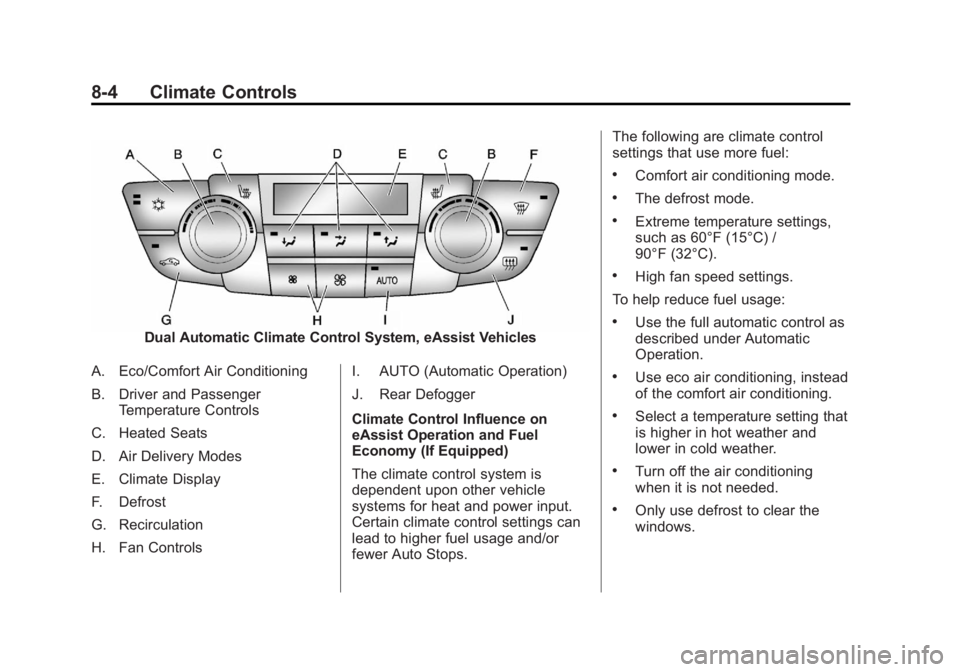
Dual Automatic Climate Control System, eAssist Vehicles
A. Eco/Comfort Air Conditioning
B. Driver and Passenger Temperature Controls
C. Heated Seats
D. Air Delivery Modes
E. Climate Display
F. Defrost
G. Recirculation
H. Fan Controls I. AUTO (Automatic Operation)
J. Rear Defogger
Climate Control Influence on
eAssist Operation and Fuel
Economy (If Equipped)
The climate control system is
dependent upon other vehicle
systems for heat and power input.
Certain climate control settings can
lead to higher fuel usage and/or
fewer Auto Stops.The following are climate control
settings that use more fuel:
.Comfort air conditioning mode.
.The defrost mode.
.Extreme temperature settings,
such as 60°F (15°C) /
90°F (32°C).
.High fan speed settings.
To help reduce fuel usage:
.Use the full automatic control as
described under Automatic
Operation.
.Use eco air conditioning, instead
of the comfort air conditioning.
.Select a temperature setting that
is higher in hot weather and
lower in cold weather.
.Turn off the air conditioning
when it is not needed.
.Only use defrost to clear the
windows.
Page 219 of 440
Black plate (5,1)Buick Regal Owner Manual - 2012
Climate Controls 8-5
Automatic Operation
The system automatically controls
the fan speed, air delivery, air
conditioning, and recirculation in
order to heat or cool the vehicle to
the desired temperature.
When the indicator light is on, the
system is in full automatic operation.
If the air delivery mode or fan
setting is manually adjusted, the
auto indicator turns off and displays
will show the selected settings.
To place the system in
automatic mode:
1. Press AUTO.
2. Set the temperature. Allow thesystem time to stabilize. Then
adjust the temperature as
needed for best comfort.
To improve fuel efficiency and to
cool the vehicle faster, recirculation
may be automatically selected in
warm weather. The recirculation
light will not come on. Press
hto
select recirculation; press it again to
select outside air. English units can be changed to
metric units through the Driver
Information Center (DIC). See
Driver Information Center (DIC) on
page 5‑25.
Manual Operation
Driver and Passenger
Temperature Control:
The
temperature can be adjusted
separately for the driver and
passenger.
Turn the knob clockwise or
counterclockwise to increase or
decrease the driver or passenger
temperature setting.
Fan Control: Press the left fan
button to decrease the fan speed.
Press the right fan button to
increase the fan speed. The
selected fan speed is indicated by
the number of segments shown in
the display.
Pressing the left fan button longer
turns the fan off.
Press AUTO to return to automatic
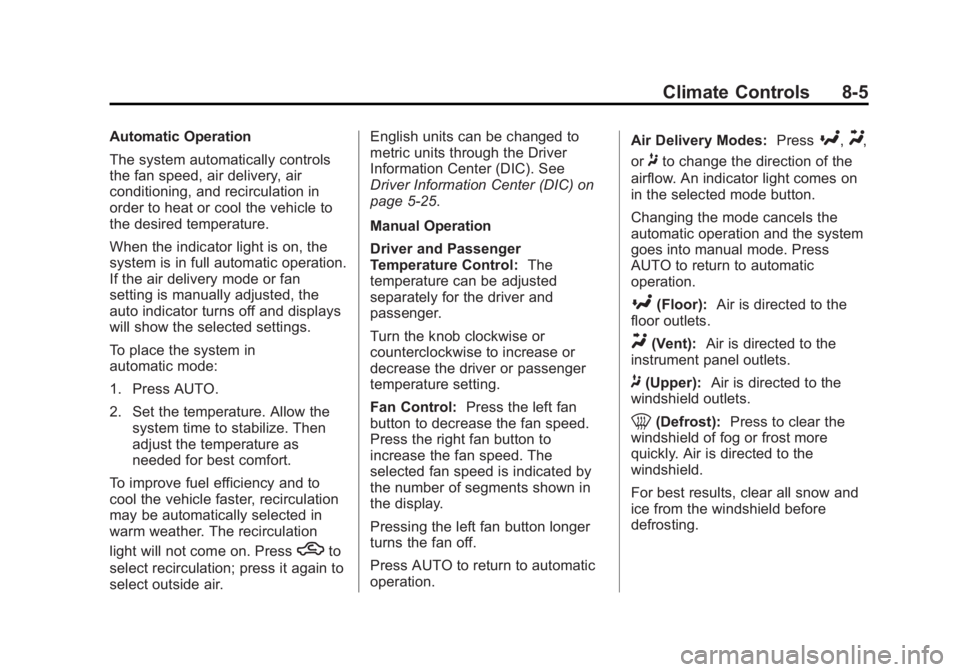
operation. Air Delivery Modes:
Press
[,Y,
or
8to change the direction of the
airflow. An indicator light comes on
in the selected mode button.
Changing the mode cancels the
automatic operation and the system
goes into manual mode. Press
AUTO to return to automatic
operation.
[(Floor): Air is directed to the
floor outlets.
Y(Vent): Air is directed to the
instrument panel outlets.
8(Upper): Air is directed to the
windshield outlets.
0(Defrost): Press to clear the
windshield of fog or frost more
quickly. Air is directed to the
windshield.
For best results, clear all snow and
ice from the windshield before
defrosting.
Page 220 of 440
Black plate (6,1)Buick Regal Owner Manual - 2012
8-6 Climate Controls
For eAssist vehicles that have the
auto‐defog feature, auto stops can
occur in defrost mode. In this mode,
the auto stops are shorter and less
frequent than other air delivery
modes to prevent flash fogging.
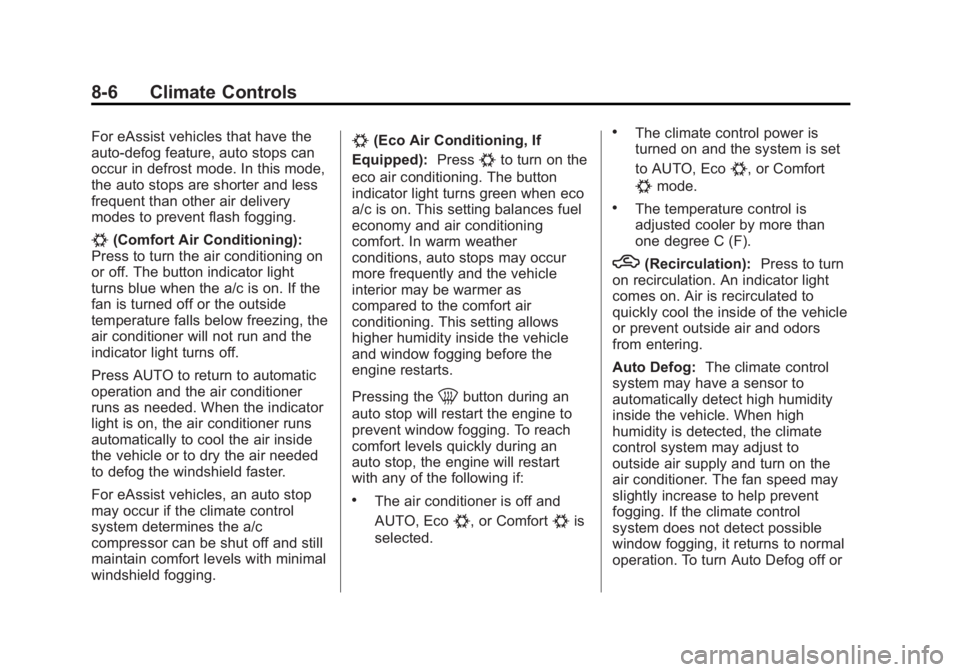
#(Comfort Air Conditioning):
Press to turn the air conditioning on
or off. The button indicator light
turns blue when the a/c is on. If the
fan is turned off or the outside
temperature falls below freezing, the
air conditioner will not run and the
indicator light turns off.
Press AUTO to return to automatic
operation and the air conditioner
runs as needed. When the indicator
light is on, the air conditioner runs
automatically to cool the air inside
the vehicle or to dry the air needed
to defog the windshield faster.
For eAssist vehicles, an auto stop
may occur if the climate control
system determines the a/c
compressor can be shut off and still
maintain comfort levels with minimal
windshield fogging.
#(Eco Air Conditioning, If
Equipped): Press
#to turn on the
eco air conditioning. The button
indicator light turns green when eco
a/c is on. This setting balances fuel
economy and air conditioning
comfort. In warm weather
conditions, auto stops may occur
more frequently and the vehicle
interior may be warmer as
compared to the comfort air
conditioning. This setting allows
higher humidity inside the vehicle
and window fogging before the
engine restarts.
Pressing the
0button during an
auto stop will restart the engine to
prevent window fogging. To reach
comfort levels quickly during an
auto stop, the engine will restart
with any of the following if:
.The air conditioner is off and
AUTO, Eco
#, or Comfort#is
selected.
.The climate control power is
turned on and the system is set
to AUTO, Eco
#, or Comfort
#mode.
.The temperature control is
adjusted cooler by more than
one degree C (F).
h(Recirculation): Press to turn
on recirculation. An indicator light
comes on. Air is recirculated to
quickly cool the inside of the vehicle
or prevent outside air and odors
from entering.
Auto Defog: The climate control
system may have a sensor to
automatically detect high humidity
inside the vehicle. When high
humidity is detected, the climate
control system may adjust to
outside air supply and turn on the
air conditioner. The fan speed may
slightly increase to help prevent
fogging. If the climate control
system does not detect possible
window fogging, it returns to normal
operation. To turn Auto Defog off or
Page 244 of 440
Black plate (22,1)Buick Regal Owner Manual - 2012
9-22 Driving and Operating
eAssist Automatic Engine
Start/Stop
{WARNING
Exiting the vehicle, without first
shifting into P (Park), may cause
the vehicle to move, you or others
may be injured. Because the
vehicle has the automatic engine
start/stop feature, the vehicle's
engine might seem to be shut off;
however, once the brake pedal is
released, the engine will start up
again.
Shift to P (Park) and turn the
ignition to LOCK/OFF, before
exiting the vehicle.
Vehicles with eAssist have an
automatic engine start/stop feature.
After the engine is started and has
reached operating temperature, the
auto stop feature may cause the
engine to turn off when the brakes are applied and the vehicle comes
to a complete stop. The vehicle
may remain in auto stop for up to
two minutes. When the brake is
released or the accelerator pedal is
applied, the engine will start. The
engine will continue to run until the
next auto stop.
AUTO STOP on the tachometer
signifies that the engine is in auto
stop mode. See
Tachometer on
page 5‑11 for more information.
When the vehicle is turned off, the
tachometer will move to OFF. If the
driver door is opened while in auto
stop mode, a chime will sound.
To restart the engine during auto
stop, release the brake pedal or
press the accelerator pedal. The
engine starts immediately. The
vehicle continues to run until the
next stop.
There are several conditions which
may prevent an auto stop or cause
an auto start. The Engine Will Remain
Running When:
.The engine, transmission,
or high voltage battery is not
warmed up yet.
.The outside temperature is less
than
−20°C (−4°F).
.The air conditioning or defrost
system need the compressor to
maintain vehicle comfort. See
Dual Automatic Climate Control
System on page 8‑3 for more
information.
.The shift lever is in P (Park),
N (Neutral), R (Reverse),
or M (Manual Mode).
.The high voltage battery pack
charge is low.
.The 12‐volt vehicle battery
charge is low, or loads are high.
.The hood is not fully closed.
.Brake pedal pressure is high.
.If the MIL is on, auto stop may
be prevented.
Page 245 of 440
Black plate (23,1)Buick Regal Owner Manual - 2012
Driving and Operating 9-23
The Engine Will Restart When:
.The brake pedal is released.
.The accelerator pedal is applied.
.Shifting out of D (Drive) to any
other gear.
.If eco air conditioning is
selected, the duration of the auto
stop will depend on the outside
temperature. This economy
mode improves fuel economy by
limiting the effects of the air
conditioning. The warmer it is
outside, the shorter the time
before the engine is restarted to
provide cabin cooling.
.The climate control system is
turned from off to normal air
conditioning or defrost. SeeDual
Automatic Climate Control
System on page 8‑3 for more
information.
.The engine is required to run for
either heater or climate control
performance. See Dual
Automatic Climate Control
System on page 8‑3 for more
information.
.The high voltage battery pack
charge is low and requires
recharging.
.Auto stop time is greater than
two minutes.
.The hood is opened.
Engine Heater
The engine coolant heater,
if available, can help in cold weather
conditions at or below −18°C (0°F)
for easier starting and better fuel
economy during engine warm-up.
Plug in the coolant heater at least
four hours before starting the
vehicle. An internal thermostat in
the plug-end of the cord will prevent
engine coolant heater operation at
temperatures above −18°C (0°F).
Page 297 of 440
Black plate (23,1)Buick Regal Owner Manual - 2012
Vehicle Care 10-23
If it is decided to lift the hood, make
sure the vehicle is parked on a level
surface.
Then check to see if the engine
cooling fans are running. If the
engine is overheating, both fans
should be running. If they are not,
do not continue to run the engine
and have the vehicle serviced.
Notice:Engine damage from
running the engine without
coolant is not covered by the
warranty.
If Steam Is Coming from the
Engine Compartment
{WARNING
Steam from an overheated engine
can burn you badly, even if you
just open the hood. Stay away
from the engine if you see or hear
steam coming from it. Just turn it
off and get everyone away from
the vehicle until it cools down.
(Continued)
WARNING (Continued)
Wait until there is no sign of
steam or coolant before you
open the hood.
If you keep driving when the
engine is overheated, the liquids
in it can catch fire. You or others
could be badly burned. Stop the
engine if it overheats, and get out
of the vehicle until the engine
is cool.
If No Steam Is Coming from
the Engine Compartment
If an engine overheat warning is
displayed but no steam can be seen
or heard, the problem may not be
too serious. Sometimes the engine
can get a little too hot when the
vehicle:
.Climbs a long hill on a hot day.
.Stops after high-speed driving.
.Idles for long periods in traffic. If the overheat warning is displayed
with no sign of steam:
1. Turn the air conditioning off.
2. Turn the heater on to the highest
temperature and to the highest
fan speed. Open the windows as
necessary.
3. In heavy traffic, let the engine idle in N (Neutral) while stopped.
If it is safe to do so, pull off the
road, shift to P (Park) or
N (Neutral), and let the
engine idle.
2.0L Engine and 2.4L Engine
without eAssist
If the engine coolant temperature
gauge is no longer in the overheat
zone or the engine coolant
temperature warning light no longer
displays, the vehicle can be driven.
Continue to drive the vehicle slowly
for about 10 minutes. Keep a safe
vehicle distance from the vehicle in
front. If the warning does not come
back on, continue to drive normally.
Page 317 of 440
Black plate (43,1)Buick Regal Owner Manual - 2012
Vehicle Care 10-43
Number Usage5 Radio Displays,
Park Assist,
Infotainment,
Module Tunnel
Control
6 Power Outlet 1
7 Power Outlet 2
8 Body Control
Module 3
9 Body Control
Module 4
10 Body Control
Module 8
11 Front Heater
Ventilation Air
Conditioning/Blower Number Usage
12 Right‐Hand Power
Front Seat
13 Left‐Hand Power
Front Seat
14 Diagnostic Link
Connector
15 Airbag
16 Trunk Release
17 Heating Ventilation
Air Conditioning
Controller
18 Service Fuse,
Logistic Relay
19 Not Used Number Usage
20 Automatic Occupant
Sensing
21 Instrument Panel
Cluster
22 Discrete Logic
Ignition Switch
23 Body Control
Module 1
24 Body Control
Module 2
25 OnStar
26 Power Outlet, Trunk
Page 323 of 440
Black plate (49,1)Buick Regal Owner Manual - 2012
Vehicle Care 10-49
is certified to carry. The speed
rating is the maximum speed a
tire is certified to carry a load.
Tire Terminology and
Definitions
Air Pressure:The amount of
air inside the tire pressing
outward on each square inch
of the tire. Air pressure is
expressed in kPa (kilopascal)
or psi (pounds per square inch).
Accessory Weight
:The
combined weight of optional
accessories. Some examples of
optional accessories are
automatic transmission, power
steering, power brakes, power
windows, power seats, and air
conditioning.
Aspect Ratio
:The relationship
of a tire's height to its width. Belt
:A rubber coated layer of
cords that is located between
the plies and the tread. Cords
may be made from steel or other
reinforcing materials.
Bead
:The tire bead contains
steel wires wrapped by steel
cords that hold the tire onto
the rim.
Bias Ply Tire
:A pneumatic tire
in which the plies are laid at
alternate angles less than
90 degrees to the centerline of
the tread.
Cold Tire Pressure
:The
amount of air pressure in a tire,
measured in kPa (kilopascal)
or psi (pounds per square inch)
before a tire has built up heat
from driving. See Tire Pressure
on page 10‑52.
Curb Weight
:The weight of a
motor vehicle with standard and
optional equipment including the maximum capacity of fuel,
oil, and coolant, but without
passengers and cargo.
DOT Markings
:A code molded
into the sidewall of a tire
signifying that the tire is in
compliance with the U.S.
Department of Transportation
(DOT) Motor Vehicle Safety
Standards. The DOT code
includes the Tire Identification
Number (TIN), an alphanumeric
designator which can also
identify the tire manufacturer,
production plant, brand, and
date of production.
GVWR
:Gross Vehicle Weight
Rating. See Vehicle Load Limits
on page 9‑10.
GAWR FRT
:Gross Axle Weight
Rating for the front axle. See
Vehicle Load Limits on
page 9‑10.
Page 398 of 440
Black plate (2,1)Buick Regal Owner Manual - 2012
12-2 Technical Data
Vehicle Data
Capacities and Specifications
ApplicationCapacities
Metric English
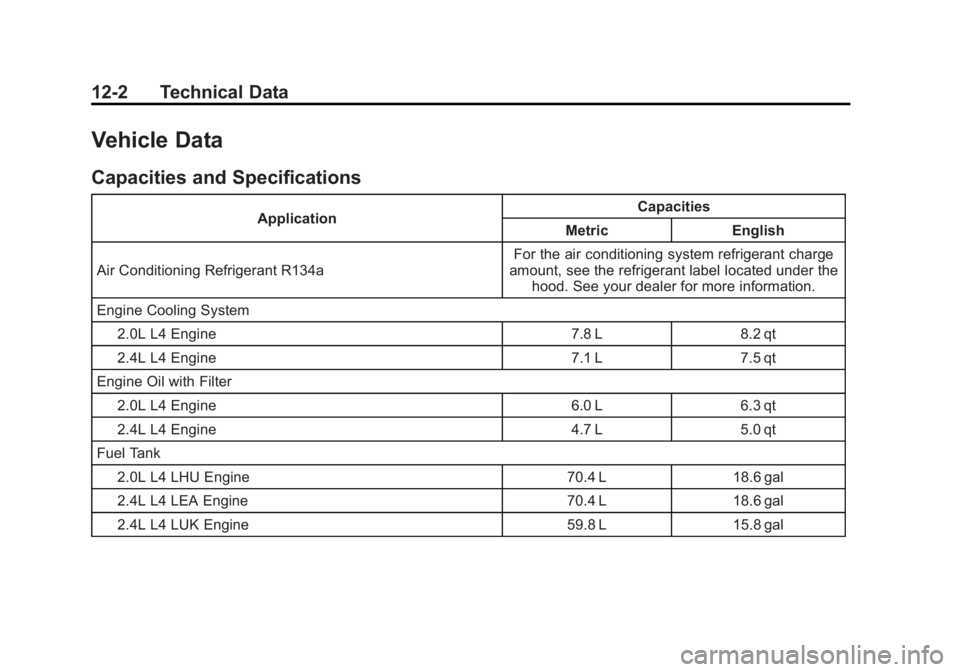
Air Conditioning Refrigerant R134a For the air conditioning system refrigerant charge
amount, see the refrigerant label located under the hood. See your dealer for more information.
Engine Cooling System 2.0L L4 Engine 7.8 L 8.2 qt
2.4L L4 Engine 7.1 L 7.5 qt
Engine Oil with Filter
2.0L L4 Engine 6.0 L 6.3 qt
2.4L L4 Engine 4.7 L 5.0 qt
Fuel Tank
2.0L L4 LHU Engine 70.4 L 18.6 gal
2.4L L4 LEA Engine 70.4 L 18.6 gal
2.4L L4 LUK Engine 59.8 L 15.8 gal
Page 430 of 440
Black plate (2,1)Buick Regal Owner Manual - 2012
i-2 INDEX
B
Battery . . . . . . . . . . . . . . . . . . . . . . . 10-29Jump Starting . . . . . . . . 10-89, 10-91
Power Protection . . . . . . . . . . . . . . 6-6
Voltage and ChargingMessages . . . . . . . . . . . . . . . . . . . 5-29
Blade Replacement, Wiper . . . 10-32
Bluetooth . . . . . . . . . . 7-36, 7-38, 7-41
Brake
System Warning Light . . . . . . . . 5-18
Brakes . . . . . . . . . . . . . . . . . . . . . . . . 10-26
Antilock . . . . . . . . . . . . . . . . . . . . . . . 9-33
Assist . . . . . . . . . . . . . . . . . . . . . . . . . 9-36
Fluid . . . . . . . . . . . . . . . . . . . . . . . . 10-27
Parking . . . . . . . . . . . . . . . . . . . . . . . 9-34
System Messages . . . . . . . . . . . . 5-30
Braking . . . . . . . . . . . . . . . . . . . . . . . . . 9-4
Break-In, New Vehicle . . . . . . . . . 9-15
Bulb Replacement . . . . . . . . . . . . 10-37 Fog Lamps . . . . . . . . . . . . . 10-35, 6-4
Halogen Bulbs . . . . . . . . . . . . . . 10-33
Headlamp Aiming . . . . . . . . . . . 10-33
Headlamps . . . . . . . . . . . . . . . . . 10-33
Headlamps, Front TurnSignal, and Parking
Lamps . . . . . . . . . . . . . . . . . . . . 10-34 Bulb Replacement (cont'd)
High Intensity Discharge
(HID) Lighting . . . . . . . . . . . . . 10-33
License Plate Lamps . . . . . . . 10-36
Taillamps, Turn Signal,
Stoplamps, and
Back-up Lamps . . . . . . . . . . . 10-35
Buying New Tires . . . . . . . . . . . . . 10-60
C
Calibration . . . . . . . . . . . . . . . . . . . . . . 5-5
California Fuel Requirements . . . . . . . . . . . 9-47
Perchlorate MaterialsRequirements . . . . . . . . . . . . . . . 10-3
Warning . . . . . . . . . . . . . . . . . . . . . . 10-3
Canadian Vehicle Owners . . . . . . . . iii
Capacities and Specifications . . . . . . . . . . . . . . . . 12-2
Carbon Monoxide
Engine Exhaust . . . . . . . . . . . . . . . 9-27
Trunk . . . . . . . . . . . . . . . . . . . . . . . . . 2-11
Winter Driving . . . . . . . . . . . . . . . . . 9-8
Cargo Net . . . . . . . . . . . . . . . . . . . . . . 4-3
Cautions, Danger, and Warnings . . . . . . . . . . . . . . . . . . . . . . . . iv CD Player . . . . . . . . . . . . . . . . . . . . . 7-24
Center Console Storage . . . . . . . . 4-3
Chains, Tire . . . . . . . . . . . . . . . . . . 10-65
Charging System Light . . . . . . . . 5-15
Check
Engine Light . . . . . . . . . . . . . . . . . . 5-15
IgnitionTransmission Lock . . . . . . . . 10-31
Child Restraints Infants and YoungChildren . . . . . . . . . . . . . . . . . . . . . 3-36
Lower Anchors and Tethers for Children . . . . . . . . . 3-42
Older Children . . . . . . . . . . . . . . . . 3-34
Securing . . . . . . . . . . . . . . . . 3-50, 3-52
Systems . . . . . . . . . . . . . . . . . . . . . . 3-39
Circuit Breakers . . . . . . . . . . . . . . 10-38
Cleaning Exterior Care . . . . . . . . . . . . . . . 10-98
Interior Care . . . . . . . . . . . . . . . 10-101
Climate Control Systems . . . . . . . 8-1
Air Conditioning . . . . . . . . . . . . . . . 8-1
Dual Automatic . . . . . . . . . . . . . . . . 8-3
Heating . . . . . . . . . . . . . . . . . . . . . . . . 8-1
Clock . . . . . . . . . . . . . . . . . . . . . . . . . . . 5-5
Cluster, Instrument . . . . . . . . . . . . . 5-9