buttons BUICK REGAL 2012 User Guide
[x] Cancel search | Manufacturer: BUICK, Model Year: 2012, Model line: REGAL, Model: BUICK REGAL 2012Pages: 440, PDF Size: 6.22 MB
Page 140 of 440
Black plate (26,1)Buick Regal Owner Manual - 2012
5-26 Instruments and Controls
DIC Operation and Displays
The DIC has different displays
which can be accessed by using the
DIC buttons on the turn signal lever,
located on the left side of the
steering wheel. The DIC displays
trip, fuel, and vehicle system
information, and warning messages
if a system problem is detected.
The bottom of the DIC display
shows the position of the shift lever
and the odometer. It may also show
the direction the vehicle is driving.
In cold weather the DIC display may
change slowly. This is normal and
will move more quickly as the
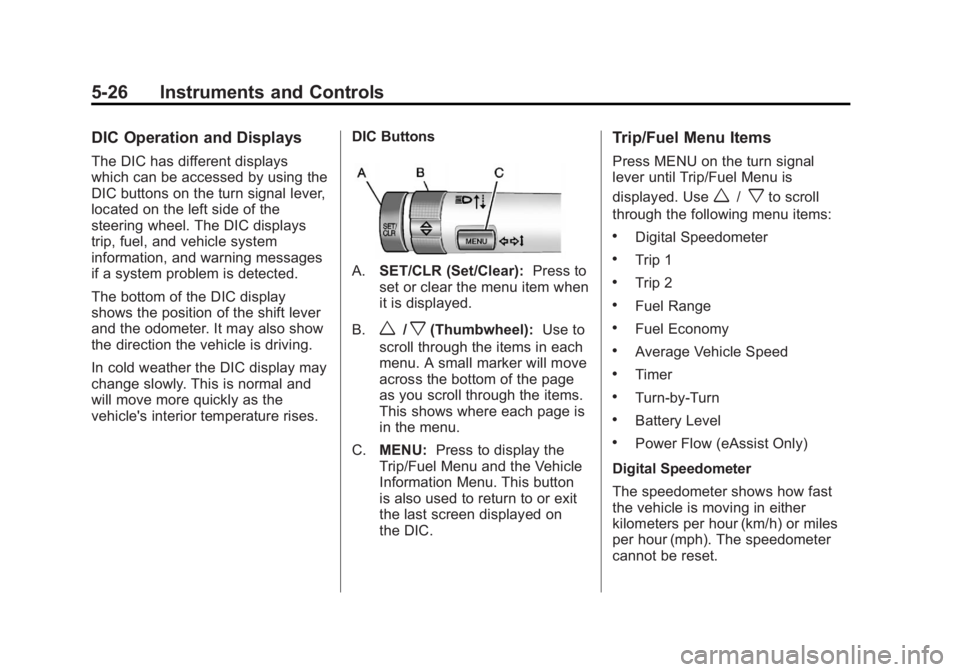
vehicle's interior temperature rises.DIC Buttons
A.
SET/CLR (Set/Clear): Press to
set or clear the menu item when
it is displayed.
B.
w/x(Thumbwheel): Use to
scroll through the items in each
menu. A small marker will move
across the bottom of the page
as you scroll through the items.
This shows where each page is
in the menu.
C. MENU: Press to display the
Trip/Fuel Menu and the Vehicle
Information Menu. This button
is also used to return to or exit
the last screen displayed on
the DIC.
Trip/Fuel Menu Items
Press MENU on the turn signal
lever until Trip/Fuel Menu is
displayed. Use
w/xto scroll
through the following menu items:
.Digital Speedometer
.Trip 1
.Trip 2
.Fuel Range
.Fuel Economy
.Average Vehicle Speed
.Timer
.Turn-by-Turn
.Battery Level
.Power Flow (eAssist Only)
Digital Speedometer
The speedometer shows how fast
the vehicle is moving in either
kilometers per hour (km/h) or miles
per hour (mph). The speedometer
cannot be reset.
Page 153 of 440
Black plate (39,1)Buick Regal Owner Manual - 2012
Instruments and Controls 5-39
Remote Lock Feedback
This allows selection of what type of
feedback is given when locking the
vehicle with the RKE transmitter.
Press the Multifunction knob when
Remote Lock Feedback is
highlighted. Turn the knob to select
Lights and Horn, Lights Only, Horn
Only, or Off. Press the knob to
confirm and go back to the
last menu.
Remote Door Unlock
This allows selection of which doors
will unlock when pressing
"on the
RKE transmitter. Press the Multifunction knob when
Remote Door Unlock is highlighted.
Turn the knob to select Driver Door
or All Doors. When set to Driver
Door, the driver door will unlock the
first time
"is pressed and all doors
will unlock when
"is pressed a
second time. When set to All Doors,
all of the doors will unlock at the first
press of
". Press the Multifunction
knob to confirm and go back to the
last menu.
Return to Factory Settings
Select Return to Factory Settings to
return all of the vehicle
personalization to the default
settings. Turn the knob to select Yes
or No. Press the knob to confirm
and go back to the last menu.
Universal Remote
System
See Radio Frequency Statement on
page 13‑20 for information
regarding Part 15 of the Federal
Communications Commission (FCC)
rules and Industry Canada
Standards RSS-GEN/210/220/310.
Universal Remote System
Programming
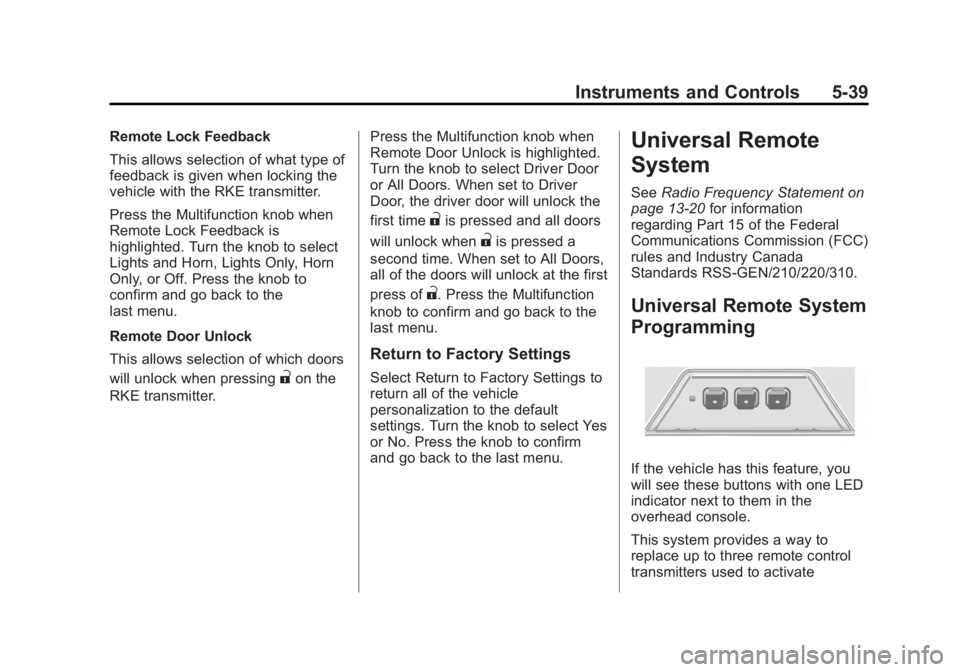
If the vehicle has this feature, you
will see these buttons with one LED
indicator next to them in the
overhead console.
This system provides a way to
replace up to three remote control
transmitters used to activate
Page 154 of 440
Black plate (40,1)Buick Regal Owner Manual - 2012
5-40 Instruments and Controls
devices such as garage door
openers, security systems, and
home automation devices.
Do not use the Universal Remote
system with any garage door opener
that does not have the stop and
reverse feature. This includes any
garage door opener model
manufactured before April 1,1982.
Read the instructions completely
before attempting to program the
Universal Remote system. Because
of the steps involved, it may be
helpful to have another person
available to assist with programming
the Universal Remote system.
Keep the original hand-held
transmitter for use in other vehicles
as well as for future Universal
Remote system programming. It is
also recommended that upon the
sale of the vehicle, the programmed
Universal Remote system buttons
be erased for security purposes.
See“Erasing Universal Remote
System Buttons” later in this
section. When programming a garage door,
park outside of the garage. Park
directly in line with and facing the
garage door opener motor-head or
gate motor-head. Be sure that
people and objects are clear of the
garage door or gate being
programmed.
It is recommended that a new
battery be installed in the hand-held
transmitter for quicker and more
accurate transmission of the
radio-frequency signal.
Programming the Universal
Remote System
For questions or help programming
the Universal Remote system, call
1‐800‐355‐3515 or go to
www.homelink.com.
Programming a garage door opener
involves time-sensitive actions, so
read the entire procedure before
starting. Otherwise, the device will
time out and the procedure will have
to be repeated.
To program up to three devices:
1. Hold the end of the hand-held
transmitter about 3 to 8 cm
(1 to 3 in) away from the
Universal Remote system
buttons while keeping the
indicator light in view. The
hand-held transmitter was
supplied by the manufacturer of
the garage door opener receiver
(motor-head unit).
2. At the same time, press and hold both the hand-held
transmitter button and one of the
three Universal Remote system
buttons to be used to operate
the garage door. Do not release
the Universal Remote system
button or the hand-held
transmitter button until the
indicator light changes from a
slowly to a rapidly flashing light.
You now may release both
buttons.
Page 156 of 440
Black plate (42,1)Buick Regal Owner Manual - 2012
5-42 Instruments and Controls
To program the remaining two
Universal Remote system buttons,
begin with Step 1 of“Programming
the Universal Remote System.”
Gate Operator and Canadian
Programming
If you have questions or need help
programming the Universal Remote
system, call 1‐800‐355‐3515 or go
to www.homelink.com.
Canadian radio-frequency laws
require transmitter signals to time
out or quit after several seconds of
transmission. This may not be long
enough for the Universal Remote
system to pick up the signal during
programming. Similarly, some U.S.
gate operators are manufactured to
time out in the same manner. If you live in Canada, or you are
having difficulty programming a gate
operator or garage door opener by
using the
“Programming the
Universal Remote System”
procedures, regardless of where
you live, replace Step 2 under
“Programming the Universal Remote
System” with the following:
Continue to press and hold the
Universal Remote system button
while you press and release every
two seconds (cycle) the hand-held
transmitter button until the
frequency signal has been
successfully accepted by the
Universal Remote system. The
Universal Remote system indicator
light will flash slowly at first and then
rapidly. Proceed with Step 3 under
“Programming the Universal Remote
System” to complete.
Universal Remote System
Operation
Using the Universal Remote
System
Press and hold the appropriate
Universal Remote system button for
at least half of a second. The
indicator light will come on while the
signal is being transmitted.
Erasing Universal Remote
System Buttons
All programmed buttons should be
erased when the vehicle is sold or
the lease ends.
To erase all programmed buttons on
the Universal Remote system
device:
1. Press and hold down the two
outside buttons until the
indicator light begins to flash.
This should take about
10 seconds.
2. Release both buttons.
Page 157 of 440
Black plate (43,1)Buick Regal Owner Manual - 2012
Instruments and Controls 5-43
Reprogramming a Single
Universal Remote System
Button
To reprogram any of the three
Universal Remote system buttons:
1. Press and hold the desiredUniversal Remote system
button. Do not release the
button.
2. The indicator light will begin to flash after 20 seconds. Without
releasing the button, proceed
with Step 1 of the section
“Programming the Universal
Remote System.” If you have questions or need help
programming the Universal Remote
system, call 1‐800‐355‐3515 or go
to www.homelink.com. You may
also call the customer assistance
phone number under
Customer
Assistance Offices (U.S. and
Canada) on page 13‑4 orCustomer
Assistance Offices (Mexico) on
page 13‑5.
Page 167 of 440
Black plate (3,1)Buick Regal Owner Manual - 2012
Infotainment System 7-3
Overview (Radio with CD)
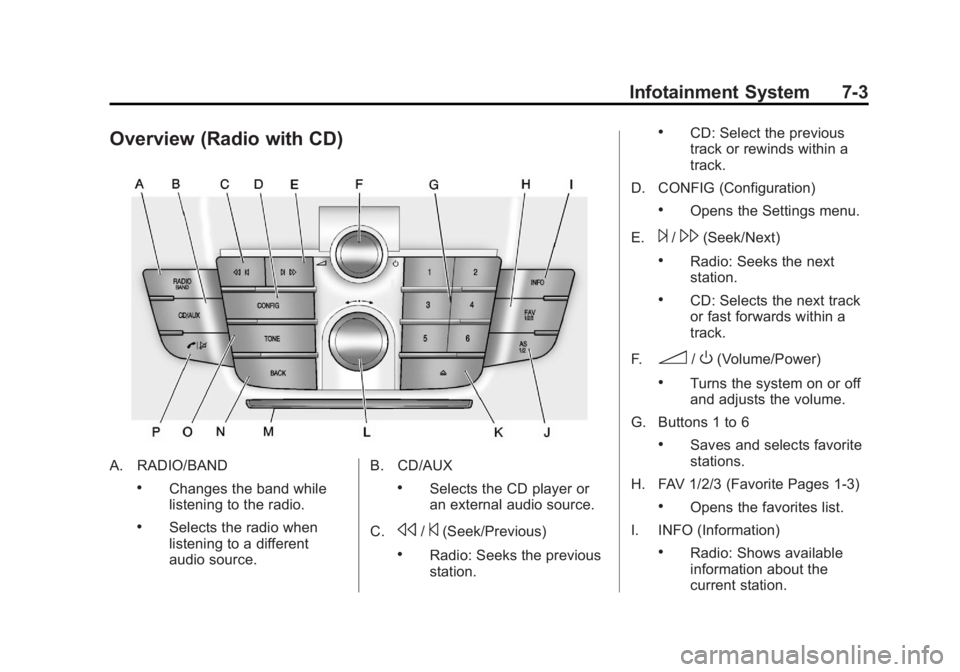
A. RADIO/BAND
.Changes the band while
listening to the radio.
.Selects the radio when
listening to a different
audio source.B. CD/AUX
.Selects the CD player or
an external audio source.
C.
s/©(Seek/Previous)
.Radio: Seeks the previous
station.
.CD: Select the previous
track or rewinds within a
track.
D. CONFIG (Configuration)
.Opens the Settings menu.
E.
¨/\(Seek/Next)
.Radio: Seeks the next
station.
.CD: Selects the next track
or fast forwards within a
track.
F.
3/O(Volume/Power)
.Turns the system on or off
and adjusts the volume.
G. Buttons 1 to 6
.Saves and selects favorite
stations.
H. FAV 1/2/3 (Favorite Pages 1‐3)
.Opens the favorites list.
I. INFO (Information)
.Radio: Shows available
information about the
current station.
Page 168 of 440
Black plate (4,1)Buick Regal Owner Manual - 2012
7-4 Infotainment System
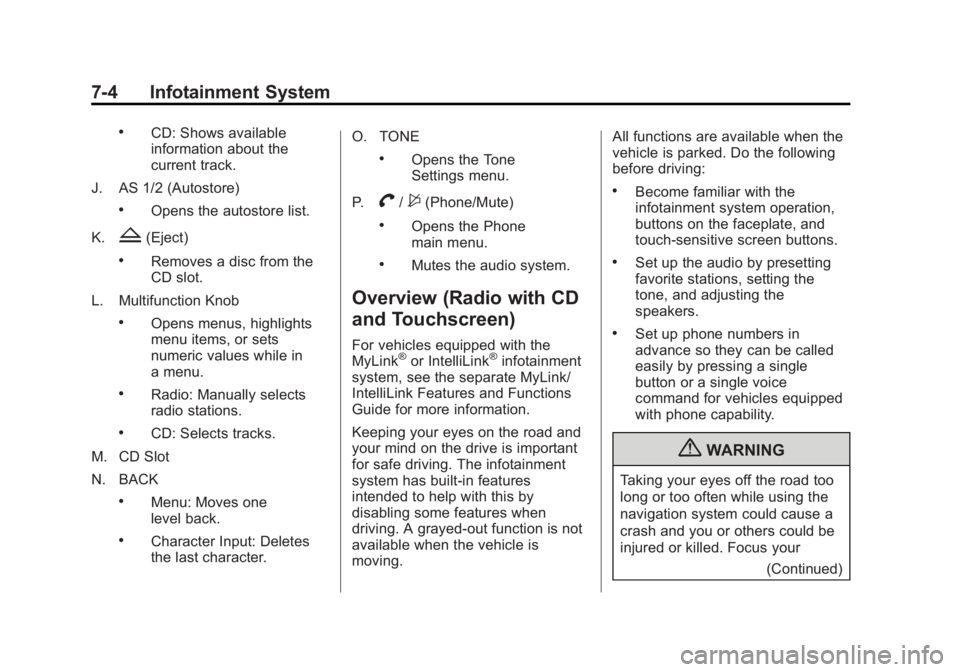
.CD: Shows available
information about the
current track.
J. AS 1/2 (Autostore)
.Opens the autostore list.
K.
Z(Eject)
.Removes a disc from the
CD slot.
L. Multifunction Knob
.Opens menus, highlights
menu items, or sets
numeric values while in
a menu.
.Radio: Manually selects
radio stations.
.CD: Selects tracks.
M. CD Slot
N. BACK
.Menu: Moves one
level back.
.Character Input: Deletes
the last character. O. TONE
.Opens the Tone
Settings menu.
P.
V/$(Phone/Mute)
.Opens the Phone
main menu.
.Mutes the audio system.
Overview (Radio with CD
and Touchscreen)
For vehicles equipped with the
MyLink®or IntelliLink®infotainment
system, see the separate MyLink/
IntelliLink Features and Functions
Guide for more information.
Keeping your eyes on the road and
your mind on the drive is important
for safe driving. The infotainment
system has built-in features
intended to help with this by
disabling some features when
driving. A grayed-out function is not
available when the vehicle is
moving. All functions are available when the
vehicle is parked. Do the following
before driving:
.Become familiar with the
infotainment system operation,
buttons on the faceplate, and
touch-sensitive screen buttons.
.Set up the audio by presetting
favorite stations, setting the
tone, and adjusting the
speakers.
.Set up phone numbers in
advance so they can be called
easily by pressing a single
button or a single voice
command for vehicles equipped
with phone capability.
{WARNING
Taking your eyes off the road too
long or too often while using the
navigation system could cause a
crash and you or others could be
injured or killed. Focus your
(Continued)
Page 169 of 440
Black plate (5,1)Buick Regal Owner Manual - 2012
Infotainment System 7-5
WARNING (Continued)
attention on driving and limit
glances at the moving map on the
navigation screen. Use voice
guidance whenever possible.
The infotainment system is
controlled by using the buttons on
the faceplate and the touch screen.
See “Infotainment Control Buttons”
in this section for more information.
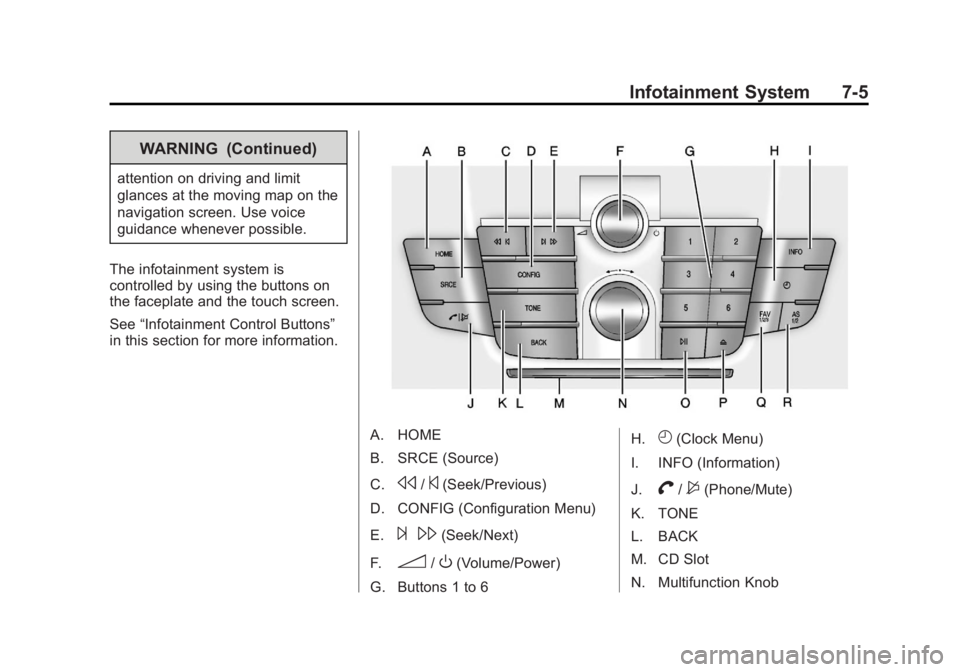
A. HOME
B. SRCE (Source)
C.
s/©(Seek/Previous)
D. CONFIG (Configuration Menu)
E.
¨ \(Seek/Next)
F.
3/O(Volume/Power)
G. Buttons 1 to 6 H.
H(Clock Menu)
I. INFO (Information)
J.
V/$(Phone/Mute)
K. TONE
L. BACK
M. CD Slot
N. Multifunction Knob
Page 170 of 440
Black plate (6,1)Buick Regal Owner Manual - 2012
7-6 Infotainment System
O.w j(Play/Pause)
P.
Z(Eject)
Q. FAV 1/2/3 (Favorite Pages 1-3)
R. AS 1/2 (Autostore)
Infotainment Control Buttons
The buttons on the faceplate are
used to start primary functions while
using the infotainment system.
3/O(Volume/Power):
1. Press to turn the system on and off.
2. Turn to adjust the volume.
w j(Play/Pause): Press to start,
pause, and resume playback. See
CD Player on page 7‑24 andMP3
on page 7‑27 for more information.
SRCE (Source): Press to change
the audio sources such as AM-FM
Radio, XM™ (if equipped), CD,
and AUX. TONE:
Press to access the sound
menu screen to adjust bass,
midrange, and treble. See AM-FM
Radio on page 7‑14 for more
information.
INFO (Information): Press to
toggle through an audio information
screen.
CONFIG (Configuration Menu):
Press to adjust features for radio,
display, phone, vehicle, and time.
HOME: See“Home Page” following
in this section.
Multifunction Knob: Turn to
highlight a feature. Press to activate
the highlighted feature.
V/$(Phone/Mute): See
Bluetooth (Overview) on page 7‑36
or Bluetooth (Infotainment Controls)
on page 7‑38 orBluetooth (Voice
Recognition) on page 7‑41 for more
information. Press to mute the audio
system.
BACK: Press to return to the
previous screen in a menu. If on a page accessed directly by a
faceplate button or Home Page
screen button, pressing BACK will
go to the previous menu.
FAV 1/2/3 (Favorite Pages 1-3):
Press to display the current page
number above the preset buttons.
The stored stations for each list
display on the touch-sensitive
preset buttons at the bottom of the
screen. The number of preset FAV
lists can be changed in the
Configuration Menu.
s
©(Seek/Previous):
1. Press to seek to the beginning of the current or previous track.
If the track has been playing for
less than five seconds, it seeks
the previous track. If longer than
five seconds, the current track
starts from the beginning.
2. Press and hold to quickly reverse through a track. Release
the button to return to playing
speed. See CD Player on
page 7‑24 andMP3 on
page 7‑27 for more information.
Page 171 of 440
Black plate (7,1)Buick Regal Owner Manual - 2012
Infotainment System 7-7
3. For AM, FM, or XM (if equipped),press to seek to the previous
strong station.
¨\(Seek/Next):
1. Press to seek the next track.
2. Press and hold to fast forward through a track.
3. Release the button to return to playing speed. See CD Player
on page 7‑24 andMP3 on
page 7‑27 for more information.
4. For AM, FM, or XM (if equipped), press to seek to the next strong
station.
Preset Buttons (1-6): The preset
buttons numbered one through six
can be used to select stored AM,
FM, and XM (if equipped) stations.
H(Clock Menu): Press to set
the time.
Z(Eject): Press to eject a disc
from the CD player. See CD Player
on page 7‑24. AS 1/2 (Autostore):
Autostore searches and stores
six FM and six AM stations with
the strongest signal.
To use autostore:
1. Press SRCE to select FM or AM.
2. Press AS 1/2 for at least
two seconds. The radio then
searches for available stations.
3. The radio automatically stores the six strongest stations found
as autostore presets
Press the AS 1/2 button to alternate
between the autostore stations and
favorites.
AS displays on the radio when using
autostore presets.
Autostore does not delete
previously stored favorite stations.
Autostore does not function with XM
radio stations, if equipped.
Touch Screen Buttons
Touch screen buttons are on the
screen and highlighted when a
feature is available. Some toggle
screen buttons highlight when active
and gray out when inactive.
Home Page
The infotainment system displays a
home page that makes accessing
many of the features an easy
process.
Back: If on page two of the Home
Page, press Back to return to page
one of the Home Page. If on page
one, Back serves no function.
Home: While navigating through
other menus, press to go back to
the Home Page to start a different
feature.
FAV: Press to display a page of
stored (favorite) AM, FM, or XM
(if equipped) stations. Keep
pressing FAV to scroll through
the favorite pages.