display BUICK REGAL 2012 Service Manual
[x] Cancel search | Manufacturer: BUICK, Model Year: 2012, Model line: REGAL, Model: BUICK REGAL 2012Pages: 440, PDF Size: 6.22 MB
Page 172 of 440
Black plate (8,1)Buick Regal Owner Manual - 2012
7-8 Infotainment System
Info:Press to toggle through an
audio information screen.
The Home Page Menu lists the
options Customize Home Page and
Restore Home Page Defaults.
Out of all available Home Page
icons, up to eight icons can be
selected and sorted for the first
Home Page screen.
Home Page Features
Various functions are disabled when
the vehicle is moving.
Press the Now Playing screen
button to display the active source
page. The sources available are
AM, FM, XM (if equipped), CD,
USB/iPod, and AUX.
See AM-FM Radio on page 7‑14,
Satellite Radio on page 7‑19, CD
Player on page 7‑24, and Auxiliary
Devices on page 7‑29.
Press the Phone screen button to
display the Phone main page. See
Bluetooth (Overview) on page 7‑36 or
Bluetooth (Infotainment Controls)
on page 7‑38 orBluetooth (Voice
Recognition) on page 7‑41.
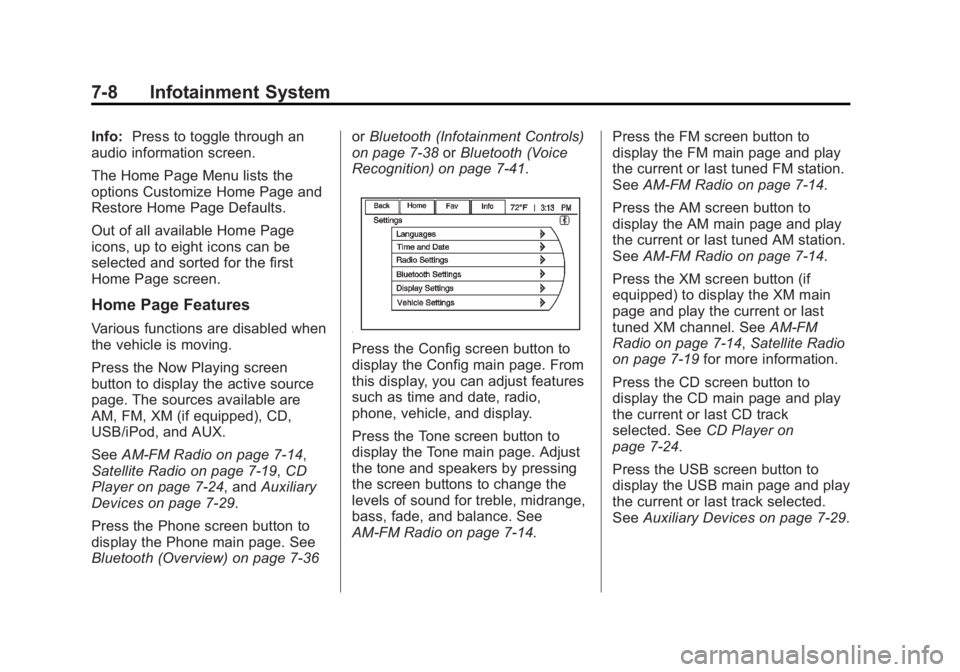
Press the Config screen button to
display the Config main page. From
this display, you can adjust features
such as time and date, radio,
phone, vehicle, and display.
Press the Tone screen button to
display the Tone main page. Adjust
the tone and speakers by pressing
the screen buttons to change the
levels of sound for treble, midrange,
bass, fade, and balance. See
AM-FM Radio on page 7‑14. Press the FM screen button to
display the FM main page and play
the current or last tuned FM station.
See
AM-FM Radio on page 7‑14.
Press the AM screen button to
display the AM main page and play
the current or last tuned AM station.
See AM-FM Radio on page 7‑14.
Press the XM screen button (if
equipped) to display the XM main
page and play the current or last
tuned XM channel. See AM-FM
Radio on page 7‑14, Satellite Radio
on page 7‑19 for more information.
Press the CD screen button to
display the CD main page and play
the current or last CD track
selected. See CD Player on
page 7‑24.
Press the USB screen button to
display the USB main page and play
the current or last track selected.
See Auxiliary Devices on page 7‑29.
Page 173 of 440
Black plate (9,1)Buick Regal Owner Manual - 2012
Infotainment System 7-9
Press the AUX screen button to
access any connected auxiliary
device. SeeAuxiliary Devices on
page 7‑29.
The Configuration Menu is used to
adjust features and preferences,
such as Sound, Radio, Nav
(Navigation), Display, or Clock
Settings.
1. Press the Config screen button on the Home Page or the
CONFIG button on the faceplate.
2. Touch-tap the scroll bar until the desired option displays. Select
the desired settings to change.
Languages
The vehicle supports English,
French (Canadian), and Spanish.
The default language is English.
To change the display language,
see Vehicle Personalization on
page 5‑35 for more information.
Time and Date Settings
From the Time & Date Settings
screen button, press to display the
Time & Date Settings menu.
Set Time: Press + or−to increase
or decrease the Hours and Minutes
displayed on the clock.
Set Date: Press + or−to increase
or decrease the day.
Set Time Format: Press the 12 HR
screen button for standard time;
press the 24 HR screen button for
military time.
Set Date Format: Depending on
the region, the following date
formats may be available: MM/DD/
YYYY, DD.MM.YYYY, or YYYY/
MM/DD.
Radio Settings
Press the Config button on the
Home Page or the CONFIG button
on the faceplate to enter the menu
options. Turn the Multifunction knob
or touch-tap the scroll bar to scroll
through the available options. Press the Multifunction knob or press
Radio Settings to display the radio
settings menu. Press this feature to
make changes for radio information
displayed, preset pages, Auto
Volume Control, and XM Categories
Restore. See
Satellite Radio on
page 7‑19 (if equipped), for more
information about XM Categories.
The Radio Settings are:
Speed Dependent Volume: Select
OFF, Low, Medium, or High
sensitivity to automatically adjust
the volume to minimize the effects
of unwanted background noise that
can result from changing road
surfaces, driving speeds, or open
windows. This feature works best at
lower volume settings where
background noise is typically louder
than the sound system volume.
Startup Volume: Press to set the
maximum volume level for startup
that will be used even if a higher
volume had been set when the radio
was turned off.
Page 174 of 440
Black plate (10,1)Buick Regal Owner Manual - 2012
7-10 Infotainment System
Radio Favorites:Press to select
the number of FAV pages to be
used in the system.
Add/Remove XM Categories:
Press to customize which available
XM Categories are used and
displayed in the system.
Phone Settings
See Bluetooth (Overview) on
page 7‑36 orBluetooth
(Infotainment Controls) on
page 7‑38 orBluetooth (Voice
Recognition) on page 7‑41 in the
“Phone” section for more
information on phone settings.
Vehicle Settings
See Vehicle Personalization on
page 5‑35 for more information.
Display Settings
Press the Config button on the
Home Page or the CONFIG button
on the faceplate, then select Display
Settings from the list. The following options may display:
Dimming Mode:
Press to change
the screen background. The
Automatic setting adjusts the screen
background automatically
depending on the exterior lighting
conditions.
To change the overall brightness
setting for the display, use the
vehicle interior lighting instrument
panel illumination control.
English and Metric Unit
Conversion
To change the display units between
English and metric units, see Driver
Information Center (DIC) on
page 5‑25 for more information.
Cleaning the Display
Notice:Using abrasive cleaners
when cleaning glass surfaces
could scratch the glass. Use only
a soft cloth and do not spray
cleaner directly on the system as
it could affect the mechanical
parts. Do not wipe the panel with a hard
cloth or use a volatile liquid such as
paint thinner; it could scratch the
surface or erase the characters on
the buttons.
Operation
Controls
The infotainment system is operated
by using the pushbuttons,
Multifunction knobs, menus shown
on the display, and steering wheel
controls, if equipped.
Turning the System On or Off
3/O(Volume/Power):
Press to
turn the system on and off.
Automatic Switch‐Off
If the infotainment system has been
turned on after the ignition is turned
off, the system will turn off
automatically after 10 minutes.
Page 178 of 440
Black plate (14,1)Buick Regal Owner Manual - 2012
7-14 Infotainment System
5. Press the BACK button to goback to the System
Configuration menu.
Maximum Startup Volume
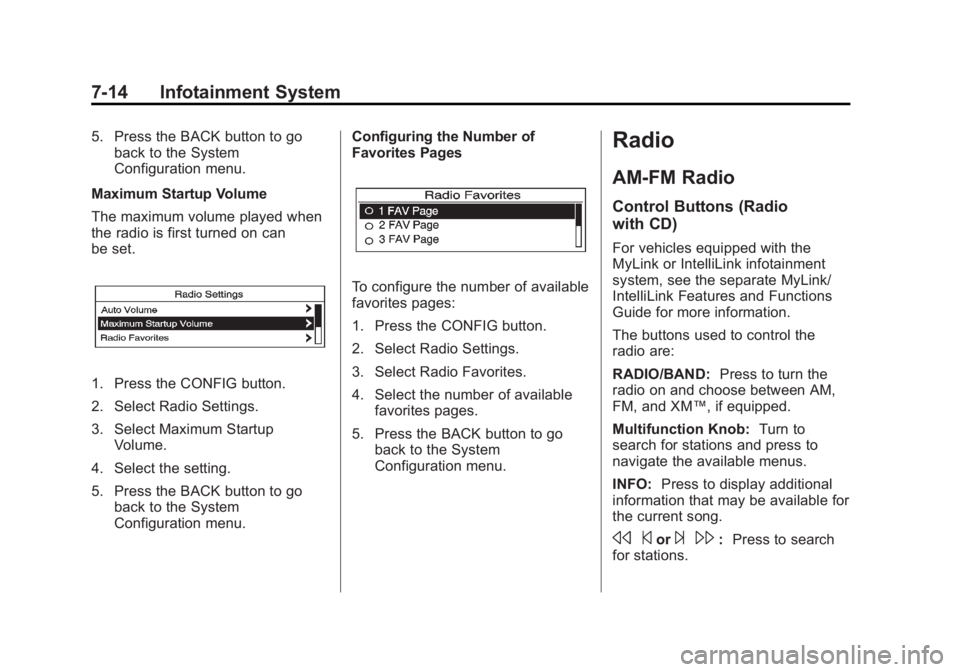
The maximum volume played when
the radio is first turned on can
be set.
1. Press the CONFIG button.
2. Select Radio Settings.
3. Select Maximum Startup Volume.
4. Select the setting.
5. Press the BACK button to go back to the System
Configuration menu. Configuring the Number of
Favorites Pages
To configure the number of available
favorites pages:
1. Press the CONFIG button.
2. Select Radio Settings.
3. Select Radio Favorites.
4. Select the number of available
favorites pages.
5. Press the BACK button to go back to the System
Configuration menu.
Radio
AM-FM Radio
Control Buttons (Radio
with CD)
For vehicles equipped with the
MyLink or IntelliLink infotainment
system, see the separate MyLink/
IntelliLink Features and Functions
Guide for more information.
The buttons used to control the
radio are:
RADIO/BAND: Press to turn the
radio on and choose between AM,
FM, and XM™, if equipped.
Multifunction Knob: Turn to
search for stations and press to
navigate the available menus.
INFO: Press to display additional
information that may be available for
the current song.
s ©or¨\:Press to search
for stations.
Page 179 of 440
Black plate (15,1)Buick Regal Owner Manual - 2012
Infotainment System 7-15
Buttons 1 to 6:Press to select
preset stations.
FAV 1/2/3: Press to open the
favorites list and select favorites
pages.
AS 1/2: Press to open the
autostore list and select autostore
pages.
RDS (Radio Data System)
The radio may have RDS. The RDS
feature is available for use only on
FM stations that broadcast RDS
information. This feature only works
when the information from the radio
station is available. In rare cases, a
radio station could broadcast
incorrect information that causes the
radio features to work improperly.
If this happens, contact the radio
station.
While the radio is tuned to an
FM-RDS station, the station
name or call letters display.
Radio Menus
Radio menus are available for AM
and FM.
Push the multifunction knob to open
the main radio menu for that band.
Selecting a Band
Press the RADIO/BAND button
to choose AM, FM, or XM™,
if equipped. The last station that
was playing starts playing again.
Selecting a Station
Seek Tuning
If the radio station is not known:
Briefly press
s ©or¨\to
automatically search for the next
available station. If a station is not
found, the radio switches to a more
sensitive search level. If a station
still is not found, the frequency that
was last active begins to play. If the radio station is known:
Press and hold
s
©or¨\until
the station on the display is
reached, then release the button.
Manual Tuning
Turn the multifunction knob to select
the frequency on the display.
Favorites List
1. Press the multifunction knob.
2. Select Favorites List.
3. Select the station.
Station Lists
1. Press the multifunction knob.
2. Select AM or FM Station List. All receivable stations in the current
reception area are displayed. If a
station list has not been created,
an automatic station search
is done.
3. Select the station.
Page 180 of 440
Black plate (16,1)Buick Regal Owner Manual - 2012
7-16 Infotainment System
Category Lists
Most stations that broadcast an
RDS program‐type code specify the
type of programming transmitted.
Some stations change the program
type code depending on the
content. The system stores the RDS
stations sorted by program type in
the FM category list.
To search for a programming type
determined by station:
1. Press the multifunction knob.
2. Select FM Category List. A list ofall programming types available
displays.
3. Select the programming type. A list of stations that transmit
programming of the selected
type displays.
4. Select the station. The category lists are updated
when the station lists are
updated. Updating Station & Category Lists
If stations stored in the station list
can no longer be received:
1. Press the multifunction knob.
2. Select Update AM or FM Station
List, if the stations stored in the
station list are no longer
received. A station search will be
completed and the first station in
the updated list will play.
To cancel the station search, press
the multifunction knob.
Storing a Station as a Favorite
Stations from all bands can be
stored in any order in the favorite
pages.
Up to six stations can be stored in
each favorite page and the number
of available favorite pages can
be set. Storing Stations
To store the station to a position in
the list, press the corresponding
numeric button 1 to 6 until a beep is
heard. The stored station will begin
playback.
Retrieving Stations
Press the FAV 1/2/3 button to open
a favorite page or to switch to
another favorite page. Briefly press
one of the 1 to 6 buttons to retrieve
the station.
Autostore Stations
AS 1/2 (Autostore):
Autostore
searches and stores six FM and
six AM stations with the strongest
signal. To use autostore:
1. Press RADIO/BAND to select FM or AM.
2. Press AS 1/2 for at least two seconds. The radio then
searches for available stations.
3. The radio automatically stores the six strongest stations found
as autostore presets.
Page 181 of 440
Black plate (17,1)Buick Regal Owner Manual - 2012
Infotainment System 7-17
Press the AS 1/2 button to alternate
between the autostore stations and
favorites.
AS displays on the radio when using
autostore presets.
Autostore does not delete
previously stored favorite stations.
Autostore does not function with XM
radio stations.
Control Buttons (Radio with
CD and Touchscreen)
The buttons used to control the
radio are:
SRCE:Press to choose between
AM, FM, XM™, if equipped,
and CD.
Multifunction Knob: Turn to
search for stations and press to
navigate the available menus.
INFO: Press to display additional
information that may be available for
the current song.
s ©or¨\:Press to search
for stations. Buttons 1 to 6:
Press to select
preset stations.
FAV 1/2/3: Press to open the
favorites list and select favorites
pages.
AS 1/2: Press to open the
autostore list and select autostore
pages.
RDS (Radio Data System)
The radio may have RDS. The RDS
feature is available for use only on
FM stations that broadcast RDS
information. This feature only works
when the information from the radio
station is available. In rare cases, a
radio station could broadcast
incorrect information that causes the
radio features to work improperly.
If this happens, contact the radio
station.
While the radio is tuned to an
FM-RDS station, the station name
or call letters display.
Radio Menus
Radio menus are available for AM
and FM.
Push the Multifunction knob to open
the main radio menu for that band.
Selecting a Band
Press the SRCE button to choose
AM, FM, XM, if equipped, or CD.
The last station that was playing
starts playing again.
Selecting a Station
Seek Tuning
If the radio station is not known:
Briefly press
s ©or¨\to
automatically search for the next
available station. If a station is not
found, the radio switches to a more
sensitive search level. If a station
still is not found, the frequency that
was last active begins to play.
Page 182 of 440
Black plate (18,1)Buick Regal Owner Manual - 2012
7-18 Infotainment System
If the radio station is known:
Press and hold
s©or¨\until
the station on the display is
reached, then release the button.
Manual Tuning
Turn the Multifunction knob to select
the frequency on the display.
Favorites List
1. Press the Multifunction knob.
2. Select Favorites List.
3. Select the station.
Station Lists
1. Press the Multifunction knob.
2. Select AM or FM Station List. All receivable stations in the current
reception area are displayed. If a
station list has not been created,
an automatic station search
is done.
3. Select the station. Category Lists
Most stations that broadcast an
RDS program‐type code specify the
type of programming transmitted.
Some stations change the program
type code depending on the
content. The system stores the RDS
stations sorted by program type in
the FM category list.
To search for a programming type
determined by station:
1. Press the Multifunction knob.
2. Select FM Category List. A list of
all programming types available
displays.
3. Select the programming type. A list of stations that transmit
programming of the selected
type displays.
4. Select the station. The category lists are updated
when the station lists are
updated. Updating Station and Category
Lists
If stations stored in the station list
can no longer be received:
1. Press the Multifunction knob.
2. Select Update AM or FM Station
List, if the stations stored in
the station list are no longer
received. A station search will be
completed and the first station in
the updated list will play.
To cancel the station search, press
the Multifunction knob.
Storing a Station as a Favorite
Stations from all bands can be
stored in any order in the favorite
pages.
Up to six stations can be stored in
each favorite page and the number
of available favorite pages can
be set.
Page 183 of 440
Black plate (19,1)Buick Regal Owner Manual - 2012
Infotainment System 7-19
Storing Stations
To store the station to a position in
the list, press the corresponding
numeric button 1 to 6 until a beep is
heard. The stored station will begin
playback.
Retrieving Stations
Press the FAV 1/2/3 button to open
a favorite page or to switch to
another favorite page. Briefly press
one of the 1 to 6 buttons to retrieve
the station.
Autostore Stations
AS 1/2 (Autostore):Autostore
searches and stores six FM and
six AM stations with the strongest
signal. To use autostore:
1. Press SRCE to select FM or AM.
2. Press AS 1/2 for at least two seconds. The radio then
searches for available stations.
3. The radio automatically stores the six strongest stations found
as autostore presets. Press the AS 1/2 button to alternate
between the autostore stations and
favorites.
AS displays on the radio when using
autostore presets.
Autostore does not delete
previously stored favorite stations.
Autostore does not function with XM
radio stations.
Satellite Radio
For vehicles equipped with the
MyLink or IntelliLink infotainment
system, see the separate MyLink/
IntelliLink Features and Functions
Guide for more information.
Vehicles with an XM Satellite Radio
tuner and a valid XM Satellite Radio
subscription can receive XM
programming.
XM Satellite Radio Service
XM is a satellite radio service based
in the 48 contiguous United States
and 10 Canadian provinces. XM
Satellite Radio has a wide variety of programming and commercial-free
music, coast to coast, and in
digital-quality sound. A service fee
is required to receive the XM
service. If XM Service needs to be
reactivated, the radio will display
"No Subscription Please Renew" on
channel XM1. For more information,
contact XM at www.xmradio.com or
1-800-929-2100 in the U.S. and
www.xmradio.ca or
1-877-438-9677 in Canada.
Control Buttons (Radio
with CD)
The buttons used to control the XM
radio are:
RADIO/BAND:
Press to turn the
radio on and choose between AM,
FM, and XM™, if equipped.
Multifunction Knob: Turn to
search for channels and press to
navigate the available menus.
INFO: Press to display additional
information that may be available
about the current song.
Page 184 of 440
Black plate (20,1)Buick Regal Owner Manual - 2012
7-20 Infotainment System
s©or¨\:Press to go to the
previous or next channel.
FAV 1/2/3: Press to open the
favorites list and select favorite
pages.
Buttons 1 to 6: Press to select
preset stations.
Selecting the XM Band
Press the SRCE button to choose
between the AM, FM, and XM
bands. The last channel played in
that band begins to play when that
band is selected.
XM Categories
XM channels are organized in
categories.
Removing or Adding Categories
Channels in a category that have
been removed can still be accessed
by using the
s ©or¨\
buttons, or the Multifunction knob. To add or remove categories:
1. Press the CONFIG button.
2. Select Radio Settings.
3. Select XM Categories.
4. Turn the Multifunction knob to
highlight the category.
5. Press the Multifunction knob to remove or add the category.
Selecting an XM Channel
XM channels can be selected by
station lists or category lists.
Selecting a Channel by
Station List
XM channels can be selected by
using
s©,¨\, or the
Multifunction knob.
To select an XM channel using
s
©
or¨ \, do one of the following:
.Press and releases ©or¨
\
to go to the previous or next
channel.
.Press and holds ©or¨\
to scroll through the previous or
next channels until the channel
is reached.
To select an XM channel using the
Multifunction knob:
1. Turn the Multifunction knob to highlight an XM channel.
2. Press the Multifunction knob to select the channel, or leave the
channel highlighted.
To select an XM channel using
the menu:
1. Press the Multifunction knob.
2. Select XM Stations List.
3. Select the channel.
Selecting a Channel by Category
1. Press the Multifunction knob.
2. Select XM Category List. A list of all programming types available
displays.
3. Select the programming type.
4. Select the channel.