steering wheel CADILLAC ATS 2013 1.G User Guide
[x] Cancel search | Manufacturer: CADILLAC, Model Year: 2013, Model line: ATS, Model: CADILLAC ATS 2013 1.GPages: 450, PDF Size: 6.98 MB
Page 77 of 450
Black plate (23,1)Cadillac ATS Owner Manual - 2013 - CRC - 10/5/12
Seats and Restraints 3-23
{WARNING
If something is between an
occupant and an airbag, the
airbag might not inflate properly
or it might force the object into
that person causing severe injury
or even death. The path of an
inflating airbag must be kept
clear. Do not put anything
between an occupant and an
airbag, and do not attach or put
anything on the steering wheel
hub or on or near any other
airbag covering.
Do not use seat accessories that
block the inflation path of a
seat-mounted side impact airbag.
Never secure anything to the roof
of a vehicle with roof-rail airbags
by routing a rope or tie‐down
through any door or window
opening. If you do, the path of an
inflating roof-rail airbag will be
blocked.
When Should an Airbag
Inflate?
Frontal airbags are designed to
inflate in moderate to severe frontal
or near frontal crashes to help
reduce the potential for severe
injuries, mainly to the driver's or
front outboard passenger's head
and chest. However, they are only
designed to inflate if the impact
exceeds a predetermined
deployment threshold. Deployment
thresholds are used to predict how
severe a crash is likely to be in time
for the airbags to inflate and help
restrain the occupants.
Whether the frontal airbags will or
should inflate is not based primarily
on how fast the vehicle is traveling.
It depends on what is hit, the
direction of the impact, and how
quickly the vehicle slows down.Frontal airbags may inflate at
different crash speeds depending on
whether the vehicle hits an object
straight on or at an angle, and
whether the object is fixed or
moving, rigid or deformable, narrow
or wide.
Thresholds can also vary with
specific vehicle design.
Frontal airbags are not intended to
inflate during vehicle rollovers, in
rear impacts, or in many side
impacts.
In addition, the vehicle has
dual-stage frontal airbags.
Dual-stage airbags adjust the
restraint according to crash severity.
Frontal knee airbags are designed
to inflate in moderate to severe
frontal or near frontal impacts that
exceed a predetermined
deployment threshold.
Page 78 of 450
Black plate (24,1)Cadillac ATS Owner Manual - 2013 - CRC - 10/5/12
3-24 Seats and Restraints
The vehicle has electronic frontal
sensors, which help the sensing
system distinguish between a
moderate frontal impact and a more
severe frontal impact. For moderate
frontal impacts, dual-stage airbags
inflate at a level less than full
deployment. For more severe frontal
impacts, full deployment occurs.
The passenger seat position sensor
and the passenger safety belt
buckle provide information that is
used to determine if the passenger
knee airbag should deploy.
The vehicle has seat-mounted side
impact airbags and roof-rail airbags.
SeeAirbag System on page 3‑19.
Seat-mounted side impact and
roof-rail airbags are intended to
inflate in moderate to severe side
crashes depending on the location
of the impact. In addition, these
roof-rail airbags are intended to
inflate during a rollover or in a
severe frontal impact. Seat-mounted
side impact and roof-rail airbags will
inflate if the crash severity is above the system's designed threshold
level. The threshold level can vary
with specific vehicle design.
Seat-mounted side impact airbags
are not intended to inflate in frontal
impacts, near frontal impacts,
rollovers, or rear impacts.
Roof-rail airbags are not intended
to inflate in rear impacts.
A seat-mounted side impact airbag
is intended to inflate on the side of
the vehicle that is struck. Both
roof-rail airbags will inflate when
either side of the vehicle is struck or
if the sensing system predicts that
the vehicle is about to roll over on
its side, or in a severe frontal
impact.
In any particular crash, no one can
say whether an airbag should have
inflated simply because of the
vehicle damage or repair costs.What Makes an Airbag
Inflate?
In a deployment event, the sensing
system sends an electrical signal
triggering a release of gas from the
inflator. Gas from the inflator fills the
airbag causing the bag to break out
of the cover. The inflator, the airbag,
and related hardware are all part of
the airbag module.
For airbag location, see
Where Are
the Airbags? on page 3‑21.
How Does an Airbag
Restrain?
In moderate to severe frontal or
near frontal collisions, even belted
occupants can contact the steering
wheel or the instrument panel. In
moderate to severe side collisions,
even belted occupants can contact
the inside of the vehicle.
Page 86 of 450
Black plate (32,1)Cadillac ATS Owner Manual - 2013 - CRC - 10/5/12
3-32 Seats and Restraints
The operation of the airbag system
can also be affected by changing or
moving any parts of the front seats,
safety belts, the airbag sensing and
diagnostic module, steering wheel,
instrument panel, roof-rail airbag
modules, ceiling headliner or pillar
garnish trim, overhead console,
front sensors, side impact sensors,
or airbag wiring.
Your dealer and the service manual
have information about the location
of the airbag sensors, sensing and
diagnostic module, and airbag
wiring.
In addition, the vehicle has a
passenger sensing system for the
front outboard passenger position,
which includes sensors that are
part of the passenger seat. The
passenger sensing system may not
operate properly if the original seat
trim is replaced with non-GM
covers, upholstery, or trim; or with
GM covers, upholstery, or trim
designed for a different vehicle. Any
object, such as an aftermarket seat
heater or a comfort-enhancing pador device, installed under or on
top of the seat fabric, could also
interfere with the operation of the
passenger sensing system. This
could either prevent proper
deployment of the passenger
airbag(s) or prevent the passenger
sensing system from properly
turning off the passenger airbag(s).
See
Passenger Sensing System on
page 3‑27.
The vehicle has rollover roof-rail
airbags, see Different Size Tires
and Wheels on page 10‑61.
If your vehicle needs to be modified
because you have a disability and
you have questions about whether
the modifications will affect the
vehicle's airbag system, or if you
have questions about whether the
airbag system will be affected if the
vehicle is modified for any other
reason, call Customer Assistance.
See Customer Assistance Offices
(U.S. and Canada) on page 13‑4 or
Customer Assistance Offices
(Mexico) on page 13‑5.Airbag System Check
The airbag system does not need
regularly scheduled maintenance or
replacement. Make sure the airbag
readiness light is working. See
Airbag Readiness Light on
page 5‑14.
Notice: If an airbag covering is
damaged, opened, or broken, the
airbag may not work properly. Do
not open or break the airbag
coverings. If there are any
opened or broken airbag covers,
have the airbag covering and/or
airbag module replaced. For the
location of the airbags, see
Where Are the Airbags? on
page 3‑21. See your dealer for
service.
Page 111 of 450
Black plate (1,1)Cadillac ATS Owner Manual - 2013 - CRC - 10/5/12
Instruments and Controls 5-1
Instruments and
Controls
Controls
Steering Wheel Adjustment . . . 5-2
Steering Wheel Controls . . . . . . 5-2
Heated Steering Wheel . . . . . . . 5-3
Horn . . . . . . . . . . . . . . . . . . . . . . . . . . 5-4
Windshield Wiper/Washer . . . . . 5-4
Compass . . . . . . . . . . . . . . . . . . . . . 5-5
Clock (Base Radio) . . . . . . . . . . . 5-6
Clock (Uplevel Radio) . . . . . . . . . 5-6
Power Outlets . . . . . . . . . . . . . . . . . 5-7
Warning Lights, Gauges, and
Indicators
Warning Lights, Gauges, andIndicators . . . . . . . . . . . . . . . . . . . . 5-8
Instrument Cluster . . . . . . . . . . . . 5-9
Speedometer . . . . . . . . . . . . . . . . 5-10
Odometer . . . . . . . . . . . . . . . . . . . . 5-11
Trip Odometer . . . . . . . . . . . . . . . 5-11
Tachometer . . . . . . . . . . . . . . . . . . 5-11
Fuel Gauge . . . . . . . . . . . . . . . . . . 5-11
Engine Coolant Temperature Gauge . . . . . . . . . . . . . . . . . . . . . . 5-12
Safety Belt Reminders . . . . . . . 5-13 Airbag Readiness Light . . . . . . 5-14
Passenger Airbag Status
Indicator . . . . . . . . . . . . . . . . . . . . 5-14
Charging System Light . . . . . . 5-15
Malfunction Indicator Lamp . . . . . . . . . . . . . 5-16
Brake System Warning Light . . . . . . . . . . . . . . . . . . . . . . . 5-18
Parking Brake Light . . . . . . . . . . 5-19
Service Electric Parking Brake Light . . . . . . . . . . . . . . . . . . . . . . . 5-19
Antilock Brake System (ABS) Warning Light . . . . . . . . . . . . . . 5-20
Lane Departure Warning (LDW) Light . . . . . . . . . . . . . . . . 5-20
Vehicle Ahead Indicator . . . . . . 5-20
Traction Off Light . . . . . . . . . . . . 5-21
StabiliTrak
®OFF Light . . . . . . . 5-21
Traction Control System (TCS)/StabiliTrak
®Light . . . . 5-21
Engine Coolant Temperature Warning Light . . . . . . . . . . . . . . 5-22
Tire Pressure Light . . . . . . . . . . 5-22
Engine Oil Pressure Light . . . . 5-23
Low Fuel Warning Light . . . . . . 5-23
Security Light . . . . . . . . . . . . . . . . 5-24
High-Beam On Light . . . . . . . . . 5-24 Adaptive Forward Lighting
(AFL) Light . . . . . . . . . . . . . . . . . 5-24
Lamps On Reminder . . . . . . . . . 5-25
Cruise Control Light . . . . . . . . . 5-25
Information Displays
Driver Information Center (DIC) . . . . . . . . . . . . . . . 5-26
Head-Up Display (HUD) . . . . . 5-29
Vehicle Messages
Vehicle Messages . . . . . . . . . . . 5-32
Battery Voltage and Charging Messages . . . . . . . . . . . . . . . . . . 5-33
Brake System Messages . . . . 5-33
Compass Messages . . . . . . . . . 5-34
Cruise Control Messages . . . . 5-34
Door Ajar Messages . . . . . . . . . 5-34
Engine Cooling System Messages . . . . . . . . . . . . . . . . . . 5-35
Engine Oil Messages . . . . . . . . 5-35
Engine Power Messages . . . . 5-36
Fuel System Messages . . . . . . 5-36
Key and Lock Messages . . . . . 5-36
Lamp Messages . . . . . . . . . . . . . 5-37
Object Detection System Messages . . . . . . . . . . . . . . . . . . 5-38
Ride Control System Messages . . . . . . . . . . . . . . . . . . 5-40
Page 112 of 450
Black plate (2,1)Cadillac ATS Owner Manual - 2013 - CRC - 10/5/12
5-2 Instruments and Controls
Airbag System Messages . . . . 5-41
Security Messages . . . . . . . . . . 5-41
Service Vehicle Messages . . . 5-41
Starting the VehicleMessages . . . . . . . . . . . . . . . . . . 5-41
Tire Messages . . . . . . . . . . . . . . . 5-42
Transmission Messages . . . . . 5-42
Vehicle Reminder Messages . . . . . . . . . . . . . . . . . . 5-43
Vehicle Speed Messages . . . . 5-43
Washer Fluid Messages . . . . . 5-43
Vehicle Personalization
Vehicle Personalization . . . . . . 5-43
Universal Remote System
Universal Remote System . . . 5-49
Universal Remote System Programming . . . . . . . . . . . . . . . 5-50
Universal Remote System Operation . . . . . . . . . . . . . . . . . . 5-52
Controls
Steering Wheel
Adjustment
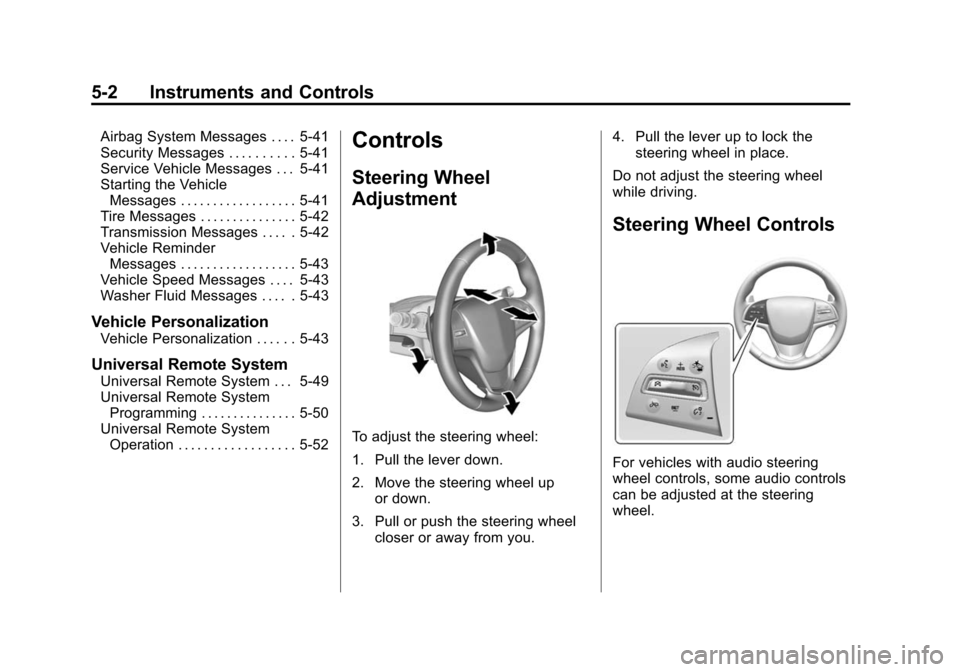
To adjust the steering wheel:
1. Pull the lever down.
2. Move the steering wheel up
or down.
3. Pull or push the steering wheel closer or away from you. 4. Pull the lever up to lock the
steering wheel in place.
Do not adjust the steering wheel
while driving.
Steering Wheel Controls
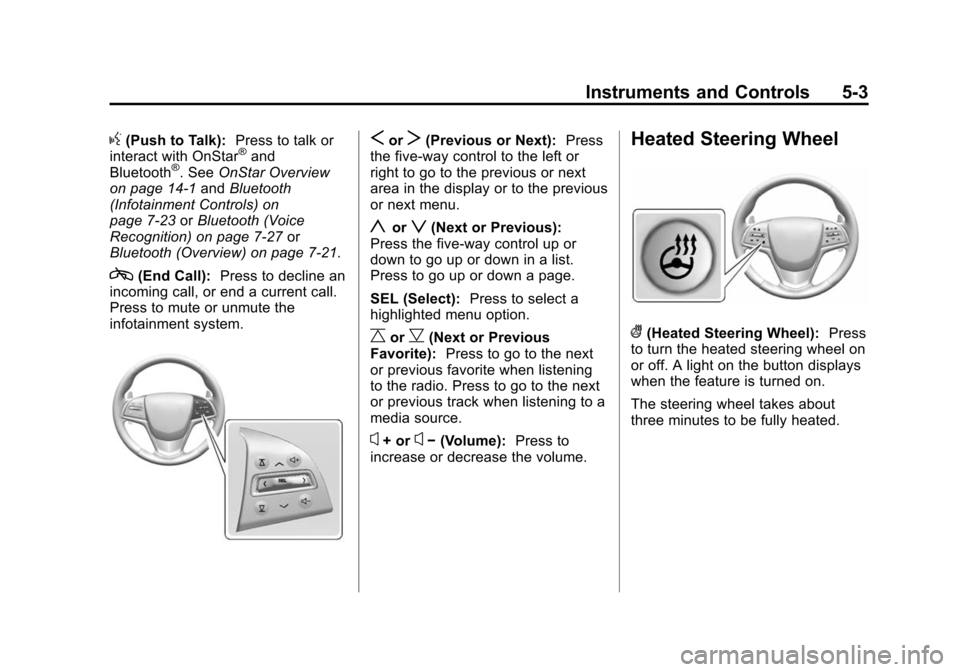
For vehicles with audio steering
wheel controls, some audio controls
can be adjusted at the steering
wheel.
Page 113 of 450
Black plate (3,1)Cadillac ATS Owner Manual - 2013 - CRC - 10/5/12
Instruments and Controls 5-3
g(Push to Talk):Press to talk or
interact with OnStar®and
Bluetooth®. See OnStar Overview
on page 14‑1 andBluetooth
(Infotainment Controls) on
page 7‑23 orBluetooth (Voice
Recognition) on page 7‑27 or
Bluetooth (Overview) on page 7‑21.
c(End Call): Press to decline an
incoming call, or end a current call.
Press to mute or unmute the
infotainment system.
SorT(Previous or Next): Press
the five-way control to the left or
right to go to the previous or next
area in the display or to the previous
or next menu.
yorz(Next or Previous):
Press the five-way control up or
down to go up or down in a list.
Press to go up or down a page.
SEL (Select): Press to select a
highlighted menu option.
CorB(Next or Previous
Favorite): Press to go to the next
or previous favorite when listening
to the radio. Press to go to the next
or previous track when listening to a
media source.
x+ orx− (Volume): Press to
increase or decrease the volume.
Heated Steering Wheel
((Heated Steering Wheel): Press
to turn the heated steering wheel on
or off. A light on the button displays
when the feature is turned on.
The steering wheel takes about
three minutes to be fully heated.
Page 114 of 450
Black plate (4,1)Cadillac ATS Owner Manual - 2013 - CRC - 10/5/12
5-4 Instruments and Controls
Horn
Pressaon the steering wheel pad
to sound the horn.
Windshield Wiper/Washer
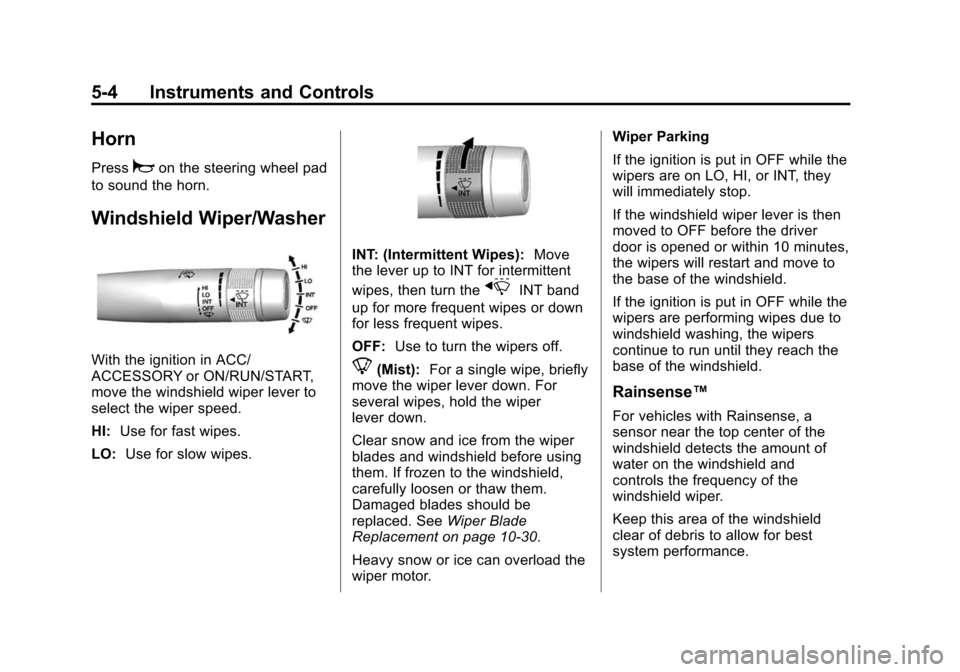
With the ignition in ACC/
ACCESSORY or ON/RUN/START,
move the windshield wiper lever to
select the wiper speed.
HI: Use for fast wipes.
LO: Use for slow wipes.
INT: (Intermittent Wipes): Move
the lever up to INT for intermittent
wipes, then turn the
xINT band
up for more frequent wipes or down
for less frequent wipes.
OFF: Use to turn the wipers off.
8(Mist): For a single wipe, briefly
move the wiper lever down. For
several wipes, hold the wiper
lever down.
Clear snow and ice from the wiper
blades and windshield before using
them. If frozen to the windshield,
carefully loosen or thaw them.
Damaged blades should be
replaced. See Wiper Blade
Replacement on page 10‑30.
Heavy snow or ice can overload the
wiper motor. Wiper Parking
If the ignition is put in OFF while the
wipers are on LO, HI, or INT, they
will immediately stop.
If the windshield wiper lever is then
moved to OFF before the driver
door is opened or within 10 minutes,
the wipers will restart and move to
the base of the windshield.
If the ignition is put in OFF while the
wipers are performing wipes due to
windshield washing, the wipers
continue to run until they reach the
base of the windshield.
Rainsense™
For vehicles with Rainsense, a
sensor near the top center of the
windshield detects the amount of
water on the windshield and
controls the frequency of the
windshield wiper.
Keep this area of the windshield
clear of debris to allow for best
system performance.
Page 120 of 450
Black plate (10,1)Cadillac ATS Owner Manual - 2013 - CRC - 10/5/12
5-10 Instruments and Controls
Cluster Application Displays
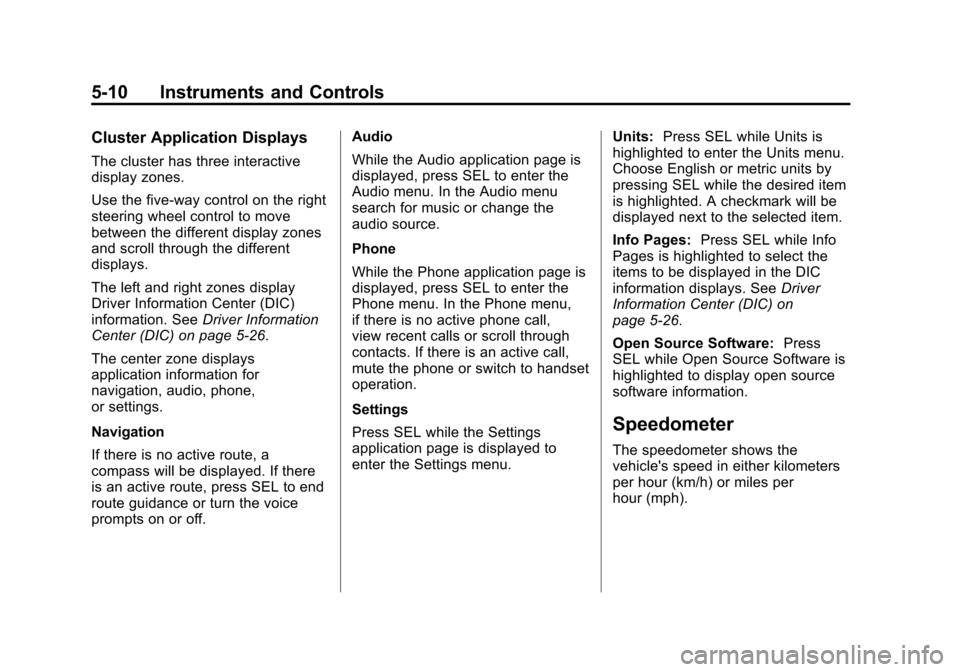
The cluster has three interactive
display zones.
Use the five-way control on the right
steering wheel control to move
between the different display zones
and scroll through the different
displays.
The left and right zones display
Driver Information Center (DIC)
information. SeeDriver Information
Center (DIC) on page 5‑26.
The center zone displays
application information for
navigation, audio, phone,
or settings.
Navigation
If there is no active route, a
compass will be displayed. If there
is an active route, press SEL to end
route guidance or turn the voice
prompts on or off. Audio
While the Audio application page is
displayed, press SEL to enter the
Audio menu. In the Audio menu
search for music or change the
audio source.
Phone
While the Phone application page is
displayed, press SEL to enter the
Phone menu. In the Phone menu,
if there is no active phone call,
view recent calls or scroll through
contacts. If there is an active call,
mute the phone or switch to handset
operation.
Settings
Press SEL while the Settings
application page is displayed to
enter the Settings menu.
Units:
Press SEL while Units is
highlighted to enter the Units menu.
Choose English or metric units by
pressing SEL while the desired item
is highlighted. A checkmark will be
displayed next to the selected item.
Info Pages: Press SEL while Info
Pages is highlighted to select the
items to be displayed in the DIC
information displays. See Driver
Information Center (DIC) on
page 5‑26.
Open Source Software: Press
SEL while Open Source Software is
highlighted to display open source
software information.
Speedometer
The speedometer shows the
vehicle's speed in either kilometers
per hour (km/h) or miles per
hour (mph).
Page 127 of 450
Black plate (17,1)Cadillac ATS Owner Manual - 2013 - CRC - 10/5/12
Instruments and Controls 5-17
.If towing a trailer, reduce the
amount of cargo being hauled as
soon as it is possible.
If the light continues to flash, find a
safe place to stop and park the
vehicle. Turn the vehicle off, wait at
least 10 seconds, and restart the
engine. If the light is still flashing,
follow the previous steps and see
your dealer for service as soon as
possible.
Light On Steady: An emission
control system malfunction has
been detected on the vehicle.
Diagnosis and service might be
required.
The following may correct an
emission control system
malfunction:
.Check that the fuel cap is fully
installed. See Filling the Tank on
page 9‑68. The diagnostic
system can determine if the
fuel cap has been left off or
improperly installed. A loose or
missing fuel cap allows fuel to
evaporate into the atmosphere. A few driving trips with the cap
properly installed should turn the
light off.
.Check that good quality fuel is
used. Poor fuel quality causes
the engine not to run as
efficiently as designed and may
cause stalling after start-up,
stalling when the vehicle is
changed into gear, misfiring,
hesitation on acceleration,
or stumbling on acceleration.
These conditions might go away
once the engine is warmed up.
If one or more of these conditions
occurs, change the fuel brand used.
It may require at least one full tank
of the proper fuel to turn the light off.
See Recommended Fuel on
page 9‑64.
If none of the above have made
the light turn off, your dealer can
check the vehicle. The dealer has
the proper test equipment and diagnostic tools to fix any
mechanical or electrical problems
that might have developed.Emissions Inspection and
Maintenance Programs
Depending on where you live,
your vehicle may be required to
participate in an emission control
system inspection and maintenance
program. For the inspection, the
emission system test equipment will
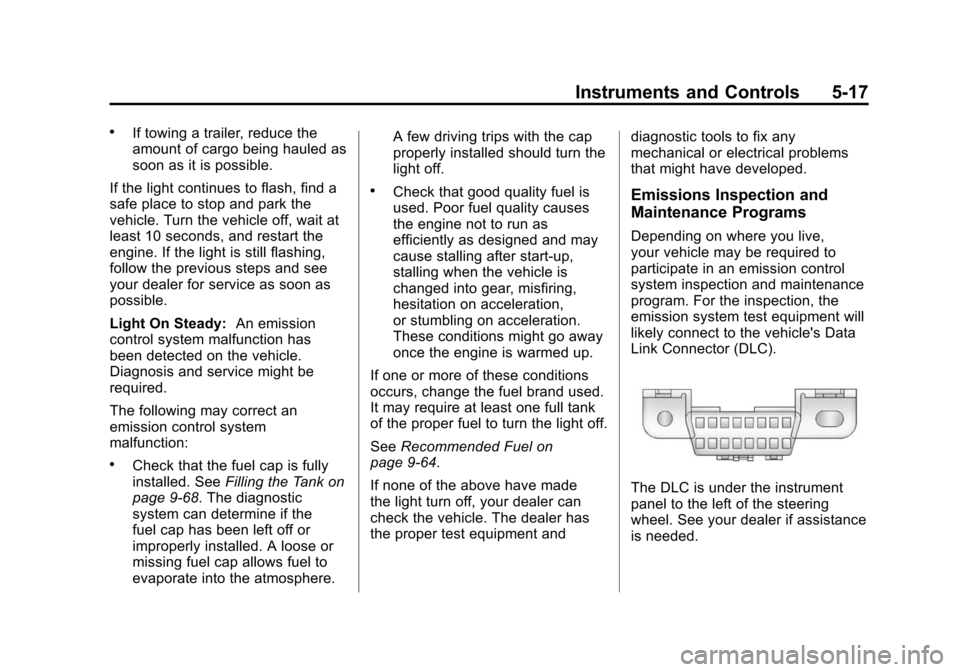
likely connect to the vehicle's Data
Link Connector (DLC).
The DLC is under the instrument
panel to the left of the steering
wheel. See your dealer if assistance
is needed.
Page 136 of 450
Black plate (26,1)Cadillac ATS Owner Manual - 2013 - CRC - 10/5/12
5-26 Instruments and Controls
Information Displays
Driver Information
Center (DIC)
The DIC displays are shown in the
left and right interactive display
zones on the instrument cluster. The
displays show the status of many
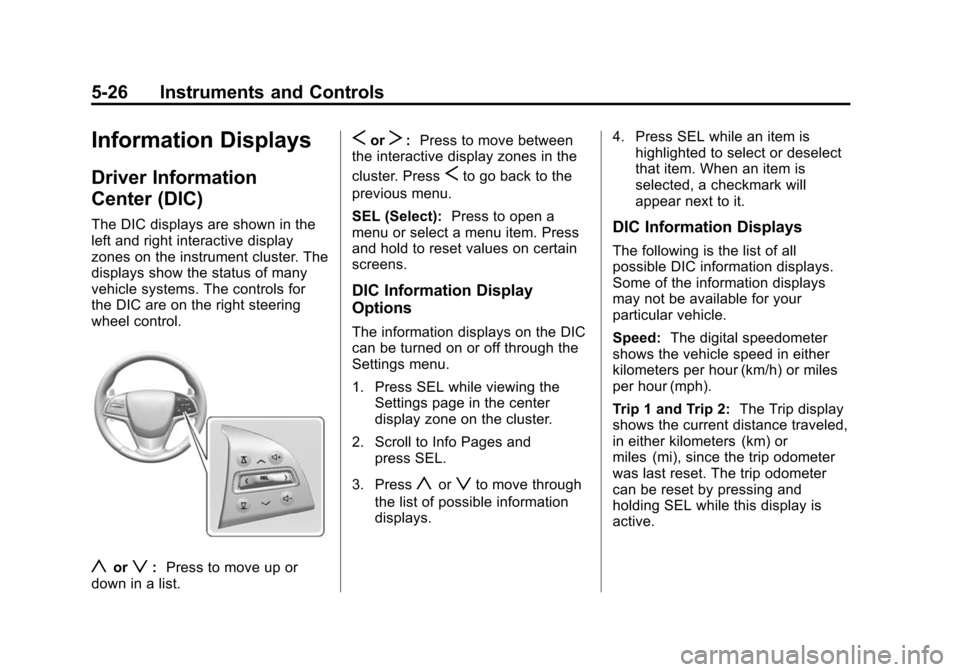
vehicle systems. The controls for
the DIC are on the right steering
wheel control.
yorz:Press to move up or
down in a list.
SorT: Press to move between
the interactive display zones in the
cluster. Press
Sto go back to the
previous menu.
SEL (Select): Press to open a
menu or select a menu item. Press
and hold to reset values on certain
screens.
DIC Information Display
Options
The information displays on the DIC
can be turned on or off through the
Settings menu.
1. Press SEL while viewing the Settings page in the center
display zone on the cluster.
2. Scroll to Info Pages and press SEL.
3. Press
yorzto move through
the list of possible information
displays. 4. Press SEL while an item is
highlighted to select or deselect
that item. When an item is
selected, a checkmark will
appear next to it.
DIC Information Displays
The following is the list of all
possible DIC information displays.
Some of the information displays
may not be available for your
particular vehicle.
Speed: The digital speedometer
shows the vehicle speed in either
kilometers per hour (km/h) or miles
per hour (mph).
Trip 1 and Trip 2: The Trip display
shows the current distance traveled,
in either kilometers (km) or
miles (mi), since the trip odometer
was last reset. The trip odometer
can be reset by pressing and
holding SEL while this display is
active.