wheel CADILLAC ATS 2013 1.G Owner's Manual
[x] Cancel search | Manufacturer: CADILLAC, Model Year: 2013, Model line: ATS, Model: CADILLAC ATS 2013 1.GPages: 450, PDF Size: 6.98 MB
Page 127 of 450
Black plate (17,1)Cadillac ATS Owner Manual - 2013 - CRC - 10/5/12
Instruments and Controls 5-17
.If towing a trailer, reduce the
amount of cargo being hauled as
soon as it is possible.
If the light continues to flash, find a
safe place to stop and park the
vehicle. Turn the vehicle off, wait at
least 10 seconds, and restart the
engine. If the light is still flashing,
follow the previous steps and see
your dealer for service as soon as
possible.
Light On Steady: An emission
control system malfunction has
been detected on the vehicle.
Diagnosis and service might be
required.
The following may correct an
emission control system
malfunction:
.Check that the fuel cap is fully
installed. See Filling the Tank on
page 9‑68. The diagnostic
system can determine if the
fuel cap has been left off or
improperly installed. A loose or
missing fuel cap allows fuel to
evaporate into the atmosphere. A few driving trips with the cap
properly installed should turn the
light off.
.Check that good quality fuel is
used. Poor fuel quality causes
the engine not to run as
efficiently as designed and may
cause stalling after start-up,
stalling when the vehicle is
changed into gear, misfiring,
hesitation on acceleration,
or stumbling on acceleration.
These conditions might go away
once the engine is warmed up.
If one or more of these conditions
occurs, change the fuel brand used.
It may require at least one full tank
of the proper fuel to turn the light off.
See Recommended Fuel on
page 9‑64.
If none of the above have made
the light turn off, your dealer can
check the vehicle. The dealer has
the proper test equipment and diagnostic tools to fix any
mechanical or electrical problems
that might have developed.Emissions Inspection and
Maintenance Programs
Depending on where you live,
your vehicle may be required to
participate in an emission control
system inspection and maintenance
program. For the inspection, the
emission system test equipment will
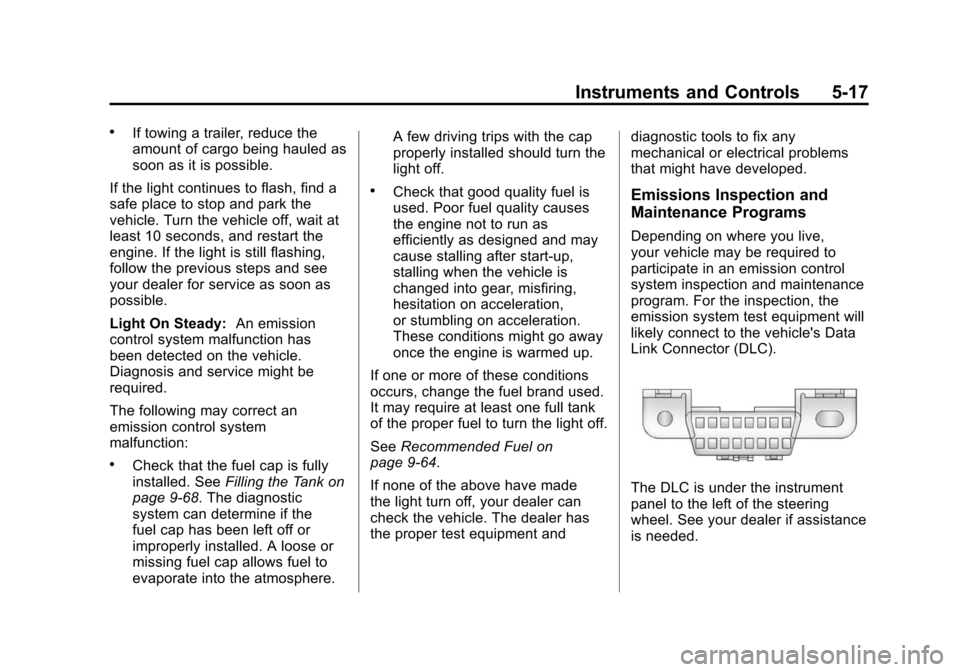
likely connect to the vehicle's Data
Link Connector (DLC).
The DLC is under the instrument
panel to the left of the steering
wheel. See your dealer if assistance
is needed.
Page 131 of 450
Black plate (21,1)Cadillac ATS Owner Manual - 2013 - CRC - 10/5/12
Instruments and Controls 5-21
This light will display amber when
you are following a vehicle ahead
much too closely.
SeeForward Collision Alert (FCA)
System on page 9‑55.
Traction Off Light
This light comes on briefly while
starting the engine. If it does not,
have the vehicle serviced by your
dealer. If the system is working
normally, the indicator light then
turns off.
The traction off light comes on when
the Traction Control System (TCS)
has been turned off by pressing and
releasing the TCS/StabiliTrak
button. This light and the StabiliTrak OFF
light come on when StabiliTrak is
turned off.
If the TCS is off, wheel spin is not
limited. Adjust driving accordingly.
See
Traction Control System (TCS)
on page 9‑34 andStabiliTrak
®
System on page 9‑36.
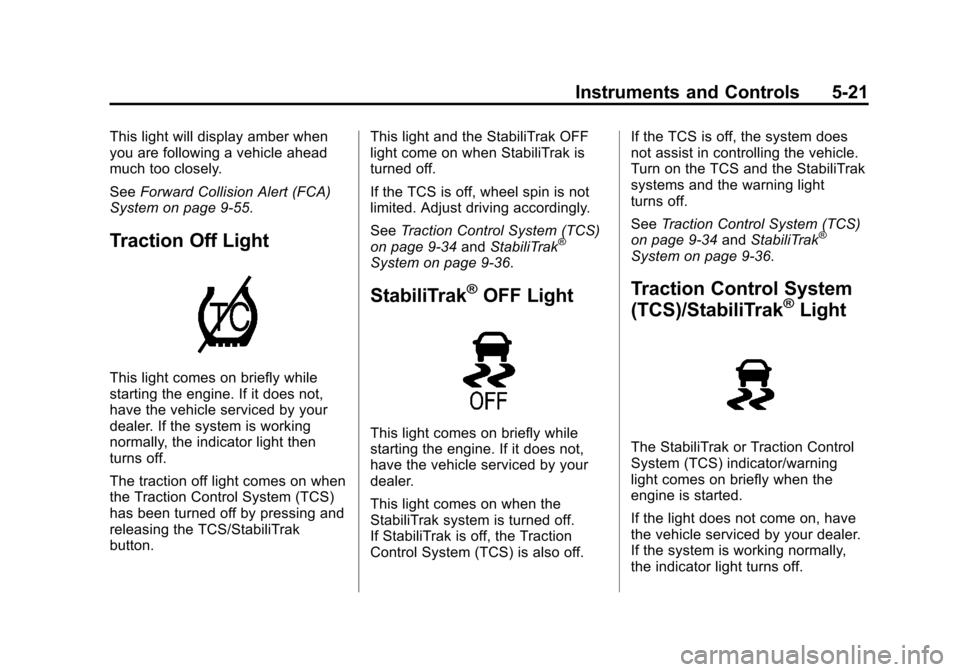
StabiliTrak®OFF Light
This light comes on briefly while
starting the engine. If it does not,
have the vehicle serviced by your
dealer.
This light comes on when the
StabiliTrak system is turned off.
If StabiliTrak is off, the Traction
Control System (TCS) is also off. If the TCS is off, the system does
not assist in controlling the vehicle.
Turn on the TCS and the StabiliTrak
systems and the warning light
turns off.
See
Traction Control System (TCS)
on page 9‑34 andStabiliTrak
®
System on page 9‑36.
Traction Control System
(TCS)/StabiliTrak®Light
The StabiliTrak or Traction Control
System (TCS) indicator/warning
light comes on briefly when the
engine is started.
If the light does not come on, have
the vehicle serviced by your dealer.
If the system is working normally,
the indicator light turns off.
Page 136 of 450
Black plate (26,1)Cadillac ATS Owner Manual - 2013 - CRC - 10/5/12
5-26 Instruments and Controls
Information Displays
Driver Information
Center (DIC)
The DIC displays are shown in the
left and right interactive display
zones on the instrument cluster. The
displays show the status of many
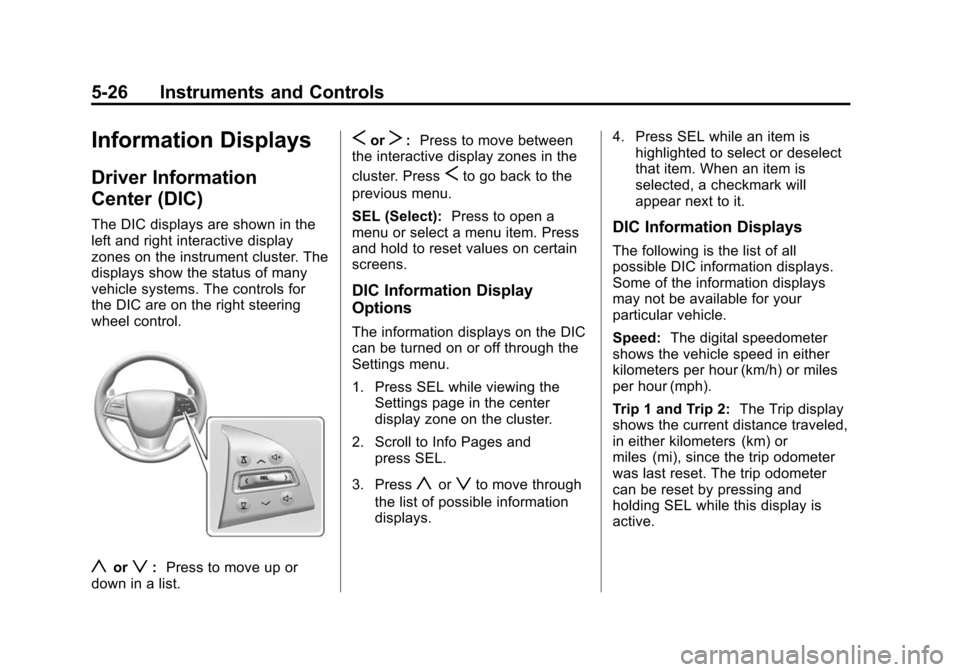
vehicle systems. The controls for
the DIC are on the right steering
wheel control.
yorz:Press to move up or
down in a list.
SorT: Press to move between
the interactive display zones in the
cluster. Press
Sto go back to the
previous menu.
SEL (Select): Press to open a
menu or select a menu item. Press
and hold to reset values on certain
screens.
DIC Information Display
Options
The information displays on the DIC
can be turned on or off through the
Settings menu.
1. Press SEL while viewing the Settings page in the center
display zone on the cluster.
2. Scroll to Info Pages and press SEL.
3. Press
yorzto move through
the list of possible information
displays. 4. Press SEL while an item is
highlighted to select or deselect
that item. When an item is
selected, a checkmark will
appear next to it.
DIC Information Displays
The following is the list of all
possible DIC information displays.
Some of the information displays
may not be available for your
particular vehicle.
Speed: The digital speedometer
shows the vehicle speed in either
kilometers per hour (km/h) or miles
per hour (mph).
Trip 1 and Trip 2: The Trip display
shows the current distance traveled,
in either kilometers (km) or
miles (mi), since the trip odometer
was last reset. The trip odometer
can be reset by pressing and
holding SEL while this display is
active.
Page 140 of 450
Black plate (30,1)Cadillac ATS Owner Manual - 2013 - CRC - 10/5/12
5-30 Instruments and Controls
.Upcoming Maneuver from
OnBoard Navigation
.Upcoming Maneuver from
OnStar
.Incoming Call
When the HUD is on, the
speedometer reading is continually
displayed, except when an imminent
navigation maneuver is being
shown. The current audio, phone,
or navigation alert temporarily
displays if their status changes. This
occurs if the steering wheel controls
are used to adjust a setting or
acknowledge an alert.
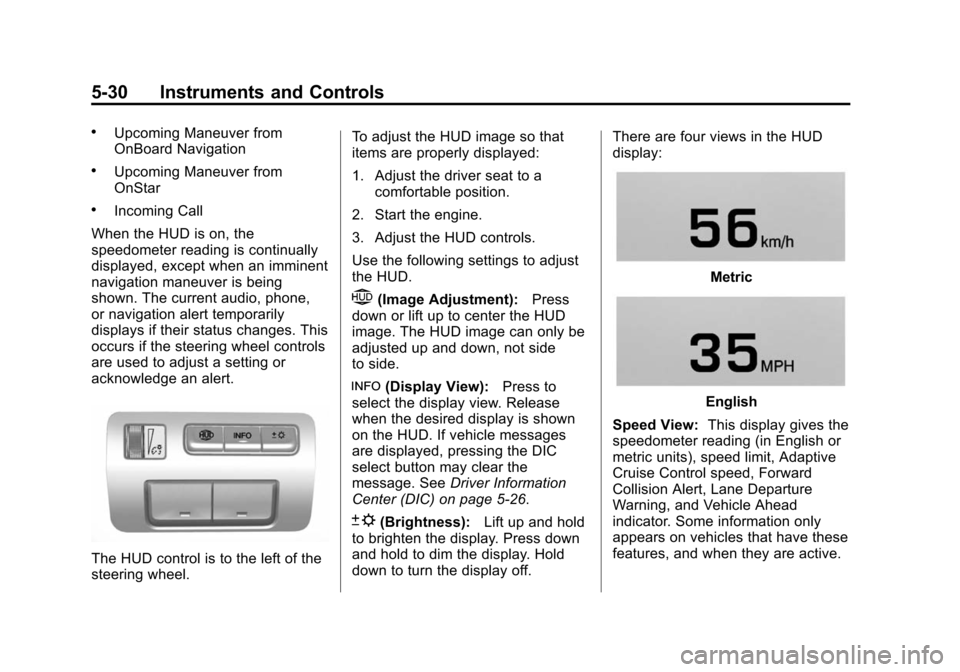
The HUD control is to the left of the
steering wheel. To adjust the HUD image so that
items are properly displayed:
1. Adjust the driver seat to a
comfortable position.
2. Start the engine.
3. Adjust the HUD controls.
Use the following settings to adjust
the HUD.
$(Image Adjustment): Press
down or lift up to center the HUD
image. The HUD image can only be
adjusted up and down, not side
to side.
!(Display View): Press to
select the display view. Release
when the desired display is shown
on the HUD. If vehicle messages
are displayed, pressing the DIC
select button may clear the
message. See Driver Information
Center (DIC) on page 5‑26.
D(Brightness): Lift up and hold
to brighten the display. Press down
and hold to dim the display. Hold
down to turn the display off. There are four views in the HUD
display:
Metric
English
Speed View: This display gives the
speedometer reading (in English or
metric units), speed limit, Adaptive
Cruise Control speed, Forward
Collision Alert, Lane Departure
Warning, and Vehicle Ahead
indicator. Some information only
appears on vehicles that have these
features, and when they are active.
Page 150 of 450
Black plate (40,1)Cadillac ATS Owner Manual - 2013 - CRC - 10/5/12
5-40 Instruments and Controls
SIDE BLIND ZONE ALERT OFF
This message indicates that the
driver has turned the Side Blind
Zone Alert (SBZA) system off.
SERVICE SIDE DETECTION
SYSTEM
If this message remains on after
continued driving, the vehicle needs
service. Side Blind Zone Alert
(SBZA) and Rear Cross Traffic Alert
(RCTA) features will not work. Take
the vehicle to your dealer.
SIDE DETECTION SYSTEM
UNAVAILABLE
This message indicates that Side
Blind Zone Alert (SBZA) and Rear
Cross Traffic Alert (RCTA) are
disabled either because the sensor
is blocked and cannot detect
vehicles in the blind zone, or the
vehicle is passing through an open
area, such as the desert, where
there is insufficient data for
operation. This message may also
activate during heavy rain or due to
road spray. The vehicle does notneed service. For cleaning, see
"Washing the Vehicle" under
Exterior Care on page 10‑81.
Ride Control System
Messages
ALL WHEEL DRIVE OFF
If the vehicle has the
All-Wheel-Drive (AWD) system, this
message displays when there is a
temporary condition making the
AWD system unavailable. The
vehicle will run in 2WD. This could
be caused by:
.Loss of wheel or vehicle speed
.AWD system overheat
.Certain vehicle electrical
conditions
This message turns off when the
above conditions are no longer
present and the warning message is
reset.
See All-Wheel Drive on page 9‑29.
SERVICE ALL WHEEL DRIVE
This message displays if a problem
occurs with the All-Wheel-Drive
(AWD) system. The vehicle will run
in 2WD. This could be caused by:
.An electronics problem
.Worn out or overheated clutch
plates
.Various electrical issues
The system may need service. See
your dealer.
SERVICE STABILITRAK
This message displays if there is a
problem with the StabiliTrak system.
See StabiliTrak
®System on
page 9‑36.
SERVICE SUSPENSION
SYSTEM
This message displays when there
is a problem with the MagneRide™
system. See Driver Mode Control on
page 9‑37. Have the vehicle
serviced by your dealer.
Page 152 of 450
Black plate (42,1)Cadillac ATS Owner Manual - 2013 - CRC - 10/5/12
5-42 Instruments and Controls
TURN STEERING WHEEL
START VEHICLE AGAIN
This message may display when
you try to start the vehicle, but the
column remains locked. Try turning
the steering wheel while starting the
vehicle to unlock the steering
column. If the vehicle still does not
start, turn the steering wheel the
other way, and try starting the
vehicle again.
Tire Messages
SERVICE TIRE MONITOR
SYSTEM
This message displays if there is a
problem with the Tire Pressure
Monitor System (TPMS). SeeTire
Pressure Monitor Operation on
page 10‑53.
TIRE LEARNING ACTIVE
This message displays when the
system is learning new tires. See
Tire Pressure Monitor Operation on
page 10‑53.
TIRE LOW ADD AIR TO TIRE
This message displays when the
pressure in one or more of the tires
is low.
This message also displays LEFT
FRONT, RIGHT FRONT, LEFT
REAR, or RIGHT REAR to indicate
the location of the low tire.
The low tire pressure warning light
will also come on. See Tire
Pressure Light on page 5‑22.
If a tire pressure message appears
on the DIC, stop as soon as you
can. Inflate the tires by adding air
until the tire pressure is equal to the
values shown on the Tire and
Loading Information label. See Tires
on page 10‑42, Vehicle Load Limits
on page 9‑11, and Tire Pressure on
page 10‑50.
You can receive more than one tire
pressure message at a time. The
DIC also shows the tire pressure
values. See Driver Information
Center (DIC) on page 5‑26.
Transmission Messages
SERVICE TRANSMISSION
This message displays if there is a
problem with the transmission. See
your dealer.
SHIFT DENIED
This message displays when using
the Driver Shift Control (DSC) and
attempting to shift to a gear not
appropriate for the vehicle speed
and engine revolutions per
minute (rpm). See Manual Mode on
page 9‑26.
SHIFT TO PARK
This message displays when the
transmission needs to be shifted to
P (Park). This may appear when
attempting to remove the key from
the vehicle if the vehicle is not in
P (Park).
Page 156 of 450
Black plate (46,1)Cadillac ATS Owner Manual - 2013 - CRC - 10/5/12
5-46 Instruments and Controls
Reverse Tilt Mirror
When on, both the driver and
passenger, driver, or passenger
mirrors will tilt downward when the
vehicle is shifted to R (Reverse) to
improve visibility of the ground near
the rear wheels. They will return
to their previous driving position
when the vehicle is shifted out of
R (Reverse) or the ignition is turned
to OFF.
Select Off, On - Driver and
Passenger, On - Driver, or On -
Passenger.
Easy Exit Options
This allows the Easy Exit Options
feature to be turned on or off.
Select Off or On.
Chime Volume
This allows the selection of the
chime volume level.
Select a volume between 0 and 63.Rain Sense Wipers
This allows the Rain Sense Wipers
feature to be turned on or off.
Select Disabled or Enabled.
Language
Select the Language menu and the
following will be displayed:
.English
.French
.Spanish
Select the language. The selected
language will display on the system,
and voice recognition will reflect the
selected language.
Lighting
Select the Lighting menu and the
following will be displayed:
.Vehicle Locator Lights
.Exit Lighting
.Left or Right Hand Traffic
.Auto High Beam
.Adaptive High Beam
.Adaptive Forward Lighting
.Daytime Tail Lights
Vehicle Locator Lights
This allows the vehicle locator lights
to be turned on or off.
Select Off or On.
Exit Lighting
This allows the selection of how
long the exterior lamps stay on
when leaving the vehicle when it is
dark outside.
Select Off, 30 Seconds,
60 Seconds, or 120 Seconds.
Page 171 of 450
Black plate (7,1)Cadillac ATS Owner Manual - 2013 - CRC - 10/5/12
Lighting 6-7
Interior Lighting
Instrument Panel
Illumination Control
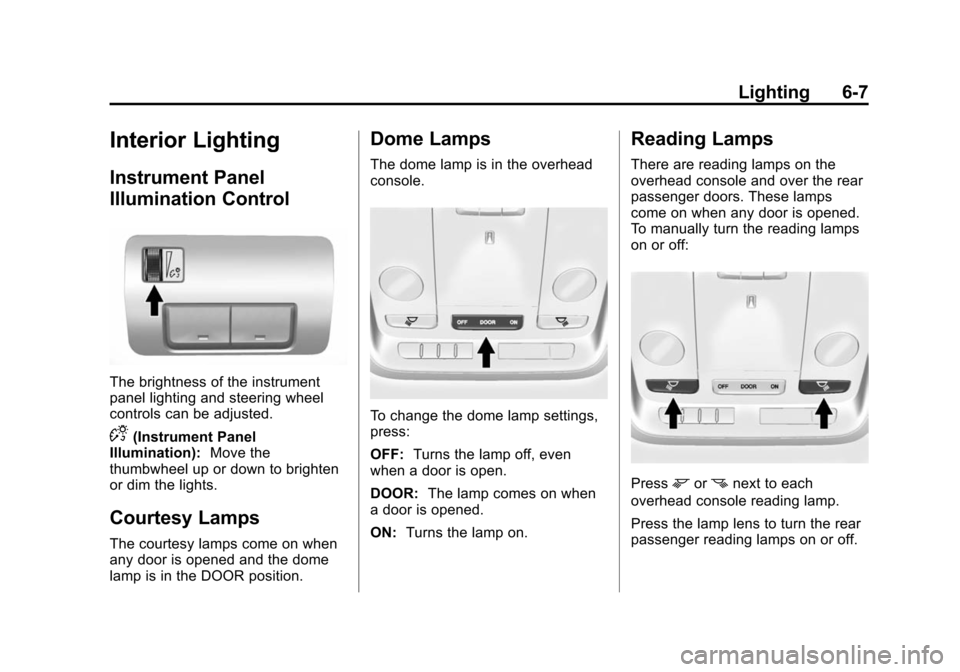
The brightness of the instrument
panel lighting and steering wheel
controls can be adjusted.
D(Instrument Panel
Illumination): Move the
thumbwheel up or down to brighten
or dim the lights.
Courtesy Lamps
The courtesy lamps come on when
any door is opened and the dome
lamp is in the DOOR position.
Dome Lamps
The dome lamp is in the overhead
console.
To change the dome lamp settings,
press:
OFF: Turns the lamp off, even
when a door is open.
DOOR: The lamp comes on when
a door is opened.
ON: Turns the lamp on.
Reading Lamps
There are reading lamps on the
overhead console and over the rear
passenger doors. These lamps
come on when any door is opened.
To manually turn the reading lamps
on or off:
Pressmornnext to each
overhead console reading lamp.
Press the lamp lens to turn the rear
passenger reading lamps on or off.
Page 175 of 450
Black plate (3,1)Cadillac ATS Owner Manual - 2013 - CRC - 10/5/12
Infotainment System 7-3
Overview
Infotainment System Overview
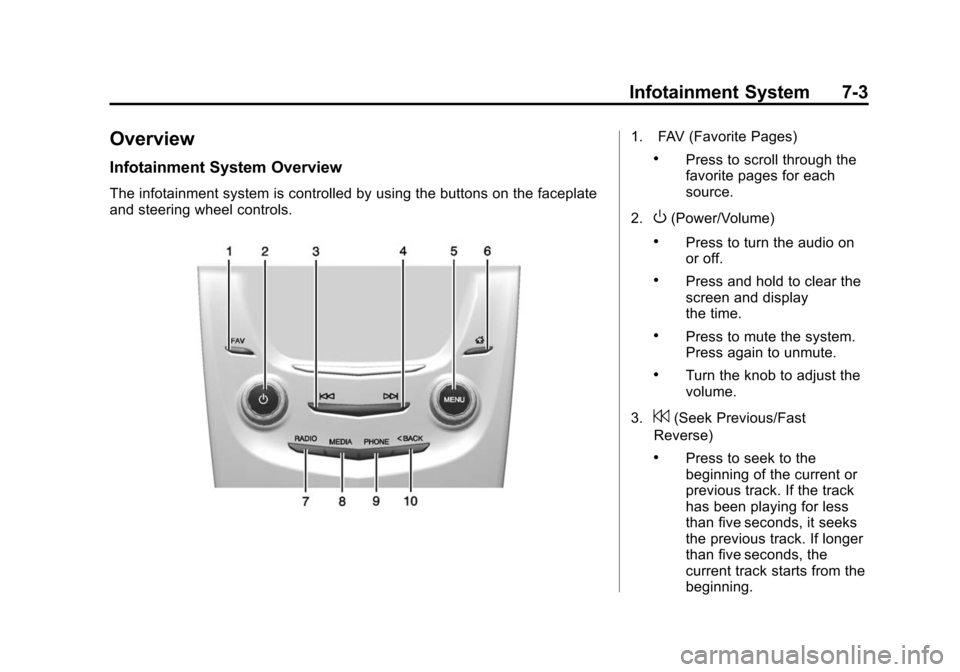
The infotainment system is controlled by using the buttons on the faceplate
and steering wheel controls.
1. FAV (Favorite Pages)
.Press to scroll through the
favorite pages for each
source.
2.
O(Power/Volume)
.Press to turn the audio on
or off.
.Press and hold to clear the
screen and display
the time.
.Press to mute the system.
Press again to unmute.
.Turn the knob to adjust the
volume.
3.
7(Seek Previous/Fast
Reverse)
.Press to seek to the
beginning of the current or
previous track. If the track
has been playing for less
than five seconds, it seeks
the previous track. If longer
than five seconds, the
current track starts from the
beginning.
Page 180 of 450
Black plate (8,1)Cadillac ATS Owner Manual - 2013 - CRC - 10/5/12
7-8 Infotainment System
Clear All Private Data:This option
clears all private information from
the vehicle. Select Clear All Private
Data. Select Cancel or Continue.
Press
SBACK to go back to the
last menu.
Restore Radio Settings: This
option will restore factory radio
settings. Select Restore Radio
Settings. A screen displays stating
all personalized radio settings will
be restored back to the factory
settings. Select Cancel or Continue.
Press
SBACK to go back to the
last menu.
English and Metric Unit
Conversion
To change the display units between
English and metric units, see
Instrument Cluster on page 5‑9.
Software Updates
See the following websites for
information:
Cadillac
In the U.S., see www.cadillac.com.
In Canada, see www.cadillac.ca.
Radio
AM-FM Radio
Playing the Radio
While on the audio main page,
press the RADIO or MEDIA button
repeatedly to display and scroll
through the available sources (AM,
FM, and SiriusXM
®(if equipped),
CD, USB, SD, and AUX).
The steering wheel controls can
also be used to adjust the volume.
See Steering Wheel Controls on
page 5‑2.
AM, FM, SiriusXM (If Equipped)
To select AM, FM, or SiriusXM
(if equipped):
1. Press
{.
2. Turn the MENU knob to highlight the AUDIO screen icon.
3. Press the MENU knob to select.