DIC unit CADILLAC ATS 2014 User Guide
[x] Cancel search | Manufacturer: CADILLAC, Model Year: 2014, Model line: ATS, Model: CADILLAC ATS 2014Pages: 434, PDF Size: 5.61 MB
Page 208 of 434

Black plate (6,1)Cadillac ATS Owner Manual (GMNA-Localizing-U.S./Canada/Mexico-
6014430) - 2014 - 2nd Edition - 8/23/13
8-6 Climate Controls
Climate Control Touch Screen
The fan, air delivery mode, A/C
mode, driver and passenger
temperatures and SYNC settings
can be controlled by pressing
CLIMATE on the infotainment home
screen or the climate button in the
touch screen application tray.
A selection can then be made on
the front climate control page
displayed. See the infotainment
manual.
Climate Control Status ScreenThe climate control status screen
appears briefly when the climate
control buttons on the faceplate are
adjusted. The air delivery mode can
be adjusted on the climate control
status screen.
Automatic Operation
The system automatically controls
the fan speed, air delivery, air
conditioning, and recirculation in
order to heat or cool the vehicle to
the desired temperature.
When the indicator light is on or
AUTO is displayed on the touch
screen, the system is in full
automatic operation. If the air
delivery mode or fan setting is
manually adjusted, the auto
indicator turns off and the display
will show the selected settings. Auto
operation can be turned off
individually for climate settings.
For automatic operation:
1. Press AUTO.2. Set the temperature. Allow the
system time to stabilize. Then
adjust the temperature as
needed for best comfort.
To improve fuel efficiency and to
cool the vehicle faster, recirculation
may be automatically selected in
warm weather. The recirculation
light will not come on. Press
@to
select recirculation; press it again to
select outside air.
English units can be changed to
metric units through the instrument
cluster. See “Settings”under
Instrument Cluster on page 5-10.
OFF (Fan): Press to turn the fan on
or off. The temperature control and
air delivery mode can still be
adjusted.
worx(Driver and Passenger
Temperature Controls): The
temperature can be adjusted
separately for the driver and the
passenger. Press to increase or
decrease the temperature. Press
and hold to rapidly increase or
decrease the temperature. The
Page 253 of 434
Black plate (39,1)Cadillac ATS Owner Manual (GMNA-Localizing-U.S./Canada/Mexico-
6014430) - 2014 - 2nd Edition - 8/23/13
Driving and Operating 9-39
3. Press and release the SET−control on the steering wheel.
4. Remove foot from the accelerator.
When the cruise control has been
set to the desired speed, the cruise
control indicator appears green on
the instrument cluster and a cruise
set speed message appears on the
Head-Up Display (HUD),
if equipped.
Resuming a Set Speed
If the cruise control is set at a
desired speed and then the brakes
are applied, the cruise control is
disengaged without erasing the set
speed from memory.
Once the vehicle speed reaches
about 40 km/h (25 mph) or more,
press +RES up to the first detent
briefly on the steering wheel. The
vehicle returns to the previous set
speed. Increasing Speed While Cruise
Control is at a Set Speed
If the cruise control system is
already activated:
.Press and hold +RES up until
the desired speed is reached,
then release it.
.To increase vehicle speed in
small increments, briefly press
+RES up to the first detent. For
each press, the vehicle goes
about 1 km/h (1 mph) faster.
.To increase vehicle speed in
larger increments, briefly press
+RES up to the second detent.
For each press, the vehicle
speed increases to the next
5 km/h (5 mph) mark on the
speedometer.
The speedometer reading can be
displayed in either English or metric
units. See Instrument Cluster on
page 5-10. The increment value
used depends on the units
displayed. Reducing Speed While Cruise
Control is at a Set Speed
If the cruise control system is
already activated:
.Press and hold SET−
down until
the desired lower speed is
reached, then release it.
.To decrease the vehicle speed in
small increments, briefly press
SET− down to the first detent.
For each press, the vehicle goes
about 1 km/h (1 mph) slower.
.To decrease the vehicle speed in
larger increments, briefly press
SET− down to the second
detent. For each press, the
vehicle speed decreases to the
next 5 km/h (5 mph) mark on the
speedometer.
The cruise control system may
automatically brake to slow the
vehicle down.
The speedometer reading can be
displayed in either English or metric
units. See Instrument Cluster on
Page 257 of 434
Black plate (43,1)Cadillac ATS Owner Manual (GMNA-Localizing-U.S./Canada/Mexico-
6014430) - 2014 - 2nd Edition - 8/23/13
Driving and Operating 9-43
Increasing Speed While ACC is at
a Set Speed
If ACC is already activated, do one
of the following:
.Use the accelerator to get to the
higher speed. Press SET–down.
Release the control and the
accelerator pedal. The vehicle
will now cruise at the higher
speed.
When the accelerator pedal is
pressed, ACC will not brake
because it is overridden.
A warning message will appear
on the Driver Information Center
(DIC) and the Head-Up Display
(HUD). See Cruise Control
Messages on page 5-33.
.Press and hold +RES up until
the desired set speed appears
on the display, then release it.
.To increase vehicle speed in
small increments, press +RES
up to the first detent. For each
press, the vehicle goes 1 km/h
(1 mph) faster.
.To increase vehicle speed in
larger increments, press +RES
up to the second detent. For
each press, the vehicle speed
increases to the next 5 km/h
(5 mph) mark on the
speedometer.
When it is determined that there is
no vehicle ahead inside the selected
following gap, then the vehicle
speed will increase to the set speed.
The speedometer reading can be
displayed in either English or metric
units. See Instrument Cluster on
page 5-10. The increment value
used depends on the units
displayed.
Reducing Speed While ACC is at a
Set Speed
If ACC is already activated, do one
of the following:
.Use the brake to get to the
desired lower speed. Press
SET– down and release the
accelerator pedal. The vehicle
will now cruise at the lower
speed.
.Press and hold SET– down until
the desired lower speed is
reached, then release it.
.To decrease the vehicle speed in
small increments, press SET−
down to the first detent. For
each press, the vehicle goes
about 1 km/h (1 mph) slower.
.To decrease the vehicle speed in
larger increments, press SET−
down to the second detent. For
each press, the vehicle speed
decreases to the next 5 km/h
(5 mph) mark on the
speedometer.
The speedometer reading can be
displayed in either English or metric
units. See Instrument Cluster on
page 5-10. The increment value
used depends on the units
displayed.
Selecting the Follow Distance
When a slower moving vehicle is
detected ahead within the selected
following gap, ACC will adjust the
Page 330 of 434
Black plate (44,1)Cadillac ATS Owner Manual (GMNA-Localizing-U.S./Canada/Mexico-
6014430) - 2014 - 2nd Edition - 8/23/13
10-44 Vehicle Care
manufactured date. The first two
digits represent the week
(01-52) and the last two digits,
the year. For example, the third
week of the year 2010 would
have a four-digit DOT date
of 0310.
(4) Tire Identification Number
(TIN)
:The letters and numbers
following the DOT code are the
Tire Identification Number (TIN).
The TIN shows the
manufacturer and plant code,
tire size, and date the tire was
manufactured. The TIN is
molded onto both sides of the
tire, although only one side may
have the date of manufacture.
(5) Tire Ply Material
:The type
of cord and number of plies in
the sidewall and under the tread.
(6) Uniform Tire Quality
Grading (UTQG)
:Tire
manufacturers are required to
grade tires based on three performance factors: treadwear,
traction, and temperature
resistance. For more information
see
Uniform Tire Quality
Grading on page 10-59.
(7) Maximum Cold Inflation
Load Limit
:Maximum load that
can be carried and the
maximum pressure needed to
support that load.
Tire Designations
Tire Size
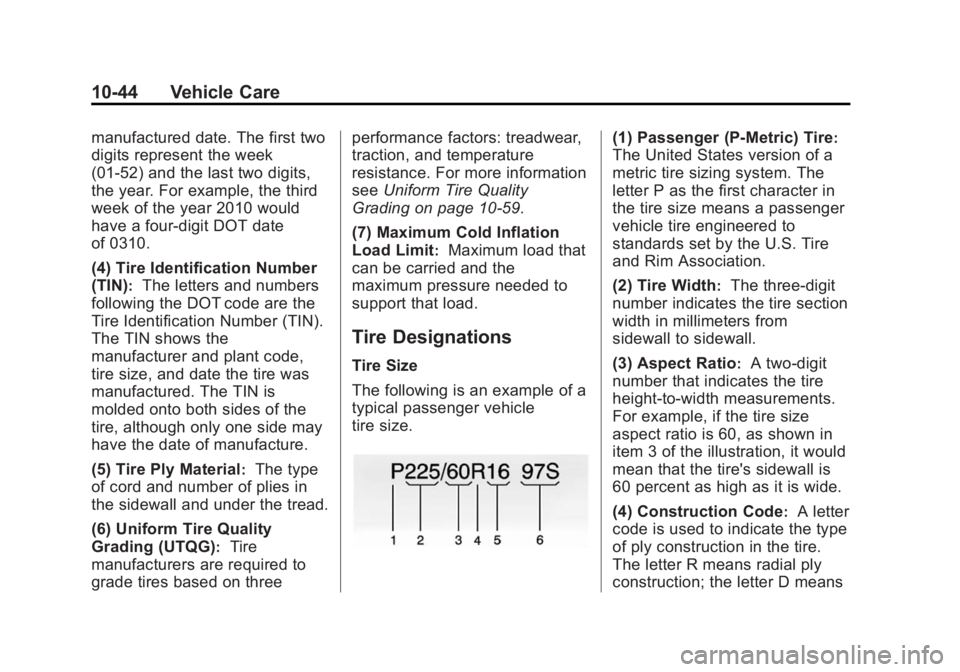
The following is an example of a
typical passenger vehicle
tire size.
(1) Passenger (P-Metric) Tire:
The United States version of a
metric tire sizing system. The
letter P as the first character in
the tire size means a passenger
vehicle tire engineered to
standards set by the U.S. Tire
and Rim Association.
(2) Tire Width
:The three-digit
number indicates the tire section
width in millimeters from
sidewall to sidewall.
(3) Aspect Ratio
:A two-digit
number that indicates the tire
height-to-width measurements.
For example, if the tire size
aspect ratio is 60, as shown in
item 3 of the illustration, it would
mean that the tire's sidewall is
60 percent as high as it is wide.
(4) Construction Code
:A letter
code is used to indicate the type
of ply construction in the tire.
The letter R means radial ply
construction; the letter D means
Page 397 of 434
Black plate (3,1)Cadillac ATS Owner Manual (GMNA-Localizing-U.S./Canada/Mexico-
6014430) - 2014 - 2nd Edition - 8/23/13
Customer Information 13-3
STEP THREE—Canadian
Owners: In the event that you do
not feel your concerns have been
addressed after following the
procedure outlined in Steps One
and Two, General Motors of Canada
Limited wants you to be aware of its
participation in a no-charge
mediation/arbitration program.
General Motors of Canada Limited
has committed to binding arbitration
of owner disputes involving
factory-related vehicle service
claims. The program provides for
the review of the facts involved by
an impartial third party arbiter, and
may include an informal hearing
before the arbiter. The program is
designed so that the entire dispute
settlement process, from the time
you file your complaint to the final
decision, should be completed in
approximately 70 days. We believe
our impartial program offers
advantages over courts in most
jurisdictions because it is informal,
quick, and free of charge. For further information concerning
eligibility in the Canadian Motor
Vehicle Arbitration Plan (CAMVAP),
call toll-free 1-800-207-0685, or call
the General Motors Customer Care
Centre, 1-888-446-2000 (English),
1-800-263-7854 (French),
or write to:
Mediation/Arbitration Program
c/o Customer Care Centre
General Motors of Canada Limited
Mail Code: CA1-163-005
1908 Colonel Sam Drive
Oshawa, Ontario L1H 8P7
The inquiry should be accompanied
by the Vehicle Identification
Number (VIN).Customer Assistance
Offices
Cadillac encourages customers to
call the toll-free number for
assistance. However, if a customer
wishes to write or e-mail Cadillac,
the letter should be addressed to:
United States and Puerto Rico
Cadillac Customer Assistance
Center
Cadillac Motor Car Division
P.O. Box 33169
Detroit, MI 48232-5169
www.Cadillac.com
1-800-458-8006
1-800-833-2622 (For Text
Telephone devices (TTYs))
Roadside Service: 1-800-224-1400
From U.S. Virgin Islands:
1-800-496-9994