DIC unit CADILLAC ATS 2014 Owner's Manual
[x] Cancel search | Manufacturer: CADILLAC, Model Year: 2014, Model line: ATS, Model: CADILLAC ATS 2014Pages: 434, PDF Size: 5.61 MB
Page 15 of 434
Black plate (9,1)Cadillac ATS Owner Manual (GMNA-Localizing-U.S./Canada/Mexico-
6014430) - 2014 - 2nd Edition - 8/23/13
In Brief 1-9
Safety Belts
Refer to the following sections for
important information on how to use
safety belts properly:
.Safety Belts on page 3-11.
.How to Wear Safety Belts
Properly on page 3-12.
.Lap-Shoulder Belt on page 3-13.
.Lower Anchors and Tethers for
Children (LATCH System) on
page 3-40.
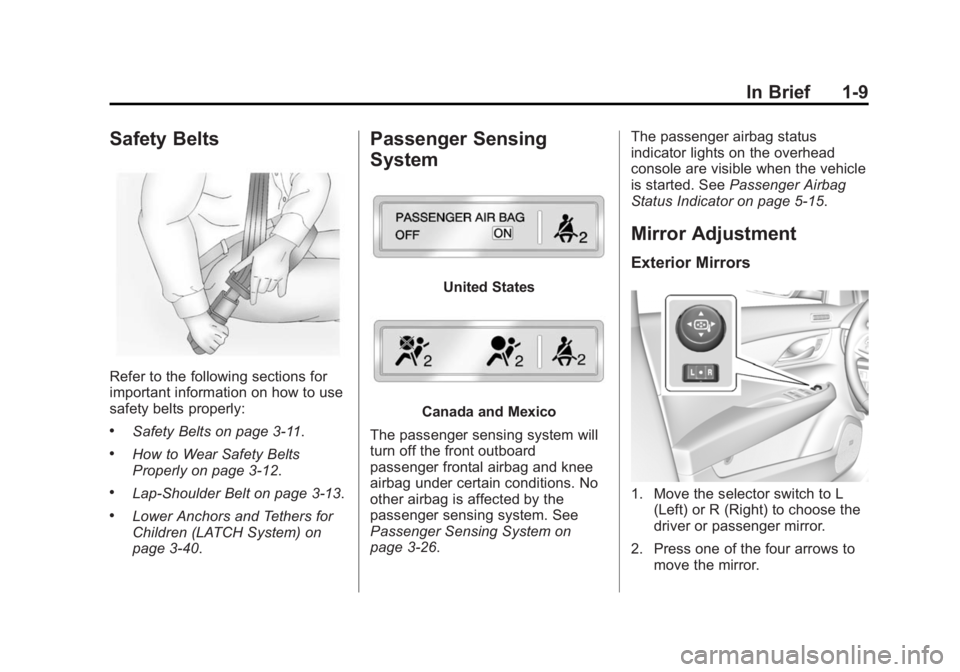
Passenger Sensing
System
United States
Canada and Mexico
The passenger sensing system will
turn off the front outboard
passenger frontal airbag and knee
airbag under certain conditions. No
other airbag is affected by the
passenger sensing system. See
Passenger Sensing System on
page 3-26. The passenger airbag status
indicator lights on the overhead
console are visible when the vehicle
is started. See
Passenger Airbag
Status Indicator on page 5-15.
Mirror Adjustment
Exterior Mirrors
1. Move the selector switch to L (Left) or R (Right) to choose the
driver or passenger mirror.
2. Press one of the four arrows to move the mirror.
Page 39 of 434
Black plate (9,1)Cadillac ATS Owner Manual (GMNA-Localizing-U.S./Canada/Mexico-
6014430) - 2014 - 2nd Edition - 8/23/13
Keys, Doors, and Windows 2-9
/(Remote Vehicle Start):This
button will be on the RKE
transmitter if the vehicle has remote
start.
The climate control system will use
the previous settings during a
remote start. The rear window
defogger may come on during
remote start based on cold ambient
conditions. The rear defog indicator
light does not come on during
remote start.
If the vehicle has heated seats, they
may come on during a remote start.
See Heated Front Seats on
page 3-8.
Laws in some local communities
may restrict the use of remote
starters. For example, some laws
may require a person using remote
start to have the vehicle in view.
Check local regulations for any
requirements.
If your vehicle is low on fuel, do not
use the remote start feature. The
vehicle may run out of fuel. The RKE transmitter range may be
less while the vehicle is running.
Other conditions can affect the
performance of the transmitter. See
Remote Keyless Entry (RKE)
System on page 2-2.
Starting the Engine Using Remote
Start
1. Press and release
Qon the
RKE transmitter.
2. Immediately press and hold
/
for at least four seconds or until
the turn signal lamps flash. This
confirms the request to remote
start the vehicle has been
received. If the vehicle's lamps
are not visible, press and hold
/for at least four seconds.
During the remote start, the
doors will be locked and the
parking lamps will remain on as
long as the engine is running. The engine will shut off after
10 minutes unless a time
extension is done or the ignition
is put in ON/RUN/START.
3. Press the brake pedal and select the ON/RUN/START ignition
mode to drive the vehicle.
Extending Engine Run Time
The engine run time can also be
extended by another 10 minutes,
if during the first 10 minutes
Steps 1–2 are repeated while the
engine is still running. This provides
a total of 20 minutes.
The remote start can only be
extended once.
A maximum of two remote starts,
or a remote start with an extension,
are allowed between ignition cycles.
The vehicle's ignition must be
changed to ON/RUN/START and
then back to OFF before the remote
start procedure can be used again.
Page 48 of 434
Black plate (18,1)Cadillac ATS Owner Manual (GMNA-Localizing-U.S./Canada/Mexico-
6014430) - 2014 - 2nd Edition - 8/23/13
2-18 Keys, Doors, and Windows
How to Detect a Tamper
Condition
IfKis pressed on the transmitter
and the horn chirps three times, a
previous alarm occurred while the
system was armed.
If the alarm has been activated, a
message will appear on the DIC.
See Security Messages on
page 5-40.
Power Sounder and Inclination
Sensor
In addition to the standard
theft-deterrent system features, this
system may also have a power
sounder and inclination sensor.
The power sounder provides an
audible alarm which is distinct from
the vehicle’ s horn. It has its own
power source, and can sound an
alarm if the vehicle’s battery is
compromised. The inclination sensor can set off
the alarm if it senses movement of
the vehicle, such as a change in
vehicle orientation.
Immobilizer
See
Radio Frequency Statement on
page 13-15.
Immobilizer Operation
This vehicle has a passive
theft-deterrent system.
The system does not have to be
manually armed or disarmed.
The vehicle is automatically
immobilized when the vehicle is
turned off.
The immobilization system is
disarmed when the pushbutton start
is activated to enter the ACC/
ACCESSORY mode or the ON/
RUN/START mode and a valid
transmitter is present in the vehicle.
The security light, in the instrument
cluster, comes on if there is a
problem with arming or disarming
the theft-deterrent system.
The system has one or more RKE
transmitters matched to an
immobilizer control unit in the
vehicle. Only a correctly matched
RKE transmitter will start the
vehicle. If the transmitter is ever
damaged, you may not be able to
start your vehicle.
When trying to start the vehicle, the
security light comes on briefly when
the ignition is turned on.
If the engine does not start and the
security light stays on, there is a
problem with the system. Turn the
ignition off and try again.
Page 82 of 434
Black plate (26,1)Cadillac ATS Owner Manual (GMNA-Localizing-U.S./Canada/Mexico-
6014430) - 2014 - 2nd Edition - 8/23/13
3-26 Seats and Restraints
.Let only qualified technicians
work on the airbag systems.
Improper service can mean that
an airbag system will not work
properly. See your dealer for
service.
Passenger Sensing
System
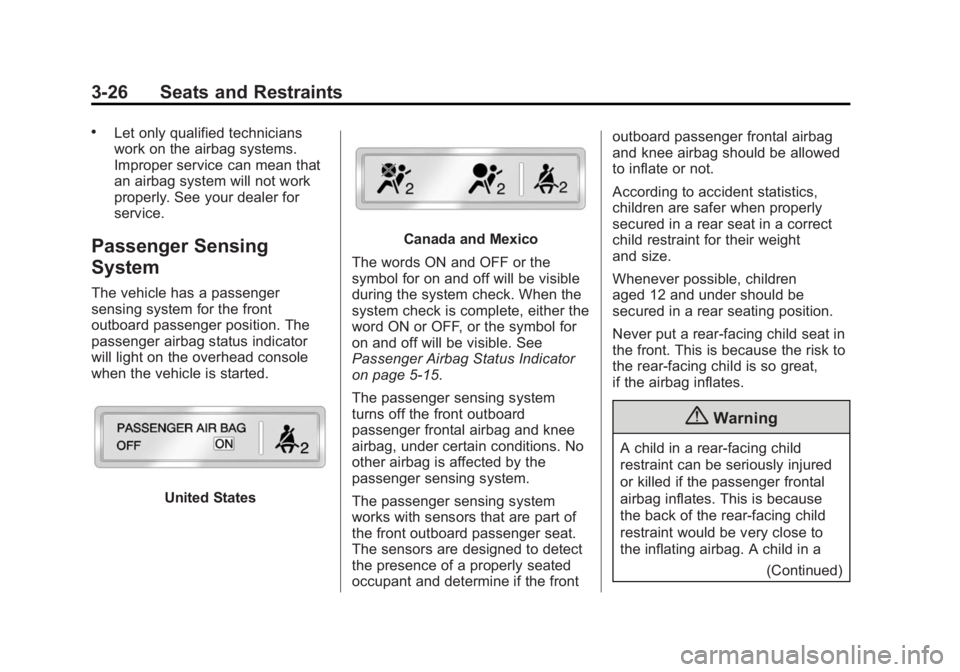
The vehicle has a passenger
sensing system for the front
outboard passenger position. The
passenger airbag status indicator
will light on the overhead console
when the vehicle is started.
United States
Canada and Mexico
The words ON and OFF or the
symbol for on and off will be visible
during the system check. When the
system check is complete, either the
word ON or OFF, or the symbol for
on and off will be visible. See
Passenger Airbag Status Indicator
on page 5-15.
The passenger sensing system
turns off the front outboard
passenger frontal airbag and knee
airbag, under certain conditions. No
other airbag is affected by the
passenger sensing system.
The passenger sensing system
works with sensors that are part of
the front outboard passenger seat.
The sensors are designed to detect
the presence of a properly seated
occupant and determine if the front outboard passenger frontal airbag
and knee airbag should be allowed
to inflate or not.
According to accident statistics,
children are safer when properly
secured in a rear seat in a correct
child restraint for their weight
and size.
Whenever possible, children
aged 12 and under should be
secured in a rear seating position.
Never put a rear-facing child seat in
the front. This is because the risk to
the rear-facing child is so great,
if the airbag inflates.
{Warning
A child in a rear-facing child
restraint can be seriously injured
or killed if the passenger frontal
airbag inflates. This is because
the back of the rear-facing child
restraint would be very close to
the inflating airbag. A child in a
(Continued)
Page 119 of 434
Black plate (11,1)Cadillac ATS Owner Manual (GMNA-Localizing-U.S./Canada/Mexico-
6014430) - 2014 - 2nd Edition - 8/23/13
Instruments and Controls 5-11
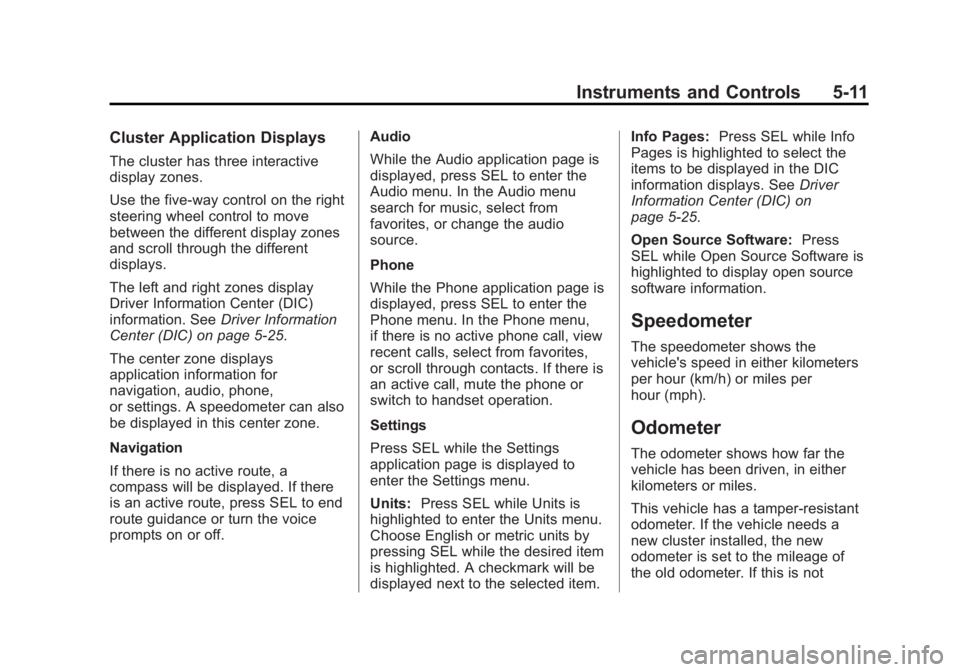
Cluster Application Displays
The cluster has three interactive
display zones.
Use the five-way control on the right
steering wheel control to move
between the different display zones
and scroll through the different
displays.
The left and right zones display
Driver Information Center (DIC)
information. SeeDriver Information
Center (DIC) on page 5-25.
The center zone displays
application information for
navigation, audio, phone,
or settings. A speedometer can also
be displayed in this center zone.
Navigation
If there is no active route, a
compass will be displayed. If there
is an active route, press SEL to end
route guidance or turn the voice
prompts on or off. Audio
While the Audio application page is
displayed, press SEL to enter the
Audio menu. In the Audio menu
search for music, select from
favorites, or change the audio
source.
Phone
While the Phone application page is
displayed, press SEL to enter the
Phone menu. In the Phone menu,
if there is no active phone call, view
recent calls, select from favorites,
or scroll through contacts. If there is
an active call, mute the phone or
switch to handset operation.
Settings
Press SEL while the Settings
application page is displayed to
enter the Settings menu.
Units:
Press SEL while Units is
highlighted to enter the Units menu.
Choose English or metric units by
pressing SEL while the desired item
is highlighted. A checkmark will be
displayed next to the selected item. Info Pages:
Press SEL while Info
Pages is highlighted to select the
items to be displayed in the DIC
information displays. See Driver
Information Center (DIC) on
page 5-25.
Open Source Software: Press
SEL while Open Source Software is
highlighted to display open source
software information.
Speedometer
The speedometer shows the
vehicle's speed in either kilometers
per hour (km/h) or miles per
hour (mph).
Odometer
The odometer shows how far the
vehicle has been driven, in either
kilometers or miles.
This vehicle has a tamper-resistant
odometer. If the vehicle needs a
new cluster installed, the new
odometer is set to the mileage of
the old odometer. If this is not
Page 123 of 434
Black plate (15,1)Cadillac ATS Owner Manual (GMNA-Localizing-U.S./Canada/Mexico-
6014430) - 2014 - 2nd Edition - 8/23/13
Instruments and Controls 5-15
Passenger Airbag Status
Indicator
The vehicle has a passenger
sensing system. SeePassenger
Sensing System on page 3-26 for
important safety information. The
passenger airbag status indicator is
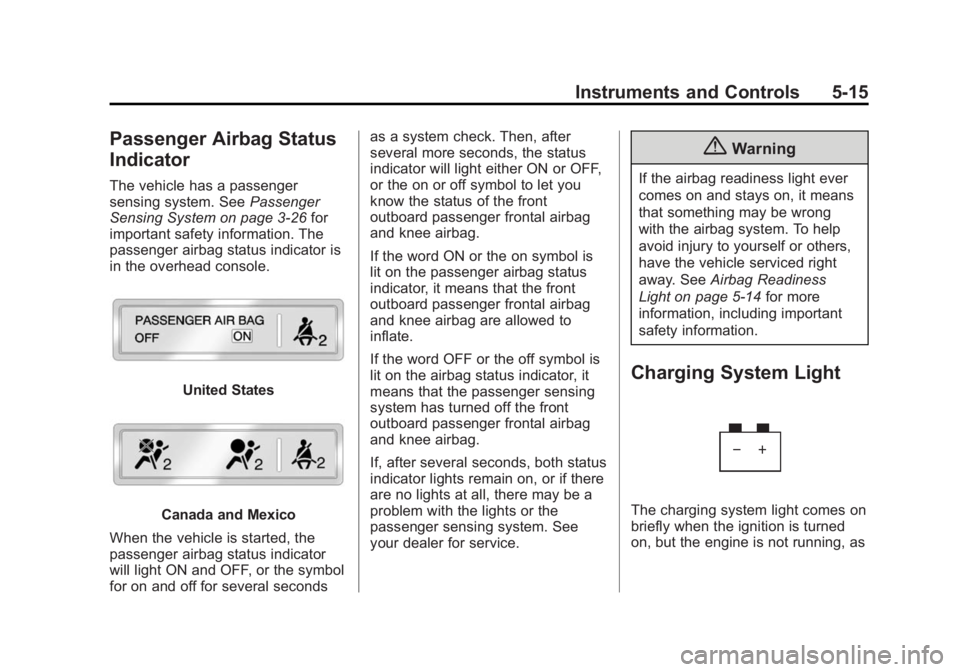
in the overhead console.
United States
Canada and Mexico
When the vehicle is started, the
passenger airbag status indicator
will light ON and OFF, or the symbol
for on and off for several seconds as a system check. Then, after
several more seconds, the status
indicator will light either ON or OFF,
or the on or off symbol to let you
know the status of the front
outboard passenger frontal airbag
and knee airbag.
If the word ON or the on symbol is
lit on the passenger airbag status
indicator, it means that the front
outboard passenger frontal airbag
and knee airbag are allowed to
inflate.
If the word OFF or the off symbol is
lit on the airbag status indicator, it
means that the passenger sensing
system has turned off the front
outboard passenger frontal airbag
and knee airbag.
If, after several seconds, both status
indicator lights remain on, or if there
are no lights at all, there may be a
problem with the lights or the
passenger sensing system. See
your dealer for service.
{Warning
If the airbag readiness light ever
comes on and stays on, it means
that something may be wrong
with the airbag system. To help
avoid injury to yourself or others,
have the vehicle serviced right
away. See
Airbag Readiness
Light on page 5-14 for more
information, including important
safety information.
Charging System Light
The charging system light comes on
briefly when the ignition is turned
on, but the engine is not running, as
Page 136 of 434
Black plate (28,1)Cadillac ATS Owner Manual (GMNA-Localizing-U.S./Canada/Mexico-
6014430) - 2014 - 2nd Edition - 8/23/13
5-28 Instruments and Controls
seconds while the Oil Life display is
active. SeeEngine Oil Life System
on page 10-12.
Tire Pressure: Shows the
approximate pressures of all four
tires. Tire pressure is displayed in
either kilopascal (kPa) or in pounds
per square inch (psi). If the pressure
is low, the value for that tire is
shown in amber. See Tire Pressure
Monitor System on page 10-49 and
Tire Pressure Monitor Operation on
page 10-50.
Vehicle Odometer (Base
Cluster): Shows the odometer.
Blank Page: The Blank Page
display allows for no information to
be displayed in the DIC display
zone(s).Head-Up Display (HUD)
{Warning
If the HUD image is too bright or
too high in your field of view, it
may take you more time to see
things you need to see when it is
dark outside. Be sure to keep the
HUD image dim and placed low in
your field of view.
If equipped with HUD, some
information concerning the
operation of the vehicle is projected
onto the windshield. The information
is projected through the HUD lens
on the driver side of the instrument
panel and focused out toward the
front of the vehicle.
{Caution
If you try to use the HUD image
as a parking aid, you may
misjudge the distance and
damage your vehicle. Do not use
the HUD image as a parking aid.
The HUD information can be
displayed in various languages. The
speedometer reading and other
numerical values can be displayed
in either English or metric units.
The language selection is changed
through the radio and the units of
measurement is changed through
the instrument cluster. See Vehicle
Personalization on page 5-43 and
“Settings” underInstrument Cluster
on page 5-10.
Page 138 of 434
Black plate (30,1)Cadillac ATS Owner Manual (GMNA-Localizing-U.S./Canada/Mexico-
6014430) - 2014 - 2nd Edition - 8/23/13
5-30 Instruments and Controls
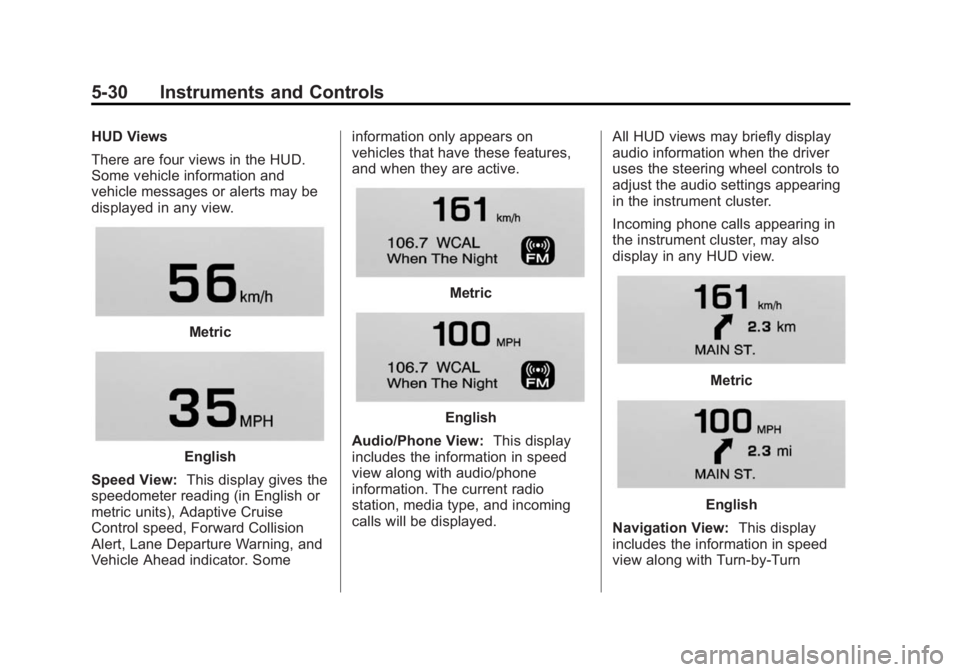
HUD Views
There are four views in the HUD.
Some vehicle information and
vehicle messages or alerts may be
displayed in any view.
Metric
English
Speed View: This display gives the
speedometer reading (in English or
metric units), Adaptive Cruise
Control speed, Forward Collision
Alert, Lane Departure Warning, and
Vehicle Ahead indicator. Some information only appears on
vehicles that have these features,
and when they are active.
Metric
English
Audio/Phone View: This display
includes the information in speed
view along with audio/phone
information. The current radio
station, media type, and incoming
calls will be displayed. All HUD views may briefly display
audio information when the driver
uses the steering wheel controls to
adjust the audio settings appearing
in the instrument cluster.
Incoming phone calls appearing in
the instrument cluster, may also
display in any HUD view.
Metric
English
Navigation View: This display
includes the information in speed
view along with Turn-by-Turn
Page 139 of 434
Black plate (31,1)Cadillac ATS Owner Manual (GMNA-Localizing-U.S./Canada/Mexico-
6014430) - 2014 - 2nd Edition - 8/23/13
Instruments and Controls 5-31
Navigation information. The
compass heading is displayed when
navigation routing is not active.
Navigation Turn-by-Turn Alerts
shown in the instrument cluster may
also be displayed in any HUD view.
Metric
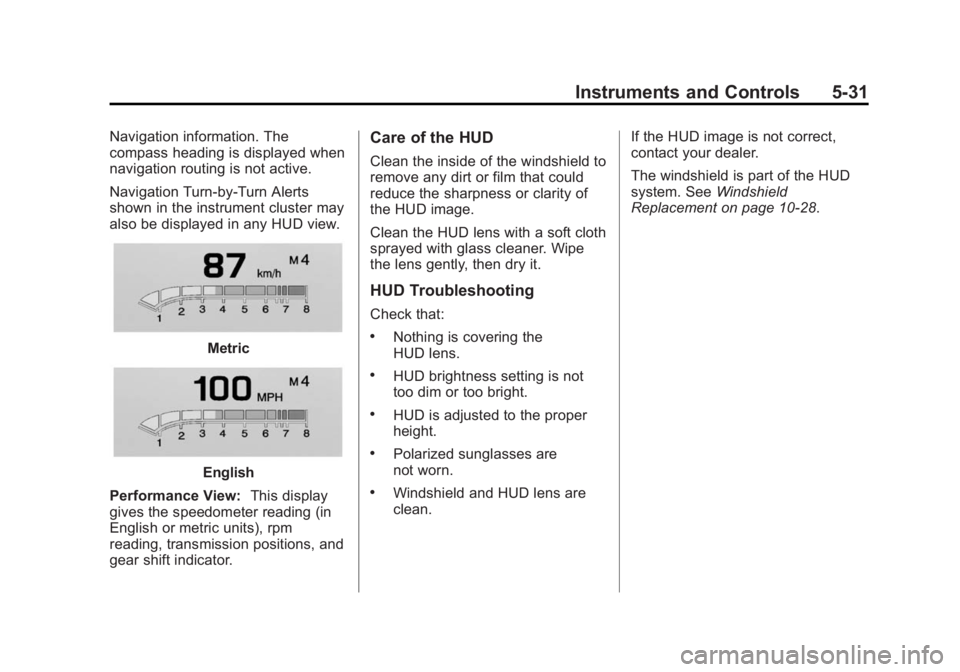
English
Performance View: This display
gives the speedometer reading (in
English or metric units), rpm
reading, transmission positions, and
gear shift indicator.
Care of the HUD
Clean the inside of the windshield to
remove any dirt or film that could
reduce the sharpness or clarity of
the HUD image.
Clean the HUD lens with a soft cloth
sprayed with glass cleaner. Wipe
the lens gently, then dry it.
HUD Troubleshooting
Check that:
.Nothing is covering the
HUD lens.
.HUD brightness setting is not
too dim or too bright.
.HUD is adjusted to the proper
height.
.Polarized sunglasses are
not worn.
.Windshield and HUD lens are
clean. If the HUD image is not correct,
contact your dealer.
The windshield is part of the HUD
system. See
Windshield
Replacement on page 10-28.
Page 204 of 434

Black plate (2,1)Cadillac ATS Owner Manual (GMNA-Localizing-U.S./Canada/Mexico-
6014430) - 2014 - 2nd Edition - 8/23/13
8-2 Climate Controls
10. Rear Window Defogger
11. Recirculation
Automatic Operation
The system automatically controls
the fan speed, air delivery, air
conditioning, and recirculation in
order to heat or cool the vehicle to
the desired temperature.
When the indicator light is on or
AUTO is displayed on the screen,
the system is in full automatic
operation. If the air delivery mode or
fan setting is manually adjusted, the
auto indicator turns off and the
display will show the selected
settings.
For automatic operation:
1. Press AUTO.
2. Set the temperature. Allow thesystem time to stabilize. Then
adjust the temperature as
needed for best comfort.
To improve fuel efficiency and to
cool the vehicle faster, recirculation
may be automatically selected in warm weather. The recirculation
light will not come on. Press
@to
select recirculation; press it again to
select outside air.
English units can be changed to
metric units through the instrument
cluster. See “Settings”under
Instrument Cluster on page 5-10.
OFF (Fan): Press to turn the fan on
or off. The temperature control and
air delivery mode can still be
adjusted.
worx(Driver and Passenger
Temperature Controls): The
temperature can be adjusted
separately for the driver and the
passenger. Press to increase or
decrease the temperature. Press
and hold to rapidly increase or
decrease the temperature.
SYNC (Synchronized
Temperature): Press SYNC to link
all climate zone settings to the
driver settings. The SYNC indicator
will be lit. Adjust the driver side
temperature control to change the
linked temperature. When the passenger settings are adjusted, the
temperatures are unlinked and the
SYNC indicator turns off.
Manual Operation
z 9or9 y(Fan Control):
Press the fan control buttons to
increase or decrease the fan speed.
Press and hold the buttons to adjust
speed more quickly. The fan speed
setting displays. Pressing either
button cancels automatic fan control
and the fan can be controlled
manually. Press AUTO to return to
automatic operation. To turn off the
fan, press OFF.
z N y(Air Delivery Mode
Control): Press the air delivery
mode buttons to change the
direction of the airflow. Selecting
any of the air delivery modes
cancels automatic air delivery
control and the direction of the
airflow can be controlled manually.
Press AUTO to return to automatic
operation.