ECO mode CADILLAC ATS 2014 User Guide
[x] Cancel search | Manufacturer: CADILLAC, Model Year: 2014, Model line: ATS, Model: CADILLAC ATS 2014Pages: 434, PDF Size: 5.61 MB
Page 81 of 434

Black plate (25,1)Cadillac ATS Owner Manual (GMNA-Localizing-U.S./Canada/Mexico-
6014430) - 2014 - 2nd Edition - 8/23/13
Seats and Restraints 3-25
be some smoke and dust coming
from the vents in the deflated
airbags. Airbag inflation does not
prevent the driver from seeing out of
the windshield or being able to steer
the vehicle, nor does it prevent
people from leaving the vehicle.
{Warning
When an airbag inflates, there
may be dust in the air. This dust
could cause breathing problems
for people with a history of
asthma or other breathing trouble.
To avoid this, everyone in the
vehicle should get out as soon as
it is safe to do so. If you have
breathing problems but cannot
get out of the vehicle after an
airbag inflates, then get fresh air
by opening a window or a door.
If you experience breathing
problems following an airbag
deployment, you should seek
medical attention.The vehicle has a feature that may
automatically unlock the doors, turn
on the interior lamps, turn on the
hazard warning flashers, and shut
off the fuel system after the airbags
inflate. You can lock the doors, turn
off the interior lamps, and turn off
the hazard warning flashers by
using the controls for those
features.
{Warning
A crash severe enough to inflate
the airbags may have also
damaged important functions in
the vehicle, such as the fuel
system, brake and steering
systems, etc. Even if the vehicle
appears to be drivable after a
moderate crash, there may be
concealed damage that could
make it difficult to safely operate
the vehicle.
Use caution if you should attempt
to restart the engine after a crash
has occurred.In many crashes severe enough to
inflate the airbag, windshields are
broken by vehicle deformation.
Additional windshield breakage may
also occur from the front outboard
passenger airbag.
.Airbags are designed to inflate
only once. After an airbag
inflates, you will need some new
parts for the airbag system.
If you do not get them, the
airbag system will not be there
to help protect you in another
crash. A new system will include
airbag modules and possibly
other parts. The service manual
for the vehicle covers the need
to replace other parts.
.The vehicle has a crash sensing
and diagnostic module which
records information after a
crash. See
Vehicle Data
Recording and Privacy on
page 13-13 andEvent Data
Recorders on page 13-13.
Page 124 of 434
Black plate (16,1)Cadillac ATS Owner Manual (GMNA-Localizing-U.S./Canada/Mexico-
6014430) - 2014 - 2nd Edition - 8/23/13
5-16 Instruments and Controls
a check to show the light is working.
It should go out when the engine is
started.
If the light stays on, or comes on
while driving, there may be a
problem with the electrical charging
system. Have it checked by your
dealer. Driving while this light is on
could drain the battery.
When this light comes on, or is
flashing, the Driver Information
Center (DIC) also displays a
message.
SeeBattery Voltage and Charging
Messages on page 5-32.
If a short distance must be driven
with the light on, be sure to turn off
all accessories, such as the radio
and air conditioner.
Malfunction
Indicator Lamp
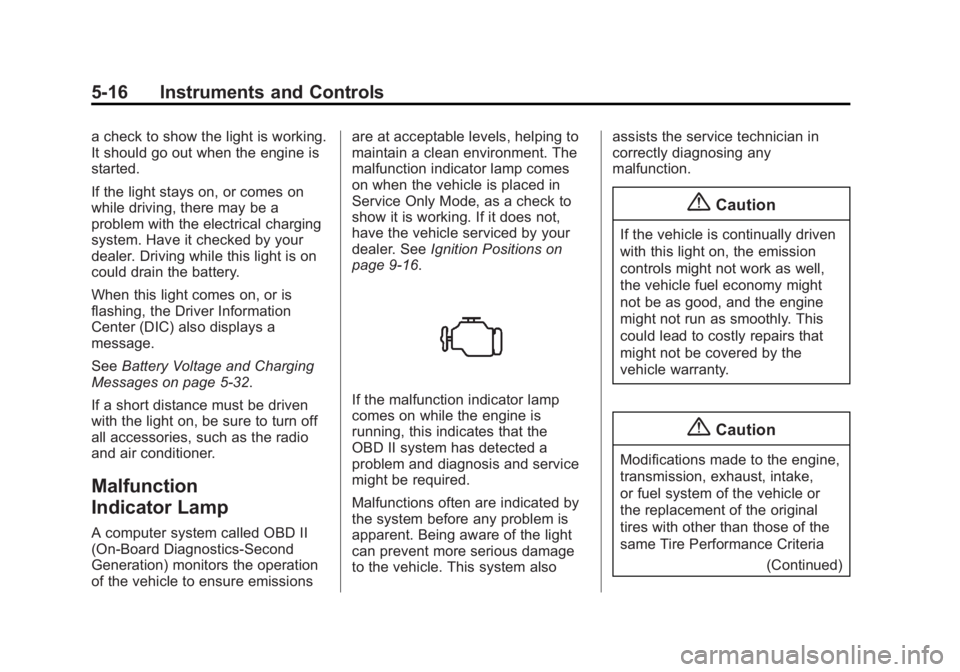
A computer system called OBD II
(On-Board Diagnostics-Second
Generation) monitors the operation
of the vehicle to ensure emissions are at acceptable levels, helping to
maintain a clean environment. The
malfunction indicator lamp comes
on when the vehicle is placed in
Service Only Mode, as a check to
show it is working. If it does not,
have the vehicle serviced by your
dealer. See
Ignition Positions on
page 9-16.
If the malfunction indicator lamp
comes on while the engine is
running, this indicates that the
OBD II system has detected a
problem and diagnosis and service
might be required.
Malfunctions often are indicated by
the system before any problem is
apparent. Being aware of the light
can prevent more serious damage
to the vehicle. This system also assists the service technician in
correctly diagnosing any
malfunction.
{Caution
If the vehicle is continually driven
with this light on, the emission
controls might not work as well,
the vehicle fuel economy might
not be as good, and the engine
might not run as smoothly. This
could lead to costly repairs that
might not be covered by the
vehicle warranty.
{Caution
Modifications made to the engine,
transmission, exhaust, intake,
or fuel system of the vehicle or
the replacement of the original
tires with other than those of the
same Tire Performance Criteria
(Continued)
Page 151 of 434
Black plate (43,1)Cadillac ATS Owner Manual (GMNA-Localizing-U.S./Canada/Mexico-
6014430) - 2014 - 2nd Edition - 8/23/13
Instruments and Controls 5-43
Vehicle
Personalization
Use the audio system controls to
access the personalization menus
for customizing vehicle features.
The following are all possible
personalization features. Depending
on the vehicle, some may not be
available.
Base Radio Audio System
Controls
MENU:Press the center of the
knob to enter the menus and select
menu items. Turn the knob to scroll
through the menus.
SBACK: Press to exit or move
backward in a menu.
To access the
personalization menu:
1. On the Home page, turn the
MENU knob to highlight Settings
and press the MENU knob. 2. Turn the MENU knob to highlight
the desired feature and press
the MENU knob.
CUE Infotainment System Audio
System Controls
To access the
personalization menu:
1. Press SETTINGS on the Home page on the infotainment system
display.
2. Press the desired feature to display a list of available
options.
3. Press to select the desired feature setting.
4. Press the[Back screen button
to return to the previous menu.
Personalization Menus
The following list of menu items may
be available:
.Time and Date
.Language [Language]
.Valet Mode
.Radio
.Vehicle
.Bluetooth
.Voice
.Display
.Rear Camera
.Return to Factory Settings
.Software Information
Each menu is detailed in the
following information.
Time and Date
Manually set the time and date. See
Clock (Base Radio) on page 5-6 or
Clock (Uplevel Radio) on page 5-6.
Language [Language]
Select Language, then select from
the available language(s).
Select the language. The selected
language will display on the system,
and voice recognition will reflect the
selected language.
Page 157 of 434
Black plate (49,1)Cadillac ATS Owner Manual (GMNA-Localizing-U.S./Canada/Mexico-
6014430) - 2014 - 2nd Edition - 8/23/13
Instruments and Controls 5-49
.Prompt Length
.Audio Feedback Speed
Confidence Threshold
This feature allows the adjustment
of the sensitivity of the speech
recognition system.
Select Confirm More or
Confirm Less.
Prompt Length
This feature adjusts the voice
prompt length.
Select Short or Long.
Audio Feedback Speed
This feature adjusts the audio
feedback speed.
Select Slow, Medium, or Fast.
Display
Select and the following may
display:
.Mode
.Proximity Sensing
.Calibrate Touchscreen
.Turn Display Off
Mode
Select to change the display screen
for day or night driving.
Select Auto, Day, or Night.
Proximity Sensing
This allows the feature to be turned
on or off.
Select Off, On, or On-Map Only.
Calibrate Touchscreen
Select to calibrate the touchscreen,
then follow the prompts.
Turn Display Off
Select to turn the display off. Press
anywhere on the display area or any
faceplate button to turn the
display on.
Rear Camera
Select and the following may
display:
.Guidance Lines
.Rear Park Assist Symbols Guidance Lines
Select to turn Off or On. See
Assistance Systems for Parking or
Backing on page 9-49.
Rear Park Assist Symbols
Select to turn Off or On. See
Assistance Systems for Parking or
Backing on page 9-49.
Return to Factory Settings
Select and the following may
display:
.Restore Vehicle Settings
.Clear All Private Data
.Restore Radio Settings
Restore Vehicle Settings
This allows selection of restoring
vehicle settings.
Select Cancel or Restore.
Clear All Private Data
This allows selection to clear all
private information from the vehicle.
Select Cancel or Delete.
Page 175 of 434
Black plate (5,1)Cadillac ATS Owner Manual (GMNA-Localizing-U.S./Canada/Mexico-
6014430) - 2014 - 2nd Edition - 8/23/13
Infotainment System 7-5
CD, USB/iPod, AUX, and SD Card.
SeeAM-FM Radio on page 7-8,
Satellite Radio on page 7-10, CD
Player on page 7-12, and Auxiliary
Jack on page 7-19.
PHONE : Select the PHONE
screen icon to display the PHONE
main page. See “PHONE”in this
section.
NAV : Select the NAV screen icon
to display the last Turn-by-Turn
maneuver if a destination was
downloaded. See Navigation on
page 14-2.
SETTINGS : Select the SETTINGS
screen icon to display the Settings
main page. See “Setting Radio
Preferences” in this section.
Setting Radio Preferences
Select the SETTINGS screen icon
to display the Settings menu and
the following may display:
Time :SeeClock (Base Radio) on
page 5-6 orClock (Uplevel Radio)
on page 5-6. Language (Current Language):
This will set the display language in
the radio, instrument cluster, and
voice recognition. Press to display a
list of languages. Press
SBACK to
go back to the previous menu.
Valet Mode:
1. Type a four-digit code on the circular numeric keypad. Turn
the MENU knob to highlight a
number.
2. Press the MENU knob to select it. Do this for each one of the
four digits. Select Enter to go to
the confirmation screen.
3. Re-enter the four-digit code. Select LOCK to lock the system.
This will also lock the vehicle
storage locations, if equipped.
4. Type the four-digit code to unlock the system. Press
S
BACK to go back to the
previous menu.
Radio : See“Radio Setup” later in
this section. Vehicle :
SeeVehicle
Personalization on page 5-43.
Display : Press the MENU knob to
turn the display on or off.
Return to Factory Settings : See
“Return to Factory Settings” later in
this section.
Radio Setup
While at the active screen, such as
AM, FM, or SiriusXM (if equipped),
press and hold the area just above
the chrome bar and below one of
the preset screen buttons to save
the current station as a favorite.
Press the area just above the
chrome bar to recall a favorite
station.
From the Home Screen, turn the
MENU knob to select Settings
application and push the MENU
knob to select. Turn again to select
"Radio" settings menu and push to
select. Turn again to select
"Manage Favorites" and push to
select.
Page 190 of 434

Black plate (20,1)Cadillac ATS Owner Manual (GMNA-Localizing-U.S./Canada/Mexico-
6014430) - 2014 - 2nd Edition - 8/23/13
7-20 Infotainment System
Phone
Bluetooth (Overview)
Instructions for using the cell phone
may differ between infotainment
systems. For vehicles with the CUE
infotainment system, see the CUE
infotainment manual.
Bluetooth-capable systems can
interact with many cell phones,
allowing:
.Placement and receipt of calls in
a hands-free mode.
.Sharing of the cell phone’s
address book or contact list with
the vehicle.
To minimize driver distraction,
before driving, and with the vehicle
parked:
.Become familiar with the
features of the cell phone.
Organize the phone book and
contact lists clearly and delete duplicate or rarely used entries.
If possible, program speed dial
or other shortcuts.
.Review the controls and
operation of the infotainment
system.
.Pair cell phone(s) to the vehicle.
The system may not work with
all cell phones. See
“Pairing”in
this section.
.If the cell phone has voice
dialing capability, learn to use
that feature to access the
address book or contact list. See
“Voice Pass-Thru” in this
section.
.See “Storing and Deleting Phone
Numbers” in this section.
{Warning
When using a cell phone, it can
be distracting to look too long or
too often at the screen of the
phone or the infotainment system.
(Continued)
Warning (Continued)
Taking your eyes off the road too
long or too often could cause a
crash resulting in injury or death.
Focus your attention on driving.
Vehicles with a Bluetooth system
can use a Bluetooth-capable cell
phone with a Hands-Free Profile to
make and receive phone calls. The
infotainment system and voice
recognition are used to control the
system. The system can be used
while in ON/RUN/START or ACC/
ACCESSORY. The range of the
Bluetooth system can be up to 9.1 m
(30 ft). Not all phones support all
functions and not all phones work
with the Bluetooth system. See
www.gm.com/bluetooth for more
information about compatible
phones.
Page 192 of 434

Black plate (22,1)Cadillac ATS Owner Manual (GMNA-Localizing-U.S./Canada/Mexico-
6014430) - 2014 - 2nd Edition - 8/23/13
7-22 Infotainment System
Switching to Handset or
Handsfree Mode
To switch between handset mode,
use the OnStar command,
“transfer call.”
Pairing
A Bluetooth-enabled cell phone
must be paired to the Bluetooth
system and then connected to the
vehicle before it can be used. See
your cell phone manufacturer's user
guide for Bluetooth functions before
pairing the cell phone. If a Bluetooth
phone is not connected, calls can
be made using OnStar Hands-Free
Calling, if available. SeeOnStar
Overview on page 14-1.
Pairing Information
.Up to five cell phones can be
paired to the Bluetooth system.
.The pairing process is disabled
when the vehicle is moving.
.Pairing only needs to be
completed once, unless the
pairing information on the cell
phone changes or the cell phone
is deleted from the system.
.Only one paired cell phone can
be connected to the Bluetooth
system at a time.
.If multiple paired cell phones are
within range of the system, the
system connects to the first
available paired cell phone in the
order that they were newly
paired to the system. To link to a
different paired phone, see
“Connecting to a Different
Phone”after in this section.
Pairing a Phone or Device
1. From the Home Page, turn the MENU knob to access the
PHONE screen button, then
press the MENU knob to select
the PHONE screen button. If a
device has been previously
paired, the main Phone menu will be shown. If no devices
have been paired, Step two can
be skipped.
2. Turn the MENU knob and press to select Manage Phones.
3. Press the area just above the chrome bar and below the PAIR
screen button. A four-digit
Personal Identification Number
(PIN) appears on the display.
The PIN is used in Step 5.
4. Start the pairing process on the cell phone to be paired to the
vehicle. See the cell phone
manufacturer's user guide for
information on this process.
5. Locate the device named “Your
Vehicle” in the list on the cell
phone. Follow the instructions
on the cell phone to enter the
PIN provided in Step 3. The
system recognizes the new
connected phone after the
pairing process is complete.
Page 215 of 434
Black plate (1,1)Cadillac ATS Owner Manual (GMNA-Localizing-U.S./Canada/Mexico-
6014430) - 2014 - 2nd Edition - 8/23/13
Driving and Operating 9-1
Driving and
Operating
Driving Information
Distracted Driving . . . . . . . . . . . . . 9-2
Defensive Driving . . . . . . . . . . . . . 9-3
Drunk Driving . . . . . . . . . . . . . . . . . 9-3
Control of a Vehicle . . . . . . . . . . . 9-3
Braking . . . . . . . . . . . . . . . . . . . . . . . 9-3
Steering . . . . . . . . . . . . . . . . . . . . . . . 9-4
Off-Road Recovery . . . . . . . . . . . . 9-5
Loss of Control . . . . . . . . . . . . . . . . 9-5
Track Events and CompetitiveDriving . . . . . . . . . . . . . . . . . . . . . . . 9-6
Driving on Wet Roads . . . . . . . . . 9-7
Highway Hypnosis . . . . . . . . . . . . 9-8
Hill and Mountain Roads . . . . . . 9-8
Winter Driving . . . . . . . . . . . . . . . . . 9-9
If the Vehicle Is Stuck . . . . . . . . 9-11
Vehicle Load Limits . . . . . . . . . . 9-11
Starting and Operating
New Vehicle Break-In . . . . . . . . 9-16
Ignition Positions . . . . . . . . . . . . 9-16
Starting the Engine . . . . . . . . . . 9-18
Engine Heater . . . . . . . . . . . . . . . 9-20 Retained Accessory
Power (RAP) . . . . . . . . . . . . . . . 9-21
Shifting Into Park (Automatic Transmission) . . . . . . . . . . . . . . 9-21
Shifting out of Park . . . . . . . . . . 9-22
Parking . . . . . . . . . . . . . . . . . . . . . . 9-22
Parking over Things
That Burn . . . . . . . . . . . . . . . . . . 9-23
Engine Exhaust
Engine Exhaust . . . . . . . . . . . . . . 9-23
Running the Vehicle WhileParked . . . . . . . . . . . . . . . . . . . . . 9-24
Automatic Transmission
Automatic Transmission . . . . . 9-24
Manual Mode . . . . . . . . . . . . . . . . 9-26
Manual Transmission
Manual Transmission . . . . . . . . 9-28
Drive Systems
All-Wheel Drive . . . . . . . . . . . . . . 9-29
Brakes
Antilock BrakeSystem (ABS) . . . . . . . . . . . . . . 9-29
Parking Brake (Electric) . . . . . . 9-30 Parking Brake (Manual) . . . . . . 9-32
Brake Assist . . . . . . . . . . . . . . . . . 9-33
Hill Start Assist (HSA) . . . . . . . 9-33
Ride Control Systems
Traction Control/Electronic
Stability Control . . . . . . . . . . . . 9-33
Driver Mode Control . . . . . . . . . 9-35
Limited-Slip Rear Axle . . . . . . . 9-37
Cruise Control
Cruise Control . . . . . . . . . . . . . . . 9-37
Adaptive Cruise Control . . . . . 9-40
Driver Assistance Systems
Driver Assistance Systems . . . . . . . . . . . . . . . . . . . . 9-48
Assistance Systems for Parking or Backing . . . . . . . . . 9-49
Assistance Systems for Driving . . . . . . . . . . . . . . . . . . . . . 9-53
Forward Collision Alert (FCA) System . . . . . . . . . . . . . . . . . . . . . 9-53
Active Emergency Braking System . . . . . . . . . . . . . . . . . . . . . 9-56
Side Blind Zone Alert (SBZA) . . . . . . . . . . . . . . . 9-58
Lane Departure Warning (LDW) . . . . . . . . . . . . . 9-60
Page 230 of 434
Black plate (16,1)Cadillac ATS Owner Manual (GMNA-Localizing-U.S./Canada/Mexico-
6014430) - 2014 - 2nd Edition - 8/23/13
9-16 Driving and Operating
Starting and
Operating
New Vehicle Break-In
Follow these recommended
guidelines during the first
2 414 km (1,500 mi) of driving this
vehicle. Parts have a break-in
period and performance will be
better in the long run.
For the first 2 414 km (1,500 mi):
.Avoid full throttle starts and
abrupt stops.
.Do not exceed 4000 engine rpm.
.Avoid driving at any one
constant speed, fast or slow.
.Avoid downshifting to brake or
slow the vehicle when the
engine speed will exceed
4000 rpm.
.Do not let the engine labor.
Never lug the engine in high
gear at low speeds. With a
manual transmission, shift to the
next lower gear. This rule
applies at all times, not just
during the break-in period.
.Check engine oil with every
refueling and add if necessary.
Oil and fuel consumption may be
higher than normal during the
first 2 414 km (1,500 mi).
.New brake linings also need a
break-in period. Avoid making
hard stops during the first
322 km (200 mi). This is
recommended every time brake
linings are replaced.
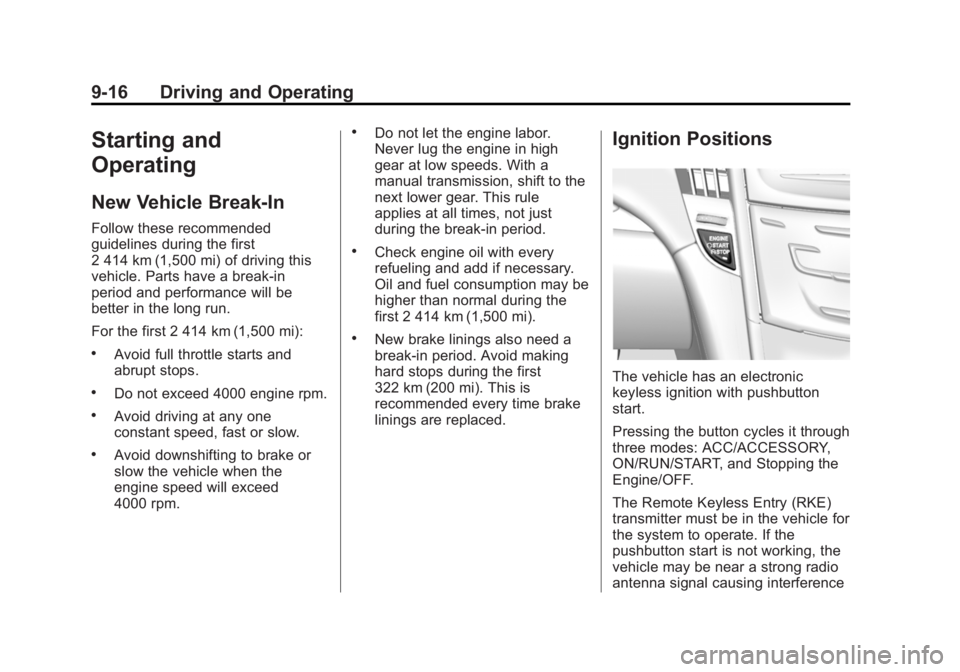
Ignition Positions
The vehicle has an electronic
keyless ignition with pushbutton
start.
Pressing the button cycles it through
three modes: ACC/ACCESSORY,
ON/RUN/START, and Stopping the
Engine/OFF.
The Remote Keyless Entry (RKE)
transmitter must be in the vehicle for
the system to operate. If the
pushbutton start is not working, the
vehicle may be near a strong radio
antenna signal causing interference
Page 232 of 434

Black plate (18,1)Cadillac ATS Owner Manual (GMNA-Localizing-U.S./Canada/Mexico-
6014430) - 2014 - 2nd Edition - 8/23/13
9-18 Driving and Operating
{Warning
Turning off the vehicle while
moving may cause loss of power
assist in the brake and steering
systems and disable the airbags.
While driving, only shut the
vehicle off in an emergency.
If the vehicle cannot be pulled over,
and must be shut off while driving,
press and hold the ENGINE START/
STOP button for longer than
two seconds, or press twice within
five seconds.
ACC/ACCESSORY (Amber
Indicator Light): This mode allows
you to use some electrical
accessories when the engine is off.
With the ignition off, pressing the
button one time without the brake
pedal applied will place the ignition
system in ACC/ACCESSORY. The ignition will switch from ACC/
ACCESSORY to OFF after
five minutes to prevent battery
rundown.
ON/RUN/START (Green Indicator
Light):
This mode is for driving and
starting. With the ignition off, and
the brake pedal applied, pressing
the button once will place the
ignition system in ON/RUN/START.
Once engine cranking begins,
release the button. Engine cranking
will continue until the engine starts.
See Starting the Engine on
page 9-18. The ignition will then
remain in ON/RUN/START.
Service Only Mode
This power mode is available for
service and diagnostics, and to
verify the proper operation of the
malfunction indicator lamp as may
be required for emission inspection
purposes. With the vehicle off, and
the brake pedal not applied,
pressing and holding the button for
more than five seconds will place
the vehicle in Service Only Mode. The instruments and audio systems
will operate as they do in ON/RUN/
START, but the vehicle will not be
able to be driven. The engine will
not start in Service Only Mode.
Push the button again to turn the
vehicle off.
Starting the Engine
Place the transmission in the
proper gear.
Automatic Transmission
Move the shift lever to P (Park) or
N (Neutral). The engine will not start
in any other position. To restart the
vehicle when it is already moving,
use N (Neutral) only.
{Caution
Do not try to shift to P (Park) if the
vehicle is moving. If you do, you
could damage the transmission.
Shift to P (Park) only when the
vehicle is stopped.