parking CADILLAC ATS 2014 Workshop Manual
[x] Cancel search | Manufacturer: CADILLAC, Model Year: 2014, Model line: ATS, Model: CADILLAC ATS 2014Pages: 434, PDF Size: 5.61 MB
Page 314 of 434
Black plate (28,1)Cadillac ATS Owner Manual (GMNA-Localizing-U.S./Canada/Mexico-
6014430) - 2014 - 2nd Edition - 8/23/13
10-28 Vehicle Care
pressure from the regular brake
pedal. Do this until the vehicle is
held by the parking brake only.
.To check the P (Park)
mechanism's holding ability:
With the engine running, shift to
P (Park). Then release the
parking brake followed by the
regular brake.
Contact your dealer if service is
required.
Wiper Blade Replacement
Windshield wiper blades should be
inspected for wear and cracking.
See Maintenance Schedule on
page 11-3.
Replacement blades come in
different types and are removed in
different ways. For proper type and
length, see Maintenance
Replacement Parts on page 11-15. To replace the windshield wiper
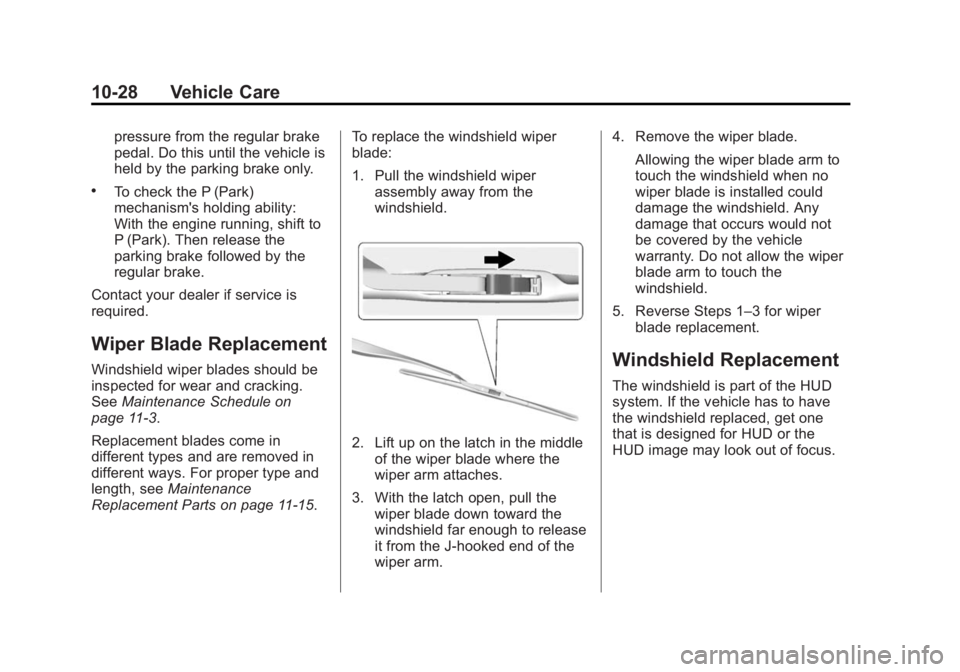
blade:
1. Pull the windshield wiper
assembly away from the
windshield.
2. Lift up on the latch in the middleof the wiper blade where the
wiper arm attaches.
3. With the latch open, pull the wiper blade down toward the
windshield far enough to release
it from the J-hooked end of the
wiper arm. 4. Remove the wiper blade.
Allowing the wiper blade arm to
touch the windshield when no
wiper blade is installed could
damage the windshield. Any
damage that occurs would not
be covered by the vehicle
warranty. Do not allow the wiper
blade arm to touch the
windshield.
5. Reverse Steps 1–3 for wiper blade replacement.
Windshield Replacement
The windshield is part of the HUD
system. If the vehicle has to have
the windshield replaced, get one
that is designed for HUD or the
HUD image may look out of focus.
Page 325 of 434

Black plate (39,1)Cadillac ATS Owner Manual (GMNA-Localizing-U.S./Canada/Mexico-
6014430) - 2014 - 2nd Edition - 8/23/13
Vehicle Care 10-39
Number Usage1 Not Used
2 Left Window
3 Body Control Module 8
4 A/C Inverter
5 Passive Entry Passive Start
Battery 1
6 Body Control Module 4
7 Heated Mirrors
8 Amplifier
9 Rear Window Defogger
10 Not Used 11 Trailer Connector
12 OnStar (If Equipped)
13 Right Window Number Usage
14 Electric Parking Brake
15 Not Used
16 Trunk Release
17 Run Relay
18 Logistics Relay
19 Logistics Fuse
20 Rear Window Defogger Relay
21 Mirror Window Module
22 Not Used
23 Canister Vent
24 Body Control Module 2
25 Rear Vision Camera
26 Not Used
27 SBZA/LDW/EOCM
28 Trailer/Sunshade Number Usage
29 Not Used
30 Semi-Active Damping System
31 Transfer Case Control Module
32 Theft Module/ Universal Garage
Door Opener/Rain
Sensor
33 UPA
34 Radio/DVD
35 Not Used
36 Trailer
37 Fuel Pump/Fuel System Control
Module
38 Not Used
39 Not Used
40 Not Used
41 Not Used
Page 339 of 434

Black plate (53,1)Cadillac ATS Owner Manual (GMNA-Localizing-U.S./Canada/Mexico-
6014430) - 2014 - 2nd Edition - 8/23/13
Vehicle Care 10-53
using a TPMS relearn tool, in the
following order: driver side front tire,
passenger side front tire, passenger
side rear tire, and driver side rear.
See your dealer for service or to
purchase a relearn tool.
There are two minutes to match the
first tire/wheel position, and
five minutes overall to match all four
tire/wheel positions. If it takes
longer, the matching process stops
and must be restarted.
The TPMS sensor matching
process is:
1. Set the parking brake.
2. Place the vehicle power mode inON/RUN/START. See Ignition
Positions on page 9-16.
3. Make sure the Tire Pressure info display option is turned on. The
info displays on the DIC can be
turned on and off through the
Settings menu. See Driver
Information Center (DIC) on
page 5-25. 4. Use the five-way DIC control on
the right side of the steering
wheel to scroll to the Tire
Pressure screen under the DIC
info page. See Driver
Information Center (DIC) on
page 5-25.
5. Press and hold the SEL button in the center of the five-way DIC
control.
The horn sounds twice to signal
the receiver is in relearn mode
and the TIRE LEARNING
ACTIVE message displays on
the DIC screen.
6. Start with the driver side front tire.
7. Place the relearn tool against the tire sidewall, near the valve
stem. Then press the button to
activate the TPMS sensor.
A horn chirp confirms that the
sensor identification code has
been matched to this tire and
wheel position. 8. Proceed to the passenger side
front tire, and repeat Step 7.
9. Proceed to the passenger side rear tire, and repeat Step 7.
10. Proceed to the driver side rear tire, and repeat Step 7. The
horn sounds two times to
indicate the sensor
identification code has been
matched to the driver side rear
tire, and the TPMS sensor
matching process is no longer
active. The TIRE LEARNING
ACTIVE message on the DIC
display screen goes off.
11. Shut the ignition off.
12. Set all four tires to the recommended air pressure
level as indicated on the Tire
and Loading Information label.
Page 342 of 434
Black plate (56,1)Cadillac ATS Owner Manual (GMNA-Localizing-U.S./Canada/Mexico-
6014430) - 2014 - 2nd Edition - 8/23/13
10-56 Vehicle Care
When It Is Time for New
Tires
Factors such as maintenance,
temperatures, driving speeds,
vehicle loading, and road conditions
affect the wear rate of the tires.
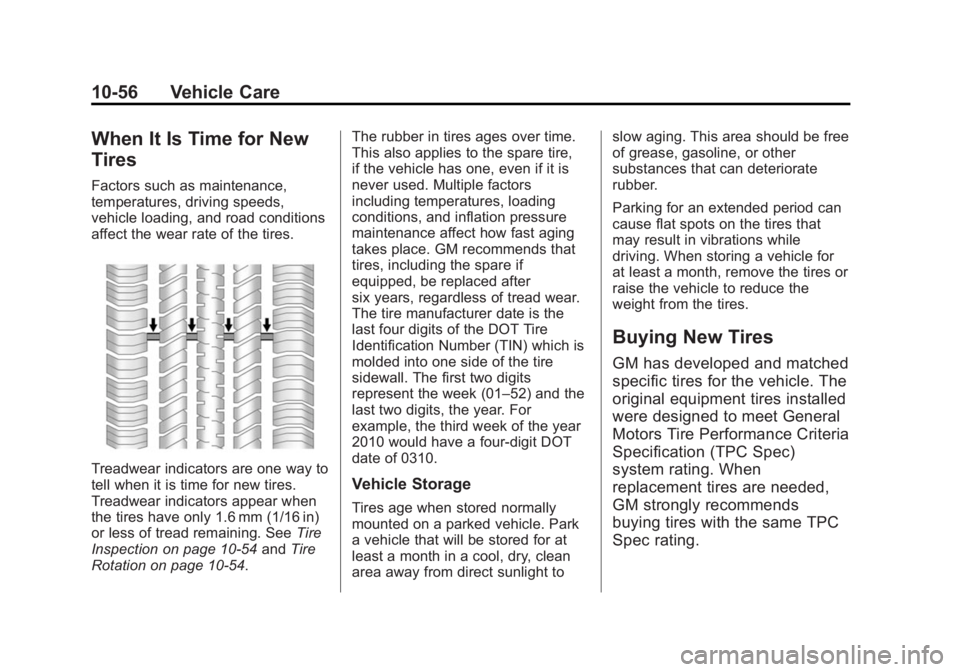
Treadwear indicators are one way to
tell when it is time for new tires.
Treadwear indicators appear when
the tires have only 1.6 mm (1/16 in)
or less of tread remaining. SeeTire
Inspection on page 10-54 andTire
Rotation on page 10-54. The rubber in tires ages over time.
This also applies to the spare tire,
if the vehicle has one, even if it is
never used. Multiple factors
including temperatures, loading
conditions, and inflation pressure
maintenance affect how fast aging
takes place. GM recommends that
tires, including the spare if
equipped, be replaced after
six years, regardless of tread wear.
The tire manufacturer date is the
last four digits of the DOT Tire
Identification Number (TIN) which is
molded into one side of the tire
sidewall. The first two digits
represent the week (01–52) and the
last two digits, the year. For
example, the third week of the year
2010 would have a four-digit DOT
date of 0310.Vehicle Storage
Tires age when stored normally
mounted on a parked vehicle. Park
a vehicle that will be stored for at
least a month in a cool, dry, clean
area away from direct sunlight toslow aging. This area should be free
of grease, gasoline, or other
substances that can deteriorate
rubber.
Parking for an extended period can
cause flat spots on the tires that
may result in vibrations while
driving. When storing a vehicle for
at least a month, remove the tires or
raise the vehicle to reduce the
weight from the tires.
Buying New Tires
GM has developed and matched
specific tires for the vehicle. The
original equipment tires installed
were designed to meet General
Motors Tire Performance Criteria
Specification (TPC Spec)
system rating. When
replacement tires are needed,
GM strongly recommends
buying tires with the same TPC
Spec rating.
Page 349 of 434
Black plate (63,1)Cadillac ATS Owner Manual (GMNA-Localizing-U.S./Canada/Mexico-
6014430) - 2014 - 2nd Edition - 8/23/13
Vehicle Care 10-63
{Warning
Special tools and procedures are
required to service a run-flat tire.
If these special tools and
procedures are not used, injury or
vehicle damage may occur.
Always be sure the proper tools
and procedures, as described in
the service manual, are used.
It is unusual for a tire to blow out
while driving, especially if the tires
are maintained properly. See Tires
on page 10-40. If air goes out of a
tire, it is much more likely to leak
out slowly. But if there is ever a
blowout, here are a few tips about
what to expect and what to do:
If a front tire fails, the flat tire
creates a drag that pulls the vehicle
toward that side. Take your foot off
the accelerator pedal and grip the
steering wheel firmly. Steer to
maintain lane position, and then
gently brake to a stop, well off the
road, if possible. A rear blowout, particularly on a
curve, acts much like a skid and
may require the same correction as
used in a skid. Stop pressing the
accelerator pedal and steer to
straighten the vehicle. It may be
very bumpy and noisy. Gently brake
to a stop, well off the road,
if possible.
{Warning
Lifting a vehicle and getting under
it to do maintenance or repairs is
dangerous without the
appropriate safety equipment and
training. If a jack is provided with
the vehicle, it is designed only for
changing a flat tire. If it is used for
anything else, you or others could
be badly injured or killed if the
vehicle slips off the jack. If a jack
is provided with the vehicle, only
use it for changing a flat tire.
If this vehicle does not have run-flat
tires and a tire goes flat, avoid
further tire and wheel damage by
driving slowly to a level place, well
off the road, if possible. Turn on the
hazard warning flashers. See
Hazard Warning Flashers on
page 6-5.
1. Turn on the hazard warning
flashers.
2. Set the parking brake firmly.
3. Put an automatic transmission in P (Park) or a manual
transmission in 1 (First) or
R (Reverse).
4. Turn off the ignition.
5. Inspect the flat tire.
{Warning
Driving on a flat tire will cause
permanent damage to the tire.
Re-inflating a tire after it has been
driven on while severely (Continued)
Page 359 of 434
Black plate (73,1)Cadillac ATS Owner Manual (GMNA-Localizing-U.S./Canada/Mexico-
6014430) - 2014 - 2nd Edition - 8/23/13
Vehicle Care 10-73
2. Position the two vehicles so thatthey are not touching.
3. Set the parking brake firmly and put the shift lever in P (Park)
with an automatic transmission,
or Neutral with a manual
transmission. See Shifting Into
Park (Automatic Transmission)
on page 9-21 with an automatic
transmission, or Parking on
page 9-22 with a manual
transmission.
{Caution
If any accessories are left on or
plugged in during the jump
starting procedure, they could be
damaged. The repairs would not
be covered by the vehicle
warranty. Whenever possible, turn
off or unplug all accessories on
either vehicle when jump starting. 4. Set the ignition to OFF. Turn off
all lights and accessories in both
vehicles, except the hazard
warning flashers if needed.
{Warning
An electric fan can start up even
when the engine is not running
and can injure you. Keep hands,
clothing and tools away from any
underhood electric fan.
{Warning
Using a match near a battery can
cause battery gas to explode.
People have been hurt doing this,
and some have been blinded.
Use a flashlight if you need more
light.
Be sure the battery has enough
water. You do not need to add
water to the battery installed in
(Continued)
Warning (Continued)
your new vehicle. But if a battery
has filler caps, be sure the right
amount of fluid is there. If it is low,
add water to take care of that
first. If you do not, explosive gas
could be present.
Battery fluid contains acid that
can burn you. Do not get it on
you. If you accidentally get it in
your eyes or on your skin, flush
the place with water and get
medical help immediately.
{Warning
Fans or other moving engine
parts can injure you badly. Keep
your hands away from moving
parts once the engine is running.
Page 362 of 434
Black plate (76,1)Cadillac ATS Owner Manual (GMNA-Localizing-U.S./Canada/Mexico-
6014430) - 2014 - 2nd Edition - 8/23/13
10-76 Vehicle Care
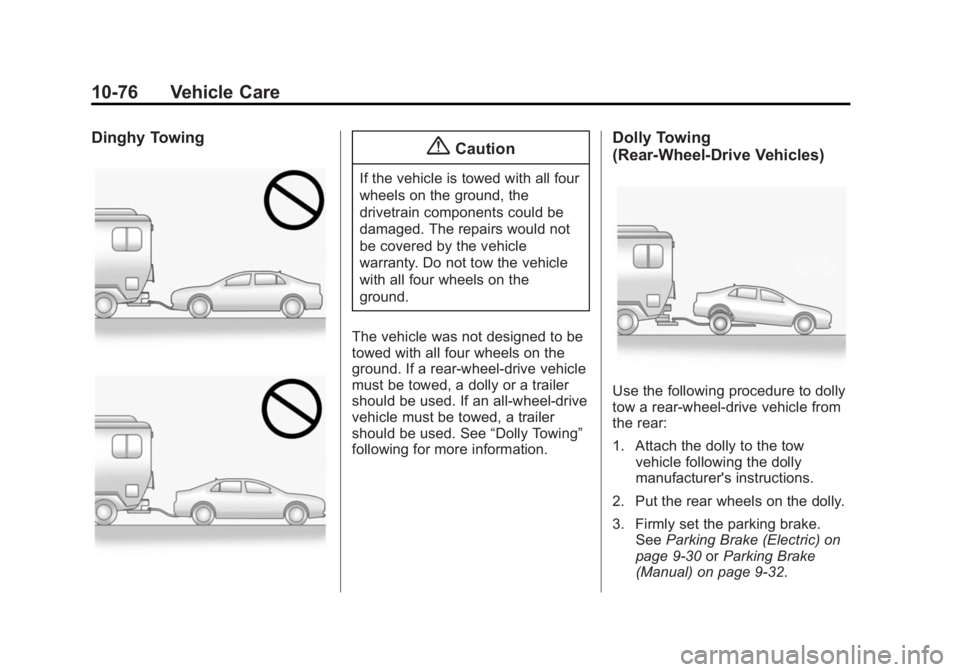
Dinghy Towing{Caution
If the vehicle is towed with all four
wheels on the ground, the
drivetrain components could be
damaged. The repairs would not
be covered by the vehicle
warranty. Do not tow the vehicle
with all four wheels on the
ground.
The vehicle was not designed to be
towed with all four wheels on the
ground. If a rear-wheel-drive vehicle
must be towed, a dolly or a trailer
should be used. If an all-wheel-drive
vehicle must be towed, a trailer
should be used. See “Dolly Towing”
following for more information.
Dolly Towing
(Rear-Wheel-Drive Vehicles)
Use the following procedure to dolly
tow a rear-wheel-drive vehicle from
the rear:
1. Attach the dolly to the tow
vehicle following the dolly
manufacturer's instructions.
2. Put the rear wheels on the dolly.
3. Firmly set the parking brake. See Parking Brake (Electric) on
page 9-30 orParking Brake
(Manual) on page 9-32.
Page 376 of 434
Black plate (4,1)Cadillac ATS Owner Manual (GMNA-Localizing-U.S./Canada/Mexico-
6014430) - 2014 - 2nd Edition - 8/23/13
11-4 Service and Maintenance
for more than a year. The engine oil
and filter must be changed at least
once a year and the oil life system
must be reset. Your trained dealer
technician can perform this work.
If the engine oil life system is reset
accidentally, service the vehicle
within 5 000 km/3,000 mi since the
last service. Reset the oil life
system when the oil is changed.
SeeEngine Oil Life System on
page 10-12.
Tire Rotation and Required
Services Every 12 000 km/
7,500 mi
Rotate the tires, if recommended for
the vehicle, and perform the
following services. See Tire
Rotation on page 10-54.
.Check engine oil level and oil
life percentage. If needed,
change engine oil and filter, and
reset oil life system. See Engine
Oil on page 10-10 andEngine
Oil Life System on page 10-12.
.Check engine coolant level. See
Engine Coolant on page 10-17.
.Check windshield washer fluid
level. See Washer Fluid on
page 10-22.
.Visually inspect windshield wiper
blades for wear, cracking,
or contamination. See Exterior
Care on page 10-77. Replace
worn or damaged wiper blades.
See Wiper Blade Replacement
on page 10-28.
.Check tire inflation pressures.
See Tire Pressure on
page 10-47.
.Inspect tire wear. See Tire
Inspection on page 10-54.
.Visually check for fluid leaks.
.Inspect engine air cleaner filter.
See Engine Air Cleaner/Filter on
page 10-15.
.Inspect brake system.
.Visually inspect steering,
suspension, and chassis
components for damaged, loose, or missing parts or signs of
wear. See
Exterior Care on
page 10-77.
.Check restraint system
components. See Safety System
Check on page 3-18.
.Visually inspect fuel system for
damage or leaks.
.Visually inspect exhaust system
and nearby heat shields for
loose or damaged parts.
.Lubricate body components. See
Exterior Care on page 10-77.
.Check starter switch. See Starter
Switch Check on page 10-26.
.Check automatic transmission
shift lock control function. See
Automatic Transmission Shift
Lock Control Function Check on
page 10-27.
.Check parking brake and
automatic transmission park
mechanism. See Park Brake and
P (Park) Mechanism Check on
page 10-27.
Page 417 of 434
Black plate (7,1)Cadillac ATS Owner Manual (GMNA-Localizing-U.S./Canada/Mexico-
6014430) - 2014 - 2nd Edition - 8/23/13
OnStar 14-7
change the OnStar PIN, call OnStar
and provide the Advisor with the
current number.
Warranty
OnStar equipment may be
warranted as part of the New
Vehicle Limited Warranty. The
manufacturer of the vehicle
furnishes detailed warranty
information.
Languages
The vehicle can be programmed to
respond in multiple languages.
Press
Qand ask an Advisor.
Advisors are available in English,
Spanish and French. Available
languages may vary by country.
Potential Issues
OnStar cannot perform Remote
Door Unlock or Stolen Vehicle
Assistance after the vehicle has
been off continuously for five days.
After five days, OnStar can contact Roadside Assistance and a
locksmith to help gain access to the
vehicle.
Global Positioning
System (GPS)
.Obstruction of the GPS can
occur in a large city with tall
buildings; in parking garages;
around airports; in tunnels,
underpasses, or parking
garages; or in an area with very
dense trees. If GPS signals are
not available, the OnStar system
should still operate to call
OnStar. However, OnStar could
have difficulty identifying the
exact location.
.In emergency situations, OnStar
can use the last stored GPS
location to send to emergency
responders.
.A temporary loss of GPS can
cause loss of the ability to send
a Turn-by-Turn Navigation route.
The Advisor may give a verbalroute or may ask for a call back
after the vehicle is driven into an
open area.
Cellular and GPS Antennas
Avoid placing items over or near the
antenna to prevent blocking cellular
and GPS signal reception. Cellular
reception is required for OnStar to
send remote signals to the vehicle.
Unable to Connect to OnStar
Message
If there is limited cellular coverage
or the cellular network has reached
maximum capacity, this message
may come on. Press
Qto try the
call again or try again after driving a
few miles into another cellular area.
Vehicle and Power Issues
OnStar services require a vehicle
electrical system, wireless service,
and GPS satellite technologies to be
available and operating for features
to function properly. These systems
may not operate if the battery is
discharged or disconnected.
Page 421 of 434
Black plate (1,1)Cadillac ATS Owner Manual (GMNA-Localizing-U.S./Canada/Mexico-
6014430) - 2014 - 2nd Edition - 8/23/13
INDEX i-1
A
Accessories andModifications . . . . . . . . . . . . . . . . . 10-3
Accessory Power . . . . . . . . . . . . . . 9-21
Active Emergency Braking System . . . . . . . . 1-19, 9-56
Adaptive Cruise Control . . . . . . . 9-40
Adaptive Forward
Lighting (AFL) . . . . . . . . . . . . . . . . . 6-5
Adaptive Forward Lighting (AFL) Light . . . . . . . . . . . . . . . . . . . 5-24
Add-On Electrical Equipment . . . . . . . . . . . . . . . . . . . 9-72
Additional Information OnStar
®. . . . . . . . . . . . . . . . . . . . . . 14-5
Adjustments
Lumbar, Front Seats . . . . . . . . . . . 3-4
Thigh Support . . . . . . . . . . . . . . . . . 3-4
Air Cleaner/Filter, Engine . . . . . 10-15
Air Filter, Passenger Compartment . . . . . . . . . . . . . . . . 8-10
Air Vents . . . . . . . . . . . . . . . . . . . . . . . 8-9 Airbag System
Check . . . . . . . . . . . . . . . . . . . . . . . . 3-31
How Does an Airbag
Restrain? . . . . . . . . . . . . . . . . . . . 3-24
Passenger Sensing System . . . . . . . . . . . . . . . . . . . . . . 3-26
What Makes an Airbag
Inflate? . . . . . . . . . . . . . . . . . . . . . . 3-24
What Will You See after an Airbag Inflates? . . . . . . . . . . . . . 3-24
When Should an Airbag
Inflate? . . . . . . . . . . . . . . . . . . . . . . 3-23
Where Are the Airbags? . . . . . . 3-21
Airbags Adding Equipment to theVehicle . . . . . . . . . . . . . . . . . . . . . . 3-30
Passenger Status Indicator . . . 5-15
Readiness Light . . . . . . . . . . . . . . 5-14
Servicing Airbag-Equipped Vehicles . . . . . . . . . . . . . . . . . . . . . 3-30
System Check . . . . . . . . . . . . . . . . 3-19
Alarm Vehicle Security . . . . . . . . . . . . . . 2-16
Alert Side Blind Zone (SBZA) . . . . . . 9-58
All-Wheel Drive . . . . . . . . . 9-29, 10-26 AM-FM Radio . . . . . . . . . . . . . . . . . . . 7-8
Antenna
Multi-band . . . . . . . . . . . . . . . . . . . . 7-12
Antilock Brake System (ABS) . . . . . . . . . . . . . . . . 9-29
Warning Light . . . . . . . . . . . . . . . . . 5-20
Appearance Care
Exterior . . . . . . . . . . . . . . . . . . . . . 10-77
Interior . . . . . . . . . . . . . . . . . . . . . . 10-82
Armrest Storage . . . . . . . . . . . . . . . . 4-2
Assistance Systems for Driving . . . . . . . . . . . . . . . . . . . . . . . 9-53
Assistance Systems for Parking and Backing . . . . . . . . . 9-49
Audio Players . . . . . . . . . . . . . . . . . 7-12 CD . . . . . . . . . . . . . . . . . . . . . . . . . . . 7-12
Audio System Backglass Antenna . . . . . . . . . . . 7-12
Radio Reception . . . . . . . . . . . . . . 7-11
Theft-Deterrent Feature . . . . . . . . 7-2
Automatic
Door Locks . . . . . . . . . . . . . . . . . . . 2-13
Headlamp System . . . . . . . . . . . . . 6-4
Transmission . . . . . . . . . . . . . . . . . 9-24
Transmission Fluid . . . . . . . . . 10-14