check CADILLAC ATS V 2017 1.G Service Manual
[x] Cancel search | Manufacturer: CADILLAC, Model Year: 2017, Model line: ATS V, Model: CADILLAC ATS V 2017 1.GPages: 335, PDF Size: 3.73 MB
Page 218 of 335
Cadillac ATS/ATS-V Owner Manual (GMNA-Localizing-MidEast-10287885) -
2017 - crc - 6/16/16
DRIVING AND OPERATING 217
Backing Warning and Reverse
Automatic Braking
Vehicles with Adaptive Cruise Control
(ACC) have the Backing Warning and
Reverse Automatic Braking (RAB)
system. The Backing Warning part of
this system can warn of rear objects
when backing up at speeds greater
than 8 km/h (5 mph).
The Backing Warning System will
beep once from the rear when a
potential object threat is first
detected, or pulse twice on both sides
of the Safety Alert Seat. When the
system detects a potential crash,
beeps will be heard from the rear,
or five pulses will be felt on both sides
of the Safety Alert Seat. There may
also be a brief, sharp application of
the brakes.
{Warning
The Backing Warning System only
operates at speeds greater than
8 km/h (5 mph). It does not detect
children, pedestrians, bicyclists,
animals, or objects below the(Continued)
Warning (Continued)
bumper or that are too close or too
far from the vehicle. In some
situations, such as at higher
backing speeds, there may not be
enough time for the short, sharp
application of the vehicle brake
system to occur. To prevent injury,
death, or vehicle damage, even with
the Backing Warning System,
always check the area around the
vehicle and check all mirrors before
backing.
When the vehicle is in R (Reverse),
if the system detects the vehicle is
backing too fast to avoid a crash with
a detected object behind your vehicle
in your path, it may automatically
brake hard to a stop to help avoid or
reduce the harm caused by a backing
crash.
{Warning
RAB may not avoid many types of
backing crashes. Do not wait for the
automatic braking to apply. This
system is not designed to replace
driver braking and only works in
R (Reverse) when an object is
detected directly behind the vehicle.
It may not brake or stop in time to
avoid a crash. It will not brake for
objects when the vehicle is moving
at very low speeds. It does not
detect children, pedestrians,
bicyclists, animals, or objects below
the bumper or that are too close or
too far from the vehicle. To prevent
injury, death, or vehicle damage,
even with RAB, always check the
area around the vehicle before and
while backing.
Pressing the brake pedal after the
vehicle comes to a stop will release
the Reverse Automatic Braking. If the
brake pedal is not pressed soon after
the stop, the Electric Parking Brake
(EPB) may be set. When it is safe,
Page 219 of 335
Cadillac ATS/ATS-V Owner Manual (GMNA-Localizing-MidEast-10287885) -
2017 - crc - 6/16/16
218 DRIVING AND OPERATING
press the accelerator pedal firmly at
any time to override the Reverse
Automatic Braking.
{Warning
There may be instances where
unexpected or undesired automatic
braking occurs. If this happens,
either press the brake pedal or
firmly press the accelerator pedal to
release the brakes from the RAB
system. Before releasing the brakes,
check the RVC screen and check the
area around the vehicle to make
sure it is safe to proceed.
Rear Cross Traffic Alert (RCTA)
If equipped, RCTA displays a red
warning triangle with a left or right
pointing arrow on the RVC screen to
warn of traffic coming from the left or
right. This system detects objects
coming from up to 20 m (65 ft) from
the left or right side of the vehicle.
When an object is detected, either
three beeps sound from the left or
right or three Safety Alert Seat pulses occur on the left or right side,
depending on the direction of the
detected vehicle.
Use caution while backing up when
towing a trailer, as the RCTA
detection zones that extend out from
the back of the vehicle do not move
further back when a trailer is towed.
Turning the Features On or Off
TheXbutton to the left of the
steering wheel is used to turn on or
off the Front and Rear Parking Assist,
Rear Cross Traffic Alert (RCTA),
Reverse Automatic Braking, and
Backing Warning System at the same
time. The indicator light next to the
button comes on when the features
are on and turns off when the features
have been disabled.
Turn off parking assist and Reverse
Automatic Braking when towing a
trailer.
To turn the RPA symbols and rear
guidance lines on or off, see “Rear
Camera ”under Vehicle
Personalization 0137. RCTA can be turned on or off through
vehicle personalization. See
“Collision/
Detection Systems” underVehicle
Personalization 0137.
Assistance Systems for
Driving
If equipped, when driving the vehicle
in a forward gear, Forward Collision
Alert (FCA), Lane Departure Warning
(LDW), Lane Keep Assist (LKA), Side
Blind Zone Alert (SBZA), Lane Change
Alert (LCA), and/or Forward
Automatic Braking (FAB) can help to
avoid a crash or reduce crash damage.
Forward Collision Alert
(FCA) System
If equipped, the FCA system may help
to avoid or reduce the harm caused by
front-end crashes. When approaching
a vehicle ahead too quickly, FCA
provides a flashing red alert on the
windshield and rapidly beeps or pulses
the Safety Alert Seat. FCA also lights
an amber visual alert if following
another vehicle much too closely.
Page 223 of 335
Cadillac ATS/ATS-V Owner Manual (GMNA-Localizing-MidEast-10287885) -
2017 - crc - 6/16/16
222 DRIVING AND OPERATING
Minor brake pedal pulsations or pedal
movement during this time is normal
and the brake pedal should continue
to be applied as needed. IBA will
automatically disengage only when
the brake pedal is released.
{Warning
IBA may increase vehicle braking in
situations when it may not be
necessary. You could block the flow
of traffic. If this occurs, take your
foot off the brake pedal and then
apply the brakes as needed.
FAB and IBA can be disabled through
vehicle personalization. See “Collision/
Detection Systems” underVehicle
Personalization 0137.
{Warning
Using FAB or IBA while towing a
trailer could cause you to lose
control of the vehicle and crash.
Turn the system to Off when
towing a trailer.
Side Blind Zone
Alert (SBZA)
If equipped, the SBZA system is a
lane-changing aid that assists drivers
with avoiding crashes that occur with
moving vehicles in the side blind zone
(or spot) areas. When the vehicle is in
a forward gear, the left or right side
mirror display will light up if a moving
vehicle is detected in that blind zone.
If the turn signal is activated and a
vehicle is also detected on the same
side, the display will flash as an extra
warning not to change lanes. Since
this system is part of the Lane Change
Alert (LCA) system, read the entire
LCA section before using this feature.
Lane Change Alert (LCA)
If equipped, the LCA system is a
lane-changing aid that assists drivers
with avoiding lane change crashes
that occur with moving vehicles in the
side blind zone (or spot) areas or with
vehicles rapidly approaching these
areas from behind. The LCA warning
display will light up in the
corresponding outside side mirror and
will flash if the turn signal is on.
{Warning
LCA does not alert the driver to
vehicles outside of the system
detection zones, pedestrians,
bicyclists, or animals. It may not
provide alerts when changing lanes
under all driving conditions. Failure
to use proper care when changing
lanes may result in injury, death,
or vehicle damage. Before making a
lane change, always check mirrors,
glance over your shoulder, and use
the turn signals.
LCA Detection Zones
1. SBZA Detection Zone
2. LCA Detection Zone
Page 224 of 335
Cadillac ATS/ATS-V Owner Manual (GMNA-Localizing-MidEast-10287885) -
2017 - crc - 6/16/16
DRIVING AND OPERATING 223
The LCA sensor covers a zone of
approximately one lane over from
both sides of the vehicle, or 3.5 m
(11 ft). The height of the zone is
approximately between 0.5 m (1.5 ft)
and 2 m (6 ft) off the ground. The Side
Blind Zone Alert (SBZA) warning area
starts at approximately the middle of
the vehicle and goes back 5 m (16 ft).
Drivers are also warned of vehicles
rapidly approaching from up to 25 m
(82 ft) behind the vehicle.
How the System Works
The LCA symbol lights up in the side
mirrors when the system detects a
moving vehicle in the next lane over
that is in the side blind zone or
rapidly approaching that zone from
behind. A lit LCA symbol indicates it
may be unsafe to change lanes. Before
making a lane change, check the LCA
display, check mirrors, glance over
your shoulder, and use the turn
signals.
Left Side MirrorDisplayRight Side Mirror Display
When the vehicle is started, both
outside mirror LCA displays will
briefly come on to indicate the system
is operating. When the vehicle is in a
forward gear, the left or right side
mirror display will light up if a moving
vehicle is detected in the next lane
over in that blind zone or rapidly
approaching that zone. If the turn
signal is activated in the same
direction as a detected vehicle, this
display will flash as an extra warning
not to change lanes.
LCA can be disabled through vehicle
personalization. See “Collision/
Detection Systems” underVehicle
Personalization 0137. If LCA is
disabled by the driver, the LCA mirror
displays will not light up.
When the System Does Not
Seem to Work Properly
The LCA system requires some driving
for the system to calibrate to
maximum performance. This
calibration may occur more quickly if
the vehicle is driven on a straight
highway road with traffic and roadside
objects (e.g., guardrails, barriers).
During a trip, the LCA system is not
operational until the vehicle first
reaches a speed of 24 km/h (15 mph).
LCA displays may not come on when
passing a vehicle quickly, for a
stopped vehicle, or when towing a
trailer. The LCA detection zones that
extend back from the side of the
vehicle do not move further back
when a trailer is towed. Use caution
while changing lanes when towing a
trailer. LCA may alert to objects
attached to the vehicle, such as a
trailer, bicycle, or object extending out
to either side of the vehicle. Attached
objects may also interfere with the
detection of vehicles. This is normal
system operation; the vehicle does not
need service.
Page 229 of 335
Cadillac ATS/ATS-V Owner Manual (GMNA-Localizing-MidEast-10287885) -
2017 - crc - 6/16/16
228 DRIVING AND OPERATING
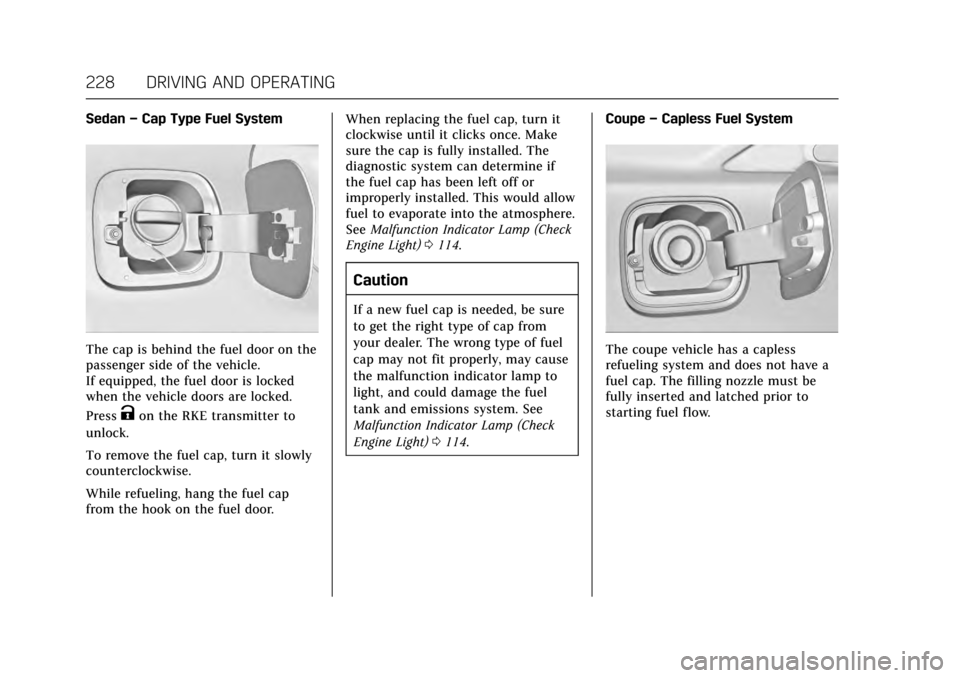
Sedan–Cap Type Fuel System
The cap is behind the fuel door on the
passenger side of the vehicle.
If equipped, the fuel door is locked
when the vehicle doors are locked.
Press
Kon the RKE transmitter to
unlock.
To remove the fuel cap, turn it slowly
counterclockwise.
While refueling, hang the fuel cap
from the hook on the fuel door. When replacing the fuel cap, turn it
clockwise until it clicks once. Make
sure the cap is fully installed. The
diagnostic system can determine if
the fuel cap has been left off or
improperly installed. This would allow
fuel to evaporate into the atmosphere.
See
Malfunction Indicator Lamp (Check
Engine Light) 0114.
Caution
If a new fuel cap is needed, be sure
to get the right type of cap from
your dealer. The wrong type of fuel
cap may not fit properly, may cause
the malfunction indicator lamp to
light, and could damage the fuel
tank and emissions system. See
Malfunction Indicator Lamp (Check
Engine Light) 0114. Coupe
–Capless Fuel System
The coupe vehicle has a capless
refueling system and does not have a
fuel cap. The filling nozzle must be
fully inserted and latched prior to
starting fuel flow.
Page 231 of 335
Cadillac ATS/ATS-V Owner Manual (GMNA-Localizing-MidEast-10287885) -
2017 - crc - 6/16/16
230 DRIVING AND OPERATING
Trailer Towing
General Towing
Information
The vehicle is neither designed nor
intended to tow a trailer or another
vehicle.
For information on towing a disabled
vehicle, seeTowing the Vehicle 0295.
For information on towing the vehicle
behind another vehicle such as a
motor home, see Recreational Vehicle
Towing 0296.
Conversions and
Add-Ons
Add-On Electrical
Equipment
{Warning
The Data Link Connector (DLC) is
used for vehicle service and
Emission Inspection/Maintenance
testing. See Malfunction Indicator
Lamp (Check Engine Light) 0114.
A device connected to the DLC —
such as an aftermarket fleet or
driver-behavior tracking device —
may interfere with vehicle systems.
This could affect vehicle operation
and cause a crash. Such devices
may also access information stored
in the vehicle’s systems.
Caution
Some electrical equipment can
damage the vehicle or cause
components to not work and would
not be covered by the vehicle
warranty. Always check with your
dealer before adding electrical
equipment.
Add-on equipment can drain the
vehicle's 12-volt battery, even if the
vehicle is not operating.
The vehicle has an airbag system.
Before attempting to add anything
electrical to the vehicle, see Servicing
the Airbag-Equipped Vehicle 077 and
Adding Equipment to the
Airbag-Equipped Vehicle 077.
Page 232 of 335
Cadillac ATS/ATS-V Owner Manual (GMNA-Localizing-MidEast-10287885) -
2017 - crc - 6/16/16
VEHICLE CARE 231
Vehicle Care
General Information
General Information . . . . . . . . . . . . . 232
Accessories andModifications . . . . . . . . . . . . . . . . . . . 232
Vehicle Checks
Doing Your OwnService Work . . . . . . . . . . . . . . . . . . . . 233
Hood . . . . . . . . . . . . . . . . . . . . . . . . . . . . . . 233
Engine Compartment Overview . . . . . . . . . . . . . . . . . . . . . . . . . 234
Engine Oil . . . . . . . . . . . . . . . . . . . . . . . . . 241
Engine Oil Life System . . . . . . . . . . . 243
Automatic Transmission Fluid . . . . . . . . . . . . . . . . . . . . . . . . . . . . . 244
Engine Air Cleaner/Filter . . . . . . . . . 245
Cooling System (Engine) . . . . . . . . . 246
Cooling System (Intercooler) . . . . 248
Engine Coolant . . . . . . . . . . . . . . . . . . . 248
Engine Overheating . . . . . . . . . . . . . . 251
Washer Fluid . . . . . . . . . . . . . . . . . . . . . 253
Brakes . . . . . . . . . . . . . . . . . . . . . . . . . . . . . 253
Brake Fluid . . . . . . . . . . . . . . . . . . . . . . . 254
Battery . . . . . . . . . . . . . . . . . . . . . . . . . . . . 255
Starter Switch Check . . . . . . . . . . . . . 256
Automatic Transmission Shift Lock Control Function
Check . . . . . . . . . . . . . . . . . . . . . . . . . . . . 257 Park Brake and P (Park)
Mechanism Check . . . . . . . . . . . . . . 257
Wiper Blade Replacement . . . . . . . 257
Windshield Replacement . . . . . . . . 258
Headlamp Aiming
Headlamp Aiming . . . . . . . . . . . . . . . . 258
Bulb Replacement
Bulb Replacement . . . . . . . . . . . . . . . . 259
Halogen Bulbs . . . . . . . . . . . . . . . . . . . . 259
High Intensity Discharge (HID) Lighting . . . . . . . . . . . . . . . . . . . . . . . . . 259
LED Lighting . . . . . . . . . . . . . . . . . . . . . 259
Back-Up Lamps . . . . . . . . . . . . . . . . . . . 259
License Plate Lamp . . . . . . . . . . . . . . 260
Replacement Bulbs . . . . . . . . . . . . . . . 261
Electrical System
Electrical System Overload . . . . . . 261
Fuses and Circuit Breakers . . . . . . 261
Engine Compartment Fuse Block . . . . . . . . . . . . . . . . . . . . . . . . . . . . 262
Instrument Panel Fuse Block . . . . 265
Rear Compartment Fuse Block . . . . . . . . . . . . . . . . . . . . . . . . . . . . 267
Wheels and Tires
Tires . . . . . . . . . . . . . . . . . . . . . . . . . . . . . . . 270
All-Season Tires . . . . . . . . . . . . . . . . . . 271
Winter Tires . . . . . . . . . . . . . . . . . . . . . . 271
Run-Flat Tires . . . . . . . . . . . . . . . . . . . . 271 Summer Tires . . . . . . . . . . . . . . . . . . . . 272
Tire Pressure . . . . . . . . . . . . . . . . . . . . . . 273
Tire Pressure for High-Speed
Operation . . . . . . . . . . . . . . . . . . . . . . . . 274
Tire Pressure Monitor System . . . 274
Tire Pressure Monitor
Operation . . . . . . . . . . . . . . . . . . . . . . . . 275
Tire Inspection . . . . . . . . . . . . . . . . . . . 278
Tire Rotation . . . . . . . . . . . . . . . . . . . . . 278
When It Is Time for New Tires . . . . . . . . . . . . . . . . . . . . . . . . . . . . . 280
Buying New Tires . . . . . . . . . . . . . . . . 280
Different Size Tires and Wheels . . . . . . . . . . . . . . . . . . . . . . . . . . 282
Wheel Alignment and Tire Balance . . . . . . . . . . . . . . . . . . . . . . . . . . 282
Wheel Replacement . . . . . . . . . . . . . . 282
Tire Chains . . . . . . . . . . . . . . . . . . . . . . . 284
If a Tire Goes Flat . . . . . . . . . . . . . . . . 284
Tire Sealant and Compressor Kit . . . . . . . . . . . . . . . . . 286
Storing the Tire Sealant and Compressor Kit . . . . . . . . . . . . . . . . . 292
Jump Starting
Jump Starting . . . . . . . . . . . . . . . . . . . . . 292
Towing the Vehicle
Towing the Vehicle . . . . . . . . . . . . . . . 295
Recreational Vehicle Towing . . . . 296
Page 234 of 335
Cadillac ATS/ATS-V Owner Manual (GMNA-Localizing-MidEast-10287885) -
2017 - crc - 6/16/16
VEHICLE CARE 233
Vehicle Checks
Doing Your Own
Service Work
{Warning
It can be dangerous to work on
your vehicle if you do not have the
proper knowledge, service manual,
tools, or parts. Always follow
owner’s manual procedures and
consult the service manual for your
vehicle before doing any
service work.
If doing some of your own service
work, use the proper service manual.
It tells you much more about how to
service the vehicle than this
manual can.
This vehicle has an airbag system.
Before attempting to do your own
service work, see Airbag System
Check 078.
Keep a record with all parts receipts
and list the mileage and the date of
any service work performed.
Caution
Even small amounts of
contamination can cause damage to
vehicle systems. Do not allow
contaminants to contact the fluids,
reservoir caps, or dipsticks.
Hood
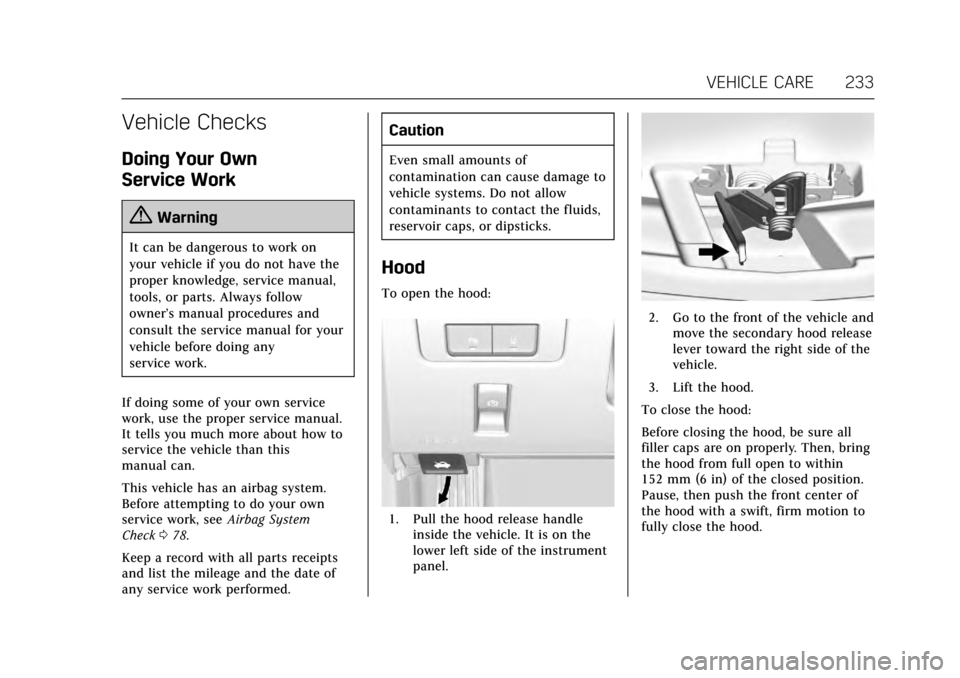
To open the hood:
1. Pull the hood release handle inside the vehicle. It is on the
lower left side of the instrument
panel.
2. Go to the front of the vehicle andmove the secondary hood release
lever toward the right side of the
vehicle.
3. Lift the hood.
To close the hood:
Before closing the hood, be sure all
filler caps are on properly. Then, bring
the hood from full open to within
152 mm (6 in) of the closed position.
Pause, then push the front center of
the hood with a swift, firm motion to
fully close the hood.
Page 242 of 335
Cadillac ATS/ATS-V Owner Manual (GMNA-Localizing-MidEast-10287885) -
2017 - crc - 6/16/16
VEHICLE CARE 241
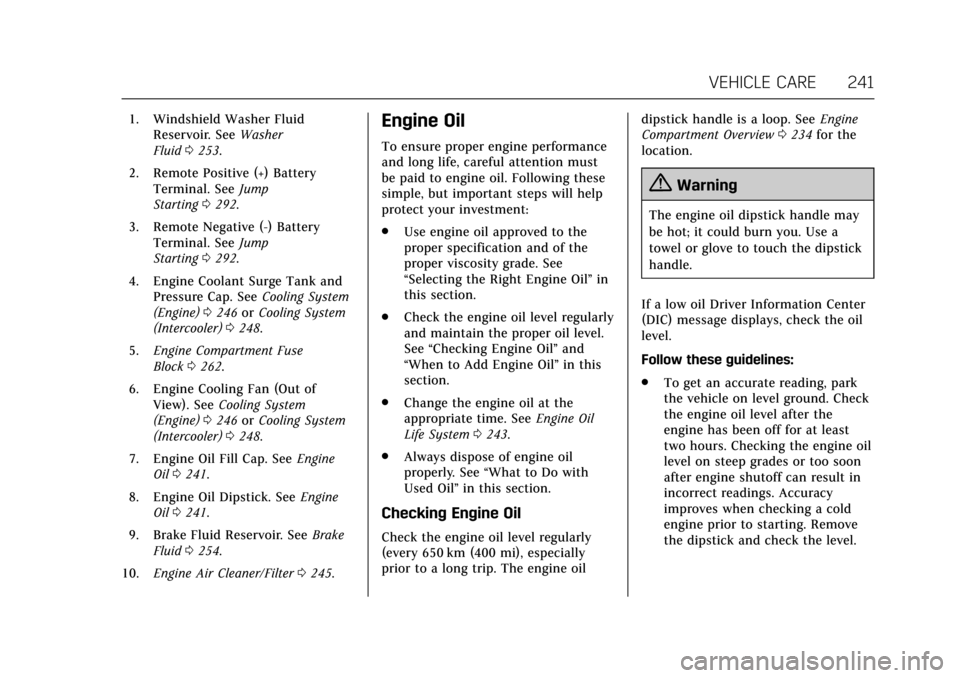
1. Windshield Washer FluidReservoir. See Washer
Fluid 0253.
2. Remote Positive (+) Battery Terminal. See Jump
Starting 0292.
3. Remote Negative (-) Battery Terminal. See Jump
Starting 0292.
4. Engine Coolant Surge Tank and Pressure Cap. See Cooling System
(Engine) 0246 orCooling System
(Intercooler) 0248.
5. Engine Compartment Fuse
Block 0262.
6. Engine Cooling Fan (Out of View). See Cooling System
(Engine) 0246 orCooling System
(Intercooler) 0248.
7. Engine Oil Fill Cap. See Engine
Oil 0241.
8. Engine Oil Dipstick. See Engine
Oil 0241.
9. Brake Fluid Reservoir. See Brake
Fluid 0254.
10. Engine Air Cleaner/Filter 0245.Engine Oil
To ensure proper engine performance
and long life, careful attention must
be paid to engine oil. Following these
simple, but important steps will help
protect your investment:
.
Use engine oil approved to the
proper specification and of the
proper viscosity grade. See
“Selecting the Right Engine Oil” in
this section.
. Check the engine oil level regularly
and maintain the proper oil level.
See “Checking Engine Oil” and
“When to Add Engine Oil” in this
section.
. Change the engine oil at the
appropriate time. See Engine Oil
Life System 0243.
. Always dispose of engine oil
properly. See “What to Do with
Used Oil” in this section.
Checking Engine Oil
Check the engine oil level regularly
(every 650 km (400 mi), especially
prior to a long trip. The engine oil dipstick handle is a loop. See
Engine
Compartment Overview 0234 for the
location.
{Warning
The engine oil dipstick handle may
be hot; it could burn you. Use a
towel or glove to touch the dipstick
handle.
If a low oil Driver Information Center
(DIC) message displays, check the oil
level.
Follow these guidelines:
. To get an accurate reading, park
the vehicle on level ground. Check
the engine oil level after the
engine has been off for at least
two hours. Checking the engine oil
level on steep grades or too soon
after engine shutoff can result in
incorrect readings. Accuracy
improves when checking a cold
engine prior to starting. Remove
the dipstick and check the level.
Page 243 of 335
Cadillac ATS/ATS-V Owner Manual (GMNA-Localizing-MidEast-10287885) -
2017 - crc - 6/16/16
242 VEHICLE CARE
.If unable to wait two hours, the
engine must be off for at least
15 minutes if the engine is warm,
or at least 30 minutes if the
engine is not warm. Pull out the
dipstick, wipe it with a clean paper
towel or cloth, then push it back
in all the way. Remove it again,
keeping the tip down, and check
the level.
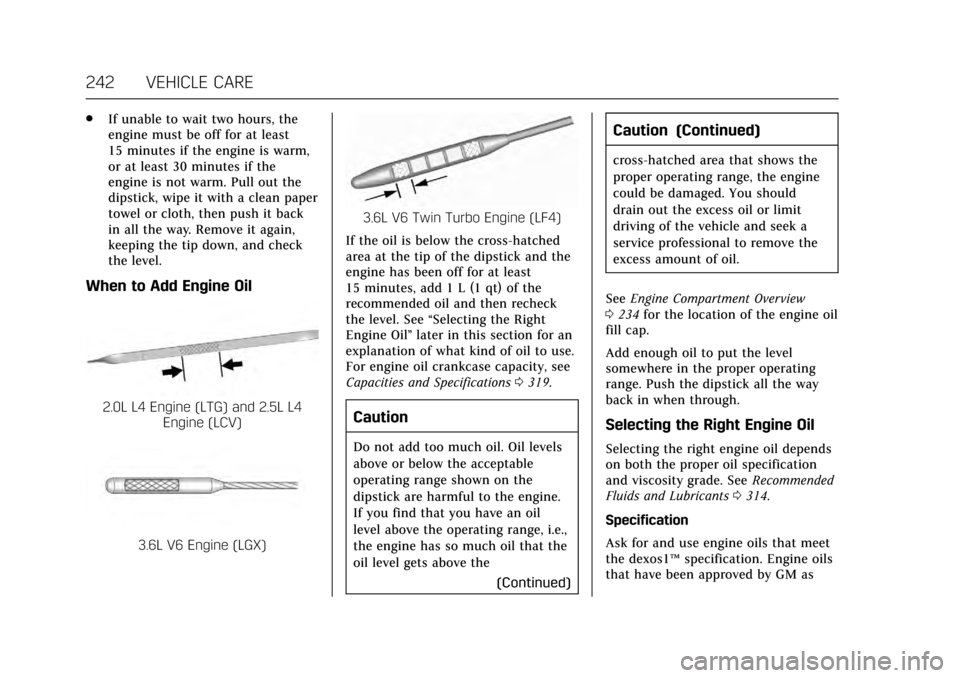
When to Add Engine Oil
2.0L L4 Engine (LTG) and 2.5L L4
Engine (LCV)
3.6L V6 Engine (LGX)
3.6L V6 Twin Turbo Engine (LF4)
If the oil is below the cross-hatched
area at the tip of the dipstick and the
engine has been off for at least
15 minutes, add 1 L (1 qt) of the
recommended oil and then recheck
the level. See “Selecting the Right
Engine Oil” later in this section for an
explanation of what kind of oil to use.
For engine oil crankcase capacity, see
Capacities and Specifications 0319.
Caution
Do not add too much oil. Oil levels
above or below the acceptable
operating range shown on the
dipstick are harmful to the engine.
If you find that you have an oil
level above the operating range, i.e.,
the engine has so much oil that the
oil level gets above the
(Continued)
Caution (Continued)
cross-hatched area that shows the
proper operating range, the engine
could be damaged. You should
drain out the excess oil or limit
driving of the vehicle and seek a
service professional to remove the
excess amount of oil.
See Engine Compartment Overview
0 234 for the location of the engine oil
fill cap.
Add enough oil to put the level
somewhere in the proper operating
range. Push the dipstick all the way
back in when through.
Selecting the Right Engine Oil
Selecting the right engine oil depends
on both the proper oil specification
and viscosity grade. See Recommended
Fluids and Lubricants 0314.
Specification
Ask for and use engine oils that meet
the dexos1™ specification. Engine oils
that have been approved by GM as