check CADILLAC ATS V 2017 1.G User Guide
[x] Cancel search | Manufacturer: CADILLAC, Model Year: 2017, Model line: ATS V, Model: CADILLAC ATS V 2017 1.GPages: 335, PDF Size: 3.73 MB
Page 68 of 335
Cadillac ATS/ATS-V Owner Manual (GMNA-Localizing-MidEast-10287885) -
2017 - crc - 6/16/16
SEATS AND RESTRAINTS 67
Safety belts should be properly cared
for and maintained.
Safety belt hardware should be kept
dry and free of dust or debris. As
necessary exterior hard surfaces and
safety belt webbing may be lightly
cleaned with mild soap and water.
Ensure there is not excessive dust or
debris in the mechanism. If dust or
debris exists in the system please see
the dealer. Parts may need to be
replaced to ensure proper
functionality of the system.
Replacing Safety Belt
System Parts after a Crash
{Warning
A crash can damage the safety belt
system in the vehicle. A damaged
safety belt system may not properly
protect the person using it,
resulting in serious injury or even
death in a crash. To help make sure
the safety belt systems are working
properly after a crash, have them(Continued)
Warning (Continued)
inspected and any necessary
replacements made as soon as
possible.
After a minor crash, replacement of
safety belts may not be necessary. But
the safety belt assemblies that were
used during any crash may have been
stressed or damaged. See your dealer
to have the safety belt assemblies
inspected or replaced.
New parts and repairs may be
necessary even if the safety belt
system was not being used at the time
of the crash.
Have the safety belt pretensioners
checked if the vehicle has been in a
crash, or if the airbag readiness light
stays on after you start the vehicle or
while you are driving. See Airbag
Readiness Light 0113.
Airbag System
The vehicle has the following airbags:
.
A frontal airbag for the driver.
. A frontal airbag for the front
outboard passenger.
. A knee airbag for the driver.
. A knee airbag for the front
outboard passenger.
. A seat-mounted side impact airbag
for the driver.
. A seat-mounted side impact airbag
for the front outboard passenger.
. A roof-rail airbag for the driver
and the passenger seated directly
behind the driver.
. A roof-rail airbag for the front
outboard passenger and the
passenger seated directly behind
the front outboard passenger.
Sedan models may have the following
airbags:
. Seat-mounted side impact airbags
for the second row outboard
passengers.
Page 70 of 335
Cadillac ATS/ATS-V Owner Manual (GMNA-Localizing-MidEast-10287885) -
2017 - crc - 6/16/16
SEATS AND RESTRAINTS 69
{Warning
Children who are up against,
or very close to, any airbag when it
inflates can be seriously injured or
killed. Always secure children
properly in the vehicle. To read
how, seeOlder Children 079 or
Infants and Young Children 081.
There is an airbag readiness light on
the instrument cluster, which shows
the airbag symbol. The system checks
the airbag electrical system for
malfunctions. The light tells you if
there is an electrical problem. See
Airbag Readiness Light 0113.
Where Are the Airbags?
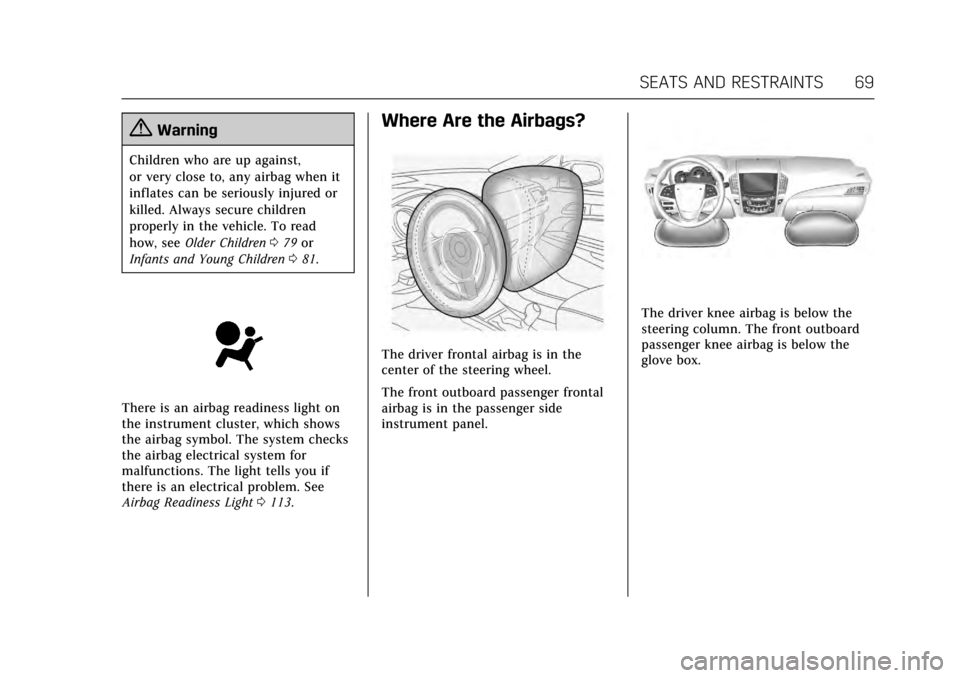
The driver frontal airbag is in the
center of the steering wheel.
The front outboard passenger frontal
airbag is in the passenger side
instrument panel.
The driver knee airbag is below the
steering column. The front outboard
passenger knee airbag is below the
glove box.
Page 74 of 335
Cadillac ATS/ATS-V Owner Manual (GMNA-Localizing-MidEast-10287885) -
2017 - crc - 6/16/16
SEATS AND RESTRAINTS 73
exceeds a predetermined threshold.
You can lock the doors, turn off the
interior lamps, and turn off the hazard
warning flashers by using the controls
for those features.
{Warning
A crash severe enough to inflate the
airbags may have also damaged
important functions in the vehicle,
such as the fuel system, brake and
steering systems, etc. Even if the
vehicle appears to be drivable after
a moderate crash, there may be
concealed damage that could make
it difficult to safely operate the
vehicle.
Use caution if you should attempt
to restart the engine after a crash
has occurred.
In many crashes severe enough to
inflate the airbag, windshields are
broken by vehicle deformation.
Additional windshield breakage may
also occur from the front outboard
passenger airbag. .
Airbags are designed to inflate
only once. After an airbag inflates,
you will need some new parts for
the airbag system. If you do not
get them, the airbag system will
not be there to help protect you in
another crash. A new system will
include airbag modules and
possibly other parts. The service
manual for the vehicle covers the
need to replace other parts.
. The vehicle has a crash sensing
and diagnostic module which
records information after a crash.
See Vehicle Data Recording and
Privacy 0323 and Event Data
Recorders 0323.
. Let only qualified technicians
work on the airbag systems.
Improper service can mean that
an airbag system will not work
properly. See your dealer for
service.
Passenger Sensing System
The vehicle has a passenger sensing
system for the front outboard
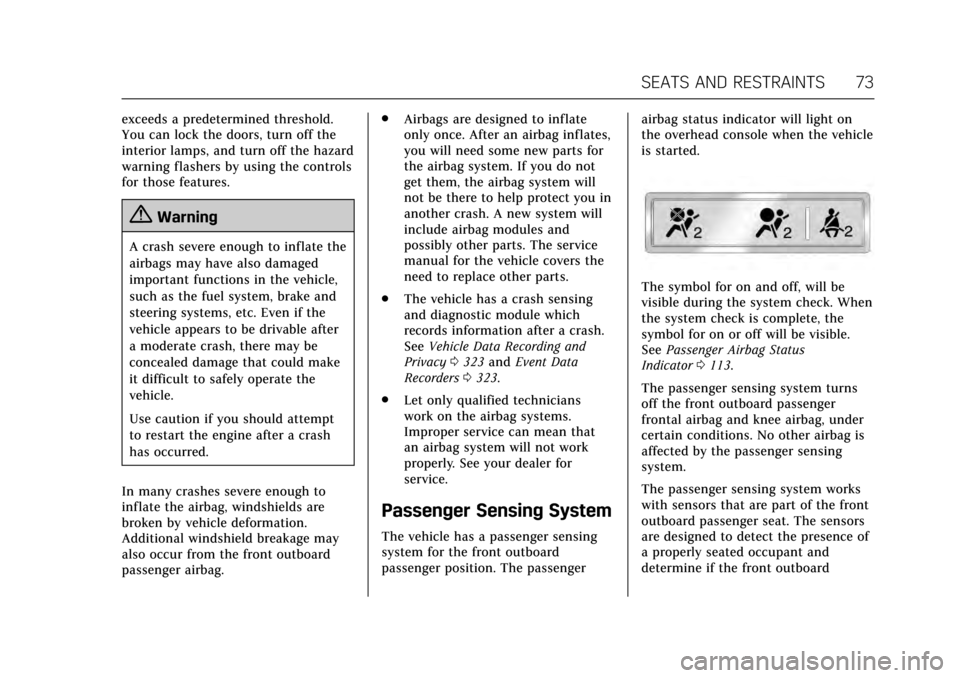
passenger position. The passenger airbag status indicator will light on
the overhead console when the vehicle
is started.
The symbol for on and off, will be
visible during the system check. When
the system check is complete, the
symbol for on or off will be visible.
See
Passenger Airbag Status
Indicator 0113.
The passenger sensing system turns
off the front outboard passenger
frontal airbag and knee airbag, under
certain conditions. No other airbag is
affected by the passenger sensing
system.
The passenger sensing system works
with sensors that are part of the front
outboard passenger seat. The sensors
are designed to detect the presence of
a properly seated occupant and
determine if the front outboard
Page 79 of 335
Cadillac ATS/ATS-V Owner Manual (GMNA-Localizing-MidEast-10287885) -
2017 - crc - 6/16/16
78 SEATS AND RESTRAINTS
modules, ceiling or pillar garnish trim,
overhead console, front sensors, side
impact sensors, or airbag wiring.
Your dealer and the service manual
have information about the location of
the airbag sensors, sensing and
diagnostic module, and airbag wiring.
In addition, the vehicle has a
passenger sensing system for the front
outboard passenger position, which
includes sensors that are part of the
passenger seat. The passenger sensing
system may not operate properly if
the original seat trim is replaced with
non-GM covers, upholstery, or trim; or
with GM covers, upholstery, or trim
designed for a different vehicle. Any
object, such as an aftermarket seat
heater or a comfort-enhancing pad or
device, installed under or on top of
the seat fabric, could also interfere
with the operation of the passenger
sensing system. This could either
prevent proper deployment of the
passenger airbag(s) or prevent the
passenger sensing system from
properly turning off the passenger
airbag(s). SeePassenger Sensing
System 073. If the vehicle has rollover roof-rail
airbags, see
Different Size Tires and
Wheels 0282 for additional important
information.
If you have to modify your vehicle
because you have a disability and you
have questions about whether the
modifications will affect the vehicle's
airbag system, or if you have
questions about whether the airbag
system will be affected if the vehicle is
modified for any other reason, see
your dealer.
Airbag System Check
The airbag system does not need
regularly scheduled maintenance or
replacement. Make sure the airbag
readiness light is working. See Airbag
Readiness Light 0113.
Caution
If an airbag covering is damaged,
opened, or broken, the airbag may
not work properly. Do not open or
break the airbag coverings. If there
are any opened or broken airbag
(Continued)
Caution (Continued)
coverings, have the airbag covering
and/or airbag module replaced. For
the location of the airbags, see
Where Are the Airbags?069. See
your dealer for service.
Replacing Airbag System
Parts after a Crash
{Warning
A crash can damage the airbag
systems in the vehicle. A damaged
airbag system may not properly
protect you and your passenger(s)
in a crash, resulting in serious
injury or even death. To help make
sure the airbag systems are working
properly after a crash, have them
inspected and any necessary
replacements made as soon as
possible.
Page 92 of 335
Cadillac ATS/ATS-V Owner Manual (GMNA-Localizing-MidEast-10287885) -
2017 - crc - 6/16/16
SEATS AND RESTRAINTS 91
or head restraint and route
the tether under the
headrest or head restraint
and in between the
headrest or head restraint
posts.
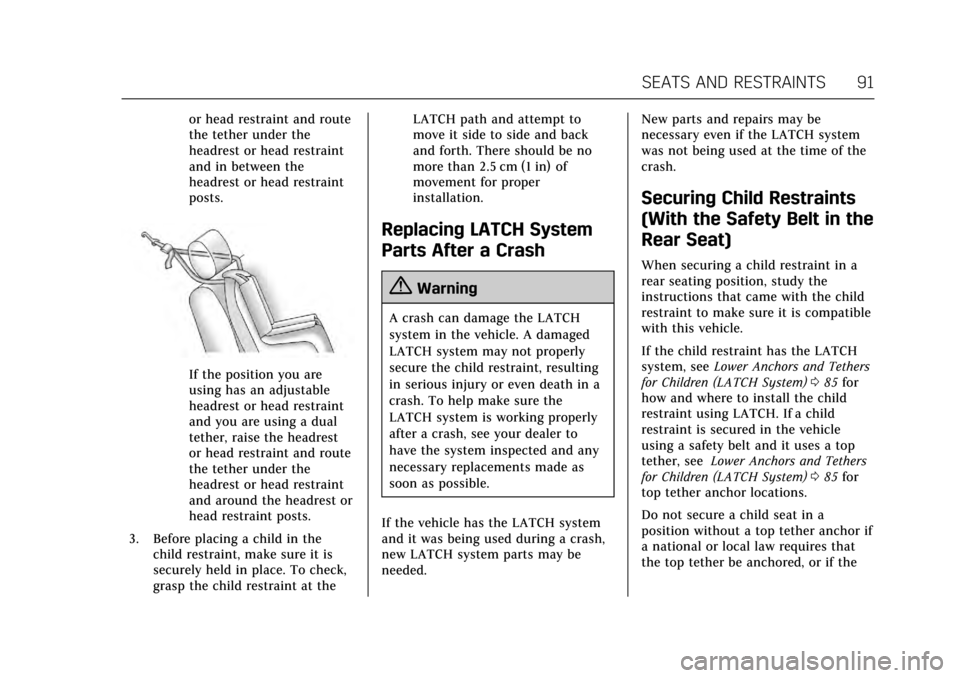
If the position you are
using has an adjustable
headrest or head restraint
and you are using a dual
tether, raise the headrest
or head restraint and route
the tether under the
headrest or head restraint
and around the headrest or
head restraint posts.
3. Before placing a child in the child restraint, make sure it is
securely held in place. To check,
grasp the child restraint at the LATCH path and attempt to
move it side to side and back
and forth. There should be no
more than 2.5 cm (1 in) of
movement for proper
installation.
Replacing LATCH System
Parts After a Crash
{Warning
A crash can damage the LATCH
system in the vehicle. A damaged
LATCH system may not properly
secure the child restraint, resulting
in serious injury or even death in a
crash. To help make sure the
LATCH system is working properly
after a crash, see your dealer to
have the system inspected and any
necessary replacements made as
soon as possible.
If the vehicle has the LATCH system
and it was being used during a crash,
new LATCH system parts may be
needed. New parts and repairs may be
necessary even if the LATCH system
was not being used at the time of the
crash.
Securing Child Restraints
(With the Safety Belt in the
Rear Seat)
When securing a child restraint in a
rear seating position, study the
instructions that came with the child
restraint to make sure it is compatible
with this vehicle.
If the child restraint has the LATCH
system, see
Lower Anchors and Tethers
for Children (LATCH System) 085 for
how and where to install the child
restraint using LATCH. If a child
restraint is secured in the vehicle
using a safety belt and it uses a top
tether, see Lower Anchors and Tethers
for Children (LATCH System) 085 for
top tether anchor locations.
Do not secure a child seat in a
position without a top tether anchor if
a national or local law requires that
the top tether be anchored, or if the
Page 93 of 335
Cadillac ATS/ATS-V Owner Manual (GMNA-Localizing-MidEast-10287885) -
2017 - crc - 6/16/16
92 SEATS AND RESTRAINTS
instructions that come with the child
restraint say that the top strap must
be anchored.
If the child restraint or vehicle seat
position does not have the LATCH
system, you will be using the safety
belt to secure the child restraint. Be
sure to follow the instructions that
came with the child restraint.
If more than one child restraint needs
to be installed in the rear seat, be sure
to readWhere to Put the Restraint 084.
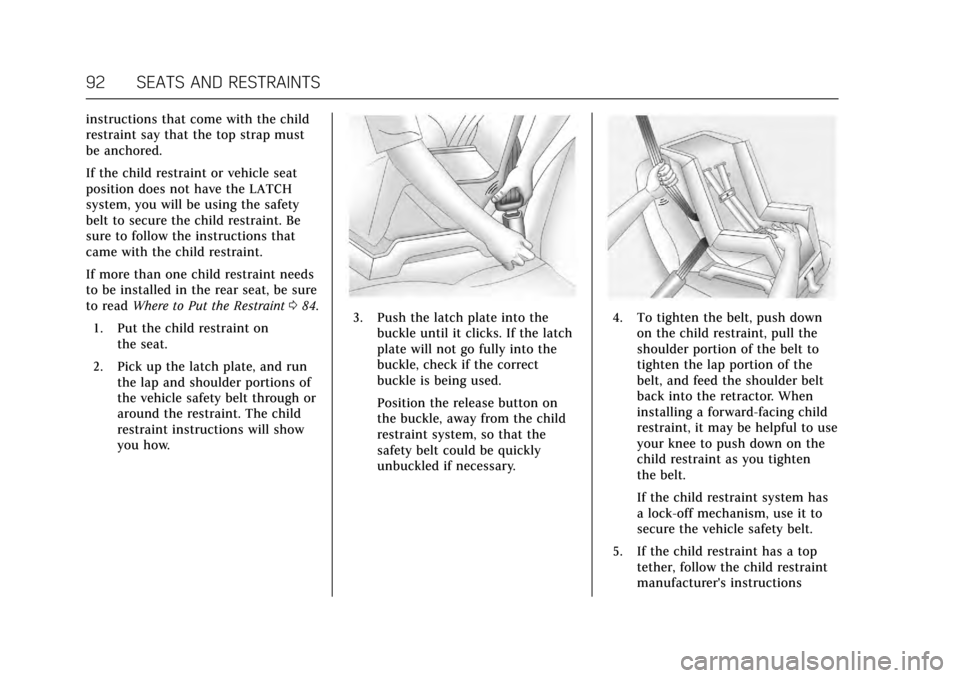
1. Put the child restraint on the seat.
2. Pick up the latch plate, and run the lap and shoulder portions of
the vehicle safety belt through or
around the restraint. The child
restraint instructions will show
you how.
3. Push the latch plate into thebuckle until it clicks. If the latch
plate will not go fully into the
buckle, check if the correct
buckle is being used.
Position the release button on
the buckle, away from the child
restraint system, so that the
safety belt could be quickly
unbuckled if necessary.4. To tighten the belt, push downon the child restraint, pull the
shoulder portion of the belt to
tighten the lap portion of the
belt, and feed the shoulder belt
back into the retractor. When
installing a forward-facing child
restraint, it may be helpful to use
your knee to push down on the
child restraint as you tighten
the belt.
If the child restraint system has
a lock-off mechanism, use it to
secure the vehicle safety belt.
5. If the child restraint has a top tether, follow the child restraint
manufacturer's instructions
Page 100 of 335
Cadillac ATS/ATS-V Owner Manual (GMNA-Localizing-MidEast-10287885) -
2017 - crc - 6/16/16
INSTRUMENTS AND CONTROLS 99
Instruments and
Controls
Controls
Steering Wheel Adjustment . . . . . 100
Steering Wheel Controls . . . . . . . . . 100
Heated Steering Wheel . . . . . . . . . . 100
Horn . . . . . . . . . . . . . . . . . . . . . . . . . . . . . . . 100
Windshield Wiper/Washer . . . . . . . 101
Clock . . . . . . . . . . . . . . . . . . . . . . . . . . . . . . 102
Power Outlets . . . . . . . . . . . . . . . . . . . . . 103
Wireless Charging . . . . . . . . . . . . . . . . 104
Warning Lights, Gauges, and
Indicators
Warning Lights, Gauges, andIndicators . . . . . . . . . . . . . . . . . . . . . . . 106
Instrument Cluster . . . . . . . . . . . . . . . 107
Speedometer . . . . . . . . . . . . . . . . . . . . . . 110
Odometer . . . . . . . . . . . . . . . . . . . . . . . . . 110
Trip Odometer . . . . . . . . . . . . . . . . . . . . 110
Tachometer . . . . . . . . . . . . . . . . . . . . . . . 110
Fuel Gauge . . . . . . . . . . . . . . . . . . . . . . . . 111
Engine Coolant Temperature Gauge . . . . . . . . . . . . . . . . . . . . . . . . . . . . 111
Safety Belt Reminders . . . . . . . . . . . . 112
Airbag Readiness Light . . . . . . . . . . 113
Passenger Airbag Status Indicator . . . . . . . . . . . . . . . . . . . . . . . . . 113 Charging System Light . . . . . . . . . . . 114
Malfunction Indicator Lamp
(Check Engine Light) . . . . . . . . . . . 114
Brake System Warning Light . . . . 116
Parking Brake Light . . . . . . . . . . . . . . 116
Service Electric Parking Brake Light . . . . . . . . . . . . . . . . . . . . . . . . . . . . . 117
Antilock Brake System (ABS) Warning Light . . . . . . . . . . . . . . . . . . 117
Lane Keep Assist (LKA) Light . . . 117
Vehicle Ahead Indicator . . . . . . . . . 118
Traction Off Light . . . . . . . . . . . . . . . . 118
StabiliTrak
®OFF Light . . . . . . . . . . . 118
Traction Control System (TCS)/ StabiliTrak
®Light . . . . . . . . . . . . . . 119
Engine Coolant Temperature Warning Light . . . . . . . . . . . . . . . . . . 119
Tire Pressure Light . . . . . . . . . . . . . . . 119
Engine Oil Pressure Light . . . . . . . . 120
Low Fuel Warning Light . . . . . . . . . 120
Security Light . . . . . . . . . . . . . . . . . . . . . 120
High-Beam On Light . . . . . . . . . . . . . 121
Adaptive Forward Lighting (AFL) Light . . . . . . . . . . . . . . . . . . . . . . . . . . . . . 121
Lamps On Reminder . . . . . . . . . . . . . 121
Cruise Control Light . . . . . . . . . . . . . . 121
Information Displays
Driver Information Center (DIC) . . . . . . . . . . . . . . . . . . . . . 122
Head-Up Display (HUD) . . . . . . . . . 124
Vehicle Messages
Vehicle Messages . . . . . . . . . . . . . . . . . 127
Battery Voltage and Charging Messages . . . . . . . . . . . . . . . . . . . . . . . . 127
Brake System Messages . . . . . . . . . . 128
Cruise Control Messages . . . . . . . . . 128
Door Ajar Messages . . . . . . . . . . . . . . 129
Engine Cooling System Messages . . . . . . . . . . . . . . . . . . . . . . . . 129
Engine Oil Messages . . . . . . . . . . . . . 130
Engine Power Messages . . . . . . . . . . 130
Fuel System Messages . . . . . . . . . . . 130
Key and Lock Messages . . . . . . . . . . 131
Lamp Messages . . . . . . . . . . . . . . . . . . . 131
Object Detection System Messages . . . . . . . . . . . . . . . . . . . . . . . . 131
Ride Control System Messages . . . . . . . . . . . . . . . . . . . . . . . . 134
Airbag System Messages . . . . . . . . . 134
Safety Belt Messages . . . . . . . . . . . . . 134
Security Messages . . . . . . . . . . . . . . . . 135
Service Vehicle Messages . . . . . . . . 135
Starting the Vehicle Messages . . . 135
Tire Messages . . . . . . . . . . . . . . . . . . . . 135
Transmission Messages . . . . . . . . . . 136
Vehicle Reminder Messages . . . . . 136
Vehicle Speed Messages . . . . . . . . . 136
Washer Fluid Messages . . . . . . . . . . 137
Vehicle Personalization
Vehicle Personalization . . . . . . . . . . 137
Page 105 of 335
Cadillac ATS/ATS-V Owner Manual (GMNA-Localizing-MidEast-10287885) -
2017 - crc - 6/16/16
104 INSTRUMENTS AND CONTROLS
Power Outlet 220/230 Volt
Alternating Current
If equipped, this power outlet is on
the rear of the center floor console.
It can be used to plug in electrical
equipment that uses a maximum limit
of 150 watts.
An indicator light on the outlet turns
on to show it is in use. The light
comes on when the ignition is in ON/
RUN/START, equipment requiring less
than 150 watts is plugged into the
outlet, and no system fault is
detected.
The indicator light does not come on
when the ignition is in LOCK/OFF or if
the equipment is not fully seated into
the outlet.
If equipment is connected using more
than 150 watts or a system fault is
detected, a protection circuit shuts off
the power supply and the indicator
light turns off. To reset the circuit,
unplug the item and plug it back in or
turn the Retained Accessory Power
(RAP) off and then back on. See
Retained Accessory Power (RAP)0188.
The power restarts when equipment using 150 watts or less is plugged into
the outlet and a system fault is not
detected.
The power outlet is not designed for
the following and may not work
properly, if this equipment is
plugged in:
.
Equipment with high initial peak
wattage such as:
compressor-driven refrigerators
and electric power tools.
. Other equipment requiring an
extremely stable power supply
such as: microcomputer-controlled
electric blankets, touch sensor
lamps, etc.
. Medical equipment.
Wireless Charging
The vehicle may have wireless
charging in the storage behind the
climate control system. See Instrument
Panel Storage 096. The system
wirelessly charges one PMA or Qi
compatible mobile device. To check
for phone or other device
compatibility, see your dealer for
details.
{Warning
Wireless charging can affect the
operation of an implanted
pacemaker or other medical devices.
If you have one, it is recommended
to consult with your doctor before
using the wireless charging system.
The vehicle must be in ON/RUN/
START, ACC/ACCESSORY, or Retained
Accessory Power (RAP). The wireless
charging feature may not correctly
indicate charging when the vehicle is
in RAP. See Retained Accessory Power
(RAP) 0188.
The operating temperature is −20 °C
(−4 °F) to 60 °C (140 °F) for the
charging system and 0 °C (32 °F) to
35 °C (95 °F) for the phone.
{Warning
Remove all metal objects from the
charging pad before charging your
mobile device. Metal objects, such
as coins, keys, rings, or paper clips,
(Continued)
Page 107 of 335
Cadillac ATS/ATS-V Owner Manual (GMNA-Localizing-MidEast-10287885) -
2017 - crc - 6/16/16
106 INSTRUMENTS AND CONTROLS
Warning Lights, Gauges,
and Indicators
Warning lights and gauges can signal
that something is wrong before it
becomes serious enough to cause an
expensive repair or replacement.
Paying attention to the warning lights
and gauges could prevent injury.
Some warning lights come on briefly
when the engine is started to indicate
they are working. When one of the
warning lights comes on and stays on
while driving, or when one of the
gauges shows there may be a problem,
check the section that explains what
to do. Waiting to do repairs can be
costly and even dangerous.
Page 110 of 335
Cadillac ATS/ATS-V Owner Manual (GMNA-Localizing-MidEast-10287885) -
2017 - crc - 6/16/16
INSTRUMENTS AND CONTROLS 109
Cluster Application Displays
The cluster has three interactive
display zones.
Use the five-way control on the right
steering wheel control to move
between the different display zones
and scroll through the different
displays.
The left and right zones display Driver
Information Center (DIC) information.
SeeDriver Information Center
(DIC) 0122.
The center zone displays application
information for the digital
speedometer, navigation, audio,
phone, efficiency gauge, best fuel
economy, or options.
Digital Speedometer
While the digital speedometer is
displayed, press SEL to select speed
limit information.
Navigation
If there is no active route, a compass
will be displayed. If there is an active
route, press SEL to end route guidance
or turn the voice prompts (if
equipped) on or off. Audio
While the Audio application page is
displayed, press SEL to enter the
Audio menu. In the Audio menu
search for music or change the audio
source.
Phone
While the Phone application page is
displayed, press SEL to enter the
Phone menu. In the Phone menu,
if there is no active phone call, view
recent calls or scroll through contacts.
If there is an active call, mute the
phone or switch to handset operation.
Best Fuel Economy
This page displays average fuel
economy, the best fuel economy over
the selected distance, and a bar graph
showing instantaneous fuel economy.
Options
Press SEL while the Settings
application page is displayed to enter
the Settings menu.
Units :
Press SEL while Units is
highlighted to enter the Units menu.
Choose English or metric units by pressing SEL while the desired item is
highlighted. A checkmark will be
displayed next to the selected item.
Info Pages :
Press SEL while Info
Pages is highlighted to select the
items to be displayed in the DIC
information displays. See Driver
Information Center (DIC) 0122.
Head-up Display (HUD) Rotation :
This feature allows for adjusting the
angle of the HUD image. Press SEL on
the steering wheel controls while
Head-up Display Rotation is
highlighted to enter Adjust Mode.
Press
yorzto adjust the angle of
the HUD display. Press
SorTto
highlight OK, then press SEL to save
the setting. Cancel can also be
selected to cancel the setting. The
vehicle must be in P (Park).
Fav Button Options : Press SEL while
Fav Button Options is highlighted to
select between FAV Primary and SEEK
Primary. This selection allows for
configuration of the
CandB
steering wheel controls. When FAV
Primary is selected, pressing
Cand
Bwill go to the next or previous