check CADILLAC ATS V 2017 1.G Owner's Guide
[x] Cancel search | Manufacturer: CADILLAC, Model Year: 2017, Model line: ATS V, Model: CADILLAC ATS V 2017 1.GPages: 335, PDF Size: 3.73 MB
Page 175 of 335
Cadillac ATS/ATS-V Owner Manual (GMNA-Localizing-MidEast-10287885) -
2017 - crc - 6/16/16
174 DRIVING AND OPERATING
to a lower gear. Any sudden
changes could cause the tires to
slide.
Remember: Antilock brakes help avoid
only the braking skid.
Track Events and
Competitive Driving
Competitive driving may affect the
vehicle warranty. See the warranty
manual before using the vehicle for
competitive driving.
Caution
Low oil levels can damage the
engine. If using the vehicle for
competitive driving, the engine may
use more oil than it would with
normal use. Check the oil level
often during competitive driving.
Engine Oil
2.0L Turbo (LTG) Engine Only: .
Keep the level at or near 1 L (1 qt)
above the upper mark that shows
the proper operating range on the
engine oil dipstick.
. Use a 600 W fan in addition to the
production option V03.
. Gasolines with a Pump Octane ((R
+M)/2) of 99 or greater and
ethanol content below 15%
volume must be used for
competitive driving to protect
against engine damage. Colder
spark plug ratings should also be
used. Consult your dealer.
3.6L Non-Turbo (LGX) Engine Only:
. 3.6L Non-Turbo (LGX) Engine with
Oil Cooler: Confirm the oil level is
at the upper mark that shows the
proper operating range on the
engine oil dipstick.
3.6L Twin Turbo (LF4) Engine Only:
. The twin turbo 3.6L engine (LF4)
requires premium fuel, and comes
standard with a 7 qt sump,
integrated oil cooler, and other
powertrain and powertrain cooling
components in preparation for
track use. Brake Fluid
.
Before racing, replace existing
brake fluid with a qualified racing
brake fluid from a sealed
container. Brake fluid with a dry
boiling point >279 °C (534 °F) is
qualified. If racing brake fluid is
used, replace it with GM approved
brake fluid before driving on
public roads. See Recommended
Fluids and Lubricants 0314.
. Do not use silicone-based fluids.
If racing brake fluid is in the vehicle
and the age of the brake fluid is over a
month old or unknown, replace the
brake fluid between racing/closed
track driving.
Caution
Failure to change the brake fluid
and transfer case fluid after any
performance or race track driving
could result in damage not covered
by the vehicle warranty. Have the
brake fluid and transfer case fluid
changed by your dealer after any (Continued)
Page 180 of 335
Cadillac ATS/ATS-V Owner Manual (GMNA-Localizing-MidEast-10287885) -
2017 - crc - 6/16/16
DRIVING AND OPERATING 179
.Check all fluid levels and brakes,
tires, cooling system, and
transmission.
. Shift to a lower gear when going
down steep or long hills.
{Warning
Using the brakes to slow the vehicle
on a long downhill slope can cause
brake overheating, can reduce brake
performance, and could result in a
loss of braking. Shift the
transmission to a lower gear to let
the engine assist the brakes on a
steep downhill slope.
{Warning
Coasting downhill in N (Neutral) or
with the ignition off is dangerous.
This can cause overheating of the
brakes and loss of steering. Always
have the engine running and the
vehicle in gear. .
Drive at speeds that keep the
vehicle in its own lane. Do not
swing wide or cross the
center line.
. Be alert on top of hills; something
could be in your lane (e.g., stalled
car, accident).
. Pay attention to special road signs
(e.g., falling rocks area, winding
roads, long grades, passing or
no-passing zones) and take
appropriate action.
Winter Driving
Driving on Snow or Ice
Snow or ice between the tires and the
road creates less traction or grip, so
drive carefully. Wet ice can occur at
about 0 °C (32 °F) when freezing rain
begins to fall. Avoid driving on wet ice
or in freezing rain until roads can be
treated.
For Slippery Road Driving:
.Accelerate gently. Accelerating too
quickly causes the wheels to spin
and makes the surface under the
tires slick. .
Turn on Traction Control. See
Traction Control/Electronic Stability
Control 0198.
. Antilock Brake System (ABS)
improves vehicle stability during
hard stops, but the brakes should
be applied sooner than when on
dry pavement. See Antilock Brake
System (ABS) 0195.
. Allow greater following distance
and watch for slippery spots. Icy
patches can occur on otherwise
clear roads in shaded areas. The
surface of a curve or an overpass
can remain icy when the
surrounding roads are clear. Avoid
sudden steering maneuvers and
braking while on ice.
. Turn off cruise control.
Blizzard Conditions
Stop the vehicle in a safe place and
signal for help. Stay with the vehicle
unless there is help nearby. To get
help and keep everyone in the
vehicle safe:
.Turn on the hazard warning
flashers.
Page 185 of 335
Cadillac ATS/ATS-V Owner Manual (GMNA-Localizing-MidEast-10287885) -
2017 - crc - 6/16/16
184 DRIVING AND OPERATING
{Warning
Things inside the vehicle can
strike and injure people in a
sudden stop or turn, or in a
crash.
.Put things in the cargo
area of the vehicle. In the
cargo area, put them as far
forward as possible. Try to
spread the weight evenly.
.Never stack heavier things,
like suitcases, inside the
vehicle so that some of
them are above the tops of
the seats.
.Do not leave an unsecured
child restraint in the
vehicle.
.Secure loose items in the
vehicle.
.Do not leave a seat folded
down unless needed.
Starting and Operating
New Vehicle Break-In
Follow these recommended guidelines
during the first 2 414 km (1,500 mi) of
driving this vehicle. Parts have a
break-in period and performance will
be better in the long run.
For the first 2 414 km (1,500 mi):
. Avoid full throttle starts and
abrupt stops.
. Do not exceed 4000 engine rpm.
. Avoid driving at any one constant
speed, fast or slow.
. Avoid downshifting to brake or
slow the vehicle when the engine
speed will exceed 4000 rpm.
. Check engine oil with every
refueling and add if necessary. Oil
and fuel consumption may be
higher than normal during the
first 2 414 km (1,500 mi).
. New brake linings also need a
break-in period. Avoid making
hard stops during the first 322 km (200 mi). This is
recommended every time brake
linings are replaced.Composite Materials
This vehicle may be equipped with
parts containing carbon fiber,
sheet-molding compound or other
composite materials. Dealer-installed
accessories may also contain
composite materials. These parts and
accessories may include the splitter or
rocker extensions.
{Warning
Exposed edges of parts containing
carbon fiber and other composite
materials can be sharp. Contact
with these parts could result in
injury. Use caution to avoid
contacting these parts, including
when washing the vehicle. If the
parts are damaged, replace the
parts promptly with replacements
from your dealer.
Page 196 of 335
Cadillac ATS/ATS-V Owner Manual (GMNA-Localizing-MidEast-10287885) -
2017 - crc - 6/16/16
DRIVING AND OPERATING 195
Brakes
Antilock Brake
System (ABS)
This vehicle has an Antilock Brake
System (ABS), an advanced electronic
braking system that helps prevent a
braking skid.
When the vehicle begins to drive
away, ABS checks itself. A momentary
motor or clicking noise may be heard
while this test is going on, and it may
even be noticed that the brake pedal
moves a little. This is normal.
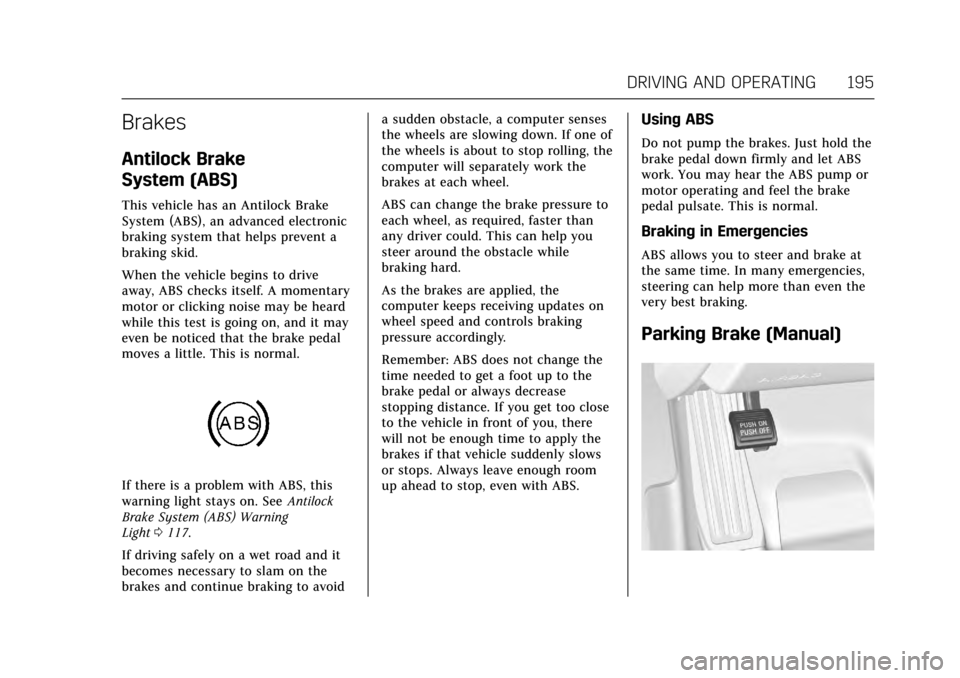
If there is a problem with ABS, this
warning light stays on. SeeAntilock
Brake System (ABS) Warning
Light 0117.
If driving safely on a wet road and it
becomes necessary to slam on the
brakes and continue braking to avoid a sudden obstacle, a computer senses
the wheels are slowing down. If one of
the wheels is about to stop rolling, the
computer will separately work the
brakes at each wheel.
ABS can change the brake pressure to
each wheel, as required, faster than
any driver could. This can help you
steer around the obstacle while
braking hard.
As the brakes are applied, the
computer keeps receiving updates on
wheel speed and controls braking
pressure accordingly.
Remember: ABS does not change the
time needed to get a foot up to the
brake pedal or always decrease
stopping distance. If you get too close
to the vehicle in front of you, there
will not be enough time to apply the
brakes if that vehicle suddenly slows
or stops. Always leave enough room
up ahead to stop, even with ABS.
Using ABS
Do not pump the brakes. Just hold the
brake pedal down firmly and let ABS
work. You may hear the ABS pump or
motor operating and feel the brake
pedal pulsate. This is normal.
Braking in Emergencies
ABS allows you to steer and brake at
the same time. In many emergencies,
steering can help more than even the
very best braking.
Parking Brake (Manual)
Page 197 of 335
Cadillac ATS/ATS-V Owner Manual (GMNA-Localizing-MidEast-10287885) -
2017 - crc - 6/16/16
196 DRIVING AND OPERATING
To set the parking brake, hold the
regular brake pedal down, then push
the parking brake pedal down.
If the ignition is on, the brake system
warning light will come on. SeeBrake
System Warning Light 0116.
Caution
Driving with the parking brake on
can overheat the brake system and
cause premature wear or damage to
brake system parts. Make sure that
the parking brake is fully released
and the brake warning light is off
before driving.
To release the parking brake, hold the
regular brake pedal down, then push
down momentarily on the parking
brake pedal until you feel the pedal
release. Slowly pull your foot up off
the parking brake pedal. If the parking
brake is not released when you begin
to drive, the brake system warning
light will be on and a chime will
sound warning you that the parking
brake is still on.
Parking Brake (Electric)
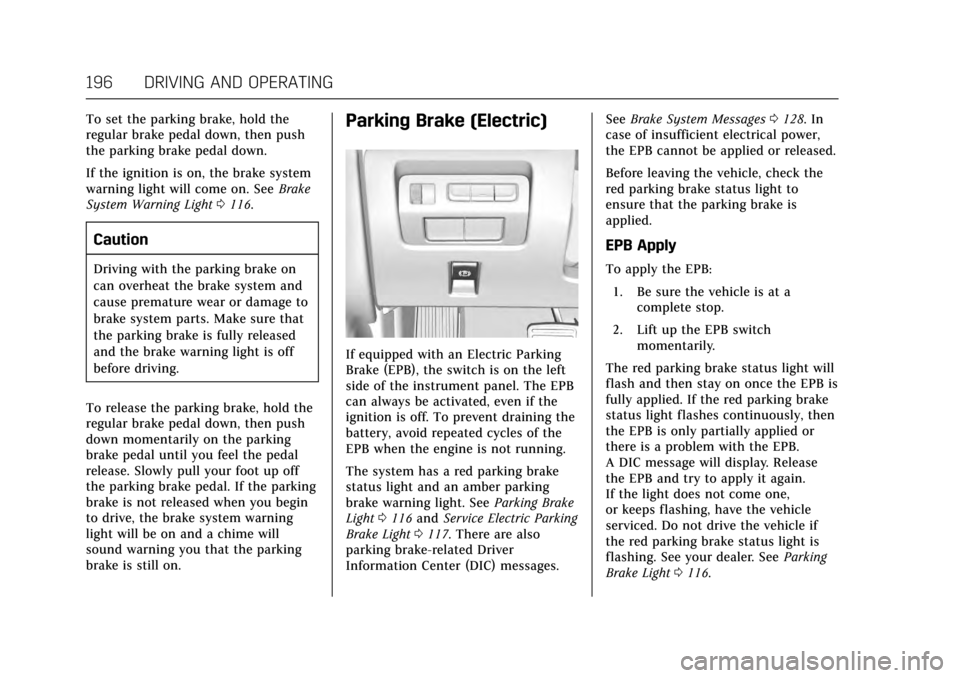
If equipped with an Electric Parking
Brake (EPB), the switch is on the left
side of the instrument panel. The EPB
can always be activated, even if the
ignition is off. To prevent draining the
battery, avoid repeated cycles of the
EPB when the engine is not running.
The system has a red parking brake
status light and an amber parking
brake warning light. See Parking Brake
Light 0116 and Service Electric Parking
Brake Light 0117. There are also
parking brake-related Driver
Information Center (DIC) messages. See
Brake System Messages 0128. In
case of insufficient electrical power,
the EPB cannot be applied or released.
Before leaving the vehicle, check the
red parking brake status light to
ensure that the parking brake is
applied.
EPB Apply
To apply the EPB:
1. Be sure the vehicle is at a complete stop.
2. Lift up the EPB switch momentarily.
The red parking brake status light will
flash and then stay on once the EPB is
fully applied. If the red parking brake
status light flashes continuously, then
the EPB is only partially applied or
there is a problem with the EPB.
A DIC message will display. Release
the EPB and try to apply it again.
If the light does not come one,
or keeps flashing, have the vehicle
serviced. Do not drive the vehicle if
the red parking brake status light is
flashing. See your dealer. See Parking
Brake Light 0116.
Page 198 of 335
Cadillac ATS/ATS-V Owner Manual (GMNA-Localizing-MidEast-10287885) -
2017 - crc - 6/16/16
DRIVING AND OPERATING 197
If the amber parking brake warning
light is on, lift up on the EPB switch
and hold it up. Continue to hold the
switch until the red parking brake
status light remains on. If the amber
parking brake warning light is on, see
your dealer.
If the EPB is applied while the vehicle
is moving, the vehicle will decelerate
as long as the switch is held up. If the
switch is held up until the vehicle
comes to a stop, the EPB will remain
applied.
The vehicle may automatically apply
the EPB in some situations when the
vehicle is not moving. This is normal,
and is done to periodically check the
correct operation of the EPB system.
If the EPB fails to apply, the rear
wheels should be blocked to prevent
vehicle movement.
EPB Release
To release the EPB:1. Place the ignition in the ACC/ ACCESSORY or ON/RUN
position.
2. Apply and hold the brake pedal. 3. Press the EPB switch
momentarily.
The EPB is released when the red
parking brake status light is off.
If the amber parking brake warning
light is on, release the EPB by pressing
and holding the EPB switch. Continue
to hold the switch until the red
parking brake status light is off.
If either light stays on after release is
attempted, see your dealer.
Caution
Driving with the parking brake on
can overheat the brake system and
cause premature wear or damage to
brake system parts. Make sure that
the parking brake is fully released
and the brake warning light is off
before driving.
Automatic EPB Release
The EPB will automatically release if
the vehicle is running, placed into
gear, and an attempt is made to drive away. Avoid rapid acceleration when
the EPB is applied, to preserve parking
brake lining life.
Brake Assist
This vehicle has a brake assist feature
designed to assist the driver in
stopping or decreasing vehicle speed
in emergency driving conditions. This
feature uses the stability system
hydraulic brake control module to
supplement the power brake system
under conditions where the driver has
quickly and forcefully applied the
brake pedal in an attempt to quickly
stop or slow down the vehicle. The
stability system hydraulic brake
control module increases brake
pressure at each corner of the vehicle
until the ABS activates. Minor brake
pedal pulsation or pedal movement
during this time is normal and the
driver should continue to apply the
brake pedal as the driving situation
dictates. The brake assist feature will
automatically disengage when the
brake pedal is released or brake pedal
pressure is quickly decreased.
Page 199 of 335

Cadillac ATS/ATS-V Owner Manual (GMNA-Localizing-MidEast-10287885) -
2017 - crc - 6/16/16
198 DRIVING AND OPERATING
Hill Start Assist (HSA)
This vehicle has a Hill Start Assist
(HSA) feature, which may be useful
when the vehicle is stopped on a
grade sufficient enough to activate
HSA. This feature is designed to
prevent the vehicle from rolling, either
forward or rearward, during vehicle
drive off. After the driver completely
stops and holds the vehicle in a
complete standstill on a grade, HSA
will be automatically activated. During
the transition period between when
the driver releases the brake pedal and
starts to accelerate to drive off on a
grade, HSA holds the braking pressure
for a maximum of two seconds to
ensure that there is no rolling. The
brakes will automatically release when
the accelerator pedal is applied within
the two-second window. It will not
activate if the vehicle is in a drive gear
and facing downhill, or if the vehicle
is facing uphill and in R (Reverse).
Ride Control Systems
Traction Control/Electronic
Stability Control
System Operation
The vehicle has a Traction Control
System (TCS) and StabiliTrak®, an
electronic stability control system.
These systems help limit wheel slip
and assist the driver in maintaining
control, especially on slippery road
conditions.
TCS activates if it senses that any of
the drive wheels are spinning or
beginning to lose traction. When this
happens, TCS applies the brakes to the
spinning wheels and reduces engine
power to limit wheel spin.
StabiliTrak activates when the vehicle
senses a difference between the
intended path and the direction the
vehicle is actually traveling.
StabiliTrak selectively applies braking
pressure to any one of the vehicle
wheel brakes to assist the driver in
keeping the vehicle on the
intended path. If cruise control is being used and
traction control or StabiliTrak begins
to limit wheel spin, cruise control will
disengage. Cruise control may be
turned back on when road conditions
allow.
Both systems come on automatically
when the vehicle is started and begins
to move. The systems may be heard or
felt while they are operating or while
performing diagnostic checks. This is
normal and does not mean there is a
problem with the vehicle.
It is recommended to leave both
systems on for normal driving
conditions, but it may be necessary to
turn TCS off if the vehicle gets stuck
in sand, mud, ice, or snow. See
If the
Vehicle Is Stuck 0180 and “Turning
the Systems Off and On ”later in this
section.
Page 212 of 335
Cadillac ATS/ATS-V Owner Manual (GMNA-Localizing-MidEast-10287885) -
2017 - crc - 6/16/16
DRIVING AND OPERATING 211
Warning (Continued)
when a vehicle suddenly appears
due to a vehicle ahead changing
lanes. Your vehicle may not stop
and could cause a crash. Use
caution when using ACC. Your
complete attention is always
required while driving and you
should be ready to take action and
apply the brakes.
ACC Automatically Disengages
ACC may automatically disengage and
the driver will need to manually apply
the brakes to slow the vehicle when:
. The sensors are blocked.
. The Traction Control System (TCS)
or electronic stability control
system has activated or been
disabled.
. No traffic or other objects are
being detected.
. There is a fault in the system. The ACC active symbol will not be
displayed when ACC is no longer
active.
Notification to Resume ACC
ACC will maintain a follow gap behind
a detected vehicle and slow your
vehicle to a stop behind that vehicle.
If the stopped vehicle ahead has
driven away and ACC has not
resumed, the vehicle ahead indicator
will flash as a reminder to check
traffic before proceeding. In addition,
the left and right sides of the Safety
Alert Seat will pulse three times,
or three beeps will sound. See
”Alert
Type ”and “Go Notifier” in“Collision/
Detection Systems” underVehicle
Personalization 0137.
When the vehicle ahead drives away,
press +RES or the accelerator pedal to
resume ACC. If stopped for more than
two minutes or if the driver door is
opened and the driver safety belt is
unbuckled, the ACC automatically
applies the electric parking brake to hold the vehicle. The electric parking
brake status light will turn on. See
Parking Brake (Manual)
0195 or
Parking Brake (Electric) 0196. To
release the electric parking brake,
press the accelerator pedal.
A DIC warning message may display
indicating to shift to P (Park) before
exiting the vehicle. See Vehicle
Messages 0127.
{Warning
If ACC has stopped the vehicle, and
if ACC is disengaged, turned off,
or canceled, the vehicle will no
longer be held at a stop. The vehicle
can move. When ACC is holding the
vehicle at a stop, always be
prepared to manually apply the
brakes.
Page 216 of 335

Cadillac ATS/ATS-V Owner Manual (GMNA-Localizing-MidEast-10287885) -
2017 - crc - 6/16/16
DRIVING AND OPERATING 215
Audible or Safety Alert Seat
Some driver assistance features alert
the driver of obstacles by beeping. To
change the volume of the warning
chime, see“Comfort and Convenience ”
under Vehicle Personalization 0137.
If equipped with the Safety Alert Seat,
the driver seat cushion may provide a
vibrating pulse alert instead of
beeping. To change this, see
“Collision/Detection Systems” under
Vehicle Personalization 0137.
Assistance Systems for
Parking or Backing
If equipped, the Rear Vision Camera
(RVC), Rear Parking Assist (RPA),
Front Parking Assist (FPA), Reverse
Automatic Braking (RAB) and Backing
Warning System, and Rear Cross
Traffic Alert (RCTA) may help the
driver park or avoid objects. Always
check around the vehicle when
parking or backing. Rear Vision Camera (RVC)
When the vehicle is shifted into
R (Reverse), the RVC displays an
image of the area behind the vehicle
in the infotainment display. The
previous screen displays when the
vehicle is shifted out of R (Reverse)
after a short delay. To return to the
previous screen sooner, press a button
on the infotainment system, shift into
P (Park), or reach a vehicle speed of
8 km/h (5 mph).
1. View Displayed by the
Camera
1. View Displayed by the
Camera
2. Corners of the Rear Bumper
Displayed images may be farther or
closer than they appear. The area
displayed is limited and objects that
are close to either corner of the
bumper or under the bumper do not
display.
A warning triangle may display on the
RVC screen to show that Rear Parking
Assist (RPA) has detected an object.
This triangle changes from amber to
red and increases in size the closer
the object.
Page 217 of 335
Cadillac ATS/ATS-V Owner Manual (GMNA-Localizing-MidEast-10287885) -
2017 - crc - 6/16/16
216 DRIVING AND OPERATING
{Warning
The camera(s) do not display
children, pedestrians, bicyclists,
crossing traffic, animals, or any
other object outside of the cameras’
field of view, below the bumper,
or under the vehicle. Shown
distances may be different from
actual distances. Do not drive or
park the vehicle using only these
camera(s). Always check behind and
around the vehicle before driving.
Failure to use proper care may
result in injury, death, or vehicle
damage.
Parking Assist
With RPA, and if equipped with FPA,
as the vehicle moves at speeds of less
than 8 km/h (5 mph) the sensors on
the bumpers may detect objects up to
2.5 m (8 ft) behind and 1.2 m (4 ft) in
front of the vehicle within a zone
25 cm (10 in) high off the ground and
below bumper level. These detection
distances may be shorter during
warmer or humid weather. Blocked sensors will not detect objects and
can also cause false detections. Keep
the sensors clean of mud, dirt, snow,
ice, and slush; and clean sensors after
a car wash in freezing temperatures.
{Warning
The Parking Assist system does not
detect children, pedestrians,
bicyclists, animals, or objects
located below the bumper or that
are too close or too far from the
vehicle. It is not available at speeds
greater than 8 km/h (5 mph). To
prevent injury, death, or vehicle
damage, even with Parking Assist,
always check the area around the
vehicle and check all mirrors before
moving forward or backing.
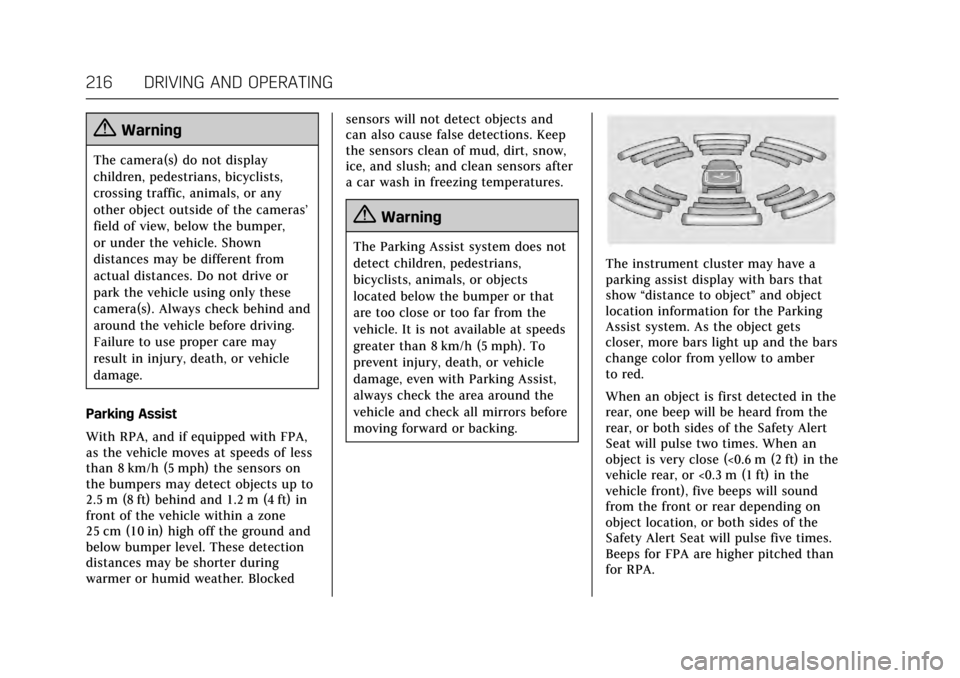
The instrument cluster may have a
parking assist display with bars that
show
“distance to object ”and object
location information for the Parking
Assist system. As the object gets
closer, more bars light up and the bars
change color from yellow to amber
to red.
When an object is first detected in the
rear, one beep will be heard from the
rear, or both sides of the Safety Alert
Seat will pulse two times. When an
object is very close (<0.6 m (2 ft) in the
vehicle rear, or <0.3 m (1 ft) in the
vehicle front), five beeps will sound
from the front or rear depending on
object location, or both sides of the
Safety Alert Seat will pulse five times.
Beeps for FPA are higher pitched than
for RPA.