instrument panel CADILLAC CT4 2023 User Guide
[x] Cancel search | Manufacturer: CADILLAC, Model Year: 2023, Model line: CT4, Model: CADILLAC CT4 2023Pages: 524, PDF Size: 6.98 MB
Page 120 of 524

Cadillac CT4 Owner Manual (GMNA-Localizing-U.S./Canada-16500442) -
2023 - CRC - 5/4/22
Instruments and Controls 119
and increase vehicle
emissions. Diagnosis and
service may be required.
To help prevent damage,
reduce vehicle speed and
avoid hard accelerations and
uphill grades. If towing a
trailer, reduce the amount of
cargo being hauled as soon as
possible.
If the light continues to flash,
find a safe place to park. Turn
the vehicle off and wait at
least 10 seconds before
restarting the engine. If the
light is still flashing, follow the
previous guidelines and see
your dealer for service as
soon as possible.
If the light is on steady :A
malfunction has been
detected. Diagnosis and
service may be required.
Check the following:
.If fuel has been added to the
vehicle using the capless fuel
funnel adapter, make sure
that it has been removed. See
“Filling the Tank with a
Portable Gas Can” under
Filling the Tank 0356. The
diagnostic system can
detect if the adapter has
been left installed in the
vehicle, allowing fuel to
evaporate into the
atmosphere. A few driving
trips with the adapter
removed may turn off the
light.
.Poor fuel quality can cause
inefficient engine operation
and poor driveability, which
may go away once the
engine is warmed up. If this
occurs, change the fuel
brand. It may require at least
one full tank of the proper
fuel to turn the light off. See
Recommended Fuel (LSY
2.0L L4 Turbo Engine) 0354
or
Recommended Fuel (L3B
2.7L L4 Turbo and LF4 3.6L
V6 Twin Turbo Engines)
0 355.
If the light remains on, see
your dealer.
Emissions Inspection and
Maintenance Programs
If the vehicle requires an
Emissions Inspection/
Maintenance test, the test
equipment will likely connect
to the vehicle's Data Link
Connector (DLC).
The DLC is under the
instrument panel to the left of
the steering wheel.
Connecting devices that are
not used to perform an
Emissions Inspection/
Maintenance test or to service
the vehicle may affect vehicle
operation. See Add-On
Electrical Equipment 0366.
See your dealer if assistance
is needed.
Page 137 of 524

Cadillac CT4 Owner Manual (GMNA-Localizing-U.S./Canada-16500442) -
2023 - CRC - 5/4/22
136 Instruments and Controls
displays, the engine air filter
should be replaced as soon as
possible.
Engine Hours :Displays the
total number of hours the
engine has run. The display
also shows the engine idle
hours.
Lifetime Revs : The display
shows total engine revolutions
divided by 10,000.
Brake Pad Life : If equipped,
this displays an estimate of
the remaining life of the front
and rear brake pads.
Messages are displayed based
on brake pad wear and the
state of the system. Reset the
Brake Pad Life display after
replacing the brake pads. See
Brake Pad Life System (If
Equipped) 0396.Head-Up
Display (HUD)
{Warning
If the HUD image is too
bright or too high in your
field of view, it may take you
more time to see things you
need to see when it is dark
outside. Be sure to keep the
HUD image dim and placed
low in your field of view.
If equipped with HUD, some
information concerning the
operation of the vehicle is
projected onto the windshield.
The information is projected
through the HUD lens on the
driver side of the instrument
panel and focused out toward
the front of the vehicle.
Caution
If you try to use the HUD
image as a parking aid, you
may misjudge the distance
and damage your vehicle. Do
not use the HUD image as a
parking aid.
The HUD information can be
displayed in various languages.
The speedometer reading and
other numerical values can be
displayed in either English or
metric units.
The language selection is
changed through the radio
and the units of measurement
are changed through the
instrument cluster. See
Settings 0207 and “Options”
under Instrument Cluster
(Base Level) 0106 or
Instrument Cluster (Uplevel)
0 108.
Page 146 of 524

Cadillac CT4 Owner Manual (GMNA-Localizing-U.S./Canada-16500442) -
2023 - CRC - 5/4/22
Lighting 145
Lighting
Exterior Lighting
Exterior LampControls . . . . . . . . . . . . . . . . . . . . . 145
Exterior Lamps Off Reminder . . . . . . . . . . . . . . . . . . . . 147
Headlamp High/ Low-Beam Changer . . . . . 147
Flash-to-Pass . . . . . . . . . . . . . . . 147
Daytime Running Lamps (DRL) . . . . . . . . . . . . . . . 147
Automatic Headlamp System . . . . . . . . . . . . . . . . . . . . . . 148
Hazard Warning Flashers . . . . . . . . . . . . . . . . . . . . . 149
Turn and Lane-Change Signals . . . . . . . . . . . . . . . . . . . . . . . 149
Cornering Lamps . . . . . . . . . . 149
Interior Lighting
Instrument Panel Illumination Control . . . . . . 150
Courtesy Lamps . . . . . . . . . . . 150
Dome Lamps . . . . . . . . . . . . . . . . 150
Reading Lamps . . . . . . . . . . . . . 150
Lighting Features
Entry Lighting . . . . . . . . . . . . . . . 151
Exit Lighting . . . . . . . . . . . . . . . . . . 151
Battery Load Management . . . . . . . . . . . . . . . 152
Battery Power
Protection . . . . . . . . . . . . . . . . . . 153
Exterior Lighting Battery Saver . . . . . . . . . . . . . . . . . . . . . . . . . 153Exterior Lighting
Exterior Lamp
Controls
The exterior lamp control is on
the turn signal lever.
Turn the control to the
following positions:
O:Turns the exterior lamps
off and deactivates the AUTO
mode. Turn to
Oagain to
reactivate the AUTO mode.
In Canada, the headlamps will
automatically reactivate when
the vehicle is shifted out of
P (Park).
Page 147 of 524

Cadillac CT4 Owner Manual (GMNA-Localizing-U.S./Canada-16500442) -
2023 - CRC - 5/4/22
146 Lighting
AUTO :Automatically turns
the exterior lamps on and off,
depending on outside lighting.
;: Turns on the parking
lamps including all lamps,
except the headlamps.
2: Turns on the headlamps
together with the parking
lamps and instrument panel
lights.
IntelliBeam System
If equipped, this system turns
the vehicle's high-beam
headlamps on and off
according to surrounding
traffic conditions.
The system turns the
high-beam headlamps on when
it is dark enough and there is
no other traffic present.
This light
bcomes on in the
instrument cluster when the
IntelliBeam system is enabled. Turning On and Enabling
IntelliBeam
To enable the IntelliBeam
system, press
bon the turn
signal lever when it is dark
outside and the exterior lamp
control is in AUTO or
2.
Driving with IntelliBeam
The system only activates the
high beams when driving over
40 km/h (25 mph).
The blue high-beam on light
appears on the instrument
cluster when the high beams
are on. There is a sensor near the top
center of the windshield that
automatically controls the
system. Keep this area of the
windshield clear of debris to
allow for best system
performance.
The high-beam headlamps
remain on, under the
automatic control, until one of
the following situations
occurs:
.The system detects an
approaching vehicle's
headlamps.
.The system detects a
preceding vehicle's taillamps.
.The outside light is bright
enough that high-beam
headlamps are not required.
.The vehicle's speed drops
below 20 km/h (12 mph).
.The IntelliBeam system is
disabled by the button on
the turn signal lever. If this
happens, press
bon the
turn signal lever when the
exterior lamp control is in
Page 149 of 524

Cadillac CT4 Owner Manual (GMNA-Localizing-U.S./Canada-16500442) -
2023 - CRC - 5/4/22
148 Lighting
If equipped, the DRL will come
on when all of the following
conditions are met:
.The ignition is on.
.The exterior lamp control is
in AUTO.
.The light sensor determines
it is daytime.
The DRL turn off when the
headlamps are turned to
Oor
the ignition is off.
For vehicles first sold in
Canada, the DRL can only be
turned off when the vehicle is
parked.
Automatic Headlamp
System
When the exterior lamp
control is set to AUTO and it is
dark enough outside, the
headlamps come on
automatically.
The light sensor is on top of
the instrument panel or on the
windshield near the rearview
mirror. Do not cover the
sensor, otherwise the
headlamps will come on when
they are not needed.
The system may also turn on
the headlamps when driving
through a parking garage or
tunnel.
If the vehicle is started in a
dark garage, the automatic
headlamp system comes on
immediately. If it is light
outside when the vehicle
leaves the garage, there is a slight delay before the
automatic headlamp system
turns off the headlamps.
During that delay, the
instrument cluster may not be
as bright as usual. Make sure
the instrument panel
brightness control is in the full
bright position. See
Instrument Panel Illumination
Control
0150.
When it is bright enough
outside, the headlamps will
turn off.
The automatic headlamp
system turns off when the
exterior lamp control is turned
to
Oor the ignition is off. For
vehicles sold in Canada, this
control only works when the
transmission is in P (Park).
Lights On with Wipers
If the windshield wipers are
activated in daylight with the
engine on, and the exterior
lamp control is in AUTO, the
headlamps, parking lamps, and
other exterior lamps come on.
Page 151 of 524
Cadillac CT4 Owner Manual (GMNA-Localizing-U.S./Canada-16500442) -
2023 - CRC - 5/4/22
150 Lighting
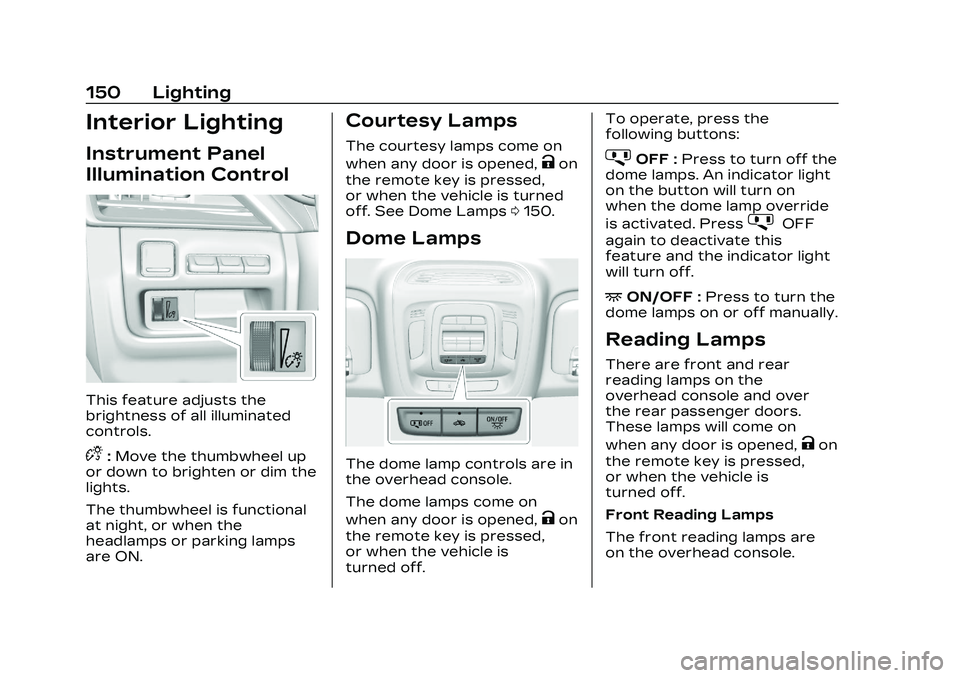
Interior Lighting
Instrument Panel
Illumination Control
This feature adjusts the
brightness of all illuminated
controls.
D:Move the thumbwheel up
or down to brighten or dim the
lights.
The thumbwheel is functional
at night, or when the
headlamps or parking lamps
are ON.
Courtesy Lamps
The courtesy lamps come on
when any door is opened,
Kon
the remote key is pressed,
or when the vehicle is turned
off. See Dome Lamps 0150.
Dome Lamps
The dome lamp controls are in
the overhead console.
The dome lamps come on
when any door is opened,
Kon
the remote key is pressed,
or when the vehicle is
turned off. To operate, press the
following buttons:
jOFF :
Press to turn off the
dome lamps. An indicator light
on the button will turn on
when the dome lamp override
is activated. Press
jOFF
again to deactivate this
feature and the indicator light
will turn off.
+ON/OFF : Press to turn the
dome lamps on or off manually.
Reading Lamps
There are front and rear
reading lamps on the
overhead console and over
the rear passenger doors.
These lamps will come on
when any door is opened,
Kon
the remote key is pressed,
or when the vehicle is
turned off.
Front Reading Lamps
The front reading lamps are
on the overhead console.
Page 228 of 524

Cadillac CT4 Owner Manual (GMNA-Localizing-U.S./Canada-16500442) -
2023 - CRC - 5/4/22
Climate Controls 227
The following climate control
settings use more fuel:
.MAX air conditioning mode
.Defrost mode
.Extreme temperature
settings, such as 15° C
(60° F) or 32° C (90° F)
.High fan speed settings
To help reduce fuel usage:
.Use the full automatic
control as described under
“Automatic Operation.”
.Select a temperature setting
that is higher in hot weather
and lower in cold weather.
.Turn off the air conditioning
when it is not needed.
.Only use defrost to clear the
windows.
Automatic Operation
The system automatically
controls the following four
functions to heat or cool the
vehicle to the desired
temperature:
.Fan Speed
.Air Delivery Mode
.Air Conditioning
.Recirculation
When the AUTO indicator light
is lit, all four functions are
operating automatically. Each
function can be manually set
and the selected setting will
be shown. This cancels full
automatic operation and the
AUTO indicator light turns off.
Functions that are not
manually set will continue to
be automatically controlled,
although the AUTO indicator
light will not be lit.
To place the system in
automatic mode: 1. Press AUTO.
2. Set the driver and passenger temperature.
To find your comfort
setting, start with 22 °C
(72 °F) and allow the
system time to stabilize.
Then adjust the
temperature as needed for
best comfort. To improve fuel efficiency and
to cool the vehicle faster,
recirculation may be
automatically selected in warm
weather.
The recirculation light will not
come on when automatically
controlled. Press
@to
manually select recirculation;
press it again to select
outside air.
Do not cover the solar sensor
on the top of the instrument
panel near the windshield.
This sensor regulates air
temperature based on sun
load. See “Sensors” later in
this section.
Manual Operation
On/Off : Press to turn the
climate control system on or
off. When the system is off,
outside air will be prevented
from entering the vehicle.
When the system is on or a
button is pressed, the climate
Page 229 of 524

Cadillac CT4 Owner Manual (GMNA-Localizing-U.S./Canada-16500442) -
2023 - CRC - 5/4/22
228 Climate Controls
control system will turn on and
deliver airflow per the current
setting.
9:Press button up or down
to increase or decrease the
fan speed.
Press AUTO to return to
automatic operation.
Driver and Passenger
Temperature Control : The
temperature can be adjusted
separately for the driver and
passenger.
Press button up or down to
increase or decrease the
driver or passenger
temperature setting.
The driver side or passenger
side temperature display
shows the temperature
setting increasing or
decreasing.
SYNC : Press to link the
passenger and rear climate
temperature settings,
if equipped, to the driver
setting. The SYNC indicator
light will turn on. When the passenger or rear climate
temperature settings are
adjusted, the SYNC indicator
light is off.
Air Delivery Mode Control :
Press
Y,[, orzto change
the direction of the airflow. An
indicator light comes on in the
selected mode button. Multiple
buttons can be selected
simultaneously.
Changing the mode cancels
the automatic operation and
the system goes into manual
mode. Press AUTO to return
to automatic operation.
z: This mode clears the
windows of fog or moisture.
Air is directed to the
windshield and side window
vents. The system
automatically forces outside
air into the vehicle and the air
conditioning compressor will
run, unless the outside
temperature is close to
freezing.
Y: Air is directed to the
instrument panel outlets.
[: Air is directed to the floor
outlets, with some to the
windshield, side window
outlets, outboard panel
outlets, and second row floor
outlets.
0: Press to clear the
windshield of fog or frost
more quickly. Air is directed to
the windshield and the side
window outlets. The air
conditioning compressor also
comes on, unless the outside
temperature is below freezing.
Do not drive the vehicle until
all windows are clear.
See Air Vents 0230.
A/C : Press to turn the air
conditioning system on or off.
An indicator light comes on to
show that the air conditioning
is enabled. If the fan is turned
off, the air conditioner will not
run. The A/C light will stay on
Page 231 of 524

Cadillac CT4 Owner Manual (GMNA-Localizing-U.S./Canada-16500442) -
2023 - CRC - 5/4/22
230 Climate Controls
Settings > Climate and Air
Quality > Ionizer > Select ON
or OFF.
Sensors
The solar sensor, located in
the defrost grille in the middle
of the instrument panel,
monitors the solar heat. Do
not cover the solar sensor or
the system will not work
properly.
There is also an exterior
temperature sensor behind
the front grille. This sensor
reads the outside air
temperature and helpsmaintain the temperature
inside the vehicle. Any cover
on the front of the vehicle,
could cause a false reading in
the displayed temperature.
The climate control system
uses the information from
these sensors to maintain
comfort settings by adjusting
the outlet temperature, fan
speed, and air delivery mode.
The system may also supply
cooler air to the side of the
vehicle facing the sun. The
recirculation mode will also be
used as needed to maintain
cool outlet temperatures.
Afterblow Feature
If equipped, under certain
conditions, the fan may stay
on or may turn on and off
several times after you turn
off and lock the vehicle. This is
normal.
Air Vents
Adjustable air vents are in the
center and on the sides of the
instrument panel, and on the
rear of the center console
storage.
Move the slider knobs to
change the direction of or to
close off the airflow.
Page 255 of 524

Cadillac CT4 Owner Manual (GMNA-Localizing-U.S./Canada-16500442) -
2023 - CRC - 5/10/22
254 Driving and Operating
are clear. Avoid sudden
steering maneuvers and
braking while on ice.
.Turn off cruise control.
.Select All-Wheel Drive (AWD)
Mode for vehicles equipped
with AWD. Select Snow/Ice
Mode for FWD only vehicles.
See Driver Mode Control
0292 and
All-Wheel Drive 0286.
Cold Weather Mode
In very low temperatures, a
cold weather message may
display on the Driver
Information Center (DIC). The
engine speed, transmission
shift patterns, and cabin fan
speed may operate differently
to enable the vehicle to warm
up quicker. You can manually
override the cabin fan speed in
cold weather mode.
Blizzard Conditions
Stop the vehicle in a safe
place and signal for help. Stay
with the vehicle unless there is
help nearby. If possible, use Roadside Assistance. See
Roadside Assistance Program
0
487. To get help and keep
everyone in the vehicle safe:
.Turn on the hazard warning
flashers.
.Tie a red cloth to an outside
mirror.
{Warning
Snow can trap engine
exhaust under the vehicle.
This may cause exhaust
gases to get inside. Engine
exhaust contains carbon
monoxide (CO), which cannot
be seen or smelled. It can
cause unconsciousness and
even death.
If the vehicle is stuck
in snow:
.Clear snow from the base
of the vehicle, especially
any blocking the
exhaust pipe.
(Continued)
Warning (Continued)
.Open a window about
5 cm (2 in) on the vehicle
side that is away from the
wind, to bring in fresh air.
.Fully open the air outlets
on or under the
instrument panel.
.Adjust the climate control
system to circulate the air
inside the vehicle and set
the fan speed to the
highest setting. See
“Climate Control Systems.”
For more information about
CO, see Engine Exhaust
0 271.
To save fuel, run the engine
for short periods to warm the
vehicle and then shut the
engine off and partially close
the window. Moving about to
keep warm also helps.
If it takes time for help to
arrive, when running the
engine, push the accelerator
pedal slightly so the engine