automatic CADILLAC CT5 2021 Owner's Guide
[x] Cancel search | Manufacturer: CADILLAC, Model Year: 2021, Model line: CT5, Model: CADILLAC CT5 2021Pages: 435, PDF Size: 8.9 MB
Page 60 of 435
Cadillac CT5 Owner Manual (GMNA-Localizing-U.S./Canada-14584312) -
2021 - CRC - 11/23/20
SEATS AND RESTRAINTS 59
What Will You See after an
Airbag Inflates?
After frontal, knee, and seat-mounted
side impact airbags inflate, they
quickly deflate, so quickly that some
people may not even realize the
airbags inflated. Roof-rail airbags may
still be at least partially inflated for
some time after they inflate. Some
components of the airbag module may
be hot for several minutes. For
location of the airbags, seeWhere Are
the Airbags? 056.
The parts of the airbag that come into
contact with you may be warm, but
not too hot to touch. There may be
some smoke and dust coming from
the vents in the deflated airbags.
Airbag inflation does not prevent the
driver from seeing out of the
windshield or being able to steer the
vehicle, nor does it prevent people
from leaving the vehicle.
{Warning
When an airbag inflates, there may
be dust in the air. This dust could
cause breathing problems for
people with a history of asthma or
other breathing trouble. To avoid
this, everyone in the vehicle should
get out as soon as it is safe to do
so. If you have breathing problems
but cannot get out of the vehicle
after an airbag inflates, then get
fresh air by opening a window or a
door. If you experience breathing
problems following an airbag
deployment, you should seek
medical attention.
The vehicle has a feature that may
automatically unlock the doors, turn
on the interior lamps and hazard
warning flashers, and shut off the fuel
system after the airbags inflate. The
feature may also activate, without
airbag inflation, after an event that
exceeds a predetermined threshold.
After turning the ignition off and then
on again, the fuel system will return
to normal operation; the doors can be locked, the interior lamps can be
turned off, and the hazard warning
flashers can be turned off using the
controls for those features. If any of
these systems are damaged in the
crash they may not operate as normal.
{Warning
A crash severe enough to inflate the
airbags may have also damaged
important functions in the vehicle,
such as the fuel system, brake and
steering systems, etc. Even if the
vehicle appears to be drivable after
a moderate crash, there may be
concealed damage that could make
it difficult to safely operate the
vehicle.
Use caution if you should attempt
to restart the engine after a crash
has occurred.
In many crashes severe enough to
inflate the airbag, windshields are
broken by vehicle deformation.
Additional windshield breakage may
also occur from the front outboard
passenger airbag.
Page 87 of 435
Cadillac CT5 Owner Manual (GMNA-Localizing-U.S./Canada-14584312) -
2021 - CRC - 11/24/20
86 INSTRUMENTS AND CONTROLS
Instruments and
Controls
Controls
Steering Wheel Adjustment . . . . . . . 87
Steering Wheel Controls . . . . . . . . . . 87
Heated Steering Wheel . . . . . . . . . . . . 87
Horn . . . . . . . . . . . . . . . . . . . . . . . . . . . . . . . . 88
Windshield Wiper/Washer . . . . . . . . 88
Compass . . . . . . . . . . . . . . . . . . . . . . . . . . . . 90
Clock . . . . . . . . . . . . . . . . . . . . . . . . . . . . . . . 90
Power Outlets . . . . . . . . . . . . . . . . . . . . . . 90
Wireless Charging . . . . . . . . . . . . . . . . . 91
Warning Lights, Gauges, and
Indicators
Warning Lights, Gauges, andIndicators . . . . . . . . . . . . . . . . . . . . . . . . . 93
Instrument Cluster (Base Level) . . . . . . . . . . . . . . . . . . . . . . . . . . . . . 94
Instrument Cluster (Uplevel) . . . . . 96
Speedometer . . . . . . . . . . . . . . . . . . . . . . . 99
Odometer . . . . . . . . . . . . . . . . . . . . . . . . . . . 99
Trip Odometer . . . . . . . . . . . . . . . . . . . . . 99
Tachometer . . . . . . . . . . . . . . . . . . . . . . . . 99
Fuel Gauge . . . . . . . . . . . . . . . . . . . . . . . . 100
Engine Coolant Temperature
Gauge (Base Level) . . . . . . . . . . . . . 100 Engine Coolant Temperature
Gauge (Uplevel) . . . . . . . . . . . . . . . . . 101
Seat Belt Reminders . . . . . . . . . . . . . . 101
Airbag Readiness Light . . . . . . . . . . 102
Passenger Airbag Status Indicator . . . . . . . . . . . . . . . . . . . . . . . . . 102
Charging System Light . . . . . . . . . . . 103
Malfunction Indicator Lamp (Check Engine Light) . . . . . . . . . . . 103
Brake System Warning Light . . . . 105
Electric Parking Brake Light . . . . . 106
Service Electric Parking Brake Light . . . . . . . . . . . . . . . . . . . . . . . . . . . . . 106
Antilock Brake System (ABS) Warning Light . . . . . . . . . . . . . . . . . . 106
Performance Shifting Light . . . . . . 107
Automatic Vehicle Hold (AVH) Light . . . . . . . . . . . . . . . . . . . . . . . . . . . . . 107
Lane Keep Assist (LKA) Light . . . 107
Automatic Emergency Braking (AEB) Disabled Light . . . . . . . . . . . 107
Vehicle Ahead Indicator . . . . . . . . . 108
Pedestrian Ahead Indicator . . . . . . 108
Traction Off Light . . . . . . . . . . . . . . . . 108
StabiliTrak OFF Light . . . . . . . . . . . . 108
Traction Control System (TCS)/ StabiliTrak Light . . . . . . . . . . . . . . . . 109
Engine Coolant Temperature Warning Light . . . . . . . . . . . . . . . . . . 109
Driver Mode Control Light . . . . . . . 109 Tire Pressure Light . . . . . . . . . . . . . . . 110
Engine Oil Pressure Light . . . . . . . . 110
Low Fuel Warning Light . . . . . . . . . 111
Security Light . . . . . . . . . . . . . . . . . . . . . 111
High-Beam On Light . . . . . . . . . . . . . 111
Lamps On Reminder . . . . . . . . . . . . . 112
Cruise Control Light (Base
Level) . . . . . . . . . . . . . . . . . . . . . . . . . . . . 112
Cruise Control Light (Uplevel) . . . 112
Door Ajar Light . . . . . . . . . . . . . . . . . . . 113
Information Displays
Driver Information Center (DIC) (Base Level) . . . . . . . . . . . . . . . . . . . . . 113
Driver Information Center (DIC) (Uplevel) . . . . . . . . . . . . . . . . . . . . . . . . . 116
Head-Up Display (HUD) . . . . . . . . . 118
Vehicle Messages
Vehicle Messages . . . . . . . . . . . . . . . . . 122
Engine Power Messages . . . . . . . . . . 123
Vehicle Speed Messages . . . . . . . . . 123
Vehicle Personalization
Vehicle Personalization . . . . . . . . . . 123
Universal Remote System
Universal Remote System . . . . . . . . 128
Universal Remote System
Programming . . . . . . . . . . . . . . . . . . . 129
Universal Remote System Operation . . . . . . . . . . . . . . . . . . . . . . . . 131
Page 89 of 435
Cadillac CT5 Owner Manual (GMNA-Localizing-U.S./Canada-14584312) -
2021 - CRC - 11/24/20
88 INSTRUMENTS AND CONTROLS
If equipped with a remote start heated
steering wheel, the heated steering
wheel and indicator will turn on
automatically.
If equipped with auto heated seats,
the heated steering wheel will turn on
along with the heated seats when it is
cold outside. The heated steering
wheel indicator light may not come
on. SeeHeated and Ventilated Front
Seats 042.
Horn
Pressaon the steering wheel pad to
sound the horn.
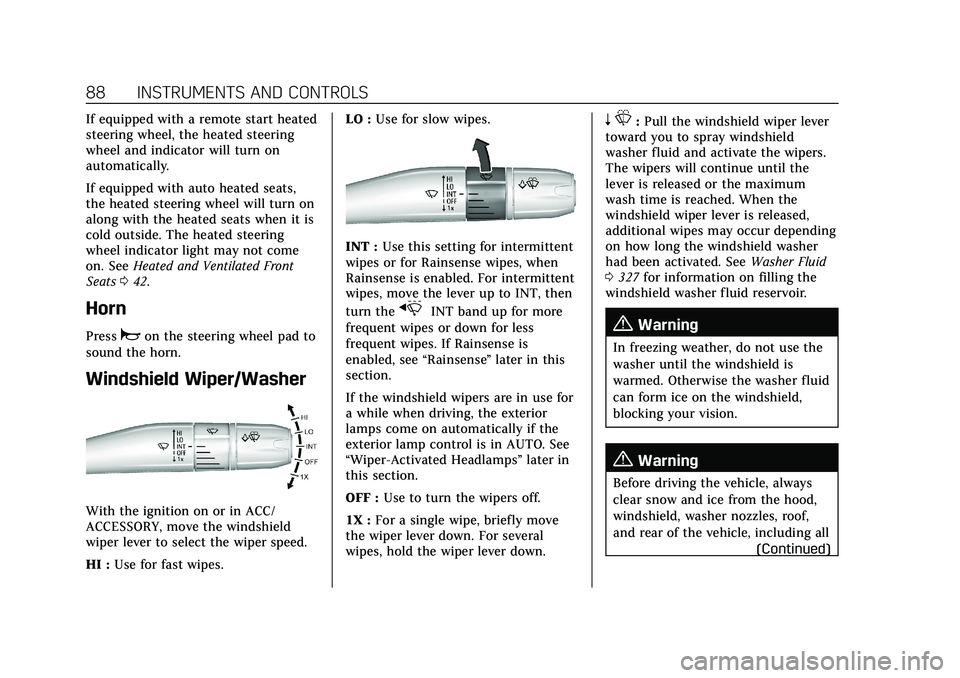
Windshield Wiper/Washer
With the ignition on or in ACC/
ACCESSORY, move the windshield
wiper lever to select the wiper speed.
HI : Use for fast wipes. LO :
Use for slow wipes.
INT : Use this setting for intermittent
wipes or for Rainsense wipes, when
Rainsense is enabled. For intermittent
wipes, move the lever up to INT, then
turn the
xINT band up for more
frequent wipes or down for less
frequent wipes. If Rainsense is
enabled, see “Rainsense”later in this
section.
If the windshield wipers are in use for
a while when driving, the exterior
lamps come on automatically if the
exterior lamp control is in AUTO. See
“Wiper-Activated Headlamps” later in
this section.
OFF : Use to turn the wipers off.
1X : For a single wipe, briefly move
the wiper lever down. For several
wipes, hold the wiper lever down.
n L: Pull the windshield wiper lever
toward you to spray windshield
washer fluid and activate the wipers.
The wipers will continue until the
lever is released or the maximum
wash time is reached. When the
windshield wiper lever is released,
additional wipes may occur depending
on how long the windshield washer
had been activated. See Washer Fluid
0 327 for information on filling the
windshield washer fluid reservoir.
{Warning
In freezing weather, do not use the
washer until the windshield is
warmed. Otherwise the washer fluid
can form ice on the windshield,
blocking your vision.
{Warning
Before driving the vehicle, always
clear snow and ice from the hood,
windshield, washer nozzles, roof,
and rear of the vehicle, including all
(Continued)
Page 90 of 435
Cadillac CT5 Owner Manual (GMNA-Localizing-U.S./Canada-14584312) -
2021 - CRC - 11/24/20
INSTRUMENTS AND CONTROLS 89
Warning (Continued)
lamps and windows. Reduced
visibility from snow and ice buildup
could lead to a crash.
Clear snow and ice from the wiper
blades and windshield before using
them. If frozen to the windshield,
carefully loosen or thaw them.
Damaged blades should be replaced.
See Wiper Blade Replacement 0331.
Wiper Parking
If the ignition is turned off while the
wipers are on LO, HI, or INT, they will
immediately stop.
If the windshield wiper lever is then
moved to OFF before the driver door is
opened or within 10 minutes, the
wipers will restart and move to the
base of the windshield.
If the ignition is turned off while the
wipers are performing wipes due to
windshield washing or Rainsense
wipes, the wipers continue to run
until they reach the base of the
windshield.
Rainsense
There is a sensor near the top center
of the windshield detects the amount
of water on the windshield and
controls the frequency of the
windshield wiper. To turn this feature
on or off, see “Rain Sense Wipers ”
under Vehicle Personalization 0123.
Keep this area of the windshield clear
of debris to allow for best system
performance.
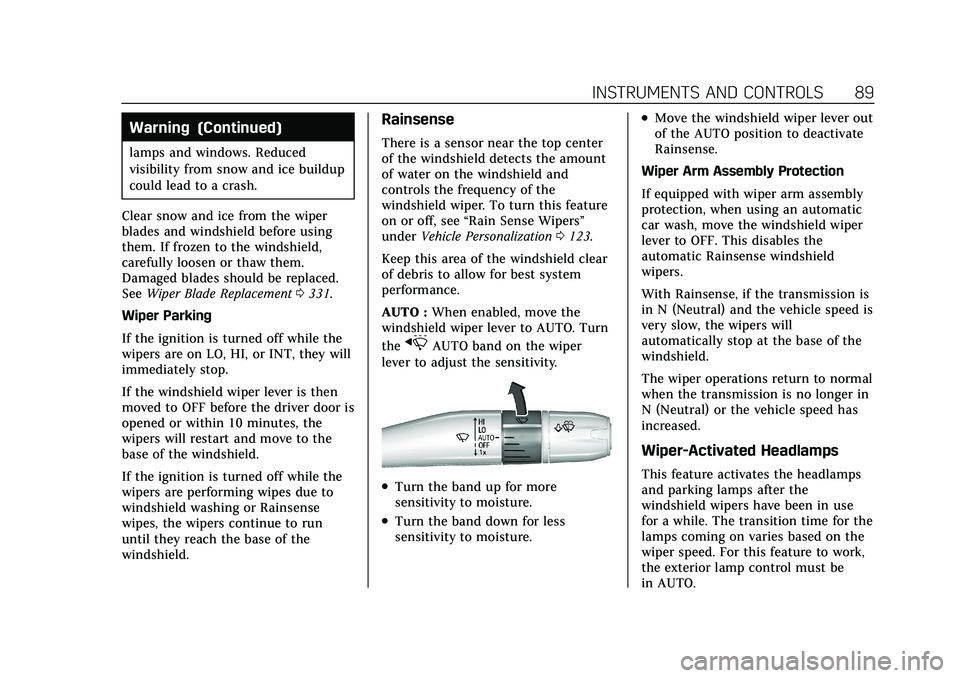
AUTO : When enabled, move the
windshield wiper lever to AUTO. Turn
the
xAUTO band on the wiper
lever to adjust the sensitivity.
.Turn the band up for more
sensitivity to moisture.
.Turn the band down for less
sensitivity to moisture.
.Move the windshield wiper lever out
of the AUTO position to deactivate
Rainsense.
Wiper Arm Assembly Protection
If equipped with wiper arm assembly
protection, when using an automatic
car wash, move the windshield wiper
lever to OFF. This disables the
automatic Rainsense windshield
wipers.
With Rainsense, if the transmission is
in N (Neutral) and the vehicle speed is
very slow, the wipers will
automatically stop at the base of the
windshield.
The wiper operations return to normal
when the transmission is no longer in
N (Neutral) or the vehicle speed has
increased.
Wiper-Activated Headlamps
This feature activates the headlamps
and parking lamps after the
windshield wipers have been in use
for a while. The transition time for the
lamps coming on varies based on the
wiper speed. For this feature to work,
the exterior lamp control must be
in AUTO.
Page 91 of 435
Cadillac CT5 Owner Manual (GMNA-Localizing-U.S./Canada-14584312) -
2021 - CRC - 11/24/20
90 INSTRUMENTS AND CONTROLS
The wiper-activated headlamps
immediately turn off when the
ignition is turned to off, or the
windshield wiper control is turned off.
Compass
The vehicle may have a compass
display on the Driver Information
Center (DIC). The compass receives its
heading and other information from
the Global Positioning System (GPS)
antenna, StabiliTrak/Electronic
Stability Control (ESC), and vehicle
speed information.
The compass system is designed to
operate for a certain number of miles
or degrees of turn before needing a
signal from the GPS satellites. When
the compass display shows CAL, drive
the vehicle for a short distance in an
open area where it can receive a GPS
signal. The compass system will
automatically determine when a GPS
signal is restored and provide a
heading again.
Clock
Set the time and date using the
infotainment system. See "Time /
Date" underSettings0182.
Power Outlets
The accessory power outlets can be
used to plug in electrical equipment,
such as a cell phone or MP3 player.
The vehicle has two accessory power
outlets:
.Inside the center console
storage area.
.On the rear of the center floor
console.
Lift the cover to access the accessory
power outlet.
Certain electrical accessories may not
be compatible with the accessory
power outlet and could overload a
vehicle circuit breaker or adapter fuse.
If overloaded, the circuit breaker will
reset after all devices are disconnected
or if Retained Accessory Power (RAP)
is turned off and then back on. See
Retained Accessory Power (RAP) 0229.
Wait one minute to allow the circuit breaker to reset before reconnecting
devices or turning RAP back on. If the
problem continues, the issue could be
within your device. Try another
known good device to make sure the
circuit breaker is operating properly.
If this does not resolve your problem,
see your dealer.
It is possible to replace the factory
power outlet with a cigar lighter
receptacle, if desired. This requires the
factory installed circuit breaker to be
replaced with a standard minifuse by
the dealer. A minifuse will not reset
and will have to be replace if blown.
Caution
Failure to replace the circuit
breaker with the minifuse could
overheat the cigar lighter and
damage the vehicle.
When adding electrical equipment, be
sure to follow the proper installation
instructions included with the
equipment. See Add-On Electrical
Equipment 0307.
Page 108 of 435
Cadillac CT5 Owner Manual (GMNA-Localizing-U.S./Canada-14584312) -
2021 - CRC - 11/24/20
INSTRUMENTS AND CONTROLS 107
If the ABS warning light is the only
light on, the vehicle has regular
brakes, but ABS is not functioning.
If both the ABS warning light and the
brake system warning light are on,
ABS is not functioning and there is a
problem with the regular brakes. See
your dealer for service.
SeeBrake System Warning Light 0105.
Performance Shifting Light
If equipped, this light may display
green when Sport Mode is activated
and certain driving conditions are
met. Sport Mode detects when the
vehicle is being driven in a
competitive manner, and adjusts the
shifting of the gears accordingly. See
Driver Mode Control 0242.
Automatic Vehicle Hold
(AVH) Light
This light comes on when AVH is
actively holding the vehicle. See
Automatic Vehicle Hold (AVH) 0240.
Lane Keep Assist (LKA)
Light
After the vehicle is started, this light
turns off and stays off if LKA has not
been turned on or is unavailable.
If equipped, this light is white if LKA
is turned on, but not ready to assist.
This light is green if LKA is turned on
and is ready to assist. LKA may assist by gently turning the
steering wheel if the vehicle
approaches a detected lane marking.
The LKA light is amber when
assisting.
This light flashes amber as a Lane
Departure Warning (LDW) alert, to
indicate that the lane marking has
been crossed.
LKA will not assist or alert if the turn
signal is active in the direction of lane
departure, or if LKA detects that you
are accelerating, braking, or actively
steering.
See
Lane Keep Assist (LKA) 0293.
Automatic Emergency
Braking (AEB) Disabled
Light
Page 109 of 435

Cadillac CT5 Owner Manual (GMNA-Localizing-U.S./Canada-14584312) -
2021 - CRC - 11/24/20
108 INSTRUMENTS AND CONTROLS
This indicator will display when
Automatic Emergency Braking or
Front Pedestrian Braking has been
turned off or is currently unavailable
due to malfunction.
SeeAutomatic Emergency Braking
(AEB) 0288.
See Front Pedestrian Braking (FPB)
System 0289.
Vehicle Ahead Indicator
If equipped, this indicator will display
green when a vehicle is detected
ahead and amber when you are
following a vehicle ahead much too
closely.
See Forward Collision Alert (FCA)
System 0285.
Pedestrian Ahead Indicator
If equipped, this indicator will display
amber when a nearby pedestrian is
detected in front of the vehicle.
See Front Pedestrian Braking (FPB)
System 0289.
Traction Off Light
This light comes on briefly when the
vehicle is turned on. If it does not,
have the vehicle serviced by your
dealer. If the system is working
normally, the indicator light then
turns off. The traction off light comes on when
the Traction Control System (TCS) has
been turned off. If StabiliTrak/
Electronic Stability Control (ESC) is
turned off, TCS is also turned off. To
turn TCS and ESC off and on, see
Traction Control/Electronic Stability
Control
0240.
If TCS is off, wheel spin is not limited
unless necessary to help protect the
driveline from damage. Adjust driving
accordingly.
StabiliTrak OFF Light
This light comes on briefly when the
vehicle is turned on. If the light does
not come on, have the vehicle serviced
by your dealer. If the system is
working normally, the indicator light
then turns off.
This light comes on when the
StabiliTrak/Electronic Stability Control
(ESC) system is turned off.
Page 113 of 435

Cadillac CT5 Owner Manual (GMNA-Localizing-U.S./Canada-14584312) -
2021 - CRC - 11/24/20
112 INSTRUMENTS AND CONTROLS
Lamps On Reminder
This light comes on when the exterior
lamps are in use, except when only
the Daytime Running Lamps (DRL)
are active. SeeExterior Lamp Controls
0 132.
Cruise Control Light (Base
Level)
The cruise control light is white when
the cruise control is on and ready, and
turns green when the cruise control is
set and active.
See Cruise Control 0249.
Adaptive Cruise Control Light
This light is white when the Adaptive
Cruise Control (ACC, if equipped) is on
and ready, and turns green when the
ACC is set and active.
See Adaptive Cruise Control (Advanced)
0 251.
Cruise Control Light
(Uplevel)
The cruise control light is white when
the cruise control is on and ready, and
turns green when the cruise control is
set and active.
See Cruise Control 0249.
Adaptive Cruise Control Light
This light is white when the Adaptive
Cruise Control (ACC, if equipped) is on
and ready, and turns green when the
ACC is set and active.
Curve Speed Control Light
If equipped, this light may illuminate
green when ACC is actively controlling
the vehicle speed and detects a sharp
curve on the road ahead.
ACC automatically slows the vehicle
down while navigating the curve and
may increase speed out of the curve,
but will not exceed the set speed.
Page 116 of 435
Cadillac CT5 Owner Manual (GMNA-Localizing-U.S./Canada-14584312) -
2021 - CRC - 11/24/20
INSTRUMENTS AND CONTROLS 115
Brake Pad Life :If equipped, This
displays an estimate of the remaining
life of the front and rear brake pads.
Messages will display based on brake
pad wear and the state of the system.
Reset the Brake Pad Life display after
replacing the brake pads. See Brake
Pad Life System (If Equipped) 0328.
Tire Pressure : Shows the
approximate pressures of all four tires.
Tire pressure is displayed in either
kilopascal (kPa) or in pounds per
square inch (psi). If the pressure is
low, the value for that tire is shown in
amber. See Tire Pressure Monitor
System 0351 and
Tire Pressure Monitor Operation 0352.
Fuel Economy : Displays average fuel
economy, the best fuel economy over
the selected distance, and a bar graph
showing instantaneous fuel economy.
Average Speed : Displays the average
vehicle speed of the vehicle in
kilometers per hour (km/h) or miles
per hour (mph). This average is based
on the various vehicle speeds recorded
since the last reset. Reset the average
speed by pressing the thumbwheel while this display is active to show a
confirmation window to select yes
or no.
Timer :
This display can be used as a
timer. To start the timer, press the
thumbwheel while this display is
active. The display will show the
amount of time that has passed since
the timer was last reset. To stop the
timer, press the thumbwheel briefly
while this display is active and the
timer is running.
Press the thumbwheel while this
display is active to reset the timer.
Follow Distance/Gap Setting : When
Adaptive Cruise Control (ACC) is not
engaged, the current follow time to
the vehicle ahead is displayed as a
time value on this page. When ACC
has been engaged, the display
switches to the gap setting page. This
page shows the current gap setting
along with the vehicle ahead telltale.
Driver Assistance : If equipped,
shows information for Lane Keep
Assist (LKA) and Forward Collision
Alert (FCA). Battery Voltage :
Shows the current
battery voltage.
Coolant Temperature : Shows the
engine coolant temperature in either
degrees Celsius (°C) or degrees
Fahrenheit (°F).
Oil Temperature : Shows the engine
oil temperature in either degrees
Celsius (°C) or degrees Fahrenheit (°F).
Engine Hours (Hourmeter) : Shows
the total number of hours the engine
has run. The display also shows the
engine idle hours.
Engine Boost : Displays engine
manifold pressure relative to ambient
air pressure. It will display boost
pressure generated by the
turbocharging system.
Transmission Fluid Temperature :
Shows the temperature of the
automatic transmission fluid in either
degrees Celsius (°C) or degrees
Fahrenheit (°F).
Info Page Options : Scroll to choose
which info pages appear on the DIC.
Press the thumbwheel to select or
deselect.
Page 121 of 435
Cadillac CT5 Owner Manual (GMNA-Localizing-U.S./Canada-14584312) -
2021 - CRC - 11/24/20
120 INSTRUMENTS AND CONTROLS
The HUD image will automatically
dim and brighten to compensate for
outside lighting. The HUD brightness
control can also be adjusted as
needed.
The HUD image can temporarily light
up depending on the angle and
position of sunlight on the HUD
display. This is normal.
Polarized sunglasses could make the
HUD image harder to see.
Head-Up Display (HUD) Rotation
Option
This feature allows for adjusting the
angle of the HUD image.
Press the thumbwheel while Adjust
Rotation is highlighted to enter Adjust
Mode. Scroll to adjust the angle of the
HUD display. Press the thumbwheel to
confirm and save the setting. This
feature may only be available in
P (Park). SeeInstrument Cluster (Base
Level) 094 or
Instrument Cluster (Uplevel) 096. Speed Limit Style Adjustment
The speed limit style can be changed
to a speed limit bar or speed limit sign
from the Options menu. Press the
thumbwheel while Speed Limit Style
is highlighted to change the speed
sign style or to turn it off.
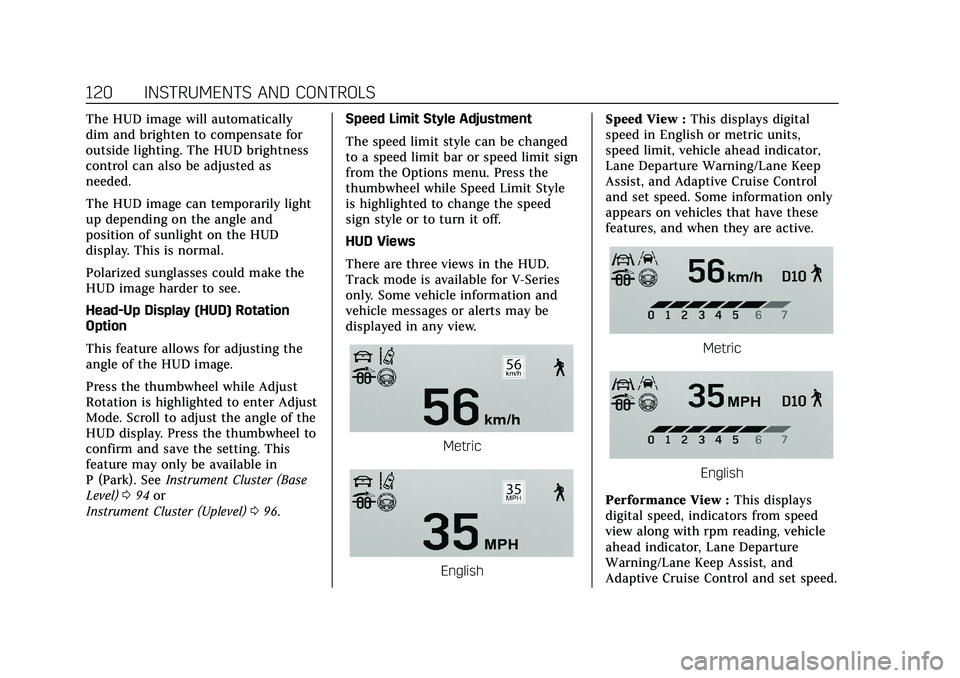
HUD Views
There are three views in the HUD.
Track mode is available for V-Series
only. Some vehicle information and
vehicle messages or alerts may be
displayed in any view.
Metric
English Speed View :
This displays digital
speed in English or metric units,
speed limit, vehicle ahead indicator,
Lane Departure Warning/Lane Keep
Assist, and Adaptive Cruise Control
and set speed. Some information only
appears on vehicles that have these
features, and when they are active.
Metric
English
Performance View : This displays
digital speed, indicators from speed
view along with rpm reading, vehicle
ahead indicator, Lane Departure
Warning/Lane Keep Assist, and
Adaptive Cruise Control and set speed.