automatic CADILLAC CT5 2021 Owner's Guide
[x] Cancel search | Manufacturer: CADILLAC, Model Year: 2021, Model line: CT5, Model: CADILLAC CT5 2021Pages: 435, PDF Size: 8.9 MB
Page 125 of 435
Cadillac CT5 Owner Manual (GMNA-Localizing-U.S./Canada-14584312) -
2021 - CRC - 11/24/20
124 INSTRUMENTS AND CONTROLS
.Visualization
My Mode
Touch and the following may display:
.Engine Sound
.Steering
.Suspension
.Brake Feel
For information on the range of
settings, see “Driver Mode
Customization ”in Driver Mode Control
0 242.
V-Mode
Touch and the following may display:
.Engine Sound
.Steering
.Suspension
.Brake Feel
.Powertrain
For information on the range of
settings, see “Driver Mode
Customization ”in Driver Mode Control
0 242. Visualization
This setting shows handling and
performance settings on the
infotainment display when changing
drive modes.
Touch Off or On.
Climate and Air Quality
Touch and the following may display:
.Auto Fan Speed
.Air Quality Sensor
.Auto Cooled Seats
.Auto Heated Seats
.Auto Defog
.Auto Rear Defog
.Ionizer
Auto Fan Speed
This setting specifies the amount of
airf low when the climate control fan
setting is Auto Fan.
Touch Low, Medium, or High.
Air Quality Sensor
This setting switches the system into
Recirculation Mode based on the
quality of the outside air. Touch Off, Low Sensitivity, or High
Sensitivity.
Auto Cooled Seats
This setting automatically turns on
and regulates the ventilated seats
when the cabin temperature is warm.
See
Heated and Ventilated Front Seats
0 42.
Touch Off or On.
Auto Heated Seats
This setting automatically turns on
and regulates the heated seats when
the cabin temperature is cool. The
auto heated seats can be turned off by
using the heated seat buttons on the
center stack. See Heated and Ventilated
Front Seats 042.
If equipped with auto heated steering
wheel, this feature will turn on when
the auto heated seats turn on.
Touch Off or On.
Auto Defog
This setting automatically turns the
front defogger on when the engine is
started.
Touch Off or On.
Page 126 of 435
Cadillac CT5 Owner Manual (GMNA-Localizing-U.S./Canada-14584312) -
2021 - CRC - 11/24/20
INSTRUMENTS AND CONTROLS 125
Auto Rear Defog
This setting automatically turns the
rear defogger on when the engine is
started.
Touch Off or On.
Ionizer
If equipped and on, this feature helps
clean the air inside the vehicle and
remove contaminants such as pollen,
odors, and dust. SeeDual Automatic
Climate Control System 0202.
Touch Off or On.
Collision / Detection Systems
Touch and the following may display:
.Alert Type
.Forward Collision System
.Front Pedestrian Detection
.Lane Change Alert
.Seat Belt Tightening
.Rear Cross Traffic Alert
.Rear Pedestrian Detection
.Adaptive Cruise Go Notifier
.Rear Camera Park Assist Symbols
.Super Cruise Lane Change Alert Type
This setting specifies the type of
vehicle feedback provided, either a
beep or seat vibration, when you are
in danger of colliding with an object.
Touch Beeps or Safety Alert Seat.
Forward Collision System
This setting can alert of a potential
crash with a detected vehicle ahead
and can apply brakes to help reduce a
collision’s severity.
Touch Off, Alert, or Alert and Brake.
Front Pedestrian Detection
This feature may help avoid or reduce
the harm caused by front-end crashes
with nearby pedestrians.
See
Front Pedestrian Braking (FPB)
System 0289.
Touch Off, Alert, or Alert and Brake.
Lane Change Alert
This setting specifies if an alert will
display on the outside mirror to help
you avoid crashing into a vehicle in
your blind spot, or rapidly approaching your blind spot, during a
lane change maneuver. See
Lane
Change Alert (LCA) 0291.
Touch Off or On.
Seat Belt Tightening
This setting automatically adjusts
your seat belts to a snug fit when
buckled. The seat belts tighten when
you first buckle up and during rough
driving or road conditions.
Touch Off or On.
Rear Cross Traffic Alert
This setting specifies if an alert will
display when the vehicle detects
approaching rear cross traffic when in
R (Reverse). See Assistance Systems for
Parking or Backing 0277.
Touch Off or On.
Rear Pedestrian Detection
This setting specifies if alerts will
display when the vehicle detects
pedestrians behind when in
R (Reverse). See Rear Pedestrian Alert
0 284.
Touch Off, Alert, or Alert and Brake.
Page 127 of 435
Cadillac CT5 Owner Manual (GMNA-Localizing-U.S./Canada-14584312) -
2021 - CRC - 11/24/20
126 INSTRUMENTS AND CONTROLS
Adaptive Cruise Go Notifier
This setting determines if an alert will
appear when Adaptive Cruise Control
brings the vehicle to a complete stop
and the vehicle ahead of you starts
moving again. SeeAdaptive Cruise
Control (Advanced) 0251.
Touch Off or On.
Rear Camera Park Assist Symbols
This setting enables the Rear Camera
Park Assist Symbols. See Assistance
Systems for Parking or Backing 0277.
Touch Off or On.
Super Cruise Lane Change
When on, the vehicle can change
lanes while Super Cruise is active. The
vehicle will only steer to change lanes
when traffic allows .
Touch Off or On.
Comfort and Convenience
Touch and the following may display:
.Chime Volume
.Reverse Tilt Mirror
.Remote Mirror Folding
.Rain Sense Wipers
.Hands Free Liftgate/Trunk Control
Chime Volume
This setting determines the chime
volume level.
Touch the controls on the
infotainment display to adjust the
volume.
Reverse Tilt Mirror
When on, the driver, passenger,
or both driver and passenger outside
mirrors will tilt downward when the
vehicle is shifted into R (Reverse) to
improve visibility of the ground near
the rear wheels. They may move from
their tilted position when the vehicle
is shifted out of R (Reverse) or turned
off. See Reverse Tilt Mirrors 028.
Touch Off, On - Driver and Passenger,
On - Driver, or On - Passenger.
Remote Mirror Folding
This setting adjusts the outside
mirrors when locking and unlocking
the vehicle. Press
Qon the remote key
or lock button on the door handle to
fold the mirrors in. Press
Kon the remote key or unlock button on the
door handle to unfold the mirrors. See
Folding Mirrors
027.
Touch Off or On.
Rain Sense Wipers
This setting automatically turns on
the wipers when moisture is detected
and the wiper switch is in
intermittent mode.
Touch Disabled or Enabled.
Hands Free Liftgate/Trunk Control
The trunk may be operated with a
kicking motion under the rear bumper
at the location of the projected logo.
See Trunk 018.
Touch Off, or On-Open Only.
Lighting
Touch and the following may display:
.Vehicle Locator Lights
.Exit Lighting
Vehicle Locator Lights
This setting flashes the headlamps of
your vehicle when you press
Kon the
Remote Key.
Page 128 of 435
Cadillac CT5 Owner Manual (GMNA-Localizing-U.S./Canada-14584312) -
2021 - CRC - 11/24/20
INSTRUMENTS AND CONTROLS 127
Touch Off or On.
Exit Lighting
This setting specifies how long the
headlamps stay on after the vehicle is
turned off and exited.
Touch Off, 30 Seconds, 60 Seconds,
or 120 Seconds.
Power Door Locks
Touch and the following may display:
.Auto Door Unlock
.Delayed Door Lock
Auto Door Unlock
This setting allows selection of which
doors will automatically unlock when
the vehicle is shifted into P (Park).
Touch Off, All Doors, or Driver Door.
Delayed Door Lock
This setting delays the locking of the
vehicle’s doors.
Touch Off or On.
Remote Lock, Unlock, and Start
Touch and the following may display:
.Remote Unlock Light Feedback
.Remote Lock Feedback
.Remote Door Unlock
.Remote Start Auto Cool Seats
.Remote Start Auto Heat Seats
.Remote Window Operation
.Passive Door Unlock
.Passive Door Lock
.Remote Left in Vehicle Alert
.Remote Removed from Vehicle Alert
Remote Unlock Light Feedback
This setting flashes the exterior lamps
when the vehicle is unlocked with the
remote key.
Touch Off or Flash Lights.
Remote Lock Feedback
This setting specifies how the vehicle
responds when the vehicle is locked
with the remote key.
Touch Off, Lights and Horn, Lights
Only, or Horn Only.
Remote Door Unlock
This setting specifies whether all
doors, or just the driver door, unlock
when pressing
Kon the remote key.
Touch All Doors or Driver Door. Remote Start Auto Cool Seats
This setting automatically turns on
the ventilated seats when using the
remote start function on warm days.
See
Heated and Ventilated Front Seats
0 42 and
Remote Vehicle Start 013.
Touch Off or On.
Remote Start Auto Heat Seats
This setting automatically turns on
the heated seats when using the
remote start function on cold days.
See Heated and Ventilated Front Seats
0 42 and
Remote Vehicle Start 013.
If equipped with Auto Heated Steering
Wheel, this feature will turn on when
the Remote Start Auto Heated Seats
turn on.
Touch Off or On.
Remote Window Operation
If equipped, this feature enables
remote operation of the windows with
the remote key. See Remote Keyless
Entry (RKE) System Operation 07.
Touch Off or On.
Page 129 of 435
Cadillac CT5 Owner Manual (GMNA-Localizing-U.S./Canada-14584312) -
2021 - CRC - 11/24/20
128 INSTRUMENTS AND CONTROLS
Passive Door Unlock
This setting specifies which doors
unlock when using the button on the
driver door handle to unlock the
vehicle.
Touch All Doors or Driver Door Only.
Passive Door Lock
This setting specifies if the vehicle will
automatically lock, or lock and
provide an alert after all the doors are
closed, and you walk away from the
vehicle with the remote key. See
Remote Keyless Entry (RKE) System
Operation07.
Touch Off, On with Horn Chirp, or On.
Remote Left in Vehicle Alert
This feature sounds an alert when the
remote key is left in the vehicle. This
menu also enables Remote No Longer
in Vehicle Alert.
Touch Off or On.
Remote Removed from Vehicle
Alert
This feature beeps the horn 3 times
when exiting a running vehicle with
the remote key. Touch Off or On.
Seating Position
Touch and the following may display:
.Seat Entry Memory
.Seat Exit Memory
Seat Entry Memory
This feature automatically recalls the
previously stored 1 or 2 button
positions when the ignition is changed
from off to on or ACC/ACCESSORY.
See Memory Seats 039.
Touch Off or On.
Seat Exit Memory
This feature automatically recalls the
previously stored exit button positions
when the ignition is changed from on
or ACC/ACCESSORY to off if the driver
door is open or opened. See Memory
Seats 039.
Touch Off or On.
Teen Driver
See “Teen Driver” underSettings 0182.
Valet Mode
This will lock the infotainment system
and steering wheel controls. It may
also limit access to vehicle storage
locations, if equipped.
To enable valet mode:
1. Enter a four-digit code on the keypad.
2. Touch Enter to go to the confirmation screen.
3. Re-enter the four-digit code.
Touch Lock or Unlock to lock or
unlock the system. Touch Back to go
back to the previous menu.
Universal Remote
System
See Radio Frequency Statement 0410.
Page 133 of 435
Cadillac CT5 Owner Manual (GMNA-Localizing-U.S./Canada-14584312) -
2021 - CRC - 11/23/20
132 LIGHTING
Lighting
Exterior Lighting
Exterior Lamp Controls . . . . . . . . . . 132
Exterior Lamps Off Reminder . . . 134
Headlamp High/Low-BeamChanger . . . . . . . . . . . . . . . . . . . . . . . . . . 134
Flash-to-Pass . . . . . . . . . . . . . . . . . . . . . 134
Daytime Running Lamps (DRL) . . . . . . . . . . . . . . . . . . . . 134
Automatic Headlamp System . . . 134
Hazard Warning Flashers . . . . . . . . 135
Turn and Lane-Change Signals . . . . . . . . . . . . . . . . . . . . . . . . . . . 135
Cornering Lamps . . . . . . . . . . . . . . . . . 136
Interior Lighting
Instrument Panel Illumination Control . . . . . . . . . . . . . . . . . . . . . . . . . . 136
Courtesy Lamps . . . . . . . . . . . . . . . . . . 136
Dome Lamps . . . . . . . . . . . . . . . . . . . . . 136
Reading Lamps . . . . . . . . . . . . . . . . . . . 137
Lighting Features
Entry Lighting . . . . . . . . . . . . . . . . . . . . 137
Exit Lighting . . . . . . . . . . . . . . . . . . . . . . 138
Battery Load Management . . . . . . 138
Battery Power Protection . . . . . . . . 139
Exterior Lighting Battery Saver . . . . . . . . . . . . . . . . . . . . . . . . . . . . . 139
Exterior Lighting
Exterior Lamp Controls
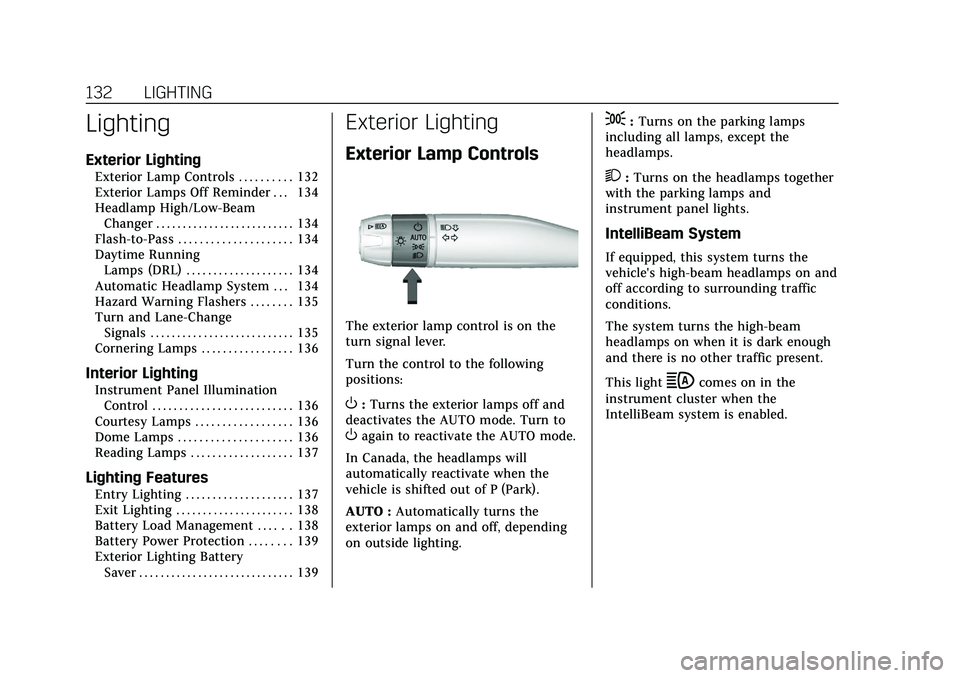
The exterior lamp control is on the
turn signal lever.
Turn the control to the following
positions:
O:Turns the exterior lamps off and
deactivates the AUTO mode. Turn to
Oagain to reactivate the AUTO mode.
In Canada, the headlamps will
automatically reactivate when the
vehicle is shifted out of P (Park).
AUTO : Automatically turns the
exterior lamps on and off, depending
on outside lighting.
;: Turns on the parking lamps
including all lamps, except the
headlamps.
2: Turns on the headlamps together
with the parking lamps and
instrument panel lights.
IntelliBeam System
If equipped, this system turns the
vehicle's high-beam headlamps on and
off according to surrounding traffic
conditions.
The system turns the high-beam
headlamps on when it is dark enough
and there is no other traffic present.
This light
bcomes on in the
instrument cluster when the
IntelliBeam system is enabled.
Page 134 of 435

Cadillac CT5 Owner Manual (GMNA-Localizing-U.S./Canada-14584312) -
2021 - CRC - 11/23/20
LIGHTING 133
Turning On and Enabling IntelliBeam
To enable the IntelliBeam system,
press
bon the turn signal lever
when it is dark outside and the
exterior lamp control is in AUTO
or
2.
Driving with IntelliBeam
The system only activates the high
beams when driving over 40 km/h
(25 mph).
The blue high-beam on light appears
on the instrument cluster when the
high beams are on.
There is a sensor near the top center
of the windshield that automatically
controls the system. Keep this area of
the windshield clear of debris to allow
for best system performance. The high-beam headlamps remain on,
under the automatic control, until one
of the following situations occurs:
.The system detects an approaching
vehicle's headlamps.
.The system detects a preceding
vehicle's taillamps.
.The outside light is bright enough
that high-beam headlamps are not
required.
.The vehicle's speed drops below
20 km/h (12 mph).
.The IntelliBeam system is disabled
by the button on the turn signal
lever. If this happens, press
bon
the turn signal lever when the
exterior lamp control is in the
AUTO or
2position to reactivate
the IntelliBeam system. The
instrument cluster light will come
on to indicate the IntelliBeam
system is reactivated.
The high beams may not turn off
automatically if the system cannot
detect another vehicle's lamps because
of any of the following:
.The other vehicle's lamps are
missing, damaged, obstructed from
view, or otherwise undetected.
.The other vehicle's lamps are
covered with dirt, snow, and/or road
spray.
.The other vehicle's lamps cannot be
detected due to dense exhaust,
smoke, fog, snow, road spray, mist,
or other airborne obstructions.
.The vehicle's windshield is dirty,
cracked, or obstructed by something
that blocks the view of the light
sensor.
.The vehicle is loaded such that the
front end points upward, causing
the light sensor to aim high and not
detect headlamps and taillamps.
.The vehicle is being driven on
winding or hilly roads.
The automatic high-beam headlamps
may need to be disabled if any of the
above conditions exist.
Page 135 of 435

Cadillac CT5 Owner Manual (GMNA-Localizing-U.S./Canada-14584312) -
2021 - CRC - 11/23/20
134 LIGHTING
Exterior Lamps Off
Reminder
A warning chime sounds if the driver
door is opened while the ignition is off
and the exterior lamps are on.
Headlamp High/Low-Beam
Changer
3:Push the turn signal lever away
from you and release, to turn the high
beams on. To return to low beams,
push the lever again or pull it toward
you and release.
This indicator light turns on in the
instrument cluster when the
high-beam headlamps are on.
Flash-to-Pass
To flash the high beams, pull the turn
signal lever toward you, and release.
Daytime Running
Lamps (DRL)
DRL can make it easier for others to
see the front of your vehicle during
the day. Fully functional DRL are
required on all vehicles first sold in
Canada.
If equipped, the DRL will come on
when all of the following conditions
are met:
.The ignition is on.
.The exterior lamp control is
in AUTO.
.The light sensor determines it is
daytime.
The DRL turn off when the headlamps
are turned to
Oor the ignition is off.
For vehicles first sold in Canada, the
DRL can only be turned off when the
vehicle is parked.
Automatic Headlamp
System
When the exterior lamp control is set
to AUTO and it is dark enough
outside, the headlamps come on
automatically.
If equipped, the light sensor is on top
of the instrument panel or on the
windshield near the rearview mirror.
Do not cover the sensor, otherwise the
headlamps will come on when they
are not needed.
The system may also turn on the
headlamps when driving through a
parking garage or tunnel.
Page 136 of 435

Cadillac CT5 Owner Manual (GMNA-Localizing-U.S./Canada-14584312) -
2021 - CRC - 11/23/20
LIGHTING 135
If the vehicle is started in a dark
garage, the automatic headlamp
system comes on immediately. If it is
light outside when the vehicle leaves
the garage, there is a slight delay
before the automatic headlamp
system turns off the headlamps.
During that delay, the instrument
cluster may not be as bright as usual.
Make sure the instrument panel
brightness control is in the full bright
position. SeeInstrument Panel
Illumination Control 0136.
When it is bright enough outside, the
headlamps will turn off.
The automatic headlamp system turns
off when the exterior lamp control is
turned to
Oor the ignition is off. For
vehicles sold in Canada, this control
only works when the transmission is
in P (Park).
Lights On with Wipers
If the windshield wipers are activated
in daylight with the engine on, and
the exterior lamp control is in AUTO,
the headlamps, parking lamps, and
other exterior lamps come on. The
transition time for the lamps coming on varies based on wiper speed. When
the wipers are not operating, these
lamps turn off. Move the exterior
lamp control to
Oor;to disable
this feature.
Hazard Warning Flashers
|: Press this button to make the
front and rear turn signal lamps flash
on and off. Release the button for at
least one second and press again to
turn the flashers off.
The hazard warning flashers turn on
automatically if the airbags deploy.
Turn and Lane-Change
Signals
Move the lever all the way up or down
to signal a turn.
An arrow on the instrument cluster
flashes in the direction of the turn or
lane change.
Raise or lower the lever until the
arrow starts to flash to signal a lane
change. Hold it there until the lane
change is completed. If the lever is
briefly pressed and released, the turn
signal flashes three times.
The turn and lane-change signal can
be turned off manually by moving the
lever back to its original position.
Page 137 of 435
Cadillac CT5 Owner Manual (GMNA-Localizing-U.S./Canada-14584312) -
2021 - CRC - 11/23/20
136 LIGHTING
If after signaling a turn or lane
change, the arrow flashes rapidly or
does not come on, a signal function
may be inoperative. This vehicle may
be equipped with LED lighting. For
replacement of any LED lighting,
contact your dealer.
Cornering Lamps
If equipped with cornering lamps, they
automatically come on when all of the
following occur:
.The low-beam headlamps are on.
.The turn signals are activated or the
steering wheel is at a turning angle.
.The vehicle speed is below 40 km/h
(25 mph) .
Interior Lighting
Instrument Panel
Illumination Control
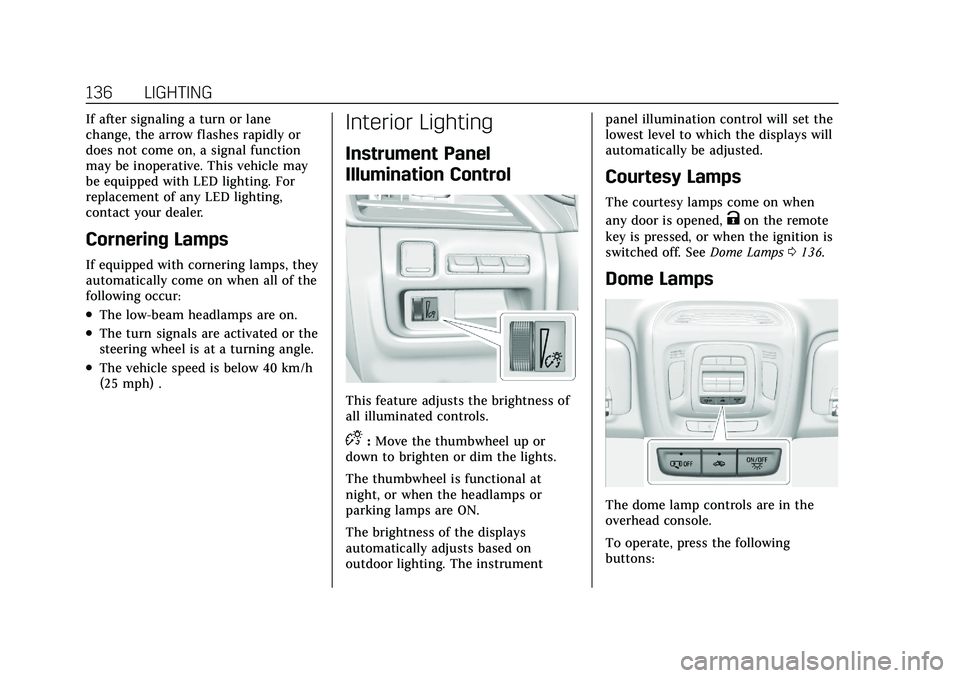
This feature adjusts the brightness of
all illuminated controls.
D:Move the thumbwheel up or
down to brighten or dim the lights.
The thumbwheel is functional at
night, or when the headlamps or
parking lamps are ON.
The brightness of the displays
automatically adjusts based on
outdoor lighting. The instrument panel illumination control will set the
lowest level to which the displays will
automatically be adjusted.
Courtesy Lamps
The courtesy lamps come on when
any door is opened,
Kon the remote
key is pressed, or when the ignition is
switched off. See Dome Lamps0136.
Dome Lamps
The dome lamp controls are in the
overhead console.
To operate, press the following
buttons: