key battery CADILLAC CT5 2022 User Guide
[x] Cancel search | Manufacturer: CADILLAC, Model Year: 2022, Model line: CT5, Model: CADILLAC CT5 2022Pages: 466, PDF Size: 7.21 MB
Page 24 of 466

Cadillac CT5 Owner Manual (GMNA-Localizing-U.S./Canada-15268585) -
2022 - CRC - 10/11/21
KEYS, DOORS, AND WINDOWS 23
.Use the Keyless Access system.
.With a door open, pressQon
the interior of the door.
3. After 30 seconds the alarm system will arm, and the indicator light
will begin to slowly flash indicating
the alarm system is operating.
Pressing
Qon the remote key a
second time will bypass the
30-second delay and immediately
arm the alarm system.
The vehicle alarm system will not arm
if the doors are locked with the
mechanical key.
If the driver door is opened without
first unlocking with the remote key,
the horn will chirp and the lights will
flash to indicate pre-alarm. If the
vehicle is not started, or the door is
not unlocked by pressing
Kon the
remote key during the 10-second
pre-alarm, the alarm will be activated.
The alarm will also be activated if a
passenger door, the trunk, or the hood
is opened without first disarming the
system. When the alarm is activated,
the turn signals flash and the horn sounds for about 30 seconds. The
alarm system will then re-arm to
monitor the next unauthorized event.
Disarming the Alarm System
To disarm the alarm system or turn
off the alarm if it has been activated:
.PressKon the remote key.
.Unlock the vehicle using the Keyless
Access system.
.Start the vehicle.
To avoid setting off the alarm by
accident:
.Lock the vehicle after all occupants
have left the vehicle and all doors
are closed.
.Always unlock a door with the
remote key or use the Keyless
Access system.
Unlatching the driver door with the
mechanical key will not disarm the
system or turn off the alarm.
How to Detect a Tamper
Condition
IfKis pressed on the remote key and
the horn chirps and the lights flash
three times, a previous alarm occurred
while the system was armed.
If the alarm has been activated, a
message will appear on the DIC.
Power Sounder, Inclination
Sensor, and Intrusion Sensor
In addition to the standard
theft-deterrent system features, this
system may also have a power
sounder, inclination sensor, and
intrusion sensor.
The power sounder provides an
audible alarm which is distinct from
the vehicle’s horn. It has its own
power source, and can sound an alarm
if the vehicle’s battery is
compromised.
The inclination sensor can set off the
alarm if it senses movement of the
vehicle, such as when a tire is
removed. Make sure the vehicle's
alarm is not armed prior to any
jacking.
Page 33 of 466

Cadillac CT5 Owner Manual (GMNA-Localizing-U.S./Canada-15268585) -
2022 - CRC - 10/11/21
32 KEYS, DOORS, AND WINDOWS
If equipped, pull the window switch
up fully and quickly release to express
close the window. Briefly press or pull
the window switch in the same
direction to stop that window’s
express movement.
Window Automatic Reversal
System
The express-close feature will reverse
window movement if it comes in
contact with an object. Extreme cold
or ice could cause the window to
auto-reverse. The window will operate
normally after the object or condition
is removed.
Automatic Reversal System
Override
{Warning
If automatic reversal system
override is active, the window will
not reverse automatically. You or
others could be injured and the
window could be damaged. Before
using automatic reversal system(Continued)
Warning (Continued)
override, make sure that all people
and obstructions are clear of the
window path.
When the engine is on, override the
automatic reversal system by pulling
and holding the window switch if
conditions prevent it from closing.
Programming the Power
Windows
Programming may be necessary if the
vehicle battery has been disconnected
or discharged. If the window is unable
to express-up, program each
express-close window: 1. Close all doors.
2. Turn the ignition on or to ACC/ ACCESSORY.
3. Partially open the window to be programmed. Then close it and
continue to pull the switch briefly
after the window has fully closed.
4. Open the window and continue to press the switch briefly after the
window has fully opened.
Remote Window Operation
If equipped, this feature allows all the
windows to be opened remotely. See
Remote Keyless Entry (RKE) System
Operation 07. To enable the feature,
see Vehicle Personalization 0126.
Sun Visors
Pull the sun visor down to block glare.
Detach the sun visor from the center
mount to pivot to the side window
and, if equipped, extend along the rod.
Roof
Sunroof
If equipped, the ignition must be on
or in ACC/ACCESSORY, or Retained
Accessory Power (RAP) must be active
Page 142 of 466

Cadillac CT5 Owner Manual (GMNA-Localizing-U.S./Canada-15268585) -
2022 - CRC - 10/11/21
LIGHTING 141
If the vehicle has remained parked for
an extended period of time with no
remote key use or keyless access
operation, approach detection will be
disabled. To reactivate, press any
button on the remote key or open and
close all vehicle doors to re-enable the
entry lighting feature on approach.
Exit Lighting
Some exterior lamps and interior
lamps turn on when the driver door is
opened after the ignition is turned off.
The interior lights turn on when the
ignition is turned off.
The exterior and interior lamps
remain on for a set amount of time,
then automatically turn off.
The exterior lamps turn off
immediately by turning the exterior
lamp control off.
This feature can be changed. See
Vehicle Personalization0126.
Battery Load Management
The vehicle has Electric Power
Management (EPM), which estimates
the battery's temperature and state of charge. It then adjusts the voltage for
best performance and extended life of
the battery.
When the battery's state of charge is
low, the voltage is raised slightly to
quickly bring the charge back up.
When the state of charge is high, the
voltage is lowered slightly to prevent
overcharging. If the vehicle has a
voltmeter gauge or a voltage display
on the Driver Information Center
(DIC), you may see the voltage move
up or down. This is normal. If there is
a problem, an alert will be displayed.
The battery can be discharged at idle
if the electrical loads are very high.
This is true for all vehicles. This is
because the generator (alternator)
may not be spinning fast enough at
idle to produce all the power that is
needed for very high electrical loads.
A high electrical load occurs when
several of the following are on, such
as: headlamps, high beams, fog lamps,
rear window defogger, climate control
fan at high speed, heated seats, engine
cooling fans, and loads plugged into
accessory power outlets.
EPM works to prevent excessive
discharge of the battery. It does this
by balancing the generator's output
and the vehicle's electrical needs.
It can increase engine idle speed to
generate more power, whenever
needed. It can temporarily reduce the
power demands of some accessories.
Normally, these actions occur in steps
or levels, without being noticeable. In
rare cases at the highest levels of
corrective action, this action may be
noticeable to the driver. If so, a DIC
message might be displayed. If a
battery message is displayed, it is
recommended that the driver reduce
the electrical loads as much as
possible. See
Driver Information Center
(DIC) (Base Level) 0116 or
Driver Information Center (DIC)
(Uplevel) 0119.
Battery Power Protection
This feature helps prevent the battery
from being drained, if the interior
courtesy lamps or reading lamps are
accidentally left on. If any of these
lamps are left on, they automatically
turn off after 10 minutes, if the
Page 223 of 466

Cadillac CT5 Owner Manual (GMNA-Localizing-U.S./Canada-15268585) -
2022 - CRC - 10/11/21
222 DRIVING AND OPERATING
fluid after the first racing or
competitive driving event, and then
after every 24 hours of racing or
competitive driving. See your dealer
for the correct fluid.
Caution
During a first time track or racing
event, high axle temperatures can
occur. Damage could be caused to
the axle and would not be covered
by the vehicle warranty. Do not
drive as long or as fast the first
time the vehicle is driven on the
track or raced.
.The axle lubricant should be
replaced with new lubricant.
.On vehicles without a differential
cooler, additional cooling capacity is
required for continuous competitive
driving. The V-Series Blackwing has
a differential cooler, so no
additional cooling capacity is
necessary.
Engine OilCaution
If the vehicle is used for track
events and competitive driving, the
engine may use more oil than it
would with normal use. Low oil
levels can damage the engine.
Check the oil level often and
maintain the proper level. See
Engine Oil 0336.
Check the oil level often during track
events and competitive driving, and
keep the oil level at or near the upper
mark. See “Checking the Engine Oil" in
Engine Oil 0336.
Fuel
Use premium unleaded gasoline with
a posted octane rating of 93 at a track
event. Unleaded gasoline with a
posted octane rating of 91 may be
used, but performance will be
degraded. See Prohibited Fuels 0317.
Automatic or Manual
Transmission Fluid
Have the transmission fluid set to the
track specific oil level prior to track
usage. Transmission fluid should be
changed after every 15 hours of track
usage. Any transmission level set or
change should be performed at the
dealer.
Brakes
Battery Disconnect
Disconnect the battery before
servicing the hydraulic brake system.
It is critical to disconnect the battery
before bleeding the system, replacing
the pads, or any other work. The
battery must be disconnected to
prevent the brake master cylinder
from pressurizing the hydraulic
system during its automated self
diagnostic tests that may occur when
a door is opened or the remote key is
present.
Page 225 of 466

Cadillac CT5 Owner Manual (GMNA-Localizing-U.S./Canada-15268585) -
2022 - CRC - 10/11/21
224 DRIVING AND OPERATING
A message will display in the Driver
Information Center (DIC) when the
brake pads show excessive wear.
Brake Fluid
Replace existing brake fluid with a
qualified DOT 4 high performance
brake fluid from a sealed container.
Brake fluid with a dry boiling point
>310 °C (590 °F) is qualified. If high
performance brake fluid is used,
replace it with GM approved brake
fluid before driving on public roads.
If high performance brake fluid is in
the vehicle and the age of the brake
fluid is over a month old or unknown,
replace the brake fluid before track
events and competitive driving. Do
not use silicone or DOT 5 brake fluids.
It is critical to disconnect the battery
before bleeding the system, replacing
the pads, or any other work. The
battery must be disconnected to
prevent the brake master cylinder
from pressurizing the hydraulic
system during its automated self
diagnostic tests that can possibly
occur when a door is opened or the
remote key is present.Check the fluid level before each
competitive driving event.
Brake System Flushing & Bleeding
The J56 brake system requires specific
processes for bleeding and fluid
flushing. These can be found in the
service manual.
Properly bleeding the brake system is
required for proper operation of the
hydraulic brake system.
Brake Leak Detection
The hydraulic braking system has
advanced diagnostic capability to help
detect hydraulic leaks, trapped air,
and other performance issues. These
diagnostics are active when the
hydraulic system is powered. In order
to avoid inadvertently setting a leak
Diagnostic Trouble Code (DTC),
disconnect the battery before
servicing the brake system.
If the vehicle sets a DTC related to a
brake system leak, the Brake System
Warning Light will come on and
vehicle speed may be limited to 100
kph (62 mph). Any time a leak DTC is
set, the vehicle should be inspectedcarefully for evidence of a leak and
should be repaired immediately. See
your dealer.
Brake Fade Warning Assist
The Brake Fade Warning Assist
system monitors the performance of
the brake system. If the system
detects brake fade, or if the brake
fluid is near the boiling point, the
driver will be alerted.
The Brake Fade Warning Assist
system is designed for use with the
factory-installed brake pads or GM
approved replacement pads. If the
brake pads on the vehicle need to be
replaced, use GM approved brake
pads. If this is not done, the brake
fade warning system may not function
properly.
Stage 1 :
The DIC displays a “Reduce
Braking to Avoid Overheating”
message, a chime sounds and brake
pedal effort and travel is increased.
When the message displays, the driver
should back up braking points and
reduce brake usage in order to reduce
brake temperature. This will allow for
continued lapping with no speed
limitations.
Page 241 of 466

Cadillac CT5 Owner Manual (GMNA-Localizing-U.S./Canada-15268585) -
2022 - CRC - 10/11/21
240 DRIVING AND OPERATING
Caution
Do not try to shift to P (Park) if the
vehicle is moving. If you do, you
could damage the transmission.
Shift to P (Park) only when the
vehicle is stopped.
Manual Transmission
The shift lever should be in Neutral
and the parking brake engaged. Hold
the clutch pedal down to the floor,
press the brake pedal, and start the
engine.
Starting the Vehicle 1. For vehicles with an automatic transmission, press the brake pedal,
then press ENGINE START/STOP
on the instrument panel. For a
manual transmission, place the
shift lever in Neutral with the
parking brake engaged. Hold the
clutch pedal down to the floor,
press the brake pedal, then press
ENGINE START/STOP.
If the remote key is not in the
vehicle, if there is interference, or if
the remote key battery is low, a
Driver Information Center (DIC) message will display. See
Remote
Keyless Entry (RKE) System
Operation 07.
Caution
Cranking the engine for long
periods of time, by pressing
ENGINE START/STOP immediately
after cranking has ended, can
overheat and damage the cranking
motor, and drain the battery. Wait
at least 15 seconds between each
try, to let the cranking motor
cool down.
2. If the engine does not start after five to 10 seconds, especially in
very cold weather (below −18 °C or
0 °F), it could be flooded with too
much gasoline. Try pushing the
accelerator pedal all the way to the
floor and hold it there, then press
ENGINE START/STOP for up to a
maximum of 15 seconds. Wait at
least 15 seconds between each try,
to allow the cranking motor to cool
down. When the engine starts, let
go of the button and the
accelerator. If the vehicle starts
briefly but then stops again, do the same thing. This clears the extra
gasoline from the engine. Do not
race the engine immediately after
starting it. Operate the engine and
transmission gently until the oil
warms up and lubricates all
moving parts.
Stopping the Engine
If the vehicle has an automatic
transmission, move the shift lever to
P (Park) and press and hold ENGINE
START/STOP on the instrument panel,
until the engine shuts off. If the shift
lever is not in P (Park), the engine
shuts off and the ignition goes to
ACC/ACCESSORY. The DIC displays
SHIFT TO PARK. Once the shift lever
is moved to P (Park), the vehicle
turns off.
If the vehicle has a manual
transmission, before getting out of the
vehicle, shift to 1 (First) or R (Reverse)
and apply the parking brake. Then
turn off the ignition off by pressing
ENGINE START/STOP and release the
clutch pedal when the engine has
stopped.
Page 242 of 466

Cadillac CT5 Owner Manual (GMNA-Localizing-U.S./Canada-15268585) -
2022 - CRC - 10/11/21
DRIVING AND OPERATING 241
If the remote key is not detected
inside the vehicle when it is turned off
the DIC displays a message.
Stop/Start System
If equipped, the Stop/Start system will
shut off the engine to help conserve
fuel. It has components designed for
the increased number of starts.
{Warning
The automatic engine Stop/Start
feature causes the engine to shut
off while the vehicle is still on. Do
not exit the vehicle before shifting
to P (Park). The vehicle may restart
and move unexpectedly. Always
shift to P (Park), and then turn the
ignition off before exiting the
vehicle.
Auto Engine Stop/Start
When the brakes are applied and the
vehicle is at a complete stop, the
engine may turn off. When stopped,
the tachometer displays AUTO STOP.
See Tachometer 0101. When the brake pedal is released or the accelerator
pedal is pressed, the engine will
restart.
To maintain vehicle performance,
other conditions may cause the engine
to automatically restart before the
brake pedal is released.
Auto Stops may not occur and/or Auto
Starts may occur because:
.The climate control settings require
the engine to be running to cool or
heat the vehicle interior.
.The vehicle battery needs to charge.
.The vehicle battery has recently
been disconnected.
.Minimum vehicle speed has not
been reached since the last
Auto Stop.
.The accelerator pedal is pressed.
.The engine or transmission is not at
the required operating temperature.
.The outside temperature is not in
the required operating range.
.The vehicle is shifted out of D
(Drive) to any gear other than
P (Park).
.Certain driver modes have been
selected. See
Driver Mode Control
0 259.
.The vehicle is on a steep hill or
grade.
.The driver door has been opened or
the driver seat belt has been
unbuckled.
.The hood has been opened.
.The Auto Stop has reached the
maximum allowed time.
Auto Stop Disable Switch
Page 362 of 466
Cadillac CT5 Owner Manual (GMNA-Localizing-U.S./Canada-15268585) -
2022 - CRC - 10/11/21
VEHICLE CARE 361
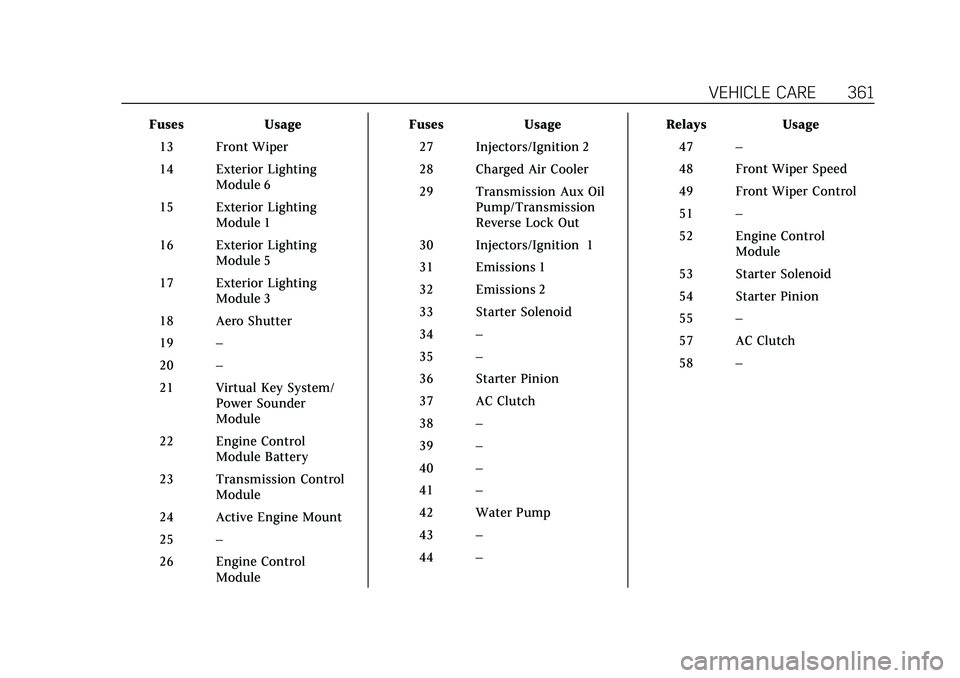
FusesUsage
13 Front Wiper
14 Exterior Lighting Module 6
15 Exterior Lighting Module 1
16 Exterior Lighting Module 5
17 Exterior Lighting Module 3
18 Aero Shutter
19 –
20 –
21 Virtual Key System/ Power Sounder
Module
22 Engine Control Module Battery
23 Transmission Control Module
24 Active Engine Mount
25 –
26 Engine Control Module Fuses
Usage
27 Injectors/Ignition 2
28 Charged Air Cooler
29 Transmission Aux Oil Pump/Transmission
Reverse Lock Out
30 Injectors/Ignition 1
31 Emissions 1
32 Emissions 2
33 Starter Solenoid
34 –
35 –
36 Starter Pinion
37 AC Clutch
38 –
39 –
40 –
41 –
42 Water Pump
43 –
44 – Relays
Usage
47 –
48 Front Wiper Speed
49 Front Wiper Control
51 –
52 Engine Control Module
53 Starter Solenoid
54 Starter Pinion
55 –
57 AC Clutch
58 –
Page 446 of 466
Cadillac CT5 Owner Manual (GMNA-Localizing-U.S./Canada-15268585) -
2022 - CRC - 10/11/21
ONSTAR 445
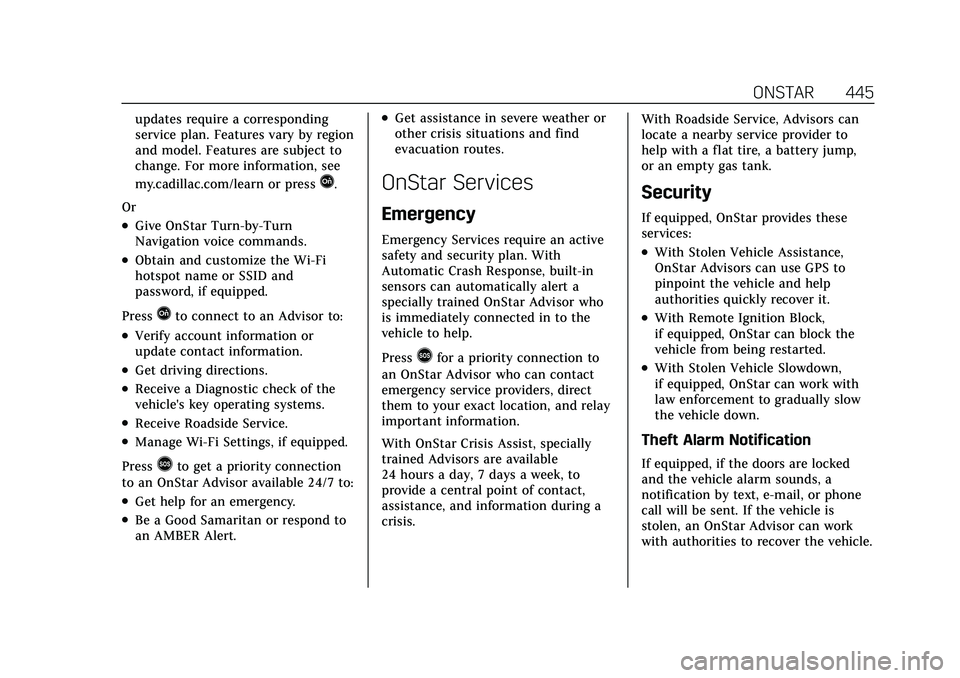
updates require a corresponding
service plan. Features vary by region
and model. Features are subject to
change. For more information, see
my.cadillac.com/learn or press
Q.
Or
.Give OnStar Turn-by-Turn
Navigation voice commands.
.Obtain and customize the Wi-Fi
hotspot name or SSID and
password, if equipped.
Press
Qto connect to an Advisor to:
.Verify account information or
update contact information.
.Get driving directions.
.Receive a Diagnostic check of the
vehicle's key operating systems.
.Receive Roadside Service.
.Manage Wi-Fi Settings, if equipped.
Press
>to get a priority connection
to an OnStar Advisor available 24/7 to:
.Get help for an emergency.
.Be a Good Samaritan or respond to
an AMBER Alert.
.Get assistance in severe weather or
other crisis situations and find
evacuation routes.
OnStar Services
Emergency
Emergency Services require an active
safety and security plan. With
Automatic Crash Response, built-in
sensors can automatically alert a
specially trained OnStar Advisor who
is immediately connected in to the
vehicle to help.
Press
>for a priority connection to
an OnStar Advisor who can contact
emergency service providers, direct
them to your exact location, and relay
important information.
With OnStar Crisis Assist, specially
trained Advisors are available
24 hours a day, 7 days a week, to
provide a central point of contact,
assistance, and information during a
crisis. With Roadside Service, Advisors can
locate a nearby service provider to
help with a flat tire, a battery jump,
or an empty gas tank.
Security
If equipped, OnStar provides these
services:
.With Stolen Vehicle Assistance,
OnStar Advisors can use GPS to
pinpoint the vehicle and help
authorities quickly recover it.
.With Remote Ignition Block,
if equipped, OnStar can block the
vehicle from being restarted.
.With Stolen Vehicle Slowdown,
if equipped, OnStar can work with
law enforcement to gradually slow
the vehicle down.
Theft Alarm Notification
If equipped, if the doors are locked
and the vehicle alarm sounds, a
notification by text, e-mail, or phone
call will be sent. If the vehicle is
stolen, an OnStar Advisor can work
with authorities to recover the vehicle.
Page 459 of 466

Cadillac CT5 Owner Manual (GMNA-Localizing-U.S./Canada-15268585) -
2022 - CRC - 10/11/21
458 INDEX
Headlamps (cont'd)High-Beam On Light . . . . . . . . . . . . . . 115
High/Low Beam Changer . . . . . . . . . 137
Lamps On Reminder . . . . . . . . . . . . . . 115
Heated Steering Wheel . . . . . . . . . . . . . . . . . . . . . 89
Heated and Ventilated Front
Seats . . . . . . . . . . . . . . . . . . . . . . . . . . . . . . . . 43
Heated Mirrors . . . . . . . . . . . . . . . . . . . . . . . 28
Heater Engine . . . . . . . . . . . . . . . . . . . . . . . . . . . . . 242
Heating . . . . . . . . . . . . . . . . . . . . . . . . . . . . . . 209
High-Beam On Light . . . . . . . . . . . . . . . . 115
High-Speed Operation . . . . . . . . . . . . . . 375
Hill and Mountain Roads . . . . . . . . . . 231
Hill Start Assist (HSA) . . . . . . . . . . . . . 257
Hood . . . . . . . . . . . . . . . . . . . . . . . . . . . . . . . . . 329
Horn . . . . . . . . . . . . . . . . . . . . . . . . . . . . . . . . . . 90
How to Wear Seat Belts Properly . . . 48
HVAC . . . . . . . . . . . . . . . . . . . . . . . . . . . . . . . . 209
Hydraulic Clutch . . . . . . . . . . . . . . . . . . . . 340
I
If the System Needs Service . . . . . . . 171
Ignition Positions . . . . . . . . . . . . . . . . . . . 238
Immobilizer . . . . . . . . . . . . . . . . . . . . . . . . . . 25
Indicator
Pedestrian Ahead . . . . . . . . . . . . . . . . . 111 Indicator (cont'd)
Vehicle Ahead . . . . . . . . . . . . . . . . . . . . . 110
Infants and Young Children, Restraints . . . . . . . . . . . . . . . . . . . . . . . . . . . 68
Information Publication Ordering . . . . . . . . . . . . . 440
Infotainment System . . . . . . . . . . . . . . . 443
Instrument Cluster . . . . . . . . . . . . . . 96, 98
Instrument Panel Overview . . . . . . . . . . . 4
Interior Rearview Mirrors . . . . . . . . . . . 28
Introduction . . . . . . . . . . . . . . . . . . . . . . 1, 143
J
Jump Starting - North America . . . . 394
K
Keyless Entry Remote (RKE) System . . . . . . . . . . . . . . . 7
Keys . . . . . . . . . . . . . . . . . . . . . . . . . . . . . . . . . . . . 6
L
Labeling, Tire Sidewall . . . . . . . . . . . . . 370
Lamps Cornering . . . . . . . . . . . . . . . . . . . . . . . . . . 139
Courtesy . . . . . . . . . . . . . . . . . . . . . . . . . . . 139
Daytime Running (DRL) . . . . . . . . . . 137
Dome . . . . . . . . . . . . . . . . . . . . . . . . . . . . . . 139
Exterior Controls . . . . . . . . . . . . . . . . . . 135
Exterior Lamps Off Reminder . . . . 137 Lamps (cont'd)
Exterior Lighting Battery
Saver . . . . . . . . . . . . . . . . . . . . . . . . . . . . . 142
Malfunction Indicator (Check Engine) . . . . . . . . . . . . . . . . . . . . . . . . . . 106
On Reminder . . . . . . . . . . . . . . . . . . . . . . 115
Reading . . . . . . . . . . . . . . . . . . . . . . . . . . . . 140
Lane Change Alert (LCA) . . . . . . . . . . . 310
Lane Keep Assist (LKA) . . . . . . . . . . . . 312
Lane Keep Assist Light . . . . . . . . . . . . . 110
Lap-Shoulder Belt . . . . . . . . . . . . . . . . . . . . 50
LATCH System Replacing Parts after a Crash . . . . . 80
LATCH, Lower Anchors and Tethers for Children . . . . . . . . . . . . . . . 74
LED Lighting . . . . . . . . . . . . . . . . . . . . . . . . 357
Light
Performance Shifting . . . . . . . . . . . . . 109
Lighting Entry . . . . . . . . . . . . . . . . . . . . . . . . . . . . . . 140
Exit . . . . . . . . . . . . . . . . . . . . . . . . . . . . . . . . 141
Illumination Control . . . . . . . . . . . . . . 139
LED . . . . . . . . . . . . . . . . . . . . . . . . . . . . . . . . 357
Lights Airbag Readiness . . . . . . . . . . . . . . . . . 105
Antilock Brake System (ABS)Warning . . . . . . . . . . . . . . . . . . . . . . . . . 109
Automatic Vehicle Hold . . . . . . . . . . 110