transmission CADILLAC CT5 2022 User Guide
[x] Cancel search | Manufacturer: CADILLAC, Model Year: 2022, Model line: CT5, Model: CADILLAC CT5 2022Pages: 466, PDF Size: 7.21 MB
Page 103 of 466

Cadillac CT5 Owner Manual (GMNA-Localizing-U.S./Canada-15268585) -
2022 - CRC - 10/11/21
102 INSTRUMENTS AND CONTROLS
(Base Level) or the cluster displays
AUTO STOP text (Uplevel), the engine
is off but the vehicle is on and can
move. The engine could auto start at
any time. When the indicator points
to OFF, the vehicle is off.
The tachometer may vary by several
hundred rpm, during Auto Stop mode,
when the engine is shutting off and
restarting.
Uplevel
The redline of the tachometer adjusts
dynamically based on engine
temperature. The redline displays a
lower indication when the vehicles
odometer value is less than
805 kilometers (500 miles).
If equipped, the shift indicators are
displayed on instrument cluster and
Head-Up Display (HUD). The shift
indicators are only operational when
the automatic transmission is in
Manual mode, or the vehicle has a
manual transmission. SeeManual
Mode 0250. When the vehicle engine
is less than 70°C (158°F) and the
vehicle odometer value is less than
805 kilometers (500 miles) the shift
indications are not displayed. A strong visual indicator is displayed
as the vehicle approaches the red line.
Tour and Sport themes feature shift
rings while the Track theme features
shift lights accompanied by a
numerical tachometer display.
Fuel Gauge
Base Level
Uplevel Sport Mode Shown, Other
Modes Similar When the ignition is on, the fuel
gauge indicates the approximate
amount of fuel left in the tank.
There is an arrow near the fuel gauge
pointing to the side of the vehicle the
fuel door is on.
When the indicator nears empty, the
low fuel light comes on. There still is
a little fuel left, but the vehicle should
be refueled soon.
The fuel gauge may:
.Take a little more, or less fuel to fill
up than it indicates. For example,
the gauge may have indicated the
tank is half full, but it actually takes
a little more, or less than half the
tank's capacity to fill the tank.
.Move a little while turning a corner,
speeding up, or braking.
.Take a few seconds to stabilize after
the ignition is turned on and goes
back to empty when the ignition is
turned off.
These are normal conditions, none of
which indicate a problem with the fuel
gauge.
Page 108 of 466

Cadillac CT5 Owner Manual (GMNA-Localizing-U.S./Canada-15268585) -
2022 - CRC - 10/11/21
INSTRUMENTS AND CONTROLS 107
Caution
Modifications to the engine,
transmission, exhaust, intake,
or fuel system, or the use of
replacement tires that do not meet
the original tire specifications, can
cause this light to come on. This
could lead to costly repairs not
covered by the vehicle warranty.
This could also affect the vehicle’s
ability to pass an Emissions
Inspection/Maintenance test. See
Accessories and Modifications0328.
If the light is f lashing : A
malfunction has been detected that
could damage the emission control
system and increase vehicle
emissions. Diagnosis and service may
be required.
To help prevent damage, reduce
vehicle speed and avoid hard
accelerations and uphill grades.
If towing a trailer, reduce the amount
of cargo being hauled as soon as
possible. If the light continues to flash, find a
safe place to park. Turn the vehicle off
and wait at least 10 seconds before
restarting the engine. If the light is
still flashing, follow the previous
guidelines and see your dealer for
service as soon as possible.
If the light is on steady :
A
malfunction has been detected.
Diagnosis and service may be
required.
Check the following:
.If fuel has been added to the vehicle
using the capless fuel funnel
adapter, make sure that it has been
removed. See “Filling the Tank with
a Portable Gas Can ”under Filling the
Tank 0317. The diagnostic system
can detect if the adapter has been
left installed in the vehicle, allowing
fuel to evaporate into the
atmosphere. A few driving trips with
the adapter removed may turn off
the light.
.Poor fuel quality can cause
inefficient engine operation and
poor driveability, which may go
away once the engine is warmed up.
If this occurs, change the fuel brand. It may require at least one
full tank of the proper fuel to turn
the light off. See
Recommended Fuel
(LSY 2.0L L4 Engine) 0316 or
Recommended Fuel (LGY 3.0L V6 and
LT4 6.2L V8 Engines) 0316.
If the light remains on, see your
dealer.
Emissions Inspection and
Maintenance Programs
If the vehicle requires an Emissions
Inspection/Maintenance test, the test
equipment will likely connect to the
vehicle's Data Link Connector (DLC).
The DLC is under the instrument
panel to the left of the steering wheel.
Connecting devices that are not used
to perform an Emissions Inspection/
Maintenance test or to service the
Page 120 of 466

Cadillac CT5 Owner Manual (GMNA-Localizing-U.S./Canada-15268585) -
2022 - CRC - 10/11/21
INSTRUMENTS AND CONTROLS 119
Engine Boost :Displays engine
manifold pressure relative to ambient
air pressure. It will display boost
pressure generated by the
turbocharging system.
Transmission Fluid Temperature :
If equipped, Shows the temperature of
the transmission fluid in either
degrees Celsius (°C) or degrees
Fahrenheit (°F).
Info Page Options : Scroll to choose
which info pages appear on the DIC.
Press the thumbwheel to select or
deselect.
Blank Page : Allows for no
information to be displayed in the
cluster info display areas.
Driver Information Center
(DIC) (Uplevel)
The DIC is displayed in the
instrument cluster. It shows the status
of many vehicle systems.
DIC information is broken down into
two main zones: Left Zone :
Displays on the
instrument cluster to the left of the
speedometer.
Right Zone : Displays on the
instrument cluster to the right of the
speedometer.
SorT: Press to move left or right
between the interactive display zones
in the cluster. Press the thumbwheel
to select.
yorz: Use the thumbwheel to
scroll up or down in a list. Press the
thumbwheel to select.
DIC Info Tiles Selection
The following is the list of all possible
DIC Info Tiles. Depending on the
vehicle, some may not be available.
Left Zone
Battery Voltage : Displays the current
battery voltage. The battery voltage
can fluctuate while viewing this
information on the DIC. This is
normal.
Coolant Temperature : Displays the
coolant temperature in either degrees
Celsius (°C) or degrees Fahrenheit (°F).
eLSD : Displays the amount of rear
differential coupling when the
Electronic Limited-Slip Differential
(eLSD) is active and functioning
during vehicle operation. A reading of
1% is an open differential and 100% is
locked. It is normal for the value to
make small or large changes due to
driving conditions and driver inputs.
For the V-Series Blackwing models,
the eLSD maintains some coupling
even if the vehicle is stationary or not
accelerating. Coupling values of 3%
and up are typical. See Limited-Slip
Differential 0267.
Page 121 of 466
Cadillac CT5 Owner Manual (GMNA-Localizing-U.S./Canada-15268585) -
2022 - CRC - 10/11/21
120 INSTRUMENTS AND CONTROLS
Engine Boost :If equipped, displays
engine manifold pressure relative to
ambient air pressure. It will display
boost pressure generated by the
turbocharging system.
Instantaneous Fuel Economy/
Economy Trend : Displays the current
fuel economy in liters per
100 kilometers (L/100 km) or miles per
gallon (mpg). This number reflects
only the approximate fuel economy
and changes frequently as driving
conditions change. This display
cannot be reset.
When in tour mode, shows history of
the Average Fuel Economy from the
last 100 km (62 mi). Each bar
represents about 5 km (3 mi) of
driving. When driving, the bars shift
to reflect the most recent distance on
the right side.
Lateral G-Force : If equipped,
displays inertial forces being exerted
on the vehicle in the lateral
(side-to-side) direction as numerical
value and as graphical depiction.
Oil Pressure : Shows the current oil
pressure in either kilopascal (kPa) or
in pounds per square inch (psi). Oil Temperature :
Shows the current
oil temperature in either degrees
Celsius (°C) or degrees Fahrenheit (°F).
Time & Temperature : Displays the
current time and the current outside
air temperature.
Tire Status : Shows individual tire
pressures and overall temperature as
either Cold, Cool, Normal, Warm,
or Hot. Normal is typical for normal
driving while Warm is typical for
aggressive driving. Unknown displays
when tire temperature information is
unavailable.
Transmission Fluid Temperature :
If equipped, shows the temperature of
the transmission fluid in either
degrees Celsius (°C) or degrees
Fahrenheit (°F).
Right Zone
Trip 1 or 2/Average Speed/Average
Fuel Economy : Trip displays the
current distance traveled, in either
kilometers (km) or miles (mi), since
the trip odometer was last reset. The
trip odometer can be reset by pressing
and holding the thumbwheel while
this display is active. Average Speed displays the average
speed of the vehicle in kilometers per
hour (km/h) or miles per hour (mph).
This average is calculated based on
the various vehicle speeds recorded
since the last reset of this value. The
average speed can be reset by pressing
and holding the thumbwheel while
this display is active.
Average Fuel Economy displays the
approximate average liters per
100 kilometers (L/100 km) or miles
per gallon (mpg). This number is
calculated based on the number of
L/100 km (mpg) recorded since the
last time this menu item was reset.
This number reflects only the current,
approximate average fuel economy
and changes as driving conditions
change. The Average Fuel Economy
can be reset by pressing and holding
the thumbwheel while this display is
active.
Fuel Economy :
Displays the average
fuel economy, the best fuel economy
over the selected distance, and a bar
graph showing instantaneous fuel
Page 125 of 466
Cadillac CT5 Owner Manual (GMNA-Localizing-U.S./Canada-15268585) -
2022 - CRC - 10/11/21
124 INSTRUMENTS AND CONTROLS
English
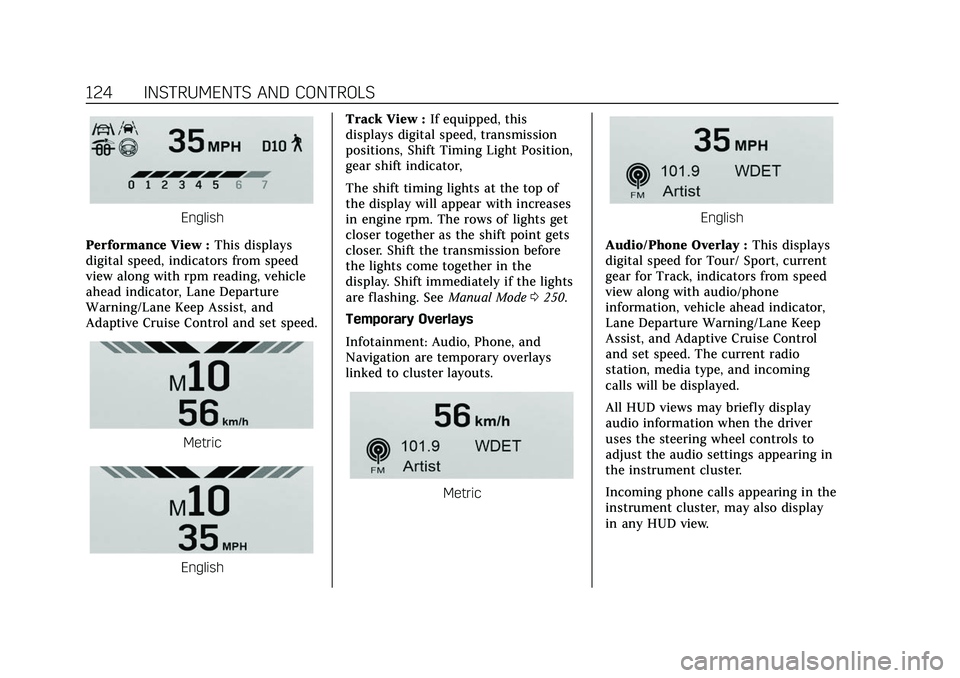
Performance View : This displays
digital speed, indicators from speed
view along with rpm reading, vehicle
ahead indicator, Lane Departure
Warning/Lane Keep Assist, and
Adaptive Cruise Control and set speed.
Metric
English Track View :
If equipped, this
displays digital speed, transmission
positions, Shift Timing Light Position,
gear shift indicator,
The shift timing lights at the top of
the display will appear with increases
in engine rpm. The rows of lights get
closer together as the shift point gets
closer. Shift the transmission before
the lights come together in the
display. Shift immediately if the lights
are flashing. See Manual Mode0250.
Temporary Overlays
Infotainment: Audio, Phone, and
Navigation are temporary overlays
linked to cluster layouts.
Metric
English
Audio/Phone Overlay : This displays
digital speed for Tour/ Sport, current
gear for Track, indicators from speed
view along with audio/phone
information, vehicle ahead indicator,
Lane Departure Warning/Lane Keep
Assist, and Adaptive Cruise Control
and set speed. The current radio
station, media type, and incoming
calls will be displayed.
All HUD views may briefly display
audio information when the driver
uses the steering wheel controls to
adjust the audio settings appearing in
the instrument cluster.
Incoming phone calls appearing in the
instrument cluster, may also display
in any HUD view.
Page 127 of 466
Cadillac CT5 Owner Manual (GMNA-Localizing-U.S./Canada-15268585) -
2022 - CRC - 10/11/21
126 INSTRUMENTS AND CONTROLS
.Ride Control Systems
.Driver Assistance Systems
.Cruise Control
.Lighting and Bulb Replacement
.Wiper/Washer Systems
.Doors and Windows
.Seat Belts
.Airbag Systems
.Engine and Transmission
.Tire Pressure
.Battery
Engine Power Messages
REDUCED ACCELERATION DRIVE
WITH CARE
This message displays when the
vehicle's propulsion power is reduced.
A reduction in propulsion power can
affect the vehicle's ability to
accelerate. If this message is on, but
there is no observed reduction in
performance, proceed to your
destination. Under certain conditions
the performance may be reduced the
next time the vehicle is driven. The
vehicle may be driven while this
message is on, but maximumacceleration and speed may be
reduced. Anytime this message stays
on, or displays repeatedly, the vehicle
should be taken to your dealer for
service as soon as possible.
Under certain operating conditions,
propulsion will be disabled. Try
restarting after the ignition has been
off for two minutes.
Vehicle Speed Messages
SPEED LIMITED TO XXX KM/H
(MPH)
This message shows that the vehicle
speed has been limited to the speed
displayed. The limited speed is a
protection for various propulsion and
vehicle systems, such as lubrication,
thermal, brakes, suspension, Teen
Driver if equipped, or tires.
Vehicle Personalization
The following are all possible vehicle
personalization features. Depending
on the vehicle, some may not be
available.
For System, Apps, and Personal
features and functions, see
Settings
0 189.
To access the vehicle
personalization menu: 1. Touch the Settings icon on the Home Page of the infotainment
display.
2. Touch Vehicle to display a list of available options.
3. Touch to select the desired feature setting.
4. Touch
9orRto turn a feature off
or on.
5. Touch
zto go to the top level of
the Settings menu.
The menu may contain the following:
Rear Seat Reminder
This allows for a chime and a message
when the rear door has been opened
before or during operation of the
vehicle.
Touch Off or On.
Page 133 of 466
Cadillac CT5 Owner Manual (GMNA-Localizing-U.S./Canada-15268585) -
2022 - CRC - 10/11/21
132 INSTRUMENTS AND CONTROLS
2. Touch Enter to go to theconfirmation screen.
3. Re-enter the four-digit code.
Touch Lock or Unlock to lock or
unlock the system. Touch Back to go
back to the previous menu.
Universal Remote
System
See Radio Frequency Statement 0440.
Universal Remote System
Programming
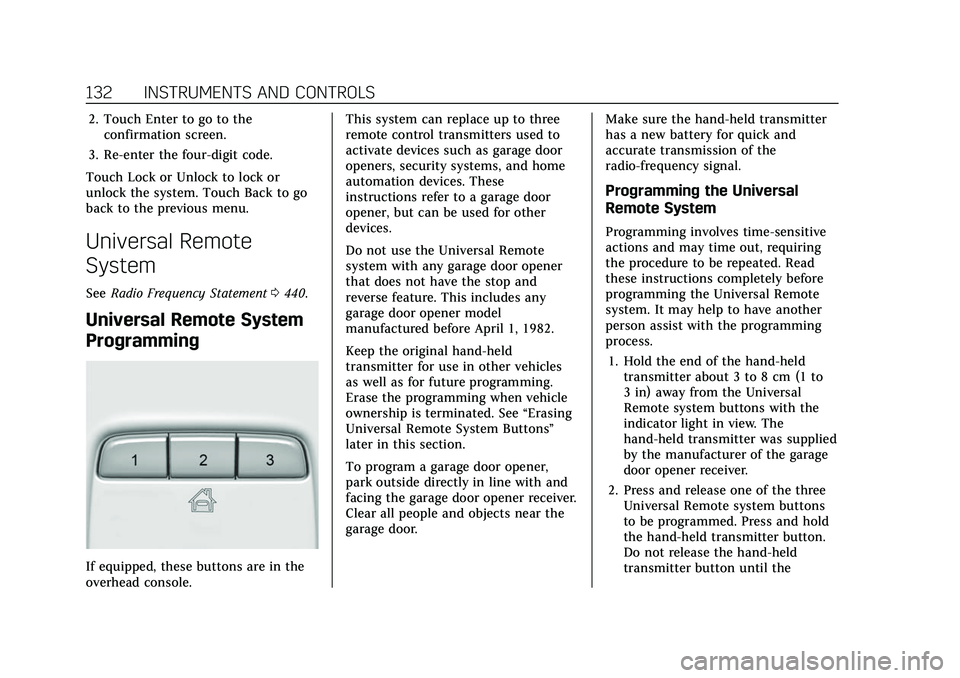
If equipped, these buttons are in the
overhead console. This system can replace up to three
remote control transmitters used to
activate devices such as garage door
openers, security systems, and home
automation devices. These
instructions refer to a garage door
opener, but can be used for other
devices.
Do not use the Universal Remote
system with any garage door opener
that does not have the stop and
reverse feature. This includes any
garage door opener model
manufactured before April 1, 1982.
Keep the original hand-held
transmitter for use in other vehicles
as well as for future programming.
Erase the programming when vehicle
ownership is terminated. See
“Erasing
Universal Remote System Buttons”
later in this section.
To program a garage door opener,
park outside directly in line with and
facing the garage door opener receiver.
Clear all people and objects near the
garage door. Make sure the hand-held transmitter
has a new battery for quick and
accurate transmission of the
radio-frequency signal.
Programming the Universal
Remote System
Programming involves time-sensitive
actions and may time out, requiring
the procedure to be repeated. Read
these instructions completely before
programming the Universal Remote
system. It may help to have another
person assist with the programming
process.
1. Hold the end of the hand-held transmitter about 3 to 8 cm (1 to
3 in) away from the Universal
Remote system buttons with the
indicator light in view. The
hand-held transmitter was supplied
by the manufacturer of the garage
door opener receiver.
2. Press and release one of the three Universal Remote system buttons
to be programmed. Press and hold
the hand-held transmitter button.
Do not release the hand-held
transmitter button until the
Page 134 of 466

Cadillac CT5 Owner Manual (GMNA-Localizing-U.S./Canada-15268585) -
2022 - CRC - 10/11/21
INSTRUMENTS AND CONTROLS 133
indicator light changes from a slow
to a rapid flash or continuous light.
Then release the hand-held
transmitter button.
Some garage door openers may
require substitution of Step 2 with
the procedure under“Radio Signals
for Some Gate Operators ”later in
this section.
3. Press and hold the newly programmed Universal Remote
system button for five seconds
while watching the indicator light
and garage door activation.
.If the indicator light stays on
continuously or the garage door
moves when the button is
pressed, then programming is
complete. There is no need to
complete Steps 4–6.
.If the indicator light does not
come on or the garage door does
not move, a second button press
may be required. For a second
time, press and hold the newly
programmed button for
five seconds. If the indicator
light stays on continuously or
the garage door moves when the button is pressed, then
programming is complete. There
is no need to complete
Steps 4–6.
.If the garage door does not
move, continue with
programming Steps 4–6.
Learn or Smart Button
4. After completing Steps 1–3, locate the Learn or Smart button inside
garage on the garage door opener
receiver. The name and color of the
button may vary by manufacturer.
5. Press and release the Learn or Smart button. Step 6 must be
completed within 30 seconds of
pressing this button.
6. Return to the vehicle and firmly press and hold the trained
Universal Remote system button for two seconds and release. Repeat
the
“press/hold/release ”sequence
up to three times to complete the
training process.
The Universal Remote system should
now activate the garage door. Repeat
the process for programming the
remaining two buttons.
For questions or programming help,
see www.homelink.com/gm or call
1-800-355-3515. For calls placed
outside the U.S., Canada, or Puerto
Rico, international rates will apply and
may differ based on landline or mobile
phone.Radio Signals for Some Gate
Operators
Some gate operators and
radio-frequency laws require
transmitter signals to time out or quit
after several seconds of transmission.
This may not be long enough for the
Universal Remote system to pick up
the signal during programming.
If the programming did not work,
replace Step 2 under “Programming
the Universal Remote System ”with
the following:
Page 139 of 466

Cadillac CT5 Owner Manual (GMNA-Localizing-U.S./Canada-15268585) -
2022 - CRC - 10/11/21
138 LIGHTING
If the vehicle is started in a dark
garage, the automatic headlamp
system comes on immediately. If it is
light outside when the vehicle leaves
the garage, there is a slight delay
before the automatic headlamp
system turns off the headlamps.
During that delay, the instrument
cluster may not be as bright as usual.
Make sure the instrument panel
brightness control is in the full bright
position. SeeInstrument Panel
Illumination Control 0139.
When it is bright enough outside, the
headlamps will turn off.
The automatic headlamp system turns
off when the exterior lamp control is
turned to
Oor the ignition is off. For
vehicles sold in Canada, this control
only works when the transmission is
in P (Park).
Lights On with Wipers
If the windshield wipers are activated
in daylight with the engine on, and
the exterior lamp control is in AUTO,
the headlamps, parking lamps, and
other exterior lamps come on. The
transition time for the lamps coming on varies based on wiper speed. When
the wipers are not operating, these
lamps turn off. Move the exterior
lamp control to
Oor;to disable
this feature.
Hazard Warning Flashers
|: Press this button to make the
front and rear turn signal lamps flash
on and off. Release the button for at
least one second and press again to
turn the flashers off.
The hazard warning flashers turn on
automatically if the airbags deploy.
Turn and Lane-Change
Signals
Move the lever all the way up or down
to signal a turn.
An arrow on the instrument cluster
flashes in the direction of the turn or
lane change.
Raise or lower the lever until the
arrow starts to flash to signal a lane
change. Hold it there until the lane
change is completed. If the lever is
briefly pressed and released, the turn
signal flashes three times.
The turn and lane-change signal can
be turned off manually by moving the
lever back to its original position.
Page 180 of 466
Cadillac CT5 Owner Manual (GMNA-Localizing-U.S./Canada-15268585) -
2022 - CRC - 10/11/21
INFOTAINMENT SYSTEM 179
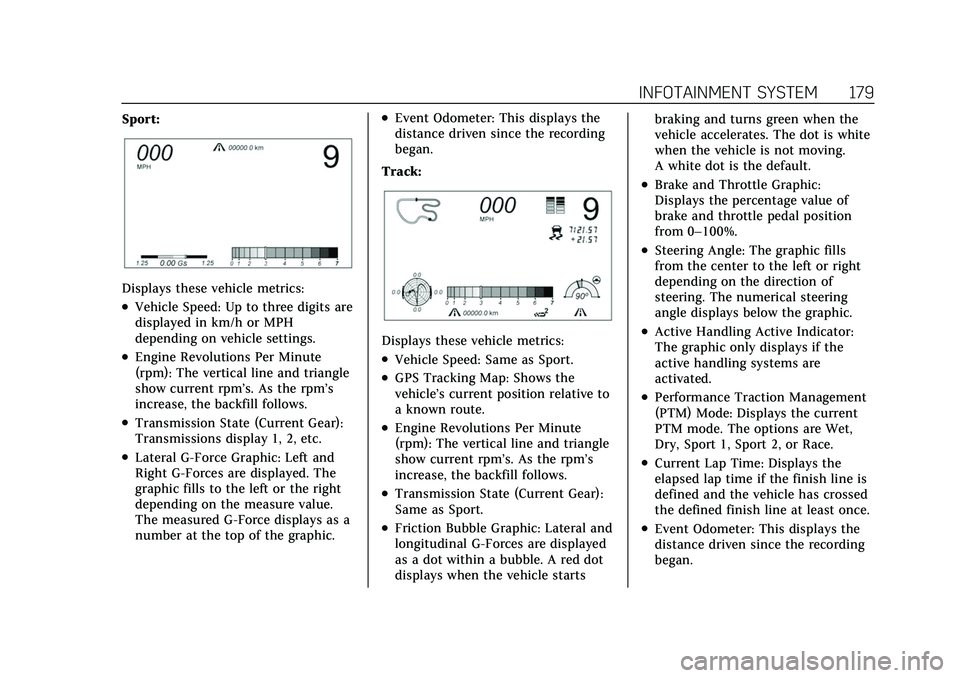
Sport:
Displays these vehicle metrics:
.Vehicle Speed: Up to three digits are
displayed in km/h or MPH
depending on vehicle settings.
.Engine Revolutions Per Minute
(rpm): The vertical line and triangle
show current rpm’s. As the rpm’s
increase, the backfill follows.
.Transmission State (Current Gear):
Transmissions display 1, 2, etc.
.Lateral G-Force Graphic: Left and
Right G-Forces are displayed. The
graphic fills to the left or the right
depending on the measure value.
The measured G-Force displays as a
number at the top of the graphic.
.Event Odometer: This displays the
distance driven since the recording
began.
Track:
Displays these vehicle metrics:
.Vehicle Speed: Same as Sport.
.GPS Tracking Map: Shows the
vehicle’s current position relative to
a known route.
.Engine Revolutions Per Minute
(rpm): The vertical line and triangle
show current rpm’s. As the rpm’s
increase, the backfill follows.
.Transmission State (Current Gear):
Same as Sport.
.Friction Bubble Graphic: Lateral and
longitudinal G-Forces are displayed
as a dot within a bubble. A red dot
displays when the vehicle starts braking and turns green when the
vehicle accelerates. The dot is white
when the vehicle is not moving.
A white dot is the default.
.Brake and Throttle Graphic:
Displays the percentage value of
brake and throttle pedal position
from 0–100%.
.Steering Angle: The graphic fills
from the center to the left or right
depending on the direction of
steering. The numerical steering
angle displays below the graphic.
.Active Handling Active Indicator:
The graphic only displays if the
active handling systems are
activated.
.Performance Traction Management
(PTM) Mode: Displays the current
PTM mode. The options are Wet,
Dry, Sport 1, Sport 2, or Race.
.Current Lap Time: Displays the
elapsed lap time if the finish line is
defined and the vehicle has crossed
the defined finish line at least once.
.Event Odometer: This displays the
distance driven since the recording
began.