automatic transmission CADILLAC CT5 2023 User Guide
[x] Cancel search | Manufacturer: CADILLAC, Model Year: 2023, Model line: CT5, Model: CADILLAC CT5 2023Pages: 526, PDF Size: 6.85 MB
Page 241 of 526

Cadillac CT5 Owner Manual (GMNA-Localizing-U.S./Canada-16500419) -
2023 - CRC - 5/10/22
240 Driving and Operating
Driving and
Operating
Driving Information
Driving for Better FuelEconomy . . . . . . . . . . . . . . . . . . . . 241
Distracted Driving . . . . . . . . . 242
Defensive Driving . . . . . . . . . . 242
Impaired Driving . . . . . . . . . . . 243
Control of a Vehicle . . . . . . 243
Braking . . . . . . . . . . . . . . . . . . . . . . . 243
Steering . . . . . . . . . . . . . . . . . . . . . . 244
Off-Road Recovery . . . . . . . 245
Loss of Control . . . . . . . . . . . . 245
Track Events and Competitive Driving
(V-Series and V-Series
Blackwing) . . . . . . . . . . . . . . . . . 246
Driving on Wet Roads . . . . 257
Hill and Mountain Roads . . . . . . . . . . . . . . . . . . . . . . . 258
Winter Driving . . . . . . . . . . . . . . 259
If the Vehicle Is Stuck . . . . . 261
Vehicle Load Limits . . . . . . . 261
Starting and Operating
New Vehicle Break-In . . . . 265
Composite Materials . . . . . 266
Ignition Positions . . . . . . . . . . 267 Starting the Engine . . . . . . . 269
Stop/Start System . . . . . . . . 270
Engine Heater . . . . . . . . . . . . . . 272
Retained Accessory
Power (RAP) . . . . . . . . . . . . . . . 273
Shifting Into Park . . . . . . . . . . 273
Shifting out of Park . . . . . . . 274
Parking (Manual Transmission) . . . . . . . . . . . . . 275
Parking over Things That Burn . . . . . . . . . . . . . . . . . . 275
Active Fuel Management . . . . . . . . . . . . . . 275
Extended Parking . . . . . . . . . 275
Engine Exhaust
Engine Exhaust . . . . . . . . . . . . 276
Running the Vehicle While Parked . . . . . . . . . . . . . . 276
Automatic Transmission
AutomaticTransmission . . . . . . . . . . . . . . 277
Manual Mode . . . . . . . . . . . . . . . 282
Manual Transmission
Manual Transmission . . . . . 283
Active Rev Match . . . . . . . . . 286
Drive Systems
All-Wheel Drive . . . . . . . . . . . . . 287
Brakes
Electric Brake Boost . . . . . . 287
Antilock Brake System (ABS) . . . . . . . . . . . . . 287
Electric Parking Brake . . . 288
Brake Assist . . . . . . . . . . . . . . . . 289
Hill Start Assist (HSA) . . . . 289
Automatic Vehicle Hold (AVH) . . . . . . . . . . . . . . . . . 290
Ride Control Systems
Traction Control/Electronic Stability
Control . . . . . . . . . . . . . . . . . . . . . . 291
Driver Mode Control . . . . . . 293
Competitive Driving Mode . . . . . . . . . . . . . . 299
Limited-Slip
Differential . . . . . . . . . . . . . . . . . 302
Cruise Control
Cruise Control . . . . . . . . . . . . . 302
Adaptive Cruise Control(Advanced) . . . . . . . . . . . . . . . . 305
Super Cruise . . . . . . . . . . . . . . . . 317
Driver Assistance
Systems
Driver Assistance Systems . . . . . . . . . . . . . . . . . . . . 334
Page 249 of 526
Cadillac CT5 Owner Manual (GMNA-Localizing-U.S./Canada-16500419) -
2023 - CRC - 5/10/22
248 Driving and Operating
Caution
During a first time track or
racing event, high axle
temperatures can occur.
Damage could be caused to
the axle and would not be
covered by the vehicle
warranty. Do not drive as
long or as fast the first time
the vehicle is driven on the
track or raced.
.The axle lubricant should be
replaced with new lubricant.
.On vehicles without a
differential cooler, additional
cooling capacity is required
for continuous competitive
driving. The V-Series
Blackwing has a differential
cooler, so no additional
cooling capacity is
necessary.
Engine OilCaution
If the vehicle is used for
track events and
competitive driving, the
engine may use more oil
than it would with normal
use. Low oil levels can
damage the engine. Check
the oil level often and
maintain the proper level.
See Engine Oil 0383.
Check the oil level often during
track events and competitive
driving, and keep the oil level
at or near the upper mark. See
“Checking the Engine Oil" in
Engine Oil 0383.
Fuel
Use premium unleaded
gasoline with a posted octane
rating of 93 at a track event.
Unleaded gasoline with a
posted octane rating of 91 may be used, but
performance will be degraded.
See Prohibited Fuels
0361.
Automatic or Manual
Transmission Fluid
Have the transmission fluid
set to the track specific oil
level prior to track usage.
Transmission fluid should be
changed after every 15 hours
of track usage. Any
transmission level set or
change should be performed
at the dealer.
Brakes
Battery Disconnect
Disconnect the battery before
servicing the hydraulic brake
system. It is critical to
disconnect the battery before
bleeding the system, replacing
the pads, or any other work.
The battery must be
disconnected to prevent the
brake master cylinder from
pressurizing the hydraulic
system during its automated
Page 256 of 526
Cadillac CT5 Owner Manual (GMNA-Localizing-U.S./Canada-16500419) -
2023 - CRC - 5/10/22
Driving and Operating 255
.Performance Traction
Management (PTM) Mode
must be enabled. See Driver
Mode Control0293.
.The steering wheel must be
straight.
.The driver door must be
closed.
.The transmission must be in
D (Drive) or forward gear.
.The parking brake must not
be engaged.
For more information on
Competitive Driving Mode, see
Competitive Driving Mode
0 299.
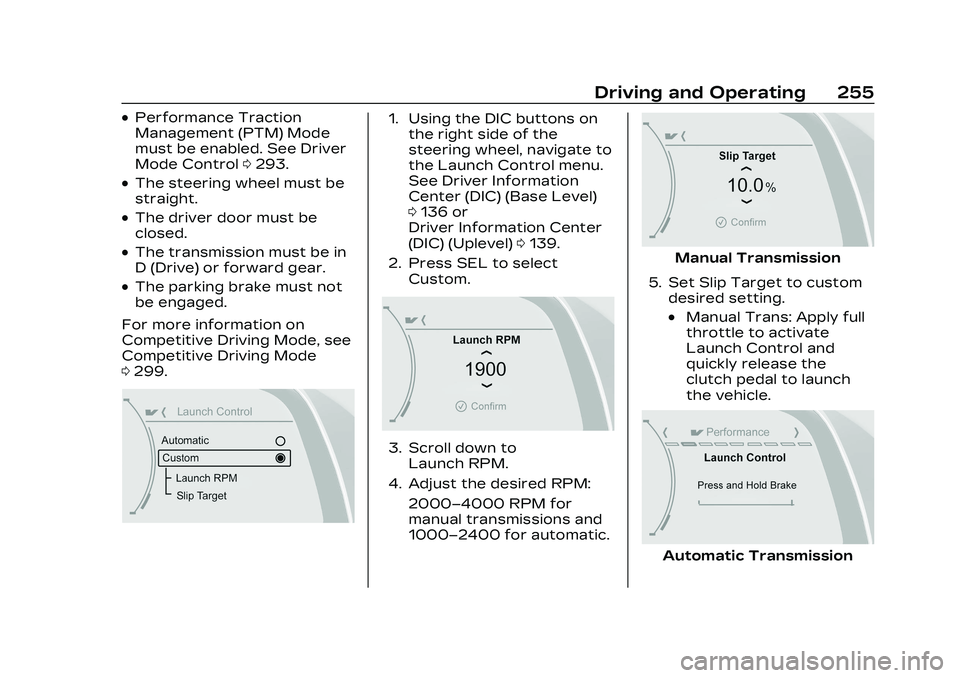
1. Using the DIC buttons on
the right side of the
steering wheel, navigate to
the Launch Control menu.
See Driver Information
Center (DIC) (Base Level)
0136 or
Driver Information Center
(DIC) (Uplevel) 0139.
2. Press SEL to select Custom.
3. Scroll down toLaunch RPM.
4. Adjust the desired RPM: 2000–4000 RPM for
manual transmissions and
1000–2400 for automatic.
Manual Transmission
5. Set Slip Target to custom desired setting.
.Manual Trans: Apply full
throttle to activate
Launch Control and
quickly release the
clutch pedal to launch
the vehicle.
Automatic Transmission
Page 257 of 526

Cadillac CT5 Owner Manual (GMNA-Localizing-U.S./Canada-16500419) -
2023 - CRC - 5/10/22
256 Driving and Operating
.Auto Trans: Firmly press
and hold the brake pedal
to activate Launch
Control.
6. Auto Trans Only - Quicklyapply full throttle. Release
the brake pedal to launch
the vehicle.
Line Lock (If Equipped)
{Warning
The vehicle may move
unexpectedly when using
Line Lock, which could cause
injury to persons or property
located nearby. Only use
Line Lock on a closed track
where there is a large clear
(Continued)
Warning (Continued)
area around all sides of the
vehicle. Be ready to apply
the brakes immediately if the
vehicle begins to move. Do
not use Line Lock in an area
that is accessible to the
public or where people or
property are located near
the vehicle.
Caution
Attempting to shift when
the drive wheels are
spinning and do not have
traction may cause damage
to the transmission. Damage
caused by misuse of the
vehicle is not covered by the
vehicle warranty. Do not
attempt to shift when the
drive wheels do not have
traction. Line Lock allows for locking
the front brakes
independently of the rear
brakes. This allows the rear
tires to spin when the throttle
is applied.
To enter Line Lock, all of
these conditions must be met:
.The vehicle must be in
Track Mode.
.Performance Traction
Management (PTM) Mode
must be enabled.
.The steering wheel must be
straight.
.The driver door must be
closed.
.The vehicle must be in D
(Drive) for an automatic
transmission or 1 (First) gear
for a manual transmission.
.The parking brake must not
be engaged.
.The vehicle must be stopped
on level ground. The
accelerator pedal must not
be applied.
Page 268 of 526

Cadillac CT5 Owner Manual (GMNA-Localizing-U.S./Canada-16500419) -
2023 - CRC - 5/10/22
Driving and Operating 267
{Warning
Rocker extensions may
break under pressure,
resulting in property damage
or injury. Do not stand on
the rocker extension or use
it as a step.
{Warning
Rear end spoilers may break
under pressure, resulting in
property damage or injury.
Do not push the vehicle by
the spoiler or use the spoiler
as a handle.
Ignition Positions
The vehicle has an electronic
keyless ignition with
pushbutton start.
The Remote Key must be in
the vehicle for the system to
operate. If the pushbutton
start is not working, the
vehicle may be near a strong
radio antenna signal causing
interference to the Keyless
Access system. See Remote
Key Operation09.
To shift out of P (Park), the
vehicle must be on and the
brake pedal must be applied. Stopping the Engine/OFF (No
Indicator Lights) :
When the
vehicle is stopped, press
ENGINE START/STOP once to
turn the engine off.
If the vehicle is in P (Park), the
ignition will turn off, and
Retained Accessory
Power (RAP) will remain active.
See Retained Accessory
Power (RAP) 0273.
If the vehicle has an automatic
transmission, and is not in
P (Park), the ignition will return
to accessory mode and display
a message in the Driver
Information Center (DIC).
When the vehicle is shifted
into P (Park), the ignition
system will turn OFF.
If the vehicle has a manual
transmission and is stationary,
the ignition will turn off, and
Retained Accessory
Power (RAP) will remain active.
See Retained Accessory
Power (RAP) 0273.
Page 269 of 526

Cadillac CT5 Owner Manual (GMNA-Localizing-U.S./Canada-16500419) -
2023 - CRC - 5/10/22
268 Driving and Operating
The vehicle may have an
electric steering column lock.
The lock is activated when the
vehicle is switched to OFF and
the driver door is opened.
A sound may be heard as the
lock actuates or releases. The
steering column lock may not
release with the wheels
turned off center. If this
happens, the vehicle may not
start. Move the steering wheel
from left to right while
attempting to start the
vehicle. If this does not work,
the vehicle needs service.
Do not turn the engine off
when the vehicle is moving.
This will cause a loss of power
assist in the brake and
steering systems and disable
the airbags.
If the vehicle must be shut off
in an emergency:1. Brake using a firm and steady pressure. Do not
pump the brakes
repeatedly. This may deplete power assist,
requiring increased brake
pedal force.
2. Shift the vehicle to N (Neutral). This can be
done while the vehicle is
moving. After shifting to
N (Neutral), firmly apply the
brakes and steer the
vehicle to a safe location.
3. Come to a complete stop. Shift to P (Park) with an
automatic transmission,
or Neutral with a manual
transmission. Turn the
ignition off.
4. Set the parking brake. See Electric Parking Brake
0288.
{Warning
Turning off the vehicle while
moving may cause loss of
power assist in the brake
and steering systems and
disable the airbags. While
driving, only shut the vehicle
off in an emergency. If the vehicle cannot be pulled
over, and must be shut off
while driving, press and hold
ENGINE START/STOP for
longer than two seconds,
or press twice within
five seconds.
Accessory Mode (Amber
Indicator Light) :
This mode
allows the use of some
electrical accessories when
the engine is off.
With the ignition off, pressing
the button once without the
brake pedal applied will place
the ignition system in
accessory mode.
The ignition will switch from
accessory mode to OFF after
five minutes to prevent
battery rundown.
ON/RUN/START (Green
Indicator Light) : This mode is
for driving and starting. With
the ignition off, and the brake
pedal applied, pressing the
button once will place the
ignition system in ON/RUN/
START. Once engine cranking
Page 270 of 526
Cadillac CT5 Owner Manual (GMNA-Localizing-U.S./Canada-16500419) -
2023 - CRC - 5/10/22
Driving and Operating 269
begins, release the button.
Engine cranking will continue
until the engine starts. See
Starting the Engine0269. The
ignition will then remain on.
Service Mode
This power mode is available
for service and diagnostics,
and to verify the proper
operation of the malfunction
indicator lamp as may be
required for emission
inspection purposes. With the
vehicle off, and the brake
pedal not applied, pressing
and holding ENGINE START/
STOP for more than
five seconds will place the
vehicle in Service Mode. The
instruments and audio
systems will operate as they
do in ON/RUN, but the vehicle
will not be able to be driven.
The engine will not start in
Service Mode. Press the
button again to turn the
vehicle off.Starting the Engine
Place the transmission in the
proper gear
Caution
If you add electrical parts or
accessories, you could
change the way the engine
operates. Any resulting
damage would not be
covered by the vehicle
warranty. See Add-On
Electrical Equipment 0372.
Automatic Transmission
Move the shift lever to
P (Park) or N (Neutral). To
restart the vehicle when it is
already moving, use
N (Neutral) only.
Caution
Do not try to shift to P (Park)
if the vehicle is moving.
If you do, you could damage (Continued)
Caution (Continued)
the transmission. Shift to
P (Park) only when the
vehicle is stopped.
Manual Transmission
The shift lever should be in
Neutral and the parking brake
engaged. Hold the clutch pedal
down to the floor, press the
brake pedal, and start the
engine.
Starting the Vehicle 1. For vehicles with an automatic transmission,
press the brake pedal, then
press ENGINE START/
STOP on the instrument
panel. For a manual
transmission, place the
shift lever in Neutral with
the parking brake engaged.
Hold the clutch pedal down
to the floor, press the
brake pedal, then press
ENGINE START/STOP.
Page 271 of 526

Cadillac CT5 Owner Manual (GMNA-Localizing-U.S./Canada-16500419) -
2023 - CRC - 5/10/22
270 Driving and Operating
If the remote key is not in
the vehicle, if there is
interference, or if the
remote key battery is low,
a Driver Information
Center (DIC) message will
display. See Remote Key
Operation09.
Caution
Cranking the engine for long
periods of time, by pressing
ENGINE START/STOP
immediately after cranking
has ended, can overheat and
damage the cranking motor,
and drain the battery. Wait
at least 15 seconds between
each try, to let the cranking
motor cool down.
2. If the engine does not start after five to 10 seconds,
especially in very cold
weather (below −18 °C or
0 °F), it could be flooded
with too much gasoline.
Try pushing the
accelerator pedal all the
way to the floor and hold it there, then press ENGINE
START/STOP for up to a
maximum of 15 seconds.
Wait at least 15 seconds
between each try, to allow
the cranking motor to cool
down. When the engine
starts, let go of the button
and the accelerator. If the
vehicle starts briefly but
then stops again, do the
same thing. This clears the
extra gasoline from the
engine. Do not race the
engine immediately after
starting it. Operate the
engine and transmission
gently until the oil warms
up and lubricates all
moving parts.
Stopping the Engine
If the vehicle has an automatic
transmission, move the shift
lever to P (Park) and press and
hold ENGINE START/STOP on
the instrument panel, until the
engine shuts off. If the shift
lever is not in P (Park), the
engine shuts off and the
ignition goes to accessory
mode. The DIC displays SHIFT
TO PARK. Once the shift lever
is moved to P (Park), the
vehicle turns off.
If the vehicle has a manual
transmission, before getting
out of the vehicle, shift to
1 (First) or R (Reverse) and
apply the parking brake. Then
turn off the ignition off by
pressing ENGINE START/
STOP and release the clutch
pedal when the engine has
stopped.
If the remote key is not
detected inside the vehicle
when it is turned off the DIC
displays a message.
Stop/Start System
If equipped, the Stop/Start
system will shut off the engine
to help conserve fuel. It has
components designed for the
increased number of starts.
Page 272 of 526

Cadillac CT5 Owner Manual (GMNA-Localizing-U.S./Canada-16500419) -
2023 - CRC - 5/10/22
Driving and Operating 271
{Warning
The automatic engine Stop/
Start feature causes the
engine to shut off while the
vehicle is still on. Do not exit
the vehicle before shifting to
P (Park). The vehicle may
restart and move
unexpectedly. Always shift
to P (Park), and then turn
the ignition off before
exiting the vehicle.
Auto Engine Stop/Start
When the brakes are applied
and the vehicle is at a
complete stop, the engine may
turn off. When stopped, the
tachometer displays AUTO
STOP. See Tachometer 0120.
When the brake pedal is
released or the accelerator
pedal is pressed, the engine
will restart. To maintain vehicle
performance, other conditions
may cause the engine to
automatically restart before
the brake pedal is released.
Auto Stops may not occur
and/or Auto Starts may occur
because:
.The climate control settings
require the engine to be
running to cool or heat the
vehicle interior.
.The vehicle battery needs to
charge.
.The vehicle battery has
recently been disconnected.
.Minimum vehicle speed has
not been reached since the
last Auto Stop.
.The accelerator pedal is
pressed.
.The engine or transmission
is not at the required
operating temperature.
.The outside temperature is
not in the required operating
range.
.The vehicle is shifted out of
D (Drive) to any gear other
than P (Park).
.Certain driver modes have
been selected. See Driver
Mode Control
0293.
.The vehicle is on a steep hill
or grade.
.The driver door has been
opened or the driver seat
belt has been unbuckled.
.The hood has been opened.
.The Auto Stop has reached
the maximum allowed time.
Auto Stop Disable Switch
Page 274 of 526

Cadillac CT5 Owner Manual (GMNA-Localizing-U.S./Canada-16500419) -
2023 - CRC - 5/10/22
Driving and Operating 273
Warning (Continued)
cause a fire, property
damage, electric shock,
and injury.
.Do not operate the vehicle
with the heater cord
permanently attached to
the vehicle. Possible
heater cord and
thermostat damage could
occur.
.While in use, do not let the
heater cord touch vehicle
parts or sharp edges.
Never close the hood on
the heater cord.
.Before starting the
vehicle, unplug the cord,
reattach the cover to the
plug, and securely fasten
the cord. Keep the cord
away from any moving
parts.
4. Before starting the engine, be sure to unplug and
store the cord as it was
before to keep it away from moving engine parts.
If you do not, it could be
damaged.
Contact your dealer for
information on how long to
use the heater in your
particular area.
Retained Accessory
Power (RAP)
When the vehicle is turned
from on to off, the following
features (if equipped) will
continue to function for up to
10 minutes, or until the driver
door is opened. These
features will also work when
the vehicle is on or in
accessory mode:
.Infotainment System
.Power Windows (during RAP
this functionality will be lost
when any door is opened)
.Sunroof (during RAP this
functionality will be lost
when any door is opened)
.Auxiliary Power Outlet
.Audio System
.OnStar System
Shifting Into Park
To shift into P (Park): 1. Hold the brake pedal down and set the parking brake.
See Electric Parking Brake
0288.
2. Press the button on top of the shift lever to shift into
P (Park). See Automatic
Transmission 0277.
3. The P indicator on the shift lever will turn red when the
vehicle is in P (Park).
If the vehicle is shifted into
P (Park) on a hill, the
Electric Parking Brake
(EPB) may apply
automatically. You may not
be able to release the EPB
using the EPB switch.
It should automatically
release when the vehicle is
shifted out of P (Park).